

Microsoft has begun tightening Microsoft Teams meeting access for external AI note-taking and meeting-assistant bots in 2026, using a new admin policy, lobby labeling, explicit organizer approval, and a forthcoming bot identification program for vendors. The move is not a blanket ban on AI meeting assistants. It is Microsoft’s attempt to make automated attendees visible, governable, and less likely to slip into a call under the social fog of hybrid work. For Windows admins, the story is less about bots being clever and more about Teams finally treating them as a distinct class of participant.
For years, the Teams lobby has carried a deceptively simple burden: separate the people who should enter a meeting from those who should not. That model worked tolerably well when the unknown attendee was a consultant, a customer, or the occasional personal account. It became brittle when the unknown attendee was an AI service silently invited by a calendar integration, an eager employee, or a third-party productivity app.
Microsoft’s new external bot controls acknowledge that a bot is not just another guest. A human attendee can misunderstand confidentiality, but a bot can record, transcribe, summarize, store, and redistribute meeting content at cloud scale. That difference matters in board meetings, legal reviews, incident-response calls, sales negotiations, HR conversations, healthcare consultations, and any other meeting where “just taking notes” is not a neutral act.
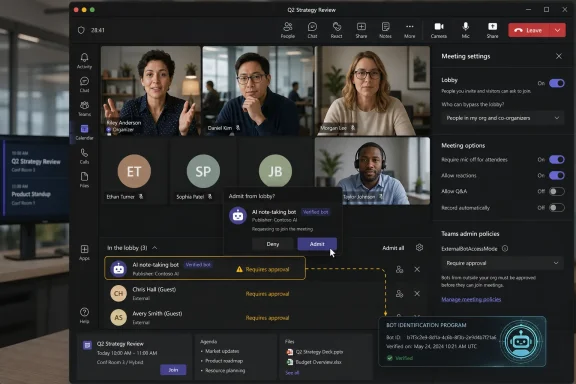
The new policy, described by Microsoft as “Manage external bots and their access to meetings,” lets Teams detect suspected external AI bots during the meeting join process and force them into the lobby even when other participants might otherwise bypass it. Organizers then see clearer labeling and must explicitly admit the bot. Microsoft says Teams uses a mix of infrastructure and behavioral signals to make that call, which is a polite way of saying the platform is now watching not just who joins, but how they join.
That is a significant product shift. Teams is no longer merely hosting the meeting; it is interpreting the identity and risk profile of the things trying to enter it.
The problem is that meeting bots arrived faster than meeting governance. Many third-party tools operate by joining a call as an attendee, often through a calendar invite or user-authorized integration. From a user’s perspective, this is convenient. From an administrator’s perspective, it can look like an unapproved recording device walking into every room with a badge printed by someone else.
The security concern is not hypothetical. A meeting can contain customer data, unreleased financials, legal strategy, trade secrets, credentials spoken aloud during troubleshooting, or private personnel details. Once a third-party assistant captures that content, the organization has to care about where it is processed, where it is stored, how long it is retained, which model providers touch it, and whether the vendor’s contractual promises match the company’s compliance obligations.
That is where the bot problem diverges from the familiar “recording has started” warning. Native Teams recording and transcription can be governed within Microsoft 365 policy, licensing, audit, retention, and eDiscovery frameworks. External bots may sit outside those boundaries. They may still be legitimate tools, but they are legitimate tools with a separate data path.
Microsoft’s answer is not to pretend all AI assistants are malicious. It is to make Teams stop pretending they are indistinguishable from humans.
Microsoft is trying to interrupt that muscle memory. When bot detection is enabled, Teams can group participants more deliberately, separating ordinary attendees from registered or suspected bots. It also adds confirmation prompts and warnings designed to prevent organizers from accidentally admitting an AI assistant while clearing the lobby.
This matters because many security failures are not dramatic compromises. They are tiny acts of interface ambiguity. A button says “admit,” a meeting is running late, five people are waiting, and someone clicks. If one of those “people” is a transcription bot connected to a vendor the company has never reviewed, the breach of policy may already have happened before anyone reads the display name.
The new Teams behavior turns the lobby into a consent checkpoint. It makes the organizer decide, at the point of entry, whether this automated participant belongs in the room. That will not solve every problem, but it changes the default from passive admission to deliberate approval.
For admins, the important detail is that Microsoft’s default mode is “require approval when detected,” not “allow bots as ordinary attendees.” That default reflects the broader Secure Future Initiative-era posture Microsoft has been trying to project: if customers do nothing, the safer setting should increasingly be the one they inherit.
That creates two operational realities. First, organizations should not treat the new policy as a full data-loss prevention strategy. A determined or simply different kind of tool may still capture meeting content without appearing as a conventional meeting bot. Desktop recorders, browser-based capture tools, mobile devices, and “bot-free” note-taking apps can route around the specific model of an external participant joining a call.
Second, false positives will happen. If Teams incorrectly marks a person as a bot, the meeting still needs a recovery path. Microsoft says organizers can admit the participant and mark them as not a bot for that meeting. That is sensible, but it also means training matters. Users need to know that a warning is neither a conviction nor a decoration.
The right way to read Microsoft’s move is as a layer, not a wall. It reduces the chance that a third-party AI attendee joins unnoticed. It gives admins a policy handle. It gives organizers better visibility. It does not guarantee that every meeting is free from unauthorized recording or AI processing.
That distinction is especially important for regulated industries. A hospital, bank, law firm, defense contractor, or public-sector agency cannot outsource meeting confidentiality to a Teams prompt. The prompt is a useful enforcement point for an existing policy; it is not a substitute for the policy itself.
This is where the story becomes more than a security tweak. Microsoft is creating a distinction between registered bots, unregistered bots, and suspected threats. That is a familiar platform move. Once a software ecosystem becomes too unruly, the platform owner introduces identity, registration, policy, and trust tiers.
For vendors, the message is blunt: if you want your assistant to look legitimate inside Teams, you will eventually need to play by Microsoft’s rules. That may be good for enterprise customers, who need transparency and supportability. It may be uncomfortable for smaller AI notetaker companies that built their distribution around frictionless joining and user-level consent.
For Microsoft, the move has a second benefit. It nudges the market toward a world where Teams is not just a meeting surface but the gatekeeper of meeting automation. A third-party bot can still exist, but Microsoft controls how it is identified, how it is presented, and whether it is treated as trustworthy enough for organizers to admit without alarm.
There is a competitive undertone here that should not be ignored. Microsoft sells Teams Premium, Copilot, intelligent recap features, transcription controls, and a broader Microsoft 365 compliance stack. The company can credibly argue that third-party bots create unmanaged risk. It can also benefit when customers decide the safest AI meeting assistant is the one already inside Microsoft’s tenant boundary.
Both things can be true. The external bot problem is real, and Microsoft’s incentives are not purely altruistic.
There is a small documentation oddity worth watching: Microsoft’s page discusses the Teams meeting policy and references PowerShell usage, while examples have used command naming that may raise eyebrows among admins accustomed to the Teams PowerShell module’s sprawling and sometimes inconsistent policy surface. That is not unusual in Microsoft 365 administration, where feature rollout, documentation, and module behavior can briefly move out of lockstep. The practical advice is simple: verify available parameters in your tenant before scripting a broad rollout.
More important than the syntax is the policy model. Because it can be applied at the tenant level or to specific users and groups, organizations can stage adoption. A company might enforce stricter bot handling for executives, legal, finance, product leadership, customer support, or anyone hosting external meetings, while taking more time to educate the rest of the workforce.
That flexibility matters because meeting culture varies wildly. Some companies have already banned third-party notetakers unless approved by security. Others have employees casually inviting AI assistants to every stand-up, sales demo, and vendor call. A single switch will not reconcile those cultures overnight.
Admins should also revisit who can admit people from the lobby. Microsoft itself recommends restricting lobby admission to organizers and co-organizers where appropriate. That recommendation becomes more important in a world where admitting someone from the lobby might mean admitting a system that records the meeting.
AI meeting assistants thrive in that ambiguity. A user signs up for a notetaker, connects a calendar, and the bot begins appearing in meetings where the user is invited. The organizer may not know the bot is coming. Other attendees may not know who controls it. The security team may not know the vendor exists. Legal may not know meeting content is leaving the company’s preferred systems.
That is not necessarily malicious. It is the predictable result of consumer-style SaaS adoption entering enterprise collaboration. The path from “this tool helps me remember action items” to “this tool is storing sensitive customer strategy in an unreviewed cloud” is short and often invisible.
Microsoft’s new controls attack that invisibility. By surfacing bots as bots, Teams makes the social contract explicit. The organizer must decide whether the automated note-taker belongs. Participants can more easily see that the meeting includes an automated attendee. Admins have a policy lever to set the default posture.
Still, consent is more than a UI state. A meeting participant may consent to transcription for internal notes but not to storage by a third-party vendor. A customer may accept a recording under one contract but not another. An employee may be comfortable with Teams transcription but not with an external AI agent that trains, processes, or analyzes content under different terms. The Teams lobby can reveal the bot; it cannot negotiate all the legal and ethical boundaries behind it.
Compliance teams should be more cautious in their celebration. Visibility is a prerequisite for governance, but it is not governance by itself. Organizations still need rules for which AI assistants are approved, what data they can process, how recordings and transcripts are retained, and how attendees are notified.
For many enterprises, the safest near-term posture will be to keep Microsoft’s default approval requirement enabled, inventory third-party AI meeting tools already in use, and decide which vendors belong on an approved list. That decision should involve security, legal, privacy, records management, procurement, and the business units that actually rely on meeting summaries.
There is also a training burden. Organizers need to understand that “registered” does not automatically mean “approved by our company.” It may mean Microsoft recognizes the bot’s identity or program status. Internal approval is still a separate question. Likewise, “suspected threat” is a risk label, not a courtroom verdict. The useful behavior is not panic; it is scrutiny.
This is where admins can turn a product feature into a policy outcome. A warning prompt helps only if users know what decision they are expected to make. Otherwise, they will do what users always do under time pressure: click through.
That phase is ending. Microsoft’s bot controls are part of a larger pattern across collaboration platforms: AI assistants are being treated less like harmless productivity add-ons and more like applications that require identity, disclosure, and governance. That is exactly what they are.
The vendors that adapt will likely emphasize transparent joining, admin controls, retention settings, data residency, audit logs, and formal registration with platform owners. The vendors that do not adapt may find themselves increasingly labeled as suspicious, blocked by default, or forced into less visible capture methods that raise even harder trust questions.
There is an irony here. The more responsible AI meeting assistants become, the more they will resemble the enterprise software they once promised to simplify. Procurement reviews, consent language, tenant controls, vendor attestations, compliance documentation, and admin dashboards are not glamorous. They are the price of being allowed into serious meetings.
For users, this may feel like bureaucracy invading a useful tool. For organizations, it is overdue normalization. If a piece of software listens to your meetings, captures your decisions, and stores your words, it should not enter the room on a wink.
The first step is discovery. Admins should identify whether external AI notetakers are already appearing in meetings, whether users have granted calendar or OAuth permissions to meeting-assistant services, and which departments depend on those tools. The answer may surprise leadership. In many organizations, AI note-taking is already in production; it just was never formally deployed.
The second step is classification. Not every meeting has the same risk profile. A public webinar, a vendor demo, and a privileged legal discussion should not have identical rules. Teams policies can help, but they need to map onto business reality.
The third step is communication. Users should not first encounter this change when a bot is sitting in the lobby and a customer is waiting. Explain what the labels mean, when to admit a bot, when to reject it, and where to request approval for a tool. If the company has an approved AI assistant, say so plainly. If it does not, say that too.
The final step is monitoring. Audit logs, user reports, help desk tickets, and security alerts should all feed back into the policy. If legitimate tools are being misclassified, admins need a path to resolve that. If unapproved bots keep appearing, the organization has a behavioral problem, not just a Teams configuration problem.
 Microsoft Draws a Line Between Guests and Machines
For years, the Teams lobby has carried a deceptively simple burden: separate the people who should enter a meeting from those who should not. That model worked tolerably well when the unknown attendee was a consultant, a customer, or the occasional personal account. It became brittle when the unknown attendee was an AI service silently invited by a calendar integration, an eager employee, or a third-party productivity app.Microsoft’s new external bot controls acknowledge that a bot is not just another guest. A human attendee can misunderstand confidentiality, but a bot can record, transcribe, summarize, store, and redistribute meeting content at cloud scale. That difference matters in board meetings, legal reviews, incident-response calls, sales negotiations, HR conversations, healthcare consultations, and any other meeting where “just taking notes” is not a neutral act.
The new policy, described by Microsoft as “Manage external bots and their access to meetings,” lets Teams detect suspected external AI bots during the meeting join process and force them into the lobby even when other participants might otherwise bypass it. Organizers then see clearer labeling and must explicitly admit the bot. Microsoft says Teams uses a mix of infrastructure and behavioral signals to make that call, which is a polite way of saying the platform is now watching not just who joins, but how they join.
That is a significant product shift. Teams is no longer merely hosting the meeting; it is interpreting the identity and risk profile of the things trying to enter it.
The AI Notetaker Boom Created a Governance Hole
The appeal of AI meeting assistants is obvious. Nobody likes writing minutes, action items are easily lost, and hybrid meetings often produce more words than decisions. A bot that joins, listens, transcribes, and produces a tidy summary can feel like a gift from the productivity gods.The problem is that meeting bots arrived faster than meeting governance. Many third-party tools operate by joining a call as an attendee, often through a calendar invite or user-authorized integration. From a user’s perspective, this is convenient. From an administrator’s perspective, it can look like an unapproved recording device walking into every room with a badge printed by someone else.
The security concern is not hypothetical. A meeting can contain customer data, unreleased financials, legal strategy, trade secrets, credentials spoken aloud during troubleshooting, or private personnel details. Once a third-party assistant captures that content, the organization has to care about where it is processed, where it is stored, how long it is retained, which model providers touch it, and whether the vendor’s contractual promises match the company’s compliance obligations.
That is where the bot problem diverges from the familiar “recording has started” warning. Native Teams recording and transcription can be governed within Microsoft 365 policy, licensing, audit, retention, and eDiscovery frameworks. External bots may sit outside those boundaries. They may still be legitimate tools, but they are legitimate tools with a separate data path.
Microsoft’s answer is not to pretend all AI assistants are malicious. It is to make Teams stop pretending they are indistinguishable from humans.
The Lobby Becomes a Security Control Again
The most practical change is also the most mundane: detected bots wait in the lobby. That sounds small until you consider how many organizations have tuned lobby settings for convenience. Internal users often bypass the lobby. Trusted guests may be allowed through. Presenters might have admission rights. In busy meetings, organizers admit clusters of waiting participants without much ceremony.Microsoft is trying to interrupt that muscle memory. When bot detection is enabled, Teams can group participants more deliberately, separating ordinary attendees from registered or suspected bots. It also adds confirmation prompts and warnings designed to prevent organizers from accidentally admitting an AI assistant while clearing the lobby.
This matters because many security failures are not dramatic compromises. They are tiny acts of interface ambiguity. A button says “admit,” a meeting is running late, five people are waiting, and someone clicks. If one of those “people” is a transcription bot connected to a vendor the company has never reviewed, the breach of policy may already have happened before anyone reads the display name.
The new Teams behavior turns the lobby into a consent checkpoint. It makes the organizer decide, at the point of entry, whether this automated participant belongs in the room. That will not solve every problem, but it changes the default from passive admission to deliberate approval.
For admins, the important detail is that Microsoft’s default mode is “require approval when detected,” not “allow bots as ordinary attendees.” That default reflects the broader Secure Future Initiative-era posture Microsoft has been trying to project: if customers do nothing, the safer setting should increasingly be the one they inherit.
Detection Is Useful, but It Is Not a Magic Wand
Microsoft’s documentation is careful about limitations, and administrators should be equally careful. Bot detection systems can miss bots. They can also misclassify humans. The company says Teams uses signals gathered during the join process, but any detection regime based on behavior and infrastructure will be probabilistic rather than perfect.That creates two operational realities. First, organizations should not treat the new policy as a full data-loss prevention strategy. A determined or simply different kind of tool may still capture meeting content without appearing as a conventional meeting bot. Desktop recorders, browser-based capture tools, mobile devices, and “bot-free” note-taking apps can route around the specific model of an external participant joining a call.
Second, false positives will happen. If Teams incorrectly marks a person as a bot, the meeting still needs a recovery path. Microsoft says organizers can admit the participant and mark them as not a bot for that meeting. That is sensible, but it also means training matters. Users need to know that a warning is neither a conviction nor a decoration.
The right way to read Microsoft’s move is as a layer, not a wall. It reduces the chance that a third-party AI attendee joins unnoticed. It gives admins a policy handle. It gives organizers better visibility. It does not guarantee that every meeting is free from unauthorized recording or AI processing.
That distinction is especially important for regulated industries. A hospital, bank, law firm, defense contractor, or public-sector agency cannot outsource meeting confidentiality to a Teams prompt. The prompt is a useful enforcement point for an existing policy; it is not a substitute for the policy itself.
Microsoft Is Also Building a Passport System for Bots
The more strategic part of the announcement is the Teams Bot Identification Program. Microsoft says the program will allow eligible independent software vendors to register their meeting bot experiences and include a self-identification marker in join requests. Teams can then recognize those bots as known participants and label them more clearly.This is where the story becomes more than a security tweak. Microsoft is creating a distinction between registered bots, unregistered bots, and suspected threats. That is a familiar platform move. Once a software ecosystem becomes too unruly, the platform owner introduces identity, registration, policy, and trust tiers.
For vendors, the message is blunt: if you want your assistant to look legitimate inside Teams, you will eventually need to play by Microsoft’s rules. That may be good for enterprise customers, who need transparency and supportability. It may be uncomfortable for smaller AI notetaker companies that built their distribution around frictionless joining and user-level consent.
For Microsoft, the move has a second benefit. It nudges the market toward a world where Teams is not just a meeting surface but the gatekeeper of meeting automation. A third-party bot can still exist, but Microsoft controls how it is identified, how it is presented, and whether it is treated as trustworthy enough for organizers to admit without alarm.
There is a competitive undertone here that should not be ignored. Microsoft sells Teams Premium, Copilot, intelligent recap features, transcription controls, and a broader Microsoft 365 compliance stack. The company can credibly argue that third-party bots create unmanaged risk. It can also benefit when customers decide the safest AI meeting assistant is the one already inside Microsoft’s tenant boundary.
Both things can be true. The external bot problem is real, and Microsoft’s incentives are not purely altruistic.
The Admin Center Finally Gets a Handle It Should Have Had Earlier
The policy surface is straightforward enough for Teams administrators. The setting lives in Teams meeting policies under the meeting join and lobby area, and Microsoft exposes it through PowerShell as theExternalBotAccessMode attribute. The two core modes are essentially to allow bots without detection or to require approval when Teams detects them.There is a small documentation oddity worth watching: Microsoft’s page discusses the Teams meeting policy and references PowerShell usage, while examples have used command naming that may raise eyebrows among admins accustomed to the Teams PowerShell module’s sprawling and sometimes inconsistent policy surface. That is not unusual in Microsoft 365 administration, where feature rollout, documentation, and module behavior can briefly move out of lockstep. The practical advice is simple: verify available parameters in your tenant before scripting a broad rollout.
More important than the syntax is the policy model. Because it can be applied at the tenant level or to specific users and groups, organizations can stage adoption. A company might enforce stricter bot handling for executives, legal, finance, product leadership, customer support, or anyone hosting external meetings, while taking more time to educate the rest of the workforce.
That flexibility matters because meeting culture varies wildly. Some companies have already banned third-party notetakers unless approved by security. Others have employees casually inviting AI assistants to every stand-up, sales demo, and vendor call. A single switch will not reconcile those cultures overnight.
Admins should also revisit who can admit people from the lobby. Microsoft itself recommends restricting lobby admission to organizers and co-organizers where appropriate. That recommendation becomes more important in a world where admitting someone from the lobby might mean admitting a system that records the meeting.
The Real Risk Is Consent Drift
The phrase “unauthorized bot” can make the issue sound like an attacker problem. Sometimes it may be. But the more common enterprise risk is probably consent drift: one person authorizes a tool, another person hosts the meeting, several other people speak freely, and nobody shares the same understanding of who agreed to what.AI meeting assistants thrive in that ambiguity. A user signs up for a notetaker, connects a calendar, and the bot begins appearing in meetings where the user is invited. The organizer may not know the bot is coming. Other attendees may not know who controls it. The security team may not know the vendor exists. Legal may not know meeting content is leaving the company’s preferred systems.
That is not necessarily malicious. It is the predictable result of consumer-style SaaS adoption entering enterprise collaboration. The path from “this tool helps me remember action items” to “this tool is storing sensitive customer strategy in an unreviewed cloud” is short and often invisible.
Microsoft’s new controls attack that invisibility. By surfacing bots as bots, Teams makes the social contract explicit. The organizer must decide whether the automated note-taker belongs. Participants can more easily see that the meeting includes an automated attendee. Admins have a policy lever to set the default posture.
Still, consent is more than a UI state. A meeting participant may consent to transcription for internal notes but not to storage by a third-party vendor. A customer may accept a recording under one contract but not another. An employee may be comfortable with Teams transcription but not with an external AI agent that trains, processes, or analyzes content under different terms. The Teams lobby can reveal the bot; it cannot negotiate all the legal and ethical boundaries behind it.
This Is a Win for Security Teams, Not a Free Pass for Compliance
Security teams will welcome the change because it gives them something they have badly needed: a native Teams control for a native Teams problem. Blocking domains, tightening calendar permissions, restricting OAuth consent, and educating users all help, but none of those measures fully address the moment a bot attempts to enter a meeting. The new policy does.Compliance teams should be more cautious in their celebration. Visibility is a prerequisite for governance, but it is not governance by itself. Organizations still need rules for which AI assistants are approved, what data they can process, how recordings and transcripts are retained, and how attendees are notified.
For many enterprises, the safest near-term posture will be to keep Microsoft’s default approval requirement enabled, inventory third-party AI meeting tools already in use, and decide which vendors belong on an approved list. That decision should involve security, legal, privacy, records management, procurement, and the business units that actually rely on meeting summaries.
There is also a training burden. Organizers need to understand that “registered” does not automatically mean “approved by our company.” It may mean Microsoft recognizes the bot’s identity or program status. Internal approval is still a separate question. Likewise, “suspected threat” is a risk label, not a courtroom verdict. The useful behavior is not panic; it is scrutiny.
This is where admins can turn a product feature into a policy outcome. A warning prompt helps only if users know what decision they are expected to make. Otherwise, they will do what users always do under time pressure: click through.
AI Meeting Tools Are Being Forced Into the Enterprise Era
The AI notetaker market has enjoyed a period of permissive experimentation. Tools spread virally because their value is immediate and their cost is often hidden. A bot that attends meetings on your behalf feels like personal productivity software even when it creates organizational data-handling obligations.That phase is ending. Microsoft’s bot controls are part of a larger pattern across collaboration platforms: AI assistants are being treated less like harmless productivity add-ons and more like applications that require identity, disclosure, and governance. That is exactly what they are.
The vendors that adapt will likely emphasize transparent joining, admin controls, retention settings, data residency, audit logs, and formal registration with platform owners. The vendors that do not adapt may find themselves increasingly labeled as suspicious, blocked by default, or forced into less visible capture methods that raise even harder trust questions.
There is an irony here. The more responsible AI meeting assistants become, the more they will resemble the enterprise software they once promised to simplify. Procurement reviews, consent language, tenant controls, vendor attestations, compliance documentation, and admin dashboards are not glamorous. They are the price of being allowed into serious meetings.
For users, this may feel like bureaucracy invading a useful tool. For organizations, it is overdue normalization. If a piece of software listens to your meetings, captures your decisions, and stores your words, it should not enter the room on a wink.
Windows Admins Should Treat This as a Policy Rollout, Not a News Item
The WindowsForum audience knows the pattern. Microsoft ships a default that looks sensible, admins assume it is handled, and months later someone discovers a corner case that should have been part of the rollout plan. Teams bot detection deserves better.The first step is discovery. Admins should identify whether external AI notetakers are already appearing in meetings, whether users have granted calendar or OAuth permissions to meeting-assistant services, and which departments depend on those tools. The answer may surprise leadership. In many organizations, AI note-taking is already in production; it just was never formally deployed.
The second step is classification. Not every meeting has the same risk profile. A public webinar, a vendor demo, and a privileged legal discussion should not have identical rules. Teams policies can help, but they need to map onto business reality.
The third step is communication. Users should not first encounter this change when a bot is sitting in the lobby and a customer is waiting. Explain what the labels mean, when to admit a bot, when to reject it, and where to request approval for a tool. If the company has an approved AI assistant, say so plainly. If it does not, say that too.
The final step is monitoring. Audit logs, user reports, help desk tickets, and security alerts should all feed back into the policy. If legitimate tools are being misclassified, admins need a path to resolve that. If unapproved bots keep appearing, the organization has a behavioral problem, not just a Teams configuration problem.
The New Teams Lobby Rule Changes the Meeting Checklist
Microsoft’s bot protections are narrow in implementation but broad in implication. They turn a previously vague meeting nuisance into something administrators can manage and organizers can see.- Teams can now detect suspected external AI meeting bots using join-process signals and place them in the lobby for explicit approval.
- The default administrative posture is to require approval when bots are detected rather than allowing them to enter like ordinary attendees.
- Microsoft is preparing a Teams Bot Identification Program so eligible vendors can register bots and make them easier to distinguish from unregistered or suspicious automation.
- The feature reduces accidental bot admission, but it does not prevent every form of meeting recording, transcription, or AI-assisted capture.
- Organizations still need their own policies for approved vendors, participant consent, retention, compliance boundaries, and organizer training.
- Admins should review lobby admission rights, because allowing too many presenters to admit participants can weaken the value of bot detection.
References
- Primary source: cyberpress.org
Published: Wed, 01 Jul 2026 05:05:57 GMT
Loading…
cyberpress.org - Independent coverage: iTnews
Published: 2026-07-01T03:42:07.895927
Loading…
www.itnews.com.au - Official source: learn.microsoft.com
Loading…
learn.microsoft.com - Related coverage: helpnetsecurity.com
Loading…
www.helpnetsecurity.com - Official source: support.microsoft.com
Loading…
support.microsoft.com - Related coverage: basilai.app
Bot vs Bot-Free AI Notetakers: Why the 2026 Platform Crackdown Changes Your Buying Decision | Basil AI
Google Meet now flags AI notetaker bots as 'potential risk.' Microsoft Teams MC1251206 routes them to a 'Suspected threats' lobby. Here's how the bot vs bot-free split should drive your 2026 AI notetaker decision.basilai.app
- Related coverage: blog-en.topedia.com
Meeting Bot Detection in Microsoft Teams | Topedia Blog
Microsoft is rolling out bot detection for Teams Meetings, requiring an additional approval step before external meeting assistant bots can be admitted from the lobby. Administrators can configure a new policy setting to control bot access tenant-wide, including blocking detected bots entirely.blog-en.topedia.com - Official source: marketplace.microsoft.com
Loading…
marketplace.microsoft.com - Related coverage: fellow.ai
Loading…
fellow.ai - Related coverage: windowscentral.com
Microsoft Teams will block unwanted bots from meetings | Windows Central
That silent "AI Assistant" in the corner isn't always a company tool. Microsoft is finally giving you a way to lock the door on data-scraping hitchhikers.www.windowscentral.com - Related coverage: techradar.com
Microsoft announces new security features to boost Teams defenses | TechRadar
Expect new protections against malicious contentwww.techradar.com - Related coverage: labs.cloudsecurityalliance.org
Microsoft Teams as Phishing Infrastructure: The A0Backdoor Campaign and the Industrialization of Collaboration-Platform Attacks
PDF documentlabs.cloudsecurityalliance.org
- Related coverage: thehomeofficelife.com
Loading…
thehomeofficelife.com - Official source: news.microsoft.com
Loading…
news.microsoft.com - Related coverage: techriver.com