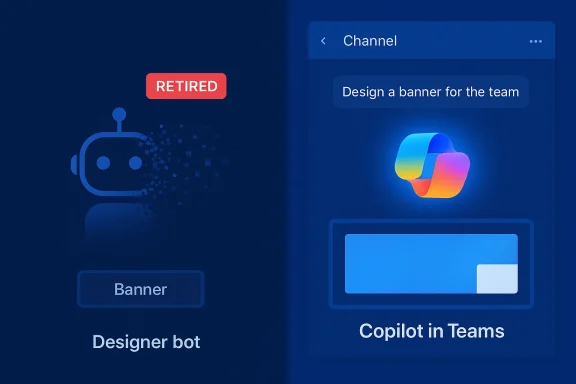
Microsoft has quietly moved one of Teams’ long-running creative tools into Copilot’s orbit: the standalone Designer bot and the Designer banner creation interface in Microsoft Teams are being retired and their image-generation duties are being folded into Microsoft 365 Copilot, with the retirement window completing on February 27, 2026.
Microsoft Designer arrived as a consumer-facing, generative‑AI design assistant that made it simple to create visuals, banners, and quick layouts from text prompts and uploaded images. Over time Microsoft repositioned Designer functionality into the broader Copilot family — exposing design suggestions in PowerPoint, enabling image editing inside Copilot flows, and testing Designer capabilities inside Teams and other Microsoft 365 surfaces. Those earlier integration efforts were documented in Microsoft’s change notices and in coverage of the Copilot/Designer feature set.
The move announced in Microsoft 365 message MC1197104 signals a completion of that strategy inside Teams: the separate Designer bot and the legacy channel banner designer are being removed from Teams and users are expected to use Copilot’s image-generation and design controls instead. Microsoft’s admin note frames this as a consolidation to a single, more capable creative experience and says no tenant configuration is required to effect the change.
At the same time, centralization concentrates risk and responsibility. When a single assistant controls many creative and automated flows, outages or policy failures have broader impact. The prudent enterprise response is proactive governance, clear entitlements, and a tested fallback plan for business‑critical workflows.
Source: Windows Report https://windowsreport.com/microsoft-replaces-teams-designer-features-with-copilot/
 Background / Overview
Microsoft Designer arrived as a consumer-facing, generative‑AI design assistant that made it simple to create visuals, banners, and quick layouts from text prompts and uploaded images. Over time Microsoft repositioned Designer functionality into the broader Copilot family — exposing design suggestions in PowerPoint, enabling image editing inside Copilot flows, and testing Designer capabilities inside Teams and other Microsoft 365 surfaces. Those earlier integration efforts were documented in Microsoft’s change notices and in coverage of the Copilot/Designer feature set.The move announced in Microsoft 365 message MC1197104 signals a completion of that strategy inside Teams: the separate Designer bot and the legacy channel banner designer are being removed from Teams and users are expected to use Copilot’s image-generation and design controls instead. Microsoft’s admin note frames this as a consolidation to a single, more capable creative experience and says no tenant configuration is required to effect the change.
What Microsoft announced (the facts, verified)
- The official Microsoft 365 Message Center entry (MC1197104) states that the Designer bot and Designer banners in Microsoft Teams will be retired between mid‑January 2026 and February 27, 2026. The post explicitly says users will no longer be able to install or use the Designer bot in Teams chats and that the legacy interface for creating channel announcement banners will be removed.
- Microsoft instructs administrators that no admin action is required to enact the change; the service retirement is automatic. Administrators are advised to notify users and update internal documentation to point people to Copilot’s image-generation features in Teams.
- Independent coverage from WindowsReport and several change‑intelligence feeds confirms the same timeline and frames the change as part of a broader consolidation of creative features under Copilot in Microsoft 365. Those outlets report the mid‑January rollout and the February 27 completion date, and relayed Microsoft’s guidance that Copilot will now handle image generation inside Teams.
Why Microsoft is consolidating Designer into Copilot
Microsoft is converging multiple AI experiences into a smaller set of branded assistants, and there are several pragmatic reasons for that consolidation:- Unified user experience: Copilot has become the single brand users associate with generative assistance across Word, Excel, PowerPoint, OneDrive, and Teams. Moving Designer capabilities into Copilot reduces fragmentation and helps users find creative tools in one place. This has been Microsoft’s explicit strategy since Copilot began absorbing specialized features like "Design suggestions" in PowerPoint.
- Engineering efficiency: Maintaining multiple UI surfaces and separate bots (Designer bot, Copilot chat, in‑app Designer panes) creates duplication in development and model orchestration. Consolidation allows Microsoft to centralize model tuning, moderation, and feature development for image generation under Copilot. Technology reporting has documented this trend as Microsoft integrates Designer features into Copilot and the Copilot app.
- Licensing and monetization clarity: Copilot is now a paid-addition to Microsoft 365 for many organizational scenarios. Folding higher‑value creative capabilities into Copilot clarifies which customers receive which features, and it aligns premium functionality with the Copilot licensing model that Microsoft has been rolling out. Earlier Microsoft messages stated Copilot users would see enhanced design suggestions while non‑Copilot users would keep access to standard Designer layouts — a pattern that helps Microsoft segment capabilities.
- Governance and safety rationalization: Centralizing image generation in Copilot makes it easier for Microsoft to apply unified content filters, attribution features, and enterprise governance controls across image and text generation. From an enterprise governance perspective, one integrated surface is simpler to secure and audit than multiple, separate bots. Microsoft’s message center guidance downplays direct compliance risk but points admins toward Copilot for future image generation.
What this means for everyday Teams users
- Creation flow: If you used the Designer bot in Teams chat to create images or the Designer interface to make channel announcement banners, you will need to use Copilot in Teams going forward. The same kinds of prompts (describe an image, provide a theme, upload a photo to edit) should work inside Copilot’s image generation flows, but the interface and the exact affordances will be those of Copilot rather than the old Designer bot.
- Availability and restrictions: Microsoft’s prior rollout behavior suggests that some advanced design suggestions were tied to Copilot licensing in other apps; non‑Copilot users retained access to standard Designer layouts. Organizations should verify whether the Copilot image generator is available to all users in their tenant, or whether it requires a specific Copilot or Microsoft 365 plan. The Message Center note does not change licensing policy directly — it only retires the bot — but the practical accessibility of the replacement Copilot features can vary by license. Administrators should confirm entitlement for their user base.
- Workflows for channel banners: The Designer-based channel banner tool is being removed. Teams customers who rely on quick banner creation inside Teams channels (for announcements, event promos, or community highlights) must adapt their workflows to use Copilot’s Create or image generation flow and then manually attach or post the output where needed, or switch to a new in‑app Copilot banner flow if Microsoft releases one. Community reports show users noticing the removal in the UI before the final cutoff.
Admin impact and recommended operational steps
Microsoft’s message center message stresses that no admin action is required, but good operational hygiene suggests several practical steps administrators should take immediately to reduce user confusion and maintain compliance:- Notify users and update support documentation. Tell Teams users where to find image-generation capabilities after Designer’s retirement and include brief how‑to examples for Copilot image prompts.
- Verify Copilot entitlements. Check tenant licensing and Copilot availability — if your users need advanced dr tenant lacks Copilot seats, plan for licensing changes or establish alternate workflows (e.g., a centralized design queue or using a licensed marketing user account).
- Audit automation and bots. If you deployed automation that called the Designer bot (for example, scheduled banner generation or channel automation), find and update those automation scripts to call Copilot (if supported) or to use a replacement process. Microsoft’s notice about the retirement suggests bot endpoints will stop responding.
- Review DLP and content policies. Copilot’s image generation may interact with organizational DLP, content moderation, or export controls. Confirm that image generation via Copilot respects tenant restrictions and consider applying or tightening policies in the Microsoft 365 compliance center where needed.
- Test and train. Before the change reaches every user, create test scenarios to confirm that Copilot produces acceptable outputs for typical banner or announcement needs and produce a short training session or quick reference to help users transition. Community threads show people already encountering errors where Designer had been removed — proactive training prevents helpdesk spikes.
Risks, governance and legal considerations
Consolidating Designer into Copilot brings advantages, but it also concentrates several risks that organizations must manage.- Licensing surprise and cost: Organizations that relied on the older, perhaps free Designer bot might discover that equivalent Copilot design suggestions are limited to Copilot‑licensed users. If Copilot entitlements are required for certain creative outputs, organizations may face unexpected licensing costs. Microsoft’s prior messaging made explicit differences between Copilot and non‑Copilot users’ access to advanced features. Administrators should treat licensing as a first‑order risk.
- Content provenance and IP: Generative images raise questions about source content, model training provenance, and commercial reuse rights. When an image is generated inside Copilot, enterprises should confirm the licensing terms that govern that content. Mature procurement and legal teams will want to know whether generated im‑party copyrighted elements and whether they can be used for commercial assets without additional clearance. These are not questions answered in the retirement notice itself and must be confirmed by reviewing Microsoft’s terms. Flag such unresolved legal questions and consult procurement or legal counsel.
- Data leakage and privacy: Copilot’s ability to access context (for example, messages, files, or meeting content) is a powerful productivity asset, but it increases the stakes for data leakage. Ensure Copilot image generation cannot inadvertently incorporate sensitive text or internal imagery unless explicitly allowed by policy and user action. Audit logs and tenant‑level policies should be reviewed.
- Model behavior and safety: Generative models sometimes produce unexpected or biased outputs. Centralizing image generation in Copilot concentrates that risk into one surface. Enterprises should create review processes for externally posted creative assets and consider using an approvals workflow for marketing or public‑facing banners.
- Support and fallback: If Copilot experiences an outage or rate limits are applied in peak usage, teams that relied on on-demand Designer banners could be blocked. Maintain a fallback plan (templated static banners or an alternative image service) to avoid interruptions for event-critical messaging. Community reports show users discovering the Designer removal when attempting to creae users will need clear fallback instructions.
Technical verification and timeline (detailed)
- The Message Center ID MC1197104 is the authoritative administrative notice for this change; it lists mid‑January through February 27, 2026 as the retirement window and specifies the removal of the Designer bot and banner UI, while directing users to Copilot for image generation. This is the core administrative verification and should be treated as the source of truth for rollout timing.
- Coverage by outlets like WindowsReport and change‑intelligence blogs tracked the same notice and reported user‑visible removal occurring before the final cutoff, consistent with a staged retirement. Those corroborating reports help confirm that the retirement isn’t hypothetical — customers are already seeing the changes in their tenants.
- Historical context: Microsoft announced earlier transitions that moved Designer features into Copilot (for example, “Design suggestions” in PowerPoint rolled into Copilot flows in mid‑2025). That earlier integration is relevant because it explains Microsoft’s multi‑phase approach: add Designer capabilities into Copilot, then remove the older, parallel Designer surfaces. Those prior messages are documented in Microsoft’s message center notices and change feeds.
- Community signals: Forum threads and user posts showed people encountering errors or the Designer bot “leaving the organization” as it was removed, which is an early indicator of rollout progress in the wild. These community observations are useful operational telemetry but are not formal Microsoft guidance; treat them as user reports rather than official statements.
Practical how‑to: quick steps for IT teams and power users
- For IT teams
- Announce the change to end users as soon as possible and include sample Copilot prompts for common banner or announcement needs.
- Confirm whether Copilot image generation is entitled for your users; if not, evaluate licensing or define a central design role.
- Update runbooks that reference the Designer bot or banner flows; search tenant automation for Designer bot IDs and redirect or deprecate those automations.
- Review DLP, retention, and compliance policies to ensure Copilot interactions are controlled and logged.
- For power users and community owners
- Test Copilot image generation in a safe, non‑production channel. Try the prompts you’d normally use with Designer and note differences in styling, available parameters (size, aspect ratio, style modifiers), and post‑processing options.
- Create a small set of approved Copilot prompts for your community to encourage consistent visuals and minimize iterations.
- Keep master templates externally (for example, in SharePoint or OneDrive) that you can update and re‑use if Copilot outputs vary between sessions.
- For marketers and designers
- Treat Copilot‑generated assets like initial drafts. Always run a short human review pass for brand compliance, composition, and IP issues before distribution.
- If you require high‑fidelity, production‑grade imagery, continue to maintain a professional design pipeline; Copilot is fast for ideation but does not replace a full design review process.
Broader implications: a microcosm of Microsoft’s Copilot strategy
The Designer retirement in Teams is not an isolated event; it’s a visible example of Microsoft’s broader strategy to consolidate vertical capabilities into Copilot as the organization’s primary interface for generative assistance. That strategy has repeated across PowerPoint, OneDrive, Windows, and now Teams: Microsoft is shaping a single, increasingly capable assistant platform rather than many small, specialized bots. For IT leaders, the implications are organizational: governance, licensing, and training now center on Copilot rather than a constellation of smaller tools.At the same time, centralization concentrates risk and responsibility. When a single assistant controls many creative and automated flows, outages or policy failures have broader impact. The prudent enterprise response is proactive governance, clear entitlements, and a tested fallback plan for business‑critical workflows.
Conclusion
Microsoft’s retirement of the Designer bot and Designer banners inside Teams — formally announced in Message Center entry MC1197104 and rolling out through February 27, 2026 — closes one chapter of parallel creative tooling in Teams and opens another where Copilot is the single point for AI‑driven imagery and design inside Microsoft 365. The change simplifies Microsoft’s product landscape and aligns with a long‑running strategy to centralize AI features under Copilot, but it also raises practical questions around licensing, governance, intellectual property, and operational continuity that enterprises must address now. Administrators should treat this as an operational change: notify users, verify Copilot entitlements, update documentation, and put review and fallback procedures in place so creative workflows continue smoothly after the Designer surfaces disappear.Source: Windows Report https://windowsreport.com/microsoft-replaces-teams-designer-features-with-copilot/