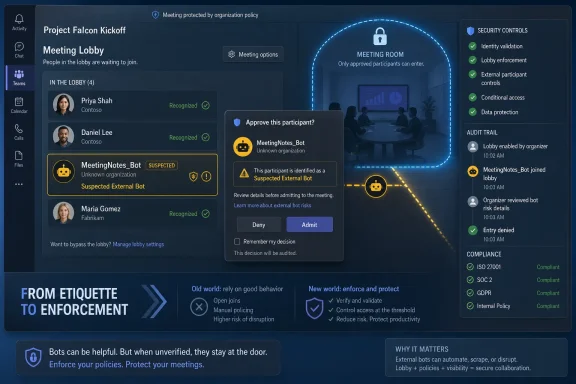
Microsoft Teams now lets admins manage detected external meeting bots by policy, placing suspected bots in the lobby for organizer approval even when the meeting’s normal lobby setting would otherwise allow bypass. Before enabling or expanding the protection, admins should test legitimate note-taking tools, anonymous attendee flows, webinar-style joins, and organizer admission behavior—not just whether malicious bots are blocked. The practical rollout problem is that bot protection is a workflow change disguised as a security control.
To configure it, go to the Teams admin center, open meeting policies, find the Meeting Join and Lobby section, and set “Manage external bots and their access to meetings” to “When detected, require approval before joining.” Microsoft lists the PowerShell control as the
The important change in Teams is not that Microsoft has discovered AI meeting assistants. Everyone in IT has already watched the shift from “a person invited a recorder” to “a service appeared in the attendee list with a plausible name.” The change is that Teams is turning that ambiguity into an admission decision.
When bot detection is enabled, Teams can identify suspected external bots during the join process and force them into the meeting lobby. That matters because the bot control can override the meeting’s ordinary lobby bypass posture: a meeting that normally lets certain participants enter directly can still stop a detected bot at the door. In security terms, Microsoft is adding a second gate; in operational terms, it is adding another moment where a human must make the right call.
That is where the rollout can go sideways. If an organization treats the feature as a simple anti-abuse toggle, it may reduce one class of risk while creating another: missed transcripts, broken executive briefings, frustrated customers stuck in webinar entry flows, and organizers who admit anything because they were not trained to recognize what Teams is asking them.
The smarter framing is not “block the bots.” It is “make bot admission explicit, predictable, and auditable enough that meetings still work.” That distinction should drive every pilot, help-desk article, and organizer message.
For PowerShell-driven tenants, Microsoft identifies
The first planning question is policy scope. Microsoft describes the control as a Teams meeting policy setting that can be applied through the org-wide default policy or through targeted policies. That means the safer rollout pattern is not necessarily tenant-wide activation on day one; it is a staged deployment to meeting-heavy groups, regulated departments, executives’ staff, and webinar organizers whose workflows expose the most edge cases.
The second planning question is who is allowed to admit people from the lobby. Microsoft recommends configuring lobby admission so only organizers and co-organizers can admit participants. That recommendation is easy to dismiss as generic hardening, but it becomes central once the lobby is also the bot decision point. If presenters can admit suspected bots, a careful admin policy can be undone by the least-trained person with a presenter role.
The third planning question is whether the organization already relies on external note-taking services as a business process. If sales calls, customer success reviews, recruiting interviews, board prep, or incident retrospectives depend on AI notes, bot protection becomes a change-management project. It is not enough to tell organizers, “You may see bots in the lobby.” They need to know which services are expected, who requested them, and when admitting one is appropriate.
That sounds obvious until you map it onto real meetings. A legitimate assistant may join with a name that does not match the employee who invited it. A vendor’s note-taker may arrive before the vendor’s human attendee. A customer may use a meeting assistant that your tenant has never seen before. In each case, the organizer sees a risk prompt, makes a quick decision, and lives with the outcome.
Microsoft’s own limitations make this more than a theoretical concern. Teams support notes that some bots may still be missed, while some human participants may be mislabeled. Organizers can correct a false positive after admitting the participant by marking them as “This is not a bot,” but that does not erase the live-meeting friction that came before it.
This is why admins should resist presenting the feature as an oracle. Detection is a signal, not a verdict. The right organizer behavior is not blind denial, and it is not blind admission; it is contextual approval based on whether the participant is expected, identifiable, and appropriate for the meeting’s sensitivity.
WindowsForum readers have already been following the governance angle around AI meeting assistants, including earlier coverage of Teams bot detection and lobby approval in Microsoft Teams 2026 Bot Detection: Lobby Approval as AI Assistant Governance and the newer admin-blocking direction discussed in Microsoft Teams Admins Can Auto-Block External AI Bots in Meetings. The through-line is clear: Microsoft is moving Teams from permissive collaboration toward explicit assistant governance, one lobby prompt at a time.
This is where meetings and webinars diverge operationally. A small internal meeting can tolerate a few seconds of confusion while someone solves a verification prompt or waits in the lobby. A webinar cannot. At scale, every extra join step becomes a support issue, a chat complaint, or a drop-off point before the content even starts.
The verified fact that CAPTCHA-based checks can reduce web-bot disruption should not be read as a command to apply them everywhere. They are a useful tool for anonymous and unverified access, especially where meetings are public, widely forwarded, or exposed to disruption. But they also need accessibility review, user-experience testing, and clear pre-event communication.
A sane Teams rollout separates external bot detection from anonymous-user verification. They are related controls, but they answer different questions. Bot detection asks whether a joining participant appears to be an external bot; verification checks ask whether an anonymous or unverified external participant can prove enough humanness to proceed.
Blending the two in admin messaging is a mistake. Organizers need to understand that a known person may be challenged because of anonymous or unverified status, while a detected bot may be held in the lobby even if the meeting’s other settings would normally admit it. Those are different events, and the help desk should not have to explain the distinction during a live customer call.
Microsoft’s framing acknowledges that external meeting assistant tools can create security, compliance, privacy, and data leakage risks when they access meetings without organizer awareness or consent. That is the strongest argument for the feature. The point is not that all note-takers are bad; it is that invisible note-takers are unacceptable in many professional settings.
Admins should therefore test more than detection. They should test whether the feature restores meaningful consent. Does the organizer see enough information to make a decision? Does the meeting culture support denying an unexpected assistant, even if a senior participant invited it? Does the organization have a standard answer when a customer asks why their note-taking bot is stuck in the lobby?
This is also where internal policy must catch up with product behavior. A Teams setting can force an approval moment, but it cannot decide whether a sales rep is allowed to use a third-party transcription service with customer data. It cannot determine whether HR interviews may be summarized by an external AI assistant. It cannot know whether a legal meeting requires every recording tool to be pre-approved.
The rollout should therefore include a plain-English meeting assistant policy. If the organization allows certain note-taking tools, say so. If some meetings are off-limits, say so. If external attendees may bring their own assistants only with organizer permission, say so before the meeting starts.
Admins should not fill that gap with assumptions. “External bot” is not the same phrase as “all bots,” and tenant-local app governance is a separate discipline from meeting-lobby enforcement. If a company has approved an internal assistant or a line-of-business integration that joins meetings, it needs to test that behavior rather than infer it from the external-bot documentation.
This matters because the risk model changes inside the tenant. An internal assistant may be more trusted from an identity and compliance standpoint, but it can still create disclosure, retention, and consent issues. Conversely, an external note-taking service may be business-critical for one team and prohibited for another.
The right admin move is to inventory meeting assistant usage before changing policy. Ask business units which services they use, which meetings they join, and whether the services authenticate as external participants, anonymous users, or tenant-approved apps. That inventory will surface surprises long before the first executive asks why the quarterly customer review has no transcript.
This is the gap where WindowsForum’s IT audience should be most skeptical of glossy vendor language. “Smarter bot protection” is useful, but it is not a complete governance model. Until same-tenant and exception behavior is documented clearly for every deployment scenario, admins should treat the feature as one control in a broader meeting-security program.
A practical pilot should include recurring internal meetings with external attendees, vendor calls that use note-taking services, and at least one webinar-style workflow if the organization uses anonymous access. The goal is to capture real join behavior across human guests, detected bots, missed bots, mislabeled humans, and CAPTCHA-challenged users. A lab meeting with three IT staffers will not reveal enough.
Organizers in the pilot need a short script, not a policy PDF. They should know that detected bots will be placed in the lobby even when other participants bypass it. They should know that a false positive can be admitted and then marked as “This is not a bot.” They should know that unexpected bots should not be admitted simply because their display name looks familiar.
Help-desk teams also need sample tickets before the feature is broadly enabled. “My note-taker did not join,” “My customer is stuck at a verification check,” “Teams says a person is a bot,” and “A bot joined without being detected” are different incidents. If they all route to the same generic Teams queue, the organization will learn slowly and frustrate users quickly.
For admins following the broader thread, the earlier WindowsForum piece Microsoft Teams Lobby Bot Check: New Rules for AI Meeting Assistants is useful context because it captures the shift from invisible assistant joins to organizer-facing approval. The next step is not more awareness; it is operational rehearsal.
The first message should go to organizers and co-organizers, not the whole company. They are the people who will see the lobby prompt, decide whether to admit a detected bot, and correct a mislabeled human. Their guidance should be concrete: admit expected assistants only when the meeting permits them, deny unexpected assistants, and verify with the participant who requested the tool if the meeting sensitivity is high.
The second message should go to frequent users of note-taking services. They need to know that their assistant may be held in the lobby and may require organizer approval. If they invite an assistant to someone else’s meeting, they should warn the organizer in advance. This is not merely etiquette; it reduces the chance that a legitimate workflow is blocked because it looks like an unsolicited bot.
The third message should go to webinar and event owners. They need to test anonymous or unverified access flows, especially if CAPTCHA-based verification checks are used. A registration funnel that looks fine in a dry run can fail in production if attendees encounter prompts they were not told to expect.
The final message should go to security, legal, compliance, and records teams. Bot protection may expose meeting-assistant usage that was previously informal. Those teams should be ready to answer whether a given third-party assistant is allowed, not discover the question during an escalated incident.
Before enabling detection broadly, admins should document which policies apply to which users, whether the org-wide default will change, and whether any high-friction groups need a targeted policy first. They should confirm who can admit lobby participants and consider aligning that with Microsoft’s recommendation that only organizers and co-organizers handle admission. They should also decide whether disabling bot detection is ever acceptable for a specific business scenario, because emergency exceptions tend to become permanent if no one writes down the exit criteria.
Testing should cover the normal and abnormal paths. A known external assistant should be invited and observed. An unexpected assistant should be denied. A human participant should be admitted from the lobby and, if mislabeled, marked as not a bot. An anonymous attendee should attempt to join a meeting or webinar where verification checks apply. The point is not to prove that every path is perfect; it is to ensure the support organization has seen the failure modes before users do.
Audit and monitoring expectations should be realistic. Microsoft recommends monitoring audit logs for unusual participant activity, but logs do not replace organizer judgment during a live meeting. They are better at post-event review, trend detection, and proving that a policy needs adjustment.
The most valuable artifact is a one-page organizer guide. It should show what a detected bot means, when to admit one, when to deny one, how to handle false positives, and whom to contact when a legitimate assistant is blocked. If that guide cannot be written clearly, the policy is not ready for broad deployment.
Second, some humans can be mislabeled. That means the help desk and organizers need a calm path for correction, including the “This is not a bot” option after admission. False positives are not just technical errors; they can embarrass customers, delay interviews, or disrupt external collaboration if organizers are not prepared.
Third, availability and rollout details should not be invented. If a tenant does not yet see the setting, or if behavior differs from the documentation, admins should verify the tenant’s state rather than assume a global switch has landed everywhere at once. Microsoft 365 features often move through rings, policies, and service-side updates in ways that are not visible to end users.
That uncertainty is not a reason to ignore the feature. It is a reason to avoid writing brittle internal documentation that promises more than the tenant can currently do. The right language is conditional and test-driven: “When enabled in our tenant, detected external bots will be placed in the lobby,” not “Teams blocks all bots.”
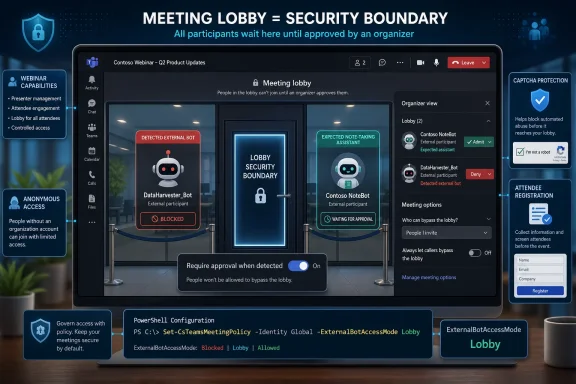
To configure it, go to the Teams admin center, open meeting policies, find the Meeting Join and Lobby section, and set “Manage external bots and their access to meetings” to “When detected, require approval before joining.” Microsoft lists the PowerShell control as the
ExternalBotAccessMode attribute, with RequireApprovalWhenDetected requiring approval for detected bots and AllowBots disabling detection and the secure lobby behavior. In parallel, admins should review verification checks for anonymous or unverified external users, because CAPTCHA-style checks can reduce web-bot disruption in meetings and webinars but may also alter the join path for real attendees.
 Microsoft Is Moving Bot Control From Trust to Admission
The important change in Teams is not that Microsoft has discovered AI meeting assistants. Everyone in IT has already watched the shift from “a person invited a recorder” to “a service appeared in the attendee list with a plausible name.” The change is that Teams is turning that ambiguity into an admission decision.When bot detection is enabled, Teams can identify suspected external bots during the join process and force them into the meeting lobby. That matters because the bot control can override the meeting’s ordinary lobby bypass posture: a meeting that normally lets certain participants enter directly can still stop a detected bot at the door. In security terms, Microsoft is adding a second gate; in operational terms, it is adding another moment where a human must make the right call.
That is where the rollout can go sideways. If an organization treats the feature as a simple anti-abuse toggle, it may reduce one class of risk while creating another: missed transcripts, broken executive briefings, frustrated customers stuck in webinar entry flows, and organizers who admit anything because they were not trained to recognize what Teams is asking them.
The smarter framing is not “block the bots.” It is “make bot admission explicit, predictable, and auditable enough that meetings still work.” That distinction should drive every pilot, help-desk article, and organizer message.
The Setting Is Simple; The Policy Consequences Are Not
The admin path is straightforward. In the Teams admin center, admins manage the setting through meeting policies, under Meeting Join and Lobby, using “Manage external bots and their access to meetings.” The available behavior is essentially binary: do not detect bots, or require approval when a bot is detected.For PowerShell-driven tenants, Microsoft identifies
ExternalBotAccessMode as the policy attribute. RequireApprovalWhenDetected is the posture that detects and labels suspected bots in the lobby, while AllowBots turns off detection and leaves bots to appear like other external participants. That is enough for configuration management, but not enough for deployment planning.The first planning question is policy scope. Microsoft describes the control as a Teams meeting policy setting that can be applied through the org-wide default policy or through targeted policies. That means the safer rollout pattern is not necessarily tenant-wide activation on day one; it is a staged deployment to meeting-heavy groups, regulated departments, executives’ staff, and webinar organizers whose workflows expose the most edge cases.
The second planning question is who is allowed to admit people from the lobby. Microsoft recommends configuring lobby admission so only organizers and co-organizers can admit participants. That recommendation is easy to dismiss as generic hardening, but it becomes central once the lobby is also the bot decision point. If presenters can admit suspected bots, a careful admin policy can be undone by the least-trained person with a presenter role.
The third planning question is whether the organization already relies on external note-taking services as a business process. If sales calls, customer success reviews, recruiting interviews, board prep, or incident retrospectives depend on AI notes, bot protection becomes a change-management project. It is not enough to tell organizers, “You may see bots in the lobby.” They need to know which services are expected, who requested them, and when admitting one is appropriate.
The Lobby Is Becoming a Security Boundary
The Teams lobby used to be mostly about people: anonymous users, external users, dial-in participants, and the familiar problem of who gets waved in before the organizer joins. Bot protection changes the lobby’s role. It is now also a machine-screening surface.That sounds obvious until you map it onto real meetings. A legitimate assistant may join with a name that does not match the employee who invited it. A vendor’s note-taker may arrive before the vendor’s human attendee. A customer may use a meeting assistant that your tenant has never seen before. In each case, the organizer sees a risk prompt, makes a quick decision, and lives with the outcome.
Microsoft’s own limitations make this more than a theoretical concern. Teams support notes that some bots may still be missed, while some human participants may be mislabeled. Organizers can correct a false positive after admitting the participant by marking them as “This is not a bot,” but that does not erase the live-meeting friction that came before it.
This is why admins should resist presenting the feature as an oracle. Detection is a signal, not a verdict. The right organizer behavior is not blind denial, and it is not blind admission; it is contextual approval based on whether the participant is expected, identifiable, and appropriate for the meeting’s sensitivity.
WindowsForum readers have already been following the governance angle around AI meeting assistants, including earlier coverage of Teams bot detection and lobby approval in Microsoft Teams 2026 Bot Detection: Lobby Approval as AI Assistant Governance and the newer admin-blocking direction discussed in Microsoft Teams Admins Can Auto-Block External AI Bots in Meetings. The through-line is clear: Microsoft is moving Teams from permissive collaboration toward explicit assistant governance, one lobby prompt at a time.
Anonymous Access Is a Separate Door With Its Own Failure Modes
Bot detection is not the only Teams control aimed at unwanted automated joins. Microsoft’s verification-check guidance says anonymous or unverified external users can be forced through CAPTCHA-based checks to reduce web-bot disruption. That applies to the messy world of people joining without strong identity, including attendees coming through web-based paths or external meeting platforms.This is where meetings and webinars diverge operationally. A small internal meeting can tolerate a few seconds of confusion while someone solves a verification prompt or waits in the lobby. A webinar cannot. At scale, every extra join step becomes a support issue, a chat complaint, or a drop-off point before the content even starts.
The verified fact that CAPTCHA-based checks can reduce web-bot disruption should not be read as a command to apply them everywhere. They are a useful tool for anonymous and unverified access, especially where meetings are public, widely forwarded, or exposed to disruption. But they also need accessibility review, user-experience testing, and clear pre-event communication.
A sane Teams rollout separates external bot detection from anonymous-user verification. They are related controls, but they answer different questions. Bot detection asks whether a joining participant appears to be an external bot; verification checks ask whether an anonymous or unverified external participant can prove enough humanness to proceed.
Blending the two in admin messaging is a mistake. Organizers need to understand that a known person may be challenged because of anonymous or unverified status, while a detected bot may be held in the lobby even if the meeting’s other settings would normally admit it. Those are different events, and the help desk should not have to explain the distinction during a live customer call.
The Note-Taker Problem Is Really a Consent Problem
The uncomfortable truth is that many “bot incidents” are not attacks. They are consent failures. Someone invited a note-taking service because it made their life easier, but the organizer, participants, legal team, or customer did not understand that a third-party system might record, transcribe, summarize, or store meeting data.Microsoft’s framing acknowledges that external meeting assistant tools can create security, compliance, privacy, and data leakage risks when they access meetings without organizer awareness or consent. That is the strongest argument for the feature. The point is not that all note-takers are bad; it is that invisible note-takers are unacceptable in many professional settings.
Admins should therefore test more than detection. They should test whether the feature restores meaningful consent. Does the organizer see enough information to make a decision? Does the meeting culture support denying an unexpected assistant, even if a senior participant invited it? Does the organization have a standard answer when a customer asks why their note-taking bot is stuck in the lobby?
This is also where internal policy must catch up with product behavior. A Teams setting can force an approval moment, but it cannot decide whether a sales rep is allowed to use a third-party transcription service with customer data. It cannot determine whether HR interviews may be summarized by an external AI assistant. It cannot know whether a legal meeting requires every recording tool to be pre-approved.
The rollout should therefore include a plain-English meeting assistant policy. If the organization allows certain note-taking tools, say so. If some meetings are off-limits, say so. If external attendees may bring their own assistants only with organizer permission, say so before the meeting starts.
Same-Tenant Bots Remain the Uncomfortable Unknown
The sharpest unanswered question is same-tenant handling. Microsoft’s public framing, as reflected in the available guidance, centers on external bots attempting to join meetings hosted by the organization. That leaves a practical gray zone for bots, apps, or assistants operating inside the tenant boundary or appearing through sanctioned internal workflows.Admins should not fill that gap with assumptions. “External bot” is not the same phrase as “all bots,” and tenant-local app governance is a separate discipline from meeting-lobby enforcement. If a company has approved an internal assistant or a line-of-business integration that joins meetings, it needs to test that behavior rather than infer it from the external-bot documentation.
This matters because the risk model changes inside the tenant. An internal assistant may be more trusted from an identity and compliance standpoint, but it can still create disclosure, retention, and consent issues. Conversely, an external note-taking service may be business-critical for one team and prohibited for another.
The right admin move is to inventory meeting assistant usage before changing policy. Ask business units which services they use, which meetings they join, and whether the services authenticate as external participants, anonymous users, or tenant-approved apps. That inventory will surface surprises long before the first executive asks why the quarterly customer review has no transcript.
This is the gap where WindowsForum’s IT audience should be most skeptical of glossy vendor language. “Smarter bot protection” is useful, but it is not a complete governance model. Until same-tenant and exception behavior is documented clearly for every deployment scenario, admins should treat the feature as one control in a broader meeting-security program.
The Rollout Should Start With Meetings That Can Afford to Break
The worst pilot group is the one with the most political visibility. Do not start with the CEO’s external advisory call, the public webinar, or the sales organization’s largest customer renewal meeting. Start with meetings where the organization can observe behavior, correct instructions, and absorb friction.A practical pilot should include recurring internal meetings with external attendees, vendor calls that use note-taking services, and at least one webinar-style workflow if the organization uses anonymous access. The goal is to capture real join behavior across human guests, detected bots, missed bots, mislabeled humans, and CAPTCHA-challenged users. A lab meeting with three IT staffers will not reveal enough.
Organizers in the pilot need a short script, not a policy PDF. They should know that detected bots will be placed in the lobby even when other participants bypass it. They should know that a false positive can be admitted and then marked as “This is not a bot.” They should know that unexpected bots should not be admitted simply because their display name looks familiar.
Help-desk teams also need sample tickets before the feature is broadly enabled. “My note-taker did not join,” “My customer is stuck at a verification check,” “Teams says a person is a bot,” and “A bot joined without being detected” are different incidents. If they all route to the same generic Teams queue, the organization will learn slowly and frustrate users quickly.
For admins following the broader thread, the earlier WindowsForum piece Microsoft Teams Lobby Bot Check: New Rules for AI Meeting Assistants is useful context because it captures the shift from invisible assistant joins to organizer-facing approval. The next step is not more awareness; it is operational rehearsal.
Communication Is the Control Most Tenants Will Underfund
The feature only works if organizers understand what Teams is asking them to do. That is not a minor adoption point. It is the difference between a security boundary and a new button everyone clicks through.The first message should go to organizers and co-organizers, not the whole company. They are the people who will see the lobby prompt, decide whether to admit a detected bot, and correct a mislabeled human. Their guidance should be concrete: admit expected assistants only when the meeting permits them, deny unexpected assistants, and verify with the participant who requested the tool if the meeting sensitivity is high.
The second message should go to frequent users of note-taking services. They need to know that their assistant may be held in the lobby and may require organizer approval. If they invite an assistant to someone else’s meeting, they should warn the organizer in advance. This is not merely etiquette; it reduces the chance that a legitimate workflow is blocked because it looks like an unsolicited bot.
The third message should go to webinar and event owners. They need to test anonymous or unverified access flows, especially if CAPTCHA-based verification checks are used. A registration funnel that looks fine in a dry run can fail in production if attendees encounter prompts they were not told to expect.
The final message should go to security, legal, compliance, and records teams. Bot protection may expose meeting-assistant usage that was previously informal. Those teams should be ready to answer whether a given third-party assistant is allowed, not discover the question during an escalated incident.
The Admin Checklist Is Mostly About Exceptions
The configuration itself is short. The rollout checklist is longer because the danger lives in exceptions, not defaults.Before enabling detection broadly, admins should document which policies apply to which users, whether the org-wide default will change, and whether any high-friction groups need a targeted policy first. They should confirm who can admit lobby participants and consider aligning that with Microsoft’s recommendation that only organizers and co-organizers handle admission. They should also decide whether disabling bot detection is ever acceptable for a specific business scenario, because emergency exceptions tend to become permanent if no one writes down the exit criteria.
Testing should cover the normal and abnormal paths. A known external assistant should be invited and observed. An unexpected assistant should be denied. A human participant should be admitted from the lobby and, if mislabeled, marked as not a bot. An anonymous attendee should attempt to join a meeting or webinar where verification checks apply. The point is not to prove that every path is perfect; it is to ensure the support organization has seen the failure modes before users do.
Audit and monitoring expectations should be realistic. Microsoft recommends monitoring audit logs for unusual participant activity, but logs do not replace organizer judgment during a live meeting. They are better at post-event review, trend detection, and proving that a policy needs adjustment.
The most valuable artifact is a one-page organizer guide. It should show what a detected bot means, when to admit one, when to deny one, how to handle false positives, and whom to contact when a legitimate assistant is blocked. If that guide cannot be written clearly, the policy is not ready for broad deployment.
The Small Print That Will Decide Whether This Feels Smart or Arbitrary
There are three caveats admins should state out loud. First, some bots can still be missed. That means enabling detection does not make a meeting safe for unrestricted disclosure, and sensitive meetings still need disciplined invitations, lobby settings, and participant review.Second, some humans can be mislabeled. That means the help desk and organizers need a calm path for correction, including the “This is not a bot” option after admission. False positives are not just technical errors; they can embarrass customers, delay interviews, or disrupt external collaboration if organizers are not prepared.
Third, availability and rollout details should not be invented. If a tenant does not yet see the setting, or if behavior differs from the documentation, admins should verify the tenant’s state rather than assume a global switch has landed everywhere at once. Microsoft 365 features often move through rings, policies, and service-side updates in ways that are not visible to end users.
That uncertainty is not a reason to ignore the feature. It is a reason to avoid writing brittle internal documentation that promises more than the tenant can currently do. The right language is conditional and test-driven: “When enabled in our tenant, detected external bots will be placed in the lobby,” not “Teams blocks all bots.”
A Teams Bot Rollout Lives or Dies Before the First Suspicious Join
The concrete work for IT is less glamorous than the announcement, but it is what will determine whether users trust the control.- Configure “Manage external bots and their access to meetings” in Teams meeting policies, and use
RequireApprovalWhenDetectedwhere detected external bots should require lobby approval. - Review lobby admission roles so organizers and co-organizers, rather than ordinary presenters, are responsible for admitting participants from the lobby.
- Test legitimate external note-taking services before broad rollout, because blocking a business-approved assistant can be just as disruptive as admitting an unwanted one.
- Test anonymous and unverified external join flows separately, especially for webinars or public meetings where CAPTCHA-based verification checks may change the attendee experience.
- Train organizers to deny unexpected bots, admit expected assistants only when appropriate, and use “This is not a bot” when Teams mislabels a real participant.
- Treat missed bots and false positives as expected operational cases, not rare anomalies, and prepare help-desk routing before the policy reaches high-profile meetings.
References
- Primary source: learn.microsoft.com
Manage external bots and their access to meetings hosted in your organization - Microsoft Teams | Microsoft Learn
Learn how to configure the access that external bots get to Teams meetings hosted in your organizationlearn.microsoft.com - Independent coverage: techcommunity.microsoft.com
- Independent coverage: support.microsoft.com
Prevent spam or phishing attempts from external chats in Microsoft Teams | Microsoft Support
Ensure your security from spam, phishing, or impersonation attempts from external chats in Microsoft Teams.support.microsoft.com - Independent coverage: blog-en.topedia.com
Meeting Bot Detection in Microsoft Teams | Topedia Blog
Microsoft is rolling out bot detection for Teams Meetings, requiring an additional approval step before external meeting assistant bots can be admitted from the lobby. Administrators can configure a new policy setting to control bot access tenant-wide, including blocking detected bots entirely.blog-en.topedia.com - Independent coverage: theregister.com
Microsoft builds a bouncer to keep bots out of Teams meetings
Allows ISVs to put their names on the door so desirable bots always get inwww.theregister.com - Independent coverage: microsoft.com
Microsoft 365 Roadmap | Microsoft 365
The Microsoft 365 Roadmap lists updates that are currently planned for applicable subscribers. Check here for more information on the status of new features and updates.www.microsoft.com
- Primary source: WindowsForum
Microsoft Teams 2026 Bot Detection: Lobby Approval as AI Assistant Governance | Windows Forum
Microsoft Teams is rolling out an admin-controlled external bot detection system in 2026 that routes suspected third-party meeting bots into the lobby...windowsforum.com