

Microsoft is preparing a new Microsoft Teams Facilitator capability for Microsoft 365 Copilot Premium users that can monitor standard Teams meetings, detect unresolved factual questions, search the web, and post AI-generated answers into meeting chat during an expected worldwide rollout in August 2026. The feature is narrow in one sense: it must be added to a meeting, it depends on Copilot web search, and administrators can block it. But it is broad in another, more important sense: Microsoft is moving Teams from a place where people ask software for help to a place where software decides a meeting needs help before anyone explicitly asks.
That shift is the real story. Facilitator is not just another Copilot button, nor merely a smarter meeting-notes assistant. It is Microsoft’s clearest attempt yet to normalize the AI agent as a participant in workplace conversation — present, listening, contextualizing, and occasionally speaking up.
The traditional bargain with enterprise AI has been relatively easy to explain. A user asks a question, the model responds, and the organization audits the data boundary around that interaction. Copilot in Teams already complicated that bargain by giving users meeting summaries, recaps, task extraction, and answers grounded in meeting context, but the interaction model still generally centered on an explicit user prompt.
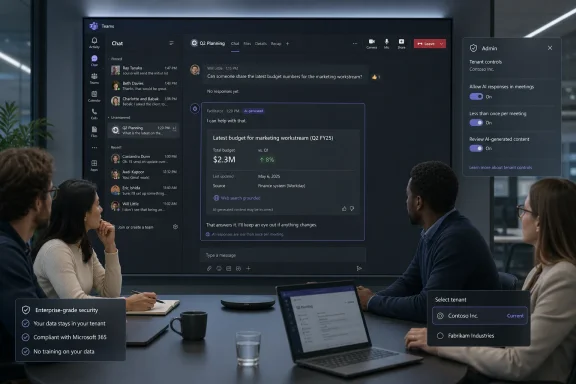
The new Facilitator behavior changes the posture. According to Microsoft’s admin-center notice as described in reporting, the agent can recognize when meeting participants are unsure or when a factual question appears to go unanswered. It can then run a web search and place a contextual answer in the chat, even though no one has directly invoked the agent at that moment.
Microsoft says this should happen rarely, usually less than once per meeting. That caveat matters, because a meeting bot that interrupts every tangent would become intolerable within a week. But rarity does not erase the architectural significance: Teams is gaining an AI layer that evaluates the flow of human conversation and decides when information should enter the room.
That is the kind of product decision that sounds small in a roadmap entry and large inside a conference call. The software is not merely transcribing. It is interpreting hesitation, uncertainty, and relevance.
That is a meaningful control. It gives organizations a path to pilot the feature among trained users rather than waking up to find an AI agent appearing in every recurring staff meeting. It also gives meeting participants a visible object to remove if the experience is not appropriate.
Tenant-level controls matter even more. Administrators can disable the capability, and the feature depends on whether Copilot web search is enabled. In other words, the security boundary is not just a friendly toggle in the meeting window; it is tied to the same governance questions Microsoft 365 admins are already wrestling with around Copilot’s access to organizational and web-based information.
Still, “opt-in” has become an overloaded phrase in enterprise software. A feature can be opt-in at the meeting level while still creating pressure at the organizational level. Once a few executives or project leads decide that AI-assisted meetings are more efficient, IT departments may find themselves supporting a tool that is technically optional but culturally expected.
That is where the controversy will live. Not in whether someone can remove Facilitator from a meeting, but in whether employees feel they can object when a licensed organizer adds it.
There is a reason this sounds compelling. Meetings are full of micro-stalls, and many of them are information retrieval problems masquerading as collaboration problems. If an AI agent can safely answer the simple stuff, humans can spend more time debating judgment calls rather than hunting for facts.
But web search is not a neutral act. Search results can be stale, context-poor, promotional, region-specific, or just wrong. A generated answer in meeting chat may carry a social authority that a random browser tab would not, especially when it appears in the middle of an official workplace discussion.
The risk is not that Facilitator will constantly hallucinate dramatic falsehoods. The more mundane risk is that it will introduce an answer that sounds plausible enough to steer a conversation before anyone has verified the source. In a sales meeting, a product planning call, or a compliance discussion, that can matter.
Microsoft’s claim that Facilitator will respond infrequently is therefore not just a usability promise. It is a risk-control statement. The fewer times an AI agent volunteers information, the fewer opportunities it has to distort the meeting’s direction.
A document assistant can be ignored. A chat assistant can be closed. A meeting agent enters a social space. It appears alongside people, responds in a shared channel, and becomes part of the conversational record.
That is why agent etiquette is now a product problem. When should an AI speak? How confident should it be? Should it cite uncertainty in plain language? Should it wait for a lull? Should it answer if the question seems rhetorical? Should it stay silent if the meeting is sensitive, even when it knows the answer?
Those choices are not merely interface details. They define whether AI feels like a helpful colleague, a surveillance device, or an overeager intern with a search engine. Microsoft’s “less than once per meeting” framing suggests the company knows the acceptable answer is not “as often as possible.”
The hard part is that meetings differ wildly. A stand-up, a legal review, a customer escalation, a board prep call, and a classroom session all have different norms. A single model of helpfulness will not fit all of them.
Because the feature analyzes meeting conversation in real time and can use web search, it intersects with several policies at once. There are meeting transcription and recording norms. There are Copilot web grounding settings. There are external participant rules. There are industry-specific constraints around confidential information.
Microsoft’s notice reportedly says the feature works in standard Teams meetings, not calls, webinars, or town halls. It also supports meetings with external and cross-tenant participants. That last point is operationally important: the most sensitive meetings are often not purely internal.
External participation raises obvious governance questions. If a vendor, customer, law firm, auditor, or partner joins a meeting, does everyone understand that an AI agent may analyze the discussion and answer from the web? Is that covered by existing meeting notices? Does the organizer have authority to add Facilitator? Does the external party’s organization have different expectations?
The answers will vary by company, sector, and jurisdiction. But the burden will land on IT, legal, compliance, and business owners long before the average user sees the feature in a meeting.
That argument has force. Teams is already the operating system of many office workers’ days. If an AI agent can reduce context switching, preserve decisions, and keep action items from evaporating, organizations will listen.
But administrators do not buy productivity in the abstract. They buy it after mapping it against support burden, user confusion, licensing complexity, data exposure, and regulatory risk. For them, Facilitator is not one feature; it is another node in a fast-growing Copilot control plane.
That control plane is getting harder to explain. There is Microsoft 365 Copilot. There is Copilot Chat. There are Teams Premium meeting features. There are agents. There are web search settings. There are tenant policies. There are meeting-level controls. Each layer may be rational on its own, but the combined experience can become opaque for both users and administrators.
This is Microsoft’s recurring enterprise AI challenge. The company is moving quickly enough to make Copilot feel alive, but that speed can make governance feel like a chase.
Those constraints are probably deliberate. Microsoft is trying to place an agent into live conversation without triggering the reaction that follows when workplace software appears to be listening too aggressively. A restrained rollout gives the company room to gather telemetry, measure annoyance, and refine the relevance threshold.
The meeting types excluded from the initial scope are also telling. Webinars and town halls are one-to-many formats where an AI interjection could create reputational or moderation issues. Calls are often more casual and less structured than meetings, making contextual interpretation harder. Standard meetings are the safest place to test whether proactive AI can be helpful without becoming weird.
Even the “less than once per meeting” expectation functions as a social promise. Microsoft is not pitching Facilitator as a second chair at the table. It is pitching it as a quiet assistant that occasionally prevents a factual gap from derailing the agenda.
Whether users experience it that way will depend on execution. One well-timed answer can feel magical. One poorly timed answer can make the entire meeting wonder what else the agent thinks it heard.
But privacy is only one layer. The deeper workplace question is power. Who decides that a meeting should have an AI participant? Who can stop it? Who is comfortable objecting? Who understands what the agent can and cannot do?
A senior manager adding Facilitator to a meeting is not socially equivalent to a peer doing the same. An employee may technically be able to ask for the agent to be removed, but that does not mean they will feel free to do so. Microsoft can provide controls; organizations must provide norms.
There is also the problem of unequal AI literacy. Some participants will understand that a generated answer is probabilistic and should be checked. Others may treat it as the voice of Microsoft-backed authority. The meeting chat can flatten those differences, making the AI response look like just another contribution in the record.
This is why training cannot be an afterthought. If organizations enable Facilitator, they should explain not only how to use it, but when not to use it. Sensitive HR discussions, legal strategy meetings, incident-response calls, merger planning, and customer-confidential conversations may require stricter defaults than ordinary project check-ins.
That is the Microsoft 365 dream in miniature. The meeting has an agenda, documents, participants, chat, transcript, tasks, and now an AI agent that can search outside the tenant when internal context is not enough. Teams becomes less a conferencing app than a live workspace with an embedded knowledge broker.
This is also why the feature matters beyond Teams. If Microsoft can persuade customers that proactive agents are acceptable in meetings, it becomes easier to justify similar behavior in chats, documents, project spaces, and business applications. The agent that answers a factual question today may become the agent that flags contradictions, drafts follow-up documents, or suggests decisions tomorrow.
That is not science fiction. Microsoft has already been pushing Copilot toward agentic work across Microsoft 365. Facilitator is simply one of the most visible places where that strategy enters the human rhythm of work.
The browser tab, in other words, is not the rival. The rival is the old assumption that software waits.
But the cultural decision is harder. Organizations need to decide whether they want meetings to become AI-mediated by default, even if the mediation begins as opt-in. That decision belongs partly to IT, but not only to IT.
The most successful deployments will probably be explicit and boring. They will define approved meeting types, name restricted scenarios, require notice for external participants, and teach users that AI answers in chat are useful leads rather than final authority. They will treat Facilitator as a tool with a job, not as a magical coworker.
The worst deployments will be ambiguous. They will let licensed users experiment without guidance, assume Microsoft’s defaults are enough, and then react only after an awkward customer call or internal complaint. That is how optional features become policy incidents.
Microsoft has given admins a chance to get ahead of this one. Whether they take it is the difference between a useful assistant and another surprise in the Teams meeting window.
The better question is what kind of meeting culture the organization wants once AI can listen for uncertainty and respond. The answer will differ between a software team, a hospital system, a law firm, a university, and a manufacturer. But none of them should discover their answer accidentally.
Here is the practical shape of the decision:
Microsoft’s new Facilitator behavior may prove genuinely useful, because meetings often fail for boring reasons: someone does not know a fact, nobody wants to interrupt the flow, and the group drifts. But the same feature also marks a boundary crossing for Teams, from passive collaboration software to an active participant in the room. If Microsoft gets the restraint right and organizations get the governance right, proactive AI could become one of those quietly helpful tools people stop noticing. If either side gets it wrong, the next Teams meeting controversy will not be about whether AI can answer before you ask, but whether anyone in the meeting really had a choice.
That shift is the real story. Facilitator is not just another Copilot button, nor merely a smarter meeting-notes assistant. It is Microsoft’s clearest attempt yet to normalize the AI agent as a participant in workplace conversation — present, listening, contextualizing, and occasionally speaking up.
 Microsoft’s Meeting AI Stops Waiting Its Turn
The traditional bargain with enterprise AI has been relatively easy to explain. A user asks a question, the model responds, and the organization audits the data boundary around that interaction. Copilot in Teams already complicated that bargain by giving users meeting summaries, recaps, task extraction, and answers grounded in meeting context, but the interaction model still generally centered on an explicit user prompt.The new Facilitator behavior changes the posture. According to Microsoft’s admin-center notice as described in reporting, the agent can recognize when meeting participants are unsure or when a factual question appears to go unanswered. It can then run a web search and place a contextual answer in the chat, even though no one has directly invoked the agent at that moment.
Microsoft says this should happen rarely, usually less than once per meeting. That caveat matters, because a meeting bot that interrupts every tangent would become intolerable within a week. But rarity does not erase the architectural significance: Teams is gaining an AI layer that evaluates the flow of human conversation and decides when information should enter the room.
That is the kind of product decision that sounds small in a roadmap entry and large inside a conference call. The software is not merely transcribing. It is interpreting hesitation, uncertainty, and relevance.
The Opt-In Label Does Real Work, But It Does Not End the Debate
Microsoft has clearly learned from the backlash cycle around workplace AI. Facilitator’s proactive web-answer feature is not being described as a default behavior for all meetings. It must be manually added by someone with the right Microsoft 365 Copilot Premium license, and other participants do not need that license to see the generated responses.That is a meaningful control. It gives organizations a path to pilot the feature among trained users rather than waking up to find an AI agent appearing in every recurring staff meeting. It also gives meeting participants a visible object to remove if the experience is not appropriate.
Tenant-level controls matter even more. Administrators can disable the capability, and the feature depends on whether Copilot web search is enabled. In other words, the security boundary is not just a friendly toggle in the meeting window; it is tied to the same governance questions Microsoft 365 admins are already wrestling with around Copilot’s access to organizational and web-based information.
Still, “opt-in” has become an overloaded phrase in enterprise software. A feature can be opt-in at the meeting level while still creating pressure at the organizational level. Once a few executives or project leads decide that AI-assisted meetings are more efficient, IT departments may find themselves supporting a tool that is technically optional but culturally expected.
That is where the controversy will live. Not in whether someone can remove Facilitator from a meeting, but in whether employees feel they can object when a licensed organizer adds it.
Web Search Inside the Meeting Is Both Useful and Dangerous
The practical appeal is obvious. Every organization has meetings where five people spend three minutes trying to remember a standard, a release date, a policy threshold, a customer statistic, or a public fact someone could verify in a browser. Facilitator promises to compress that dead air into a short chat answer and keep the conversation moving.There is a reason this sounds compelling. Meetings are full of micro-stalls, and many of them are information retrieval problems masquerading as collaboration problems. If an AI agent can safely answer the simple stuff, humans can spend more time debating judgment calls rather than hunting for facts.
But web search is not a neutral act. Search results can be stale, context-poor, promotional, region-specific, or just wrong. A generated answer in meeting chat may carry a social authority that a random browser tab would not, especially when it appears in the middle of an official workplace discussion.
The risk is not that Facilitator will constantly hallucinate dramatic falsehoods. The more mundane risk is that it will introduce an answer that sounds plausible enough to steer a conversation before anyone has verified the source. In a sales meeting, a product planning call, or a compliance discussion, that can matter.
Microsoft’s claim that Facilitator will respond infrequently is therefore not just a usability promise. It is a risk-control statement. The fewer times an AI agent volunteers information, the fewer opportunities it has to distort the meeting’s direction.
Teams Becomes the Place Where Microsoft Tests Agent Etiquette
Facilitator fits into a larger Microsoft strategy that has been unfolding across Microsoft 365: Copilot is becoming less like a text box and more like a cast of role-specific agents. In Teams, that strategy is especially potent because meetings are where context, hierarchy, urgency, and ambiguity collide.A document assistant can be ignored. A chat assistant can be closed. A meeting agent enters a social space. It appears alongside people, responds in a shared channel, and becomes part of the conversational record.
That is why agent etiquette is now a product problem. When should an AI speak? How confident should it be? Should it cite uncertainty in plain language? Should it wait for a lull? Should it answer if the question seems rhetorical? Should it stay silent if the meeting is sensitive, even when it knows the answer?
Those choices are not merely interface details. They define whether AI feels like a helpful colleague, a surveillance device, or an overeager intern with a search engine. Microsoft’s “less than once per meeting” framing suggests the company knows the acceptable answer is not “as often as possible.”
The hard part is that meetings differ wildly. A stand-up, a legal review, a customer escalation, a board prep call, and a classroom session all have different norms. A single model of helpfulness will not fit all of them.
The Compliance Conversation Starts Before the Rollout
For administrators, the first question is not whether Facilitator is clever. It is where the data goes, who can activate the feature, what gets retained, and how the organization explains the experience to participants.Because the feature analyzes meeting conversation in real time and can use web search, it intersects with several policies at once. There are meeting transcription and recording norms. There are Copilot web grounding settings. There are external participant rules. There are industry-specific constraints around confidential information.
Microsoft’s notice reportedly says the feature works in standard Teams meetings, not calls, webinars, or town halls. It also supports meetings with external and cross-tenant participants. That last point is operationally important: the most sensitive meetings are often not purely internal.
External participation raises obvious governance questions. If a vendor, customer, law firm, auditor, or partner joins a meeting, does everyone understand that an AI agent may analyze the discussion and answer from the web? Is that covered by existing meeting notices? Does the organizer have authority to add Facilitator? Does the external party’s organization have different expectations?
The answers will vary by company, sector, and jurisdiction. But the burden will land on IT, legal, compliance, and business owners long before the average user sees the feature in a meeting.
Microsoft Is Selling Flow, While Admins Are Buying Risk Reduction
The product pitch is productivity. Facilitator helps meetings stay focused, captures notes, tracks tasks, manages agendas, and now fills knowledge gaps. It is the classic Microsoft 365 argument: the work already happens in Teams, so the intelligence should live there too.That argument has force. Teams is already the operating system of many office workers’ days. If an AI agent can reduce context switching, preserve decisions, and keep action items from evaporating, organizations will listen.
But administrators do not buy productivity in the abstract. They buy it after mapping it against support burden, user confusion, licensing complexity, data exposure, and regulatory risk. For them, Facilitator is not one feature; it is another node in a fast-growing Copilot control plane.
That control plane is getting harder to explain. There is Microsoft 365 Copilot. There is Copilot Chat. There are Teams Premium meeting features. There are agents. There are web search settings. There are tenant policies. There are meeting-level controls. Each layer may be rational on its own, but the combined experience can become opaque for both users and administrators.
This is Microsoft’s recurring enterprise AI challenge. The company is moving quickly enough to make Copilot feel alive, but that speed can make governance feel like a chase.
The Feature’s Small Scope May Be Its Smartest Design Choice
The limitations around Facilitator’s proactive web answers are easy to dismiss as conservative. It is only for standard Teams meetings. It is not for calls, webinars, or town halls. It requires a Copilot Premium user to add it. It depends on web search being enabled. It is expected to speak rarely.Those constraints are probably deliberate. Microsoft is trying to place an agent into live conversation without triggering the reaction that follows when workplace software appears to be listening too aggressively. A restrained rollout gives the company room to gather telemetry, measure annoyance, and refine the relevance threshold.
The meeting types excluded from the initial scope are also telling. Webinars and town halls are one-to-many formats where an AI interjection could create reputational or moderation issues. Calls are often more casual and less structured than meetings, making contextual interpretation harder. Standard meetings are the safest place to test whether proactive AI can be helpful without becoming weird.
Even the “less than once per meeting” expectation functions as a social promise. Microsoft is not pitching Facilitator as a second chair at the table. It is pitching it as a quiet assistant that occasionally prevents a factual gap from derailing the agenda.
Whether users experience it that way will depend on execution. One well-timed answer can feel magical. One poorly timed answer can make the entire meeting wonder what else the agent thinks it heard.
The Privacy Problem Is Also a Workplace Power Problem
Much of the public reaction to AI meeting tools focuses on privacy, and rightly so. People are sensitive to the idea that software is listening, analyzing, summarizing, and potentially retaining conversations. That concern becomes sharper when the software is controlled by an employer.But privacy is only one layer. The deeper workplace question is power. Who decides that a meeting should have an AI participant? Who can stop it? Who is comfortable objecting? Who understands what the agent can and cannot do?
A senior manager adding Facilitator to a meeting is not socially equivalent to a peer doing the same. An employee may technically be able to ask for the agent to be removed, but that does not mean they will feel free to do so. Microsoft can provide controls; organizations must provide norms.
There is also the problem of unequal AI literacy. Some participants will understand that a generated answer is probabilistic and should be checked. Others may treat it as the voice of Microsoft-backed authority. The meeting chat can flatten those differences, making the AI response look like just another contribution in the record.
This is why training cannot be an afterthought. If organizations enable Facilitator, they should explain not only how to use it, but when not to use it. Sensitive HR discussions, legal strategy meetings, incident-response calls, merger planning, and customer-confidential conversations may require stricter defaults than ordinary project check-ins.
The Browser Tab Was Never the Real Competition
It is tempting to frame Facilitator’s web-search behavior as a replacement for someone opening Edge or Chrome during a meeting. That is true at the surface level, but it understates the strategic move. Microsoft is not merely reducing tab switching; it is trying to make Teams the place where information retrieval, collaboration, and decision-making collapse into one workflow.That is the Microsoft 365 dream in miniature. The meeting has an agenda, documents, participants, chat, transcript, tasks, and now an AI agent that can search outside the tenant when internal context is not enough. Teams becomes less a conferencing app than a live workspace with an embedded knowledge broker.
This is also why the feature matters beyond Teams. If Microsoft can persuade customers that proactive agents are acceptable in meetings, it becomes easier to justify similar behavior in chats, documents, project spaces, and business applications. The agent that answers a factual question today may become the agent that flags contradictions, drafts follow-up documents, or suggests decisions tomorrow.
That is not science fiction. Microsoft has already been pushing Copilot toward agentic work across Microsoft 365. Facilitator is simply one of the most visible places where that strategy enters the human rhythm of work.
The browser tab, in other words, is not the rival. The rival is the old assumption that software waits.
The Admin Checklist Hides a Cultural Decision
For WindowsForum’s IT-pro audience, the near-term work is straightforward enough. Review Copilot web search settings. Decide which users should have licenses. Test the feature in low-risk meetings. Update AI usage policies. Prepare help-desk language for users who ask why an AI agent appeared in chat.But the cultural decision is harder. Organizations need to decide whether they want meetings to become AI-mediated by default, even if the mediation begins as opt-in. That decision belongs partly to IT, but not only to IT.
The most successful deployments will probably be explicit and boring. They will define approved meeting types, name restricted scenarios, require notice for external participants, and teach users that AI answers in chat are useful leads rather than final authority. They will treat Facilitator as a tool with a job, not as a magical coworker.
The worst deployments will be ambiguous. They will let licensed users experiment without guidance, assume Microsoft’s defaults are enough, and then react only after an awkward customer call or internal complaint. That is how optional features become policy incidents.
Microsoft has given admins a chance to get ahead of this one. Whether they take it is the difference between a useful assistant and another surprise in the Teams meeting window.
The August Rollout Is Really a Governance Deadline
Facilitator’s proactive web-answer feature is expected to arrive worldwide in the second half of August 2026, which gives organizations a short but meaningful runway. That runway should not be spent debating whether AI in meetings is coming. It is already here.The better question is what kind of meeting culture the organization wants once AI can listen for uncertainty and respond. The answer will differ between a software team, a hospital system, a law firm, a university, and a manufacturer. But none of them should discover their answer accidentally.
Here is the practical shape of the decision:
- Organizations should verify whether Copilot web search is enabled before assuming Facilitator can or cannot provide proactive answers.
- Administrators should decide in advance whether tenant-level controls should block the feature, allow a pilot, or permit broad use.
- Meeting organizers should be trained to disclose Facilitator’s presence, especially when external or cross-tenant participants are invited.
- Users should be told that AI-generated meeting answers can be useful but still require judgment, verification, and context.
- Sensitive meeting categories should have stricter rules than ordinary project meetings, even if the software technically supports both.
Microsoft’s new Facilitator behavior may prove genuinely useful, because meetings often fail for boring reasons: someone does not know a fact, nobody wants to interrupt the flow, and the group drifts. But the same feature also marks a boundary crossing for Teams, from passive collaboration software to an active participant in the room. If Microsoft gets the restraint right and organizations get the governance right, proactive AI could become one of those quietly helpful tools people stop noticing. If either side gets it wrong, the next Teams meeting controversy will not be about whether AI can answer before you ask, but whether anyone in the meeting really had a choice.
References
- Primary source: Windows Report
Published: 2026-07-02T07:46:08.129661
Teams' New Facilitator AI Will Listen to Meetings, Searches Web & Answers Proactively
Microsoft Teams is getting an opt-in AI Facilitator that detects knowledge gaps, searches the web, and posts answers in meeting chat. windowsreport.com
- Official source: support.microsoft.com
Facilitator in Microsoft Teams meetings | Microsoft Support
AI-generated notes automate note-taking during Teams meetings to capture the discussion in real-time with action items and follow-up tasks.support.microsoft.com - Official source: learn.microsoft.com
Set up Facilitator in Microsoft Teams - Microsoft Teams | Microsoft Learn
Learn about how Facilitator in Microsoft Teams enables group collaboration powered by Copilot.learn.microsoft.com - Related coverage: letsdatascience.com
Microsoft Teams Introduces Facilitator Meeting AI | Let's Data Science
Microsoft Teams is rolling out **Facilitator**, an AI meeting agent that detects when participants express uncertainty or ask unanswered questions and posts web-sourced explanations directly into the meeting chat, with general availability targeted for late **August 2026**. According to Windows... letsdatascience.com
- Related coverage: windowsforum.com
Microsoft Teams Facilitator (Aug 2026): Answers Unanswered Questions with Web Search | Windows Forum
Microsoft plans to add an August 2026 Teams Facilitator feature that detects unanswered questions during meetings and offers to search the web for an answer...windowsforum.com - Official source: microsoft.com
Transforming meetings: How we’re using the new Microsoft 365 Copilot-powered Facilitator feature at Microsoft - Inside Track Blog
Learn how our employees are using the new AI-powered Facilitator feature in Microsoft Teams to make their meetings more productive.www.microsoft.com