

Microsoft is rolling out Teams meeting controls in late June and July 2026 that detect likely external bots, force them into the lobby, and require a human organizer or authorized participant to approve them before they can join a meeting. The change sounds like a small lobby tweak, but it is really Microsoft redrawing the boundary between collaboration convenience and meeting-room consent. In an era when AI note-takers can appear as casually as late attendees, Teams is treating automation as a participant class that deserves its own scrutiny. That is overdue, and it will still be messy.
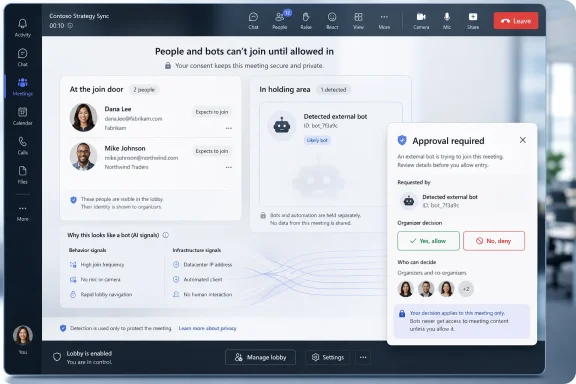
The practical change is simple: when Teams identifies a likely external bot, it no longer lets that participant blend into the regular join flow. The bot is placed in the lobby, marked for organizers, and held there until someone explicitly admits it. Microsoft says this applies even when the meeting’s normal lobby settings would otherwise allow participants to bypass the lobby.
That last detail matters. Many organizations have tuned lobby behavior around human friction: employees bypass, invited guests wait, anonymous users face more checks. Bots have complicated that model because they can arrive through a user’s connected service rather than through a straightforward guest invitation. Microsoft is now saying that a meeting assistant should not inherit the trust given to the person who once connected it.
This is not a ban on meeting bots. It is a consent mechanism. Microsoft is not pretending that transcription agents, recap tools, and third-party assistants are going away; it is trying to make their presence more legible to the people responsible for the meeting.
The new policy also gives admins an explicit control surface. The default posture is to require approval when a bot is detected, while organizations can choose not to detect and mark bots if they have a business reason to do so. That choice will be revealing: for most enterprises, disabling detection will be less a productivity decision than a governance risk someone will need to defend.
But the convenience story has been carrying an uncomfortable footnote. A bot that records, transcribes, summarizes, or stores meeting content is not just another silent attendee. It is a data-processing participant, often operated by a third party, sometimes connected to a user’s account, and potentially governed by policies outside the host organization’s compliance boundary.
That is why the most important phrase in Microsoft’s documentation is not “AI” or “bot detection.” It is “awareness or consent.” If a tool joins a meeting because one attendee connected a service weeks ago, the organizer may not know that the meeting is being captured, where the data goes, or whether the tool should be present for this specific conversation.
The risk is not theoretical. Sales calls, legal reviews, HR discussions, product roadmap meetings, incident-response bridges, and executive briefings all routinely happen in Teams. A bot that is welcome in a weekly project sync may be unacceptable in a negotiation or disciplinary meeting. Context is the control that automation tends to flatten.
Bot detection systems will miss some bots and misclassify some humans. Microsoft acknowledges both possibilities. The product includes a way to mark a wrongly identified participant as not a bot for that meeting, and Microsoft says it continues tuning detection based on observed gaps.
That is the trade-off with any classifier in a live collaboration product. Make the system too aggressive and legitimate participants get stuck at the door. Make it too permissive and the whole feature becomes theater. Teams has to operate in the uncomfortable middle, where the product can raise a hand and say, “This looks automated,” but the organizer still owns the decision.
For sysadmins, the message is clear: do not treat this as a replacement for meeting policy hygiene. It complements lobby settings, anonymous join controls, sensitivity labels, compliance training, and good organizer behavior. The feature can surface the bot; it cannot decide whether this particular bot should hear this particular conversation.
This is the enterprise software move hidden inside the security update. Microsoft is not merely blocking suspicious bots; it is encouraging a market of compliant bots that identify themselves in a Microsoft-recognized way. That could make life easier for reputable vendors and safer for customers, but it also gives Microsoft more influence over which meeting agents are considered first-class citizens in Teams.
There is a reasonable argument for that gatekeeping. Organizations need reliable signals, and vendors that want to capture meeting content should be willing to identify themselves clearly. A registration path can reduce ambiguity for organizers and help distinguish legitimate assistants from opportunistic scrapers or poorly behaved automation.
There is also a platform politics angle. Whenever a dominant collaboration suite creates a trust program, smaller vendors will worry about review timelines, opaque criteria, and the possibility that first-party tools get smoother treatment than outsiders. Microsoft will need to show that the program is a transparency mechanism, not a velvet rope for favored partners.
The most conservative setting is not necessarily the most practical one. Blocking or scrutinizing every external bot may frustrate teams that rely on transcription workflows, accessibility tools, customer-call intelligence, or project documentation. At the same time, allowing any participant to admit a bot from the lobby undermines the point of detection.
Microsoft’s own recommendation points toward a narrower admission model: organizers and co-organizers should control who gets in from the lobby. That is good advice, especially for regulated organizations. Presenter privileges are often distributed for meeting management convenience, not because every presenter understands the data implications of admitting an automated recorder.
The next step is policy communication. If organizers see a bot warning and treat it like another nuisance dialog, the feature will not deliver much security. Users need to understand that admitting a bot may mean allowing recording, transcription, storage, and downstream processing by a third party.
But the larger issue is privacy and governance. Many unwanted bots are not malware in the traditional sense. They are productivity tools doing exactly what they were designed to do, only in meetings where not everyone agreed to that presence. That makes the problem more subtle than blocking a bad IP address or disabling a suspicious app.
This is where Teams reflects the broader AI workplace dilemma. The same tool that helps one employee remember action items can create a compliance problem for another department. The same transcript that makes a meeting accessible can become discoverable data, training material, or a retention headache.
Microsoft’s move is therefore less about stopping “bots” as a category and more about restoring intentionality. A human should make a deliberate decision before an automated agent enters a room full of business context. That sounds obvious only because collaboration software spent years making it too easy to forget.
A human guest can take notes, of course. A person can record a screen, leak information, or summarize a call in another system. No meeting platform can fully prevent that. But automated agents change the scale and default behavior of capture. They can join repeatedly, process consistently, and transmit structured records into systems the organizer may never see.
That is why visibility matters even when prevention is imperfect. If Teams can label likely bots and force a deliberate admission, it gives the host organization a moment to apply judgment. That moment is the real product improvement.
There will be complaints. Some users will see extra clicks. Some vendors will have to adapt. Some meetings will begin with the small ritual of asking, “Do we want this assistant here?” That is not friction for its own sake. It is the cost of making automation accountable.
 Microsoft Turns the Meeting Lobby Into a Bot Checkpoint
The practical change is simple: when Teams identifies a likely external bot, it no longer lets that participant blend into the regular join flow. The bot is placed in the lobby, marked for organizers, and held there until someone explicitly admits it. Microsoft says this applies even when the meeting’s normal lobby settings would otherwise allow participants to bypass the lobby.That last detail matters. Many organizations have tuned lobby behavior around human friction: employees bypass, invited guests wait, anonymous users face more checks. Bots have complicated that model because they can arrive through a user’s connected service rather than through a straightforward guest invitation. Microsoft is now saying that a meeting assistant should not inherit the trust given to the person who once connected it.
This is not a ban on meeting bots. It is a consent mechanism. Microsoft is not pretending that transcription agents, recap tools, and third-party assistants are going away; it is trying to make their presence more legible to the people responsible for the meeting.
The new policy also gives admins an explicit control surface. The default posture is to require approval when a bot is detected, while organizations can choose not to detect and mark bots if they have a business reason to do so. That choice will be revealing: for most enterprises, disabling detection will be less a productivity decision than a governance risk someone will need to defend.
The AI Note-Taker Problem Was Always a Consent Problem
AI meeting assistants became popular because they solve a real problem. People miss details, meetings sprawl across time zones, and the person most responsible for follow-up is often the person most distracted by running the call. A good transcript or summary can save hours.But the convenience story has been carrying an uncomfortable footnote. A bot that records, transcribes, summarizes, or stores meeting content is not just another silent attendee. It is a data-processing participant, often operated by a third party, sometimes connected to a user’s account, and potentially governed by policies outside the host organization’s compliance boundary.
That is why the most important phrase in Microsoft’s documentation is not “AI” or “bot detection.” It is “awareness or consent.” If a tool joins a meeting because one attendee connected a service weeks ago, the organizer may not know that the meeting is being captured, where the data goes, or whether the tool should be present for this specific conversation.
The risk is not theoretical. Sales calls, legal reviews, HR discussions, product roadmap meetings, incident-response bridges, and executive briefings all routinely happen in Teams. A bot that is welcome in a weekly project sync may be unacceptable in a negotiation or disciplinary meeting. Context is the control that automation tends to flatten.
Detection Is Useful, but It Is Not a Security Perimeter
Microsoft says Teams uses a mix of behavioral and infrastructure signals during the join process to identify likely external bots. That is the right kind of language: cautious, probabilistic, and grounded in signals rather than magic. It also means administrators should not confuse the feature with a perfect perimeter.Bot detection systems will miss some bots and misclassify some humans. Microsoft acknowledges both possibilities. The product includes a way to mark a wrongly identified participant as not a bot for that meeting, and Microsoft says it continues tuning detection based on observed gaps.
That is the trade-off with any classifier in a live collaboration product. Make the system too aggressive and legitimate participants get stuck at the door. Make it too permissive and the whole feature becomes theater. Teams has to operate in the uncomfortable middle, where the product can raise a hand and say, “This looks automated,” but the organizer still owns the decision.
For sysadmins, the message is clear: do not treat this as a replacement for meeting policy hygiene. It complements lobby settings, anonymous join controls, sensitivity labels, compliance training, and good organizer behavior. The feature can surface the bot; it cannot decide whether this particular bot should hear this particular conversation.
Microsoft Is Also Building a Trusted Lane for Bot Vendors
The other half of the announcement is Microsoft’s planned Teams Bot Identification Program. Independent software vendors that build meeting bot experiences will be able to register with Microsoft and include a self-identification marker in their join requests. When Teams recognizes that marker, it can present the bot as a known participant rather than an unknown automated guest.This is the enterprise software move hidden inside the security update. Microsoft is not merely blocking suspicious bots; it is encouraging a market of compliant bots that identify themselves in a Microsoft-recognized way. That could make life easier for reputable vendors and safer for customers, but it also gives Microsoft more influence over which meeting agents are considered first-class citizens in Teams.
There is a reasonable argument for that gatekeeping. Organizations need reliable signals, and vendors that want to capture meeting content should be willing to identify themselves clearly. A registration path can reduce ambiguity for organizers and help distinguish legitimate assistants from opportunistic scrapers or poorly behaved automation.
There is also a platform politics angle. Whenever a dominant collaboration suite creates a trust program, smaller vendors will worry about review timelines, opaque criteria, and the possibility that first-party tools get smoother treatment than outsiders. Microsoft will need to show that the program is a transparency mechanism, not a velvet rope for favored partners.
The Admin Burden Moves From Blocking Everything to Explaining Exceptions
For IT teams, this change shifts the conversation from “Can we stop bots?” to “Which bots do we allow, under what conditions, and who is allowed to admit them?” That is a better question, but not an easier one. It forces organizations to define meeting data as something that can leak through automation, not just through human attendees.The most conservative setting is not necessarily the most practical one. Blocking or scrutinizing every external bot may frustrate teams that rely on transcription workflows, accessibility tools, customer-call intelligence, or project documentation. At the same time, allowing any participant to admit a bot from the lobby undermines the point of detection.
Microsoft’s own recommendation points toward a narrower admission model: organizers and co-organizers should control who gets in from the lobby. That is good advice, especially for regulated organizations. Presenter privileges are often distributed for meeting management convenience, not because every presenter understands the data implications of admitting an automated recorder.
The next step is policy communication. If organizers see a bot warning and treat it like another nuisance dialog, the feature will not deliver much security. Users need to understand that admitting a bot may mean allowing recording, transcription, storage, and downstream processing by a third party.
This Is a Privacy Feature Wearing a Security Badge
The security framing is understandable. “Unauthorized bots” sounds like an intrusion problem, and in some cases it is. A malicious or deceptive automated participant could collect sensitive information, impersonate a legitimate tool, or exploit careless admission practices.But the larger issue is privacy and governance. Many unwanted bots are not malware in the traditional sense. They are productivity tools doing exactly what they were designed to do, only in meetings where not everyone agreed to that presence. That makes the problem more subtle than blocking a bad IP address or disabling a suspicious app.
This is where Teams reflects the broader AI workplace dilemma. The same tool that helps one employee remember action items can create a compliance problem for another department. The same transcript that makes a meeting accessible can become discoverable data, training material, or a retention headache.
Microsoft’s move is therefore less about stopping “bots” as a category and more about restoring intentionality. A human should make a deliberate decision before an automated agent enters a room full of business context. That sounds obvious only because collaboration software spent years making it too easy to forget.
The Meeting Room Now Has Two Kinds of Guests
The Teams update draws a line that other collaboration platforms will probably have to draw as well. Human guests and automated guests are not equivalent. They may use similar join flows, display names, and lobby prompts, but they create different obligations.A human guest can take notes, of course. A person can record a screen, leak information, or summarize a call in another system. No meeting platform can fully prevent that. But automated agents change the scale and default behavior of capture. They can join repeatedly, process consistently, and transmit structured records into systems the organizer may never see.
That is why visibility matters even when prevention is imperfect. If Teams can label likely bots and force a deliberate admission, it gives the host organization a moment to apply judgment. That moment is the real product improvement.
There will be complaints. Some users will see extra clicks. Some vendors will have to adapt. Some meetings will begin with the small ritual of asking, “Do we want this assistant here?” That is not friction for its own sake. It is the cost of making automation accountable.
The New Teams Lobby Rule Rewards Organizations That Already Know Their Meeting Data
The strongest organizations will not wait for the first awkward bot prompt to decide their policy. They will inventory the meeting assistants their employees use, decide which tools are approved, and teach organizers how to handle the rest. The weaker ones will discover their bot strategy one lobby warning at a time.- Teams now treats detected external meeting bots as participants that require separate, explicit approval before joining.
- The protection can apply even when the meeting’s usual lobby configuration would allow other participants to bypass the lobby.
- Microsoft is using behavioral and infrastructure signals, which means detection should help but will not be flawless.
- Admins should limit lobby admission power to organizers and co-organizers for sensitive meetings.
- The coming Teams Bot Identification Program gives legitimate vendors a path to identify their bots more clearly.
- The real risk is not only malicious automation, but also routine meeting capture without clear organizer awareness or consent.
References
- Primary source: SC Media
Published: Wed, 01 Jul 2026 22:12:15 GMT
Microsoft Teams enhances bot protection with human verification | brief | SC Media
The new technology acts like a security guard, requiring a human user to verify the identity of bots in the meeting lobby before the session begins.www.scworld.com - Related coverage: techradar.com
Microsoft Teams is getting wants to block bad bots for good | TechRadar
"Smarter bot protection" is coming to Microsoft Teamswww.techradar.com - Official source: support.microsoft.com
Using the lobby in Microsoft Teams meetings | Microsoft Support
In Teams, the meeting lobby keeps participants from joining a meeting until they’re admitted by an organizer, co-organizer, or presenter. When people are in the lobby, organizers, co-organizers, and presenters are notified and can choose when to admit them to the meeting.support.microsoft.com - Official source: learn.microsoft.com
Teams Bot Identification Program - Microsoft Teams | Microsoft Learn
Learn about the Teams Bot Identification Program.learn.microsoft.com - Official source: techcommunity.microsoft.com
- Related coverage: en.softonic.com
Microsoft Teams now flags suspicious meeting bots: they go to the lobby first - Softonic
In mid-May 2026, Microsoft began rolling out a new bot-detection feature in Teams. If Teams suspects a participant is a bot, it sends that account toen.softonic.com
- Related coverage: helpnetsecurity.com
Microsoft wants to stop unwanted bots from entering Teams meetings - Help Net Security
Microsoft Teams bot detection adds admin controls to identify external bots, protect meetings, and improve oversight for admins.www.helpnetsecurity.com - Related coverage: windowscentral.com
Microsoft Teams will block unwanted bots from meetings | Windows Central
That silent "AI Assistant" in the corner isn't always a company tool. Microsoft is finally giving you a way to lock the door on data-scraping hitchhikers.www.windowscentral.com - Related coverage: windowsreport.com
Microsoft Teams Gets New Bot Security Controls for Meetings
Microsoft Teams is rolling out smarter bot protection with new admin policies, lobby approval, warnings, and future allow-list controls. windowsreport.com
- Related coverage: bleepingcomputer.com
Microsoft Teams will tag third-party bots trying to join meetings
Microsoft says Teams will soon automatically tag third-party bots in lobbies, allowing organizers to control whether they can join meetings.www.bleepingcomputer.com
- Related coverage: blog-en.topedia.com
Meeting Bot Detection in Microsoft Teams | Topedia Blog
Microsoft is rolling out bot detection for Teams Meetings, requiring an additional approval step before external meeting assistant bots can be admitted from the lobby. Administrators can configure a new policy setting to control bot access tenant-wide, including blocking detected bots entirely.blog-en.topedia.com - Related coverage: newsminimalist.com
- Related coverage: techriver.com
- Related coverage: docs.pexip.com
- Official source: microsoft-assessment.com