

Microsoft is developing a built-in AI Interpreter for calls on Android-based Teams Phone devices, with Microsoft 365 Roadmap ID 553594 listing worldwide and GCC general availability for August 2026 after a June 30, 2026 update to the in-development feature. The feature sounds small until you consider where Teams Phone devices live: reception desks, shared offices, conference rooms, clinics, retail counters, classrooms, factories, and public-sector spaces where language barriers are not an edge case. Microsoft is not merely adding another Copilot-adjacent convenience; it is pushing real-time AI mediation into the hardware layer of workplace communications.
Teams has spent years becoming less like an app and more like a communications substrate. It began as a chat-and-meetings hub, became a telephony platform, then absorbed webinars, town halls, contact-center integrations, room systems, frontline workflows, and Copilot-powered meeting intelligence. The new AI Interpreter work for Teams Phone devices fits that longer arc: Microsoft wants Teams to be the place where work conversation happens, regardless of whether that conversation starts in a calendar invite, a handset, a room console, or a shared Android device on a counter.
The roadmap item is narrow by design. It names Microsoft Teams, Android, General Availability, Worldwide Standard Multi-Tenant, and GCC. It does not promise Windows desktop parity, iOS device support, or an immediate replacement for professional interpreters. But the wording is clear enough: Teams Phone Devices will provide real-time language interpretation directly within the call experience, allowing users to participate more naturally in multilingual calls.
That phrase, directly within the call experience, is doing most of the work. Microsoft is trying to remove the old choreography of translation: separate dial-in bridges, third-party interpreter lines, manual language channels, or meeting-only features that do not quite fit ordinary phone calls. If it works well, the phone itself becomes the translation surface.
For organizations that have standardized on Teams Phone, this is a potentially meaningful shift. The practical question is no longer whether translation exists somewhere in the Microsoft 365 estate. It is whether the person picking up a Teams-certified Android desk phone can use it in the moment, without escalating a simple call into a managed event.
Telephony features have a different burden than chat or document features. A buggy rewrite suggestion in Word is annoying; a delayed or mistranslated sentence during a live support call can derail the conversation. Audio features have to contend with latency, accent variation, background noise, device microphones, network quality, and call topology. When Microsoft chooses General Availability rather than a vague “preview” label, it is implicitly saying the feature is approaching operational maturity.
The inclusion of GCC is also notable. Government Community Cloud availability does not mean every government agency can safely use the feature for every sensitive call, but it does signal that Microsoft sees public-sector demand. Multilingual service delivery is routine in government, healthcare-adjacent workflows, education, transportation, and public administration. Those organizations often use shared phones and certified devices, not just laptops with headsets.
The Android platform detail narrows the first wave. Many modern Teams Phone devices, panels, and room-adjacent appliances run Android, and Microsoft has increasingly treated these devices as managed endpoints rather than dumb accessories. That makes them suitable targets for centrally controlled AI features, but it also means deployment will depend on firmware support, Teams app versions, device certification status, and tenant policy.
That distinction is crucial. A professional interpreter does more than swap words between languages. Interpreters preserve intent, register, cultural context, and sometimes legal or medical nuance. They know when not to translate literally. They can ask for clarification, flag ambiguity, and adapt to specialized vocabulary.
AI interpretation, by contrast, is a speed-and-accessibility play. It can make a previously impossible conversation possible, but it can also create a false sense of precision. In business settings, that may be acceptable for appointment scheduling, basic troubleshooting, front-desk routing, or internal coordination. In high-stakes contexts, it will need guardrails.
Microsoft will likely market this as reducing language barriers, and that is fair. But IT leaders should resist the temptation to treat AI interpretation as a universal substitute for trained interpreters. The better frame is tiering: use AI for routine, low-risk multilingual calls, and preserve human interpretation for contractual, clinical, legal, disciplinary, or safety-critical conversations.
That changes user expectations. When AI lives in a side panel, users can ignore it. When AI is built into the phone interface, it becomes part of the call flow. The user does not need to think, “Which app should I open?” The feature is presented as a normal capability of the communications endpoint.
This is how enterprise AI becomes mundane. Not through dramatic demos, but through steady absorption into the tools workers already use. The interpreter does not have to be magical to be disruptive. It only has to be good enough, available enough, and easier than the alternatives.
For WindowsForum readers, the hardware angle should sound familiar. Microsoft’s platform strategy has often worked by making a capability feel native at the endpoint. Windows Hello made biometric sign-in feel like part of the PC. Teams Rooms made meeting control feel like part of the room. Teams Phone AI interpretation aims to make translation feel like part of the call.
Real-time interpretation touches several sensitive layers at once. Audio is captured, processed, transformed, and played back. If transcripts are generated as part of the pipeline, even temporarily, compliance teams will ask where that text exists and for how long. If synthetic voice output is involved, organizations will ask whether speaker identity is preserved, approximated, or deliberately flattened.
There is also the matter of consent. In many jurisdictions and industries, recording and processing call audio is not just a technical setting. It is a policy decision that may require notice, user education, or customer-facing disclosure. Even if Microsoft processes the audio transiently, organizations will need to understand the data path.
Tenant administrators should therefore expect this to arrive with controls, or at least hope it does. A credible enterprise rollout needs the ability to enable or disable AI Interpreter by user, device, policy group, call type, or environment. It also needs reporting, documentation, and clear interaction with existing Teams Phone and Copilot controls.
That matters because interpretation is both a user experience and a compliance surface. If one department is authorized to use AI interpretation and another is not, a shared device can blur the boundary. If a call involves a guest, customer, patient, contractor, or resident, the governance problem widens again.
Organizations that already manage Teams Phone devices through Intune, Teams admin center policies, device configuration profiles, and conditional access will have a head start. But this feature will still force a more precise inventory conversation. Which devices should be allowed to interpret calls? Which locations need it? Which call queues, auto attendants, or front-desk workflows benefit most?
The answer will rarely be “turn it on everywhere.” AI interpretation is useful precisely because language needs are situational. The best deployments will start where the pain is measurable and the risk is bounded.
Teams Phone devices may help here because Microsoft can optimize for known hardware, microphones, speakers, and Teams call flows. A managed Android endpoint is a more predictable target than the wild mix of consumer laptops, Bluetooth headsets, browser sessions, and mobile networks that define many meetings. That does not eliminate latency, but it may reduce variables.
Audio quality will be just as important. Frontline environments are noisy. Reception areas have background chatter. Clinics have privacy constraints and ambient alarms. Warehouses and retail floors are acoustically hostile. AI speech systems are far better than they were a decade ago, but they are not immune to bad input.
User trust will also depend on how the interface handles uncertainty. Does the device show that interpretation is initializing? Does it make clear which language is active? Can a user quickly pause or switch interpretation? Does it fail gracefully when it cannot detect speech reliably? These details will matter more than the headline feature.
This is a logical move. Voice remains one of the least structured forms of enterprise data and one of the most common ways work actually gets done. Calls contain intent, urgency, sentiment, context, and decisions. Historically, much of that vanished unless someone took notes or recorded the call. AI gives Microsoft a way to make voice more actionable, more searchable, and more integrated.
Interpretation is a relatively palatable entry point because the value proposition is obvious. Nobody needs a white paper to understand why two people who do not share a language might need help speaking. That makes AI Interpreter less abstract than agents that plan work across systems or summarize massive document sets.
But the strategic destination is broader. Once Teams can reliably process live speech on managed devices, interpretation is only one application. Summaries, action extraction, sentiment analysis, call routing, compliance flags, coaching, and workflow triggers all become more plausible. Microsoft is not just translating calls; it is preparing the phone system for an AI-mediated future.
For routine calls, the built-in option may be “good enough” and far easier to justify. If an organization already pays for Teams Phone, Teams devices, and Microsoft 365 licensing, a native capability can look cheaper than a separate service, even if the total cost is buried elsewhere. Procurement departments like consolidation, and Microsoft is very good at making adjacent products feel administratively inevitable.
Specialized vendors will respond by emphasizing quality, human expertise, domain specialization, and accountability. That is a defensible position. AI interpretation may handle everyday communication, but a legal negotiation or public hearing is not the same as rescheduling a delivery.
The market will likely split rather than disappear. Microsoft will absorb the low-friction, high-volume use cases. Vendors will defend the high-stakes, high-precision, multilingual event and regulated-sector work. The uncomfortable middle will be where organizations have to decide how much risk they are willing to automate.
That raises the stakes. In a corporate setting, a mistranslated internal call may cause confusion. In a government or public-service setting, language access can affect benefits, appointments, compliance, safety, or trust. AI interpretation could improve access dramatically, especially in under-resourced offices where human interpreters are not readily available for every interaction.
But public-sector use also demands clarity. Agencies will need to know how the feature aligns with language-access obligations, accessibility requirements, procurement rules, and records policies. A tool that improves informal communication may still be inadequate for official proceedings or regulated interactions.
The best public-sector deployments will treat AI Interpreter as an access aid, not a policy escape hatch. It can help staff communicate faster and more inclusively, but it should not become a way to avoid providing qualified interpretation where the law, ethics, or common sense requires it.
This shift has consequences for device lifecycle planning. Organizations that bought Teams Phone hardware as a long-lived appliance may discover that AI-era features depend on newer chipsets, supported Android builds, firmware cadence, and vendor commitment. Not every certified device ages equally. A phone that can place calls may not be a phone that can deliver the next generation of AI experiences.
It also changes how IT should evaluate Teams device purchases. The question is no longer only whether a handset has good audio, a reliable touchscreen, and Teams certification. Buyers should ask how quickly the vendor updates firmware, how long the device will remain supported, and whether it is positioned for Microsoft’s newer AI workloads.
For admins, this is a familiar story in a new form. Endpoint management always expands to absorb the next layer of capability. The printer became a security problem. The conference room became a collaboration endpoint. The phone is now becoming an AI endpoint.
The ideal interaction is almost boring. A user answers or places a call, selects or confirms languages, sees a clear indicator that interpretation is active, and speaks naturally. The device should make it obvious who is hearing what, when the interpreter is ready, and how to stop it. Anything more complicated will limit adoption.
Microsoft also needs to handle call scenarios beyond the clean two-person demo. Transfers, call queues, delegates, consultative holds, escalation from one-to-one calls to meetings, and shared-line appearances are normal in Teams Phone deployments. If AI Interpreter works only in the simplest call path, admins will have to document exceptions constantly.
This is where Microsoft’s integration advantage can become a liability. Users will assume that a native Teams feature works across Teams calling. If it does not, the boundaries must be visible and predictable. Hidden limitations are worse than limited support.
That means accuracy requirements vary by scenario. A facilities worker coordinating access to a building may need fast, approximate interpretation. A benefits counselor discussing eligibility may need precision and a record. A school administrator speaking with a parent may need both warmth and clarity. The same model output can be acceptable in one setting and unacceptable in another.
Microsoft can help by being transparent about supported languages, known limitations, and recommended use cases. It should avoid implying that AI interpretation is universally equivalent to human interpretation. Enterprise buyers are increasingly wary of AI features that arrive with glossy demos and thin operational guidance.
There is also a cultural dimension. Literal translation can miss tone, politeness, idiom, and indirect speech. In multilingual workplaces, trust is built not only by exchanging information but by respecting how people communicate. AI interpretation has to be evaluated as a human communication tool, not merely a speech-processing pipeline.
IT teams should begin by mapping where language barriers already exist. Help desks, HR intake lines, reception areas, field offices, clinics, retail counters, and student services may all have different needs. Some will benefit from AI interpretation immediately. Others will require formal human interpreter workflows.
Security and compliance teams should ask Microsoft the dull questions early. How is audio processed? Is any text generated or retained? Does the feature interact with transcription, recording, eDiscovery, audit logs, or retention policies? Can it be disabled for sensitive users or devices? Which licenses are required? Which call types are excluded?
Training will matter too. Users need to understand that AI interpretation can help them communicate, but they also need permission to escalate when the conversation becomes too sensitive or unclear. A practical deployment guide should include examples of appropriate and inappropriate use, not just button-click instructions.
That makes it more grounded than many AI features. It does not require users to invent prompts or rethink their workflow around an agent. It meets a direct need: two people need to talk, and language is in the way. If Microsoft can reduce that friction, the value will be immediately visible.
The risk is that Microsoft overstates what the technology can safely do. Translation is intimate infrastructure. It mediates meaning between people who may already be vulnerable, frustrated, rushed, or dependent on the outcome of the conversation. A bad interpretation is not just a bad answer; it can change what someone believes was said.
That is why this feature should be welcomed, tested, and governed in equal measure. It is exactly the kind of AI that can improve daily work when deployed thoughtfully, and exactly the kind that can cause quiet harm if treated as a magic layer.
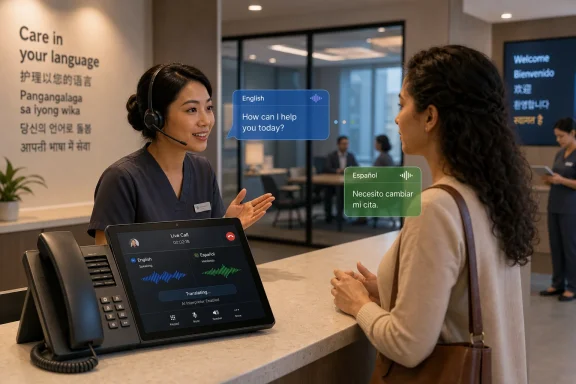 Microsoft Moves Translation From the Meeting Room to the Phone Itself
Teams has spent years becoming less like an app and more like a communications substrate. It began as a chat-and-meetings hub, became a telephony platform, then absorbed webinars, town halls, contact-center integrations, room systems, frontline workflows, and Copilot-powered meeting intelligence. The new AI Interpreter work for Teams Phone devices fits that longer arc: Microsoft wants Teams to be the place where work conversation happens, regardless of whether that conversation starts in a calendar invite, a handset, a room console, or a shared Android device on a counter.The roadmap item is narrow by design. It names Microsoft Teams, Android, General Availability, Worldwide Standard Multi-Tenant, and GCC. It does not promise Windows desktop parity, iOS device support, or an immediate replacement for professional interpreters. But the wording is clear enough: Teams Phone Devices will provide real-time language interpretation directly within the call experience, allowing users to participate more naturally in multilingual calls.
That phrase, directly within the call experience, is doing most of the work. Microsoft is trying to remove the old choreography of translation: separate dial-in bridges, third-party interpreter lines, manual language channels, or meeting-only features that do not quite fit ordinary phone calls. If it works well, the phone itself becomes the translation surface.
For organizations that have standardized on Teams Phone, this is a potentially meaningful shift. The practical question is no longer whether translation exists somewhere in the Microsoft 365 estate. It is whether the person picking up a Teams-certified Android desk phone can use it in the moment, without escalating a simple call into a managed event.
The Roadmap Date Matters Because Telephony Features Age Differently
An August 2026 general availability target is not a shipping guarantee. Microsoft’s own roadmap language treats dates as estimates, and anyone who tracks Microsoft 365 knows that features can slip, split, rename, or arrive unevenly across tenants and regions. Still, the timing tells us something about Microsoft’s confidence: this is not a speculative research demo, nor is it framed as a private preview.Telephony features have a different burden than chat or document features. A buggy rewrite suggestion in Word is annoying; a delayed or mistranslated sentence during a live support call can derail the conversation. Audio features have to contend with latency, accent variation, background noise, device microphones, network quality, and call topology. When Microsoft chooses General Availability rather than a vague “preview” label, it is implicitly saying the feature is approaching operational maturity.
The inclusion of GCC is also notable. Government Community Cloud availability does not mean every government agency can safely use the feature for every sensitive call, but it does signal that Microsoft sees public-sector demand. Multilingual service delivery is routine in government, healthcare-adjacent workflows, education, transportation, and public administration. Those organizations often use shared phones and certified devices, not just laptops with headsets.
The Android platform detail narrows the first wave. Many modern Teams Phone devices, panels, and room-adjacent appliances run Android, and Microsoft has increasingly treated these devices as managed endpoints rather than dumb accessories. That makes them suitable targets for centrally controlled AI features, but it also means deployment will depend on firmware support, Teams app versions, device certification status, and tenant policy.
AI Interpretation Is Not the Same Product as Human Interpretation
Microsoft already supports language interpretation scenarios in Teams meetings, including workflows that involve professional interpreters. Those are valuable, especially in formal meetings where accuracy, accountability, and neutrality matter. The AI Interpreter roadmap item points to a different use case: live, everyday calls where the alternative may be no interpretation at all.That distinction is crucial. A professional interpreter does more than swap words between languages. Interpreters preserve intent, register, cultural context, and sometimes legal or medical nuance. They know when not to translate literally. They can ask for clarification, flag ambiguity, and adapt to specialized vocabulary.
AI interpretation, by contrast, is a speed-and-accessibility play. It can make a previously impossible conversation possible, but it can also create a false sense of precision. In business settings, that may be acceptable for appointment scheduling, basic troubleshooting, front-desk routing, or internal coordination. In high-stakes contexts, it will need guardrails.
Microsoft will likely market this as reducing language barriers, and that is fair. But IT leaders should resist the temptation to treat AI interpretation as a universal substitute for trained interpreters. The better frame is tiering: use AI for routine, low-risk multilingual calls, and preserve human interpretation for contractual, clinical, legal, disciplinary, or safety-critical conversations.
The Hardware Layer Is Where AI Becomes Hard to Ignore
The most interesting thing about this feature is not that Microsoft can translate speech. Microsoft has been working on speech translation for years, and the industry as a whole has made rapid progress in speech-to-text, machine translation, and synthetic voice output. The interesting thing is that Microsoft is embedding the capability into Teams Phone devices.That changes user expectations. When AI lives in a side panel, users can ignore it. When AI is built into the phone interface, it becomes part of the call flow. The user does not need to think, “Which app should I open?” The feature is presented as a normal capability of the communications endpoint.
This is how enterprise AI becomes mundane. Not through dramatic demos, but through steady absorption into the tools workers already use. The interpreter does not have to be magical to be disruptive. It only has to be good enough, available enough, and easier than the alternatives.
For WindowsForum readers, the hardware angle should sound familiar. Microsoft’s platform strategy has often worked by making a capability feel native at the endpoint. Windows Hello made biometric sign-in feel like part of the PC. Teams Rooms made meeting control feel like part of the room. Teams Phone AI interpretation aims to make translation feel like part of the call.
Admins Will Want Policy Before They Want Magic
The roadmap entry does not spell out licensing, policy controls, language coverage, retention behavior, transcript handling, or whether interpreted audio can be recorded. Those omissions are not surprising for a roadmap card, but they are exactly where administrators will focus once the feature approaches rollout.Real-time interpretation touches several sensitive layers at once. Audio is captured, processed, transformed, and played back. If transcripts are generated as part of the pipeline, even temporarily, compliance teams will ask where that text exists and for how long. If synthetic voice output is involved, organizations will ask whether speaker identity is preserved, approximated, or deliberately flattened.
There is also the matter of consent. In many jurisdictions and industries, recording and processing call audio is not just a technical setting. It is a policy decision that may require notice, user education, or customer-facing disclosure. Even if Microsoft processes the audio transiently, organizations will need to understand the data path.
Tenant administrators should therefore expect this to arrive with controls, or at least hope it does. A credible enterprise rollout needs the ability to enable or disable AI Interpreter by user, device, policy group, call type, or environment. It also needs reporting, documentation, and clear interaction with existing Teams Phone and Copilot controls.
Shared Devices Make Governance Messier
Personal Teams clients are relatively easy to reason about. A licensed user signs in, policies apply, and the user’s activity is tied to an identity. Shared Teams Phone devices complicate that model. A handset in a lobby, nurse station, break room, warehouse, or service desk may be used by multiple people, sometimes under a shared account or common area phone configuration.That matters because interpretation is both a user experience and a compliance surface. If one department is authorized to use AI interpretation and another is not, a shared device can blur the boundary. If a call involves a guest, customer, patient, contractor, or resident, the governance problem widens again.
Organizations that already manage Teams Phone devices through Intune, Teams admin center policies, device configuration profiles, and conditional access will have a head start. But this feature will still force a more precise inventory conversation. Which devices should be allowed to interpret calls? Which locations need it? Which call queues, auto attendants, or front-desk workflows benefit most?
The answer will rarely be “turn it on everywhere.” AI interpretation is useful precisely because language needs are situational. The best deployments will start where the pain is measurable and the risk is bounded.
Latency Will Decide Whether Users Trust It
Real-time interpretation has one unforgiving enemy: delay. If a translated sentence arrives too late, the rhythm of conversation collapses. Users start talking over each other, repeating themselves, or abandoning the tool. The feature can be technically impressive and still fail socially.Teams Phone devices may help here because Microsoft can optimize for known hardware, microphones, speakers, and Teams call flows. A managed Android endpoint is a more predictable target than the wild mix of consumer laptops, Bluetooth headsets, browser sessions, and mobile networks that define many meetings. That does not eliminate latency, but it may reduce variables.
Audio quality will be just as important. Frontline environments are noisy. Reception areas have background chatter. Clinics have privacy constraints and ambient alarms. Warehouses and retail floors are acoustically hostile. AI speech systems are far better than they were a decade ago, but they are not immune to bad input.
User trust will also depend on how the interface handles uncertainty. Does the device show that interpretation is initializing? Does it make clear which language is active? Can a user quickly pause or switch interpretation? Does it fail gracefully when it cannot detect speech reliably? These details will matter more than the headline feature.
Microsoft’s Copilot Strategy Is Spilling Into the Phone System
Even when Microsoft does not put “Copilot” in every feature name, the gravitational pull is obvious. The company is building AI into the seams of Microsoft 365: documents, email, chat, meetings, search, analytics, agents, and now increasingly voice workflows. Teams Phone is becoming another endpoint for that strategy.This is a logical move. Voice remains one of the least structured forms of enterprise data and one of the most common ways work actually gets done. Calls contain intent, urgency, sentiment, context, and decisions. Historically, much of that vanished unless someone took notes or recorded the call. AI gives Microsoft a way to make voice more actionable, more searchable, and more integrated.
Interpretation is a relatively palatable entry point because the value proposition is obvious. Nobody needs a white paper to understand why two people who do not share a language might need help speaking. That makes AI Interpreter less abstract than agents that plan work across systems or summarize massive document sets.
But the strategic destination is broader. Once Teams can reliably process live speech on managed devices, interpretation is only one application. Summaries, action extraction, sentiment analysis, call routing, compliance flags, coaching, and workflow triggers all become more plausible. Microsoft is not just translating calls; it is preparing the phone system for an AI-mediated future.
The Feature Will Pressure Third-Party Interpretation Vendors
Remote simultaneous interpretation vendors have carved out a real market around Teams, Zoom, and hybrid events. Many offer professional interpreter networks, specialized consoles, scheduling, language-channel management, and compliance-oriented workflows. Microsoft’s built-in AI Interpreter will not wipe that market away, but it will change the procurement conversation.For routine calls, the built-in option may be “good enough” and far easier to justify. If an organization already pays for Teams Phone, Teams devices, and Microsoft 365 licensing, a native capability can look cheaper than a separate service, even if the total cost is buried elsewhere. Procurement departments like consolidation, and Microsoft is very good at making adjacent products feel administratively inevitable.
Specialized vendors will respond by emphasizing quality, human expertise, domain specialization, and accountability. That is a defensible position. AI interpretation may handle everyday communication, but a legal negotiation or public hearing is not the same as rescheduling a delivery.
The market will likely split rather than disappear. Microsoft will absorb the low-friction, high-volume use cases. Vendors will defend the high-stakes, high-precision, multilingual event and regulated-sector work. The uncomfortable middle will be where organizations have to decide how much risk they are willing to automate.
The GCC Signal Makes This More Than a Convenience Feature
GCC inclusion deserves more attention than it will probably receive. Microsoft does not casually list government cloud support for every consumer-friendly AI feature. If this roadmap item reaches GCC as planned, it suggests Microsoft expects demand from agencies and public institutions that routinely serve multilingual populations.That raises the stakes. In a corporate setting, a mistranslated internal call may cause confusion. In a government or public-service setting, language access can affect benefits, appointments, compliance, safety, or trust. AI interpretation could improve access dramatically, especially in under-resourced offices where human interpreters are not readily available for every interaction.
But public-sector use also demands clarity. Agencies will need to know how the feature aligns with language-access obligations, accessibility requirements, procurement rules, and records policies. A tool that improves informal communication may still be inadequate for official proceedings or regulated interactions.
The best public-sector deployments will treat AI Interpreter as an access aid, not a policy escape hatch. It can help staff communicate faster and more inclusively, but it should not become a way to avoid providing qualified interpretation where the law, ethics, or common sense requires it.
Teams Phone Devices Are Becoming AI Endpoints, Not Peripherals
The old mental model of a desk phone is obsolete. A Teams Phone device is an authenticated, managed, updateable, cloud-connected endpoint with a screen, microphone, speaker, operating system, and policy surface. Once you accept that, AI interpretation on the device feels less like a novelty and more like the next expected platform capability.This shift has consequences for device lifecycle planning. Organizations that bought Teams Phone hardware as a long-lived appliance may discover that AI-era features depend on newer chipsets, supported Android builds, firmware cadence, and vendor commitment. Not every certified device ages equally. A phone that can place calls may not be a phone that can deliver the next generation of AI experiences.
It also changes how IT should evaluate Teams device purchases. The question is no longer only whether a handset has good audio, a reliable touchscreen, and Teams certification. Buyers should ask how quickly the vendor updates firmware, how long the device will remain supported, and whether it is positioned for Microsoft’s newer AI workloads.
For admins, this is a familiar story in a new form. Endpoint management always expands to absorb the next layer of capability. The printer became a security problem. The conference room became a collaboration endpoint. The phone is now becoming an AI endpoint.
The User Experience Must Be Simple Enough for a Front Desk
A feature like this succeeds or fails at the moment of use. If a worker has to dig through menus, remember a policy name, explain a setup process to the caller, or restart a device, the feature will be used once and abandoned. Real-time interpretation needs to be accessible without turning every phone call into a mini training session.The ideal interaction is almost boring. A user answers or places a call, selects or confirms languages, sees a clear indicator that interpretation is active, and speaks naturally. The device should make it obvious who is hearing what, when the interpreter is ready, and how to stop it. Anything more complicated will limit adoption.
Microsoft also needs to handle call scenarios beyond the clean two-person demo. Transfers, call queues, delegates, consultative holds, escalation from one-to-one calls to meetings, and shared-line appearances are normal in Teams Phone deployments. If AI Interpreter works only in the simplest call path, admins will have to document exceptions constantly.
This is where Microsoft’s integration advantage can become a liability. Users will assume that a native Teams feature works across Teams calling. If it does not, the boundaries must be visible and predictable. Hidden limitations are worse than limited support.
Accuracy Will Be Judged by the Cost of Being Wrong
Machine translation quality is often discussed in abstract terms: word error rates, model performance, supported languages, or benchmark scores. Real users judge it differently. They ask whether the other person understood them, whether the conversation stayed respectful, and whether the outcome was correct.That means accuracy requirements vary by scenario. A facilities worker coordinating access to a building may need fast, approximate interpretation. A benefits counselor discussing eligibility may need precision and a record. A school administrator speaking with a parent may need both warmth and clarity. The same model output can be acceptable in one setting and unacceptable in another.
Microsoft can help by being transparent about supported languages, known limitations, and recommended use cases. It should avoid implying that AI interpretation is universally equivalent to human interpretation. Enterprise buyers are increasingly wary of AI features that arrive with glossy demos and thin operational guidance.
There is also a cultural dimension. Literal translation can miss tone, politeness, idiom, and indirect speech. In multilingual workplaces, trust is built not only by exchanging information but by respecting how people communicate. AI interpretation has to be evaluated as a human communication tool, not merely a speech-processing pipeline.
The August Target Gives IT a Planning Window
The useful thing about a roadmap item arriving months before general availability is that it gives administrators time to prepare. The wrong response is to wait until the feature appears in the tenant and then decide whether it is a problem. Teams Phone environments are too varied for that.IT teams should begin by mapping where language barriers already exist. Help desks, HR intake lines, reception areas, field offices, clinics, retail counters, and student services may all have different needs. Some will benefit from AI interpretation immediately. Others will require formal human interpreter workflows.
Security and compliance teams should ask Microsoft the dull questions early. How is audio processed? Is any text generated or retained? Does the feature interact with transcription, recording, eDiscovery, audit logs, or retention policies? Can it be disabled for sensitive users or devices? Which licenses are required? Which call types are excluded?
Training will matter too. Users need to understand that AI interpretation can help them communicate, but they also need permission to escalate when the conversation becomes too sensitive or unclear. A practical deployment guide should include examples of appropriate and inappropriate use, not just button-click instructions.
The Phone Call Gets Its Own AI Moment
Microsoft’s broader AI messaging often gravitates toward knowledge workers: documents, spreadsheets, presentations, email triage, and meeting summaries. The Teams Phone Interpreter feature points at a different constituency. It is about the person answering a call, serving a customer, staffing a desk, or coordinating work in real time.That makes it more grounded than many AI features. It does not require users to invent prompts or rethink their workflow around an agent. It meets a direct need: two people need to talk, and language is in the way. If Microsoft can reduce that friction, the value will be immediately visible.
The risk is that Microsoft overstates what the technology can safely do. Translation is intimate infrastructure. It mediates meaning between people who may already be vulnerable, frustrated, rushed, or dependent on the outcome of the conversation. A bad interpretation is not just a bad answer; it can change what someone believes was said.
That is why this feature should be welcomed, tested, and governed in equal measure. It is exactly the kind of AI that can improve daily work when deployed thoughtfully, and exactly the kind that can cause quiet harm if treated as a magic layer.
The Call Desk Is Where Microsoft’s Interpreter Has to Prove Itself
The roadmap entry is short, but the deployment implications are not. By putting AI interpretation into Teams Phone devices, Microsoft is taking a capability associated with meetings and bringing it to the ordinary phone call, where there is less preparation and less tolerance for friction.- Microsoft lists the feature as in development for Android-based Teams Phone devices, with general availability targeted for August 2026 across Worldwide Standard Multi-Tenant and GCC clouds.
- The feature is aimed at real-time language interpretation inside the call experience, not merely captions or post-call translation.
- IT teams should treat this as a managed endpoint feature and plan for device eligibility, policy controls, licensing, and user training.
- AI interpretation should be positioned as a practical aid for routine multilingual calls, not a blanket replacement for professional interpreters in high-stakes settings.
- Shared devices, call queues, recording policies, and government-cloud deployments will require especially careful governance.
- The success of the feature will depend less on the roadmap promise than on latency, accuracy, language coverage, and how clearly Teams Phone devices expose the controls to everyday users.
References
- Primary source: Microsoft 365 Roadmap
Published: 2026-06-30T22:57:58.6723014Z
Microsoft 365 Roadmap | Microsoft 365
The Microsoft 365 Roadmap lists updates that are currently planned for applicable subscribers. Check here for more information on the status of new features and updates.www.microsoft.com
- Official source: support.microsoft.com
Loading…
support.microsoft.com - Related coverage: m365admin.handsontek.net
Loading…
m365admin.handsontek.net - Related coverage: windowscentral.com
Loading…
www.windowscentral.com - Related coverage: akouo.co
Loading…
akouo.co - Official source: marketplace.microsoft.com
KUDO for Microsoft Teams
Add Live Translation to your Microsoft Teams Meetings and Eventsmarketplace.microsoft.com