

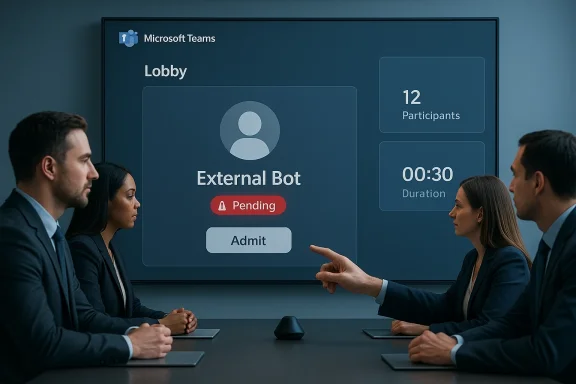
Microsoft appears ready to give meeting organizers a clearer way to spot — and stop — non‑human attendees before they ever step into the conversation: a forthcoming Teams change will label external third‑party bots in the lobby and require organizers to explicitly admit them, a rollout Microsoft has slated for May 2026 according to multiple roadmap reports.
For several years Microsoft Teams has evolved from a chat-and-meetings app into an AI‑augmented collaboration platform that routinely integrates bots and assistant services for transcription, summarization, note taking, and workflow automation. That growth has delivered real productivity gains, but it has also widened an attacker surface: the same integration points that let a legitimate notetaker join a call can be abused by external or malicious bots that record, transcribe, or otherwise siphon sensitive meeting data.
Security teams and administrators have long had partial mitigations — lobby controls, app‑management policies and, more recently, verification / CAPTCHA checks for anonymous joins — but the rise of third‑party AI meeting assistants (and the explosive growth of automated internet traffic) has made more explicit, client‑side visibility desirable. Microsoft’s latest plan to flag bots in the lobby is framed as that additional visibility: a deliberate visual cue and an extra explicit admission step targeted at external, third‑party bots.
That said, the feature is not a silver bullet. It must be paired with tenant app governance, identity protections, and operational training to be truly effective. Administrators should prepare by tightening app policies, enabling verification checks for anonymous joins where practical, and rehearsing the user communications they’ll need when the feature reaches their tenants. For organizations managing regulated data, this capability will likely become a useful part of compliance playbooks — but the roadmap date and the exact implementation details (for example, how Microsoft classifies a bot) should be verified against official Microsoft channels as the rollout approaches.
Microsoft’s roadmap move acknowledges a practical truth: the security of hybrid collaboration depends as much on making risky actions visible to humans at the moment they must act as it does on back‑end policy. If enforced thoughtfully, the combination of lobby labeling, sensible admin controls, identity hygiene and staff training can substantially reduce the risk that a “ghost” bot will ride in on an innocent guest and take a permanent copy of your meeting.
Source: Windows Central Is a "ghost" bot secretly recording your private meetings? Teams can help.
 Background
For several years Microsoft Teams has evolved from a chat-and-meetings app into an AI‑augmented collaboration platform that routinely integrates bots and assistant services for transcription, summarization, note taking, and workflow automation. That growth has delivered real productivity gains, but it has also widened an attacker surface: the same integration points that let a legitimate notetaker join a call can be abused by external or malicious bots that record, transcribe, or otherwise siphon sensitive meeting data.Security teams and administrators have long had partial mitigations — lobby controls, app‑management policies and, more recently, verification / CAPTCHA checks for anonymous joins — but the rise of third‑party AI meeting assistants (and the explosive growth of automated internet traffic) has made more explicit, client‑side visibility desirable. Microsoft’s latest plan to flag bots in the lobby is framed as that additional visibility: a deliberate visual cue and an extra explicit admission step targeted at external, third‑party bots.
What Microsoft is changing (what we know today)
The headline feature
- When an external third‑party bot attempts to join a Teams meeting, organizers will see a clear representation of that bot in the lobby.
- The bot will not be admitted with the other participants; an organizer must explicitly and separately admit the bot for it to join.
- The rollout is reported to begin in May 2026 and will cover Teams on Windows, macOS, Linux, Android and iOS. Multiple outlets citing the Microsoft 365 Roadmap have published the same timeline and wording.
Platforms and scope
Microsoft’s roadmap reporting (as picked up by security and tech outlets) indicates this will be a broad client‑side rollout across desktop and mobile Teams clients. The company’s stated aim is to prevent accidental admission of external bots and give meeting organizers full control over the presence of these agents. If you host meetings that include external participants — customers, partners, contractors — this change is specifically designed to interrupt the common attack vector where a bot is invited or attached to an external attendee’s account and inherits meeting privileges.What “external 3P bot” likely means
Microsoft’s public materials and developer docs distinguish between:- Signed‑in bots (registered app/bot identities using Microsoft Entra / Bot Framework),
- Web‑based automation that joins a meeting via an anonymous or delegated join link, and
- Third‑party note‑taking or transcription services that can be attached to an external participant.
The roadmap language and community reports emphasize third‑party (3P) bots — that is, apps and services not managed by the meeting host’s organization. Expect the visual cue and separate admission step to apply to those external agents rather than org‑managed, trusted bots.
Why this matters: real risks from “ghost” bots
Data exfiltration, compliance and client trust
When a bot records audio, screenshots shared content, or creates searchable transcripts, it creates a durable artifact that may leave your tenant’s control. That’s a compliance and confidentiality risk for legal calls, executive briefings, or client conversations where data handling is regulated or contractually sensitive.Social engineering and impersonation
Attackers can use bots as force multipliers: a bot could impersonate a service account and inject messages, or harvest names and spoken details to enable follow‑up phishing. There are real incidents and repeated community complaints about note‑taking bots (for instance, read.ai and others) being attached to external attendees and appearing in meetings unexpectedly. These cases show how a single external participant can become a delivery mechanism for an automated agent.Automation at scale
Security research and reports from infrastructure vendors show a large fraction of internet traffic is now automated — a mix of benign automation and malicious bots. That scale matters: if even a tiny slice of automated traffic is used to harvest meeting content, the aggregate impact is large. Microsoft’s roadmap‑style change is a response to that systemic trend as much as to individual incidents.How Teams already helps — and where gaps remained
Existing controls you can and should use now
Microsoft Teams already offers a set of controls admins and organizers can use to reduce bot and unwanted external access:- Lobby settings / “Who can bypass the lobby” — you can make external attendees wait for admission and decide whether only organizers (or co‑organizers) may admit people. This is the single most useful per‑meeting control to limit accidental admissions.
- Verification checks (CAPTCHA) for anonymous users — admins can enforce a verification step for anonymous attendees and people from untrusted organizations, forcing a CAPTCHA before they land in a meeting. This blocks many automated web‑based joiners. Microsoft documented this verification mechanism as part of meeting policy controls.
- App management and app permission policies in the Teams Admin Center — tenants can allow or block specific apps and bot publishers organization‑wide, or create app permission policies to make certain bots available only to a controlled set of users. This prevents many known third‑party bots from being broadly usable inside your tenant.
Practical guidance: a hardening checklist for IT and meeting organizers
Below is an actionable, prioritized checklist you can apply right now — and a short plan that integrates the new Teams behavior once it ships.For admins (apply tenant‑wide)
- Review and enforce app governance in the Teams admin center > Teams apps > Manage apps. Block known third‑party notetaker/transcription bots you don’t trust.
- Configure Meeting policies > Meeting Lobby and Join to require verification checks for Anonymous users and people from untrusted organizations. This forces CAPTCHAs and blocks many automated join attempts.
- Use App permission policies to restrict who can install or use specific bots; create an allowlist for trusted automation and denylist for others.
- Audit and, if needed, block external domains or publishers at the tenant level if a particular bot domain is abused (some admins have blocked read.ai and similar services to stop recurring incidents). Community guidance and admin experiences demonstrate this is an effective, if blunt, tool.
- Update internal policies and training: require meeting organizers to set “who can admit” to organizers and co‑organizers only for sensitive calls. Document exceptions and a secure exception approval flow.
For meeting organizers and end users
- Always check the lobby list before admitting: look for clearly labeled participants and, as soon as the new feature ships, treat any bot label as a red flag unless you invited a specific and trusted service.
- Use co‑organizers or designate a trusted moderator on calls with external participants — that spreads the admittance responsibility but preserves control.
- Announce recordings and automated note‑taking at the start of every meeting; require explicit consent when there are external attendees or regulated content. Human governance is still one of the most effective mitigations.
When Microsoft’s bot‑labeling feature arrives
- Treat the label and separate admit control as the canonical signal that a participant is an external bot. Update your runbooks to require the organizer to deny unless a vetted reason exists and the bot identity is verified.
- Use the arrival window between the public rollout and tenant completion to pilot the changes in a small set of teams (Targeted Release) and refine your training materials.
Technical analysis: how bots get into meetings (and how attackers bypass controls)
To harden defenses, defenders must understand the common join patterns bots rely on:- Signed‑in bots: registered bot identities (Microsoft Entra / Bot Framework) are legitimate app principals. If the tenant has allowed a bot or if an external tenant trusts a bot publisher, the bot may join as a signed identity. App governance and publisher blocking are required to control this vector.
- Web joiners / anonymous bots: automation that uses a meeting join link (sometimes via a headless browser or API) can sign in anonymously or present a third‑party service account. CAPTCHA verification and strict lobby rules markedly reduce these attacks.
- Credential delegation: attackers sometimes use a legitimate attendee’s account (compromised credentials or token delegation) to bring in an attached bot. Strong identity hygiene — conditional access, MFA, and device compliance policies — reduces this risk. Microsoft’s wider identity controls (Entra / Conditional Access) are the right layer to pair with Teams policies. (Official admin docs on these identity controls sit in Microsoft’s Entra/Conditional Access guidance.)
- App misconfiguration: badly scoped bot permissions or overly permissive app‑setup policies can allow a bot to act more broadly than intended. Auditing app manifests and limiting app setup privileges helps contain this risk.
Strengths of Microsoft’s planned approach
- User‑facing clarity: Flagging bots in the lobby makes the threat visible at the right time — when a human is deciding who enters the room — and reduces the human error factor where someone inadvertently admits an automated agent.
- Low friction for trusted bots: By isolating external third‑party bots for separate admission, the feature should preserve seamless functionality for trusted, org‑managed automation while protecting meetings from unknown agents.
- Platform coverage: The planned cross‑platform rollout (desktop and mobile) recognizes that meetings are multi‑device events and reduces the chance a bot is admissible simply because an organizer uses a different client.
Limitations and risk considerations
- Rollout timing & discoverability: The reported May 2026 roll‑out date comes from Microsoft 365 Roadmap entries cited by industry outlets; Microsoft has historically adjusted roadmap timelines and some changes roll out in stages across clouds and tenants. Treat the date as “slated” and expect tenant‑level variability. I could find consistent reporting from multiple outlets referencing the roadmap, but the public roadmap UI can be filtered in ways that make direct linking and retrieval inconsistent; if you need authoritative timing for your org, watch the Teams admin center message center and targeted release channels.
- False negatives / labeling accuracy: The client must reliably identify an external bot vs. an ordinary user or an org‑managed automated account. Mislabeling could create administrative friction or a false sense of security. Microsoft’s docs do not yet detail the detection heuristics or the taxonomy of “external 3P bots,” so this remains an area to watch for clarifying documentation after the feature ships. If critical workflows rely on automation, test behavior in a pilot before broad enforcement.
- Attacker adaptation: Any protective change spurs attacker adaptation. If the client flags “bots” at the lobby, adversaries may try to route automation through compromised human accounts, simulate human behavior better, or use compromised organizational bots. That’s why this control must be one element of layered defense — identity, device posture, DLP, and auditing still matter.
- Admin vs. user tradeoffs: Organizations that must often host external participants (for example, sales teams or customer success) may object to tighter settings if they add friction and slow onboarding. Admins should provide well‑documented exception procedures and co‑organizer patterns to reduce support burden.
What to watch for when the feature ships
- Official Microsoft documentation: look for exact definitions of “external 3P bot,” admin toggles (if any), and whether the feature can be controlled tenant‑wide from the Teams Admin Center or via meeting policies.
- Message center notifications and Microsoft 365 Roadmap updates: Microsoft can change the rollout window; watch the admin message center for tenant‑specific timing.
- Logging and audit improvements: ideally the release will include a traceable event in Teams audit logs when a bot attempts to join and when it is admitted. If that appears, integrate those events into your SIEM/monitoring rules so you can detect anomalous bot admissions.
Recommended long‑term posture (beyond quick fixes)
- Adopt a least privilege app governance model: only allow bots that have a documented business case and a named owner; require periodic re‑approval.
- Integrate Teams events with your SIEM and DLP: capture and review meeting artifacts (who added which apps, admission events) and trigger alerts on unusual bot join patterns.
- Pair Teams meeting policies with identity controls: require MFA and compliant devices for sensitive meeting organizers; use conditional access to constrain where and how meeting creators can join.
- Train the human firewall: make lobby checks and “announce recording/notetaker” a routine and enforceable part of meeting etiquette for external calls.
Final verdict
Microsoft’s planned lobby labeling and explicit admission step for external third‑party bots is a welcome and pragmatic control that cleans up a persistent operational gap: today, many organizations rely on a combination of lobby rules, admin policies, and tribal knowledge to avoid accidentally admitting automated note takers or transcription services. A client‑side, organizer‑visible cue — paired with a distinct admission action — reduces the chance of human error and makes it clearer when a machine wants into a meeting.That said, the feature is not a silver bullet. It must be paired with tenant app governance, identity protections, and operational training to be truly effective. Administrators should prepare by tightening app policies, enabling verification checks for anonymous joins where practical, and rehearsing the user communications they’ll need when the feature reaches their tenants. For organizations managing regulated data, this capability will likely become a useful part of compliance playbooks — but the roadmap date and the exact implementation details (for example, how Microsoft classifies a bot) should be verified against official Microsoft channels as the rollout approaches.
Quick action plan (summary you can copy into a ticket)
- In Teams admin center, set Meeting policy: Require verification check from anonymous users and people from untrusted organizations.
- Audit Teams apps: block any external notetaker apps you do not approve organization‑wide. Use Teams apps > Manage apps.
- Set default meeting options to only allow organizers and co‑organizers to admit people for meetings that handle sensitive data.
- Prepare a comms/training plan for meeting hosts so they recognize the bot label and follow the new admission workflow once the feature is in your tenant.
Microsoft’s roadmap move acknowledges a practical truth: the security of hybrid collaboration depends as much on making risky actions visible to humans at the moment they must act as it does on back‑end policy. If enforced thoughtfully, the combination of lobby labeling, sensible admin controls, identity hygiene and staff training can substantially reduce the risk that a “ghost” bot will ride in on an innocent guest and take a permanent copy of your meeting.
Source: Windows Central Is a "ghost" bot secretly recording your private meetings? Teams can help.
