

Microsoft has begun to bury one of Teams’ most annoying legacy pains: the company is rolling its many Teams clients and fractured account experiences into a single, unified desktop app — and it’s pairing that consolidation with surgical engineering work to make calling and meetings less resource‑hungry on Windows devices.
Microsoft Teams’ evolution has been a study in growth by accretion. What began as a single collaboration client quickly multiplied into distinct surfaces: the enterprise/work/education Teams client, a separate personal Teams experience, lightweight “compact” surfaces integrated into Windows, and a slew of platform-specific variants. That fragmentation produced real user fstalled apps with the same name, confusing taskbar icons, inconsistent notifications, and the constant need to sign in to different accounts for different contexts. The company acknowledged the problem and began work to consolidate the experience. In mid‑2024 Microsoft started previewing a unified Teams experience in Insider channels and, by August 2024, announced a full rollout on Windows and Mac that lets one desktop application host work, school and personal accounts side‑by‑side. The intent is straightforward: one app, multiple accounts, clearer notifications, and simpler meeting joining. Microsoft’s product teams emphasized that the change was motivated by customer feedback and the clear, repeated request to “stop making me switch apps.” At the same time, Teams’ reputation for being “heavy” and resource‑intensive persisted. The underlying WebView2/Chromium‑based architecture has historically led to high baseline RAM usage and spikes during meetings. Microsoft’s engineers have been tackling that problem by reworking internal process boundaries — most notably by moving the real‑time calling stack into a dedicated child process to reduce latency and isolate failures. That operational change began rolling out across tenants in early January 2026.
security tradeoffs
Microsoft’s next steps will be informative: whether the company leans further into deeper architectural refactors, accelerates update orchestration across the Store and system settings, and continues to consolidate admin control planes will determine if this is a decisive turning point for Teams’ usability or one meaningful step in a longer journey. For now, the single‑app era for Teams is real, and the client’s internal cleanup matters to both users and administrators.
Source: BetaNews https://betanews.com/article/microsoft-is-finally-unifying-teams-chaos-into-a-single-app/]
 Background
Microsoft Teams’ evolution has been a study in growth by accretion. What began as a single collaboration client quickly multiplied into distinct surfaces: the enterprise/work/education Teams client, a separate personal Teams experience, lightweight “compact” surfaces integrated into Windows, and a slew of platform-specific variants. That fragmentation produced real user fstalled apps with the same name, confusing taskbar icons, inconsistent notifications, and the constant need to sign in to different accounts for different contexts. The company acknowledged the problem and began work to consolidate the experience. In mid‑2024 Microsoft started previewing a unified Teams experience in Insider channels and, by August 2024, announced a full rollout on Windows and Mac that lets one desktop application host work, school and personal accounts side‑by‑side. The intent is straightforward: one app, multiple accounts, clearer notifications, and simpler meeting joining. Microsoft’s product teams emphasized that the change was motivated by customer feedback and the clear, repeated request to “stop making me switch apps.” At the same time, Teams’ reputation for being “heavy” and resource‑intensive persisted. The underlying WebView2/Chromium‑based architecture has historically led to high baseline RAM usage and spikes during meetings. Microsoft’s engineers have been tackling that problem by reworking internal process boundaries — most notably by moving the real‑time calling stack into a dedicated child process to reduce latency and isolate failures. That operational change began rolling out across tenants in early January 2026. What’s in the unified Teams app
Single app, multiple account types
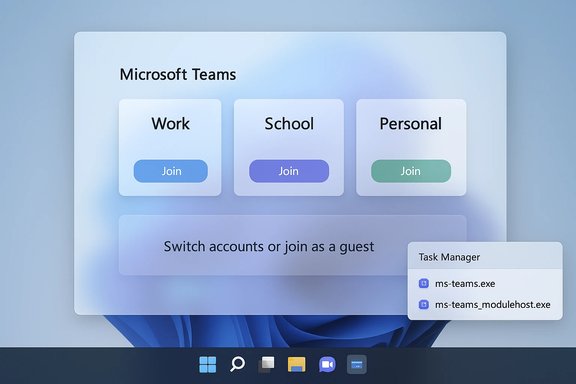
The core UX change is simple but impactful: **work, school and personal accounts can now live in a single Teams desktop an sign into multiple accounts and open them in side‑by‑side windows, pick which identity to use when joining a meeting, and join as a guest without signing in. Those options eliminate the old “which Teams am I using?” confusion and make multi‑tenant workflows less error‑prone. Key consumer and enterprise fey account switching from the profile menu.- Choice of account at meeting join time.
- Guest join links that do not require sign‑in.
- Improved notification banners that show which account they belong to.
- “Community” features and personal account capabilities retained for non‑work use.
Better notifications and multi‑window behavior
Notifications nowtion to the account that generated them, addressing frequent confusion when a message arrives but users aren’t sure which account or tenant it came from. Microsoft also supported a multi‑window preference — many users asked to keep personal and work windows separate while still using one app as the orchestrator. The unified app preserves that multi‑window behavior to match real user workflows.Admin controls remain intact
For administrators, the unified app is designed to respect existing policy guardrails. Admin sign‑in restricies continue to apply; the unified surface isn’t intended to weaken those controls. Enterprises can still deploy and manage the client via their chosen tooling. Microsoft documented guidance for enterprise rollouts and later issued more specific admin notices tied to operational changes in the client.The performance work: splitting the calling stack
ms‑teams_modulehost.exe — a new, dedicated child process
Beginning in January 2026, Microsoft began deploying a targeted client change that creates a separate child process (ms‑teams_modulehost.exe) to host the calling, video, codec and RTC pipeline. The visible UI and workflows do not change, but Task Manager will show the new process alongside the main ms‑teams.exe entry. The goal is to isolate latency‑sensihat, file and UI responsibilities. Microsoft advised admins to allowlist the new binary and duplicate existing QoS (DSCP) rules for the new process. Why this matters: media tasks (camera, microphone, encoding/decoding) are the most likely subsystems to cause spikes, crashes, or driver failures. By isolating that work, Teams can:- Improve perceived call startup times through parallel initialization.
- Contain faults to the media process so UI and chat remain responsive.
- Allow targeted scheduling and QoS for latency‑sensitive threads.
No magic bullets — but real architectural gains
This change is an engineering optimization rather than a complete rewrite. It buys operational resilience and better resource accounting, but it does not remove Chromium’s underlying memory profile. Users on lower‑spec devices may still see significant resource use during heavy calls; improvements will be workload and hardware dependent. Microsoft did not publish quantitative performance benchmarks tied to the rollout, so expectations should be measured accordingly.Why unification matters — benefits for end users
- Faster context switching: Professionals who juggle personal, vendor, or multiple employer tenants now switch identity in‑app rather than switching apps or signing in/out.
- Reduced cognitive load: Clearer notifications and an account selector when joining meetings cut down on mistakes like joining with the wrong identity.
- Streamlined meeting joins: Guest join and account selection at join time ease ad‑hoc collaboration.
- Consistent cross‑pldows, macOS and mobile clients trend closer to a single, predictable behavior model.
security tradeoffs
Allowlisting, EDR, and App Control
A practical consequence of the split calling stack is operational: many endpoint protection systems and Application Control rules flag newly launched binaries or child processes. Microsoft explicitly recommended allowlisting ms‑teams_modulehost.exe and ensuring that existing QoS rules that apply to ms‑teams.exe are extended to the new process. Admins must update runbooks and EDR policies ahead of broad rollout. Failure to do so can produce blocked calls, unexpected behavior when joining meetings from Outlook, or spikes in blocked process telemetry.Phased rollouts, testing and pilowindows are phased and gated; Microsoft’s Message Center and admin guidance recommend piloting on representative devices, checking multi‑monitor and docking behavior, and verifying that critical management tooling handles the new process. For larger fleets, a staged approach is essential to avoid widespread surprises.
Continued fragmentation risk (updates & store)
While the unified client reduces UX fragmentation, app management and update orchestration across Microsoft’s app surfaces remains complex. Microsoft has signaled that it wants to decouple update plumbing from the Store’s sovide OS‑level discovery for Store‑managed apps, but this platform work is incremental and gated. Enterprise admins should continue to manage update policies carefully.Technical analysis — what engineers and power users should know
WebView2/Chromium constraints remain
Teams’ WebView2 foundation inherits Chromium’s multi‑process runtime and memory characteristics. Chromium favors keeping renderer processes resident for smoother rendering, which increases resident set sizes on systems with available memory. Splitting the media stack into ms‑teams_modulehost.exe is sensible engineering — it doesn’t eliminate WebView2’s behavior but confines the biggest variable (media) into a restartable containt containment and potentially smoother UI responsiveness during misbehaving media sessions; don’t expect a dramatic halving of memory use.Diagnostics, QoS and monitoring
IT teams should:- Update monitoring dashboards to surface both ms‑teams.exe and ms‑teams_modulehost.exe.
- Extend DSCioritization to the new process.
- Verify AV/EDR allowlists include the child process and any hashed indicators used by controls.
Real‑world variability
Performance gains will vary based on:- CPU generation and core counts.
- GPU involvement and driver maturity for camera/video offload.
- Network conditions and managed QoS on enterprise networks.
- Third‑party drivers and codecs which can still be sources of instability.
Broader implications for the rosoft: reducing support noise
Unifying client surfaces and reducing account confusion cuts a steady stream of support tickets. The change also aligns with Microsoft’s longer‑term platform goals: fewer branded duplicate apps, more consistent experiences across Windows, and deeper alignmenter Microsoft 365 surfaces. The Message Center updates about unified app agent management indicate Microsoft is working to centralize app settings across Teams, Outlook and Microsoft 365 admin centers. That’s a step toward reducing admin complexity — assuming the platform tooling works as promised.For competitors and standards
Teams’ unification and ongoing performance work raise the bar for integrated collaboration suites. Competitors will watch whether a single‑app, multi‑account pattern proves superior for hybrid users. The engineering approach — process isolation for media — mirrors patterns already used in large browser and communications applications and is ard practice.What remains unresolved or unverifiable
- Quantified performance improvements: Microsoft has not published objective, cross‑platform benchmarks that quantify call startup or memory reductions tied to ms‑teams_modulehost.exe. Any expectations of exact percent‑level gains should be treated as speculative until third‑party benchmarking appears. Microsoft’s guidance frames the change as an optimization, not a panacea.
- Long‑term roadmap for full architectural change: Process isolation is a pragmatic containment strategy. Whether Microsoft will pursue a deeper rewrite to eliminate heavy Chromium dependencies is not public and remains uncertain. Observers should not conflate this rollout with a macroscopic platform replac
- Edge cases and region/hardware gating: Some Teams and Copilot features have historically been hardware‑ or region‑gated. The unified app does not guarantee parity of every feature across every device or locale. Admins must test specific features where gatindows.
Practical checklist for IT teams and power users
- Pilot the unified Teams client on a representative subset of devices before broad deployment.
- Update EDR/ASR and app control policies to allowlist ms‑teams_modulehost.exe and confirm no AV rule will block child processes.
- Extend QoS/DSCP policies to include the new process so media traffic retains priority.
- Update monitoring dashboards to track both ms‑teams.exe and the module host process.
- Communicate the change to end users: explain that a new Task Manager entry is expected and that UI workflows will remain the same.
- Keep a rollback plan for critical meeting rooms and conferencing hardware during initial rollout.
Final assessment
Microsoft’s unified Teams app fixes a glaring UX problem: too many similarly named apps and a fractured sign‑in model that confused users and increased support costs. Bringing work, school and personal accounts into a single, side‑by‑side windowed experience is a practical, user‑facing win; the company’s official posts and independent coverage confirm the change is broadly available and not merely a promise. The pairing of app unification with targeted performance engineering — isolating the calling stack into ms‑teams_modulehost.exe — demonstrates a pragmatic approach to an entrenched problem. It’s a realistic, incremental win: better fault isolation, potential reductions in perceived call startup time, and a narrower blast radius for media failures. However, it is not a silver bullet for WebView2’s memory profile and should not be treated as such. Admins must prepare to update allowlists, QoS, and monitoring to realize the benefits without interruption. In short, Teams’ unification is the fix users have been asking for, and the behind‑the‑scenes process work addresses one of the platform’s most visible performance complaints. The net effect should be reduced support noise and a smoother user experience — provided organizations take the straightforward but necessary administrative steps the rollout requires.Microsoft’s next steps will be informative: whether the company leans further into deeper architectural refactors, accelerates update orchestration across the Store and system settings, and continues to consolidate admin control planes will determine if this is a decisive turning point for Teams’ usability or one meaningful step in a longer journey. For now, the single‑app era for Teams is real, and the client’s internal cleanup matters to both users and administrators.
Source: BetaNews https://betanews.com/article/microsoft-is-finally-unifying-teams-chaos-into-a-single-app/]
