

Microsoft is rolling out a focused performance change to the Microsoft Teams Desktop Client on Windows that isolates call handling into a new, dedicated child process — ms-teams_modulehost.exe — promising faster call startup, better fault isolation, and clearer resource control while leaving the user interface unchanged.
Microsoft published a Message Center advisory (Message ID MC1189656) in late November 2025 announcing that the Teams Desktop Client for Windows will create a separate child process named ms-teams_modulehost.exe to host the calling stack, while the main client process remains ms-teams.exe. The rollout is scheduled to begin in early January 2026 and complete by late January 2026 for worldwide, GCC, GCC High and DoD tenants, although Microsoft noted the timeline may shift. Administrators are explicitly advised to allowlist the new executable in endpoint protection and to extend existing Quality of Service (QoS) settings to the module host rather than removing existing ms-teams.exe QoS rules. This is an incremental, surgical change that targets one of the most resource-intensive parts of the client — real-time calling and meeting media — rather than a wholesale rewrite of Teams’ architecture. Multiple IT-focused outlets and community threads reproduced the Message Center details and began preparing deployment guidance for admins within hours of the announcement.
In short: the new child process is a smart, low-friction step forward for Windows 11 Teams performance — one that improves resilience and gives admins better levers to tune call quality — but it should be evaluated as a practical optimization rather than a wholesale architectural fix.
Source: Neowin Microsoft explains how it's making Windows 11 Teams faster in 2026 with a simple new feature
 Background
Microsoft published a Message Center advisory (Message ID MC1189656) in late November 2025 announcing that the Teams Desktop Client for Windows will create a separate child process named ms-teams_modulehost.exe to host the calling stack, while the main client process remains ms-teams.exe. The rollout is scheduled to begin in early January 2026 and complete by late January 2026 for worldwide, GCC, GCC High and DoD tenants, although Microsoft noted the timeline may shift. Administrators are explicitly advised to allowlist the new executable in endpoint protection and to extend existing Quality of Service (QoS) settings to the module host rather than removing existing ms-teams.exe QoS rules. This is an incremental, surgical change that targets one of the most resource-intensive parts of the client — real-time calling and meeting media — rather than a wholesale rewrite of Teams’ architecture. Multiple IT-focused outlets and community threads reproduced the Message Center details and began preparing deployment guidance for admins within hours of the announcement. What Microsoft is shipping (the facts)
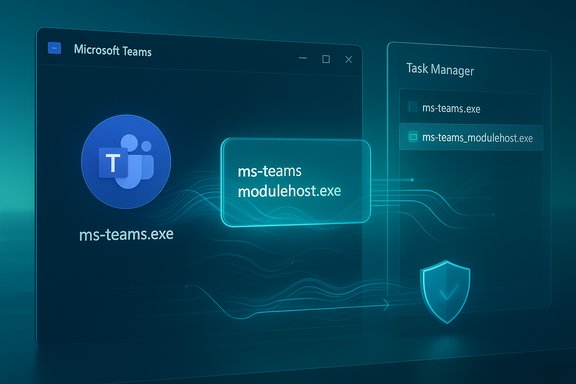
- A new child process, ms-teams_modulehost.exe, will run alongside the primary Teams process ms-teams.exe and appear under it in Task Manager.
- The new process will host the calling stack — audio, video, device enumeration, codec initialization, and the real-time communication (RTC) pipeline — separating those duties from chat, UI rendering, file handling, and other non-call features.
- No user interface changes or workflow modifications are expected; the change is intended to be invisible to end users while improving meeting experiences.
- Admins must allowlist ms-teams_modulehost.exe in endpoint protection/EDR/app-control tools and duplicate QoS (DSCP) settings currently applied to ms-teams.exe for the new executable (do not remove the existing QoS rules for ms-teams.exe).
Technical context: why process splitting matters
Teams’ Windows desktop client uses the WebView2 runtime, which itself inherits a Chromium-style multi-process browser model: a browser process, one or more renderer processes, and helper processes for GPU, audio, and other services. WebView2 applications therefore already operate in a multi-process environment, and Teams has historically shown significant baseline memory and multiple helper processes tied to that runtime. Microsoft’s change extends that model by intentionally isolating the media/calling pipeline into its own host process. Splitting the calling stack into ms-teams_modulehost.exe provides a number of engineering and operational benefits that are well-established in large, media-heavy applications:- Fault isolation: crashes or hangs in the media stack are contained to the child process and are less likely to take down the UI or chat flows.
- Parallel initialization: the media stack can initialize independently of the UI, which can shorten perceived call startup times for users who join meetings quickly after opening the client.
- Targeted resource control: OS schedulers, QoS classifiers, and network devices can target the media process for prioritization, shaping, or measurement without affecting the rest of the client.
Expected benefits for end users and IT
For users and admins, the intended wins are straightforward:- Faster perceived call startup. By initializing codecs, devices, and media pipelines in a separate process, Teams can reduce the time-to-audio/video when joining calls in many scenarios. While Microsoft did not publish quantitative performance numbers in MC1189656, the architecture change targets precisely the cold-start components that most commonly cause delays. This improvement is workload-dependent and will vary by hardware, drivers, and network conditions.
- Improved resilience during calls. If a camera driver or codec binding misbehaves, it is now likelier that the media process can be restarted or degraded without crashing the main client, allowing chat and file features to remain available.
- Cleaner QoS and monitoring. Network teams and administrators can apply traffic marking and scheduling to the process that actually owns audio/video flows, making monitoring and SLAs for call quality more precise.
- Operational clarity. Diagnostics and telemetry can separate call-specific telemetry from UI/chat telemetry, simplifying trend analysis and root-cause investigation. Administrative guidance published alongside the Message Center item encourages IT teams to pilot and measure resource and crash telemetry for both processes.
What administrators must do (practical checklist)
Microsoft’s advisory includes clear, practical guidance for admin teams preparing for the change. A condensed checklist:- Update allowlists / application control policies to include ms-teams_modulehost.exe in addition to ms-teams.exe. Failure to allowlist the new executable can lead to blocked functionality or repeated security alerts.
- Duplicate existing QoS (DSCP) policies applied to ms-teams.exe for ms-teams_modulehost.exe; do not remove the existing QoS settings for ms-teams.exe. Microsoft explicitly warns against removing existing settings.
- Update security telemetry and monitoring to track resource usage, crashes, and network metrics separately for both processes. Instrumentation should collect memory, CPU, crash dumps, and network counters for ms-teams_modulehost.exe.
- Communicate the change to helpdesk and support staff and update internal runbooks so that they recognize the new process and know common troubleshooting steps.
- Pilot the rollout in a controlled ring (users with conferencing-heavy workloads and a sample of low-RAM machines) and track the user-facing call startup times and failure rates before broad deployment.
Realistic expectations and limits
It’s essential to set measured expectations: this change is a targeted optimization, not a magical cure for every Teams performance complaint.- It does not remove the WebView2/Chromium baseline overhead. Teams’ UI and many of its features still run inside a WebView2-hosted runtime that uses Chromium’s caching and multi-process patterns. The memory baseline for WebView2 processes remains and will continue to contribute to aggregate memory usage. Administrators should therefore expect the total memory footprint of Teams to include both ms-teams.exe and ms-teams_modulehost.exe (plus any other helper processes), meaning overall resident set size may still be substantial even if responsiveness improves for particular flows.
- No specific performance numbers were provided. Microsoft’s advisory describes the optimization goals but does not quantify average startup time reductions, memory savings, or crash-rate improvements. Any headline claiming X% faster startup is speculative until independent telemetry or Microsoft publishes measured results. Flag: performance gains are measurable but workload- and environment-dependent.
- Drivers and network conditions remain important variables. Camera drivers, audio device bindings, and on-prem networking will still influence call quality. Process isolation helps contain failures and makes retries simpler, but cannot fix buggy drivers or saturated WAN links.
- Potential for new operational complexity. Adding another executable means more artifacts for security, logging, and troubleshooting. Endpoint teams will need to update policies and alerts to avoid false positives; helpdesks will need to learn which process to examine for call failures.
Security and management implications
The most immediate operational risk is that endpoint protection stacks — antivirus, EDR, application control, and allowlist-based containment — will treat the new process as an unknown binary. Enterprises that enforce strict application allowlisting may see ms-teams_modulehost.exe blocked by default unless the new executable is proactively included in policy. Microsoft highlighted this explicitly, and IT teams should add the binary to allowlists ahead of the rollout window. From a security posture perspective, process isolation can also be beneficial: the media process will have a narrower privileged surface and can be monitored and hardened separately. However, any new binary is also a new target for attackers; administrators should verify file paths, signing information, and update chains as part of their change-control activities. Independent admin trackers recommended pilots and telemetry checks to validate behavior in the organization’s endpoint environment.How to measure success: telemetry and KPIs to track
To judge whether the ms-teams_modulehost.exe rollout delivers meaningful improvements, IT teams should collect before-and-after metrics across representative user cohorts:- Time-to-Audio/Video (cold and warm starts): measure the time from user click-to-join to when audio/video is functional. Compare across identical hardware groups.
- Call setup failure rate: percentage of calls that fail to establish media paths or require user rejoin.
- Crash frequency and impact scope: track process crashes for ms-teams.exe and ms-teams_modulehost.exe separately; measure whether crashes of the module host are isolated as intended.
- Endpoint CPU and memory profile: compare aggregate and per-process CPU/Memory on representative machines during idle, chat-only, and call workloads.
- Support ticket volume and symptom taxonomy: monitor whether tickets related to call failures fall or shift in phenotype (e.g., "no audio" vs. "Teams crashed").
How this compares with other approaches
Microsoft has pursued two broad approaches to Teams performance before: preloading/boost mechanisms (like Office Startup Boost) and deeper architectural work (native Windows clients vs. WebView2-hosted client). The new module-host strategy is a pragmatic middle path:- It’s faster to ship than a complete native rewrite and preserves cross-platform parity.
- It’s more targeted and less intrusive than always-preloading large code paths (which wastes memory for users who only use chat).
- It offers better fault containment than a single monolithic process but stops short of the potential efficiency gains a native client could provide.
Potential follow-ups and what to watch for
- Telemetry and independent testing results. Look for vendor or community tests that quantify call startup latency changes, memory utilization, and crash rates once the rollout saturates. Microsoft may publish follow-up notes; independent lab tests will be important to validate practical gains. Until such numbers are published, any percentage claims are speculative.
- Third-party security vendor guidance. EDR and AV vendors will likely publish guidance to customers on how to allowlist ms-teams_modulehost.exe safely; watch for vendor-specific recommendations and signed file hashes.
- Operator best practices. Network teams should confirm that QoS classifier rules work as intended for the new executable; some traffic-shaping appliances rely on process names or executable paths and may need configuration changes.
- Driver and OS-level fixes. If performance remains poor for particular endpoints, root causes may be drivers or platform issues that process isolation cannot fix; continue to pursue driver updates and Windows platform fixes for audio/video device subsystems.
Conclusion
Microsoft’s introduction of ms-teams_modulehost.exe to host the Teams calling stack is a pragmatic engineering step aimed at improving the most friction-prone part of the Teams experience: real-time audio and video. The design leverages process isolation to deliver faster call startup, better fault containment, and clearer QoS control while preserving the cross-platform WebView2-based client and existing user workflows. The Message Center advisory MC1189656 lays out sensible administrative guidance — allowlist the new executable, duplicate QoS settings, and update runbooks — and administrators should treat this as a routine but important change to their endpoint and network policies. That said, this is a targeted mitigation, not a cure-all. Teams will still inherit WebView2’s baseline resource behavior and Chromium’s caching strategy; aggregate memory usage may remain sizable, and device drivers and network conditions can still dictate meeting quality. Administrators and IT leaders should pilot the rollout with measured telemetry, update security policies proactively, and avoid overpromising user-visible gains until empirical results confirm the benefits in their environments.In short: the new child process is a smart, low-friction step forward for Windows 11 Teams performance — one that improves resilience and gives admins better levers to tune call quality — but it should be evaluated as a practical optimization rather than a wholesale architectural fix.
Source: Neowin Microsoft explains how it's making Windows 11 Teams faster in 2026 with a simple new feature
