

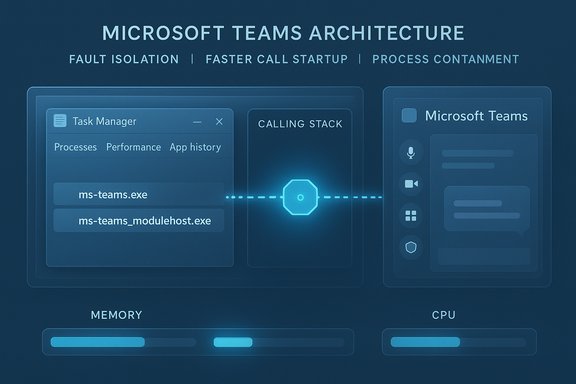
Microsoft has quietly confirmed a practical but partial fix for one of the most persistent complaints about its desktop collaboration app: Teams will soon run calling features in a separate child process — ms-teams_modulehost.exe — in an effort to reduce startup time and blunt the worst of the app’s call-time resource spikes, but the change stops short of addressing the architectural causes that make Teams heavy on RAM and sluggish on some Windows PCs.
Background
Microsoft Teams' desktop client has been a constant target for performance criticism for years. The client evolved from an Electron-based wrapper to a WebView2-hosted architecture — a move that reduced duplication of browser engines but left Teams anchored to Chromium’s multi-process model and its memory behavior. That model tends to allocate and hold memory to optimize rendering and responsiveness; on many systems, Teams processes frequently show hundreds of megabytes of resident memory even when idle, and meeting or call activity drives consumption higher. This results in the perception — and in many tests, the reality — that Teams is “heavy” compared with native Windows apps. In late November 2025 Microsoft published a Message Center notice (MC1189656) confirming a planned change: starting early January 2026, Teams Desktop for Windows will create a new child process named ms-teams_modulehost.exe dedicated to the calling stack, while the main ms-teams.exe process continues to handle chat, UI and file features. Microsoft framed the update as an optimisation to reduce startup time for calling features and to isolate call-related failures so they don’t bring the whole client down. Administrators are advised to allowlist the new executable in endpoint protection software and to update internal troubleshooting documentation accordingly.What Microsoft is shipping (the facts)
- Microsoft’s official notification describes a staged rollout beginning in early January 2026 and completing by late January 2026 for worldwide tenants (including GCC and DoD environments). The change will be server-side feature-flagged and delivered via normal update channels.
- The new process will appear as ms-teams_modulehost.exe in Task Manager and will be a child of the main ms-teams.exe process. Functionality and UI are unchanged — the change is intended to be invisible to end users while improving measurable performance at call start and during meetings.
- Microsoft explicitly warned administrators to ensure security software won’t block the new process; allowlisting may be required in locked-down enterprise environments to prevent calling features from failing.
Why Microsoft chose a separate process (what it buys)
Splitting large, multi-surface applications into smaller process domains is a proven approach to improving resilience and reducing worst-case impact during faults. The reasoning behind the ms-teams_modulehost.exe move can be distilled into three practical benefits:- Fault isolation. If an audio/video pipeline or its native bindings misbehave, isolating that workload prevents a bug or resource spike from stalling chat, file sync or other UI flows. This reduces blast radius during incidents.
- Targeted resource control. A dedicated process gives engineers and admins clearer control over quality-of-service (QoS) settings and scheduling priorities for calling vs. messaging, potentially enabling more aggressive CPU and network prioritisation for the media stack.
- Faster cold starts for calls. By shifting call initialization to a separate module, the main client can remain lean for non-call scenarios and only spin up call machinery when needed — reducing perceived startup time for users who predominantly use Teams for chat.
Why this is not a silver-bullet: the architectural root causes
While splitting the calling stack is a positive practical step, it does not eliminate the structural reasons Teams is often heavy on memory or sluggish on certain Windows installations. Two engineering realities remain:- WebView2 / Chromium multi-process model. Teams’ user interface and much of its logic run inside a WebView2-hosted environment that relies on the Edge (Chromium) engine. That engine uses multiple processes (browser, renderers, GPU, utility helpers) and aggressively caches content in memory to prioritise smooth rendering. The result is predictable memory consumption that can be significant, and which is not fixed by splitting out call logic alone. WebView2 reduces some duplication compared with bundled Chromium/Electron, but the fundamental memory profile of a Chromium-based app remains.
- Feature surface and web-first code. Teams is functionally a large single-page web application with many extension points (apps, tabs, real-time data), and that surface area alone drives memory and CPU needs. Meetings and media handling add codecs, buffers, and network processing that inherently consume resources — separating them into a process reduces interference but doesn’t remove the absolute resource requirement for media work.
Real-world numbers and what they mean
Independent testers and long-term observers have repeatedly measured Teams’ resident set size in real use:- In one community and editorial testing sweep, the Teams desktop app’s process tree regularly showed hundreds of megabytes of memory usage after sustained activity; in cross-comparisons the desktop client and web client sometimes sat in the 700–900 MB range before meeting activity, with meeting scenarios often surpassing 1 GB. Those results vary with workload, cached assets, number of open tabs/apps inside Teams, and the device’s RAM pressure — but they show why users describe idle Teams as consuming “up to 1 GB” in practice. Measured numbers are machine-dependent; low-RAM devices will feel the impact sooner.
- The Chromium memory model used by WebView2 intentionally caches and retains memory when available, then releases it when other processes demand RAM. That makes observed memory usage a function of both Teams’ workload and the system’s available memory. This behaviour accounts for some of the discrepancy between perceived “bloat” and reality: Teams will appear to consume a lot on generous machines because Chromium keeps caches in-memory to accelerate performance.
Security and management risks introduced by another EXE
The new ms-teams_modulehost.exe process reduces functional coupling but creates management surface area that IT teams must treat carefully:- False positives from endpoint protection. A new executable means some AV or EDR solutions may detect or block it by default. Microsoft explicitly advised admins to allowlist ms-teams_modulehost.exe ahead of rollout to avoid calling failures. Failing to do so risks broken meetings at scale.
- Forensics and troubleshooting complexity. Another process makes triage more complex: logs, dumps and symptom maps now span two process trees. Helpdesk staff will need updated runbooks and knowledge base entries to attribute issues accurately.
- Attack surface considerations. Any new binary increases the attack surface. Although there is no suggestion the module is insecure, security teams should include the new executable in code-signing checks, allowlisting policies, EDR baselines, and patch management inventories.
Practical guidance for administrators (action checklist)
- Update allowlists and EDR policies to include ms-teams_modulehost.exe alongside ms-teams.exe before the January 2026 rollout to avoid blocking call-related features.
- Update helpdesk documentation and runbooks to reflect the new process name and the division of responsibilities between processes (chat/UI vs calling).
- Re-evaluate QoS and network filtering rules to ensure the new process is covered by existing DSCP and network shaping policies used for Teams traffic.
- Prepare monitoring: extend existing endpoint telemetry to track ms-teams_modulehost.exe memory, CPU and crash rates separately from ms-teams.exe and instrument automated remediation if unacceptable thresholds are reached.
- Educate users on fallback options: if calling fails in the desktop client, the web client (teams.microsoft.com) remains a viable fallback and avoids dependency on local binaries.
End-user options and temporary workarounds
For users frustrated by Teams’ idle footprint or call-time sluggishness, there are pragmatic options to reduce pain while waiting for downstream fixes or architectural improvements:- Use the Teams web client (teams.microsoft.com) in Edge or Chrome for lower local binary footprint — the web client still runs Chromium processes, but it consolidates runtime and avoids per-user installed binaries in certain managed setups.
- Limit active tabs/apps inside Teams windows (apps and tabs add renderer workload). Teams’ “app suspension” features also reduce idle memory for embedded tabs when not in use — enabling or configuring those can help on constrained devices.
- For power users on constrained devices, consider a lightweight meeting-only workflow: join via the web client when not actively sharing local apps or camera feeds.
The long view: will Microsoft ever dump WebView2 for native code?
There’s a larger debate lurking beneath this release: should Microsoft rebuild Teams as a truly native Windows application rather than a WebView2-hosted web app? The trade-offs are familiar:- Native benefits: Potentially lower memory footprint, tighter integration with Windows subsystems, and possibly better performance in CPU- and I/O-sensitive scenarios. Native code can reduce runtime overhead for heavy media stacks if engineered carefully.
- WebView2 advantages: Single codebase for web and desktop, consistent UX across platforms, faster feature delivery via web-first development, and shared runtime updates via the WebView2 runtime.
Critical analysis: strengths, limitations, and recommendations
Strengths of the change
- Tactical and fast. Introducing a dedicated calling process is a fast, low-risk move compared with a full rearchitecture; it addresses the most frequent complaint (slow calls and meeting-time glitches) without altering user workflows.
- Operationally friendly. The change is backwards-compatible and requires minimal retraining while yielding measurable reliability improvements in many environments.
Limitations and residual risks
- Not a root-cause fix. The root cause — Teams’ large web-surface area running inside Chromium/WebView2 — remains. Memory and CPU characteristics inherent to that model persist even after process splitting. Users on low-RAM devices will still feel pressure.
- Administrative overhead. The change does increase the operational checklist for security and monitoring teams: allowlisting, QoS mapping, telemetry extension and updated documentation are needed. Administrators who miss these steps risk degraded calling behaviour at scale.
- Potential for fragmentation in triage. Developers and support engineers must interpret diagnostics across multiple process trees, which can complicate root-cause analysis for complex issues that span UI and media subsystems.
Recommendations
- Organisations should pilot the change in representative rings, update allowlists and monitoring prior to rollout, and validate QoS settings for the new process.
- Microsoft should pair process-splitting with telemetry and transparency: publish post-rollout metrics and, where feasible, give admins tools to tune memory footprints for non-meeting scenarios.
- For a lasting improvement, Microsoft should continue to invest in WebView2 memory tuning and server-side optimisations for Teams’ web front end — engineering the client to release cached buffers aggressively under low-memory conditions would materially improve the perceived “bloat.”
Conclusion
The ms-teams_modulehost.exe change is a logical, well-targeted engineering move: it isolates a heavy, failure-sensitive subsystem, reduces the impact of call-time bugs on the main client, and should deliver smoother call startups and fewer meeting-related slowdowns for many users. Administrators who prepare allowlists, update QoS policies and adapt monitoring will benefit the most.However, this is not the systemic cure many power users are asking for. WebView2’s Chromium-based process model and Teams’ broad web surface will continue to drive significant memory and CPU usage in many scenarios. The new EXE is a pragmatic containment strategy — effective for reliability and triage — but the broader performance story depends on continued investment in runtime memory management, smarter app suspension, and possibly future architectural shifts that reduce the need for heavy per-client caches.
For now the update is a useful step forward: it gives IT teams a clear operational playbook, and it improves the experience for users most affected by meeting-time glitches. It also serves as a reminder that engineering trade-offs are still at the heart of modern desktop apps: small, surgical fixes can buy real-world improvements, but lasting change requires addressing the architecture that created the problem in the first place.
Source: Windows Latest Microsoft admits Microsoft Teams eats RAM on Windows doing nothing, and “fix” is just another EXE
