• Thread Author
Microsoft Teams is about to get a new line of defense against social‑engineering fraud: a built‑in call‑scanning feature that warns users when an external inbound call appears to be impersonating a trusted brand, arriving as part of Microsoft's broader push to harden Teams against phishing, malicious links and weaponizable file types.

Background​

Microsoft announced a dedicated Brand Impersonation Protection capability for Teams Calling in a Microsoft 365 Message Center update, describing the feature as an automatic, enabled‑by‑default safeguard that evaluates inbound calls and surfaces high‑risk warnings for first‑contact external callers beginning in mid‑February 2026. This follows a steady rollout of other Teams secureity controls introduced across 2025, notably URL scanning for malicious links and a file‑type blocking system that prevents the delivery of executables and other commonly abused attachments in chats and channels. Those protections were introduced to preview and general availability stages in late 2025 and are now being folded into Teams’ default messaging safety posture. WindowsForum community discussions and recent industry coverage flagged the TechRadar report summarize Center bulletin and roadmap notes, reflecting the same timetable and behaviour changes users can expect on desktop and Mac clients.

What Microsoft is rolling out (at a glance)​

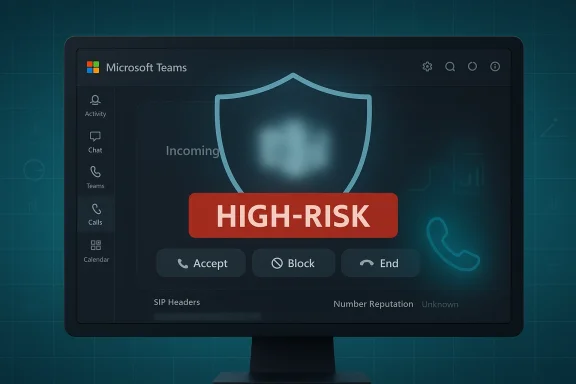
  • Brand Impersonation Protection for Teams Calling: Detects whether incoming calls from external numbers or VoIP identities are likely impersonating a commonly targeted brand and displays a high‑risk call warning to recipients on first contact. Users can accept, block, or end the call when a warning appears.
  • Malicious URL Protection for Teams chats and channels: Scans links shared in chats and channels against Microsoft threat intelligence and flags known malicious URLs with warnings; retroactive re‑scans are applied to recent messages as threat verdicts update.
  • Weaponizable File Type Protection: Blocks delivery of messages that contain risky file extensions (examples: .exe, .dll, .msi, .iso, .bat) to reduce the chance of file‑based malware or social‑engineering payloads spreading through Teams conversations. The blocked list is centrally maintained and enforced at GA.
These measures are being delivered as part of Microsoft’s multi‑layered strategy to reduce the attack surface inside collaboration platforms and to push stronger baseline protections to tenants that remain on default messaging safety settings.

Why brand spoof calls are a real risk​

Social engineering attacks rely on trust signals—display names, caller ID, branding cues, and the normal expectations of enterprise communications. Voice‑based impostors can impersonate vendors, banks, payroll services, or internal IT to extract credentials, trigger privileged actions, or coerce users into installing malicious software. Teams’ ubiquity in the enterprise context makes it an attractive vector: the platform already handles calls, chats, file exchange and meeting links, so adding caller fraud expands the playground for attackers.
Beyond opportunistic fraud, state‑level threat actors and organized cybercriminal groups have used collaboration platforms to run targeted credential harvesting and supply‑chain approaches. Microsoft’s move to add caller identity protections addresses an attack vector that traditional email‑centric protections miss: real‑time voice interactions that precede further network intrusion or extortion efforts. The Message Center bulletin frames this specifically as a reduction in social‑engineering risk when users receive first contact from external numbers.

How Brand Impersonation Protection appears to work (what we know)​

Microsoft’s public notes explain the user experience and rollout more than low‑level internals: Teams will evaluate inbound calls for indicators that a caller is impersonating a brand commonly leveraged in phishing schemes and will surface a high‑risk alert when suspicious signals are detected. Warnings can persist during the call if the risk posture remains. Desktop (Windows and Mac) clients are slated to be the first to receive the update. Key observable behaviours:
  • Warnings show at initial contact for first‑time external callers.
  • Users retain agency: options to accept, block, or end are presented with contextual risk cues.
  • The feature is enabled by default for organizations using Teams Calling; no admin action is required to receive the protection.
What remains undisclose be treated as inference:
  • The exact detection signals (ML models, heuristics, or reputation signals) Microsoft uses are not fully documented in the public bulletin. It is reasonable to expect a combination of display‑name vs. domain/name heuristics, caller‑ID and SIP metadata analysis, reputation feeds, and behavioral patterns will be leveraged—similar to the multi‑signal approach Microsoft uses for malicious URL and file‑type detection. This inference aligns with how Defender and other Microsoft threat products combine telemetry, but the precise thresholds and datasets are not publicly enumerated and should be treated as proprietary. (Flag: unverifiable internal implementation details.

Cross‑referencing the rollout: timelines and scope​

Microsoft’s Message Center entry published January 21, 2026 sets a targeted release window of mid‑February 2026 for the Brand Impersonation Protection roll‑out across desktop platforms, with general availability timelines to be communicated later. The bulletin explicitly notes the feature will be enabled by default and recommends internal helpdesk and training updates to accommodate the new warnings. This release sits beside other Teams protections that entered preview or GA in late 2025:
  • Weaponizable File Protection: Microsoft Learn documentation and Message Center coverage show the capability moved through Public preview and was updated in September 2025, with GA behaviour clarified in subsequent November 2025 communications; the feature blocks many executable/weaponizable extensions and is managed via the Teams Admin Center.
  • Malicious URL Protection: Defender for Office 365 “What’s new” lists near real‑time URL warnings for Teams messages as of September 2025 and notes message reporting flows and re‑evaluation windows up to 48 hours after message delivery.
  • Default‑on security toggle (January 2026): Industry reporting indicates Microsoft began flipping several Teams messaging protections to default ON for tenants that kept default messaging safe in January 2026, amplifying baseline defenses across millions of users.
These confirmations across Microsoft documentation and independent reporting provide corroborating evidence for the timing and scope of the protections being described.

What admins need to know and do​

Although Brand Impersonation Protection is enabled by default, administrators should not be passive. Prepare these steps now to reduce user confusion, manage false positives, and align incident processes:
  1. Update internal helpdesk scripts and training — Helpdesk state new high‑risk call banners and the steps users should follow (block, end, or accept with caution).
  2. Revise phishing playbooks — Add guidance for call‑based impersonation incidents, including immediate containment, suspected account compromise flows, and evidence collection (call logs, SIP headers).
  3. Audit messaging safety settings — If your tenant previously customized Teams messaging safety settings, those saved settings will remain; organizations on default settings should review whether they want the new defaults enabled. Microsoft has provided admin controls for related file and URL protections through the Teams Admin Center.
  4. Plan for false positive triage — Early rollout of behavior‑based protections can generate noisy alerts. Set up an incident review loop so security teams can refine detection thresholds where possible and document dispute or appeal processes for users who need a legitimate call to be cleared.

User experience: warnings, decision points, and friction​

The design choice to present a high‑risk banner but allow users to proceed (accept) strikes a balance between protection and user autonomy. Practical UX notes:
  • The prompt gives users a moment to pause and evaluate the call—this small interruption can break the reflex to “just answer” and reduce immediate social‑engineering success rates.
  • For repeated contacts from a legitimate partner, the warning only appears on first contact, reducing ongoing friction for trusted external collaborators.
  • Warnings that persist during a call if risk signals continue could provide post‑answer nudges or in‑call indicators to stop sharing sensitive information—this temporal persistence is a pragmatic design for high‑risk scenarios.
Potential drawbacks for end users include occasional false positives that may interrupt legitimate vendor calls, and the mental overhead of deciding how to respond under ambiguous risk messaging. Clear on‑screen language and help links will be essential to minimize user confusion.

Technical strengths and defensive coverage​

  • Layered detection model: Combining call metadata, display names, reputation signals, and behavior analytics (the probable approach) reduces single‑signal failure ith modern threat detection best practices.
  • Default‑on posture: Enabling protection by default lifts the baseline security for tenants that may not maintain active security configuration hygiene. This reduces the “least protected” population and raises the bar for opportunistic attackers.
  • End‑user control preserved: Giving users options to accept, block, or end keeps workflows flexible while still warning of risk—useful in partner‑heavy scenarios where strict blocking could harm business continuity.
  • Integration with existing Teams protections: Brand Impersonation Protection complements malicious URL warnings and weaponizable file blocking to provide a coherent safety fabric across voice, messaging and attachments in Teams.

Limitations, risks, and unanswered questions​

  • Proprietary detection details are unpublished: Microsoft’s public documentation focuses on behavior rather than inner model mechanics. As a result, organizations cannot fully validate or tune detection beyond the admin controls Microsoft exposes—this can hinder precise governance for high‑security environments. Treat internal ML details as proprietary and unverifiable without direct Microsoft disclosure.
  • False positives and alert fatigue: Real‑world deployments of behavior‑based systems commonly encounter false positives, which can erode user trust and cause bypass behaviours (users ignoring warnings). Security teams must monitor telemetry and provide clear remediation steps to combat fatigue.
  • Cross‑tenant enforcement complexity: For features like weaponizable file blocking, behavior changes depending on whether all conversation participants have the feature enabled—this creates edge cases in federated or partner scenarios that can surprise users. Admins should test external collaboration flows before GA toggles fully apply.
  • Privacy and telemetry concerns: Caller analysis necessarily touches metadata (SIP headers, origin networks) and possibly content signals; organizations subject to stringent privacy or regulatory regimes should review any documentation Microsoft publishes about data handling and retention for these detections. The Message Center did not raise compliance flags but recommended admins review as appropriate.

Operational recommendations and best practices​

  • Maintain a communication plan so helpdesk and frontline teams can explain what a warning means and the safe course of action.
  • Add a “call‑based impersonation” play to incident response procedures that includes call record collection, correlation with Teams call logs, and an escalation path to identity and access management teams.
  • Use tenant testing and pilot groups to surface false positive patterns before broad rollouts; gather samples for escalation to Microsoft if systemic misclassification appears.
  • Combine detection with prevention: enforce strong multi‑factor authentication, conditional access for remote sessions, and least‑privilege access so the consequences of any successful social‑engineering attempt are constrained.
  • Review and, if necessary, customize Teams messaging safety settings before default‑on changes complete to avoid sudden policy shifts for particular business units.

How this compares to other vendor approaches​

Other enterprise communication platforms have progressively added phishing and link scanning into messaging flows; however, built‑in caller identity protections at the app level remain comparatively rarer. Microsoft’s approach, tightly integrated with Teams Calling and backed by Defender‑class telemetry, gives it an advantage in combining cross‑signal intelligence across mail, chat, and voice—but it also centralizes detection in one vendor’s pipeline, which raises the usual governance questions for organizations that prefer multi‑vendor diversity for resilience.

The broader security context: why this matters now​

Collaboration platforms are a converged attack surface: messaging, calling, file exchange, and meeting invites can each be exploited to move laterally or harvest credentials. Microsoft’s incremental hardening—file‑type blocking, link reputation warnings, message reporting, and now brand impersonation call alerts—represents an industry shift toward treating collaboration clients as first‑class security enforcementmple endpoints for productivity. For organizations balancing openness with security, this shift reduces reliance on heavy perimeter tooling and places usable, just‑in‑time decisions into the flow of daily work.

Final takeaways​

Microsoft Teams’ Brand Impersonation Protection is a pragmatic, user‑facing defense against an increasingly common fraud vector—call‑based social engineering. The feature’s arrival in mid‑February 2026 as a default‑on setting should materially reduce the success rate of first‑contact impersonation attempts and complements the platform’s existing URL and file protections. Administrators should prepare by updating helpdesk procedures, testing external collaboration scenarios, and tuning incident response playbooks.
At the same time, organizations must watch for false positives and demand transparency about detection telemetry and data handling. Where vendor‑managed protections are introduced by default, the benefit is immediate: a safer baseline for the many tenants that do not actively manage Teams’ security posture. The trade‑off is operational: teams must now own the human processes that make these technical signals actionable without creating alert fatigue or unnecessary friction for legitimate communications.
Microsoft’s move is both defensive and educational: an invitation to treat voice calls the same way security teams already treat email and chat. The extra prompt may be small, but in a threat landscape built on rapid, confidence‑manipulating interactions, a short pause and a clear warning can be the difference between a stopped scam and a costly compromise.

Source: TechRadar Microsoft Teams will soon warn you about possible brand spoof calls
 

Microsoft Teams is about to get a new line of defense against social‑engineering fraud: a built‑in call‑scanning feature that warns users when an external inbound call appears to be impersonating a trusted brand, arriving as part of Microsoft's broader push to harden Teams against phishing, malicious links and weaponizable file types.

Background​

Microsoft announced a dedicated Brand Impersonation Protection capability for Teams Calling in a Microsoft 365 Message Center update, describing the feature as an automatic, enabled‑by‑default safeguard that evaluates inbound calls and surfaces high‑risk warnings for first‑contact external callers beginning in mid‑February 2026. This follows a steady rollout of other Teams secureity controls introduced across 2025, notably URL scanning for malicious links and a file‑type blocking system that prevents the delivery of executables and other commonly abused attachments in chats and channels. Those protections were introduced to preview and general availability stages in late 2025 and are now being folded into Teams’ default messaging safety posture. WindowsForum community discussions and recent industry coverage flagged the TechRadar report summarize Center bulletin and roadmap notes, reflecting the same timetable and behaviour changes users can expect on desktop and Mac clients.

What Microsoft is rolling out (at a glance)​

  • Brand Impersonation Protection for Teams Calling: Detects whether incoming calls from external numbers or VoIP identities are likely impersonating a commonly targeted brand and displays a high‑risk call warning to recipients on first contact. Users can accept, block, or end the call when a warning appears.
  • Malicious URL Protection for Teams chats and channels: Scans links shared in chats and channels against Microsoft threat intelligence and flags known malicious URLs with warnings; retroactive re‑scans are applied to recent messages as threat verdicts update.
  • Weaponizable File Type Protection: Blocks delivery of messages that contain risky file extensions (examples: .exe, .dll, .msi, .iso, .bat) to reduce the chance of file‑based malware or social‑engineering payloads spreading through Teams conversations. The blocked list is centrally maintained and enforced at GA.
These measures are being delivered as part of Microsoft’s multi‑layered strategy to reduce the attack surface inside collaboration platforms and to push stronger baseline protections to tenants that remain on default messaging safety settings.

Why brand spoof calls are a real risk​

Social engineering attacks rely on trust signals—display names, caller ID, branding cues, and the normal expectations of enterprise communications. Voice‑based impostors can impersonate vendors, banks, payroll services, or internal IT to extract credentials, trigger privileged actions, or coerce users into installing malicious software. Teams’ ubiquity in the enterprise context makes it an attractive vector: the platform already handles calls, chats, file exchange and meeting links, so adding caller fraud expands the playground for attackers.
Beyond opportunistic fraud, state‑level threat actors and organized cybercriminal groups have used collaboration platforms to run targeted credential harvesting and supply‑chain approaches. Microsoft’s move to add caller identity protections addresses an attack vector that traditional email‑centric protections miss: real‑time voice interactions that precede further network intrusion or extortion efforts. The Message Center bulletin frames this specifically as a reduction in social‑engineering risk when users receive first contact from external numbers.

How Brand Impersonation Protection appears to work (what we know)​

Microsoft’s public notes explain the user experience and rollout more than low‑level internals: Teams will evaluate inbound calls for indicators that a caller is impersonating a brand commonly leveraged in phishing schemes and will surface a high‑risk alert when suspicious signals are detected. Warnings can persist during the call if the risk posture remains. Desktop (Windows and Mac) clients are slated to be the first to receive the update. Key observable behaviours:
  • Warnings show at initial contact for first‑time external callers.
  • Users retain agency: options to accept, block, or end are presented with contextual risk cues.
  • The feature is enabled by default for organizations using Teams Calling; no admin action is required to receive the protection.
What remains undisclose be treated as inference:
  • The exact detection signals (ML models, heuristics, or reputation signals) Microsoft uses are not fully documented in the public bulletin. It is reasonable to expect a combination of display‑name vs. domain/name heuristics, caller‑ID and SIP metadata analysis, reputation feeds, and behavioral patterns will be leveraged—similar to the multi‑signal approach Microsoft uses for malicious URL and file‑type detection. This inference aligns with how Defender and other Microsoft threat products combine telemetry, but the precise thresholds and datasets are not publicly enumerated and should be treated as proprietary. (Flag: unverifiable internal implementation details.

Cross‑referencing the rollout: timelines and scope​

Microsoft’s Message Center entry published January 21, 2026 sets a targeted release window of mid‑February 2026 for the Brand Impersonation Protection roll‑out across desktop platforms, with general availability timelines to be communicated later. The bulletin explicitly notes the feature will be enabled by default and recommends internal helpdesk and training updates to accommodate the new warnings. This release sits beside other Teams protections that entered preview or GA in late 2025:
  • Weaponizable File Protection: Microsoft Learn documentation and Message Center coverage show the capability moved through Public preview and was updated in September 2025, with GA behaviour clarified in subsequent November 2025 communications; the feature blocks many executable/weaponizable extensions and is managed via the Teams Admin Center.
  • Malicious URL Protection: Defender for Office 365 “What’s new” lists near real‑time URL warnings for Teams messages as of September 2025 and notes message reporting flows and re‑evaluation windows up to 48 hours after message delivery.
  • Default‑on security toggle (January 2026): Industry reporting indicates Microsoft began flipping several Teams messaging protections to default ON for tenants that kept default messaging safe in January 2026, amplifying baseline defenses across millions of users.
These confirmations across Microsoft documentation and independent reporting provide corroborating evidence for the timing and scope of the protections being described.

What admins need to know and do​

Although Brand Impersonation Protection is enabled by default, administrators should not be passive. Prepare these steps now to reduce user confusion, manage false positives, and align incident processes:
  1. Update internal helpdesk scripts and training — Helpdesk state new high‑risk call banners and the steps users should follow (block, end, or accept with caution).
  2. Revise phishing playbooks — Add guidance for call‑based impersonation incidents, including immediate containment, suspected account compromise flows, and evidence collection (call logs, SIP headers).
  3. Audit messaging safety settings — If your tenant previously customized Teams messaging safety settings, those saved settings will remain; organizations on default settings should review whether they want the new defaults enabled. Microsoft has provided admin controls for related file and URL protections through the Teams Admin Center.
  4. Plan for false positive triage — Early rollout of behavior‑based protections can generate noisy alerts. Set up an incident review loop so security teams can refine detection thresholds where possible and document dispute or appeal processes for users who need a legitimate call to be cleared.

User experience: warnings, decision points, and friction​

The design choice to present a high‑risk banner but allow users to proceed (accept) strikes a balance between protection and user autonomy. Practical UX notes:
  • The prompt gives users a moment to pause and evaluate the call—this small interruption can break the reflex to “just answer” and reduce immediate social‑engineering success rates.
  • For repeated contacts from a legitimate partner, the warning only appears on first contact, reducing ongoing friction for trusted external collaborators.
  • Warnings that persist during a call if risk signals continue could provide post‑answer nudges or in‑call indicators to stop sharing sensitive information—this temporal persistence is a pragmatic design for high‑risk scenarios.
Potential drawbacks for end users include occasional false positives that may interrupt legitimate vendor calls, and the mental overhead of deciding how to respond under ambiguous risk messaging. Clear on‑screen language and help links will be essential to minimize user confusion.

Technical strengths and defensive coverage​

  • Layered detection model: Combining call metadata, display names, reputation signals, and behavior analytics (the probable approach) reduces single‑signal failure ith modern threat detection best practices.
  • Default‑on posture: Enabling protection by default lifts the baseline security for tenants that may not maintain active security configuration hygiene. This reduces the “least protected” population and raises the bar for opportunistic attackers.
  • End‑user control preserved: Giving users options to accept, block, or end keeps workflows flexible while still warning of risk—useful in partner‑heavy scenarios where strict blocking could harm business continuity.
  • Integration with existing Teams protections: Brand Impersonation Protection complements malicious URL warnings and weaponizable file blocking to provide a coherent safety fabric across voice, messaging and attachments in Teams.

Limitations, risks, and unanswered questions​

  • Proprietary detection details are unpublished: Microsoft’s public documentation focuses on behavior rather than inner model mechanics. As a result, organizations cannot fully validate or tune detection beyond the admin controls Microsoft exposes—this can hinder precise governance for high‑security environments. Treat internal ML details as proprietary and unverifiable without direct Microsoft disclosure.
  • False positives and alert fatigue: Real‑world deployments of behavior‑based systems commonly encounter false positives, which can erode user trust and cause bypass behaviours (users ignoring warnings). Security teams must monitor telemetry and provide clear remediation steps to combat fatigue.
  • Cross‑tenant enforcement complexity: For features like weaponizable file blocking, behavior changes depending on whether all conversation participants have the feature enabled—this creates edge cases in federated or partner scenarios that can surprise users. Admins should test external collaboration flows before GA toggles fully apply.
  • Privacy and telemetry concerns: Caller analysis necessarily touches metadata (SIP headers, origin networks) and possibly content signals; organizations subject to stringent privacy or regulatory regimes should review any documentation Microsoft publishes about data handling and retention for these detections. The Message Center did not raise compliance flags but recommended admins review as appropriate.

Operational recommendations and best practices​

  • Maintain a communication plan so helpdesk and frontline teams can explain what a warning means and the safe course of action.
  • Add a “call‑based impersonation” play to incident response procedures that includes call record collection, correlation with Teams call logs, and an escalation path to identity and access management teams.
  • Use tenant testing and pilot groups to surface false positive patterns before broad rollouts; gather samples for escalation to Microsoft if systemic misclassification appears.
  • Combine detection with prevention: enforce strong multi‑factor authentication, conditional access for remote sessions, and least‑privilege access so the consequences of any successful social‑engineering attempt are constrained.
  • Review and, if necessary, customize Teams messaging safety settings before default‑on changes complete to avoid sudden policy shifts for particular business units.

How this compares to other vendor approaches​

Other enterprise communication platforms have progressively added phishing and link scanning into messaging flows; however, built‑in caller identity protections at the app level remain comparatively rarer. Microsoft’s approach, tightly integrated with Teams Calling and backed by Defender‑class telemetry, gives it an advantage in combining cross‑signal intelligence across mail, chat, and voice—but it also centralizes detection in one vendor’s pipeline, which raises the usual governance questions for organizations that prefer multi‑vendor diversity for resilience.

The broader security context: why this matters now​

Collaboration platforms are a converged attack surface: messaging, calling, file exchange, and meeting invites can each be exploited to move laterally or harvest credentials. Microsoft’s incremental hardening—file‑type blocking, link reputation warnings, message reporting, and now brand impersonation call alerts—represents an industry shift toward treating collaboration clients as first‑class security enforcementmple endpoints for productivity. For organizations balancing openness with security, this shift reduces reliance on heavy perimeter tooling and places usable, just‑in‑time decisions into the flow of daily work.

Final takeaways​

Microsoft Teams’ Brand Impersonation Protection is a pragmatic, user‑facing defense against an increasingly common fraud vector—call‑based social engineering. The feature’s arrival in mid‑February 2026 as a default‑on setting should materially reduce the success rate of first‑contact impersonation attempts and complements the platform’s existing URL and file protections. Administrators should prepare by updating helpdesk procedures, testing external collaboration scenarios, and tuning incident response playbooks.
At the same time, organizations must watch for false positives and demand transparency about detection telemetry and data handling. Where vendor‑managed protections are introduced by default, the benefit is immediate: a safer baseline for the many tenants that do not actively manage Teams’ security posture. The trade‑off is operational: teams must now own the human processes that make these technical signals actionable without creating alert fatigue or unnecessary friction for legitimate communications.
Microsoft’s move is both defensive and educational: an invitation to treat voice calls the same way security teams already treat email and chat. The extra prompt may be small, but in a threat landscape built on rapid, confidence‑manipulating interactions, a short pause and a clear warning can be the difference between a stopped scam and a costly compromise.

Source: TechRadar Microsoft Teams will soon warn you about possible brand spoof calls
 

Microsoft Teams is about to get a new line of defense against social‑engineering fraud: a built‑in call‑scanning feature that warns users when an external inbound call appears to be impersonating a trusted brand, arriving as part of Microsoft's broader push to harden Teams against phishing, malicious links and weaponizable file types.

Background​

Microsoft announced a dedicated Brand Impersonation Protection capability for Teams Calling in a Microsoft 365 Message Center update, describing the feature as an automatic, enabled‑by‑default safeguard that evaluates inbound calls and surfaces high‑risk warnings for first‑contact external callers beginning in mid‑February 2026. This follows a steady rollout of other Teams security controls introduced across 2025, notably URL scanning for malicious links and a file‑type blocking system that prevents the delivery of executables and other commonly abused attachments in chats and channels. Those protections were introduced to preview and general availability stages in late 2025 and are now being folded into Teams’ default messaging safety posture. WindowsForum community discussions and recent industry coverage flagged the TechRadar report summarize Center bulletin and roadmap notes, reflecting the same timetable and behaviour changes users can expect on desktop and Mac clients.

What Microsoft is rolling out (at a glance)​

  • Brand Impersonation Protection for Teams Calling: Detects whether incoming calls from external numbers or VoIP identities are likely impersonating a commonly targeted brand and displays a high‑risk call warning to recipients on first contact. Users can accept, block, or end the call when a warning appears.
  • Malicious URL Protection for Teams chats and channels: Scans links shared in chats and channels against Microsoft threat intelligence and flags known malicious URLs with warnings; retroactive re‑scans are applied to recent messages as threat verdicts update.
  • Weaponizable File Type Protection: Blocks delivery of messages that contain risky file extensions (examples: .exe, .dll, .msi, .iso, .bat) to reduce the chance of file‑based malware or social‑engineering payloads spreading through Teams conversations. The blocked list is centrally maintained and enforced at GA.
These measures are being delivered as part of Microsoft’s multi‑layered strategy to reduce the attack surface inside collaboration platforms and to push stronger baseline protections to tenants that remain on default messaging safety settings.

Why brand spoof calls are a real risk​

Social engineering attacks rely on trust signals—display names, caller ID, branding cues, and the normal expectations of enterprise communications. Voice‑based impostors can impersonate vendors, banks, payroll services, or internal IT to extract credentials, trigger privileged actions, or coerce users into installing malicious software. Teams’ ubiquity in the enterprise context makes it an attractive vector: the platform already handles calls, chats, file exchange and meeting links, so adding caller fraud expands the playground for attackers.
Beyond opportunistic fraud, state‑level threat actors and organized cybercriminal groups have used collaboration platforms to run targeted credential harvesting and supply‑chain approaches. Microsoft’s move to add caller identity protections addresses an attack vector that traditional email‑centric protections miss: real‑time voice interactions that precede further network intrusion or extortion efforts. The Message Center bulletin frames this specifically as a reduction in social‑engineering risk when users receive first contact from external numbers.

How Brand Impersonation Protection appears to work (what we know)​

Microsoft’s public notes explain the user experience and rollout more than low‑level internals: Teams will evaluate inbound calls for indicators that a caller is impersonating a brand commonly leveraged in phishing schemes and will surface a high‑risk alert when suspicious signals are detected. Warnings can persist during the call if the risk posture remains. Desktop (Windows and Mac) clients are slated to be the first to receive the update. Key observable behaviours:
  • Warnings show at initial contact for first‑time external callers.
  • Users retain agency: options to accept, block, or end are presented with contextual risk cues.
  • The feature is enabled by default for organizations using Teams Calling; no admin action is required to receive the protection.
What remains undisclose be treated as inference:
  • The exact detection signals (ML models, heuristics, or reputation signals) Microsoft uses are not fully documented in the public bulletin. It is reasonable to expect a combination of display‑name vs. domain/name heuristics, caller‑ID and SIP metadata analysis, reputation feeds, and behavioral patterns will be leveraged—similar to the multi‑signal approach Microsoft uses for malicious URL and file‑type detection. This inference aligns with how Defender and other Microsoft threat products combine telemetry, but the precise thresholds and datasets are not publicly enumerated and should be treated as proprietary. (Flag: unverifiable internal implementation details.

Cross‑referencing the rollout: timelines and scope​

Microsoft’s Message Center entry published January 21, 2026 sets a targeted release window of mid‑February 2026 for the Brand Impersonation Protection roll‑out across desktop platforms, with general availability timelines to be communicated later. The bulletin explicitly notes the feature will be enabled by default and recommends internal helpdesk and training updates to accommodate the new warnings. This release sits beside other Teams protections that entered preview or GA in late 2025:
  • Weaponizable File Protection: Microsoft Learn documentation and Message Center coverage show the capability moved through Public preview and was updated in September 2025, with GA behaviour clarified in subsequent November 2025 communications; the feature blocks many executable/weaponizable extensions and is managed via the Teams Admin Center.
  • Malicious URL Protection: Defender for Office 365 “What’s new” lists near real‑time URL warnings for Teams messages as of September 2025 and notes message reporting flows and re‑evaluation windows up to 48 hours after message delivery.
  • Default‑on security toggle (January 2026): Industry reporting indicates Microsoft began flipping several Teams messaging protections to default ON for tenants that kept default messaging safe in January 2026, amplifying baseline defenses across millions of users.
These confirmations across Microsoft documentation and independent reporting provide corroborating evidence for the timing and scope of the protections being described.

What admins need to know and do​

Although Brand Impersonation Protection is enabled by default, administrators should not be passive. Prepare these steps now to reduce user confusion, manage false positives, and align incident processes:
  1. Update internal helpdesk scripts and training — Helpdesk state new high‑risk call banners and the steps users should follow (block, end, or accept with caution).
  2. Revise phishing playbooks — Add guidance for call‑based impersonation incidents, including immediate containment, suspected account compromise flows, and evidence collection (call logs, SIP headers).
  3. Audit messaging safety settings — If your tenant previously customized Teams messaging safety settings, those saved settings will remain; organizations on default settings should review whether they want the new defaults enabled. Microsoft has provided admin controls for related file and URL protections through the Teams Admin Center.
  4. Plan for false positive triage — Early rollout of behavior‑based protections can generate noisy alerts. Set up an incident review loop so security teams can refine detection thresholds where possible and document dispute or appeal processes for users who need a legitimate call to be cleared.

User experience: warnings, decision points, and friction​

The design choice to present a high‑risk banner but allow users to proceed (accept) strikes a balance between protection and user autonomy. Practical UX notes:
  • The prompt gives users a moment to pause and evaluate the call—this small interruption can break the reflex to “just answer” and reduce immediate social‑engineering success rates.
  • For repeated contacts from a legitimate partner, the warning only appears on first contact, reducing ongoing friction for trusted external collaborators.
  • Warnings that persist during a call if risk signals continue could provide post‑answer nudges or in‑call indicators to stop sharing sensitive information—this temporal persistence is a pragmatic design for high‑risk scenarios.
Potential drawbacks for end users include occasional false positives that may interrupt legitimate vendor calls, and the mental overhead of deciding how to respond under ambiguous risk messaging. Clear on‑screen language and help links will be essential to minimize user confusion.

Technical strengths and defensive coverage​

  • Layered detection model: Combining call metadata, display names, reputation signals, and behavior analytics (the probable approach) reduces single‑signal failure ith modern threat detection best practices.
  • Default‑on posture: Enabling protection by default lifts the baseline security for tenants that may not maintain active security configuration hygiene. This reduces the “least protected” population and raises the bar for opportunistic attackers.
  • End‑user control preserved: Giving users options to accept, block, or end keeps workflows flexible while still warning of risk—useful in partner‑heavy scenarios where strict blocking could harm business continuity.
  • Integration with existing Teams protections: Brand Impersonation Protection complements malicious URL warnings and weaponizable file blocking to provide a coherent safety fabric across voice, messaging and attachments in Teams.

Limitations, risks, and unanswered questions​

  • Proprietary detection details are unpublished: Microsoft’s public documentation focuses on behavior rather than inner model mechanics. As a result, organizations cannot fully validate or tune detection beyond the admin controls Microsoft exposes—this can hinder precise governance for high‑security environments. Treat internal ML details as proprietary and unverifiable without direct Microsoft disclosure.
  • False positives and alert fatigue: Real‑world deployments of behavior‑based systems commonly encounter false positives, which can erode user trust and cause bypass behaviours (users ignoring warnings). Security teams must monitor telemetry and provide clear remediation steps to combat fatigue.
  • Cross‑tenant enforcement complexity: For features like weaponizable file blocking, behavior changes depending on whether all conversation participants have the feature enabled—this creates edge cases in federated or partner scenarios that can surprise users. Admins should test external collaboration flows before GA toggles fully apply.
  • Privacy and telemetry concerns: Caller analysis necessarily touches metadata (SIP headers, origin networks) and possibly content signals; organizations subject to stringent privacy or regulatory regimes should review any documentation Microsoft publishes about data handling and retention for these detections. The Message Center did not raise compliance flags but recommended admins review as appropriate.

Operational recommendations and best practices​

  • Maintain a communication plan so helpdesk and frontline teams can explain what a warning means and the safe course of action.
  • Add a “call‑based impersonation” play to incident response procedures that includes call record collection, correlation with Teams call logs, and an escalation path to identity and access management teams.
  • Use tenant testing and pilot groups to surface false positive patterns before broad rollouts; gather samples for escalation to Microsoft if systemic misclassification appears.
  • Combine detection with prevention: enforce strong multi‑factor authentication, conditional access for remote sessions, and least‑privilege access so the consequences of any successful social‑engineering attempt are constrained.
  • Review and, if necessary, customize Teams messaging safety settings before default‑on changes complete to avoid sudden policy shifts for particular business units.

How this compares to other vendor approaches​

Other enterprise communication platforms have progressively added phishing and link scanning into messaging flows; however, built‑in caller identity protections at the app level remain comparatively rarer. Microsoft’s approach, tightly integrated with Teams Calling and backed by Defender‑class telemetry, gives it an advantage in combining cross‑signal intelligence across mail, chat, and voice—but it also centralizes detection in one vendor’s pipeline, which raises the usual governance questions for organizations that prefer multi‑vendor diversity for resilience.

The broader security context: why this matters now​

Collaboration platforms are a converged attack surface: messaging, calling, file exchange, and meeting invites can each be exploited to move laterally or harvest credentials. Microsoft’s incremental hardening—file‑type blocking, link reputation warnings, message reporting, and now brand impersonation call alerts—represents an industry shift toward treating collaboration clients as first‑class security enforcementmple endpoints for productivity. For organizations balancing openness with security, this shift reduces reliance on heavy perimeter tooling and places usable, just‑in‑time decisions into the flow of daily work.

Final takeaways​

Microsoft Teams’ Brand Impersonation Protection is a pragmatic, user‑facing defense against an increasingly common fraud vector—call‑based social engineering. The feature’s arrival in mid‑February 2026 as a default‑on setting should materially reduce the success rate of first‑contact impersonation attempts and complements the platform’s existing URL and file protections. Administrators should prepare by updating helpdesk procedures, testing external collaboration scenarios, and tuning incident response playbooks.
At the same time, organizations must watch for false positives and demand transparency about detection telemetry and data handling. Where vendor‑managed protections are introduced by default, the benefit is immediate: a safer baseline for the many tenants that do not actively manage Teams’ security posture. The trade‑off is operational: teams must now own the human processes that make these technical signals actionable without creating alert fatigue or unnecessary friction for legitimate communications.
Microsoft’s move is both defensive and educational: an invitation to treat voice calls the same way security teams already treat email and chat. The extra prompt may be small, but in a threat landscape built on rapid, confidence‑manipulating interactions, a short pause and a clear warning can be the difference between a stopped scam and a costly compromise.

Source: TechRadar Microsoft Teams will soon warn you about possible brand spoof calls
 

Microsoft Teams is getting a built‑in shield for one of the collaboration era’s nastiest social‑engineering tricks: starting in mid‑February 2026, desktop and Mac clients will warn users when a first‑time external caller appears to be impersonating a well‑known brand, giving recipients the option to accept, block, or end the call before any sensitive interaction occurs.

Background​

Microsoft has been steadily hardening Teams against non‑email phishing vectors for more than a year. The vendor’s push began in earnest when Teams chat received brand‑impersonation alerts for first‑contact external messages; that initiative moved from roadmap entries to product messages across 2024–2025 about in phases. By late 2025 Microsoft added two further protections aimed at the most common attack vectors inside Teams: Malicious URL Protection, which flags or warns on links identified as spam, phishing, or malware; and Weaponizable File (file‑type) Protection, which prevents common executable or script attachments from being shared in chats and channels. Those two protections were deployed into targeted release and then general availability during autumn 2025. The brand‑impersonation call warnings are the next logical step: they extend the same kind of first‑contact screening now applied to chats into the calling channel, where vishing (voice phishing) and social‑engineering attacks can be highly effective and fast‑moving. Microsoft’s message center entry for this change specifically frames the feature as a way to “reduce social‑engineering risks” when users receive first‑contact external calls.

What Brand Impersonation Protection actually does​

Overview​

  • The feature inspects inbound calls that come from external users and are the initial contact between that external number/account and an enterprise user.
  • When detection heuristics mark the caller as a likely impersonation of a commonly spoofed brand, Teams will surface a high‑risk warning to the recipient before a normal voice session begins.
  • From that warning the recipient can choose to accept, block, or end the flagged call.

Platforms and rollout timing​

  • The initial rollout scope is Teams on Windows and Teams on Mac (desktop clients); Microsoft’s message states desktop clients will be the first to receive the capability with general availability (GA) targeted for mid‑February 2026.
  • The feature is enabled by default and designed to require no admin action to operate, although admins are advised to prepare helpdesk and training materials to handle user questions and reported incidents.

How users will see it​

  • On receipt of a suspicious first‑contact call, the Teams UI will display an alert labeling the call as high‑risk and offering clear triage actions (accept, block, end).
  • The aim is to force a human checkpoint: attackers frequently rely on urgency and one‑click trust to extract credentials or permissions; this adds friction and an explicit decision moment before any remote access or sensitive disclosure can occur.

How this fits into Microsoft’s broader Teams calling protections are part of a suite of defenses Microsoft has layered into Teams over the past 12–18 months:​

  • Chat brand impersonation alerts (2024–2025): first‑contact messages from external domains have been scanned and, where suspicious, presented with high‑risk warnings. This set the design pattern—scan first‑contact external interactions and add a blocking/warning UI.
  • Malicious URL Protection (targeted release Sep 2025 → GA Nov 2025): integrates Defender verdicts to show warnings on messages containing URLs flagged as Spam/Phish/Malware. This was announced in Microsoft’s message center and Defender release notes and is now widely deployed.
  • Weaponizable File Protection (preview → GA late 2025): blocks attachment types commonly used to deliver malware (executables, scripts, certain archive formats) at message delivery time. Microsoft provides tenant controls through the Teams admin center and PowerShell for enabling or disabling the check.
  • Suspicious Call Reporting (roadmap entry): Microsoft plans a user reporting workflow so recipients can flag suspicious calls, feeding telemetry back to Microsoft’s security systems; the roadmap lists a timeframe around March 2026 for registration in the roadmap.
Taken together, these features form a multi‑channel detection approach—URLs, files, chat identity signals, and now voice calling—all aiming to reduce the attacker’s ability to exploit the implicit trust employees place in internal collaboration platforms.

Technical notes and what Microsoft is (and isn’t) saying​

Microsoft’s message center entry for the calling feature is deliberately concise—this is expected for feature announcements that rely on internal signals and telemetry. The key technical facts confirmed by Microsoft are:
  • Detection is applied to first‑contact external calls.
  • The feature flags suspected brand impersonation specifically (brands commonly targeted by phishing).
  • Desktop clients (Windows, Mac) will be the initial recipients of the capability.
  • The feature is enabled by default at GA and requires no proactive admin configuration to begin protecting users.
Beyond those points, Microsoft has not published low‑level detection logic (the machine‑learning models, exact heuristics, or rule lists). That’s a common practice—disclosing detection internals would make evasion easier for attackers—but it leaves security teams and auditors with some unknowns about false‑positive rates, telemetry retention, and precise signals used.
Where public documentation exists (for example, the Weaponizable File Protection documentation), Microsoft is explicit about the blocked file types and how admins can toggle the behavior. For the calling feature, however, the company’s public notes are limited to scope, intent, and timing.

Strengths: what this change gets right​

  • Extends first‑contact heuristics to voice — attackers habitually move across channels; stopping impersonation at the first voice contact closes a natural escalation path used in vishing campaigns. This mirrors the successful model used for chat.
  • Low friction for admins — the default‑on approach reduces configuration gaps and ensures most tenants get protection without an administrative rollout delay.
  • User empowerment — surfacing an explicit decision to accept/block an incoming call increases user awareness, which is often the weakest link in social‑engineering attacks. The UI hard stop is a practical way to disrupt attacker momentum.
  • Telemetry for threat hunting — combined with forthcoming suspicious‑call reporting, this will enrich Microsoft’s detection signals and shutdowns or bulk blacklisting of widespread spoof campaigns.
  • Part of a layered strategy — when paired with Malicious URL Protection and Weaponizable File Protection, enterprises gain cross‑channel defenses that raise the bar for attackers.

Risks, blind spots and operational trade‑offs​

  • False positives and user fatigue. Any heuristic that flags calls risks generating warnings that are false positives—trusted partners using third‑party PSTN gateways, legitimate vendors, or benign misconfigured SIP headers may trigger alerts. Too many alerts can lead to user disregard or helpdesk churn. Organizations must plan for triage and feedback loops.
  • Limited scope (first‑contact only). The feature is targeted at first‑time external calls; repeated or credentialed calls from compromised but previously known external accounts may not be treated the same way. Attackers who secure footholds in legitimate partner accounts could bypass first‑contact protections.
  • Opaque detection logic. Without published heuristics or false‑positive metrics, security teams cannot fully evaluate the feature’s coverage or tune dependent processes. This opacity is defensible from an operational security standpoint but problematic for compliance teams and some regulated sectors requiring explainability. Flagging any claim about detection accuracy as unverifiable is prudent until Microsoft publishes telemetry or a post‑rollout transparency report.
  • Privacy and telemetry concerns. The service necessarily analyzes caller identity attributes and potentially associated metadata. Organizations with strict data‑handling requirements will want clarity on what identifiers are transmitted to Microsoft, how long they are retained, and whether those signals are accessible to tenant administrators. Microsoft’s message center posts do not list retention or telemetry access details; that’s a gap tenants should press Microsoft to clarify.
  • Attacker adaptation. Expect adversaries to pivot: possible evasions include using compromised internal accounts, routing calls through carrier providers that preserve caller identity, or performing brief reconnaissance calls that do not trigger first‑contact heuristics. Security teams must not treat this feature as a silver bullet.

Practical recommendations for IT and security teams​

The Teams calling protection is an operational change as much as a technical one. The following steps will help organizations get value while mitigating the downsides.
  • Update security training and incident playbooks:
    • Explain the new Teams incoming‑call warning UI and required user actions.
    • Emphasize that blocking is an acceptable response to an unexplained external call.
    • Add vishing scenarios to phishing awareness exercises.
  • Prepare helpdesk and SOC triage workflows:
    • Anticipate increased helpdesk tickets as users encounter warnings.
    • Define a lightweight triage: collect caller details, timestamp, Teams session IDs, and whether the caller is a known partner before escalating.
    • Use playbooks to convert reports into telemetry for correlation in SIEM or Defender dashboards.
  • Enable and verify related protections:
    • Confirm Malicious URL Protection and Weaponizable File Protection are configured and updated where appropriate; these features will reduce the downstream impact of an answered impersonation call that later asks a user to click a link or open a downloaded file.
  • Harden tenant boundaries:
    • Use tenant allow/block lists and the Defender tenant allow/block integration to proactively block known abusive domains or tenants.
    • Consider stricter external access policies where external collaboration is unnecessary.
  • Integrate reporting with Microsoft’s workflows:
    • When the suspicious call reporting capability arrives, align internal reporting mailboxes and SIEM ingestion to capture the user reports for analysis; this doubles as a feedback mechanism for Microsoft’s detection systems.
  • Test in pilot groups:
    • Run the feature in a small, representative pilot to collect false‑positive rates and refine internal guidance before broad communications.
  • Audit and compliance planning:
    • Ask Microsoft for telemetry, data retention, and access policies tied to the calling detection feature; document how those interact with organizational privacy policies and regulatory obligations.

A short rollout checklist (1.–9.​

  1. Review Microsoft message center entries for MC1219793 and related roadmaps.
  2. (helpdesk, legal, security, frequent external collaborators).
  3. Update internal training materials and send a short bulletin explaining the new warning UI.
  4. Configure Defender and Teams messaging protections (URLs, file types).
  5. Prepare helpdesk runbooks for call warnings and user reports.
  6. Create a SIEM ingestion path for Teams call reports and flagged incidents.
  7. Build a feedback loop to capture false positives and escalate to Microsoft support if needed.
  8. Monitor user behavior, helpdesk tickets, and call‑flag telemetry for 30–60 days post‑rollout.
  9. Evaluate whether stricter external access or an allow list is required for high‑risk groups.

What to watch next​

  • Microsoft’s suspicious call reporting roadmap item will matter: user reports directly improve detection models and support takedown coordination with carriers and Microsoft security teams. Expect updates and more detailed guidance during the March 2026 roadmap cycle.
  • Post‑rollout telemetry and transparency: watch for published metrics on false‑positive rates, sample detection criteria, and retention policies. Those will be critical for auditors and risk teams.
  • Attacker evolution: expect new malspam and vishing playbooks tailored to evade first‑contact detection. Monitor external threat intelligenicators (quick recon calls, use of satellite or carrier‑spoofed numbers).

Final assessment​

Microsoft’s Brand Impersonation Protection for Teams Calling is an important, practical step in treating collaboration platforms as first‑class threat surfaces. The feature builds on proven concepts—first‑contact scanning and high‑risk UI warnings—and extends them to a channel where social engineering can lead quickly to compromise. The default‑on rollout model should give enterprises immediate risk reduction with minimal administrative overhead. At the same time, the change is not a panacea. Detection will never be perfect; legitimate calls may be flagged, attackers will adapt, and privacy/compliance questions remain unanswered until Microsoft publishes fuller telemetry and retention details. Security teams should therefore treat this feature as a valuable layer in a broader defense‑in‑depth strategy—one that combines user education, endpoint and identity hardening, message‑level protections for URLs and files, and operational processes to triage and analyze suspicious reports. The practical upshot for administrators and security leaders is straightforward: prepare users and helpdesks, enable complementary Teams protections, and make sure your SOC can consume and act on the new signals. Done correctly, this update will substantially raise the bar for vishing and brand‑spoof campaigns that have made collaboration tools a favorite vector for modern attackers.

Source: TechRadar Microsoft Teams will soon warn you about possible brand spoof calls
 

Microsoft Teams is getting a built‑in shield for one of the collaboration era’s nastiest social‑engineering tricks: starting in mid‑February 2026, desktop and Mac clients will warn users when a first‑time external caller appears to be impersonating a well‑known brand, giving recipients the option to accept, block, or end the call before any sensitive interaction occurs.

Background​

Microsoft has been steadily hardening Teams against non‑email phishing vectors for more than a year. The vendor’s push began in earnest when Teams chat received brand‑impersonation alerts for first‑contact external messages; that initiative moved from roadmap entries to product messages across 2024–2025 about in phases. By late 2025 Microsoft added two further protections aimed at the most common attack vectors inside Teams: Malicious URL Protection, which flags or warns on links identified as spam, phishing, or malware; and Weaponizable File (file‑type) Protection, which prevents common executable or script attachments from being shared in chats and channels. Those two protections were deployed into targeted release and then general availability during autumn 2025. The brand‑impersonation call warnings are the next logical step: they extend the same kind of first‑contact screening now applied to chats into the calling channel, where vishing (voice phishing) and social‑engineering attacks can be highly effective and fast‑moving. Microsoft’s message center entry for this change specifically frames the feature as a way to “reduce social‑engineering risks” when users receive first‑contact external calls.

What Brand Impersonation Protection actually does​

Overview​

  • The feature inspects inbound calls that come from external users and are the initial contact between that external number/account and an enterprise user.
  • When detection heuristics mark the caller as a likely impersonation of a commonly spoofed brand, Teams will surface a high‑risk warning to the recipient before a normal voice session begins.
  • From that warning the recipient can choose to accept, block, or end the flagged call.

Platforms and rollout timing​

  • The initial rollout scope is Teams on Windows and Teams on Mac (desktop clients); Microsoft’s message states desktop clients will be the first to receive the capability with general availability (GA) targeted for mid‑February 2026.
  • The feature is enabled by default and designed to require no admin action to operate, although admins are advised to prepare helpdesk and training materials to handle user questions and reported incidents.

How users will see it​

  • On receipt of a suspicious first‑contact call, the Teams UI will display an alert labeling the call as high‑risk and offering clear triage actions (accept, block, end).
  • The aim is to force a human checkpoint: attackers frequently rely on urgency and one‑click trust to extract credentials or permissions; this adds friction and an explicit decision moment before any remote access or sensitive disclosure can occur.

How this fits into Microsoft’s broader Teams calling protections are part of a suite of defenses Microsoft has layered into Teams over the past 12–18 months:​

  • Chat brand impersonation alerts (2024–2025): first‑contact messages from external domains have been scanned and, where suspicious, presented with high‑risk warnings. This set the design pattern—scan first‑contact external interactions and add a blocking/warning UI.
  • Malicious URL Protection (targeted release Sep 2025 → GA Nov 2025): integrates Defender verdicts to show warnings on messages containing URLs flagged as Spam/Phish/Malware. This was announced in Microsoft’s message center and Defender release notes and is now widely deployed.
  • Weaponizable File Protection (preview → GA late 2025): blocks attachment types commonly used to deliver malware (executables, scripts, certain archive formats) at message delivery time. Microsoft provides tenant controls through the Teams admin center and PowerShell for enabling or disabling the check.
  • Suspicious Call Reporting (roadmap entry): Microsoft plans a user reporting workflow so recipients can flag suspicious calls, feeding telemetry back to Microsoft’s security systems; the roadmap lists a timeframe around March 2026 for registration in the roadmap.
Taken together, these features form a multi‑channel detection approach—URLs, files, chat identity signals, and now voice calling—all aiming to reduce the attacker’s ability to exploit the implicit trust employees place in internal collaboration platforms.

Technical notes and what Microsoft is (and isn’t) saying​

Microsoft’s message center entry for the calling feature is deliberately concise—this is expected for feature announcements that rely on internal signals and telemetry. The key technical facts confirmed by Microsoft are:
  • Detection is applied to first‑contact external calls.
  • The feature flags suspected brand impersonation specifically (brands commonly targeted by phishing).
  • Desktop clients (Windows, Mac) will be the initial recipients of the capability.
  • The feature is enabled by default at GA and requires no proactive admin configuration to begin protecting users.
Beyond those points, Microsoft has not published low‑level detection logic (the machine‑learning models, exact heuristics, or rule lists). That’s a common practice—disclosing detection internals would make evasion easier for attackers—but it leaves security teams and auditors with some unknowns about false‑positive rates, telemetry retention, and precise signals used.
Where public documentation exists (for example, the Weaponizable File Protection documentation), Microsoft is explicit about the blocked file types and how admins can toggle the behavior. For the calling feature, however, the company’s public notes are limited to scope, intent, and timing.

Strengths: what this change gets right​

  • Extends first‑contact heuristics to voice — attackers habitually move across channels; stopping impersonation at the first voice contact closes a natural escalation path used in vishing campaigns. This mirrors the successful model used for chat.
  • Low friction for admins — the default‑on approach reduces configuration gaps and ensures most tenants get protection without an administrative rollout delay.
  • User empowerment — surfacing an explicit decision to accept/block an incoming call increases user awareness, which is often the weakest link in social‑engineering attacks. The UI hard stop is a practical way to disrupt attacker momentum.
  • Telemetry for threat hunting — combined with forthcoming suspicious‑call reporting, this will enrich Microsoft’s detection signals and shutdowns or bulk blacklisting of widespread spoof campaigns.
  • Part of a layered strategy — when paired with Malicious URL Protection and Weaponizable File Protection, enterprises gain cross‑channel defenses that raise the bar for attackers.

Risks, blind spots and operational trade‑offs​

  • False positives and user fatigue. Any heuristic that flags calls risks generating warnings that are false positives—trusted partners using third‑party PSTN gateways, legitimate vendors, or benign misconfigured SIP headers may trigger alerts. Too many alerts can lead to user disregard or helpdesk churn. Organizations must plan for triage and feedback loops.
  • Limited scope (first‑contact only). The feature is targeted at first‑time external calls; repeated or credentialed calls from compromised but previously known external accounts may not be treated the same way. Attackers who secure footholds in legitimate partner accounts could bypass first‑contact protections.
  • Opaque detection logic. Without published heuristics or false‑positive metrics, security teams cannot fully evaluate the feature’s coverage or tune dependent processes. This opacity is defensible from an operational security standpoint but problematic for compliance teams and some regulated sectors requiring explainability. Flagging any claim about detection accuracy as unverifiable is prudent until Microsoft publishes telemetry or a post‑rollout transparency report.
  • Privacy and telemetry concerns. The service necessarily analyzes caller identity attributes and potentially associated metadata. Organizations with strict data‑handling requirements will want clarity on what identifiers are transmitted to Microsoft, how long they are retained, and whether those signals are accessible to tenant administrators. Microsoft’s message center posts do not list retention or telemetry access details; that’s a gap tenants should press Microsoft to clarify.
  • Attacker adaptation. Expect adversaries to pivot: possible evasions include using compromised internal accounts, routing calls through carrier providers that preserve caller identity, or performing brief reconnaissance calls that do not trigger first‑contact heuristics. Security teams must not treat this feature as a silver bullet.

Practical recommendations for IT and security teams​

The Teams calling protection is an operational change as much as a technical one. The following steps will help organizations get value while mitigating the downsides.
  • Update security training and incident playbooks:
    • Explain the new Teams incoming‑call warning UI and required user actions.
    • Emphasize that blocking is an acceptable response to an unexplained external call.
    • Add vishing scenarios to phishing awareness exercises.
  • Prepare helpdesk and SOC triage workflows:
    • Anticipate increased helpdesk tickets as users encounter warnings.
    • Define a lightweight triage: collect caller details, timestamp, Teams session IDs, and whether the caller is a known partner before escalating.
    • Use playbooks to convert reports into telemetry for correlation in SIEM or Defender dashboards.
  • Enable and verify related protections:
    • Confirm Malicious URL Protection and Weaponizable File Protection are configured and updated where appropriate; these features will reduce the downstream impact of an answered impersonation call that later asks a user to click a link or open a downloaded file.
  • Harden tenant boundaries:
    • Use tenant allow/block lists and the Defender tenant allow/block integration to proactively block known abusive domains or tenants.
    • Consider stricter external access policies where external collaboration is unnecessary.
  • Integrate reporting with Microsoft’s workflows:
    • When the suspicious call reporting capability arrives, align internal reporting mailboxes and SIEM ingestion to capture the user reports for analysis; this doubles as a feedback mechanism for Microsoft’s detection systems.
  • Test in pilot groups:
    • Run the feature in a small, representative pilot to collect false‑positive rates and refine internal guidance before broad communications.
  • Audit and compliance planning:
    • Ask Microsoft for telemetry, data retention, and access policies tied to the calling detection feature; document how those interact with organizational privacy policies and regulatory obligations.

A short rollout checklist (1.–9.​

  1. Review Microsoft message center entries for MC1219793 and related roadmaps.
  2. (helpdesk, legal, security, frequent external collaborators).
  3. Update internal training materials and send a short bulletin explaining the new warning UI.
  4. Configure Defender and Teams messaging protections (URLs, file types).
  5. Prepare helpdesk runbooks for call warnings and user reports.
  6. Create a SIEM ingestion path for Teams call reports and flagged incidents.
  7. Build a feedback loop to capture false positives and escalate to Microsoft support if needed.
  8. Monitor user behavior, helpdesk tickets, and call‑flag telemetry for 30–60 days post‑rollout.
  9. Evaluate whether stricter external access or an allow list is required for high‑risk groups.

What to watch next​

  • Microsoft’s suspicious call reporting roadmap item will matter: user reports directly improve detection models and support takedown coordination with carriers and Microsoft security teams. Expect updates and more detailed guidance during the March 2026 roadmap cycle.
  • Post‑rollout telemetry and transparency: watch for published metrics on false‑positive rates, sample detection criteria, and retention policies. Those will be critical for auditors and risk teams.
  • Attacker evolution: expect new malspam and vishing playbooks tailored to evade first‑contact detection. Monitor external threat intelligenicators (quick recon calls, use of satellite or carrier‑spoofed numbers).

Final assessment​

Microsoft’s Brand Impersonation Protection for Teams Calling is an important, practical step in treating collaboration platforms as first‑class threat surfaces. The feature builds on proven concepts—first‑contact scanning and high‑risk UI warnings—and extends them to a channel where social engineering can lead quickly to compromise. The default‑on rollout model should give enterprises immediate risk reduction with minimal administrative overhead. At the same time, the change is not a panacea. Detection will never be perfect; legitimate calls may be flagged, attackers will adapt, and privacy/compliance questions remain unanswered until Microsoft publishes fuller telemetry and retention details. Security teams should therefore treat this feature as a valuable layer in a broader defense‑in‑depth strategy—one that combines user education, endpoint and identity hardening, message‑level protections for URLs and files, and operational processes to triage and analyze suspicious reports. The practical upshot for administrators and security leaders is straightforward: prepare users and helpdesks, enable complementary Teams protections, and make sure your SOC can consume and act on the new signals. Done correctly, this update will substantially raise the bar for vishing and brand‑spoof campaigns that have made collaboration tools a favorite vector for modern attackers.

Source: TechRadar Microsoft Teams will soon warn you about possible brand spoof calls
 

Microsoft Teams is getting a built‑in shield for one of the collaboration era’s nastiest social‑engineering tricks: starting in mid‑February 2026, desktop and Mac clients will warn users when a first‑time external caller appears to be impersonating a well‑known brand, giving recipients the option to accept, block, or end the call before any sensitive interaction occurs.

Background​

Microsoft has been steadily hardening Teams against non‑email phishing vectors for more than a year. The vendor’s push began in earnest when Teams chat received brand‑impersonation alerts for first‑contact external messages; that initiative moved from roadmap entries to product messages across 2024–2025 about in phases. By late 2025 Microsoft added two further protections aimed at the most common attack vectors inside Teams: Malicious URL Protection, which flags or warns on links identified as spam, phishing, or malware; and Weaponizable File (file‑type) Protection, which prevents common executable or script attachments from being shared in chats and channels. Those two protections were deployed into targeted release and then general availability during autumn 2025. The brand‑impersonation call warnings are the next logical step: they extend the same kind of first‑contact screening now applied to chats into the calling channel, where vishing (voice phishing) and social‑engineering attacks can be highly effective and fast‑moving. Microsoft’s message center entry for this change specifically frames the feature as a way to “reduce social‑engineering risks” when users receive first‑contact external calls.

What Brand Impersonation Protection actually does​

Overview​

  • The feature inspects inbound calls that come from external users and are the initial contact between that external number/account and an enterprise user.
  • When detection heuristics mark the caller as a likely impersonation of a commonly spoofed brand, Teams will surface a high‑risk warning to the recipient before a normal voice session begins.
  • From that warning the recipient can choose to accept, block, or end the flagged call.

Platforms and rollout timing​

  • The initial rollout scope is Teams on Windows and Teams on Mac (desktop clients); Microsoft’s message states desktop clients will be the first to receive the capability with general availability (GA) targeted for mid‑February 2026.
  • The feature is enabled by default and designed to require no admin action to operate, although admins are advised to prepare helpdesk and training materials to handle user questions and reported incidents.

How users will see it​

  • On receipt of a suspicious first‑contact call, the Teams UI will display an alert labeling the call as high‑risk and offering clear triage actions (accept, block, end).
  • The aim is to force a human checkpoint: attackers frequently rely on urgency and one‑click trust to extract credentials or permissions; this adds friction and an explicit decision moment before any remote access or sensitive disclosure can occur.

How this fits into Microsoft’s broader Teams calling protections are part of a suite of defenses Microsoft has layered into Teams over the past 12–18 months:​

  • Chat brand impersonation alerts (2024–2025): first‑contact messages from external domains have been scanned and, where suspicious, presented with high‑risk warnings. This set the design pattern—scan first‑contact external interactions and add a blocking/warning UI.
  • Malicious URL Protection (targeted release Sep 2025 → GA Nov 2025): integrates Defender verdicts to show warnings on messages containing URLs flagged as Spam/Phish/Malware. This was announced in Microsoft’s message center and Defender release notes and is now widely deployed.
  • Weaponizable File Protection (preview → GA late 2025): blocks attachment types commonly used to deliver malware (executables, scripts, certain archive formats) at message delivery time. Microsoft provides tenant controls through the Teams admin center and PowerShell for enabling or disabling the check.
  • Suspicious Call Reporting (roadmap entry): Microsoft plans a user reporting workflow so recipients can flag suspicious calls, feeding telemetry back to Microsoft’s security systems; the roadmap lists a timeframe around March 2026 for registration in the roadmap.
Taken together, these features form a multi‑channel detection approach—URLs, files, chat identity signals, and now voice calling—all aiming to reduce the attacker’s ability to exploit the implicit trust employees place in internal collaboration platforms.

Technical notes and what Microsoft is (and isn’t) saying​

Microsoft’s message center entry for the calling feature is deliberately concise—this is expected for feature announcements that rely on internal signals and telemetry. The key technical facts confirmed by Microsoft are:
  • Detection is applied to first‑contact external calls.
  • The feature flags suspected brand impersonation specifically (brands commonly targeted by phishing).
  • Desktop clients (Windows, Mac) will be the initial recipients of the capability.
  • The feature is enabled by default at GA and requires no proactive admin configuration to begin protecting users.
Beyond those points, Microsoft has not published low‑level detection logic (the machine‑learning models, exact heuristics, or rule lists). That’s a common practice—disclosing detection internals would make evasion easier for attackers—but it leaves security teams and auditors with some unknowns about false‑positive rates, telemetry retention, and precise signals used.
Where public documentation exists (for example, the Weaponizable File Protection documentation), Microsoft is explicit about the blocked file types and how admins can toggle the behavior. For the calling feature, however, the company’s public notes are limited to scope, intent, and timing.

Strengths: what this change gets right​

  • Extends first‑contact heuristics to voice — attackers habitually move across channels; stopping impersonation at the first voice contact closes a natural escalation path used in vishing campaigns. This mirrors the successful model used for chat.
  • Low friction for admins — the default‑on approach reduces configuration gaps and ensures most tenants get protection without an administrative rollout delay.
  • User empowerment — surfacing an explicit decision to accept/block an incoming call increases user awareness, which is often the weakest link in social‑engineering attacks. The UI hard stop is a practical way to disrupt attacker momentum.
  • Telemetry for threat hunting — combined with forthcoming suspicious‑call reporting, this will enrich Microsoft’s detection signals and shutdowns or bulk blacklisting of widespread spoof campaigns.
  • Part of a layered strategy — when paired with Malicious URL Protection and Weaponizable File Protection, enterprises gain cross‑channel defenses that raise the bar for attackers.

Risks, blind spots and operational trade‑offs​

  • False positives and user fatigue. Any heuristic that flags calls risks generating warnings that are false positives—trusted partners using third‑party PSTN gateways, legitimate vendors, or benign misconfigured SIP headers may trigger alerts. Too many alerts can lead to user disregard or helpdesk churn. Organizations must plan for triage and feedback loops.
  • Limited scope (first‑contact only). The feature is targeted at first‑time external calls; repeated or credentialed calls from compromised but previously known external accounts may not be treated the same way. Attackers who secure footholds in legitimate partner accounts could bypass first‑contact protections.
  • Opaque detection logic. Without published heuristics or false‑positive metrics, security teams cannot fully evaluate the feature’s coverage or tune dependent processes. This opacity is defensible from an operational security standpoint but problematic for compliance teams and some regulated sectors requiring explainability. Flagging any claim about detection accuracy as unverifiable is prudent until Microsoft publishes telemetry or a post‑rollout transparency report.
  • Privacy and telemetry concerns. The service necessarily analyzes caller identity attributes and potentially associated metadata. Organizations with strict data‑handling requirements will want clarity on what identifiers are transmitted to Microsoft, how long they are retained, and whether those signals are accessible to tenant administrators. Microsoft’s message center posts do not list retention or telemetry access details; that’s a gap tenants should press Microsoft to clarify.
  • Attacker adaptation. Expect adversaries to pivot: possible evasions include using compromised internal accounts, routing calls through carrier providers that preserve caller identity, or performing brief reconnaissance calls that do not trigger first‑contact heuristics. Security teams must not treat this feature as a silver bullet.

Practical recommendations for IT and security teams​

The Teams calling protection is an operational change as much as a technical one. The following steps will help organizations get value while mitigating the downsides.
  • Update security training and incident playbooks:
    • Explain the new Teams incoming‑call warning UI and required user actions.
    • Emphasize that blocking is an acceptable response to an unexplained external call.
    • Add vishing scenarios to phishing awareness exercises.
  • Prepare helpdesk and SOC triage workflows:
    • Anticipate increased helpdesk tickets as users encounter warnings.
    • Define a lightweight triage: collect caller details, timestamp, Teams session IDs, and whether the caller is a known partner before escalating.
    • Use playbooks to convert reports into telemetry for correlation in SIEM or Defender dashboards.
  • Enable and verify related protections:
    • Confirm Malicious URL Protection and Weaponizable File Protection are configured and updated where appropriate; these features will reduce the downstream impact of an answered impersonation call that later asks a user to click a link or open a downloaded file.
  • Harden tenant boundaries:
    • Use tenant allow/block lists and the Defender tenant allow/block integration to proactively block known abusive domains or tenants.
    • Consider stricter external access policies where external collaboration is unnecessary.
  • Integrate reporting with Microsoft’s workflows:
    • When the suspicious call reporting capability arrives, align internal reporting mailboxes and SIEM ingestion to capture the user reports for analysis; this doubles as a feedback mechanism for Microsoft’s detection systems.
  • Test in pilot groups:
    • Run the feature in a small, representative pilot to collect false‑positive rates and refine internal guidance before broad communications.
  • Audit and compliance planning:
    • Ask Microsoft for telemetry, data retention, and access policies tied to the calling detection feature; document how those interact with organizational privacy policies and regulatory obligations.

A short rollout checklist (1.–9.​

  1. Review Microsoft message center entries for MC1219793 and related roadmaps.
  2. (helpdesk, legal, security, frequent external collaborators).
  3. Update internal training materials and send a short bulletin explaining the new warning UI.
  4. Configure Defender and Teams messaging protections (URLs, file types).
  5. Prepare helpdesk runbooks for call warnings and user reports.
  6. Create a SIEM ingestion path for Teams call reports and flagged incidents.
  7. Build a feedback loop to capture false positives and escalate to Microsoft support if needed.
  8. Monitor user behavior, helpdesk tickets, and call‑flag telemetry for 30–60 days post‑rollout.
  9. Evaluate whether stricter external access or an allow list is required for high‑risk groups.

What to watch next​

  • Microsoft’s suspicious call reporting roadmap item will matter: user reports directly improve detection models and support takedown coordination with carriers and Microsoft security teams. Expect updates and more detailed guidance during the March 2026 roadmap cycle.
  • Post‑rollout telemetry and transparency: watch for published metrics on false‑positive rates, sample detection criteria, and retention policies. Those will be critical for auditors and risk teams.
  • Attacker evolution: expect new malspam and vishing playbooks tailored to evade first‑contact detection. Monitor external threat intelligenicators (quick recon calls, use of satellite or carrier‑spoofed numbers).

Final assessment​

Microsoft’s Brand Impersonation Protection for Teams Calling is an important, practical step in treating collaboration platforms as first‑class threat surfaces. The feature builds on proven concepts—first‑contact scanning and high‑risk UI warnings—and extends them to a channel where social engineering can lead quickly to compromise. The default‑on rollout model should give enterprises immediate risk reduction with minimal administrative overhead. At the same time, the change is not a panacea. Detection will never be perfect; legitimate calls may be flagged, attackers will adapt, and privacy/compliance questions remain unanswered until Microsoft publishes fuller telemetry and retention details. Security teams should therefore treat this feature as a valuable layer in a broader defense‑in‑depth strategy—one that combines user education, endpoint and identity hardening, message‑level protections for URLs and files, and operational processes to triage and analyze suspicious reports. The practical upshot for administrators and security leaders is straightforward: prepare users and helpdesks, enable complementary Teams protections, and make sure your SOC can consume and act on the new signals. Done correctly, this update will substantially raise the bar for vishing and brand‑spoof campaigns that have made collaboration tools a favorite vector for modern attackers.

Source: TechRadar Microsoft Teams will soon warn you about possible brand spoof calls
 

Microsoft is rolling out a new, client‑side shield inside Microsoft Teams that will warn users when an inbound VoIP call appears to be impersonating a trusted brand—a move that extends the collaboration platform’s recent anti‑phishing controls into the calling channel and aims to blunt the rising threat of vishing and brand‑spoof social engineering.

Microsoft Teams alert showing a High-Risk warning with Accept, Block, End options.Background​

Microsoft has progressively hardened Teams over the past year by adding message and file protections that scan for malicious URLs, block weaponizable file types, and flag brand impersonation in chats. The new capability—Brand Impersonation Protection for Teams Calling—follows that same “first‑contact” design pattern and is explicitly focused on inbound, external VoIP calls where the caller appears to be impersonating a well‑known organization. According to Microsoft’s Message Center advisory (MC1219793), the feature evaluates first‑contact external inbound calls and surfaces a high‑risk warning to recipients before they answer. The initial rollout targets desktop clients on Windows and Mac, will be enabled by default for Teams Calling tenants, and requires no administrator configuration to start protecting users. The targeted release window begins in mid‑February 2026.

What Brand Impersonation Protection actually does​

At a glance​

  • Scope: Inbound VoIP calls received via Teams Calling that represent first contact from an external caller.
  • Behavior: Teams evaluates the call for impersonation signals and, if suspicious, displays a high‑risk call warning before the user answers.
  • User options: When alerted, recipients can accept, block, or end the call; warnings may persist during a call if suspicious signals continue.

Why the first‑contact model matters​

Attackers rely on novelty and authority: a call that appears to come from a trusted vendor, bank, or service provider can prompt rapid compliance. By focusing on first‑contact scenarios—when there is no prior history that would suggest the caller is legitimate—Teams can add a human checkpoint at a high‑risk moment and reduce the window for credential harvesting, social engineering, or coerced actions. This approach mirrors Microsoft’s earlier chat protections that scan external, first‑contact messages for brand spoofing.

How it likely detects impersonation (technical analysis and caveats)​

Microsoft’s public messaging describes the feature in operational terms; it does not publish low‑level detection algorithms, model weights, or an explicit watchlist of protected brands. That omission is intentional—disclosing exact signals makes evasion easier—but it leaves defenders and auditors with some unknowns about detection thresholds and telemetry handling. Treat any low‑level implementation details below as reasoned inference rather than vendor disclosure.

Probable signals and inputs​

Detection is likely to combine multiple, overlapping signals:
  • Caller display name and identity strings — comparing caller names or presentation strings against known brand patterns and look‑alike strings.
  • Phone number metadata and SIP headers — origin carrier, SIP gateway anomalies, unusual routing characteristics.
  • Number reputation — historical telemetry and threat‑intel feeds showing numbers previously used in spoofing/vishing campaigns.
  • Call context and behavior — first‑contact status, absence of prior relationship, voicemail/preview content, and in‑call actions that elevate risk.
  • Cross‑signal telemetry — integrating Defender and cloud‑threat feeds used for malicious URL/file detection to surface campaign indicators.

Real‑time and in‑call scoring​

The product’s description that warnings may continue during a call implies a mix of pre‑answer scoring and in‑call monitoring. Pre‑answer heuristics provide the initial triage; ongoing signal evaluation can surface new flags if the caller behaves aggressively or shares suspicious links or instructions. This hybrid model reduces blind spots but raises operational questions about latency, false‑positive handling, and the impact on legitimate support or vendor calls.

Limits and unverifiable claims​

  • Microsoft has not published the exhaustive signal list, brand watchlists, or false‑positive rates. Any detailed claim about exact heuristics is therefore unverifiable from public materials and should be treated with caution.
  • The detection is explicitly tuned for VoIP calls over Teams Calling; calls routed over traditional PSTN networks or bridged by third‑party gateways may not be fully covered by the same checks. Organizations should not assume uniform protection for all inbound voice traffic.

Rollout, admin impact, and timelines​

Microsoft’s advisory places the targeted release in mid‑February 2026 for desktop clients on Windows and Mac, with completion expected by late February 2026. The feature is described as enabled by default for tenants using Teams Calling, and Microsoft does not require administrators to enable it manually. That said, admins are expressly advised to prepare helpdesk and training materials in advance to handle user queries and potential false‑positive reports. Key administrative points:
  • No proactive admin configuration is required to receive the feature at GA.
  • Tenant settings for Teams Calling and external access remain relevant; administrators should review existing messaging safety policies and Teams Calling policies before and after rollout.
  • Microsoft recommends updating helpdesk scripts and user training materials so staff can triage and escalate suspicious call reports efficiently.

Operational and security trade‑offs​

Adding automated, vendor‑managed protections gives many tenants an immediate baseline uplift, but there are operational trade‑offs that security teams must manage.
  • False positives: Brand similarity heuristics can accidentally flag legitimate vendors or external partners—especially smaller suppliers whose display names resemble larger brands. Organizations should plan pilot groups and feedback loops to surface patterns of misclassification early.
  • Alert fatigue: Frequent warnings can desensitize users. Balance is required: detection sensitivity must reduce risk without creating a deluge of low‑value alerts.
  • Escalation pathways: Teams must deliver a clear, low‑friction reporting mechanism so suspicious calls are captured and fed to security telemetry; Microsoft’s roadmap references a suspicious call reporting workflow on the product roadmap.
  • Coverage gaps: PSTN‑routed calls or third‑party telephony integrations may bypass Teams’ internal signals, creating inconsistent protection across an organization’s communication fabric.

Privacy, telemetry, and governance concerns​

Vendor‑managed, default‑on protection features raise governance questions that security and compliance teams must address before or during rollout.
  • Telemetry collection: The detection requires inspection of call metadata and possibly content hints (voicemail previews, invitation text). Organizations should verify Microsoft’s documentation for what data is collected, how long it is retained, and which logs are surfaced to tenant admins.
  • Transparency and auditability: With detection internals undisclosed, auditors will need to rely on Microsoft’s compliance documentation and available telemetry to validate that the feature operates within organizational risk tolerances.
  • Cross‑tenant signal sharing: Reputation and threat feeds are typically improved by aggregated telemetry. Organizations should understand the anonymization and privacy safeguards applied to any data Microsoft ingests from tenant calls.
When vendor features are enabled by default, the operational benefits are real—but so is the onus on security teams to ensure the protections align with internal policy, regulatory requirements, and accepted privacy boundaries.

How organizations should prepare (practical checklist)​

  • Review Teams Calling and external access policies to ensure the tenant configuration is compatible with the new protections.
  • Build a pilot plan: designate a small group of desktop users to validate UI behavior and collect false‑positive samples before broad exposure.
  • Update helpdesk scripts and internal knowledge bases to explain the high‑risk warning UI and triage steps for flagged calls.
  • Integrate suspicious‑call reports into SOC workflows so flagged calls become telemetry and investigative artifacts, not just one‑off user complaints.
  • Enforce complementary controls: strong multi‑factor authentication (MFA), conditional access, endpoint protection, and least‑privilege access to reduce the blast radius of any successful social‑engineering attempt.
These steps let organizations extract the maximum protective value from Brand Impersonation Protection while reducing operational friction and maintaining incident visibility.

Comparison with other vendors and market context​

Built‑in caller identity protections at the app level are still relatively uncommon. Many vendors have focused on link and file scanning for collaboration apps, but adding caller‑spoof detection inside a unified client is a newer step that recognizes voice as a significant attack surface in the collaboration era. Microsoft’s advantage is the ability to correlate cross‑signal telemetry from mail, chat, files, and voice using Defender‑class feeds; the trade‑off is increased centralization of detection in a single vendor pipeline, which may concern organizations preferring multi‑vendor diversity for resilience.
Independent reporting and industry coverage note that Microsoft’s recent «secure‑by‑default» changes—weaponizable file blocking and malicious URL detection enabled for default tenants starting January 2026—are part of the same strategic push to make collaboration clients safer without requiring deep tenant configuration. Brand Impersonation Protection for calls is the next logical evolution of that approach.

Practical examples: how the feature changes real incidents​

  • Scenario A — Vendor spoofing attempt: An attacker calls a finance analyst from a VoIP number presenting a display name similar to a payroll vendor. Teams flags the call as high‑risk before answer; the analyst declines the call, reports it, and the SOC confirms a spoofing campaign tied to the number. Outcome: incident avoided with low impact.
  • Scenario B — False positive with a small vendor: A legitimate small supplier uses a company name that resembles a large SaaS vendor. Teams flags the call; the user blocks the number then escalates. Admins review and whitelist the supplier number or follow up with a tenant‑level trust process. Outcome: minor operational overhead but resolvable with a documented override process.
These examples illustrate the practical value and the expected human processes that must accompany automated detection—an integrated approach that mixes technical controls with people and processes.

Risks and limitations: what to watch after rollout​

  • False negatives: No detection system is perfect; determined attackers may craft presentation strings and routing tactics that evade heuristics.
  • Incomplete coverage: Calls not delivered over Teams’ native VoIP path may not be evaluated.
  • User behavior dependency: The UI warning only helps if users pause and act on it; training and culture matter.
  • Policy drift: Default‑on vendor protections can change tenant behavior; security teams should monitor for policy drift and ensure that exceptions and overrides are formally documented.
Organizations should treat Brand Impersonation Protection as a strong layer—not a single point of failure—within a broader security program that includes identity hygiene, endpoint controls, and responsive incident procedures.

Final assessment: strengths, practical value, and cautionary notes​

Brand Impersonation Protection for Teams Calling is a well‑targeted, practical enhancement to enterprise telephony security. It extends a proven first‑contact warning model from chat into voice, addresses a real and increasing vishing threat, and gives tenants immediate baseline protection by enabling the capability by default. For defenders, the features’ strengths are clear:
  • User‑facing friction at the right moment: interrupts fast, high‑pressure social engineering flows.
  • Integration with existing Teams protections: complements malicious URL and file‑type blocking to reduce multi‑vector campaigns.
  • Low admin lift for immediate benefit: enabled by default, reducing the configuration burden for many tenants.
At the same time, the feature carries operational and governance responsibilities:
  • Demand transparency around telemetry, retention, and the signals used to make high‑risk determinations.
  • Prepare for false positives and integrate reporting into SOC and helpdesk workflows.
  • Don’t assume absolute coverage—document call paths that are not inspected and apply compensating controls.
When combined with robust identity controls, endpoint protection, and user training, Brand Impersonation Protection should materially reduce the success rate of first‑contact vishing and brand‑spoof campaigns. But its effectiveness depends on the human and operational processes that surround it.

Practical next steps for security teams​

  • Inventory external call paths and confirm which are routed through Teams Calling versus third‑party PSTN integrations.
  • Launch a small pilot focused on high‑risk user groups (finance, HR, IT support) to measure false positives and refine helpdesk guidance.
  • Update incident response runbooks to include suspicious call reporting and telemetry ingestion from Teams.
  • Reaffirm MFA, conditional access, and session‑management policies to limit what a successful social‑engineering call can achieve.
  • Track Microsoft admin center notices (Message Center) for updates on GA timing and any new admin controls or documentation.

Brand Impersonation Protection for Teams Calling brings a timely, usable defense into the flow of work: it adds a simple decision point that can stop scams built on trust manipulation. The feature’s design—which prioritizes first contact, surface‑level indicators, and user agency—makes it an effective addition to a layered security program. That said, organizations must pair the technical control with clear processes, telemetry review, and governance to ensure the protection delivers security improvements without generating undue operational friction or privacy concerns.
Source: Windows Report https://windowsreport.com/microsoft-teams-adds-brand-impersonation-protection-for-voice-calls/
 

Back
Top