

On June 30, 2026, Microsoft detailed a new Teams admin policy that detects likely external meeting bots, routes them into the lobby even when lobby bypass is enabled, labels them for organizers, and requires explicit approval before they can enter a meeting. The feature is not a dramatic reinvention of Teams security so much as a correction to a surprisingly dangerous workflow assumption. Microsoft is acknowledging that in the AI-meeting era, “participant” is no longer a synonym for “person.” That distinction matters because the collaboration layer has become both a productivity surface and an intrusion surface.
Teams meetings have always had a lobby, but the lobby was mostly treated as a convenience feature: a place to hold anonymous users, external participants, latecomers, or people outside the organizer’s trust boundary. Microsoft’s new bot-handling policy changes the role of that lobby. It becomes a classification checkpoint for automated participants.
The policy, called “Manage external bots and their access to meetings,” gives administrators a way to force suspected bots into the lobby regardless of the meeting’s normal bypass settings. That is the key move. A meeting organizer may have decided that guests, people in trusted organizations, or everyone with the link can bypass the lobby, but Microsoft is now saying that bot identity should override that convenience decision.
This is a subtle but important admission. The old model assumed the main risk was an unknown human joining a meeting. The new model assumes that the more likely confusion may come from software that looks enough like a participant to slip through the social and technical gaps of a busy meeting.
In the new lobby experience, arrivals are separated into clearer categories: verified participants, standard participants, registered bots, and unregistered or system-identified bots. That hierarchy is more than interface polish. It tells organizers that a meeting roster is no longer a flat list of names; it is a risk map.
But the more consequential change is the forced pause before admission. Identified bots no longer get swept into the room by the same one-click action that admits everyone else. The organizer must make a deliberate decision, and Teams adds warnings when someone tries to use “Admit all” while bots are waiting.
That matters because many security failures in collaboration tools are not caused by a missing cryptographic primitive or an exotic exploit. They are caused by an interface that lets a rushed person do the unsafe thing quickly. In a meeting with ten people waiting, the old convenience path encouraged organizers to clear the queue first and think later.
The new design reverses that order. It forces the organizer to notice that a non-human participant is asking for access, then decide whether that bot belongs in the room. This does not eliminate risk, but it changes the default from accidental admission to intentional admission.
That premise has been eroding for years. CAPTCHA-solving services, browser automation, accessibility workarounds, and increasingly capable AI systems have all weakened the idea that a one-time challenge can prove meaningful humanness. Worse, CAPTCHA creates friction for legitimate users while still leaving determined operators with ways around it.
Teams’ new model shifts the question from “Can this entity solve a puzzle?” to “Does this join attempt behave like a bot?” That is a better question for modern collaboration systems, especially when bots may be using legitimate infrastructure, calendar integrations, or meeting-assistant workflows.
The tradeoff is that behavioral classification is never perfect. Microsoft’s documentation acknowledges that some external bots may not be detected and that human participants may occasionally be misclassified. That is the price of moving from a visible challenge to an invisible scoring system: the user experience improves when it works, but administrators must understand that the result is probabilistic, not absolute.
That convenience has created an awkward privacy problem. A bot connected for one meeting may keep appearing in future meetings. A user may authorize a third-party service without understanding the organization’s compliance obligations. A vendor’s assistant may store transcripts outside the company’s preferred data boundary.
For regulated businesses, this is not a theoretical issue. A meeting can contain contract terms, product roadmaps, personnel discussions, patient data, legal strategy, incident response details, or unreleased financial information. If an external bot records or transcribes that meeting without organizer awareness, the problem is not merely etiquette. It becomes retention, discovery, privacy, and data-loss exposure.
Microsoft’s response tries to preserve the legitimate use case while making the automation visible. The company is not banning meeting bots. It is saying that bots need to be recognized as bots, routed through a decision point, and admitted with eyes open.
This is a predictable move and probably an unavoidable one. If every meeting assistant is treated as a suspicious blob, legitimate vendors will complain, users will work around restrictions, and admins will drown in exceptions. A registration program gives Microsoft a way to build a lane for approved automation without turning the lobby into permanent theater.
Still, “registered” should not be mistaken for “safe.” A registered bot can still create compliance problems if the organization has not approved the vendor, reviewed its storage practices, or mapped its data flows. Microsoft’s marker can help answer “What is this thing?” but it cannot answer “Should this thing hear our merger discussion?”
That distinction will matter for admins. The arrival of registered bot labels may tempt organizations to treat known vendors as implicitly trusted. The smarter posture is to treat registration as identification, then apply separate vendor risk, data governance, and meeting-classification policies on top.
This matters because collaboration changes are political. If IT flips on a new control that suddenly changes meeting behavior for every employee, the help desk gets the backlash. If IT targets high-risk groups first, gathers feedback, and adjusts organizer training, the control has a better chance of becoming durable.
Microsoft recommends limiting who can admit from the lobby to organizers and co-organizers. That recommendation should not be treated as optional fine print. If presenters or other participants can admit people freely, the bot protection story weakens because the decision may move from an accountable meeting owner to whoever happens to click fastest.
The practical pattern is straightforward: enable bot detection, restrict lobby admission authority, brief organizers on what the new labels mean, and document the exception path for approved bots. That is not glamorous security work, but it is exactly the kind of operational control that prevents collaboration tools from becoming accidental data exfiltration machines.
That is the broader lesson of recent Teams-focused attacks. Collaboration tools carry social trust. A message or call inside Teams often feels more legitimate than an email from the outside world, especially when the attacker’s display name resembles “Help Desk,” “IT Support,” or a known business function.
Bot admission is not the same attack as helpdesk impersonation, but it belongs to the same class of failure: the meeting surface is being asked to represent identity, intent, and trust more clearly than it used to. A malicious or unwanted bot in a meeting can record, transcribe, summarize, and forward information at machine speed. Even a benign but unauthorized bot can create a record where the organization did not intend one.
Microsoft’s latest change is therefore less about stopping “bots” in the abstract and more about restoring context. Who is joining? Are they human? Are they automated? Are they known? Did the organizer mean to let them in? These are basic questions, but Teams has grown into an environment where basic questions need product-level enforcement.
Allowlists matter because large organizations do not want every organizer making vendor-by-vendor trust decisions in real time. If a company has approved a specific transcription provider, the meeting experience should reflect that approval. If it has banned another, the organizer should not be put in the position of overriding policy during a live call.
Blocking policies matter for organizations where external bots simply do not belong. Some legal, defense, healthcare, public-sector, and incident-response meetings need a hard deny, not a better warning. A bot that never reaches the organizer’s decision queue is safer than a bot that relies on the organizer making the right call under pressure.
Audit logs may be the most important missing piece for security teams. If a sensitive meeting later becomes part of an investigation, admins will need to know which bots attempted to join, which were admitted, who admitted them, and whether Teams classified them as registered, unregistered, or suspected. Without that record, the feature reduces immediate risk but leaves incident responders guessing.
A prohibition-first approach would fail because users want the output. They want summaries, action items, searchable transcripts, CRM updates, and automatic follow-ups. If official tools make that impossible, workers will route meetings through unofficial tools, personal accounts, browser extensions, and vendor services that IT cannot see.
Managed automation is more boring but more sustainable. Identify the bot. Put it in the lobby. Label it. Force a decision. Eventually, allow approved bots, block disallowed bots, and log the entire chain.
That trajectory also aligns with Microsoft’s broader position in the AI productivity market. The company wants Teams to be the place where AI agents can operate, but it cannot credibly sell that future to enterprises unless it also offers governance over which agents enter which rooms. The bot lobby is a small feature with a strategic job: making automated participants administratively legible.
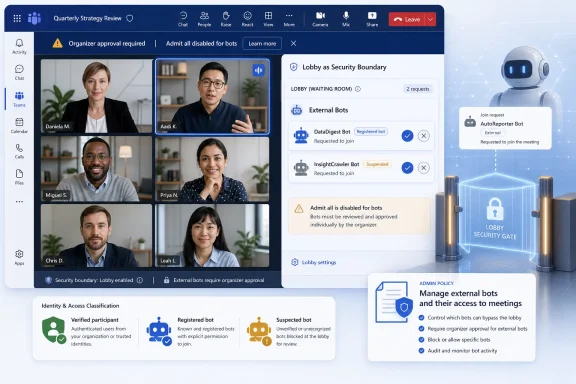 Microsoft Turns the Lobby Into a Security Boundary
Teams meetings have always had a lobby, but the lobby was mostly treated as a convenience feature: a place to hold anonymous users, external participants, latecomers, or people outside the organizer’s trust boundary. Microsoft’s new bot-handling policy changes the role of that lobby. It becomes a classification checkpoint for automated participants.The policy, called “Manage external bots and their access to meetings,” gives administrators a way to force suspected bots into the lobby regardless of the meeting’s normal bypass settings. That is the key move. A meeting organizer may have decided that guests, people in trusted organizations, or everyone with the link can bypass the lobby, but Microsoft is now saying that bot identity should override that convenience decision.
This is a subtle but important admission. The old model assumed the main risk was an unknown human joining a meeting. The new model assumes that the more likely confusion may come from software that looks enough like a participant to slip through the social and technical gaps of a busy meeting.
In the new lobby experience, arrivals are separated into clearer categories: verified participants, standard participants, registered bots, and unregistered or system-identified bots. That hierarchy is more than interface polish. It tells organizers that a meeting roster is no longer a flat list of names; it is a risk map.
The Real Fix Is Not Detection, It Is Friction
Microsoft’s own framing emphasizes smarter detection, and that is understandable. The company says Teams uses behavioral and infrastructure signals collected during the join process to identify likely bots with better accuracy than a static challenge. That sounds like the sort of modern security language customers expect: signals, classification, confidence, and policy enforcement.But the more consequential change is the forced pause before admission. Identified bots no longer get swept into the room by the same one-click action that admits everyone else. The organizer must make a deliberate decision, and Teams adds warnings when someone tries to use “Admit all” while bots are waiting.
That matters because many security failures in collaboration tools are not caused by a missing cryptographic primitive or an exotic exploit. They are caused by an interface that lets a rushed person do the unsafe thing quickly. In a meeting with ten people waiting, the old convenience path encouraged organizers to clear the queue first and think later.
The new design reverses that order. It forces the organizer to notice that a non-human participant is asking for access, then decide whether that bot belongs in the room. This does not eliminate risk, but it changes the default from accidental admission to intentional admission.
CAPTCHA Was a Speed Bump in a World of Toll Roads
Microsoft is also retiring the older CAPTCHA-based “Require verification by participants” approach, and that retirement says a lot about where collaboration security is headed. CAPTCHA was a blunt instrument. It tried to determine whether the joining entity was human by presenting a challenge that was supposed to be easy for people and hard for bots.That premise has been eroding for years. CAPTCHA-solving services, browser automation, accessibility workarounds, and increasingly capable AI systems have all weakened the idea that a one-time challenge can prove meaningful humanness. Worse, CAPTCHA creates friction for legitimate users while still leaving determined operators with ways around it.
Teams’ new model shifts the question from “Can this entity solve a puzzle?” to “Does this join attempt behave like a bot?” That is a better question for modern collaboration systems, especially when bots may be using legitimate infrastructure, calendar integrations, or meeting-assistant workflows.
The tradeoff is that behavioral classification is never perfect. Microsoft’s documentation acknowledges that some external bots may not be detected and that human participants may occasionally be misclassified. That is the price of moving from a visible challenge to an invisible scoring system: the user experience improves when it works, but administrators must understand that the result is probabilistic, not absolute.
AI Note-Takers Forced Microsoft’s Hand
The timing is not accidental. AI note-taking and meeting-assistant tools have moved from novelty to workplace routine with remarkable speed. Many users now connect transcription bots, summary agents, CRM assistants, sales-call recorders, and follow-up generators to their calendars with little thought about where those tools go next.That convenience has created an awkward privacy problem. A bot connected for one meeting may keep appearing in future meetings. A user may authorize a third-party service without understanding the organization’s compliance obligations. A vendor’s assistant may store transcripts outside the company’s preferred data boundary.
For regulated businesses, this is not a theoretical issue. A meeting can contain contract terms, product roadmaps, personnel discussions, patient data, legal strategy, incident response details, or unreleased financial information. If an external bot records or transcribes that meeting without organizer awareness, the problem is not merely etiquette. It becomes retention, discovery, privacy, and data-loss exposure.
Microsoft’s response tries to preserve the legitimate use case while making the automation visible. The company is not banning meeting bots. It is saying that bots need to be recognized as bots, routed through a decision point, and admitted with eyes open.
Registered Bots Are the Beginning of a Trust Market
The Teams Bot Identification Program is Microsoft’s attempt to separate known meeting bots from unknown ones. Independent software vendors that build Teams meeting experiences will be able to register their bots and include a self-identification marker in meeting join requests. When Teams recognizes that marker, it can identify the bot as a known participant.This is a predictable move and probably an unavoidable one. If every meeting assistant is treated as a suspicious blob, legitimate vendors will complain, users will work around restrictions, and admins will drown in exceptions. A registration program gives Microsoft a way to build a lane for approved automation without turning the lobby into permanent theater.
Still, “registered” should not be mistaken for “safe.” A registered bot can still create compliance problems if the organization has not approved the vendor, reviewed its storage practices, or mapped its data flows. Microsoft’s marker can help answer “What is this thing?” but it cannot answer “Should this thing hear our merger discussion?”
That distinction will matter for admins. The arrival of registered bot labels may tempt organizations to treat known vendors as implicitly trusted. The smarter posture is to treat registration as identification, then apply separate vendor risk, data governance, and meeting-classification policies on top.
The Admin Control Is Useful Because It Is Assignable
One of the better parts of Microsoft’s implementation is that the policy can be assigned through Teams meeting policies rather than only as a tenant-wide switch. That gives security teams a realistic rollout path. They can start with executives, legal, finance, HR, incident response teams, sales groups handling sensitive customers, or any population where meeting confidentiality carries higher stakes.This matters because collaboration changes are political. If IT flips on a new control that suddenly changes meeting behavior for every employee, the help desk gets the backlash. If IT targets high-risk groups first, gathers feedback, and adjusts organizer training, the control has a better chance of becoming durable.
Microsoft recommends limiting who can admit from the lobby to organizers and co-organizers. That recommendation should not be treated as optional fine print. If presenters or other participants can admit people freely, the bot protection story weakens because the decision may move from an accountable meeting owner to whoever happens to click fastest.
The practical pattern is straightforward: enable bot detection, restrict lobby admission authority, brief organizers on what the new labels mean, and document the exception path for approved bots. That is not glamorous security work, but it is exactly the kind of operational control that prevents collaboration tools from becoming accidental data exfiltration machines.
Teams Abuse Gave This Feature a Darker Context
The bot policy would be important even if the only concern were unwanted note-takers. But it lands during a period when Teams has been repeatedly abused for social engineering. Attackers have used external access, fake helpdesk identities, email bombing, and remote-assistance lures to make Teams feel like an internal support channel when it is not.That is the broader lesson of recent Teams-focused attacks. Collaboration tools carry social trust. A message or call inside Teams often feels more legitimate than an email from the outside world, especially when the attacker’s display name resembles “Help Desk,” “IT Support,” or a known business function.
Bot admission is not the same attack as helpdesk impersonation, but it belongs to the same class of failure: the meeting surface is being asked to represent identity, intent, and trust more clearly than it used to. A malicious or unwanted bot in a meeting can record, transcribe, summarize, and forward information at machine speed. Even a benign but unauthorized bot can create a record where the organization did not intend one.
Microsoft’s latest change is therefore less about stopping “bots” in the abstract and more about restoring context. Who is joining? Are they human? Are they automated? Are they known? Did the organizer mean to let them in? These are basic questions, but Teams has grown into an environment where basic questions need product-level enforcement.
The Missing Pieces Are the Ones Enterprises Will Ask For First
For all its usefulness, the current release is still a detection-and-friction layer. Microsoft has already signaled additional controls, including approved bot allowlists, policies to block external bots entirely, and audit logs for bot detection. Those future pieces are not administrative luxuries; they are what turn a meeting prompt into an enterprise control plane.Allowlists matter because large organizations do not want every organizer making vendor-by-vendor trust decisions in real time. If a company has approved a specific transcription provider, the meeting experience should reflect that approval. If it has banned another, the organizer should not be put in the position of overriding policy during a live call.
Blocking policies matter for organizations where external bots simply do not belong. Some legal, defense, healthcare, public-sector, and incident-response meetings need a hard deny, not a better warning. A bot that never reaches the organizer’s decision queue is safer than a bot that relies on the organizer making the right call under pressure.
Audit logs may be the most important missing piece for security teams. If a sensitive meeting later becomes part of an investigation, admins will need to know which bots attempted to join, which were admitted, who admitted them, and whether Teams classified them as registered, unregistered, or suspected. Without that record, the feature reduces immediate risk but leaves incident responders guessing.
Microsoft Is Choosing Managed Automation Over Bot Prohibition
The larger product strategy is clear: Microsoft is not trying to push bots out of meetings. It is trying to domesticate them. That is the only realistic path in a workplace where Copilot, third-party assistants, contact-center agents, sales intelligence tools, and workflow bots are becoming embedded in daily collaboration.A prohibition-first approach would fail because users want the output. They want summaries, action items, searchable transcripts, CRM updates, and automatic follow-ups. If official tools make that impossible, workers will route meetings through unofficial tools, personal accounts, browser extensions, and vendor services that IT cannot see.
Managed automation is more boring but more sustainable. Identify the bot. Put it in the lobby. Label it. Force a decision. Eventually, allow approved bots, block disallowed bots, and log the entire chain.
That trajectory also aligns with Microsoft’s broader position in the AI productivity market. The company wants Teams to be the place where AI agents can operate, but it cannot credibly sell that future to enterprises unless it also offers governance over which agents enter which rooms. The bot lobby is a small feature with a strategic job: making automated participants administratively legible.
The New Lobby Rules Put the Burden Back Where It Belongs
This update gives Windows and Microsoft 365 administrators a concrete control to deploy now, but it should be understood as part of a larger cleanup of collaboration trust. The most important consequences are practical, not philosophical.- Teams now treats detected external bots as a special class of participant that must wait in the lobby even when ordinary participants can bypass it.
- Organizers receive clearer labels and additional prompts so that admitting a bot becomes an explicit choice rather than a side effect of clearing the lobby.
- The older CAPTCHA-based verification model is being displaced by behavioral and infrastructure-based detection, which is more modern but still imperfect.
- The Teams Bot Identification Program should help legitimate vendors identify their meeting bots, but registration is not the same thing as organizational approval.
- Administrators should pair the new policy with tighter lobby-admission settings, especially limiting admission authority to organizers and co-organizers.
- Enterprises should watch for the next controls Microsoft has promised, because allowlists, bot blocking, and audit logs are what will make this feature fully governable.
References
- Primary source: SQ Magazine
Published: 2026-07-01T12:42:08.048361
Loading…
sqmagazine.co.uk - Related coverage: techradar.com
Microsoft Teams is getting wants to block bad bots for good | TechRadar
"Smarter bot protection" is coming to Microsoft Teamswww.techradar.com - Official source: learn.microsoft.com
Teams Bot Identification Program - Microsoft Teams | Microsoft Learn
Learn about the Teams Bot Identification Program.learn.microsoft.com - Official source: techcommunity.microsoft.com
Loading…
techcommunity.microsoft.com - Related coverage: en.softonic.com
Microsoft Teams now flags suspicious meeting bots: they go to the lobby first - Softonic
In mid-May 2026, Microsoft began rolling out a new bot-detection feature in Teams. If Teams suspects a participant is a bot, it sends that account toen.softonic.com - Related coverage: helpnetsecurity.com
Microsoft wants to stop unwanted bots from entering Teams meetings - Help Net Security
Microsoft Teams bot detection adds admin controls to identify external bots, protect meetings, and improve oversight for admins.www.helpnetsecurity.com
- Related coverage: windowscentral.com
Microsoft Teams will block unwanted bots from meetings | Windows Central
That silent "AI Assistant" in the corner isn't always a company tool. Microsoft is finally giving you a way to lock the door on data-scraping hitchhikers.www.windowscentral.com - Related coverage: techriver.com
- Official source: microsoft.com
Loading…
www.microsoft.com - Related coverage: techrepublic.com
Loading…
www.techrepublic.com - Related coverage: scworld.com
UNC6692 impersonates help desk employees to drop SNOW malware via Teams
Attackers abuse Teams chat to deliver malware after help desk phishing scam.www.scworld.com
- Related coverage: expertinsights.com
Microsoft Teams Users Targeted in Fake IT Support Scam Linked to Black Basta Ransomware
Campaign abuses Microsoft Teams and Quick Assist to deploy previously undocumented backdoor. expertinsights.com
- Related coverage: theregister.com
Loading…
www.theregister.com - Related coverage: cybersecuritydive.com
Loading…
www.cybersecuritydive.com - Related coverage: csoonline.com
Loading…
www.csoonline.com - Official source: blogs.microsoft.com
Loading…
blogs.microsoft.com - Related coverage: ntgit.com
Microsoft Teams “IT Support” Impersonation Scam | Northern Technologies Group
An active, fast-moving scam is targeting organizations that use Microsoft Teams — and the threat actors running it are sophisticated, persistent, and effective. Microsoft published a detailed security advisory on this campaign on April 18, 2026, and what they describe matches what is being seen... ntgit.com
- Related coverage: blumira.com
Loading…
www.blumira.com - Related coverage: daylight.ai
Loading…
daylight.ai - Related coverage: pcgamer.com
Loading…
www.pcgamer.com - Related coverage: itpro.com
Loading…
www.itpro.com - Official source: cdn-dynmedia-1.microsoft.com
Microsoft Incident Response - Cyberattack Series Part 3
</rdf:Alt> </dc:description> <pdf:Producer>Microsoft® PowerPoint® for Microsoft 365</pdf:Producer> <pdfx:Created>11/26/2023 4:00:00 PM</pdfx:Created> <pdfx:LastSaved>7/22/2025 5:00:00 PM</pdfx:LastSaved>...cdn-dynmedia-1.microsoft.com
- Related coverage: labs.cloudsecurityalliance.org
Microsoft Teams as Phishing Infrastructure: The A0Backdoor Campaign and the Industrialization of Collaboration-Platform Attacks
PDF documentlabs.cloudsecurityalliance.org