

Microsoft Teams is about to get a wave of practical, productivity-focused upgrades that will change how meetings feel, how presenters share content, and how IT teams manage risk — and while many of these improvements are small on their own, they add up to a materially smoother experience for both everyday users and administrators. Recent reporting and Microsoft’s own product updates point to a rollout that includes pop‑out meeting panes (Chat, Notes and Copilot), editable display names during calls, Loop‑powered meeting notes in more contexts, a Prevent Screen Capture control, tenant‑branded reactions, multi‑window workflows, and improved notification placement and meeting toolbar controls. These changes target friction points in hybrid work: multitasking, meeting hygiene, and meeting security — but they also raise new governance and privacy questions that IT teams should plan for now.
Microsoft has been iterating on Teams aggressively since the pandemic reshaped work patterns. The platform’s updates now emphasize two clear priorities: (1) smoothing day‑to‑day meeting logistics and multitasking, and (2) baking in controls that help organizations protect sensitive information while still enabling modern collaboration. The recent batch of features is less about headline new products and more about removing micro‑frictions — the small interruptions that add up across a workday. Microsoft’s product notes and community posts list these improvements and clarify that many will roll out gradually, appear in preview rings first, and in some cases require specific licensing (e.g., Teams Premium or Copilot entitlements).
These changes are being delivered across multiple delivery mechanisms: the public preview (for early adopters), targeted release rings for Microsoft 365 customers, and the general commercial rollout that follows. That staged approach means some organizations will see features weeks or months earlier than others — and admins need to consult rollout timelines and message their end users before surprises appear in production meetings.
Note: some online reports group features differently or use phrasing like “very soon” or “rolling out over the coming months.” Microsoft’s product documentation is more precise: features may be in preview, rolling out, or coming soon. Where dates are absent in community posts, treat timing as indicative rather than definitive and verify with your tenant’s Message Center or the Microsoft 365 Roadmap.
Second, Microsoft is expanding policy and control features — Prevent Screen Capture, branded meeting settings, and admin telemetry — which are aimed squarely at enterprise customers and regulated industries. This balance suggests Microsoft aims to retain the broad end‑user appeal of Teams while deepening its enterprise lock‑in through governance, security, and AI features that are more valuable to large organizations. Copilot integration and Loop expansion further indicate Microsoft is embedding AI into the meeting lifecycle, not just as a novelty but as a core workflow assistant.
The combined effect is a platform increasingly designed for hybrid work realities: asynchronous follow‑up, role‑based meeting experiences, and a heavy focus on preventing accidental data exposure without stopping collaboration. That said, Microsoft’s move also magnifies the importance of admin discipline: without clear policies and testing, organizations risk inconsistent adoption and compliance oversights.
If your organization relies on Teams for daily collaboration, now is the time to pilot these features, update your internal documentation, and align licensing and compliance controls. The end result — when planned and managed deliberately — should be fewer meeting frustrations and better protection for the content you share.
Source: Neowin Microsoft Teams is getting a bunch of useful features very soon
 Background / Overview
Microsoft has been iterating on Teams aggressively since the pandemic reshaped work patterns. The platform’s updates now emphasize two clear priorities: (1) smoothing day‑to‑day meeting logistics and multitasking, and (2) baking in controls that help organizations protect sensitive information while still enabling modern collaboration. The recent batch of features is less about headline new products and more about removing micro‑frictions — the small interruptions that add up across a workday. Microsoft’s product notes and community posts list these improvements and clarify that many will roll out gradually, appear in preview rings first, and in some cases require specific licensing (e.g., Teams Premium or Copilot entitlements).These changes are being delivered across multiple delivery mechanisms: the public preview (for early adopters), targeted release rings for Microsoft 365 customers, and the general commercial rollout that follows. That staged approach means some organizations will see features weeks or months earlier than others — and admins need to consult rollout timelines and message their end users before surprises appear in production meetings.
What’s landing and why it matters
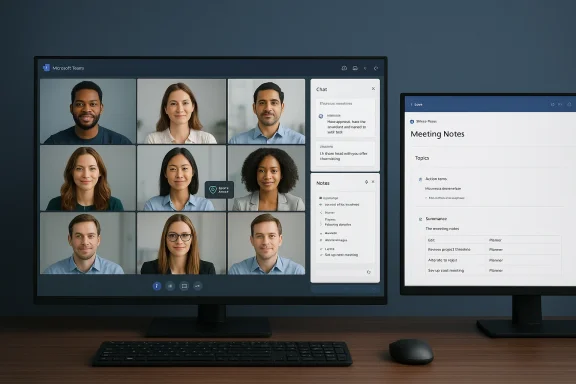
Pop‑out panes: Play with layout, stop doing window Tetris
- What it is: During a Teams meeting you can now pop out the Chat, Notes and Copilot side panes into separate windows you can resize and position independently of the main meeting view.
- Why it helps: For people who juggle meeting transcript review, chat monitoring, and Copilot prompts while presenting or listening, the ability to place these panes on another monitor or beside the main meeting significantly reduces window management friction. It’s a small change that materially improves multitasking efficiency.
Editable display names during active meetings
- What it is: Meeting participants can change the display name other attendees see for the duration of that meeting (temporary display names).
- Why it helps: This is useful in mixed settings — onboarding interns, guest speakers, or people who prefer to display role titles or pronouns in a specific meeting. It reduces confusion when joining cross‑organization calls and improves presenter clarity.
Loop‑powered meeting notes expanding beyond scheduled meetings
- What it is: Loop components that power collaborative meeting notes in scheduled meetings are being extended to channel meetings and ad‑hoc contexts, preserving up‑to‑date content across shared locations and syncing tasks to Planner/To‑Do.
- Why it helps: Loop enables persistent, editable notes that travel with the team — ideal for distributed teams that need an authoritative source of decisions and assigned tasks. When notes are Loop components, edits are reflected anywhere that component is embedded.
Prevent Screen Capture — stronger meeting data protection
- What it is: An in‑meeting control (noted as a Premium feature in some docs) that can block screenshots and screen recordings by turning the meeting window black for capture attempts or otherwise obstructing unauthorized screen grabs.
- Why it helps: Preventing casual or malicious capture of sensitive presentations is a big win for regulated industries and legal or product teams that share confidential assets during meetings. Companies can better control information exfiltration risks during live events.
Tenant‑branded reactions and meeting UX tweaks
- What it is: Tenants will be able to customize meeting reactions and organizers get more controls over what attendees see when joining large events (like Teams Town Halls).
- Why it helps: Branding and experience controls are valuable for internal town halls and leadership presentations where consistency and control over attendee view matters. It helps communications teams craft a polished experience.
Multi‑window workflows, notification placement, and toolbar hiding
- What it is: Users gain more control over where banner notifications appear, can place the meeting control toolbar out of the way (or hide it entirely), and can use multi‑window meeting flows to separate content and communications.
- Why it helps: These are classic “reduce cognitive load” improvements — fewer visual distractions, better control of what’s on screen, and easier multitasking across monitors. For frequent meeting users, these incremental UX wins significantly reduce meeting fatigue.
Cross‑verification: Microsoft’s own notes and community reporting
To verify these changes beyond third‑party reporting, consult Microsoft’s official “What’s new in Microsoft Teams” pages and Tech Community posts. Microsoft’s support pages explicitly reference both the pop‑out panes and the Prevent Screen Capture control, and Tech Community posts document pop‑outs for Chat, Notes and Copilot with usage guidance and preview requirements. Independent outlets (Windows Central, Hands on Teams) have also demonstrated the features in previews and captured screenshots from early builds. These cross‑references confirm the core functionality and show that Microsoft’s rollout strategy favors preview testing before broad availability.Note: some online reports group features differently or use phrasing like “very soon” or “rolling out over the coming months.” Microsoft’s product documentation is more precise: features may be in preview, rolling out, or coming soon. Where dates are absent in community posts, treat timing as indicative rather than definitive and verify with your tenant’s Message Center or the Microsoft 365 Roadmap.
Benefits: concrete wins for users and teams
- Improved multitasking and fewer context switches: pop‑outs and multi‑window workflows let presenters and participants keep chat, notes and AI assistance visible without rearranging the meeting layout.
- Better meeting hygiene and presenter controls: toolbar hiding, presenter share toolbar enhancements, and tenant‑branded meeting options reduce interruptions and give organizers deterministic control over attendee experience.
- Stronger, policy‑driven security: Prevent Screen Capture and other content protections are meaningful for regulated industries and for protecting IP shared during meetings.
- More accessible, persistent collaboration: Loop components and expanded meeting notes mean decisions and assigned tasks are easier to find later, making asynchronous work smoother.
Risks, tradeoffs, and areas IT must prepare for
Licensing and feature fragmentation
Microsoft increasingly places advanced features (Copilot, some security protections, premium recap tools) behind specific licenses. That creates a mixed user experience: organizations with partial licensing will have an inconsistent feature set across users, which complicates training and support. Verify Copilot and Teams Premium entitlements before promising features to end users.Privacy, compliance and audit tracing
- Editable display names and transient profile controls can make it harder to map meeting attendance to a canonical identity in event logs and recordings.
- Copilot‑generated transcripts and recaps create additional PII processing flows that must be validated against corporate data protection policies.
- Prevent Screen Capture introduces operational questions: does a “blocked” capture still generate metadata or thumbnails in endpoint logs? How does screen capture prevention interact with accessibility workflows (e.g., live captions, assistive tech)? Organizations must test end‑to‑end and document exceptions for legitimate capture needs.
False sense of security
Controls like Prevent Screen Capture can deter casual data leakage but are not a silver bullet against determined exfiltration (e.g., a second camera or external recording device). Teams and security teams should embed these features into broader data loss prevention (DLP) and governance strategies rather than treating them as stand‑alone guarantees.Admin complexity and rollout friction
Staged rollouts and preview channels are essential for stability, but they also mean admins will manage split environments. Plan pilot waves, build internal documentation, and offer role‑based training. Helpdesk playbooks should address common questions like how to reposition notifications, restore hidden toolbars, or disable pop‑outs if they conflict with legacy app workflows.Practical recommendations for IT and communications teams
- Inventory licensing: Verify Copilot, Teams Premium, and any feature‑gated licenses across your tenant. Map which user groups will receive which features and prepare licensing purchase or allocation plans.
- Pilot with a cross‑functional group: Include a mix of heavy meeting users, presenters, and security/compliance staff so you can test both UX and governance impacts. Use the preview/public preview channel for controlled testing where safe.
- Update policies and training: Add guidance on display name edits, when Prevent Screen Capture should be enabled, and how to manage Loop components for notes ownership. Create a short “what changed” guide and short video walkthrough for end users.
- Validate accessibility and integrations: Test interactions with assistive technologies, screen readers, and endpoint recording tools. Ensure legitimate capture workflows are permitted and logged.
- Monitor Message Center and Roadmap entries: Microsoft updates rollout timelines regularly. Tie any internal change communications to specific Message Center notifications to set accurate expectations for end users.
Deeper analysis: what this signals about Microsoft’s strategy
Microsoft’s recent Teams updates emphasize two strategic threads. First, the company is prioritizing micro‑productivity — the small interactions that define daily experience (pop‑outs, notification placement, toolbar visibility). These are low‑risk, high‑impact UX improvements that reward power users and reduce meeting fatigue.Second, Microsoft is expanding policy and control features — Prevent Screen Capture, branded meeting settings, and admin telemetry — which are aimed squarely at enterprise customers and regulated industries. This balance suggests Microsoft aims to retain the broad end‑user appeal of Teams while deepening its enterprise lock‑in through governance, security, and AI features that are more valuable to large organizations. Copilot integration and Loop expansion further indicate Microsoft is embedding AI into the meeting lifecycle, not just as a novelty but as a core workflow assistant.
The combined effect is a platform increasingly designed for hybrid work realities: asynchronous follow‑up, role‑based meeting experiences, and a heavy focus on preventing accidental data exposure without stopping collaboration. That said, Microsoft’s move also magnifies the importance of admin discipline: without clear policies and testing, organizations risk inconsistent adoption and compliance oversights.
What to watch next
- Licensing clarifications: Expect more detailed guidance from Microsoft on which features are gated behind Copilot or Teams Premium and how tenant admins can manage entitlements.
- Accessibility interplay: Monitor how Prevent Screen Capture and other protections coexist with accessibility tools and legal obligations for inclusive communication.
- Admin tooling: Microsoft typically follows UX updates with expanded admin controls; look for tenant‑wide toggles, audit logging improvements, and policy templates to manage these new behaviors.
- Real‑world adoption stories: Early adopter feedback from pilot groups will reveal whether these changes reduce friction as advertised or introduce new helpdesk loads. Community reports and enterprise blog posts will surface practical quirks and tips.
Conclusion
This upcoming wave of Microsoft Teams updates is notable not because it introduces a single transformative feature, but because it stitches many small, carefully thought‑out changes into a more usable, secure, and AI‑assisted meeting fabric. For end users, the wins are immediate: less window juggling, clearer meeting identity, and persistent, editable notes. For admins and security teams, the story is more nuanced: the updates offer stronger controls but demand careful testing, policy updates, and licensing alignment.If your organization relies on Teams for daily collaboration, now is the time to pilot these features, update your internal documentation, and align licensing and compliance controls. The end result — when planned and managed deliberately — should be fewer meeting frustrations and better protection for the content you share.
Source: Neowin Microsoft Teams is getting a bunch of useful features very soon
