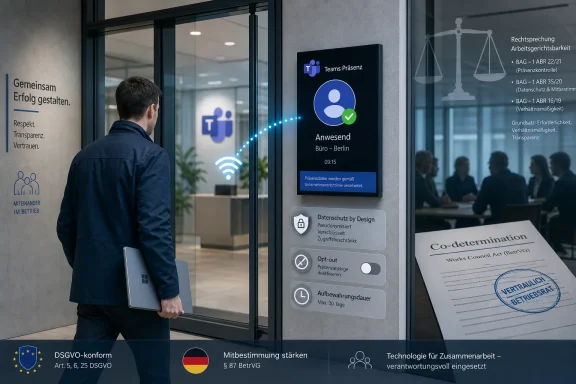
Microsoft is rolling out Workplace Check-In via Wi-Fi for Microsoft Teams and Microsoft Places in June 2026, letting organizations automatically update a user's work location when their device connects to configured corporate Wi-Fi so colleagues and managers can see office presence or, where mapped, a building. The feature is being sold as a coordination aid for hybrid work, not a surveillance product. But the anxiety around it is not irrational, because Teams presence is already a workplace signal managers understand, watch, and sometimes weaponize. Microsoft has built guardrails into the design, yet the real test will be whether employers treat location as context or as compliance.
The important shift is not that employers can suddenly learn whether someone is in the office. In most managed environments, IT already has badges, VPN logs, Wi-Fi authentication records, device inventory, room bookings, and endpoint telemetry that can answer that question with varying degrees of precision. The shift is that Microsoft is moving a piece of that knowledge into the everyday collaboration layer.
That matters because Teams is not a back-office audit tool. It is where employees talk, meet, schedule, nudge, escalate, and perform their availability to the rest of the organization. A work-location badge inside Teams or Outlook feels different from a network log available to a small IT group, because it becomes socially visible.
Microsoft’s framing is straightforward: hybrid work is messy, and people need better signals. If a project lead wants to know who is in the office before booking a room, or if a team wants to coordinate a day on-site, manually updated location fields are only useful when people remember to set them. Automation makes the signal cleaner.
The problem is that cleaner signals are not neutral. Once a status indicator becomes reliable, it can also become enforceable. That is why a feature built for “coordination” lands in the middle of a much larger argument about return-to-office mandates, employee autonomy, and the quiet expansion of workplace monitoring.
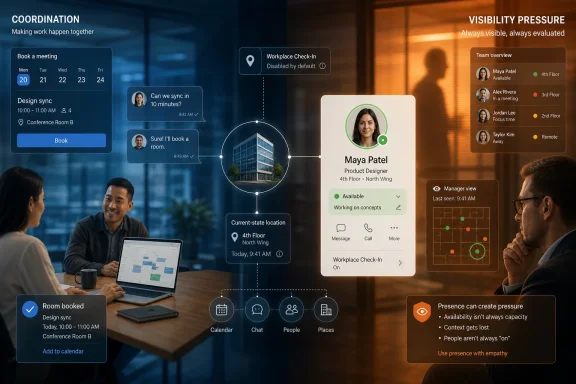
Microsoft says the capability is disabled by default, requires tenant administrator configuration, and is designed as an opt-in experience for users where the policy is enabled. It is also presented as a current-state signal rather than an attendance archive. Microsoft’s documentation and public messaging emphasize that users can change their work location manually and that the feature is meant to help colleagues coordinate, not produce attendance reports.
That distinction is real, and it is worth preserving. There is a meaningful difference between a system that says “Alex is checked in at the office today” and a purpose-built dashboard that calculates whether Alex met a three-day-per-week mandate over the last quarter. The former is collaboration metadata; the latter is labor management.
But Microsoft’s narrower claim does not end the debate. A current-state signal can still influence management behavior, especially if managers repeatedly see who appears as “in office” and who does not. Software does not need to generate a formal report to create pressure.
That move changes the audience. Badge systems are usually invisible to peers and often constrained to facilities, security, HR, or IT workflows. A Teams work-location indicator is designed to be seen by coworkers. It is meant to be useful precisely because it is visible.
There is nothing inherently sinister about that. Hybrid teams genuinely struggle with basic coordination. People commute into half-empty offices, book meetings that should have been remote, or miss the chance to collaborate because nobody knows who is nearby. A lightweight work-location signal can reduce that friction.
Still, visibility is power. A badge reader may tell the company you entered the building, but a Teams indicator can tell your department, your project group, and your manager in the flow of ordinary work. That is why the same feature can look like a convenience to one worker and like a digital attendance light to another.
Places is built around the premise that the office is no longer a static default. It is a resource to coordinate: rooms, desks, neighborhoods, attendance patterns, team overlap, and facilities usage. In that model, knowing who is physically present is not a side detail. It is the core signal that makes the system work.
Microsoft’s direction is consistent with the rest of Microsoft 365. Calendar availability, Teams presence, Viva-style workplace analytics, room booking, Copilot assistance, and Places all point toward a workplace where software mediates not just communication but physical space. The office becomes another layer in the productivity graph.
That vision can be useful. It can also make employees uneasy because it collapses boundaries. A calendar used to say when you were busy. Presence said whether you were available. Now location can say where your body probably is. Each addition is defensible on its own, but together they create a richer workplace portrait than many employees expect from a chat app.
The company also says the feature is not meant to create historical location records, attendance reports, or monitoring dashboards. That is an important boundary. Microsoft is clearly trying to separate workplace check-in from the kind of employee surveillance systems that track keystrokes, screenshots, application usage, or minute-by-minute activity.
But privacy safeguards inside a product are only part of the governance problem. The more difficult issue is organizational use. A company can comply with Microsoft’s design and still create a culture where employees feel watched. A manager does not need an export button if they can glance at a profile card often enough.
The phrase disabled by default also has a half-life in enterprise software. Today it means organizations must deliberately enable the feature. Tomorrow, adoption pressure may come from facilities teams, HR leaders, executives pushing return-to-office targets, or employees who want better coordination. Once a signal exists, business processes tend to grow around it.
Microsoft can insist, accurately, that the tool is not a return-to-office enforcement dashboard. But timing and context shape perception. Workers are not evaluating Workplace Check-In in a vacuum. They are evaluating it against years of hybrid-work negotiations, badge-swipe debates, desk-booking nudges, and executive frustration over office utilization.
For managers who already trust their teams, the feature may be harmless or helpful. For managers who equate physical presence with commitment, it may become another status cue to overinterpret. For employees in organizations with strict office mandates, even an opt-in location signal can feel less voluntary if social or managerial pressure builds around it.
This is where Microsoft’s product language runs into workplace reality. A collaboration signal can become an enforcement signal without changing a line of code. All it takes is a manager who starts asking why someone’s Teams location did not show the expected building on Tuesday.
Administrators will need to understand which Wi-Fi networks are mapped, which buildings are configured, how user prompts appear, what licenses are required, and how the feature behaves across Teams, Outlook, and Places. They will also need to explain edge cases, because workplace location is rarely as clean as a product demo suggests.
What happens when an employee connects briefly to office Wi-Fi while passing through? What if the same SSID is used across multiple offices? What if a user docks at a desk, switches networks, or works from a shared corporate space? What if a contractor, guest, or frontline worker appears differently from a full-time employee? These are not reasons to reject the feature, but they are reasons to avoid treating it as a perfect truth machine.
The best IT shops will not simply flip the toggle. They will require written policy, employee communications, HR review, data-protection review, and a clear support path. The worst shops will treat it like any other Teams feature and discover later that the help desk has become the front line for a trust dispute.
That is the central weakness in Microsoft’s position. The company can design the tool for collaboration, but it cannot guarantee collaborative use. Enterprise software always inherits the behavior of the institution deploying it. A humane workplace can use telemetry gently; a punitive workplace can turn innocuous metadata into ammunition.
This is why opt-in consent matters but does not settle the issue. Consent inside an employment relationship is complicated. If managers expect the feature to be enabled, if teammates normalize it, or if office attendance becomes politically sensitive, an employee may technically have a choice while practically feeling they do not.
Microsoft should understand this dynamic better than most companies. Teams is already the place where green dots, away statuses, read receipts, meeting attendance, and calendar visibility create informal judgments. Adding work location to that mix is not just a feature release. It is a new social signal in a tool full of social signals.
The strongest argument for concern is that surveillance often grows through mundane convenience. Very few workplace monitoring regimes begin with a villainous dashboard and a sinister launch memo. They begin with operational efficiency, security, compliance, capacity planning, or coordination. Then the data proves useful for something else.
That is the drift employees worry about. Today’s “Who is in the office?” can become tomorrow’s “Who is not in the office often enough?” Today’s voluntary check-in can become tomorrow’s expected check-in. Today’s absence of historical reporting can be supplemented by screenshots, manual notes, third-party tools, Graph integrations, or policy workarounds.
None of that means Microsoft should never build presence-aware workplace tools. It means the company and its customers should be honest about the terrain. Location is sensitive even when it is approximate, work-related, and temporary. Once it enters a collaboration product, it changes how people behave.
A good implementation could make office days less wasteful. Employees could see when teammates are nearby, choose better days to commute, reserve desks more intelligently, and avoid the familiar frustration of coming in for “collaboration” only to spend the day on video calls with people who stayed home. Facilities teams could also make better decisions about space if they understand real usage patterns.
There are accessibility and inclusion angles too. Some employees plan commutes around caregiving, disability, transportation constraints, or health needs. Better visibility into who will be present can help them decide when the trip is worth it. For distributed teams, knowing when a cluster of colleagues is physically together can improve scheduling and meeting design.
The collaboration case is therefore not fake. It is just incomplete. The same visibility that helps a teammate coordinate lunch can help a manager infer attendance behavior. The product’s value and its risk come from the same signal.
That kind of attendance theater is already common. Workers swipe badges, sit in offices to satisfy policy, and then join remote meetings from desks because the colleagues they need are elsewhere. A Teams location indicator could either reduce that absurdity by improving coordination or reinforce it by making visible compliance easier to police.
The irony is that a tool meant to make hybrid work more flexible could become another reason hybrid work feels brittle. If employees believe every office signal may become a performance signal, they will respond defensively. They may disable features, avoid connecting devices, challenge policies, or simply trust the platform less.
For Microsoft, that trust problem is not abstract. Teams sits at the center of the Microsoft 365 workday. If employees start to experience it less as a collaboration hub and more as a management sensor, the product may still be indispensable, but it becomes resented infrastructure.
Microsoft’s advantage is integration. Teams, Outlook, Places, Entra ID, Exchange, Graph, Intune, and Copilot all live in the same enterprise universe. That integration makes powerful workflows possible. It also raises the stakes for governance because a signal created in one product can become meaningful across many others.
The company’s challenge is to keep useful context from becoming ambient management. That requires more than privacy notices. It requires product boundaries that are understandable, admin controls that are granular, auditability that protects users as well as employers, and documentation that does not hide social consequences behind cheerful productivity language.
The more Microsoft wants Microsoft 365 to become the operating system of work, the more it must accept responsibility for how work feels inside that operating system. Presence is not just data. Location is not just metadata. In the workplace, these signals shape power.
For administrators, the lesson is even clearer. Do not deploy this as a silent quality-of-life enhancement. Communicate the purpose, the scope, the limits, and the governance model before users discover it through a Teams notification or a manager’s comment.
For managers, the temptation will be to treat location as a proxy for engagement. That would be a mistake. Office presence can support collaboration, but it does not prove productivity, creativity, responsiveness, or trustworthiness. Hybrid work fails when leaders measure what is easy instead of what matters.
A healthy rollout should make the feature boring. Employees should know why it exists, how to control it, and what it will not be used for. If the first reaction is suspicion, the technology may not be the real problem; the workplace probably is.
 Microsoft Turns Office Presence Into Another Teams Signal
The important shift is not that employers can suddenly learn whether someone is in the office. In most managed environments, IT already has badges, VPN logs, Wi-Fi authentication records, device inventory, room bookings, and endpoint telemetry that can answer that question with varying degrees of precision. The shift is that Microsoft is moving a piece of that knowledge into the everyday collaboration layer.That matters because Teams is not a back-office audit tool. It is where employees talk, meet, schedule, nudge, escalate, and perform their availability to the rest of the organization. A work-location badge inside Teams or Outlook feels different from a network log available to a small IT group, because it becomes socially visible.
Microsoft’s framing is straightforward: hybrid work is messy, and people need better signals. If a project lead wants to know who is in the office before booking a room, or if a team wants to coordinate a day on-site, manually updated location fields are only useful when people remember to set them. Automation makes the signal cleaner.
The problem is that cleaner signals are not neutral. Once a status indicator becomes reliable, it can also become enforceable. That is why a feature built for “coordination” lands in the middle of a much larger argument about return-to-office mandates, employee autonomy, and the quiet expansion of workplace monitoring.
The Feature Is Less Dramatic Than the Headlines, and Still More Important Than Microsoft Wants to Admit
Workplace Check-In via Wi-Fi works by associating corporate wireless networks with a workplace location. When a user’s device connects to a configured network, Teams and Microsoft Places can update that user’s work location automatically. If the organization has mapped buildings in Microsoft Places, the location can reflect the building; if not, the signal is more general.Microsoft says the capability is disabled by default, requires tenant administrator configuration, and is designed as an opt-in experience for users where the policy is enabled. It is also presented as a current-state signal rather than an attendance archive. Microsoft’s documentation and public messaging emphasize that users can change their work location manually and that the feature is meant to help colleagues coordinate, not produce attendance reports.
That distinction is real, and it is worth preserving. There is a meaningful difference between a system that says “Alex is checked in at the office today” and a purpose-built dashboard that calculates whether Alex met a three-day-per-week mandate over the last quarter. The former is collaboration metadata; the latter is labor management.
But Microsoft’s narrower claim does not end the debate. A current-state signal can still influence management behavior, especially if managers repeatedly see who appears as “in office” and who does not. Software does not need to generate a formal report to create pressure.
The Office Badge Has Moved From the Door to the Profile Card
The old office attendance signal was physical. You saw someone at a desk, in a conference room, or in the coffee line. Later, it became semi-digital through access badges, hot-desk systems, and room reservations. Now, Microsoft is pushing that signal into the productivity suite itself.That move changes the audience. Badge systems are usually invisible to peers and often constrained to facilities, security, HR, or IT workflows. A Teams work-location indicator is designed to be seen by coworkers. It is meant to be useful precisely because it is visible.
There is nothing inherently sinister about that. Hybrid teams genuinely struggle with basic coordination. People commute into half-empty offices, book meetings that should have been remote, or miss the chance to collaborate because nobody knows who is nearby. A lightweight work-location signal can reduce that friction.
Still, visibility is power. A badge reader may tell the company you entered the building, but a Teams indicator can tell your department, your project group, and your manager in the flow of ordinary work. That is why the same feature can look like a convenience to one worker and like a digital attendance light to another.
Microsoft Places Is the Real Product Story
Teams is the headline because Teams is where employees will notice the change. The broader product story is Microsoft Places, the company’s platform for making hybrid offices more measurable, schedulable, and eventually more automated. Workplace Check-In via Wi-Fi is one of the data inputs that makes that platform useful.Places is built around the premise that the office is no longer a static default. It is a resource to coordinate: rooms, desks, neighborhoods, attendance patterns, team overlap, and facilities usage. In that model, knowing who is physically present is not a side detail. It is the core signal that makes the system work.
Microsoft’s direction is consistent with the rest of Microsoft 365. Calendar availability, Teams presence, Viva-style workplace analytics, room booking, Copilot assistance, and Places all point toward a workplace where software mediates not just communication but physical space. The office becomes another layer in the productivity graph.
That vision can be useful. It can also make employees uneasy because it collapses boundaries. A calendar used to say when you were busy. Presence said whether you were available. Now location can say where your body probably is. Each addition is defensible on its own, but together they create a richer workplace portrait than many employees expect from a chat app.
The Privacy Safeguards Are Necessary, Not Sufficient
Microsoft deserves credit for avoiding the worst version of this feature. Disabled by default is the right starting point. Admin-controlled deployment is expected in enterprise software, and user consent is essential if the feature is going to be anything other than covert monitoring in a collaboration costume.The company also says the feature is not meant to create historical location records, attendance reports, or monitoring dashboards. That is an important boundary. Microsoft is clearly trying to separate workplace check-in from the kind of employee surveillance systems that track keystrokes, screenshots, application usage, or minute-by-minute activity.
But privacy safeguards inside a product are only part of the governance problem. The more difficult issue is organizational use. A company can comply with Microsoft’s design and still create a culture where employees feel watched. A manager does not need an export button if they can glance at a profile card often enough.
The phrase disabled by default also has a half-life in enterprise software. Today it means organizations must deliberately enable the feature. Tomorrow, adoption pressure may come from facilities teams, HR leaders, executives pushing return-to-office targets, or employees who want better coordination. Once a signal exists, business processes tend to grow around it.
The Return-to-Office Shadow Is Impossible to Ignore
This feature arrives in a labor market where return-to-office policies remain contested. Many employers want more predictable office attendance; many employees view forced presence as a proxy for control rather than productivity. Into that argument comes a Teams feature that can automatically say whether a worker is in the office.Microsoft can insist, accurately, that the tool is not a return-to-office enforcement dashboard. But timing and context shape perception. Workers are not evaluating Workplace Check-In in a vacuum. They are evaluating it against years of hybrid-work negotiations, badge-swipe debates, desk-booking nudges, and executive frustration over office utilization.
For managers who already trust their teams, the feature may be harmless or helpful. For managers who equate physical presence with commitment, it may become another status cue to overinterpret. For employees in organizations with strict office mandates, even an opt-in location signal can feel less voluntary if social or managerial pressure builds around it.
This is where Microsoft’s product language runs into workplace reality. A collaboration signal can become an enforcement signal without changing a line of code. All it takes is a manager who starts asking why someone’s Teams location did not show the expected building on Tuesday.
IT Administrators Get Another Policy With Human Consequences
For sysadmins and Microsoft 365 administrators, this is not just a culture-war feature. It is another tenant-level capability that needs configuration, documentation, support, and governance. The technical setup may be manageable; the policy implications are the harder part.Administrators will need to understand which Wi-Fi networks are mapped, which buildings are configured, how user prompts appear, what licenses are required, and how the feature behaves across Teams, Outlook, and Places. They will also need to explain edge cases, because workplace location is rarely as clean as a product demo suggests.
What happens when an employee connects briefly to office Wi-Fi while passing through? What if the same SSID is used across multiple offices? What if a user docks at a desk, switches networks, or works from a shared corporate space? What if a contractor, guest, or frontline worker appears differently from a full-time employee? These are not reasons to reject the feature, but they are reasons to avoid treating it as a perfect truth machine.
The best IT shops will not simply flip the toggle. They will require written policy, employee communications, HR review, data-protection review, and a clear support path. The worst shops will treat it like any other Teams feature and discover later that the help desk has become the front line for a trust dispute.
Employees Will Judge the Feature by Their Employer, Not by Microsoft
Microsoft’s privacy language may be careful, but employees will filter it through their own workplace culture. In a transparent organization, Workplace Check-In may feel like a useful convenience. In a low-trust organization, the same feature may feel like a trap.That is the central weakness in Microsoft’s position. The company can design the tool for collaboration, but it cannot guarantee collaborative use. Enterprise software always inherits the behavior of the institution deploying it. A humane workplace can use telemetry gently; a punitive workplace can turn innocuous metadata into ammunition.
This is why opt-in consent matters but does not settle the issue. Consent inside an employment relationship is complicated. If managers expect the feature to be enabled, if teammates normalize it, or if office attendance becomes politically sensitive, an employee may technically have a choice while practically feeling they do not.
Microsoft should understand this dynamic better than most companies. Teams is already the place where green dots, away statuses, read receipts, meeting attendance, and calendar visibility create informal judgments. Adding work location to that mix is not just a feature release. It is a new social signal in a tool full of social signals.
The Surveillance Debate Is Really About Defaults and Drift
The strongest argument against panic is that Workplace Check-In via Wi-Fi is not spyware. It does not appear to be designed to track GPS movement, follow employees after hours, or build a location-history dossier. It uses corporate workplace signals to update a work-location field in Microsoft 365.The strongest argument for concern is that surveillance often grows through mundane convenience. Very few workplace monitoring regimes begin with a villainous dashboard and a sinister launch memo. They begin with operational efficiency, security, compliance, capacity planning, or coordination. Then the data proves useful for something else.
That is the drift employees worry about. Today’s “Who is in the office?” can become tomorrow’s “Who is not in the office often enough?” Today’s voluntary check-in can become tomorrow’s expected check-in. Today’s absence of historical reporting can be supplemented by screenshots, manual notes, third-party tools, Graph integrations, or policy workarounds.
None of that means Microsoft should never build presence-aware workplace tools. It means the company and its customers should be honest about the terrain. Location is sensitive even when it is approximate, work-related, and temporary. Once it enters a collaboration product, it changes how people behave.
The Best Use Case Is Coordination, and It Is a Real One
It would be too easy to dismiss the feature as nothing but corporate creep. Hybrid work has a genuine coordination problem, and manual status updates are unreliable. If everyone forgets to set their location, the whole system becomes decorative.A good implementation could make office days less wasteful. Employees could see when teammates are nearby, choose better days to commute, reserve desks more intelligently, and avoid the familiar frustration of coming in for “collaboration” only to spend the day on video calls with people who stayed home. Facilities teams could also make better decisions about space if they understand real usage patterns.
There are accessibility and inclusion angles too. Some employees plan commutes around caregiving, disability, transportation constraints, or health needs. Better visibility into who will be present can help them decide when the trip is worth it. For distributed teams, knowing when a cluster of colleagues is physically together can improve scheduling and meeting design.
The collaboration case is therefore not fake. It is just incomplete. The same visibility that helps a teammate coordinate lunch can help a manager infer attendance behavior. The product’s value and its risk come from the same signal.
The Worst Use Case Is Attendance Theater With Better UI
The bad implementation is equally easy to imagine. A company announces that Teams will now “help everyone coordinate office presence,” but employees quickly understand that managers are checking it against return-to-office expectations. People begin optimizing the signal instead of the work.That kind of attendance theater is already common. Workers swipe badges, sit in offices to satisfy policy, and then join remote meetings from desks because the colleagues they need are elsewhere. A Teams location indicator could either reduce that absurdity by improving coordination or reinforce it by making visible compliance easier to police.
The irony is that a tool meant to make hybrid work more flexible could become another reason hybrid work feels brittle. If employees believe every office signal may become a performance signal, they will respond defensively. They may disable features, avoid connecting devices, challenge policies, or simply trust the platform less.
For Microsoft, that trust problem is not abstract. Teams sits at the center of the Microsoft 365 workday. If employees start to experience it less as a collaboration hub and more as a management sensor, the product may still be indispensable, but it becomes resented infrastructure.
Microsoft Is Walking the Same Tightrope as Every Workplace Platform
The broader technology trend is clear. Collaboration software is becoming context-aware. It knows your meeting schedule, availability, device state, document activity, organizational relationships, and increasingly your physical-work context. AI assistants will only increase the pressure to collect and interpret those signals.Microsoft’s advantage is integration. Teams, Outlook, Places, Entra ID, Exchange, Graph, Intune, and Copilot all live in the same enterprise universe. That integration makes powerful workflows possible. It also raises the stakes for governance because a signal created in one product can become meaningful across many others.
The company’s challenge is to keep useful context from becoming ambient management. That requires more than privacy notices. It requires product boundaries that are understandable, admin controls that are granular, auditability that protects users as well as employers, and documentation that does not hide social consequences behind cheerful productivity language.
The more Microsoft wants Microsoft 365 to become the operating system of work, the more it must accept responsibility for how work feels inside that operating system. Presence is not just data. Location is not just metadata. In the workplace, these signals shape power.
The Calendar, the Wi-Fi Network, and the Manager’s Glance
For Windows and Microsoft 365 users, the immediate practical advice is simple: pay attention to the prompt, the policy, and the audience. If your organization enables Workplace Check-In, understand whether you are opting in, what location will be shown, where it appears, and whether you can override it. Do not assume the feature is active simply because you use Teams, and do not assume it is harmless simply because it lacks a formal report.For administrators, the lesson is even clearer. Do not deploy this as a silent quality-of-life enhancement. Communicate the purpose, the scope, the limits, and the governance model before users discover it through a Teams notification or a manager’s comment.
For managers, the temptation will be to treat location as a proxy for engagement. That would be a mistake. Office presence can support collaboration, but it does not prove productivity, creativity, responsiveness, or trustworthiness. Hybrid work fails when leaders measure what is easy instead of what matters.
A healthy rollout should make the feature boring. Employees should know why it exists, how to control it, and what it will not be used for. If the first reaction is suspicion, the technology may not be the real problem; the workplace probably is.
The Signal Microsoft Cannot Keep Neutral
The concrete facts are less sensational than some headlines suggest, but the implications are bigger than a routine Teams update. Workplace Check-In via Wi-Fi is a small feature with a large cultural payload because it sits directly between employee autonomy and employer visibility.- Microsoft is rolling out Workplace Check-In via Wi-Fi for Teams and Microsoft Places as a way to automatically update work location when a device connects to configured corporate Wi-Fi.
- The feature is designed to show office or building-level presence where an organization has configured the necessary workplace data.
- Microsoft says the capability is disabled by default, requires organizational configuration, and is intended to support coordination rather than surveillance.
- The absence of a built-in attendance dashboard does not prevent managers from using visible location signals informally.
- The safest deployments will pair technical configuration with clear employee communication, HR policy, and limits on managerial use.
- The feature will be judged less by Microsoft’s intent than by whether individual employers use it to coordinate work or police presence.
References
- Primary source: trak.in
Published: 2026-06-28T04:42:07.220437
Microsoft Teams New Feature Will Reveal Employees' Location To Managers - Trak.in - Indian Business of Tech, Mobile & Startups
Microsoft Teams is rolling out a new feature called “Workplace Check-In via Wi-Fi” that aims to make hybrid work coordination easier. However, the update has also sparked concerns among employees and privacy advocates, as it can automatically indicate whether a user is working from... trak.in
- Official source: learn.microsoft.com
Configure workplace check-in - Microsoft Places | Microsoft Learn
Configure workplace check-in in a Places environment.learn.microsoft.com - Official source: techcommunity.microsoft.com
Workplace presence, made effortless: Workplace check-in via Wi-Fi for Microsoft Places and Teams | Microsoft Community Hub
We’re introducing workplace check-in via Wi-Fi for Microsoft Places and Teams, designed to help employees coordinate in-person work by keeping their... techcommunity.microsoft.com
- Related coverage: techspot.com
Microsoft Teams is getting Wi-Fi location "check-in," but it's less creepy than it sounds | TechSpot
Microsoft first introduced its location detection feature in December 2025. Now, the company has detailed how the capability will actually work and how users can control it....www.techspot.com - Related coverage: windowslatest.com
Microsoft Teams will auto-detect when you're at the office via Wi-Fi, roll out confirmed, but you can opt-out
Microsoft Teams is moving ahead with the rollout of a controversial feature that lets organizations track when you're at the office via Wi-Fi. www.windowslatest.com
- Related coverage: sofx.com
Microsoft Teams Rolls Out Wi-Fi Location Check-In After 2025 Pushback
Microsoft has begun rolling out Workplace Check-in via Wi-Fi for Teams and Microsoft Places, a feature that automatically updates anwww.sofx.com
- Related coverage: helpnetsecurity.com
Microsoft's workplace check-in via Wi-Fi tracks who's in the office, and not everyone's happy - Help Net Security
Microsoft Teams workplace presence uses Wi-Fi check-in to update work location, helping employees coordinate office attendance.www.helpnetsecurity.com - Related coverage: gadgets360.com
- Related coverage: pcworld.com
Microsoft Teams introduces office attendance tracking via Wi-Fi | PCWorld
Microsoft plans to launch a new Teams feature as early as June 2026 that will allow managers and colleagues to see whether an employee is in the office.www.pcworld.com - Related coverage: windowscentral.com
Microsoft Teams clarifies automatic work location tracking | Windows Central
Microsoft says Teams' "Automatic Update of work location" feature isn't for employee surveillance but rather collaboration.www.windowscentral.com - Official source: microsoft.com
Your request has been blocked. This could be due to several reasons.
www.microsoft.com
- Related coverage: blog-en.topedia.com
Configure work location auto-detection via WLAN in Microsoft Places and Teams | Topedia Blog
Microsoft Places and Teams now support work location auto-detection via WLAN signals, allowing Teams to automatically check users in at the connected building.blog-en.topedia.com - Related coverage: techradar.com
I can't believe Microsoft Teams is still releasing this new feature which might rat you out to your boss | TechRadar
Microsoft Teams will use Wi-Fi connectivity to automatically update your work locationwww.techradar.com - Related coverage: tomsguide.com
Microsoft Teams will start snitching to your boss when you’re not in the office — and this update is coming in December | Tom's Guide
Microsoft Teams is getting a new update in December that will track whether a worker is in the office or not using Wi-Fi networks.www.tomsguide.com - Official source: adoption.microsoft.com