

Microsoft Teams is scheduled to roll out Wi-Fi-based automatic work-location updates worldwide in June 2026, allowing organizations that enable the feature to show whether consenting users are checked into a specific office building or reserved desk. The feature is framed as a collaboration convenience, but it lands in a workplace already saturated with telemetry, return-to-office politics, and AI-assisted oversight. Microsoft has built in opt-in controls, working-hours limits, and administrative switches, yet the larger question is no longer whether Teams can tell colleagues where someone is. It is whether the modern productivity stack has quietly become the workplace’s most important monitoring system.
For years, Teams presence was a soft indicator: available, busy, away, in a meeting, presenting. It was imperfect, sometimes misleading, and usually treated as an ambient hint rather than a personnel record. Wi-Fi-based location changes that bargain because it ties a collaboration status to a physical environment.
Microsoft’s positioning is straightforward. If employees are hybrid, distributed across campuses, and booking shared desks, the software should help people find one another. A status that says “in office” is less useful than one that says which building or desk has actually been occupied, particularly in large organizations where the office is no longer a fixed daily destination.
That is the benign version of the story, and it is not imaginary. Hybrid work has made coordination harder. Desk booking, meeting-room release, ad hoc conversations, facilities planning, and emergency response all benefit from better location signals.
But the same signal that helps a teammate find you can also help a manager audit you. That is the tension Microsoft cannot resolve with product language alone. The feature may be off by default, and it may require user consent, but it still expands what Teams can represent: not just your digital availability, but your compliance with a physical workplace expectation.
Those are meaningful constraints, especially compared with the worst caricature of “Teams tracking everyone everywhere.” The feature is not a consumer GPS beacon, and it does not appear to be designed to follow workers through evenings, weekends, or personal spaces. For IT administrators, the difference between managed workplace context and free-roaming location surveillance is not semantic; it is operational.
Still, consent in the workplace is complicated. An employee can technically refuse a prompt while understanding that refusal may be noticed, questioned, or informally penalized. In a company where return-to-office compliance is already monitored through badge swipes, VPN logs, network authentication, and calendar patterns, a Teams opt-in box may feel less like a choice than an additional ritual of submission.
That is why the feature’s defaults do not settle the privacy debate. A disabled-by-default capability can still become functionally mandatory once procurement, HR, facilities, and management decide that the data is useful. Enterprise software often moves from optional to expected not through coercive pop-ups, but through policy templates, manager dashboards, and quarterly compliance goals.
That makes sense from Microsoft’s perspective. The company sells the operating system of work, and work now includes physical-office orchestration. If companies pay for campuses, shared desks, conference rooms, collaboration zones, and hybrid schedules, Microsoft wants to be the software layer that makes those investments measurable.
The problem is that measurement changes behavior. Once a workplace knows which desks are occupied, which buildings are underused, and which employees are consistently visible on-site, that data acquires managerial gravity. Facilities teams may start with space optimization; executives may end with attendance enforcement.
WindowsForum readers will recognize the pattern from endpoint management. A tool introduced for one legitimate administrative purpose often becomes valuable for several adjacent purposes. Device inventory becomes compliance scoring; sign-in risk becomes productivity inference; Teams presence becomes attendance folklore. The data exhaust is rarely as narrow as the feature description.
That case is not a perfect analogue for Teams location data. Browser history in a dismissal dispute is retrospective evidence tied to a specific allegation. Teams location status is an operational signal that can be generated routinely, normalized across an organization, and potentially used before any suspicion exists.
But the comparison is still instructive because it shows how European labor and privacy law often turns on proportionality, purpose, and necessity. Monitoring may be permitted in some circumstances, especially when employers have a legitimate interest and narrower methods are insufficient. Blanket monitoring, vague purposes, or disproportionate collection are another matter.
The Teams feature therefore sits in an awkward middle ground. Microsoft can argue that the product is designed for collaboration and workplace coordination. Employees and regulators can reasonably ask whether organizations will use the same data to infer performance, attendance, diligence, or loyalty.
A modern CISO has legitimate reasons to care where a device is connecting from, whether a user is on a trusted network, whether an authentication event matches expected behavior, and whether unusual activity suggests credential compromise. If a user’s account appears active from an office Wi-Fi network and from another geography in an impossible time window, location context can help stop an attack.
But security language can launder broader surveillance ambitions. “We need to know where users are for risk detection” is not the same as “managers should know which desk an employee occupied at 9:17 a.m.” A zero-trust architecture can depend on context without turning that context into a workplace attendance feed.
This is where enterprises will need policy discipline. The proper question is not whether location data has any security value; it does. The question is whether every consumer of that data has a legitimate need for it. Security teams, facilities teams, HR, line managers, and executives should not automatically see the same thing.
AI makes workplace monitoring more subtle because it turns raw telemetry into narrative. A log says a user joined Wi-Fi, opened a document, missed a meeting, or ignored a task. An agent can summarize patterns, flag anomalies, infer blockers, recommend follow-ups, and quietly turn scattered activity into a managerial story.
That may be useful. A good assistant can reduce administrative drag, highlight security issues, and help employees prepare for meetings they would otherwise enter cold. In a large company, an AI layer that understands work context could save time that humans currently waste stitching together calendars, chats, documents, and tickets.
Yet the same capability can produce a workplace where every action is legible to systems that employees cannot meaningfully interrogate. The danger is not just surveillance in the old sense of a boss watching a dashboard. It is interpretive surveillance, where software decides what ordinary behavior means before a human ever sees the evidence.
That context makes Teams location tracking feel combustible. A feature that might otherwise be sold as “find a colleague nearby” arrives while workers suspect that many collaboration tools are being repurposed into compliance instruments. Microsoft does not have to intend that outcome for customers to pursue it.
Return-to-office enforcement has already taught employees to read workplace technology defensively. Badge systems count entry. VPN logs reveal remote access patterns. Calendar data exposes meeting behavior. Endpoint tools show device health and sometimes activity. Teams location becomes one more signal in an already crowded evidentiary pile.
For administrators, this is a governance problem before it is a technical one. If an organization enables automatic location updates, it should tell employees exactly who can see the data, how long it is retained, whether managers can export it, whether it can be used in performance reviews, and whether refusal has consequences. Anything less invites suspicion, and suspicion is poisonous to adoption.
That is not just a procurement story. It is a political response to the feeling that productivity platforms have become strategic infrastructure. Email, documents, identity, meetings, chat, storage, endpoint management, AI assistants, and compliance tooling now sit inside a handful of ecosystems with enormous visibility into organizational life.
Microsoft’s defenders can fairly point out that European alternatives often struggle with feature parity, integration depth, migration cost, and user familiarity. Replacing Microsoft 365 is not like swapping a note-taking app. It touches identity, archives, legal hold, device management, security operations, accessibility, training, and countless line-of-business workflows.
But sovereignty projects do not need to win every customer to change the market. Their existence pressures Microsoft and other US vendors to offer clearer data boundaries, stronger administrative controls, more transparent retention policies, and region-specific assurances. The more Microsoft 365 becomes the nervous system of work, the more governments will ask whether they are comfortable outsourcing that nervous system.
Admins will need to map Wi-Fi networks and desk peripherals accurately. They will need to understand which Teams clients and platforms support the feature, how it interacts with Microsoft Places, and what happens when users move between Wi-Fi and Ethernet or work from shared devices. They will also need to test edge cases, because location automation that is wrong will be worse than location automation that does not exist.
The harder task is access control. Who gets to see desk-level information? Is “nearby” visibility limited to colleagues, or can managers query patterns? Can data feed analytics products? Does deletion happen at the level employees expect, or do derived records persist elsewhere in audit, analytics, or compliance systems?
These are not paranoid questions. Microsoft 365 is built for integration. That is its strength, but also the reason a narrowly scoped feature can have a wider operational footprint than a casual user assumes.
But retention is only one piece of trust. Employees also care about visibility, inference, pressure, and precedent. If a status is visible long enough for a manager to act on it, daily deletion does not eliminate its workplace consequences.
There is also the problem of normalization. Once workers accept that Teams can update location based on Wi-Fi, the next enhancement may feel smaller: finer-grained desk integration, richer occupancy analytics, agent-driven scheduling, or automatic nudges when a nearby colleague is available. Each step can be defensible; the cumulative effect can still be a workplace where opting out becomes socially and professionally difficult.
Privacy advocates are right to focus on slippery slopes, but the better phrase may be feature creep. Enterprise platforms do not usually leap from collaboration to surveillance in one villainous release. They accrete signals, permissions, dashboards, and “insights” until the distinction becomes harder to maintain.
If refusal generates management attention, the consent model collapses. A prompt can be technically voluntary and socially compulsory at the same time. That is especially true in organizations where hybrid work is already contested and office attendance is tied to promotion, performance scoring, or team belonging.
Microsoft can design a reasonable control plane, but customers decide the culture of use. A transparent employer can explain that location data supports desk booking, emergency response, and coworker discovery, while prohibiting attendance discipline based solely on Teams location. A less careful employer can leave the purpose vague and let managers draw their own conclusions.
The difference will not be visible in the product announcement. It will show up in employee handbooks, works council negotiations, data protection impact assessments, and the first disciplinary meeting where someone asks why Teams did not show a worker in the office.
Multi-factor authentication, conditional access, least privilege, patching discipline, endpoint detection, phishing-resistant credentials, security awareness training, and incident response rehearsals are still the unglamorous core. AI-assisted monitoring may help defenders triage alerts, but it can also create a false sense of sophistication. A company that knows which desk Alice used but still allows legacy authentication has confused visibility with resilience.
This matters because surveillance-heavy security programs can backfire. Employees who feel watched but unsupported may become less likely to report mistakes quickly. A culture that treats every click as a potential disciplinary artifact can discourage the candor needed after a phishing incident.
The best security teams understand that users are not merely risk surfaces. They are also sensors, responders, and witnesses. Monitoring should make it easier for them to do the right thing, not make them feel like suspects in advance.
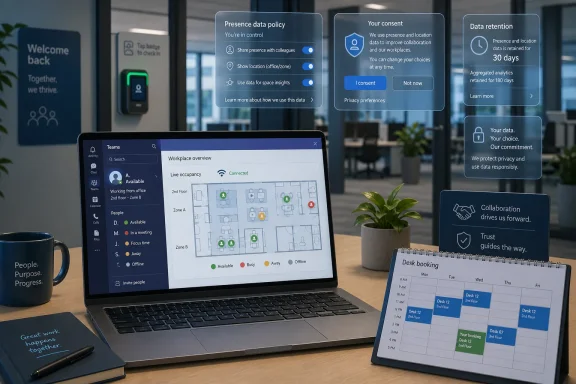 Microsoft Turns Presence Into a Physical Signal
For years, Teams presence was a soft indicator: available, busy, away, in a meeting, presenting. It was imperfect, sometimes misleading, and usually treated as an ambient hint rather than a personnel record. Wi-Fi-based location changes that bargain because it ties a collaboration status to a physical environment.Microsoft’s positioning is straightforward. If employees are hybrid, distributed across campuses, and booking shared desks, the software should help people find one another. A status that says “in office” is less useful than one that says which building or desk has actually been occupied, particularly in large organizations where the office is no longer a fixed daily destination.
That is the benign version of the story, and it is not imaginary. Hybrid work has made coordination harder. Desk booking, meeting-room release, ad hoc conversations, facilities planning, and emergency response all benefit from better location signals.
But the same signal that helps a teammate find you can also help a manager audit you. That is the tension Microsoft cannot resolve with product language alone. The feature may be off by default, and it may require user consent, but it still expands what Teams can represent: not just your digital availability, but your compliance with a physical workplace expectation.
The Opt-In Design Is a Concession, Not a Cure
Microsoft’s safeguards matter. According to Microsoft’s own documentation and Message Center descriptions, administrators must enable the capability, users must opt in, and location updates are tied to working hours. The system is also designed around corporate Wi-Fi and supported desk peripherals rather than arbitrary consumer tracking.Those are meaningful constraints, especially compared with the worst caricature of “Teams tracking everyone everywhere.” The feature is not a consumer GPS beacon, and it does not appear to be designed to follow workers through evenings, weekends, or personal spaces. For IT administrators, the difference between managed workplace context and free-roaming location surveillance is not semantic; it is operational.
Still, consent in the workplace is complicated. An employee can technically refuse a prompt while understanding that refusal may be noticed, questioned, or informally penalized. In a company where return-to-office compliance is already monitored through badge swipes, VPN logs, network authentication, and calendar patterns, a Teams opt-in box may feel less like a choice than an additional ritual of submission.
That is why the feature’s defaults do not settle the privacy debate. A disabled-by-default capability can still become functionally mandatory once procurement, HR, facilities, and management decide that the data is useful. Enterprise software often moves from optional to expected not through coercive pop-ups, but through policy templates, manager dashboards, and quarterly compliance goals.
The Office Has Become a Data Model
The deeper shift is that Microsoft is turning the workplace into a computable layer inside Microsoft 365. Microsoft Places, Teams, Exchange calendars, room systems, desk booking, Copilot, and identity controls are no longer separate utilities. They are becoming pieces of a single model of where people are, what they are doing, who they are doing it with, and whether the environment around them is being used efficiently.That makes sense from Microsoft’s perspective. The company sells the operating system of work, and work now includes physical-office orchestration. If companies pay for campuses, shared desks, conference rooms, collaboration zones, and hybrid schedules, Microsoft wants to be the software layer that makes those investments measurable.
The problem is that measurement changes behavior. Once a workplace knows which desks are occupied, which buildings are underused, and which employees are consistently visible on-site, that data acquires managerial gravity. Facilities teams may start with space optimization; executives may end with attendance enforcement.
WindowsForum readers will recognize the pattern from endpoint management. A tool introduced for one legitimate administrative purpose often becomes valuable for several adjacent purposes. Device inventory becomes compliance scoring; sign-in risk becomes productivity inference; Teams presence becomes attendance folklore. The data exhaust is rarely as narrow as the feature description.
Germany’s Browser-History Case Shows the Legal Fault Line
The AD HOC NEWS report usefully points back to a 2016 German labor case involving browser history on a company-issued computer. The Berlin-Brandenburg State Labour Court held that an employer could examine browser history without explicit employee consent when investigating suspected misconduct, after private internet use was found across roughly five workdays in a 30-day period. The court upheld the dismissal, though the broader legal terrain around employee monitoring remained contested.That case is not a perfect analogue for Teams location data. Browser history in a dismissal dispute is retrospective evidence tied to a specific allegation. Teams location status is an operational signal that can be generated routinely, normalized across an organization, and potentially used before any suspicion exists.
But the comparison is still instructive because it shows how European labor and privacy law often turns on proportionality, purpose, and necessity. Monitoring may be permitted in some circumstances, especially when employers have a legitimate interest and narrower methods are insufficient. Blanket monitoring, vague purposes, or disproportionate collection are another matter.
The Teams feature therefore sits in an awkward middle ground. Microsoft can argue that the product is designed for collaboration and workplace coordination. Employees and regulators can reasonably ask whether organizations will use the same data to infer performance, attendance, diligence, or loyalty.
Security Is the Strongest Argument and the Easiest One to Abuse
Corporate monitoring almost always finds its safest rhetorical harbor in security. That is not cynical by itself. Human behavior remains one of the central drivers of breaches, phishing continues to scale, and identity-based attacks have made the line between “employee activity” and “security telemetry” harder to draw.A modern CISO has legitimate reasons to care where a device is connecting from, whether a user is on a trusted network, whether an authentication event matches expected behavior, and whether unusual activity suggests credential compromise. If a user’s account appears active from an office Wi-Fi network and from another geography in an impossible time window, location context can help stop an attack.
But security language can launder broader surveillance ambitions. “We need to know where users are for risk detection” is not the same as “managers should know which desk an employee occupied at 9:17 a.m.” A zero-trust architecture can depend on context without turning that context into a workplace attendance feed.
This is where enterprises will need policy discipline. The proper question is not whether location data has any security value; it does. The question is whether every consumer of that data has a legitimate need for it. Security teams, facilities teams, HR, line managers, and executives should not automatically see the same thing.
AI Agents Make Monitoring Feel Less Like Monitoring
The AD HOC NEWS item also invokes Microsoft’s AI agent “Scout,” describing a workplace future in which agents monitor activity across Microsoft 365, prepare meetings, and identify security risks. The specific product naming around Microsoft’s agent strategy has shifted quickly, and Microsoft’s broader Copilot ecosystem now includes agents that can act across business data and workflows. The direction of travel is clear even when individual labels change.AI makes workplace monitoring more subtle because it turns raw telemetry into narrative. A log says a user joined Wi-Fi, opened a document, missed a meeting, or ignored a task. An agent can summarize patterns, flag anomalies, infer blockers, recommend follow-ups, and quietly turn scattered activity into a managerial story.
That may be useful. A good assistant can reduce administrative drag, highlight security issues, and help employees prepare for meetings they would otherwise enter cold. In a large company, an AI layer that understands work context could save time that humans currently waste stitching together calendars, chats, documents, and tickets.
Yet the same capability can produce a workplace where every action is legible to systems that employees cannot meaningfully interrogate. The danger is not just surveillance in the old sense of a boss watching a dashboard. It is interpretive surveillance, where software decides what ordinary behavior means before a human ever sees the evidence.
The Return-to-Office Fight Gives the Feature Its Political Charge
The Wi-Fi feature would be less controversial in a world where office attendance was settled. It is not. Many companies are still tightening hybrid policies, measuring badge data, and trying to reconcile expensive real estate with employees who have reorganized their lives around remote work.That context makes Teams location tracking feel combustible. A feature that might otherwise be sold as “find a colleague nearby” arrives while workers suspect that many collaboration tools are being repurposed into compliance instruments. Microsoft does not have to intend that outcome for customers to pursue it.
Return-to-office enforcement has already taught employees to read workplace technology defensively. Badge systems count entry. VPN logs reveal remote access patterns. Calendar data exposes meeting behavior. Endpoint tools show device health and sometimes activity. Teams location becomes one more signal in an already crowded evidentiary pile.
For administrators, this is a governance problem before it is a technical one. If an organization enables automatic location updates, it should tell employees exactly who can see the data, how long it is retained, whether managers can export it, whether it can be used in performance reviews, and whether refusal has consequences. Anything less invites suspicion, and suspicion is poisonous to adoption.
Europe’s Sovereignty Push Is No Longer Abstract
The AD HOC NEWS report ties the Teams location debate to a larger European turn toward digital sovereignty. Bavaria’s Digital Ministry reportedly wants a sovereign workplace option ready by the end of March 2027, explicitly reducing dependence on Microsoft-style ecosystems. European vendors such as Proton are trying to turn encryption, GDPR alignment, and jurisdictional distance from the US CLOUD Act into competitive differentiators.That is not just a procurement story. It is a political response to the feeling that productivity platforms have become strategic infrastructure. Email, documents, identity, meetings, chat, storage, endpoint management, AI assistants, and compliance tooling now sit inside a handful of ecosystems with enormous visibility into organizational life.
Microsoft’s defenders can fairly point out that European alternatives often struggle with feature parity, integration depth, migration cost, and user familiarity. Replacing Microsoft 365 is not like swapping a note-taking app. It touches identity, archives, legal hold, device management, security operations, accessibility, training, and countless line-of-business workflows.
But sovereignty projects do not need to win every customer to change the market. Their existence pressures Microsoft and other US vendors to offer clearer data boundaries, stronger administrative controls, more transparent retention policies, and region-specific assurances. The more Microsoft 365 becomes the nervous system of work, the more governments will ask whether they are comfortable outsourcing that nervous system.
Admins Will Inherit the Mess Microsoft Packages
For sysadmins and Microsoft 365 administrators, the immediate work is not ideological. It is configuration, communication, licensing, and policy. The feature’s success or failure inside an organization will depend less on Microsoft’s marketing and more on the tenant-level decisions made before users ever see a prompt.Admins will need to map Wi-Fi networks and desk peripherals accurately. They will need to understand which Teams clients and platforms support the feature, how it interacts with Microsoft Places, and what happens when users move between Wi-Fi and Ethernet or work from shared devices. They will also need to test edge cases, because location automation that is wrong will be worse than location automation that does not exist.
The harder task is access control. Who gets to see desk-level information? Is “nearby” visibility limited to colleagues, or can managers query patterns? Can data feed analytics products? Does deletion happen at the level employees expect, or do derived records persist elsewhere in audit, analytics, or compliance systems?
These are not paranoid questions. Microsoft 365 is built for integration. That is its strength, but also the reason a narrowly scoped feature can have a wider operational footprint than a casual user assumes.
The Privacy Problem Is Trust, Not Just Retention
Daily deletion sounds reassuring, and it may meaningfully reduce risk. Data that is not retained cannot be breached, subpoenaed, analyzed months later, or casually repurposed by a future manager. Short retention is one of the few privacy protections that changes the practical threat model.But retention is only one piece of trust. Employees also care about visibility, inference, pressure, and precedent. If a status is visible long enough for a manager to act on it, daily deletion does not eliminate its workplace consequences.
There is also the problem of normalization. Once workers accept that Teams can update location based on Wi-Fi, the next enhancement may feel smaller: finer-grained desk integration, richer occupancy analytics, agent-driven scheduling, or automatic nudges when a nearby colleague is available. Each step can be defensible; the cumulative effect can still be a workplace where opting out becomes socially and professionally difficult.
Privacy advocates are right to focus on slippery slopes, but the better phrase may be feature creep. Enterprise platforms do not usually leap from collaboration to surveillance in one villainous release. They accrete signals, permissions, dashboards, and “insights” until the distinction becomes harder to maintain.
The Practical Test Is Whether Workers Can Say No
Consent is credible only if refusal is survivable. That is the standard organizations should apply if they enable the Teams location feature. If employees can decline without explanation, without degraded access to core work tools, and without being marked as uncooperative, then opt-in has substance.If refusal generates management attention, the consent model collapses. A prompt can be technically voluntary and socially compulsory at the same time. That is especially true in organizations where hybrid work is already contested and office attendance is tied to promotion, performance scoring, or team belonging.
Microsoft can design a reasonable control plane, but customers decide the culture of use. A transparent employer can explain that location data supports desk booking, emergency response, and coworker discovery, while prohibiting attendance discipline based solely on Teams location. A less careful employer can leave the purpose vague and let managers draw their own conclusions.
The difference will not be visible in the product announcement. It will show up in employee handbooks, works council negotiations, data protection impact assessments, and the first disciplinary meeting where someone asks why Teams did not show a worker in the office.
The Real Security Fix Still Looks Boring
The security justification for workplace telemetry should not distract from the controls that actually reduce risk. Phishing, social engineering, credential theft, and misconfiguration remain stubbornly human-centered problems. More location awareness may help at the margins, but it will not save an organization that treats identity hygiene as optional.Multi-factor authentication, conditional access, least privilege, patching discipline, endpoint detection, phishing-resistant credentials, security awareness training, and incident response rehearsals are still the unglamorous core. AI-assisted monitoring may help defenders triage alerts, but it can also create a false sense of sophistication. A company that knows which desk Alice used but still allows legacy authentication has confused visibility with resilience.
This matters because surveillance-heavy security programs can backfire. Employees who feel watched but unsupported may become less likely to report mistakes quickly. A culture that treats every click as a potential disciplinary artifact can discourage the candor needed after a phishing incident.
The best security teams understand that users are not merely risk surfaces. They are also sensors, responders, and witnesses. Monitoring should make it easier for them to do the right thing, not make them feel like suspects in advance.
The Teams Location Rollout Has Already Told Us What to Watch
Microsoft’s June 2026 rollout should not be judged only by whether the feature technically works. It should be judged by how customers deploy it, how clearly Microsoft documents it, and whether employees retain meaningful agency once it enters production.- Microsoft Teams’ Wi-Fi location feature is best understood as part of Microsoft Places and the broader conversion of hybrid offices into managed, measurable environments.
- The feature’s disabled-by-default and opt-in design reduces the risk of silent deployment, but it does not eliminate workplace pressure or policy misuse.
- Desk and building awareness can support collaboration, booking, facilities management, and security, but the same signal can also support attendance enforcement.
- European legal and regulatory pressure will keep pushing vendors toward clearer purpose limits, shorter retention, and stronger administrative transparency.
- Organizations that enable the feature should publish plain-language rules before rollout, not after employees discover their location appearing in Teams.
- The security value of location context should complement, not replace, proven controls such as phishing-resistant authentication, conditional access, patching, and user training.
References
- Primary source: AD HOC NEWS
Published: Wed, 10 Jun 2026 09:03:56 GMT
Loading…
www.ad-hoc-news.de - Official source: learn.microsoft.com
Loading…
learn.microsoft.com - Official source: microsoft.com
Loading…
www.microsoft.com - Related coverage: windowscentral.com
Loading…
www.windowscentral.com - Related coverage: pcworld.com
Loading…
www.pcworld.com - Related coverage: makeuseof.com

Microsoft has changed a controversial Teams Wi-Fi location feature — but won't say why
Microsoft has seemingly updated a controversial feature to its Teams collaboration and messaging service, but won’t say what was updated or why. www.makeuseof.com
- Related coverage: techradar.com
Loading…
www.techradar.com - Official source: techcommunity.microsoft.com
Loading…
techcommunity.microsoft.com - Related coverage: nubis365.com
Loading…
nubis365.com - Related coverage: heise.de
Loading…
www.heise.de - Related coverage: pdf.hoganlovells.com
Loading…
pdf.hoganlovells.com