

Microsoft has begun inviting selected Windows Insiders in May 2026 to join a new Windows Insider Panel, a user-research program that connects participants with the Windows and Devices UX Research team through targeted studies about Windows usage, feedback habits, devices, and workflow needs. The move is not an admission of defeat, but it is an admission of something nearly as important: telemetry and Feedback Hub votes are not enough to repair Windows 11’s relationship with its most engaged users. Microsoft is now asking for the kind of qualitative, first-hand feedback that product teams usually seek when the numbers can identify pain but cannot explain it. For Windows 11, that distinction matters, because the operating system’s problem has never been only bugs; it has been trust.
The Windows Insider Panel arrives at an awkward but revealing moment for Microsoft. Windows 11 is no longer new, the Windows 10 end-of-support deadline has already forced millions of users and organizations to make hard choices, and the company has spent much of 2026 publicly emphasizing performance, reliability, quality, and polish. A research panel dedicated to user experience fits that pattern neatly.
It also suggests that Microsoft understands the limits of its existing feedback machinery. The Windows Insider Program has always produced bug reports, forum threads, telemetry, crash dumps, and highly opinionated feedback. But those channels are noisy by design. They tell Microsoft what breaks, what annoys people, and which complaints can sustain a Reddit pile-on, but they do not reliably explain how ordinary workflows actually feel.
That is the gap a research panel can fill. Asking users what devices they own, what work they do weekly, which Insider builds they run, and where they discuss Windows problems is not just demographic housekeeping. It is Microsoft trying to separate the gamer with a custom desktop from the developer living in WSL, the IT admin testing policy behavior, the creator juggling files and cloud storage, and the user who simply wants Start, Search, File Explorer, and Settings to stop getting in the way.
The important part is not that Microsoft is “listening,” a phrase every platform vendor deploys when sentiment turns sour. The important part is that Microsoft appears to be narrowing the feedback loop between people who use unfinished Windows builds and the research team responsible for understanding why some design decisions land badly. That is a different exercise from shipping a toggle and waiting for complaints.
Windows 11 can be beautiful in pieces. The Settings app is cleaner than the old Control Panel maze in many places. Snap layouts are genuinely useful. The taskbar and system tray have gradually recovered functionality that should not have been missing at launch. The problem is that these improvements coexist with legacy dialogs, duplicated settings, inconsistent context menus, web-powered surfaces, and design metaphors that appear to have been negotiated by separate committees.
That incoherence is what makes the operating system feel less polished than its competitors. macOS is not beloved because every Apple decision is correct; it is admired because the system usually appears to have been designed by people arguing inside the same room. Windows often feels like a federation of eras: Win32, UWP, WinUI, web wrappers, Control Panel remnants, Microsoft account prompts, Copilot surfaces, and legacy management tools all sharing the same desktop but not the same philosophy.
The Windows Insider Panel, if it is used seriously, can expose where that fragmentation matters most. Microsoft does not need another thousand people saying the Control Panel is old. It needs to know which legacy surfaces interrupt modern workflows, which modern replacements lack the density power users require, and which “simplifications” force admins and enthusiasts back into old tools anyway.
That opacity has damaged the credibility of Insider testing. Enthusiasts could install preview builds, file feedback, and still have little idea whether they were testing the same shell, Start menu, File Explorer, or Settings experience as the next person. Controlled rollouts are useful for risk management, but they also make community feedback harder to interpret. If the tester cannot tell what they are supposed to be testing, the feedback loop becomes guesswork.
A research panel gives Microsoft a way to ask better questions of better-defined groups. Instead of relying entirely on broad telemetry and public feedback, it can pull in a cohort of users who match a study’s needs. That might mean IT pros evaluating policy changes, developers testing window management and terminal workflows, accessibility users responding to navigation changes, or ordinary laptop users reacting to new Start menu layouts.
The danger, of course, is selection bias. Windows Insiders are not representative of the Windows install base. They are more technical, more patient with broken builds, more likely to have strong opinions, and more likely to notice when a context menu is a few pixels off. But for UX research, that is not necessarily a flaw. The best Insiders are early-warning systems. They identify the paper cuts that later become mainstream resentment.
That perception is corrosive. When File Explorer is slow, when Settings still fails to absorb every Control Panel function, when the Start menu remains less flexible than older versions, and when web-backed surfaces feel heavier than native components, users notice if the company’s most visible energy goes into AI branding. Even useful AI features can be greeted skeptically when the foundation underneath them feels neglected.
This is where UX research becomes politically important inside Microsoft. A research panel can produce evidence that is harder to dismiss than social media grumbling. If users in structured studies consistently say that Copilot entry points interrupt workflow, that AI affordances are unclear, or that new surfaces feel bolted onto the desktop rather than integrated with it, those findings can influence product prioritization in a way forum anger cannot.
Microsoft does not need to abandon AI in Windows. It needs to prove that AI is not being used as a substitute for craft. The Windows desktop is still a productivity environment first. If Copilot becomes another layer of inconsistency rather than a coherent assistant that respects context, policy, performance, and user intent, the backlash will not be about AI ideology. It will be about the same old Windows complaint: the machine got in the way.
The trouble is that modernization can create its own regressions. A new dialog that looks better but hides useful information is not progress for power users. A Settings page that replaces a Control Panel applet but removes advanced options simply relocates frustration. A redesigned Start menu that looks cleaner but still offers limited customization does not resolve the deeper complaint that Windows 11 often asks users to adapt to Microsoft’s preferred layout rather than the other way around.
This is where Microsoft must be careful. The goal should not be to make every corner of Windows look like the newest design system demo. The goal should be to make the system feel internally consistent while preserving the speed, density, and configurability that made Windows indispensable in the first place. Windows is not an appliance OS. It is the operating system people use when they need to support weird hardware, old software, corporate policy, gaming overlays, development stacks, and personal habits accumulated over decades.
That is why first-hand UX feedback matters. A designer can see that a properties dialog looks ancient. A user can explain that the old dialog, for all its age, exposed the exact information they needed without ceremony. The right answer may still be a modern replacement, but only if it respects why the old surface survived.
Microsoft has been testing new Start menu ideas, including category-style organization and alternative layouts. That is encouraging, but the bar is higher than “less bad.” The Start menu is not just an app launcher. It is a ritual, a navigation hub, a search surface, a recent-file gateway, and for many users the first signal of whether Windows feels like their PC or Microsoft’s PC.
The best version of Start would acknowledge that different users want different things from the same surface. Some want a sparse launcher. Some want dense pinned apps. Some want folders and categories. Some want documents, system tools, and settings in predictable places. Some want widgets or glanceable status. Some want the Windows 7 feeling not because they worship Aero, but because the menu felt functional, spatial, and dependable.
A UX panel can help Microsoft distinguish between aesthetic preference and workflow requirement. If users reject a Start menu variant because it looks unfamiliar, that is one kind of feedback. If they reject it because it slows task completion, buries common actions, or uses recommendation space badly, that is another. Windows 11 needs Microsoft to tell the difference.
Windows 11’s Widgets experience has struggled because it has often felt less like a native extension of the desktop and more like a web portal living beside it. When a surface is resource-heavy, sluggish, or filled with content that users did not explicitly ask for, it stops being useful context and starts being another feed. That is a fatal distinction in an operating system.
The broader industry is moving toward richer desktop surfaces again. Apple has normalized desktop widgets on macOS. Google’s rumored and reported desktop ambitions around Android-like and ChromeOS-like experiences suggest that glanceable, modular UI is not going away. Microsoft should be well positioned here; Windows has the developer base, the desktop real estate, and the history of gadgets, live tiles, and shell extensions.
But Microsoft has to learn from its own past. Live Tiles failed partly because they were tied to a platform strategy users and developers did not fully embrace. Widgets will fail if they are tied to engagement metrics rather than user utility. A native, fast, customizable widget system connected to real apps could make Windows feel alive again. A slow feed panel will only reinforce the sense that Microsoft keeps mistaking content distribution for user experience.
Windows 11’s UX issues are not merely cosmetic in managed environments. When settings move, help desk scripts break. When Control Panel features migrate unevenly, documentation fragments. When consumer-facing prompts appear in professional contexts, admins spend time suppressing them. When AI features arrive ahead of governance clarity, security teams have to evaluate data flows, compliance implications, and user confusion.
A serious research panel should therefore include more than enthusiasts who enjoy testing new builds on spare machines. It should include people who administer Windows at scale, accessibility specialists, educators, frontline workers, developers, and users with low tolerance for churn. The desktop is not one audience. A successful Windows UX strategy has to absorb conflicting requirements without turning every machine into a policy spreadsheet.
This is where Microsoft has an advantage if it chooses to use it. Apple can impose coherence because it controls the whole stack and serves a narrower set of deployment models. Microsoft has to preserve compatibility and choice across a much messier ecosystem. That makes Windows harder to polish, but it also means Microsoft has more real-world feedback available than almost any platform vendor on earth.
That may sound obvious, but Windows history is full of examples where Microsoft heard the complaint only after the market shouted. Windows 8’s touch-first strategy was not irrational in context; tablets were rising, the PC market was under pressure, and Microsoft wanted a modern app platform. The failure was not that Microsoft experimented. The failure was that it treated a desktop behavior change as something users would eventually accept because the strategy required it.
Windows 11 has not produced a Windows 8-scale revolt, but the frustration is more durable because it is distributed across hundreds of small interactions. A context menu takes an extra click. A taskbar option disappears and later returns. A web surface lags. A Settings page replaces an old tool but lacks one essential switch. A Copilot button appears where a user expected stability. None of these alone defines the OS. Together, they create an atmosphere.
A panel can help Microsoft detect that atmosphere before it hardens into reputation. But only if the company asks open-ended questions, studies workflows rather than isolated reactions, and resists the temptation to treat user research as validation for decisions already made. The panel should not be a theater of listening. It should be a mechanism for losing arguments internally before users lose patience externally.
That makes “Is this for Windows 12?” the least interesting question. The more important question is whether Microsoft is using Windows 11 as the foundation for a long UX repair cycle. If so, the panel is not a teaser for a future brand reveal. It is part of a recognition that the current product needs sustained design attention.
A new version number would not automatically solve Microsoft’s problem. Slapping “Windows 12” on a desktop with the same inconsistencies would only reset the marketing clock. Conversely, a steadily improved Windows 11 could rebuild trust without a dramatic relaunch if Microsoft fixes the surfaces people touch every day.
This is a difficult message for a company that likes moments: launches, keynotes, AI announcements, hardware showcases. UX recovery is not a moment. It is a grind. It is File Explorer opening faster, Settings behaving predictably, Start feeling personal, widgets becoming useful, updates respecting user intent, and every visible surface suggesting that someone at Microsoft cared about the last five percent.
That conflict explains many of Windows 11’s rough edges. The OS is asked to be a polished consumer product, a legacy compatibility layer, a cloud services gateway, a gaming platform, an enterprise endpoint, an AI client, and a developer workstation. No research panel can make those tensions disappear. It can only make them visible enough that bad compromises become harder to hide.
For Windows enthusiasts, the right response is cautious optimism. Microsoft asking better questions is better than Microsoft pretending the only problem is user resistance to change. But users should judge the program by shipped behavior: fewer half-modernized surfaces, fewer forced-feeling integrations, faster native components, clearer settings, more customization, and a desktop that stops surprising people for the wrong reasons.
That is the practical standard. If the panel produces another layer of surveys while the OS continues to prioritize engagement surfaces over workflow, it will become just another listening exercise. If it leads to measurable changes in Start, File Explorer, Settings, widgets, update controls, performance, and accessibility, it could become one of the more important Windows quality initiatives of the decade.
Source: Windows Latest Microsoft admits it needs feedback to fix Windows 11 UX, launches new research panel
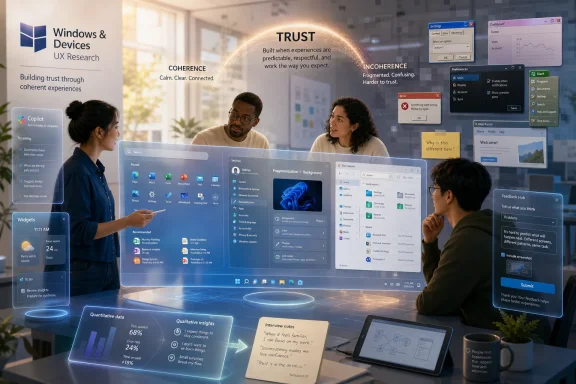 Microsoft Is Finally Treating Windows UX as a Research Problem
The Windows Insider Panel arrives at an awkward but revealing moment for Microsoft. Windows 11 is no longer new, the Windows 10 end-of-support deadline has already forced millions of users and organizations to make hard choices, and the company has spent much of 2026 publicly emphasizing performance, reliability, quality, and polish. A research panel dedicated to user experience fits that pattern neatly.It also suggests that Microsoft understands the limits of its existing feedback machinery. The Windows Insider Program has always produced bug reports, forum threads, telemetry, crash dumps, and highly opinionated feedback. But those channels are noisy by design. They tell Microsoft what breaks, what annoys people, and which complaints can sustain a Reddit pile-on, but they do not reliably explain how ordinary workflows actually feel.
That is the gap a research panel can fill. Asking users what devices they own, what work they do weekly, which Insider builds they run, and where they discuss Windows problems is not just demographic housekeeping. It is Microsoft trying to separate the gamer with a custom desktop from the developer living in WSL, the IT admin testing policy behavior, the creator juggling files and cloud storage, and the user who simply wants Start, Search, File Explorer, and Settings to stop getting in the way.
The important part is not that Microsoft is “listening,” a phrase every platform vendor deploys when sentiment turns sour. The important part is that Microsoft appears to be narrowing the feedback loop between people who use unfinished Windows builds and the research team responsible for understanding why some design decisions land badly. That is a different exercise from shipping a toggle and waiting for complaints.
Windows 11’s Problem Is Coherence, Not Just Nostalgia
It is tempting to frame every Windows UX debate as nostalgia: Windows XP had charm, Windows 7 had Aero, Windows 8 went too far, Windows 10 compromised, and Windows 11 sanded everything into rounded corners and centered icons. That version is emotionally satisfying and technically incomplete. Users are not angry merely because the past looked different; they are frustrated because the present often feels unfinished.Windows 11 can be beautiful in pieces. The Settings app is cleaner than the old Control Panel maze in many places. Snap layouts are genuinely useful. The taskbar and system tray have gradually recovered functionality that should not have been missing at launch. The problem is that these improvements coexist with legacy dialogs, duplicated settings, inconsistent context menus, web-powered surfaces, and design metaphors that appear to have been negotiated by separate committees.
That incoherence is what makes the operating system feel less polished than its competitors. macOS is not beloved because every Apple decision is correct; it is admired because the system usually appears to have been designed by people arguing inside the same room. Windows often feels like a federation of eras: Win32, UWP, WinUI, web wrappers, Control Panel remnants, Microsoft account prompts, Copilot surfaces, and legacy management tools all sharing the same desktop but not the same philosophy.
The Windows Insider Panel, if it is used seriously, can expose where that fragmentation matters most. Microsoft does not need another thousand people saying the Control Panel is old. It needs to know which legacy surfaces interrupt modern workflows, which modern replacements lack the density power users require, and which “simplifications” force admins and enthusiasts back into old tools anyway.
The Insider Program Needed a Human Layer
The timing is not accidental. Microsoft has recently reworked the Windows Insider Program around a more direct Experimental and Beta structure, with feature flags giving testers more explicit control over some early experiences. That restructuring is more than branding. It reflects a company trying to make preview testing less opaque after years of gradual rollouts, hidden A/B tests, and features that appeared for one user but not another on ostensibly similar builds.That opacity has damaged the credibility of Insider testing. Enthusiasts could install preview builds, file feedback, and still have little idea whether they were testing the same shell, Start menu, File Explorer, or Settings experience as the next person. Controlled rollouts are useful for risk management, but they also make community feedback harder to interpret. If the tester cannot tell what they are supposed to be testing, the feedback loop becomes guesswork.
A research panel gives Microsoft a way to ask better questions of better-defined groups. Instead of relying entirely on broad telemetry and public feedback, it can pull in a cohort of users who match a study’s needs. That might mean IT pros evaluating policy changes, developers testing window management and terminal workflows, accessibility users responding to navigation changes, or ordinary laptop users reacting to new Start menu layouts.
The danger, of course, is selection bias. Windows Insiders are not representative of the Windows install base. They are more technical, more patient with broken builds, more likely to have strong opinions, and more likely to notice when a context menu is a few pixels off. But for UX research, that is not necessarily a flaw. The best Insiders are early-warning systems. They identify the paper cuts that later become mainstream resentment.
Copilot Made the Trust Problem Harder to Ignore
No discussion of Windows 11 UX can avoid Copilot. Microsoft’s AI push has not merely added features to Windows; it has changed the perceived balance of the desktop. For many users, the operating system increasingly feels like a place where Microsoft inserts strategic priorities before it fixes long-standing annoyances.That perception is corrosive. When File Explorer is slow, when Settings still fails to absorb every Control Panel function, when the Start menu remains less flexible than older versions, and when web-backed surfaces feel heavier than native components, users notice if the company’s most visible energy goes into AI branding. Even useful AI features can be greeted skeptically when the foundation underneath them feels neglected.
This is where UX research becomes politically important inside Microsoft. A research panel can produce evidence that is harder to dismiss than social media grumbling. If users in structured studies consistently say that Copilot entry points interrupt workflow, that AI affordances are unclear, or that new surfaces feel bolted onto the desktop rather than integrated with it, those findings can influence product prioritization in a way forum anger cannot.
Microsoft does not need to abandon AI in Windows. It needs to prove that AI is not being used as a substitute for craft. The Windows desktop is still a productivity environment first. If Copilot becomes another layer of inconsistency rather than a coherent assistant that respects context, policy, performance, and user intent, the backlash will not be about AI ideology. It will be about the same old Windows complaint: the machine got in the way.
The Legacy Cleanup Is Necessary, but It Will Not Be Enough
Microsoft deserves some credit for continuing to replace old surfaces with modern ones. The company has been moving more Control Panel functionality into Settings, refreshing legacy dialogs, modernizing parts of File Explorer, and addressing small but visible inconsistencies across the shell. These are not glamorous changes, but they are precisely the sort of work Windows 11 needs.The trouble is that modernization can create its own regressions. A new dialog that looks better but hides useful information is not progress for power users. A Settings page that replaces a Control Panel applet but removes advanced options simply relocates frustration. A redesigned Start menu that looks cleaner but still offers limited customization does not resolve the deeper complaint that Windows 11 often asks users to adapt to Microsoft’s preferred layout rather than the other way around.
This is where Microsoft must be careful. The goal should not be to make every corner of Windows look like the newest design system demo. The goal should be to make the system feel internally consistent while preserving the speed, density, and configurability that made Windows indispensable in the first place. Windows is not an appliance OS. It is the operating system people use when they need to support weird hardware, old software, corporate policy, gaming overlays, development stacks, and personal habits accumulated over decades.
That is why first-hand UX feedback matters. A designer can see that a properties dialog looks ancient. A user can explain that the old dialog, for all its age, exposed the exact information they needed without ceremony. The right answer may still be a modern replacement, but only if it respects why the old surface survived.
Start Menu Experiments Reveal the Real Battle
The Start menu remains the emotional center of Windows UX because it is where Microsoft’s vision collides most directly with user muscle memory. Windows 11’s centered, simplified Start menu was meant to feel calmer and more modern. To many users, it instead felt like a reduction: fewer layout options, less information density, weaker personalization, and a strange dependence on recommendations that did not always feel relevant.Microsoft has been testing new Start menu ideas, including category-style organization and alternative layouts. That is encouraging, but the bar is higher than “less bad.” The Start menu is not just an app launcher. It is a ritual, a navigation hub, a search surface, a recent-file gateway, and for many users the first signal of whether Windows feels like their PC or Microsoft’s PC.
The best version of Start would acknowledge that different users want different things from the same surface. Some want a sparse launcher. Some want dense pinned apps. Some want folders and categories. Some want documents, system tools, and settings in predictable places. Some want widgets or glanceable status. Some want the Windows 7 feeling not because they worship Aero, but because the menu felt functional, spatial, and dependable.
A UX panel can help Microsoft distinguish between aesthetic preference and workflow requirement. If users reject a Start menu variant because it looks unfamiliar, that is one kind of feedback. If they reject it because it slows task completion, buries common actions, or uses recommendation space badly, that is another. Windows 11 needs Microsoft to tell the difference.
Widgets Are a Warning From the Future
Widgets should have been one of Windows 11’s easy wins. The idea is sound: glanceable information, ambient updates, calendar context, weather, tasks, news, device status, and app snippets that reduce the need to open full applications. Desktop users do not reject glanceable information. They reject implementations that feel slow, noisy, irrelevant, or commercially contaminated.Windows 11’s Widgets experience has struggled because it has often felt less like a native extension of the desktop and more like a web portal living beside it. When a surface is resource-heavy, sluggish, or filled with content that users did not explicitly ask for, it stops being useful context and starts being another feed. That is a fatal distinction in an operating system.
The broader industry is moving toward richer desktop surfaces again. Apple has normalized desktop widgets on macOS. Google’s rumored and reported desktop ambitions around Android-like and ChromeOS-like experiences suggest that glanceable, modular UI is not going away. Microsoft should be well positioned here; Windows has the developer base, the desktop real estate, and the history of gadgets, live tiles, and shell extensions.
But Microsoft has to learn from its own past. Live Tiles failed partly because they were tied to a platform strategy users and developers did not fully embrace. Widgets will fail if they are tied to engagement metrics rather than user utility. A native, fast, customizable widget system connected to real apps could make Windows feel alive again. A slow feed panel will only reinforce the sense that Microsoft keeps mistaking content distribution for user experience.
Enterprise IT Will Judge the Panel by Outcomes, Not Intentions
For sysadmins and IT departments, the Windows Insider Panel is interesting but not inherently reassuring. Enterprise users have heard every version of “we value your feedback.” What matters is whether the feedback changes defaults, policy controls, deployment predictability, performance, and support burden.Windows 11’s UX issues are not merely cosmetic in managed environments. When settings move, help desk scripts break. When Control Panel features migrate unevenly, documentation fragments. When consumer-facing prompts appear in professional contexts, admins spend time suppressing them. When AI features arrive ahead of governance clarity, security teams have to evaluate data flows, compliance implications, and user confusion.
A serious research panel should therefore include more than enthusiasts who enjoy testing new builds on spare machines. It should include people who administer Windows at scale, accessibility specialists, educators, frontline workers, developers, and users with low tolerance for churn. The desktop is not one audience. A successful Windows UX strategy has to absorb conflicting requirements without turning every machine into a policy spreadsheet.
This is where Microsoft has an advantage if it chooses to use it. Apple can impose coherence because it controls the whole stack and serves a narrower set of deployment models. Microsoft has to preserve compatibility and choice across a much messier ecosystem. That makes Windows harder to polish, but it also means Microsoft has more real-world feedback available than almost any platform vendor on earth.
The New Panel Only Works if Microsoft Is Willing to Be Told No
The hardest part of user research is not collecting responses. It is accepting answers that contradict the product roadmap. Microsoft can run studies, recruit panels, segment users, and produce immaculate slide decks, but the value depends on whether Windows leadership is willing to change course when the evidence says a cherished idea does not work.That may sound obvious, but Windows history is full of examples where Microsoft heard the complaint only after the market shouted. Windows 8’s touch-first strategy was not irrational in context; tablets were rising, the PC market was under pressure, and Microsoft wanted a modern app platform. The failure was not that Microsoft experimented. The failure was that it treated a desktop behavior change as something users would eventually accept because the strategy required it.
Windows 11 has not produced a Windows 8-scale revolt, but the frustration is more durable because it is distributed across hundreds of small interactions. A context menu takes an extra click. A taskbar option disappears and later returns. A web surface lags. A Settings page replaces an old tool but lacks one essential switch. A Copilot button appears where a user expected stability. None of these alone defines the OS. Together, they create an atmosphere.
A panel can help Microsoft detect that atmosphere before it hardens into reputation. But only if the company asks open-ended questions, studies workflows rather than isolated reactions, and resists the temptation to treat user research as validation for decisions already made. The panel should not be a theater of listening. It should be a mechanism for losing arguments internally before users lose patience externally.
Windows 12 Rumors Miss the Point
The invitation reportedly refers to the future of Windows, not explicitly to Windows 12, and that distinction matters. The industry loves a clean version-number narrative because it makes product strategy look like a movie franchise. Windows itself no longer works that way. Microsoft has spent years turning the OS into a continuously serviced platform, where major changes can arrive through feature updates, app updates, experience packs, controlled rollouts, and cloud-connected components.That makes “Is this for Windows 12?” the least interesting question. The more important question is whether Microsoft is using Windows 11 as the foundation for a long UX repair cycle. If so, the panel is not a teaser for a future brand reveal. It is part of a recognition that the current product needs sustained design attention.
A new version number would not automatically solve Microsoft’s problem. Slapping “Windows 12” on a desktop with the same inconsistencies would only reset the marketing clock. Conversely, a steadily improved Windows 11 could rebuild trust without a dramatic relaunch if Microsoft fixes the surfaces people touch every day.
This is a difficult message for a company that likes moments: launches, keynotes, AI announcements, hardware showcases. UX recovery is not a moment. It is a grind. It is File Explorer opening faster, Settings behaving predictably, Start feeling personal, widgets becoming useful, updates respecting user intent, and every visible surface suggesting that someone at Microsoft cared about the last five percent.
The Real Test Is Whether Feedback Survives the Product Machine
The Windows Insider Panel is a promising idea because it creates a more direct bridge between selected users and the people studying Windows experience. But the bridge still leads into Microsoft, a company with competing incentives. Windows has to serve consumers, OEMs, enterprises, developers, advertisers, regulators, security teams, AI strategists, and internal platform ambitions.That conflict explains many of Windows 11’s rough edges. The OS is asked to be a polished consumer product, a legacy compatibility layer, a cloud services gateway, a gaming platform, an enterprise endpoint, an AI client, and a developer workstation. No research panel can make those tensions disappear. It can only make them visible enough that bad compromises become harder to hide.
For Windows enthusiasts, the right response is cautious optimism. Microsoft asking better questions is better than Microsoft pretending the only problem is user resistance to change. But users should judge the program by shipped behavior: fewer half-modernized surfaces, fewer forced-feeling integrations, faster native components, clearer settings, more customization, and a desktop that stops surprising people for the wrong reasons.
That is the practical standard. If the panel produces another layer of surveys while the OS continues to prioritize engagement surfaces over workflow, it will become just another listening exercise. If it leads to measurable changes in Start, File Explorer, Settings, widgets, update controls, performance, and accessibility, it could become one of the more important Windows quality initiatives of the decade.
The Windows 11 Repair Job Now Has a User Panel Attached
Microsoft’s new panel matters less as a standalone program than as a signal of where the Windows team thinks the next fight is. The company has already spent 2026 talking more openly about quality, performance, and feedback. A UX research panel adds a human layer to that campaign.- Microsoft is recruiting selected Windows Insiders into a Windows and Devices UX Research panel rather than relying only on public feedback and telemetry.
- The survey’s focus on devices, work patterns, Insider engagement, and feedback venues suggests Microsoft wants to segment Windows users by real workflows.
- The Insider Program’s shift toward Experimental and Beta channels gives Microsoft a cleaner testing structure for pairing feature experiments with targeted research.
- Windows 11’s central UX challenge is coherence across old and new surfaces, not merely whether individual components look modern.
- Copilot, widgets, Start, Settings, File Explorer, and legacy dialog replacement will be the areas where users can most clearly judge whether Microsoft is listening.
- The panel will matter only if Microsoft lets negative research findings change product decisions before they become public backlash.
Source: Windows Latest Microsoft admits it needs feedback to fix Windows 11 UX, launches new research panel
