

Microsoft has launched a dedicated Survey Designer role for Viva Glint in worldwide standard Microsoft 365 tenants, giving selected users permission to create and run employee surveys on the web without granting them full administrative control or broad access to sensitive platform data. The feature, listed as Microsoft 365 Roadmap ID 548640, reached general availability in March 2026 and was marked launched, with Microsoft updating the roadmap entry on July 6, 2026. The change looks small in the admin console, but it is a meaningful shift in how Microsoft wants organizations to operationalize employee listening. Viva Glint is moving from an HR-owned survey vault toward a governed platform for distributed measurement.
The Survey Designer role is, on its face, an access-control update. Microsoft describes it as a way to let organizations run additional listening programs, including AI transformation and change management surveys, without handing users full platform settings or unnecessary sensitive data. That phrasing matters because Viva Glint sits at the intersection of workforce analytics, employee sentiment, and managerial accountability — three categories where casual permissions can create real privacy and trust problems.
Until now, many organizations have treated employee survey platforms as tools that require tight central ownership. HR, people analytics, or a small administrator group designed the survey, launched the survey, governed the reporting cuts, and controlled access to comments and dashboards. That model protected confidentiality, but it also made every new listening program compete for space on a central team’s calendar.
Microsoft’s answer is not to remove the gate. It is to make the gate narrower. The new role gives organizations a preconfigured way to let business units, transformation offices, or program teams build and administer surveys they own, while keeping broader configuration and sensitive data access out of reach by default.
That is the right architectural instinct. In Microsoft 365, the hardest governance problem is rarely whether a feature exists. It is whether the tenant can delegate use of that feature without creating a shadow administrator class.
Microsoft’s own examples for the Survey Designer role are telling. AI transformation and change management are not narrow HR survey categories. They are enterprise operating concerns, typically owned by IT, transformation offices, communications teams, business-line leaders, and HR together.
That reflects the post-Copilot reality. As organizations deploy generative AI, consolidate applications, restructure processes, or push new workplace policies, leaders want near-real-time feedback on adoption and friction. A quarterly engagement survey is too broad and too slow to answer whether employees understand a Copilot rollout, trust an automation initiative, or feel prepared for a major organizational change.
Viva Glint already supports multiple survey program types and templates, including engagement, onboarding, exit, and special-topic programs. Microsoft Learn also lists a Microsoft Copilot Impact Survey template, explicitly aimed at measuring Copilot’s impact and helping business leaders plan AI adoption and assess return on investment. In that context, the Survey Designer role is less a minor permission preset than a product signal: Microsoft expects more teams to run more surveys, more often.
That expansion creates a governance dilemma. If every program requires a full Glint admin, the platform bottlenecks. If every eager program manager gets admin-level access, the platform becomes a confidentiality risk. The Survey Designer role is Microsoft’s attempt to split that difference.
That last sentence is doing a lot of work. Microsoft is not simply creating a “survey creator” button and hoping customers manage the fallout. The role starts empty of automatic membership and broad reporting filters, which means organizations still need to decide who receives the role and what data cuts they can use.
In Microsoft’s role model, permissions govern what features a user can operate, while data access determines which populations and results that user can see. Attributes then determine which fields users can filter by in reports, sections, and comments. That separation is crucial in employee listening because the risk is not merely that someone can launch a survey. The risk is that someone can slice results finely enough to infer who said what.
The Survey Designer role is therefore a practical example of least privilege applied to HR analytics. A change manager can run a survey about an ERP migration. A Copilot adoption lead can launch a pulse survey about training gaps. A regional HR business partner can design a targeted listening program. None of those users automatically needs the power to alter service-wide settings, manage every role, or roam through every employee population.
For admins, this is a familiar Microsoft 365 story. The platform keeps adding specialized roles because global administrator-style delegation does not scale. The difference here is that the data is not mailbox routing, device compliance, or Teams policy. It is employee sentiment, manager trust, and potentially sensitive workplace commentary.
That design is common in enterprise software, but it is easy to misunderstand. A user who is a Survey Designer and also has another reporting role may end up with more access than either assignment implies in isolation. Microsoft specifically cautions customers to review combined access where comment visibility and sensitive attributes are involved.
This is where IT and HR governance must meet. HR teams tend to think in terms of confidentiality thresholds, reporting audiences, and trust promises made to employees. IT teams tend to think in terms of role membership, identity lifecycle, and access review. Viva Glint now needs both disciplines, because the product is becoming more widely delegated.
Microsoft also advises caution around report attributes. The documentation notes that giving managers access to more than one filterable attribute can increase the chance that they can deduce the origin of individual survey responses. That warning should not be dismissed as boilerplate. In small departments, narrow locations, or specialized job families, filtering by multiple attributes can turn “anonymous” feedback into a guessing game.
The Survey Designer role reduces one category of over-permissioning, but it does not remove the need for access review. Organizations should treat the role like any other privileged business application role: assigned deliberately, reviewed periodically, and tested for effective access rather than assumed access.
That aligns with Microsoft’s broader Viva strategy. Viva has always been an ambitious bundle: communications, communities, insights, learning, goals, feedback, and engagement under one employee experience banner. Some modules have had a clearer trajectory than others, and Microsoft’s Viva portfolio has seen its share of repositioning. But Glint remains one of the pieces with obvious enterprise gravity because employee feedback is both politically important and operationally useful.
The Survey Designer role makes sense precisely because Microsoft wants Viva Glint to sit closer to business transformation. If a company is rolling out Copilot, redesigning hybrid work expectations, integrating an acquisition, or changing frontline processes, it needs feedback loops that are faster than an annual survey and more structured than a Teams chat thread.
At the same time, democratization is a loaded word in analytics. More creators can mean more responsiveness, but it can also mean duplicate surveys, inconsistent question wording, uneven privacy standards, and employee fatigue. Microsoft’s role design helps with permissions, but it cannot by itself create a listening strategy.
That is the governance gap customers will need to fill. The tool can decide who may design a survey. The organization must decide who should.
A mature deployment should define which teams can request Survey Designer access, what training they must complete, what survey templates they may use, and what review is required before launch. That does not have to mean restoring the old bottleneck. It means creating a lightweight governance path so distributed survey creation does not become a free-for-all.
The role also invites a licensing and ownership conversation. Viva Glint requires proper tenant setup, user access, and integration with Microsoft Entra ID. Organizations that already run Glint likely have these foundations in place, but expanding survey design beyond the HR core means more users will need to understand where Glint sits in the Microsoft 365 identity and permissions model.
There is also a data lifecycle issue. If more teams can run surveys, more teams will generate results, comments, action plans, and follow-up obligations. Employee listening is not just collection; it is a promise that someone will read, interpret, and act. Nothing burns trust faster than asking employees for feedback during every transformation wave and then visibly doing nothing with it.
That is where Microsoft’s product story and organizational reality diverge. Viva Glint can make survey creation easier. It cannot make leaders accountable for the answers.
Employees can tell the difference between a thoughtful listening program and a reflexive pulse survey. They will tolerate repeated surveys if the surveys are short, relevant, well-timed, and followed by visible action. They will tune out quickly if every program office discovers Glint and starts asking for sentiment data to decorate a dashboard.
The danger is especially acute around AI transformation. Every organization wants to know whether employees are using AI tools, whether they trust them, and whether training investments are working. But AI adoption surveys can easily become performative if employees suspect the real purpose is to measure compliance with leadership’s preferred narrative.
A well-governed Survey Designer program should therefore include editorial discipline. Who is the audience? What decision will the results inform? What will be communicated back to employees? What data cuts are necessary, and which ones are merely interesting? Those questions matter as much as the permission checkbox.
The best use of the new role is not to let everyone survey everything. It is to let the right people survey the right populations with enough independence to move quickly and enough guardrails to preserve trust.
The first control is role membership. Because Survey Designer is not automatically granted, customers have a clean starting point. Assign it through a documented request process, avoid permanent access where temporary access will do, and remove users when a program ends.
The second control is effective access. Microsoft’s cumulative-role model means administrators should not review the Survey Designer role in isolation. They should inspect the full set of Viva Glint roles assigned to each user, especially if the user also has manager, HR, analyst, support, or custom reporting access.
The third control is attributes. Report filters, report sections, and comment filters can all affect confidentiality. A survey designer who can filter by department, location, tenure, job family, and manager may not need direct identifiers to infer identities in small groups.
The fourth control is change management. If organizations modify the predefined Survey Designer role, they should document the deviation from Microsoft’s baseline. Microsoft Learn shows that service admins can modify predefined roles, including adding permissions such as sensitive comment management and choosing report attributes. That flexibility is useful, but it also means the role name alone is not enough to understand the risk.
Microsoft is acknowledging that employee listening has escaped the annual survey cycle. Companies want feedback around AI adoption, restructuring, onboarding, hybrid work, leadership changes, security culture, and process transformation. They want that feedback quickly, but they cannot afford to treat every program owner as a full Glint administrator.
The role also reflects a broader Microsoft 365 pattern: specialized administration is replacing broad trust. Exchange, Teams, Intune, Purview, SharePoint, and Entra all pushed customers away from all-powerful admins toward scoped roles and policy-bound delegation. Viva Glint is now getting a version of that treatment for employee experience data.
That is good news for organizations that found Glint too centralized for modern transformation work. It is also a warning that Viva governance can no longer live entirely inside HR. Once business units and IT-led adoption teams begin designing surveys, Glint becomes part of the enterprise collaboration estate, with the same need for access review, lifecycle management, and policy clarity as any other Microsoft 365 workload.
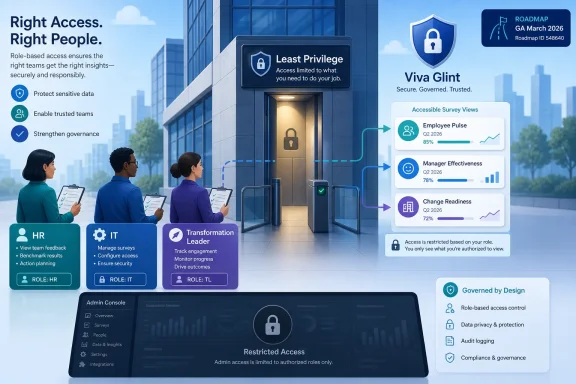 Microsoft Gives Employee Listening a Least-Privilege Doorway
The Survey Designer role is, on its face, an access-control update. Microsoft describes it as a way to let organizations run additional listening programs, including AI transformation and change management surveys, without handing users full platform settings or unnecessary sensitive data. That phrasing matters because Viva Glint sits at the intersection of workforce analytics, employee sentiment, and managerial accountability — three categories where casual permissions can create real privacy and trust problems.Until now, many organizations have treated employee survey platforms as tools that require tight central ownership. HR, people analytics, or a small administrator group designed the survey, launched the survey, governed the reporting cuts, and controlled access to comments and dashboards. That model protected confidentiality, but it also made every new listening program compete for space on a central team’s calendar.
Microsoft’s answer is not to remove the gate. It is to make the gate narrower. The new role gives organizations a preconfigured way to let business units, transformation offices, or program teams build and administer surveys they own, while keeping broader configuration and sensitive data access out of reach by default.
That is the right architectural instinct. In Microsoft 365, the hardest governance problem is rarely whether a feature exists. It is whether the tenant can delegate use of that feature without creating a shadow administrator class.
Viva Glint Is Becoming an Operating Layer, Not Just an HR Survey Tool
Viva Glint arrived in Microsoft’s portfolio as the employee engagement engine inside the broader Viva suite, positioned around organization-wide surveys, engagement insights, recommended actions, and manager-facing reporting. Microsoft Learn describes Viva Glint as a “voice of the employee” app that helps organizations understand engagement through surveys, benchmarks, action plans, and people-science-backed guidance. That is classic HR technology language, but the use cases are quickly spreading beyond annual engagement.Microsoft’s own examples for the Survey Designer role are telling. AI transformation and change management are not narrow HR survey categories. They are enterprise operating concerns, typically owned by IT, transformation offices, communications teams, business-line leaders, and HR together.
That reflects the post-Copilot reality. As organizations deploy generative AI, consolidate applications, restructure processes, or push new workplace policies, leaders want near-real-time feedback on adoption and friction. A quarterly engagement survey is too broad and too slow to answer whether employees understand a Copilot rollout, trust an automation initiative, or feel prepared for a major organizational change.
Viva Glint already supports multiple survey program types and templates, including engagement, onboarding, exit, and special-topic programs. Microsoft Learn also lists a Microsoft Copilot Impact Survey template, explicitly aimed at measuring Copilot’s impact and helping business leaders plan AI adoption and assess return on investment. In that context, the Survey Designer role is less a minor permission preset than a product signal: Microsoft expects more teams to run more surveys, more often.
That expansion creates a governance dilemma. If every program requires a full Glint admin, the platform bottlenecks. If every eager program manager gets admin-level access, the platform becomes a confidentiality risk. The Survey Designer role is Microsoft’s attempt to split that difference.
The New Role Solves a Real Delegation Problem
Microsoft Learn now lists Survey Designers as a preconfigured Viva Glint user role. The role is described as giving employees just enough permissions to create surveys and view results for surveys they have created. It is not automatically granted to any employee, and attribute filters are not defined by default.That last sentence is doing a lot of work. Microsoft is not simply creating a “survey creator” button and hoping customers manage the fallout. The role starts empty of automatic membership and broad reporting filters, which means organizations still need to decide who receives the role and what data cuts they can use.
In Microsoft’s role model, permissions govern what features a user can operate, while data access determines which populations and results that user can see. Attributes then determine which fields users can filter by in reports, sections, and comments. That separation is crucial in employee listening because the risk is not merely that someone can launch a survey. The risk is that someone can slice results finely enough to infer who said what.
The Survey Designer role is therefore a practical example of least privilege applied to HR analytics. A change manager can run a survey about an ERP migration. A Copilot adoption lead can launch a pulse survey about training gaps. A regional HR business partner can design a targeted listening program. None of those users automatically needs the power to alter service-wide settings, manage every role, or roam through every employee population.
For admins, this is a familiar Microsoft 365 story. The platform keeps adding specialized roles because global administrator-style delegation does not scale. The difference here is that the data is not mailbox routing, device compliance, or Teams policy. It is employee sentiment, manager trust, and potentially sensitive workplace commentary.
The Privacy Story Depends on How Tenants Actually Configure It
The Survey Designer role is safer than broad admin access, but it is not magic. Microsoft’s own Viva Glint documentation warns that role access is cumulative: when a user is assigned multiple roles, Viva Glint combines the permissions and data access across all assigned roles. In plain English, the effective access is the union of the roles, not the overlap.That design is common in enterprise software, but it is easy to misunderstand. A user who is a Survey Designer and also has another reporting role may end up with more access than either assignment implies in isolation. Microsoft specifically cautions customers to review combined access where comment visibility and sensitive attributes are involved.
This is where IT and HR governance must meet. HR teams tend to think in terms of confidentiality thresholds, reporting audiences, and trust promises made to employees. IT teams tend to think in terms of role membership, identity lifecycle, and access review. Viva Glint now needs both disciplines, because the product is becoming more widely delegated.
Microsoft also advises caution around report attributes. The documentation notes that giving managers access to more than one filterable attribute can increase the chance that they can deduce the origin of individual survey responses. That warning should not be dismissed as boilerplate. In small departments, narrow locations, or specialized job families, filtering by multiple attributes can turn “anonymous” feedback into a guessing game.
The Survey Designer role reduces one category of over-permissioning, but it does not remove the need for access review. Organizations should treat the role like any other privileged business application role: assigned deliberately, reviewed periodically, and tested for effective access rather than assumed access.
Microsoft Is Nudging Viva Toward Distributed Governance
The most interesting thing about this roadmap item is not that Microsoft added another role. It is that Microsoft is making a specific bet about how employee experience software will be used. Viva Glint is not being framed only as the place where HR runs a canonical engagement survey. It is becoming a governed listening fabric for multiple enterprise programs.That aligns with Microsoft’s broader Viva strategy. Viva has always been an ambitious bundle: communications, communities, insights, learning, goals, feedback, and engagement under one employee experience banner. Some modules have had a clearer trajectory than others, and Microsoft’s Viva portfolio has seen its share of repositioning. But Glint remains one of the pieces with obvious enterprise gravity because employee feedback is both politically important and operationally useful.
The Survey Designer role makes sense precisely because Microsoft wants Viva Glint to sit closer to business transformation. If a company is rolling out Copilot, redesigning hybrid work expectations, integrating an acquisition, or changing frontline processes, it needs feedback loops that are faster than an annual survey and more structured than a Teams chat thread.
At the same time, democratization is a loaded word in analytics. More creators can mean more responsiveness, but it can also mean duplicate surveys, inconsistent question wording, uneven privacy standards, and employee fatigue. Microsoft’s role design helps with permissions, but it cannot by itself create a listening strategy.
That is the governance gap customers will need to fill. The tool can decide who may design a survey. The organization must decide who should.
The Admin Console Gets Quieter, but the Policy Work Gets Louder
For Microsoft 365 administrators, the immediate action is straightforward: know that the Survey Designer role exists, know that it is preconfigured, and know that it is not automatically assigned. The more important work is mapping the role to internal operating procedures.A mature deployment should define which teams can request Survey Designer access, what training they must complete, what survey templates they may use, and what review is required before launch. That does not have to mean restoring the old bottleneck. It means creating a lightweight governance path so distributed survey creation does not become a free-for-all.
The role also invites a licensing and ownership conversation. Viva Glint requires proper tenant setup, user access, and integration with Microsoft Entra ID. Organizations that already run Glint likely have these foundations in place, but expanding survey design beyond the HR core means more users will need to understand where Glint sits in the Microsoft 365 identity and permissions model.
There is also a data lifecycle issue. If more teams can run surveys, more teams will generate results, comments, action plans, and follow-up obligations. Employee listening is not just collection; it is a promise that someone will read, interpret, and act. Nothing burns trust faster than asking employees for feedback during every transformation wave and then visibly doing nothing with it.
That is where Microsoft’s product story and organizational reality diverge. Viva Glint can make survey creation easier. It cannot make leaders accountable for the answers.
Survey Fatigue Is the Shadow Side of Democratization
Microsoft’s own Viva Glint guidance warns customers to consider survey fatigue, leader fatigue, and HR fatigue when designing listening programs. That warning becomes more urgent when survey creation is delegated. The Survey Designer role lowers the operational cost of launching a survey, and when the cost of asking drops, the volume of asks tends to rise.Employees can tell the difference between a thoughtful listening program and a reflexive pulse survey. They will tolerate repeated surveys if the surveys are short, relevant, well-timed, and followed by visible action. They will tune out quickly if every program office discovers Glint and starts asking for sentiment data to decorate a dashboard.
The danger is especially acute around AI transformation. Every organization wants to know whether employees are using AI tools, whether they trust them, and whether training investments are working. But AI adoption surveys can easily become performative if employees suspect the real purpose is to measure compliance with leadership’s preferred narrative.
A well-governed Survey Designer program should therefore include editorial discipline. Who is the audience? What decision will the results inform? What will be communicated back to employees? What data cuts are necessary, and which ones are merely interesting? Those questions matter as much as the permission checkbox.
The best use of the new role is not to let everyone survey everything. It is to let the right people survey the right populations with enough independence to move quickly and enough guardrails to preserve trust.
Where Security-Minded Administrators Should Look First
The Survey Designer role belongs on the same access-review calendar as other sensitive business roles. It may not be a global admin role, but it touches data that can be reputationally and culturally sensitive. A leaked mailbox is a security incident. A mishandled employee sentiment dataset can become an HR crisis.The first control is role membership. Because Survey Designer is not automatically granted, customers have a clean starting point. Assign it through a documented request process, avoid permanent access where temporary access will do, and remove users when a program ends.
The second control is effective access. Microsoft’s cumulative-role model means administrators should not review the Survey Designer role in isolation. They should inspect the full set of Viva Glint roles assigned to each user, especially if the user also has manager, HR, analyst, support, or custom reporting access.
The third control is attributes. Report filters, report sections, and comment filters can all affect confidentiality. A survey designer who can filter by department, location, tenure, job family, and manager may not need direct identifiers to infer identities in small groups.
The fourth control is change management. If organizations modify the predefined Survey Designer role, they should document the deviation from Microsoft’s baseline. Microsoft Learn shows that service admins can modify predefined roles, including adding permissions such as sensitive comment management and choosing report attributes. That flexibility is useful, but it also means the role name alone is not enough to understand the risk.
A Small Roadmap Item With a Big Organizational Subtext
The Microsoft 365 roadmap entry for ID 548640 is short: a dedicated Viva Glint Survey Designer role, launched for worldwide standard multi-tenant customers, available on the web, generally available as of March 2026. If you read it as a release note, it is another permissions update in a sea of Microsoft 365 changes. If you read it as a product signal, it says more.Microsoft is acknowledging that employee listening has escaped the annual survey cycle. Companies want feedback around AI adoption, restructuring, onboarding, hybrid work, leadership changes, security culture, and process transformation. They want that feedback quickly, but they cannot afford to treat every program owner as a full Glint administrator.
The role also reflects a broader Microsoft 365 pattern: specialized administration is replacing broad trust. Exchange, Teams, Intune, Purview, SharePoint, and Entra all pushed customers away from all-powerful admins toward scoped roles and policy-bound delegation. Viva Glint is now getting a version of that treatment for employee experience data.
That is good news for organizations that found Glint too centralized for modern transformation work. It is also a warning that Viva governance can no longer live entirely inside HR. Once business units and IT-led adoption teams begin designing surveys, Glint becomes part of the enterprise collaboration estate, with the same need for access review, lifecycle management, and policy clarity as any other Microsoft 365 workload.
The Glint Role Admins Should Treat as a Permission Change and a Culture Change
The practical reading is simple: the Survey Designer role gives Microsoft 365 and Viva Glint customers a safer way to distribute survey creation, but it only works if organizations pair the role with clear policy. Treat it as both a technical control and a cultural contract.- The Survey Designer role is now launched for Viva Glint in worldwide standard Microsoft 365 tenants and is tied to Roadmap ID 548640.
- The role is designed to let users create surveys and view results for surveys they created without receiving full Viva Glint service administrator access.
- Microsoft’s Viva Glint role model is cumulative, so administrators must review a user’s complete set of roles before assuming their effective access is limited.
- Report attributes and comment filters deserve special scrutiny because overly granular filtering can weaken employee confidentiality.
- The role is most useful for controlled programs such as AI transformation, Copilot adoption, change management, onboarding improvements, and other targeted listening efforts.
- The feature lowers the operational barrier to launching surveys, which makes survey governance and fatigue management more important, not less.
References
- Primary source: Microsoft 365 Roadmap
Published: 2026-07-06T23:00:50.6928566Z
Loading…
www.microsoft.com - Related coverage: m365admin.handsontek.net
Loading…
m365admin.handsontek.net - Official source: learn.microsoft.com
Loading…
learn.microsoft.com - Official source: directionsonmicrosoft.com
Loading…
www.directionsonmicrosoft.com - Official source: support.microsoft.com
Loading…
support.microsoft.com - Official source: techcommunity.microsoft.com
Loading…
techcommunity.microsoft.com