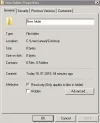
missing sharing tab in properties folder windows server 2008

bms

New Member
Joined
Jan 18, 2018
Messages
9
pls help this my problem how to solve ,,missing sharing tab in properties folder windows server 2008
 

Solution
My advice would be to have someone look it over locally and confirm that service is missing. If it truly is then it's likely you have more issues and potentially OS corruption and you will want to re-install Windows.

Neemobeer

Windows Forum Team
Staff member
Joined
Jul 4, 2015
Messages
8,998
Which directory are you trying to share? Do you have the server service disabled?
 

bms

New Member
Joined
Jan 18, 2018
Messages
9
what do you mean? its the picture that (sharing) is not exist on properties
 

Attachments

  • Captureh.webp
    Captureh.webp
    11.3 KB · Views: 732

Neemobeer

Windows Forum Team
Staff member
Joined
Jul 4, 2015
Messages
8,998
  • Press [Windows key + r]
  • Type services.msc
  • Verify server is running
 

Neemobeer

Windows Forum Team
Staff member
Joined
Jul 4, 2015
Messages
8,998
It should say running
An image from 'missing sharing tab in properties folder windows server 2008'. The images show Windows services with the 'Server' service highlighted and running automatically.
 

Last edited by a moderator:

Neemobeer

Windows Forum Team
Staff member
Joined
Jul 4, 2015
Messages
8,998
My advice would be to have someone look it over locally and confirm that service is missing. If it truly is then it's likely you have more issues and potentially OS corruption and you will want to re-install Windows.
 

Solution
Back
Top