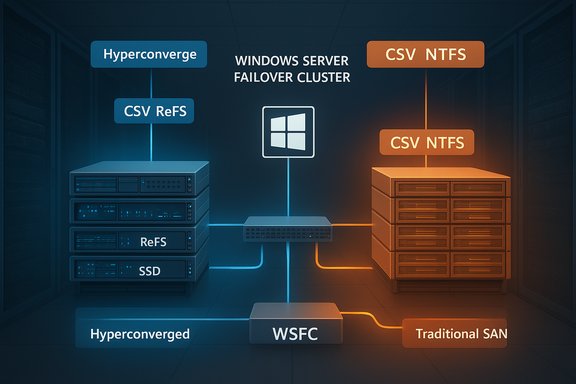
Microsoft has quietly closed a long‑standing operational gap for datacenter teams: Windows Server failover clusters can now host Storage Spaces Direct (S2D)–backed CSVs and traditional SAN‑LUN CSVs side‑by‑side, giving organizations a supported path to modernize without abandoning existing SAN investments.
For decades Windows Server Failover Clustering (WSFC) has been the backbone of Microsoft‑centric high‑availability storage and virtualization. The platform historically allowed clusters to present externally attached block storage (SAN via Fibre Channel or iSCSI) as Cluster Shared Volumes (CSVs), and since Windows Server 2016 it has also supported Storage Spaces Direct — Microsoft’s hyperconverged, software‑defined storage architecture that pools local disks and exposes volumes (usually formatted with ReFS) as CSVs for Hyper‑V and other clustered roles. Until recently, enterprises with large SAN estates faced a tradeoff: either rip‑and‑replace SANs to move to a full S2D hyperconverged architecture or maintain two distinct clusters and storage silos. Microsoft’s updated failover clustering guidance formalizes a third option — a mixed topology in which S2D (DAS) and SAN (FC/iSCSI) CSVs coexist within the same WSFC. This change was driven by customer demand to reuse SAN assets during phased S2D migrations and to allow flexible workload placement and migration strategies.
That said, mixed topologies increase operational complexity and demand disciplined automation, careful testing, and strict adherence to Microsoft’s documented constraints (no SAN disks in S2D pools; correct filesystem formatting; separate fault domains). For datacenter teams that enforce those guardrails, the mixed topology offers a practical migration path and an efficient way to balance innovation with investment protection.
Conclusion
This is an important, pragmatic step for Windows Server customers: they no longer must choose between SAN or S2D up front. Instead, they can design hybrid storage strategies that leverage the strengths of both architectures while running them safely under the umbrella of a single failover cluster — provided they follow Microsoft’s rules and invest in the validation and automation that keep mixed environments manageable and supportable.
Source: Neowin Failover Clusters in two versions of Windows Server get S2D and SAN coexistence
 Background
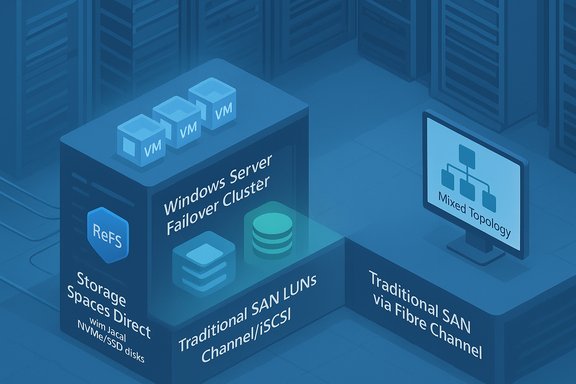
For decades Windows Server Failover Clustering (WSFC) has been the backbone of Microsoft‑centric high‑availability storage and virtualization. The platform historically allowed clusters to present externally attached block storage (SAN via Fibre Channel or iSCSI) as Cluster Shared Volumes (CSVs), and since Windows Server 2016 it has also supported Storage Spaces Direct — Microsoft’s hyperconverged, software‑defined storage architecture that pools local disks and exposes volumes (usually formatted with ReFS) as CSVs for Hyper‑V and other clustered roles. Until recently, enterprises with large SAN estates faced a tradeoff: either rip‑and‑replace SANs to move to a full S2D hyperconverged architecture or maintain two distinct clusters and storage silos. Microsoft’s updated failover clustering guidance formalizes a third option — a mixed topology in which S2D (DAS) and SAN (FC/iSCSI) CSVs coexist within the same WSFC. This change was driven by customer demand to reuse SAN assets during phased S2D migrations and to allow flexible workload placement and migration strategies. Overview: what Microsoft now supports
What “coexistence” actually means
- You can run ReFS‑formatted S2D volumes and NTFS‑formatted SAN LUNs as CSVs on the same failover cluster.
- The two storage domains operate side‑by‑side but remain logically separate; SAN LUNs are never added to an S2D pool and S2D cannot consume SAN‑presented disks.
Supported Windows Server releases
The guidance applies to modern server releases — specifically Windows Server 2022 and Windows Server 2025 (and Azure Local builds aligned to those releases). Microsoft’s documentation and Summit sessions make clear that the mixed topology has been supported in documentation since the Windows Server 2022 family and is carried forward into Windows Server 2025.Why this matters — business and technical benefits
Combining S2D and SAN CSVs in a single WSFC delivers practical benefits for real‑world datacenters:- Preserve past investments. Organizations can keep high‑capacity SANs for cold tiers, backups, and legacy applications while gradually adopting S2D for performance‑sensitive workloads.
- Flexible migration paths. Use Hyper‑V Storage Live Migration (Move Virtual Machine Storage) to shift VMs and VHDXs between SAN CSVs and S2D CSVs with minimal or no downtime. This enables phased migrations and risk‑mitigated transitions.
- Hybrid tiering within a cluster. Place latency‑sensitive VMs or AI/ML workloads on S2D (ReFS) volumes, while leaving large archival or vendor‑managed workloads on SAN (NTFS) CSVs.
- Disaster recovery and ransomware strategy. SAN arrays with integrated snapshot and replication capabilities can become backup targets for VMs running on S2D, improving recovery options and giving defenders additional immutable/snapshotted tiers.
- Operational continuity. Admins can retain existing SAN management workflows, vendor tooling and SLAs while introducing S2D benefits such as local NVMe caching, ReFS optimizations, or nested resiliency.
Technical realities and rules you must follow
The coexistence model is intentionally prescriptive to avoid catastrophic misconfigurations. Key technical constraints are:- SAN disks may not be added to S2D storage pools. SAN LUNs are managed separately as CSVs; they must remain outside S2D pools. Breaking this separation risks data corruption and unsupported states.
- S2D remains DAS‑only. S2D is a hyperconverged pooling technology and must use locally attached disks in cluster nodes (including JBOD/NVMe/SSD/HDD) — it’s not designed to pool SAN‑presented devices.
- File system rules:
- Format S2D volumes with ReFS before converting them to CSVs.
- Format SAN volumes with NTFS before converting them to CSVs.
These formats correspond to workload expectations and the S2D/CSV code paths Microsoft optimizes. - Supported connectivity for SAN CSVs includes Fibre Channel, iSCSI, and Microsoft‑supported iSCSI target implementations. Multipath and fabric resilience remain the administrator’s responsibility.
- Separate fault domains. S2D relies on node‑level replication and rebuilds; SAN availability depends on array controllers, fabrics, and multipath. Design your HA/DR to respect these domains.
- Node and cluster limits. Microsoft documents S2D cluster sizing and limits (S2D: 1–16 nodes per S2D storage cluster; SAN/disaggregated compute clusters follow separate scaling guidance). Always check the current Windows Server documentation for exact limits tied to the functional level you plan to run.
Migration patterns: practical options and recommended steps
The most common operational scenario is migrating virtual machines between SAN CSVs and S2D CSVs inside the same cluster. Microsoft recommends using Hyper‑V’s Storage Live Migration (Move Virtual Machine Storage / Move‑VMStorage) to perform these moves non‑disruptively. The storage live migration process copies VHDXs and meta files while the VM keeps running, rings changes to the destination, and then performs the final cutover. Practical migration checklist (high‑level):- Validate cluster health and backups. Ensure cluster validation tests pass and you have verified backups or snapshots for all VMs to be moved.
- Confirm destination CSV formatting. Format S2D volumes as ReFS and SAN CSVs as NTFS before migrating VMs to them.
- Verify storage paths and permissions. Confirm the cluster nodes have access to the destination CSV and that ACLs and SMB/NTFS permissions are correct.
- Use Move Virtual Machine Storage from Failover Cluster Manager or PowerShell:
- GUI: Failover Cluster Manager → Virtual Machines → right‑click VM → Move → Virtual Machine Storage.
- PowerShell example: Move‑VMStorage ‑VMName "MyVM" ‑DestinationStoragePath "C:\ClusterStorage\CSV2\MyVM\".
- Monitor I/O and latency. Storage migration creates extra network and storage load; schedule during off‑peak times or throttle simultaneous migrations.
- Validate VM functionality and performance post‑move. Check event logs, storage counters, and application behavior.
Strengths: why enterprise IT should welcome this change
- Choice and non‑disruptive modernization. Organizations no longer have to choose between keeping SANs or adopting S2D; they can do both and evolve workloads on their schedule.
- Optimized placement. S2D’s local NVMe and ReFS strengths suit latency‑sensitive and high‑IOPS workloads; SANs still excel for large persistent stores, long retention backups, or workloads tied to array‑level features.
- Improved migration economics. The mixed cluster lowers the cost of migration by allowing reuse of SAN capacity as temporary or long‑term targets during transitions.
- Operational continuity for vendor ecosystems. Storage teams can keep vendor toolsets, health monitoring, and service contracts for SANs while server teams use modern S2D tooling.
Risks and caveats — what can go wrong
No architectural shift is risk‑free. Here are the main hazards to plan for:- Misconfiguration risk. Accidentally adding SAN disks to the S2D pool (or vice versa) is an unsupported and dangerous state. Strict procedural controls and automation guards are essential.
- Performance interference. Heavy SAN I/O could congest network fabrics or cause contention that affects S2D replication traffic (east‑west). Design separate physical paths and QoS for S2D replication vs SAN access.
- Operational complexity. Two storage models in one cluster increases operational surface area. Teams must manage firmware, drivers, pathing, and update cadences for both storage stacks.
- Feature footprint differences. Some features behave differently on ReFS vs NTFS (cloning, dedupe, certain NTFS attributes). Validate application compatibility for the chosen filesystem.
- Upgrade and functional level considerations. Cluster and S2D storage pool versions are tied to cluster functional levels; rolling upgrades require careful sequencing. Community reports indicate some edge cases during in‑place functional upgrades and storage pool version transitions — test your exact upgrade path.
- Support boundaries. The coexistence guidance is prescriptive; straying outside Microsoft’s documented patterns risks stepping into unsupported configurations. Follow the Windows Server documentation and vendor guidance.
Operational best practices and hardening
To reduce risk and get the most from a mixed SAN+S2D cluster, adopt these best practices:- Strict separation in provisioning scripts. Automate checks so SAN LUNs are never fed into Storage Spaces Direct pools (validate WWNs/LUN IDs).
- Filesystem enforcement. Enforce ReFS on S2D volumes and NTFS on SAN CSVs via provisioning hooks and preflight checks.
- Network isolation and QoS. Provide dedicated networks or VLANs for S2D replication and RDMA traffic; isolate SAN traffic (Fibre Channel or iSCSI) from S2D east‑west replication to reduce contention.
- Firmware and driver discipline. Maintain vendor‑certified firmware and driver levels for both HBAs and NVMe/SSD stacks. Consistent versions reduce flaky failures during cluster failovers or rebuilds.
- Test live migrations at scale. Don’t assume Move‑VMStorage will behave identically in every environment — run scale tests to evaluate time‑to‑move, transient IOPS spikes, and VM consistency before mass migration.
- Monitoring and observability. Instrument both storage subsystems (array telemetry, multipath metrics, S2D health, CSV owner node metrics) and use synthetic IO tests to detect early signs of contention.
- Patch and update runbooks. Maintain clear sequences for cluster updates, S2D pool version updates, and SAN microcode updates; verify vendor compatibility before rolling patches.
Real‑world signals and vendor momentum
Microsoft’s own learning docs and Windows Server Summit sessions outline and demonstrate the pattern; partner ecosystems are reacting too. Storage vendors are working to validate SAN attach patterns for Azure Local and Windows Server mixed topologies, reflecting customer demand for a staged approach to modernization. These vendor signals indicate the architecture is more than theory — it’s being operationalized in co‑engineered programs and previews. At the same time, community threads and field reports highlight the need for caution: cluster functional level updates, storage pool version changes, and specific topology nuances can require extra testing, and some customers have reported issues during certain upgrade scenarios. These community experiences reinforce that lab validation and a staged rollout are non‑negotiable.A practical migration playbook (step‑by‑step)
Below is a compact, sequential approach teams can use as a starting template for migrating VMs into or out of S2D when operating a mixed cluster.- Inventory and classification:
- Catalog VMs by I/O profile, latency sensitivity, and filesystem needs (NTFS features vs ReFS advantages).
- Identify SAN LUNs and S2D volumes and map ownership and current CSV placement.
- Lab validation:
- Reproduce a subset of VMs in a test cluster with identical SAN and S2D topologies, simulate failures and live migrations.
- Prepare destination CSV:
- Ensure S2D volumes are ReFS and SAN CSVs are NTFS.
- Verify free capacity and performance headroom.
- Backup and snapshot:
- Take application‑consistent backups or array snapshots as rollback insurance.
- Execute small‑scale pilot migrations:
- Use Move Virtual Machine Storage or Move‑VMStorage for a handful of VMs.
- Monitor replication, storage latency, and VM performance.
- Scale and automate:
- Use PowerShell or System Center orchestration to process batches with throttling.
- Post‑migration validation:
- Confirm VM health, application metrics, and long‑term stability.
- Operationalize:
- Update runbooks, change management records, and monitoring dashboards for mixed clusters.
What to watch for next (roadmap and unanswered questions)
Microsoft’s documentation and summit content make coexistence an official and supported pattern, but the ecosystem is still evolving:- Watch for vendor‑specific best practices and validated configurations (HBA firmware, SAN array drivers).
- Expect more prescriptive guidance from Microsoft and partners on performance sizing when SANs and S2D share the same cluster.
- Keep an eye on Azure Local and third‑party vendor announcements: hybrid integrations and validated SAN attach programs are already emerging.
Bottom line
The ability to run Storage Spaces Direct CSVs and SAN‑LUN CSVs side‑by‑side in the same Windows Server failover cluster is a pragmatic, customer‑driven enhancement that removes a major blocker for organizations planning gradual modernization. It delivers choice — letting teams combine the low‑latency, hyperconverged advantages of S2D with the scale and enterprise features of existing SAN arrays.That said, mixed topologies increase operational complexity and demand disciplined automation, careful testing, and strict adherence to Microsoft’s documented constraints (no SAN disks in S2D pools; correct filesystem formatting; separate fault domains). For datacenter teams that enforce those guardrails, the mixed topology offers a practical migration path and an efficient way to balance innovation with investment protection.
Conclusion
This is an important, pragmatic step for Windows Server customers: they no longer must choose between SAN or S2D up front. Instead, they can design hybrid storage strategies that leverage the strengths of both architectures while running them safely under the umbrella of a single failover cluster — provided they follow Microsoft’s rules and invest in the validation and automation that keep mixed environments manageable and supportable.
Source: Neowin Failover Clusters in two versions of Windows Server get S2D and SAN coexistence