

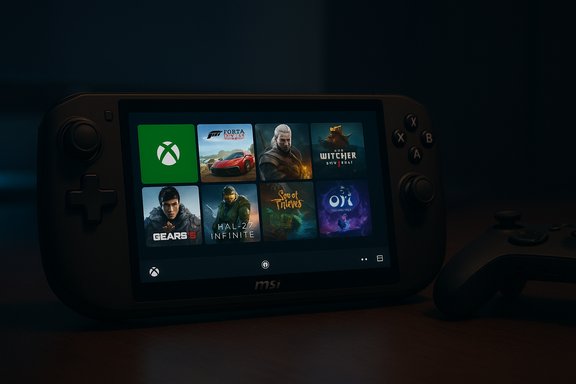
Microsoft’s console-style handheld mode for Windows — the Full Screen Experience that launched on the ROG Xbox Ally — is now rolling out to more Windows handhelds, including the MSI Claw, via the Windows 11 Insider Preview (Build 26220.7051), and eager testers can enable it today if they meet the Insider and device requirements.
Microsoft’s new Full Screen Experience (FSE) is a layered, controller-first shell built on top of Windows 11 that runs a chosen “home app” (most commonly the Xbox PC app) as a full-screen launcher and deliberately defers or suppresses non‑essential desktop services while the session is active. The goal is to make pocketable Windows gaming PCs behave more like consoles: big, thumb‑friendly tiles; smoother controller navigation; fewer background tasks; and a cleaner path to games and services.
The feature first shipped preinstalled on the ASUS ROG Xbox Ally and ROG Xbox Ally X, and Microsoft is now expanding the preview to other OEM handhelds via the Windows Insider program. The recent Insider preview build that carries the FSE expansion is Windows 11 Insider Preview Build 26220.7051 (KB5067115), distributed on the Dev and Beta channels as part of the 25H2 development line.
That said, the feature is still a preview and comes with real-world caveats: it’s gated by OEM entitlements, gated in staged server-side rollouts, and can expose users to preview instability. Practical benefits — smoother sustained frame rates and a cleaner, controller-first launcher — are compelling, but they vary by device, firmware maturity, and the games you play. For anyone who needs a reliable daily driver, the conservative route is to wait for OEM-validated stable updates; for tinkerers and enthusiasts, the Insider preview is the right place to try the future and help shape it.
The next few months will show whether Microsoft and its OEM partners can move beyond the novelty of a full-screen Xbox launcher and deliver a consistently polished, broadly supported handheld Windows experience that can genuinely compete with dedicated handheld systems.
Source: Windows Central Handheld gaming mode is officially rolling out to more than just the Xbox Ally — here's how you get it right now
 Background
Microsoft’s new Full Screen Experience (FSE) is a layered, controller-first shell built on top of Windows 11 that runs a chosen “home app” (most commonly the Xbox PC app) as a full-screen launcher and deliberately defers or suppresses non‑essential desktop services while the session is active. The goal is to make pocketable Windows gaming PCs behave more like consoles: big, thumb‑friendly tiles; smoother controller navigation; fewer background tasks; and a cleaner path to games and services.The feature first shipped preinstalled on the ASUS ROG Xbox Ally and ROG Xbox Ally X, and Microsoft is now expanding the preview to other OEM handhelds via the Windows Insider program. The recent Insider preview build that carries the FSE expansion is Windows 11 Insider Preview Build 26220.7051 (KB5067115), distributed on the Dev and Beta channels as part of the 25H2 development line.
What the Full Screen Experience actually does
A console-like launcher, not a new OS
FSE is not a fork of Windows. It is a session posture — a full-screen shell that changes what Windows loads and how the session behaves. Underneath, the same kernel, drivers, and subsystems run; what changes are the shell components, startup apps, and system policies that are active during a handheld session. That approach preserves Windows’ openness (Steam, Epic, Battle.net, GOG and other stores still work) while providing a more focused gaming surface.Key behaviors and visible changes
- A full-screen, controller-focused launcher (the Xbox app by default) that aggregates Game Pass, Xbox purchases, and many locally installed PC titles into a unified grid.
- Controller-first navigation improvements: adapted Game Bar, on-screen controller keyboard, and Xbox-button integrations for entry/exit and quick switching.
- Resource trimming: on entry to FSE, Windows defers or suppresses certain desktop subsystems and background startup tasks to free memory and reduce idle CPU wakeups, which can produce smoother sustained frame rates on thermally constrained handheld APUs.
What it does not do
- It does not replace Windows or change kernel-level scheduling or driver models. Anti-cheat, DRM, and launcher dependencies still matter and, in some cases, remain necessary for a game to run properly. Treat FSE as a different entrypoint and session posture rather than an isolated OS.
What’s new in Build 26220.7051 (KB5067115)
Microsoft shipped multiple items in this preview release beyond the Full Screen Experience. The most notable additions in the build include:- Full Screen Experience (FSE) preview expanded to MSI Claw models and staged support for additional OEMs. Availability is gated by OEM entitlements and server-side flags, so rollout can be uneven.
- Ask Copilot integrated into the taskbar as a quick entry point to Copilot features and to search for apps, files, and settings; Microsoft clarifies Copilot only sees what regular Windows Search sees.
- Shared Bluetooth LE audio (preview) for Copilot+ devices with Bluetooth LE Audio support, allowing two headsets to stream the same PC audio simultaneously. This is a Copilot+ PC feature and depends on both hardware and the Copilot+ program.
- Windows on Arm emulation improvements (Prism): an upgraded Prism emulator increases compatibility for x64 apps on Arm-based Windows devices, improving the usable software footprint for Arm laptops and handhelds.
How to get Full Screen Experience on a supported device right now
If you own a supported handheld (for example, an MSI Claw model) and want to try the new console-style handheld mode, Microsoft’s supported path is straightforward but requires being on the Windows Insider preview that includes the build.- Join the Windows Insider Program and choose the Dev or Beta channel where Build 26220.7051 is available.
- Update Windows to the Insider Preview build listed above (KB5067115 / Build 26220.7051).
- Make sure the Xbox PC app (sometimes the Xbox app beta / preview) is installed and updated — the option to set a home app may require the updated Xbox app. The Xbox Insider Hub and Xbox app preview flights can help ensure you have the right client.
- Open Settings → Gaming → Full screen experience. In “Choose home app,” select Xbox (or another supported home app) and optionally enable “boot into Full Screen Experience” to make the device start directly in the console-style launcher.
Early impressions: performance, UX, and limitations
Measured and anecdotal performance improvements
Hands‑on reports and community testing show that FSE can produce measurable runtime improvements on handheld hardware. The majority of gains come from reduced background overhead — fewer startup apps, less Explorer ornamentation, and fewer idle CPU wakeups — which in some cases translates to mid‑teens to mid‑20% FPS improvements for specific titles and device profiles. These gains are contextual and vary with chipset, power limits, drivers, and the title being tested. Treat early performance numbers as indicative rather than definitive.User experience (UX) trade-offs
The console-like home provides a far cleaner look for controller-first play, but it does not magically convert Windows into a dedicated console. Several UX frictions remain:- Setup and first-run flows still feel very Windows-like: you may still be pushed through desktop app installs (Teams, OneDrive), system dialogs, and Windows notifications that detract from the console illusion.
- Some apps and launchers still require the original desktop clients or background services, leading to occasional launcher handoffs that break the seamless console experience.
- Rollout variability and OEM gating mean identical devices can behave differently; some features are enabled via server-side flags rather than strictly by the build number.
Strengths: why this actually matters for handheld Windows
- Preserves Windows openness while delivering console ergonomics. Users keep freedom to install and run non‑Xbox apps and alternate storefronts while getting a controller-first surface when they want one.
- Pragmatic performance wins. The resource trimming approach targets the most common performance killers on small handhelds—background tasks and desktop shell overhead—so gains are achievable without kernel-level rewrites.
- OEM scalability. Implementing the surface as a Windows session posture that OEMs can enable per device lets Microsoft and partners scale the experience to many hardware partners without shipping a separate operating system.
Risks and open questions
- Stability and support for early adopters. Insider builds and early OEM rollouts carry risk. Users who depend on their device as a daily driver should avoid running preview builds on mission‑critical hardware. Backups and recovery paths are essential.
- Fragmentation across devices. Differences in drivers, firmware, and OEM utilities may produce inconsistent experiences. Some vendors will tune their drivers and firmware to pair with FSE; others may not, which could limit real-world benefits.
- Launcher and anti‑cheat complexity. For multiplayer and anti‑cheat‑protected titles, the Xbox app’s aggregation can’t eliminate the need for other launchers or services. Competitive players should verify behavior before relying on FSE for tournament play.
- Feature gating and discoverability. Because Microsoft uses staged rollouts and server-side flags, the presence of a given feature can change without a visible OS update. That complicates support and documentation for users and IT teams.
Practical checklist before you try FSE (Insider preview)
- Update firmware and drivers: update MSI Center / Armoury Crate, BIOS/UEFI, GPU drivers.
- Back up important data and game save files (consider cloud saves where supported).
- Enroll in Windows Insider (Dev or Beta channel) and update to Build 26220.7051 (KB5067115).
- Install the Xbox PC app preview via the Xbox Insider Hub if the Settings toggle doesn’t appear.
- Test your most important games and accessories after enabling FSE to ensure controllers, headsets (including Bluetooth LE Audio), and anti‑cheat systems behave as expected.
The Copilot and audio additions: what to expect
Ask Copilot on the taskbar
Build 26220.7051 brings an Ask Copilot entry into the taskbar for Insiders, which provides a quick way to search apps, files, and settings and use Copilot’s conversational abilities. Microsoft emphasizes that Copilot only accesses what Windows Search already does — it does not get unrestricted access to personal files beyond the normal search surface. This taskbar integration is distinct from Copilot+ hardware features.Bluetooth LE shared audio (Copilot+ requirement)
A new shared audio preview allows two people to listen simultaneously from the same PC to separate Bluetooth headsets using Bluetooth LE Audio. This feature is limited to Copilot+ PCs with Bluetooth LE Audio support and is part of Microsoft’s push to fold modern LE Audio capabilities into Windows. Hardware and driver support are prerequisites, so availability depends on OEM implementation and Bluetooth stack maturity.Windows on Arm: Prism emulation upgrades
Microsoft upgraded its Prism emulator in the same preview stack to improve x64 emulation on Arm devices. The updated emulation layer means more x64 apps will run on Arm devices with better compatibility and smoother performance, narrowing the app gap for Arm-based handhelds and laptops. This is an important step for the Arm ecosystem but is not a wholesale replacement for native arm64 builds when performance and driver-level features matter. Test critical apps directly on representative Arm hardware to verify behavior.Recommended approach for enthusiasts, power users, and IT teams
Enthusiasts and early adopters
- If you enjoy testing and troubleshooting, join the Insider channels, follow the Xbox app preview, and enable FSE after updating OEM software. Expect rough edges and keep recovery media ready.
Power users who rely on stability
- Wait for the stable consumer rollout or OEM-validated updates that include firmware and driver tuning for your device. Test in a secondary partition or on a secondary device before committing.
IT teams and admins
- Treat FSE and the Copilot/LE Audio additions as feature-flagged, staged rollouts. Don’t assume uniform availability across managed fleets. Where device posture matters, verify support matrices and update compliance scripts based on build numbers and OEM entitlements rather than UI banners alone.
FAQs (short, practical answers)
Does Full Screen Experience replace the Windows desktop?
No. It is an optional launcher layered on top of Windows. You can exit back to the normal desktop at any time.Do I need to be an Insider to try it?
Yes — the FSE expansion to non-Ally devices is rolling through the Windows Insider Preview (Dev and Beta channels) in Build 26220.7051 at present. Broader availability will follow OEM and stable Windows releases.Will Copilot see my private files if I use Ask Copilot?
Microsoft says Copilot only accesses what standard Windows Search indexes; it does not have free rein to crawl files beyond the search surface. However, admins concerned about telemetry and search indexing should review corporate search policies and data controls.Is shared Bluetooth audio available on any PC?
No. Shared LE Audio is a Copilot+ PC feature and requires hardware support for Bluetooth LE Audio alongside Copilot+ entitlements.Final assessment
Microsoft’s Full Screen Experience is an important, pragmatic move to make Windows handhelds feel genuinely portable and console-like without fracturing the platform. By implementing the interface as a layered session posture, Microsoft preserves Windows’ flexibility while addressing the core pain points for handheld gamers: small-screen navigation, background noise, and inconsistent runtime budgets.That said, the feature is still a preview and comes with real-world caveats: it’s gated by OEM entitlements, gated in staged server-side rollouts, and can expose users to preview instability. Practical benefits — smoother sustained frame rates and a cleaner, controller-first launcher — are compelling, but they vary by device, firmware maturity, and the games you play. For anyone who needs a reliable daily driver, the conservative route is to wait for OEM-validated stable updates; for tinkerers and enthusiasts, the Insider preview is the right place to try the future and help shape it.
The next few months will show whether Microsoft and its OEM partners can move beyond the novelty of a full-screen Xbox launcher and deliver a consistently polished, broadly supported handheld Windows experience that can genuinely compete with dedicated handheld systems.
Source: Windows Central Handheld gaming mode is officially rolling out to more than just the Xbox Ally — here's how you get it right now
