

MSI’s Claw arrives as a confident — if imperfect — reimagining of the Windows handheld: hardware that reads like a gaming laptop shrunk to your palms, a comfortable Xbox‑style grip, and Hall Effect sticks that promise to solve the drift problem that’s haunted other handhelds, but it still carries the familiar tradeoffs of Windows‑on‑a‑tiny‑screen — battery limits, driver variance, and software polish that can make or break the day‑to‑day experience.
The MSI Claw is MSI’s first mainstream handheld built around Intel’s Core Ultra family and Arc graphics, shipping with Windows 11 and a console‑style launcher layered over the desktop. MSI’s official spec sheet confirms a 7‑inch 1920×1080 IPS‑level touchscreen at up to 120 Hz, Intel Core Ultra processors (up to the Core Ultra 7 155H in current SKUs), Hall Effect analog sticks and triggers, and a 53 Wh battery in the standard Claw 7 models. These specifications are listed directly on MSI’s product pages and are corroborated by multiple hands‑on reviews published since the Claw’s launch. MSI’s intent is clear: deliver a handheld that feels like a controller in the hand but behaves like a PC under the hood. That design ambition places the Claw in direct competition with Valve’s Steam Deck family, ASUS’ ROG Ally series, and Lenovo’s Legion handhelds — devices that trade differently across usability, performance predictability, battery life, and ecosystem. Early impressions and community reporting show the Claw’s hardware choices (especially Hall Effect sticks and a higher‑resolution 120 Hz screen) win praise, while the software and Intel Arc graphics compatibility remain the most frequently cited caveats.
Build quality feels premium for the category. The device carries a bit of weight — roughly 675 g as listed on MSI’s spec page — but that mass contributes to perceived solidity rather than a flimsy toy‑like feel. Front‑firing speakers, HD haptics, and a dedicated fingerprint power button add polish, while the rear paddles give extra mapping options for competitive play. The tradeoff is size: the Claw doesn’t compete for pocketability with smaller handhelds or tablets, and users who prize ultra‑light travelability may prefer lighter alternatives.
Source: AD HOC NEWS MSI Claw Review: Can Intel’s Bold Handheld Finally Take on Steam Deck and ROG Ally?
 Background / Overview
The MSI Claw is MSI’s first mainstream handheld built around Intel’s Core Ultra family and Arc graphics, shipping with Windows 11 and a console‑style launcher layered over the desktop. MSI’s official spec sheet confirms a 7‑inch 1920×1080 IPS‑level touchscreen at up to 120 Hz, Intel Core Ultra processors (up to the Core Ultra 7 155H in current SKUs), Hall Effect analog sticks and triggers, and a 53 Wh battery in the standard Claw 7 models. These specifications are listed directly on MSI’s product pages and are corroborated by multiple hands‑on reviews published since the Claw’s launch. MSI’s intent is clear: deliver a handheld that feels like a controller in the hand but behaves like a PC under the hood. That design ambition places the Claw in direct competition with Valve’s Steam Deck family, ASUS’ ROG Ally series, and Lenovo’s Legion handhelds — devices that trade differently across usability, performance predictability, battery life, and ecosystem. Early impressions and community reporting show the Claw’s hardware choices (especially Hall Effect sticks and a higher‑resolution 120 Hz screen) win praise, while the software and Intel Arc graphics compatibility remain the most frequently cited caveats. Design and ergonomics
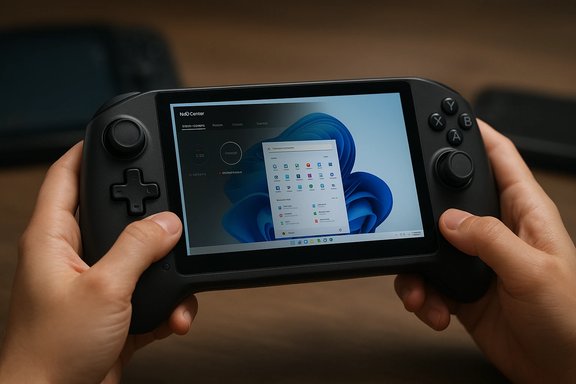
The Claw’s chassis is intentionally controller‑first. MSI borrowed the large, rounded grips from modern console controllers and integrated a roomy button layout with shoulder paddles, macro buttons, and a prominent MSI Center M button for quick profile switching. The result is one of the most comfortable single‑piece handhelds available for medium to large hands; reviewers and forum users consistently report less wrist strain during extended sessions compared with slimmer or flatter handhelds.Build quality feels premium for the category. The device carries a bit of weight — roughly 675 g as listed on MSI’s spec page — but that mass contributes to perceived solidity rather than a flimsy toy‑like feel. Front‑firing speakers, HD haptics, and a dedicated fingerprint power button add polish, while the rear paddles give extra mapping options for competitive play. The tradeoff is size: the Claw doesn’t compete for pocketability with smaller handhelds or tablets, and users who prize ultra‑light travelability may prefer lighter alternatives.
Display: sharper than many rivals
A core differentiator is the Claw’s 7‑inch 1080p IPS‑level display running up to 120 Hz. In practical terms, that yields a sharper UI for Windows tasks (desktop text and web content) and a more responsive feel for esports and fast‑paced indies than the 800p panels used in some rival handhelds. MSI’s product pages advertise 500 nits typical brightness and claimed 100% sRGB coverage on the standard FHD panel. Independent reviewers note that the panel’s pixel density materially improves game visuals and desktop productivity on a small screen. Important verification: while the 120 Hz mode benefits lighter games and menus, sustained AAA gaming at native 1080p will not always reach 120 fps on the Claw’s integrated Arc GPU. Expect to use upscaling, framerate caps, and tuned power profiles to balance visual fidelity and battery runtime. This is a hardware reality shared across handheld PCs with thin thermal envelopes.Controls: Hall Effect sticks and the drift argument
One of the Claw’s headline features is the use of Hall Effect sensors for both analog sticks and analog triggers. Hall Effect sensors detect magnetic fields rather than relying on mechanical potentiometers, which means there is significantly less physical wear over time and a dramatically reduced risk of the stick drift that has plagued many gaming controllers and handhelds. MSI’s spec page lists Hall Effect sticks and triggers, and early owner reports and forum threads praise this as a genuine long‑term benefit for heavy‑use buyers. The practical implication: if you’ve burned through a controller or two to drift, the Claw’s input hardware is a strong selling point. That said, Hall Effect components don’t change the rest of the control experience (stick geometry, throw, deadzones), so ergonomics and software calibration still matter for competitive players.Internal hardware and performance profile
MSI ships the Claw with Intel Core Ultra mobile processors (up to the Core Ultra 7 155H in many configurations), integrating Arc graphics and Intel’s AI/acceleration blocks. Official MSI materials and multiple press reviews confirm this CPU/GPU pairing and the use of Intel’s driver stack. Against AMD‑based opponents, the Core Ultra configuration offers different strengths: strong single‑thread CPU performance and integration with Intel’s AI features, but a driver and game compatibility situation that has historically required more frequent updates to reach parity with AMD’s mature Radeon drivers. Hands‑on benchmarks from reviewers and community testers show a mixed but improving picture: the Claw frequently matches or comes close to the ROG Ally or Legion Go in well‑polished titles, but some older, less common, or poorly optimized games exhibit stutter or lower performance on Intel Arc until driver fixes arrive. That variance is not unique to the Claw — any handheld using a newer GPU stack will exhibit title‑to‑title variance early in its lifecycle. Buyers who value consistent, predictable 1080p performance on day one still find AMD‑based handhelds a safer bet, while those who accept the possibility of driver issues find Intel’s roadmap and frequent updates promising. Key verified specifications (cross‑checked with MSI and independent reviews):- CPU: up to Intel Core Ultra 7 (155H) on standard Claw 7 SKUs.
- GPU: Integrated Intel Arc graphics (model varies by SKU).
- Display: 7″ FHD (1920×1080) 120 Hz IPS‑level touchscreen, 500 nits typical.
- Memory: LPDDR5 (configurations vary up to 32 GB on higher SKUs).
- Storage: M.2 SSD (size and slot format vary by model).
Battery life and thermal reality
MSI lists a 53 Wh battery in the mainstream Claw 7 models; MSI’s documentation and multiple hands‑on reports align around that figure. A 53 Wh pack is larger than some contemporaries, and real‑world testing demonstrates an advantage in lighter loads or low‑power profiles. But the fundamental truth of handheld PCs remains: modern AAA titles at high settings will consume watts fast enough to deplete the Claw within a couple of hours unless you aggressively limit power or framerate. Community testing and Reddit impressions underscore this — balanced and low‑TDP modes extend session lengths noticeably, but heavy 3D play still requires a charger for marathon sessions. Thermals are a closely related constraint. MSI’s cooling design is respectable for a compact chassis and allows the Claw to hit useful sustained clocks in many titles, but surface and internal temperatures will rise during extended Turbo mode play. Expect thermal throttling to be a variable you can tune with MSI Center M profiles — which helps performance when plugged in but won’t change the physical limits of heat dissipation in a handheld frame.Software, UI, and the Windows experience
MSI ships the Claw with Windows 11 Home and MSI Center M — a console‑style overlay that aims to reduce desktop friction by providing quick game launching, performance and fan profiles, and utility access. MSI’s UI layer is useful in principle, but reviewers consistently note bugginess and rough edges in early versions; MSI has issued multiple firmware and utility updates that improve stability, though reports show the experience still trails the polish of Valve’s SteamOS front end. Expect occasional Windows dialogs, update prompts, or other desktop artifacts when using the Claw — this is not a console, it is a full PC in your hands. Intel’s driver cadence matters here. Several outlets and community threads point out how Arc driver releases have improved certain games rapidly — but the pace and predictability of fixes can vary. That makes the Claw slightly more of a maintenance device early on: you may need to install driver updates, tweak power profiles, or apply community‑sourced optimizations to reach the best experience in some titles. MSI and Intel have been responsive with updates, but the user should be comfortable with occasional tweaks. A cautionary note on marketing claims: MSI and OEMs occasionally quote percentage gains or future AI benefits (Auto SR, on‑device upscaling, NPU features on later models). Treat those numbers as manufacturer testing under controlled conditions; independent verification and sustained real‑world gains can lag marketing claims. Several reviewers have flagged unproven NPU/TOPS benefits in competing devices, and the same caution applies to Claw marketing.How the Claw compares to the Steam Deck and ROG Ally
No single handheld “wins” for all buyers — each device is an answer to different priorities. Here’s a practical breakdown comparing MSI’s Claw to its two most discussed competitors.- Steam Deck (including OLED models)
- Strengths: Mature OS (SteamOS), excellent community integration, proven battery behavior in many scenarios, and generally lower price points for comparable base performance.
- Where Claw beats it: Full Windows out of the box (better compatibility for DRM‑heavy and Windows‑only titles), sharper 1080p 120 Hz display on many Claw SKUs, and Hall Effect sticks reduce long‑term drift risk.
- ASUS ROG Ally (and Ally X)
- Strengths: AMD‑based Z1/Z2 family offers consistent GPU driver behaviour and predictable 1080p performance; ASUS’ Armory tooling and collaboration with Xbox on the Ally X create a strong Windows‑first handheld experience.
- Where Claw beats it: Ergonomics and the Hall Effect controls (depending on Ally SKU), and the Intel platform’s potential for single‑thread CPU strength in some workloads.
- Where Claw trails: Driver maturity — the AMD side often has a smoother day‑one performance profile for many AAA titles, which translates to fewer tweaks for the user.
Practical buying checklist and tuning tips
- Confirm the exact SKU before purchase: RAM, SSD form factor, and CPU SKU (155H vs other Core Ultra SKUs) vary and affect price and performance.
- Expect and apply updates: download the latest BIOS, MSI Center M, and Intel GPU drivers as part of first‑run setup. This often smooths out early issues and improves FPS in patched titles.
- Use power profiles: switch between Turbo (plugged), Performance, and Balanced modes depending on use; cap framerate or drop resolution with Intel’s upscaling to extend battery.
- Consider docking and charging accessories: a higher‑watt PD charger and a USB‑C dock will unlock desktop modes and longer plugged‑in sessions.
- Validate the warranty and return policy in your region: early handheld launches can include model variances and patch windows.
Repairability, upgrades, and long‑term ownership
The Claw is generally better‑equipped than many handhelds when it comes to durable control components (Hall Effect) — a long‑term cost saving for frequent users. Storage upgradeability depends on SKU (some include an M.2 slot), so check the product listing if you plan to expand storage. Memory is soldered in many handhelds across the market, and the Claw follows that pattern for most SKUs; confirm RAM capacity at purchase. MSI’s recommended approach is to buy from a reputable channel and retain the receipt for warranty or RMA needs.Risks and unknowns: what to watch for
- Driver variability: Intel Arc drivers have improved quickly, but title‑by‑title variance still occurs. This means a game that runs flawlessly for one owner might stutter for another until a driver update lands. Buyers who want out‑of‑box predictability should consider AMD alternatives.
- Windows friction: pop‑ups, update prompts, and the occasional fractured full‑screen experience are part of the Windows handheld tradeoff. MSI Center M helps, but it does not fully hide Windows’ desktop behavior.
- Battery thermals tradeoffs: high‑performance gaming heats the chassis and eats battery — there’s no escaping physics in a compact frame. Expect to adjust settings or play plugged in for extended AAA sessions.
- Pricing and resale: the handheld market moves fast; new silicon, follow‑up SKUs (MSI’s own Claw A8/Claw 8 iterations), and competitor price adjustments can compress resale values. Shop with returns in mind.
Final verdict
The MSI Claw is a hardware‑driven proposition: excellent ergonomics, Hall Effect sticks and triggers that address a critical longevity issue, a sharp 1080p 120 Hz screen, and a capable Intel Core Ultra platform that can improve over time with driver and firmware updates. These strengths make the Claw uniquely compelling for buyers who value comfort, control durability, and a high‑density handheld display for both games and productivity. However, the Claw is not a turnkey replacement for the Steam Deck’s polished handheld OS or, in many cases, the ROG Ally’s more consistent day‑one GPU performance. Expect periodic tinkering: driver updates, MSI Center M configuration, and power‑profile tuning will be part of the ownership experience — particularly if you push AAA titles at native fidelity. If you are risk‑averse and demand absolute predictability on day one, a Steam Deck or an AMD‑based Windows handheld will likely be the safer choice. If you prize ergonomics, Hall Effect longevity, and the prospect of Intel Arc performance maturing over time, the MSI Claw is a very attractive, well‑engineered challenger that’s already improving with each software update. The Claw does not promise perfection; it promises potential. For buyers who understand the tradeoffs and are willing to update drivers and tune settings, it offers a distinct blend of hardware advantages and Windows flexibility that could make it the handheld they keep reaching for on the commute, couch, or during travel.Source: AD HOC NEWS MSI Claw Review: Can Intel’s Bold Handheld Finally Take on Steam Deck and ROG Ally?
