

Notebookcheck’s July 3, 2026 review of the MSI Crosshair A16 HX E8WGK found that MSI’s 16-inch gaming laptop pairs AMD’s older Ryzen 9 8940HX with Nvidia’s GeForce RTX 5070 Laptop GPU and, in several CPU-heavy tests, beats newer Ryzen AI Zen 5 silicon. That result is not a simple “old chip good, new chip bad” story. It is a reminder that gaming laptops are systems first and spec sheets second. In the Windows notebook market, power limits, cooling, GPU allocation, panel choice, and chassis economics still matter more than the generation badge printed beside the processor name.
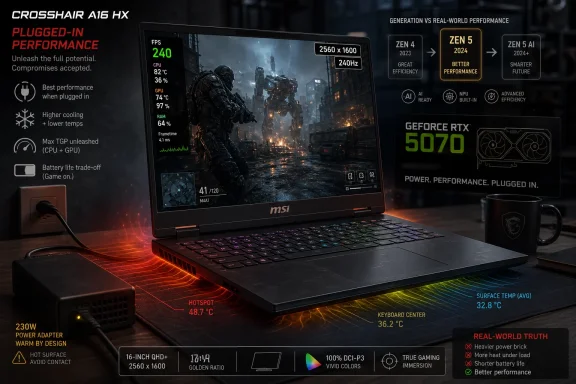
The Crosshair A16 HX is not trying to be MSI’s halo machine. Notebookcheck describes the Crosshair line as a more affordable gaming family below the company’s Raider and Titan tiers, and the reviewed E8WGK configuration makes that hierarchy obvious. It brings the big performance pieces — a Ryzen 9 8940HX, an RTX 5070 Laptop GPU rated at 115 watts, 32GB of DDR5 memory, a 1TB NVMe SSD, and a 16-inch 2560 x 1600 240Hz IPS display — while stripping away much of the premium furniture.
That trade is the whole story. The machine is built for buyers who care more about benchmark throughput and frame rates than about per-key RGB lighting, studio-grade speakers, OLED contrast, or a luxury enclosure. Notebookcheck gave the system an 83 percent rating, which is a useful shorthand: this is a good laptop, not a complete one.
The provocative part is the processor comparison. The Ryzen 9 8940HX is based on AMD’s Zen 4-era Dragon Range refresh platform, while the Ryzen AI 9 HX 470 belongs to the newer Zen 5/Zen 5c Ryzen AI family. Yet Notebookcheck’s data shows the Crosshair A16 HX landing ahead of a Lenovo Legion 7 configuration using the Ryzen AI 9 HX 470 in its aggregate CPU performance rating.
That is where the marketing lesson begins. AMD’s Ryzen AI branding is increasingly about a broader platform: CPU cores, integrated graphics, neural processing, power efficiency, and Copilot+ PC positioning. The Crosshair A16 HX does not care much about that broader pitch. It is a plugged-in gaming laptop with a discrete GPU and a cooling system tuned to feed an HX-class CPU.
The Ryzen AI 9 HX 470 is a different animal. AMD’s Ryzen AI 400 material positions it as a 12-core, 24-thread chip using four Zen 5 cores and eight Zen 5c cores, with a 55 TOPS NPU and a much more capable integrated Radeon 890M GPU than the tiny Radeon 610M attached to the 8940HX. In thin or balanced systems, that package can make more sense than a hot, hungry HX chip.
But CPU rendering, compiling, compression, and other sustained multi-threaded workloads often reward brute resources. More cores, more cache, more power, and an accommodating chassis can overwhelm a newer architecture running inside a more efficiency-oriented envelope. Notebookcheck’s numbers reflect that dynamic: the Crosshair A16 HX’s Ryzen 9 8940HX scored 77.7 points in the site’s CPU performance rating, ahead of the Ryzen AI 9 HX 470-equipped Lenovo Legion 7 at 64.9 points.
This is not a universal verdict on Zen 4 versus Zen 5. It is a verdict on two laptop implementations. In the Windows world, that distinction is not pedantry; it is the difference between buying a fast machine and buying a fast-looking one.
But gaming laptops occupy an awkward corner of that story. A Crosshair A16 HX buyer is not paying $2,699 primarily to run background NPU workloads. They are buying a transportable Windows gaming and creation machine, and most of the heavy lifting still goes through the CPU, Nvidia GPU, system memory, SSD, and cooling assembly.
That makes the Ryzen 9 8940HX look less obsolete than its architecture label suggests. It lacks the Ryzen AI 9 HX 470’s modern NPU capability and strong integrated graphics, but in a laptop with an RTX 5070, the integrated GPU is largely irrelevant to gaming performance. The dedicated Nvidia chip is the real graphics engine, and the CPU’s job is to stay out of its way while feeding high-refresh gameplay and creator workloads.
Notebookcheck’s review indirectly exposes the tension in AMD’s product stack. Ryzen AI is the right brand for the coming Windows AI cycle, but Ryzen AI is not automatically the right answer for every high-performance Windows laptop. Sometimes the older HX chip is simply the better fit because the system around it is built to let it breathe.
Notebookcheck recorded a 3DMark Time Spy score of 13,964 and a Steel Nomad score of 3,087 for the MSI system. In its power-profile testing, Balanced Mode trimmed roughly 5 percent from the 3DMark result, while running on battery hammered performance far harder. That is exactly what buyers should expect from a machine in this class: respectable plugged-in performance, sharply reduced unplugged performance.
This distinction matters because gaming laptops are often marketed as mobile desktops, but they remain hostage to electrical reality. The Crosshair can travel, but its best self lives near a wall outlet. On battery, the GPU and CPU cannot behave like they do under AC power, and Notebookcheck’s data makes that gap plain.
The lack of Advanced Optimus is more annoying than abstract. A MUX switch is useful because it can route the display directly through the discrete GPU for better gaming performance, but Advanced Optimus makes switching more seamless. Without it, the owner gets more friction in a machine whose whole sales pitch is otherwise practical performance.
MSI also deserves credit for consistency. According to Notebookcheck, all current Crosshair A16 HX configurations ship with the same quality panel, including RTX 5060 models. That matters because midrange gaming laptops have a long history of hiding weak base displays behind attractive headline specs.
The panel is not perfect. Notebookcheck noted that it could be better calibrated out of the box, and IPS cannot match OLED for black levels or HDR impact. Still, the panel feels like the part of the bill of materials where MSI decided not to insult the buyer.
That choice changes the character of the machine. A cheap chassis can be forgiven more easily if the thing you stare at for hours is bright, fast, sharp, and color-capable. The Crosshair A16 HX may not feel premium in the hands, but the screen keeps it from feeling bargain-bin in use.
That is not automatically a flaw. The machine is slightly thinner and lighter than the Intel-based Crosshair 16 HX that Notebookcheck compared it against, and the review praises the larger clickpad, expanded port selection, and serviceability. Two accessible M.2 2280 SSD slots and two SODIMM slots are exactly the kind of practical feature Windows power users still care about.
The port layout also leans functional. Notebookcheck lists three USB-A ports, two USB-C 3.2 Gen 2 ports with DisplayPort and Power Delivery support, HDMI, Gigabit Ethernet, a Kensington lock slot, and a 3.5mm combo jack. In an era when too many laptops chase thinness by handing buyers a dongle bill, that is a welcome baseline.
But the cheapness is not only aesthetic. Weak speakers, no HDR, no G-Sync, no Advanced Optimus, and no per-key RGB lighting are not catastrophic omissions, but they add up. This is the kind of laptop that performs better than it feels.
That is not just trivia for electrical engineers. If a gaming laptop regularly draws near or above the rating of its power adapter under demanding loads, owners may see battery drain while plugged in, more heat around the charging brick, and less confidence during long gaming or rendering sessions. Notebookcheck’s cons list even flags charging behavior while gaming.
This is the unavoidable cost of MSI’s performance-first configuration. Feeding a 16-core HX CPU and an RTX 5070 inside a relatively portable 16-inch chassis is not free. The power adapter becomes part of the thermal system, and in this case it appears to be operating too close to the edge.
The irony is that the Ryzen 9 8940HX looks efficient in some CPU-only comparisons. Notebookcheck measured the MSI system averaging 170.5 watts in Cinebench R15 Multi on an external monitor, below the Intel-based Crosshair 16 HX AI with Core Ultra 9 275HX at 193.3 watts. But gaming is a platform load, not a CPU-only load, and the total package is still hungry.
This machine is mobile in the same way a portable workstation is mobile. It can move between rooms, offices, LAN parties, classrooms, and hotel desks. It is not designed to spend a full workday away from power while keeping its performance identity intact.
The 80Wh battery is respectable, but the rest of the system is built around throughput. A bright 240Hz 1600p panel, HX-class CPU, discrete Nvidia GPU, and gaming-oriented cooling platform are simply not the ingredients of an endurance champion. MSI trimmed many luxuries, but it did not trim the parts that consume power.
That is why Windows buyers need to be honest about the job. If the priority is battery life, quiet operation, NPU-heavy AI features, and strong integrated graphics, Ryzen AI systems make far more sense. If the priority is plugged-in CPU and GPU performance per dollar, the Crosshair A16 HX becomes much easier to understand.
At that level, buyers are entitled to ask why the chassis feels cheap, why the speakers are weak, and why display switching lacks Advanced Optimus. They are also entitled to compare the Crosshair against discounted premium machines, last-generation RTX 4080 laptops, or competing RTX 5070 and RTX 5070 Ti systems with better creature comforts.
MSI’s answer is performance focus. The reviewed unit delivers strong CPU throughput, a good RTX 5070 implementation, a quality high-refresh IPS display, and unusually friendly upgrade access. For some buyers, especially those who upgrade RAM and storage themselves, that will beat a prettier sealed machine.
But the $2,699 figure narrows the audience. This is not a cheap gaming laptop; it is a cost-conscious performance laptop in an expensive market. The distinction matters because “budget” expectations change dramatically once the price starts with a two and a comma.
That should sound familiar to WindowsForum readers. We have seen the same pattern across Intel HX systems, AMD HS systems, thin-and-light Core Ultra designs, and gaming notebooks with wildly different GPU wattages under the same Nvidia product name. A laptop is not a CPU in a box; it is a set of vendor choices.
For administrators and power users, that means procurement by generation is risky. A newer chip may bring a better NPU, lower idle draw, better integrated graphics, and stronger platform support, but it may still lose to an older part in sustained CPU work if the older machine has more cores and a more permissive power profile. Conversely, the older HX machine may be a poor fit for fleets that value battery life, thermals, noise, and modern manageability over raw benchmark output.
The Windows AI transition makes this even messier. Some future Windows features and third-party applications will care more about NPU capability. Others will still run best on CPU or GPU. The right purchase will depend less on whether a machine says Ryzen AI and more on what workloads actually dominate the day.
 MSI Turns Yesterday’s Flagship Into Today’s Value Argument
The Crosshair A16 HX is not trying to be MSI’s halo machine. Notebookcheck describes the Crosshair line as a more affordable gaming family below the company’s Raider and Titan tiers, and the reviewed E8WGK configuration makes that hierarchy obvious. It brings the big performance pieces — a Ryzen 9 8940HX, an RTX 5070 Laptop GPU rated at 115 watts, 32GB of DDR5 memory, a 1TB NVMe SSD, and a 16-inch 2560 x 1600 240Hz IPS display — while stripping away much of the premium furniture.That trade is the whole story. The machine is built for buyers who care more about benchmark throughput and frame rates than about per-key RGB lighting, studio-grade speakers, OLED contrast, or a luxury enclosure. Notebookcheck gave the system an 83 percent rating, which is a useful shorthand: this is a good laptop, not a complete one.
The provocative part is the processor comparison. The Ryzen 9 8940HX is based on AMD’s Zen 4-era Dragon Range refresh platform, while the Ryzen AI 9 HX 470 belongs to the newer Zen 5/Zen 5c Ryzen AI family. Yet Notebookcheck’s data shows the Crosshair A16 HX landing ahead of a Lenovo Legion 7 configuration using the Ryzen AI 9 HX 470 in its aggregate CPU performance rating.
That is where the marketing lesson begins. AMD’s Ryzen AI branding is increasingly about a broader platform: CPU cores, integrated graphics, neural processing, power efficiency, and Copilot+ PC positioning. The Crosshair A16 HX does not care much about that broader pitch. It is a plugged-in gaming laptop with a discrete GPU and a cooling system tuned to feed an HX-class CPU.
The Badge Says Zen 4, the Behavior Says Desktop-Class Muscle
The Ryzen 9 8940HX is old-fashioned in the most flattering sense. AMD’s own Ryzen 8000 HX materials describe it as a 16-core, 32-thread Zen 4 part with a boost clock up to 5.3GHz, 80MB of combined L2 and L3 cache, and a 55-to-75-watt TDP class. Notebookcheck’s reviewed MSI configuration lets it run at 102 watts for both short burst and sustained power, which is exactly the sort of implementation detail that can flatten a neat architecture-generation comparison.The Ryzen AI 9 HX 470 is a different animal. AMD’s Ryzen AI 400 material positions it as a 12-core, 24-thread chip using four Zen 5 cores and eight Zen 5c cores, with a 55 TOPS NPU and a much more capable integrated Radeon 890M GPU than the tiny Radeon 610M attached to the 8940HX. In thin or balanced systems, that package can make more sense than a hot, hungry HX chip.
But CPU rendering, compiling, compression, and other sustained multi-threaded workloads often reward brute resources. More cores, more cache, more power, and an accommodating chassis can overwhelm a newer architecture running inside a more efficiency-oriented envelope. Notebookcheck’s numbers reflect that dynamic: the Crosshair A16 HX’s Ryzen 9 8940HX scored 77.7 points in the site’s CPU performance rating, ahead of the Ryzen AI 9 HX 470-equipped Lenovo Legion 7 at 64.9 points.
This is not a universal verdict on Zen 4 versus Zen 5. It is a verdict on two laptop implementations. In the Windows world, that distinction is not pedantry; it is the difference between buying a fast machine and buying a fast-looking one.
The New AI Laptop Era Has a Gaming Laptop Problem
The industry has spent the past two years teaching buyers to look for NPUs. Microsoft’s Copilot+ PC requirements, AMD’s Ryzen AI naming, Intel’s Core Ultra branding, and Qualcomm’s Windows-on-Arm push have all made local AI acceleration a central part of the notebook sales pitch. That matters for battery-powered inference, camera effects, transcription, recall-style features, and whatever else Windows and application developers eventually decide to offload.But gaming laptops occupy an awkward corner of that story. A Crosshair A16 HX buyer is not paying $2,699 primarily to run background NPU workloads. They are buying a transportable Windows gaming and creation machine, and most of the heavy lifting still goes through the CPU, Nvidia GPU, system memory, SSD, and cooling assembly.
That makes the Ryzen 9 8940HX look less obsolete than its architecture label suggests. It lacks the Ryzen AI 9 HX 470’s modern NPU capability and strong integrated graphics, but in a laptop with an RTX 5070, the integrated GPU is largely irrelevant to gaming performance. The dedicated Nvidia chip is the real graphics engine, and the CPU’s job is to stay out of its way while feeding high-refresh gameplay and creator workloads.
Notebookcheck’s review indirectly exposes the tension in AMD’s product stack. Ryzen AI is the right brand for the coming Windows AI cycle, but Ryzen AI is not automatically the right answer for every high-performance Windows laptop. Sometimes the older HX chip is simply the better fit because the system around it is built to let it breathe.
Nvidia’s RTX 5070 Is the Other Half of the Bargain
The Crosshair A16 HX does not win its argument on CPU performance alone. Notebookcheck’s sample used a GeForce RTX 5070 Laptop GPU with a 115-watt TDP, GDDR7 memory, and a MUX switch. That combination gives the machine a credible gaming foundation even without G-Sync or Advanced Optimus.Notebookcheck recorded a 3DMark Time Spy score of 13,964 and a Steel Nomad score of 3,087 for the MSI system. In its power-profile testing, Balanced Mode trimmed roughly 5 percent from the 3DMark result, while running on battery hammered performance far harder. That is exactly what buyers should expect from a machine in this class: respectable plugged-in performance, sharply reduced unplugged performance.
This distinction matters because gaming laptops are often marketed as mobile desktops, but they remain hostage to electrical reality. The Crosshair can travel, but its best self lives near a wall outlet. On battery, the GPU and CPU cannot behave like they do under AC power, and Notebookcheck’s data makes that gap plain.
The lack of Advanced Optimus is more annoying than abstract. A MUX switch is useful because it can route the display directly through the discrete GPU for better gaming performance, but Advanced Optimus makes switching more seamless. Without it, the owner gets more friction in a machine whose whole sales pitch is otherwise practical performance.
The Screen Is the Luxury MSI Decided Not to Cut
The display may be the Crosshair A16 HX’s smartest compromise. Notebookcheck measured the 16-inch AU Optronics IPS panel at 2560 x 1600, 240Hz, an average brightness of 475.9 nits, 99.6 percent sRGB coverage, and 94.9 percent Display P3 coverage. Those are strong numbers for a gaming laptop that otherwise cuts visible corners.MSI also deserves credit for consistency. According to Notebookcheck, all current Crosshair A16 HX configurations ship with the same quality panel, including RTX 5060 models. That matters because midrange gaming laptops have a long history of hiding weak base displays behind attractive headline specs.
The panel is not perfect. Notebookcheck noted that it could be better calibrated out of the box, and IPS cannot match OLED for black levels or HDR impact. Still, the panel feels like the part of the bill of materials where MSI decided not to insult the buyer.
That choice changes the character of the machine. A cheap chassis can be forgiven more easily if the thing you stare at for hours is bright, fast, sharp, and color-capable. The Crosshair A16 HX may not feel premium in the hands, but the screen keeps it from feeling bargain-bin in use.
The Chassis Tells You Where the Money Went
Notebookcheck’s physical assessment is blunt: the chassis is mostly matte black plastic, prone to fingerprints, and light on decorative excess. There is no attempt to disguise the Crosshair A16 HX as a Raider or Titan. MSI has built a performance box, not a prestige object.That is not automatically a flaw. The machine is slightly thinner and lighter than the Intel-based Crosshair 16 HX that Notebookcheck compared it against, and the review praises the larger clickpad, expanded port selection, and serviceability. Two accessible M.2 2280 SSD slots and two SODIMM slots are exactly the kind of practical feature Windows power users still care about.
The port layout also leans functional. Notebookcheck lists three USB-A ports, two USB-C 3.2 Gen 2 ports with DisplayPort and Power Delivery support, HDMI, Gigabit Ethernet, a Kensington lock slot, and a 3.5mm combo jack. In an era when too many laptops chase thinness by handing buyers a dongle bill, that is a welcome baseline.
But the cheapness is not only aesthetic. Weak speakers, no HDR, no G-Sync, no Advanced Optimus, and no per-key RGB lighting are not catastrophic omissions, but they add up. This is the kind of laptop that performs better than it feels.
The Power Brick Is a Warning Label
Notebookcheck’s energy measurements are the part of the review that should make buyers pause. The Crosshair A16 HX uses a 240-watt AC adapter, yet the system averaged 246 watts while running Cyberpunk 2077 at FHD Ultra without FSR at 150 nits, and around 250 watts during combined Prime95 and FurMark stress testing. Notebookcheck also observed that the adapter ran very warm and suggested it felt undersized for the job.That is not just trivia for electrical engineers. If a gaming laptop regularly draws near or above the rating of its power adapter under demanding loads, owners may see battery drain while plugged in, more heat around the charging brick, and less confidence during long gaming or rendering sessions. Notebookcheck’s cons list even flags charging behavior while gaming.
This is the unavoidable cost of MSI’s performance-first configuration. Feeding a 16-core HX CPU and an RTX 5070 inside a relatively portable 16-inch chassis is not free. The power adapter becomes part of the thermal system, and in this case it appears to be operating too close to the edge.
The irony is that the Ryzen 9 8940HX looks efficient in some CPU-only comparisons. Notebookcheck measured the MSI system averaging 170.5 watts in Cinebench R15 Multi on an external monitor, below the Intel-based Crosshair 16 HX AI with Core Ultra 9 275HX at 193.3 watts. But gaming is a platform load, not a CPU-only load, and the total package is still hungry.
Battery Life Is Not the Product
Notebookcheck measured 5 hours and 32 minutes of Wi-Fi web browsing on the Crosshair A16 HX. For a high-performance gaming laptop, that is not shocking. For anyone seduced by modern AI laptop talk about all-day efficiency, it is a necessary correction.This machine is mobile in the same way a portable workstation is mobile. It can move between rooms, offices, LAN parties, classrooms, and hotel desks. It is not designed to spend a full workday away from power while keeping its performance identity intact.
The 80Wh battery is respectable, but the rest of the system is built around throughput. A bright 240Hz 1600p panel, HX-class CPU, discrete Nvidia GPU, and gaming-oriented cooling platform are simply not the ingredients of an endurance champion. MSI trimmed many luxuries, but it did not trim the parts that consume power.
That is why Windows buyers need to be honest about the job. If the priority is battery life, quiet operation, NPU-heavy AI features, and strong integrated graphics, Ryzen AI systems make far more sense. If the priority is plugged-in CPU and GPU performance per dollar, the Crosshair A16 HX becomes much easier to understand.
The Price Makes the Compromise Harder to Ignore
Notebookcheck lists the reviewed RTX 5070 configuration at about $2,699 on Amazon. That price complicates the “budget-oriented” label. The Crosshair line may sit below MSI’s premium gaming families, but nearly $2,700 is not an impulse-buy bracket.At that level, buyers are entitled to ask why the chassis feels cheap, why the speakers are weak, and why display switching lacks Advanced Optimus. They are also entitled to compare the Crosshair against discounted premium machines, last-generation RTX 4080 laptops, or competing RTX 5070 and RTX 5070 Ti systems with better creature comforts.
MSI’s answer is performance focus. The reviewed unit delivers strong CPU throughput, a good RTX 5070 implementation, a quality high-refresh IPS display, and unusually friendly upgrade access. For some buyers, especially those who upgrade RAM and storage themselves, that will beat a prettier sealed machine.
But the $2,699 figure narrows the audience. This is not a cheap gaming laptop; it is a cost-conscious performance laptop in an expensive market. The distinction matters because “budget” expectations change dramatically once the price starts with a two and a comma.
Windows Enthusiasts Should Read the Review as a Platform Lesson
The most useful lesson from Notebookcheck’s review is not that the Ryzen 9 8940HX is secretly better than Zen 5. It is that laptop CPU names are increasingly poor predictors of real-world performance. The Crosshair A16 HX performs well because MSI gives an older high-core-count CPU enough power and thermal headroom to do what it was built to do.That should sound familiar to WindowsForum readers. We have seen the same pattern across Intel HX systems, AMD HS systems, thin-and-light Core Ultra designs, and gaming notebooks with wildly different GPU wattages under the same Nvidia product name. A laptop is not a CPU in a box; it is a set of vendor choices.
For administrators and power users, that means procurement by generation is risky. A newer chip may bring a better NPU, lower idle draw, better integrated graphics, and stronger platform support, but it may still lose to an older part in sustained CPU work if the older machine has more cores and a more permissive power profile. Conversely, the older HX machine may be a poor fit for fleets that value battery life, thermals, noise, and modern manageability over raw benchmark output.
The Windows AI transition makes this even messier. Some future Windows features and third-party applications will care more about NPU capability. Others will still run best on CPU or GPU. The right purchase will depend less on whether a machine says Ryzen AI and more on what workloads actually dominate the day.
The Crosshair A16 HX Wins by Refusing to Be Modern in the Wrong Places
Notebookcheck’s review leaves a clear picture of a laptop that is both impressive and compromised. The Crosshair A16 HX succeeds when judged as a plugged-in performance machine and stumbles when judged as a premium all-rounder.- The Ryzen 9 8940HX can outperform newer Ryzen AI Zen 5 laptop silicon in sustained CPU-heavy workloads when it is given enough power and cooling.
- The RTX 5070 Laptop GPU, 240Hz 1600p IPS display, and upgradeable internals make the MSI system more practical than its plain plastic shell suggests.
- The lack of Advanced Optimus, G-Sync, HDR, strong speakers, and premium materials shows exactly where MSI cut costs.
- The 240-watt power adapter looks marginal for a laptop that Notebookcheck measured near 250 watts during demanding gaming and stress workloads.
- The 5-hour-and-32-minute Wi-Fi runtime reinforces that this is a portable plugged-in gaming machine, not an all-day AI notebook.
- The $2,699 reviewed price means buyers should compare carefully, because “midrange” positioning does not automatically make a system inexpensive.
References
- Primary source: Notebookcheck
Published: Fri, 03 Jul 2026 17:45:00 GMT
Loading…
www.notebookcheck.net - Related coverage: amd.com
Loading…
www.amd.com - Related coverage: notebookcheck.com
Loading…
www.notebookcheck.com - Related coverage: nanoreview.net
Loading…
nanoreview.net - Related coverage: nanoreview.info
Loading…
nanoreview.info - Related coverage: notebookcheck.info
Loading…
www.notebookcheck.info
- Related coverage: tomshardware.com
AMD's Ryzen AI 400 series includes the first Copilot+ desktop CPU — Team Red refreshes Zen 5 APUs and Strix Halo | Tom's Hardware
Still Zen 5, still Ryzen AI – Gorgon Point is a clock speed bumpwww.tomshardware.com