

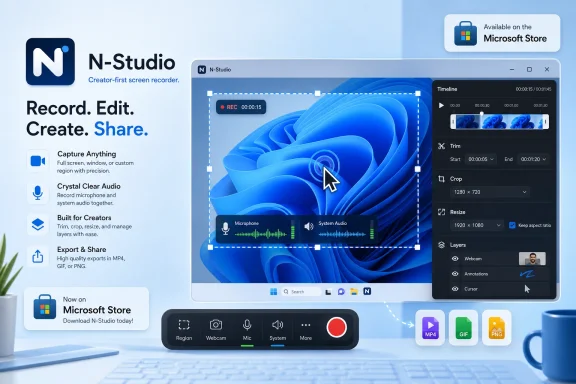
N-Studio arrived in the Microsoft Store on May 5, 2026, offering Windows users a free Starter screen recorder with audio capture, broad export support, no watermarks, no ads, and an optional $36 Professional upgrade for timeline editing. That sounds like a small app-store listing, but it lands in a much larger argument about what Windows still does not do elegantly out of the box. Microsoft has spent years adding capture features to Snipping Tool, Game Bar, Clipchamp, and Photos, yet the creator workflow on Windows still too often feels like a relay race between half-finished utilities. N-Studio’s real pitch is not that it records the screen; it is that Windows users may finally get a tidy, creator-first recording pipeline without assembling one themselves.
Windows 11 can already record your screen. That is the easy rebuttal, and it is also the reason N-Studio is interesting rather than redundant. Snipping Tool’s video capture has matured from a screenshot accessory into a usable recorder, and Microsoft has given developers an official protocol for invoking Snipping Tool for image capture and video capture. For casual users, that is enough.
But “enough” is not the same as finished. A screen recorder becomes a creative tool only when it treats capture, cleanup, and export as one continuous workflow. The moment a user needs to trim the start, crop out a notification, resize for a support ticket, export as GIF for documentation, and maybe create a video for a client, Microsoft’s native story starts to fragment.
That fragmentation is classic modern Windows. The operating system contains many of the necessary pieces, but they do not always behave like one product. You capture in one place, edit in another, transcode somewhere else, and eventually discover that the tiny task you thought would take 90 seconds has become a tour of Microsoft’s consumer-app strategy.
N-Studio enters through that gap. Its free Starter edition promises the basics that working users actually care about: screen-area selection, window or full-screen capture, microphone and system audio, cursor and click capture, keystroke capture, trim, crop, resize, layer toggles, and export to a long list of image, video, audio, and project formats. The absence of ads, watermarks, and arbitrary recording limits is not a footnote. It is the feature.
Free screen recorders have trained users to expect a catch. Maybe the video ends with a watermark. Maybe high-resolution export is paywalled. Maybe system audio costs extra. Maybe the app is “free” only until the first moment you need it for real work. N-Studio’s Starter tier appears designed to short-circuit that suspicion.
That matters because screen recording is not a niche workflow anymore. It is how support teams explain bugs, how developers document regressions, how teachers make quick walkthroughs, how creators publish tutorials, how product managers show stakeholders what changed, and how forum users demonstrate problems that would otherwise require paragraphs of painful description. The old idea that screen recording is either for gamers or YouTubers is badly out of date.
The free tier’s export list is especially telling. APNG, GIF, WEBP, MP4, MKV, MOV, WEBM, MP3, WAV, FLAC, ALAC, OGG, PSD, NSM, STG, JPG, PNG, BMP, AIF, and HEIC is not the lineup of a toy. It is the lineup of an app that understands that “screen recording” often means “make the exact artifact this other system will accept.”
That is where N-Studio becomes more than another Microsoft Store utility. It recognizes that capture is a format problem as much as a recording problem. The output destination might be a helpdesk ticket, a GitHub issue, a Slack thread, a documentation page, a training portal, or an edited video. The right recorder does not merely collect pixels; it helps them travel.
That history gives N-Studio a head start in trust. Windows users are not short on random screen recorders. The Microsoft Store, the web, and search results are crowded with capture apps that range from excellent to dubious. Many look similar at installation time. The difference only becomes clear when you try to capture system audio, export cleanly, preserve frame timing, edit without lag, or avoid being upsold mid-task.
ScreenToGif’s reputation was built among users who notice those details. The app’s audience included developers, documentation writers, support workers, and enthusiasts who needed small, precise visual captures rather than cinematic productions. N-Studio appears to take that sensibility and expand it into a broader recorder-and-editor model.
That is an important distinction from simply cloning the fashionable “make my screen recording look like a polished startup demo” category. Windows has seen a burst of tools chasing the smooth cursor, automatic zoom, and product-demo aesthetic that Mac users associate with apps like Screen Studio. N-Studio seems more utilitarian than glossy by design. It is closer to a workbench than a marketing studio.
For WindowsForum readers, that is probably a compliment. A recorder that exports widely, captures reliably, and lets users clean up the result quickly may be more valuable than one that adds theatrical camera moves. Most screen recordings are not brand films. They are evidence, explanations, and instructions.
A credible developer choosing the Store as a distribution channel gives Microsoft something it has long wanted: proof that the Store can be a normal place to get serious Windows software. Not just streaming apps, not just casual games, not just inbox components, but tools that enthusiasts and professionals might actually install on purpose. The Store’s value proposition is simple when it works: safer discovery, easier updates, cleaner install and uninstall behavior, and less reliance on wandering through search-engine sludge.
For a screen recorder, that distribution channel also carries a trust signal. Recording the screen and capturing keystrokes are sensitive capabilities. Users should be careful about which app they allow to observe their desktop, microphone, system audio, and input behavior. Store availability does not magically make an app safe, but it does place the software in a more familiar installation and update pipeline than a random executable from a landing page.
That trust is not absolute, and Microsoft should not pretend otherwise. The Store has hosted low-quality apps, confusing clones, and utilities that seem engineered more for search ranking than user value. But when a known developer ships a serious tool there, it strengthens the case for the Store as the first stop rather than the last resort.
There is also a practical enterprise angle. Many managed environments are more comfortable with Store-delivered apps than unmanaged downloads, though policies differ wildly. IT teams still need packaging, licensing, privacy, update control, and governance. But the Store listing at least begins the conversation from a cleaner place than “download this EXE from a site someone found on Reddit.”
That weakness is more glaring in 2026 than it was five years ago. Remote work normalized asynchronous video. Software support moved from “describe the problem” to “send a clip.” AI coding tools and developer platforms have made visual bug reports more valuable. Educators and trainers routinely create quick screencasts. Even forum culture has changed; a GIF or short MP4 can solve in seconds what a thread might otherwise debate for days.
Microsoft’s answer has been incremental. Snipping Tool got better. Clipchamp got folded into the Windows story. Photos picked up editing features. But these improvements still feel like separate islands. The experience lacks the confidence of a single product manager saying: here is how a Windows user records an explanation and makes it presentable.
N-Studio’s arrival is a reminder that independent developers often see workflows more clearly than platform owners do. Microsoft tends to think in platform capabilities and bundled services. Indie utility developers tend to think in user pain. A user does not want a capture API, a consumer editor, and a sharing surface. A user wants to record the thing, cut the mistake, hide the distraction, export the file, and move on.
That is why a small app can embarrass a large platform without technically doing anything Microsoft cannot do. Microsoft has the resources to build the definitive Windows screen recorder. The fact that third-party tools still feel necessary is not an engineering indictment so much as a product-priority indictment.
The question is not whether those features are worth $36 in the abstract. It is whether they save enough time for the user who repeatedly makes screen-based content. For a student making one clip a semester, maybe not. For a support engineer, tutorial creator, QA tester, software marketer, trainer, or Windows enthusiast who posts demonstrations regularly, the economics change quickly.
Subscription fatigue is real, and users are right to be suspicious of utility software that turns every minor convenience into a monthly bill. N-Studio’s $3-per-month option will trigger that reflex in some people, even though the one-time $36 license softens the criticism. The more interesting comparison is not between N-Studio and “free.” It is between N-Studio and the hidden cost of stitching together free tools.
That cost shows up in friction. OBS Studio is powerful and free, but it is not designed around quick post-capture editing. Snipping Tool is immediate, but limited. Clipchamp can edit, but it is a different environment with its own assumptions. Full professional editors are overkill for many screen recordings. The user ends up paying with time, attention, and context switching.
N-Studio Professional’s selling point is therefore not merely a timeline. It is fewer exits from the task. If the app lets you capture, annotate, blur, trim, crop, and export without changing mental modes, it earns its price the way good utilities always have: by making a recurring annoyance disappear.
Microsoft’s own tools reflect that tension. Game Bar made sense for gameplay capture and quick clips. Snipping Tool made sense for lightweight visual capture. Clipchamp made sense as a consumer video editor. Enterprise policies make sense for administrators worried about screen recording in managed environments. But the seams between these products are visible because they were not born as one workflow.
N-Studio does not have to serve everyone at platform scale. That is its advantage. It can aim at the productive middle: users who need more than a basic recorder and less than a professional video suite. That middle is larger than it looks.
A polished screen recording is now a workplace artifact. It can be the difference between a reproducible bug and a vague complaint, between a support answer that lands and one that confuses, between a product update that feels clear and one that gets ignored. The demand is not glamorous, but it is durable.
This also explains why “no watermark” matters so much. A watermark is not just a cosmetic annoyance. In professional contexts, it can make a support clip look unserious, a classroom asset look cheap, or a client-facing demo look unfinished. Removing that penalty from the free tier gives N-Studio a chance to become part of routine Windows behavior before users ever consider paying.
It is also a feature that deserves caution. Screen recording already asks users to trust an app with the contents of their display and, often, their audio. Keystroke display adds another layer because users may type passwords, access tokens, private messages, customer data, or internal system names during a recording session. A well-designed recorder should make this behavior obvious, controllable, and easy to disable.
This is not a knock on N-Studio. It is a reminder that the screen recorder category sits close to the boundary between productivity software and surveillance software. The same technical capabilities that make a tool valuable for tutorials can be dangerous in the wrong hands or careless in the wrong workflow.
Microsoft knows this, which is why Windows includes policy controls around screen recording in Snipping Tool for managed environments. IT administrators do not think about recorders only as convenience tools. They think about data leakage, regulated information, meeting captures, credentials, and user consent.
For home users, the lesson is simpler: treat screen recording like publishing. Before recording, close what should not be visible. Before exporting, scrub the timeline. Before enabling keystroke capture, think about what you might type. Good tools reduce friction, but they do not eliminate judgment.
But OBS is not the benchmark for every screen-recording product. In fact, comparing every recorder to OBS can obscure why simpler tools exist. OBS is a production switcher and recording engine; many users need a fast visual note-taking machine. They do not want scenes, sources, docks, profiles, and encoders. They want to drag a rectangle, record a bug, trim the dead air, and export a clean clip.
Snipping Tool sits at the other end. It is convenient because it is already there, but it is not trying to be the center of a creator workflow. It is the fastest path to a basic capture, not the best path to a finished artifact. Microsoft’s challenge is that many users discover this limitation only after they have already recorded something.
N-Studio’s opportunity is to occupy the gap between those poles. It can be more approachable than OBS and more capable than Snipping Tool. That is a valuable place to stand if the execution holds up.
The risk is that the gap narrows from both sides. Microsoft can keep improving Snipping Tool. OBS-related workflows can become friendlier through plugins and companion tools. Other indie recorders are also racing toward the same “Screen Studio for Windows” opportunity. N-Studio’s advantage will depend on whether it stays fast, reliable, and coherent as features accumulate.
N-Studio’s pricing threads that needle. A $36 one-time purchase is low enough to be impulse-buy territory for professionals, but high enough that the app must prove its reliability. The $3 monthly subscription is cheap in isolation but enters a crowded mental ledger of recurring charges. The free Starter tier is therefore not just generosity; it is the sales funnel.
The smart move is that the free tier appears useful on its own. If users can record without limits, export without watermarks, and avoid ads, they can build trust before confronting the upgrade. That is healthier than the old shareware trick of making the free version painful enough to force payment.
The Professional edition then becomes a test of user behavior. If users find themselves repeatedly wanting timeline layers, pixelation, speed changes, effects, and more advanced editing, the upgrade makes sense. If they do not, the free edition remains a credible everyday recorder. That is how freemium should work: not as hostage-taking, but as segmentation.
For Microsoft, there is a lesson here as well. Users will pay for polish when polish removes a real annoyance. They are less enthusiastic about paying for storage bundles, AI credits, or branded ecosystems when the core workflow remains clumsy. N-Studio’s pitch is refreshingly old-fashioned: here is a tool, here is what it does, here is what costs money.
Windows has plenty of powerful software, but it has historically lagged in this particular category of elegant small tools. The platform’s diversity is part of the reason. Windows apps must survive more hardware variation, more driver weirdness, more display configurations, more enterprise constraints, and more user expectations around backward compatibility. Beauty often loses to coverage.
But Windows users increasingly expect both. They want native performance, modern design, predictable updates, privacy-respecting behavior, and workflows that do not feel like a 2009 control panel in disguise. The success of any app like N-Studio will depend not only on its features, but on whether it feels at home on modern Windows.
That is why the article-length feature list is both promising and dangerous. Feature depth attracts power users, but feature sprawl can bury the simplicity that makes a recorder appealing in the first place. The best version of N-Studio will resist becoming a miniature Premiere. It should stay focused on screen-native editing: cutting, cropping, resizing, annotating, blurring, layering, changing speed, and exporting cleanly.
There is a market for that. It is not the Hollywood editor market. It is the “I need to explain this clearly before lunch” market. Windows has millions of those users.
N-Studio’s current boundary looks sensible. Starter handles capture, basic adjustments, broad export, and clean output. Professional handles richer editing and timeline composition. That maps well to user intent: recording is free, production is paid.
The danger will come later, as maintenance costs rise and competitive pressure increases. Will advanced export settings move behind the paywall? Will free users see nags? Will new formats become Professional-only? Will collaboration, cloud features, or AI enhancements arrive as separate subscriptions? None of that is inevitable, but Windows users have seen enough utility apps drift from “helpful” to “hungry” to be wary.
A sustainable N-Studio needs to keep the free version boringly dependable. That is not a glamorous product strategy, but it is a powerful one. If Starter becomes the default recommendation for “I need a clean screen recording with no watermark,” Professional will have a large and sympathetic audience.
That audience will include people who do not object to paying. They object to being tricked. There is a difference.
The concrete shape of the news is straightforward:
Source: Windows Central https://www.windowscentral.com/soft...he-microsoft-store-with-a-generous-free-tier/
 Microsoft’s Built-In Recorder Still Leaves Room for a Real Product
Windows 11 can already record your screen. That is the easy rebuttal, and it is also the reason N-Studio is interesting rather than redundant. Snipping Tool’s video capture has matured from a screenshot accessory into a usable recorder, and Microsoft has given developers an official protocol for invoking Snipping Tool for image capture and video capture. For casual users, that is enough.But “enough” is not the same as finished. A screen recorder becomes a creative tool only when it treats capture, cleanup, and export as one continuous workflow. The moment a user needs to trim the start, crop out a notification, resize for a support ticket, export as GIF for documentation, and maybe create a video for a client, Microsoft’s native story starts to fragment.
That fragmentation is classic modern Windows. The operating system contains many of the necessary pieces, but they do not always behave like one product. You capture in one place, edit in another, transcode somewhere else, and eventually discover that the tiny task you thought would take 90 seconds has become a tour of Microsoft’s consumer-app strategy.
N-Studio enters through that gap. Its free Starter edition promises the basics that working users actually care about: screen-area selection, window or full-screen capture, microphone and system audio, cursor and click capture, keystroke capture, trim, crop, resize, layer toggles, and export to a long list of image, video, audio, and project formats. The absence of ads, watermarks, and arbitrary recording limits is not a footnote. It is the feature.
The Free Tier Is the Disruption, Not the Paid Upgrade
The headline price for N-Studio Professional is modest: $36 as a one-time purchase, or $3 per month. In a market where every utility seems to be practicing its investor pitch for recurring revenue, that is restrained. Still, the most aggressive move here is not the paid edition. It is how much the developer is leaving in the free one.Free screen recorders have trained users to expect a catch. Maybe the video ends with a watermark. Maybe high-resolution export is paywalled. Maybe system audio costs extra. Maybe the app is “free” only until the first moment you need it for real work. N-Studio’s Starter tier appears designed to short-circuit that suspicion.
That matters because screen recording is not a niche workflow anymore. It is how support teams explain bugs, how developers document regressions, how teachers make quick walkthroughs, how creators publish tutorials, how product managers show stakeholders what changed, and how forum users demonstrate problems that would otherwise require paragraphs of painful description. The old idea that screen recording is either for gamers or YouTubers is badly out of date.
The free tier’s export list is especially telling. APNG, GIF, WEBP, MP4, MKV, MOV, WEBM, MP3, WAV, FLAC, ALAC, OGG, PSD, NSM, STG, JPG, PNG, BMP, AIF, and HEIC is not the lineup of a toy. It is the lineup of an app that understands that “screen recording” often means “make the exact artifact this other system will accept.”
That is where N-Studio becomes more than another Microsoft Store utility. It recognizes that capture is a format problem as much as a recording problem. The output destination might be a helpdesk ticket, a GitHub issue, a Slack thread, a documentation page, a training portal, or an edited video. The right recorder does not merely collect pixels; it helps them travel.
ScreenToGif’s DNA Gives N-Studio Immediate Credibility
N-Studio is associated with Nicke Manarin, best known to many Windows power users as the developer behind ScreenToGif. That lineage matters. ScreenToGif earned its following by doing a deceptively simple job well: recording part of the screen and turning it into a lightweight, editable animation. It lived in the space between a screenshot and a video editor, which is exactly where a surprising amount of real-world communication happens.That history gives N-Studio a head start in trust. Windows users are not short on random screen recorders. The Microsoft Store, the web, and search results are crowded with capture apps that range from excellent to dubious. Many look similar at installation time. The difference only becomes clear when you try to capture system audio, export cleanly, preserve frame timing, edit without lag, or avoid being upsold mid-task.
ScreenToGif’s reputation was built among users who notice those details. The app’s audience included developers, documentation writers, support workers, and enthusiasts who needed small, precise visual captures rather than cinematic productions. N-Studio appears to take that sensibility and expand it into a broader recorder-and-editor model.
That is an important distinction from simply cloning the fashionable “make my screen recording look like a polished startup demo” category. Windows has seen a burst of tools chasing the smooth cursor, automatic zoom, and product-demo aesthetic that Mac users associate with apps like Screen Studio. N-Studio seems more utilitarian than glossy by design. It is closer to a workbench than a marketing studio.
For WindowsForum readers, that is probably a compliment. A recorder that exports widely, captures reliably, and lets users clean up the result quickly may be more valuable than one that adds theatrical camera moves. Most screen recordings are not brand films. They are evidence, explanations, and instructions.
The Microsoft Store Is Becoming a Distribution Argument Again
The fact that N-Studio is now in the Microsoft Store should not be overlooked. For years, the Store was treated by many Windows veterans as either irrelevant or actively annoying: a place for UWP curiosities, repackaged utilities, abandoned apps, and the occasional Microsoft first-party download. That view has softened, but not disappeared.A credible developer choosing the Store as a distribution channel gives Microsoft something it has long wanted: proof that the Store can be a normal place to get serious Windows software. Not just streaming apps, not just casual games, not just inbox components, but tools that enthusiasts and professionals might actually install on purpose. The Store’s value proposition is simple when it works: safer discovery, easier updates, cleaner install and uninstall behavior, and less reliance on wandering through search-engine sludge.
For a screen recorder, that distribution channel also carries a trust signal. Recording the screen and capturing keystrokes are sensitive capabilities. Users should be careful about which app they allow to observe their desktop, microphone, system audio, and input behavior. Store availability does not magically make an app safe, but it does place the software in a more familiar installation and update pipeline than a random executable from a landing page.
That trust is not absolute, and Microsoft should not pretend otherwise. The Store has hosted low-quality apps, confusing clones, and utilities that seem engineered more for search ranking than user value. But when a known developer ships a serious tool there, it strengthens the case for the Store as the first stop rather than the last resort.
There is also a practical enterprise angle. Many managed environments are more comfortable with Store-delivered apps than unmanaged downloads, though policies differ wildly. IT teams still need packaging, licensing, privacy, update control, and governance. But the Store listing at least begins the conversation from a cleaner place than “download this EXE from a site someone found on Reddit.”
N-Studio Exposes the Mess in Microsoft’s Creator Workflow
Microsoft has many pieces of a creator workflow. Windows has Snipping Tool. It has Game Bar capture. It has Clipchamp. It has Photos. It has OneDrive sharing. It has built-in media APIs and a Store for distribution. It has Copilot-era ambitions around productivity and content generation. What it does not have is a coherent default path for the person who wants to record, edit, export, and share a short screen-based explanation.That weakness is more glaring in 2026 than it was five years ago. Remote work normalized asynchronous video. Software support moved from “describe the problem” to “send a clip.” AI coding tools and developer platforms have made visual bug reports more valuable. Educators and trainers routinely create quick screencasts. Even forum culture has changed; a GIF or short MP4 can solve in seconds what a thread might otherwise debate for days.
Microsoft’s answer has been incremental. Snipping Tool got better. Clipchamp got folded into the Windows story. Photos picked up editing features. But these improvements still feel like separate islands. The experience lacks the confidence of a single product manager saying: here is how a Windows user records an explanation and makes it presentable.
N-Studio’s arrival is a reminder that independent developers often see workflows more clearly than platform owners do. Microsoft tends to think in platform capabilities and bundled services. Indie utility developers tend to think in user pain. A user does not want a capture API, a consumer editor, and a sharing surface. A user wants to record the thing, cut the mistake, hide the distraction, export the file, and move on.
That is why a small app can embarrass a large platform without technically doing anything Microsoft cannot do. Microsoft has the resources to build the definitive Windows screen recorder. The fact that third-party tools still feel necessary is not an engineering indictment so much as a product-priority indictment.
The Professional Tier Sells Time, Not Features
The paid version of N-Studio adds the kind of features that turn capture into production. Professional includes timelapse and long-timelapse capture frequencies, playback speed and frame-rate changes, and a full timeline editor with inserted layers such as recordings, media, text, images, shapes, drawings, progress indicators, pixelation, brightness adjustments, effects, segment splitting, resizing, cropping, and trimming. That is the point where N-Studio stops being a recorder with cleanup tools and becomes a lightweight editor.The question is not whether those features are worth $36 in the abstract. It is whether they save enough time for the user who repeatedly makes screen-based content. For a student making one clip a semester, maybe not. For a support engineer, tutorial creator, QA tester, software marketer, trainer, or Windows enthusiast who posts demonstrations regularly, the economics change quickly.
Subscription fatigue is real, and users are right to be suspicious of utility software that turns every minor convenience into a monthly bill. N-Studio’s $3-per-month option will trigger that reflex in some people, even though the one-time $36 license softens the criticism. The more interesting comparison is not between N-Studio and “free.” It is between N-Studio and the hidden cost of stitching together free tools.
That cost shows up in friction. OBS Studio is powerful and free, but it is not designed around quick post-capture editing. Snipping Tool is immediate, but limited. Clipchamp can edit, but it is a different environment with its own assumptions. Full professional editors are overkill for many screen recordings. The user ends up paying with time, attention, and context switching.
N-Studio Professional’s selling point is therefore not merely a timeline. It is fewer exits from the task. If the app lets you capture, annotate, blur, trim, crop, and export without changing mental modes, it earns its price the way good utilities always have: by making a recurring annoyance disappear.
Windows Has a Recorder Problem Because Windows Has Every Kind of User
The Windows ecosystem is uniquely hard to serve because its users do everything. A screen recorder for Windows might be used by a gamer, accountant, teacher, accessibility tester, developer, compliance officer, YouTuber, helpdesk technician, or hobbyist trying to explain why a driver panel disappeared after an update. Their needs overlap just enough to make a universal app tempting, and diverge enough to make it nearly impossible.Microsoft’s own tools reflect that tension. Game Bar made sense for gameplay capture and quick clips. Snipping Tool made sense for lightweight visual capture. Clipchamp made sense as a consumer video editor. Enterprise policies make sense for administrators worried about screen recording in managed environments. But the seams between these products are visible because they were not born as one workflow.
N-Studio does not have to serve everyone at platform scale. That is its advantage. It can aim at the productive middle: users who need more than a basic recorder and less than a professional video suite. That middle is larger than it looks.
A polished screen recording is now a workplace artifact. It can be the difference between a reproducible bug and a vague complaint, between a support answer that lands and one that confuses, between a product update that feels clear and one that gets ignored. The demand is not glamorous, but it is durable.
This also explains why “no watermark” matters so much. A watermark is not just a cosmetic annoyance. In professional contexts, it can make a support clip look unserious, a classroom asset look cheap, or a client-facing demo look unfinished. Removing that penalty from the free tier gives N-Studio a chance to become part of routine Windows behavior before users ever consider paying.
Keystroke Capture Is Useful, Sensitive, and Exactly the Kind of Feature Users Must Understand
One of the Starter features listed for N-Studio is keystroke capture. For tutorials and software demonstrations, that can be extremely useful. Viewers often need to know not only where the cursor went, but which shortcut made the action happen. Anyone who has watched a fast-moving developer demo knows how much clarity a visible Ctrl+Shift+something can add.It is also a feature that deserves caution. Screen recording already asks users to trust an app with the contents of their display and, often, their audio. Keystroke display adds another layer because users may type passwords, access tokens, private messages, customer data, or internal system names during a recording session. A well-designed recorder should make this behavior obvious, controllable, and easy to disable.
This is not a knock on N-Studio. It is a reminder that the screen recorder category sits close to the boundary between productivity software and surveillance software. The same technical capabilities that make a tool valuable for tutorials can be dangerous in the wrong hands or careless in the wrong workflow.
Microsoft knows this, which is why Windows includes policy controls around screen recording in Snipping Tool for managed environments. IT administrators do not think about recorders only as convenience tools. They think about data leakage, regulated information, meeting captures, credentials, and user consent.
For home users, the lesson is simpler: treat screen recording like publishing. Before recording, close what should not be visible. Before exporting, scrub the timeline. Before enabling keystroke capture, think about what you might type. Good tools reduce friction, but they do not eliminate judgment.
OBS Is Not the Enemy, and Snipping Tool Is Not the Benchmark
Any new Windows screen recorder immediately gets compared to OBS Studio, because OBS is the gravitational force in the category. It is free, open source, powerful, mature, and trusted by streamers, creators, and professionals. For complex capture setups, scene composition, streaming, and serious recording control, OBS remains formidable.But OBS is not the benchmark for every screen-recording product. In fact, comparing every recorder to OBS can obscure why simpler tools exist. OBS is a production switcher and recording engine; many users need a fast visual note-taking machine. They do not want scenes, sources, docks, profiles, and encoders. They want to drag a rectangle, record a bug, trim the dead air, and export a clean clip.
Snipping Tool sits at the other end. It is convenient because it is already there, but it is not trying to be the center of a creator workflow. It is the fastest path to a basic capture, not the best path to a finished artifact. Microsoft’s challenge is that many users discover this limitation only after they have already recorded something.
N-Studio’s opportunity is to occupy the gap between those poles. It can be more approachable than OBS and more capable than Snipping Tool. That is a valuable place to stand if the execution holds up.
The risk is that the gap narrows from both sides. Microsoft can keep improving Snipping Tool. OBS-related workflows can become friendlier through plugins and companion tools. Other indie recorders are also racing toward the same “Screen Studio for Windows” opportunity. N-Studio’s advantage will depend on whether it stays fast, reliable, and coherent as features accumulate.
The Store Listing Is a Test of Whether Windows Users Will Pay for Polish
Windows users have a complicated relationship with paying for utilities. On one hand, the platform has a long tradition of excellent paid tools: file managers, terminal clients, backup apps, media utilities, developer tools, and system monitors. On the other hand, the sheer availability of free and open-source software has trained many users to treat paid apps as suspect unless they solve a very specific pain.N-Studio’s pricing threads that needle. A $36 one-time purchase is low enough to be impulse-buy territory for professionals, but high enough that the app must prove its reliability. The $3 monthly subscription is cheap in isolation but enters a crowded mental ledger of recurring charges. The free Starter tier is therefore not just generosity; it is the sales funnel.
The smart move is that the free tier appears useful on its own. If users can record without limits, export without watermarks, and avoid ads, they can build trust before confronting the upgrade. That is healthier than the old shareware trick of making the free version painful enough to force payment.
The Professional edition then becomes a test of user behavior. If users find themselves repeatedly wanting timeline layers, pixelation, speed changes, effects, and more advanced editing, the upgrade makes sense. If they do not, the free edition remains a credible everyday recorder. That is how freemium should work: not as hostage-taking, but as segmentation.
For Microsoft, there is a lesson here as well. Users will pay for polish when polish removes a real annoyance. They are less enthusiastic about paying for storage bundles, AI credits, or branded ecosystems when the core workflow remains clumsy. N-Studio’s pitch is refreshingly old-fashioned: here is a tool, here is what it does, here is what costs money.
The Real Competition Is the Mac Creator-App Standard
The unspoken pressure on every Windows screen recorder in 2026 is the Mac software ecosystem. On macOS, a certain class of polished creator utility has become a genre unto itself: beautiful, narrowly focused, opinionated, and expensive enough to support serious development. Apps like Screen Studio helped define user expectations for screen recordings that look clean without requiring the user to become a video editor.Windows has plenty of powerful software, but it has historically lagged in this particular category of elegant small tools. The platform’s diversity is part of the reason. Windows apps must survive more hardware variation, more driver weirdness, more display configurations, more enterprise constraints, and more user expectations around backward compatibility. Beauty often loses to coverage.
But Windows users increasingly expect both. They want native performance, modern design, predictable updates, privacy-respecting behavior, and workflows that do not feel like a 2009 control panel in disguise. The success of any app like N-Studio will depend not only on its features, but on whether it feels at home on modern Windows.
That is why the article-length feature list is both promising and dangerous. Feature depth attracts power users, but feature sprawl can bury the simplicity that makes a recorder appealing in the first place. The best version of N-Studio will resist becoming a miniature Premiere. It should stay focused on screen-native editing: cutting, cropping, resizing, annotating, blurring, layering, changing speed, and exporting cleanly.
There is a market for that. It is not the Hollywood editor market. It is the “I need to explain this clearly before lunch” market. Windows has millions of those users.
The Upgrade Path Must Not Poison the Free Experience
The hardest part of any freemium utility is restraint. Developers need revenue, users need trust, and the product needs a boundary between free and paid that feels fair. Put too much in the paid tier, and the free app feels like an advertisement. Put too much in the free tier, and development becomes charity. Move features backward after launch, and users revolt.N-Studio’s current boundary looks sensible. Starter handles capture, basic adjustments, broad export, and clean output. Professional handles richer editing and timeline composition. That maps well to user intent: recording is free, production is paid.
The danger will come later, as maintenance costs rise and competitive pressure increases. Will advanced export settings move behind the paywall? Will free users see nags? Will new formats become Professional-only? Will collaboration, cloud features, or AI enhancements arrive as separate subscriptions? None of that is inevitable, but Windows users have seen enough utility apps drift from “helpful” to “hungry” to be wary.
A sustainable N-Studio needs to keep the free version boringly dependable. That is not a glamorous product strategy, but it is a powerful one. If Starter becomes the default recommendation for “I need a clean screen recording with no watermark,” Professional will have a large and sympathetic audience.
That audience will include people who do not object to paying. They object to being tricked. There is a difference.
A Small Recorder Carries a Bigger Message for Windows
N-Studio’s Store debut is not a revolution, but it is a useful signal. It shows that the Windows app ecosystem still has room for focused, native-feeling utilities that solve everyday workflow gaps better than Microsoft’s bundled tools. It also shows that screen recording has become important enough to support a serious freemium product on Windows, not just a feature tucked into a screenshot app.The concrete shape of the news is straightforward:
- N-Studio is now available through the Microsoft Store, giving Windows users a new route to install a dedicated screen recorder and editor.
- The free Starter edition includes screen capture, microphone and system audio capture, cursor and click capture, keystroke capture, basic trimming, cropping, resizing, layer toggles, broad export support, no ads, no watermarks, and no stated recording limits.
- The Professional edition costs $36 or $3 per month and adds timeline editing, timelapse modes, playback and frame-rate adjustments, effects, inserted layers, pixelation, brightness tools, splitting, trimming, cropping, and resizing.
- The app’s credibility is helped by its connection to Nicke Manarin, whose ScreenToGif has long been respected by Windows users who need practical visual capture tools.
- The biggest competitive opening is not raw recording capability, but the chance to combine capture, cleanup, annotation, and export in one workflow that feels less fragmented than Microsoft’s built-in path.
Source: Windows Central https://www.windowscentral.com/soft...he-microsoft-store-with-a-generous-free-tier/
