

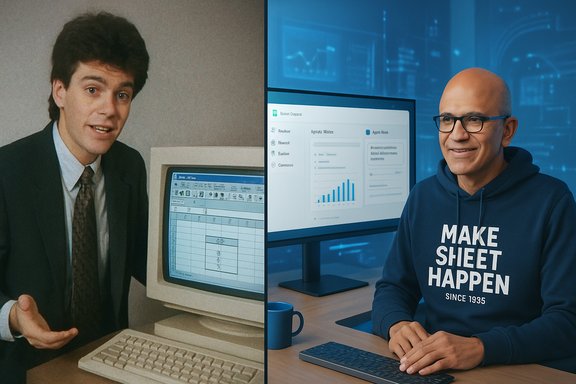
A grainy CRT monitor, a thick-haired young engineer in a suit, and a patient walkthrough of data flowing from an IBM AS/400 into Microsoft Excel — a 1993 clip of Satya Nadella at work has resurfaced and captured the internet’s imagination, and the Microsoft CEO’s recent cheeky reply — “Less hair. Same love for Excel!” — has only amplified the moment. The short exchange, which included a photograph of Nadella today wearing a hoodie that reads “Make Sheet Happen Since 1985”, is more than a nostalgic chuckle: it’s a reminder of Excel’s cultural and technical longevity, Microsoft’s enduring product-first identity, and the new chapter Excel is entering in the age of agentic AI.
Microsoft Excel was introduced in 1985 and quickly became a defining productivity tool, first on the Macintosh and later on Windows, evolving across decades into the backbone of business reporting, analysis, and ad hoc automation. That original spreadsheet model — rows, columns, formulas and tables — proved remarkably resilient as use cases expanded from simple financial models to complex data engineering tasks. The viral clip showing Nadella as a technical marketing manager explaining Excel’s integration with Windows NT and legacy systems like the AS/400 underscores how Excel has long functioned as a bridge between data stored on older enterprise systems and the spreadsheets used by analysts and managers. Microsoft’s public commentary on the resurfaced clip and Nadella’s own reaction reinforced two themes: the company’s reverence for Excel’s durability, and Nadella’s personal continuity with the product he once demoed and now oversees. The exchange came as Microsoft continues to roll out AI-driven features for Excel, including Copilot integrations and a new Agent Mode designed to let spreadsheets be created, analyzed, and iterated via conversational prompts. Those product moves refract differently through the lens of the video: Excel began as a tool for human operators; it is rapidly becoming a platform where humans and AI agents co-author work.
Two cultural takeaways are notable:
That transition is promising for productivity but also demands responsible governance. Enterprises and users must explicitly test and validate AI-assisted spreadsheets, enforce privacy and audit controls, and maintain the underlying spreadsheet literacy that makes human oversight effective. When those guardrails are in place, the new generation of Excel — still rooted in tables and lists first defined in 1985 — could become a far more powerful, efficient, and accessible tool for work. For now, the image of Nadella in front of two very different monitors — one an old CRT, the other a modern display with Excel open — is an apt metaphor: the product has changed form, but its purpose remains remarkably consistent.
Source: livemint.com ‘Less hair, same love’: Satya Nadella reacts to his 32-year-old Microsoft Excel demo going viral | Company Business News
 Background
Microsoft Excel was introduced in 1985 and quickly became a defining productivity tool, first on the Macintosh and later on Windows, evolving across decades into the backbone of business reporting, analysis, and ad hoc automation. That original spreadsheet model — rows, columns, formulas and tables — proved remarkably resilient as use cases expanded from simple financial models to complex data engineering tasks. The viral clip showing Nadella as a technical marketing manager explaining Excel’s integration with Windows NT and legacy systems like the AS/400 underscores how Excel has long functioned as a bridge between data stored on older enterprise systems and the spreadsheets used by analysts and managers. Microsoft’s public commentary on the resurfaced clip and Nadella’s own reaction reinforced two themes: the company’s reverence for Excel’s durability, and Nadella’s personal continuity with the product he once demoed and now oversees. The exchange came as Microsoft continues to roll out AI-driven features for Excel, including Copilot integrations and a new Agent Mode designed to let spreadsheets be created, analyzed, and iterated via conversational prompts. Those product moves refract differently through the lens of the video: Excel began as a tool for human operators; it is rapidly becoming a platform where humans and AI agents co-author work. The viral clip and the social moment
What surfaced, and who shared it
The resurfaced footage originates from a 1993 DevCast segment where a 26-year-old Satya Nadella demonstrated Excel running under Windows NT and showed how to bring data from an IBM AS/400 into the spreadsheet. The clip has circulated on social platforms for several years, with a widely shared repost by entrepreneur Brandon Arvanaghi in December 2022 rekindling interest; the clip often reappears in social feeds whenever nostalgia for early computing meets admiration for Nadella’s career trajectory. Recent reposting made the short video viral again, prompting Nadella to reply directly on X with the photo-and-hoodie response that sent social timelines into an affectionate flurry.Why this clip resonates now
Several forces make the clip resonate beyond simple nostalgia:- It spotlights a career arc — an ordinary product demoer who later runs a trillion-dollar company — a narrative that appeals to professional audiences and aspirational viewers alike.
- The footage is a visual marker of technological continuity: legacy systems like the AS/400 and early Windows tooling were once the connective tissue of business data; Excel was the user-facing endpoint that made that data actionable.
- The juxtaposition of the old demo and Nadella’s modern, playful reply underscores product longevity: Excel, dating to 1985, is still relevant enough to anchor jokes, hoodies, and executive photo-ops.
Satya Nadella’s response: branding, warmth, and tone
Nadella’s reply — light-hearted and self-effacing — used a short quip to do three things at once: acknowledge the internet moment, celebrate the product’s persistence, and reinforce Microsoft’s user-facing brand. The hoodie’s slogan — “Make Sheet Happen Since 1985” — is a tongue-in-cheek nod to Excel’s founding year and an example of how executives increasingly use social media to humanize corporate leadership. The one-line caption, “Less hair. Same love for Excel!”, is concise personal branding: it acknowledges change while reiterating affinity for the product. Beyond surface-level amusement, the exchange functioned as a strategic product narrative: Nadella signaled that he still champions core Microsoft productivity tools at a moment when the company is investing heavily in AI-driven productivity features. That linkage — founder-level enthusiasm for a legacy product combined with serious AI investment — reinforces Microsoft’s message that AI is an augmentation to, not a replacement for, long-standing productivity primitives like spreadsheets.Excel at 40: Why spreadsheets still matter
The enduring technical thesis
At its core, Excel persists because of three technical attributes:- Universal data model: tabular rows and columns are a simple, universal representation of structured data that human beings can easily manipulate and reason about.
- Composability: formulas, named ranges, and pivot aggregations enable non-programmers to build complex models without a formal software development process.
- Interoperability: Excel has long been a bridge between database systems, exported reports, and business workflows — making it indispensable in environments where data heterogeneity reigns.
Excel as a "blank canvas"
Public comments attributed to Nadella frame Excel as a “blank canvas” — a reachable surface on which countless solutions are improvised. That description is apt: Excel’s combination of immediacy and expressiveness makes it a prototyping environment for business logic that can later be hardened in code or BI pipelines. The new AI tools being added to Excel aim to make that canvas smarter — enabling many more users to perform complex tasks without steep learning curves.AI in Excel: Copilot and Agent Mode
What Microsoft has added
Microsoft has been aggressively embedding AI into Office, and Excel — as one of its most used products — has been a primary focus. Recent developments include:- Microsoft Copilot integration: Copilot can suggest and explain formulas, analyze data for insights, produce summaries, and create visualizations.
- Agent Mode in Excel: An agentic capability that allows users to describe multi-step tasks in natural language; the agent plans, executes, validates, and iterates on spreadsheets with human steering. Agent Mode is initially available via Microsoft’s Frontier preview and through specific subscription tiers or add-ins.
Availability and roll-out
Agent Mode and other Frontier capabilities have been rolled out as preview programs to select subscribers, with progressive expansion to individual Microsoft 365 Personal, Family, and Premium customers through the Frontier opt-in path and to enterprise Copilot customers where admins enable Frontier. Microsoft’s documentation clarifies that Agent Mode is available in English on Excel for the web initially, with desktop support to follow. These staged deployments indicate Microsoft is balancing rapid feature innovation with cautious previewing to gather telemetry and user feedback.How Agent Mode works (high-level)
Agent Mode is designed as a multi-step orchestration layer atop Excel that:- Accepts a natural-language task prompt (for example: “Create a monthly close report with YoY comparisons and visualizations.”)
- Plans an approach: identifying which sheets, formulas, and pivots are needed.
- Executes operations: creates new sheets, inserts formulas, and generates charts.
- Validates and iterates: runs checks, flags uncertainties, and asks the user clarifying questions.
Practical implications for users and organizations
Productivity gains — genuine, measurable, and contextual
For many users, Copilot and Agent Mode will speed up tasks that were previously iterative and manual: building financial models, cleaning data exports, creating reconciliations, and constructing dashboards. Microsoft’s own benchmarks — including SpreadsheetBench evaluations referenced by the company — suggest these agents can handle a meaningful share of spreadsheet tasks with reasonable accuracy in preview contexts. That said, accuracy varies by task complexity and dataset quality. Benefits include:- Faster model building and report generation
- Lowered barrier to advanced Excel features (e.g., nested formulas, dynamic arrays)
- Better accessibility for non-experts through conversational prompts
Risks and guardrails
The introduction of agentic capabilities raises a set of practical and governance concerns organizations must manage:- Accuracy and auditability: AI-generated formulas and transformations may be opaque; businesses need to maintain audit trails and verifiable steps for financial and compliance reporting. Agent Mode’s iterative validation features help, but they are not a substitute for formal controls.
- Data privacy and governance: spreadsheets often contain sensitive PII, IP, or finance data. Routing such data through cloud-based agents requires careful review of data residency, encryption, and Microsoft’s preview terms for Frontier features. Administrators must be able to opt-in/out and to set organizational policies.
- Overreliance and skill erosion: heavy dependence on AI to scaffold spreadsheet logic could weaken domain expertise among analysts; organizations should encourage a dual approach where AI accelerates work while humans retain understanding and control.
- Model drift and reproducibility: agent outputs might vary over time as models are updated; reproducibility requires explicit versioning and snapshotting of the workbook and the agent’s actions. Microsoft’s Frontier labeling and preview controls are early attempts to surface when outputs are generated by the latest models.
Technical scrutiny: what to watch for
Validation and testing
AI agents must include explicit validation steps for numerical integrity. This includes:- Built-in reconciliation checks (e.g., do totals match source ledgers?
- Sensitivity analyses (how do outputs change under data perturbations?
- Transparent formula generation with human-readable explanations
Security posture
Agent Mode’s web-first rollout means data flows to cloud services for processing; organizations must confirm contractual protections and technical safeguards before enabling Frontier capabilities broadly. Admins should treat Agent Mode like any new SaaS integration: assess DLP impacts, disable previews where necessary, and pilot with sanitized datasets. Microsoft’s Frontier opt-in model and add-in pathways provide administrative levers, but they must be actively configured.The cultural dimension: legacy products in an AI era
The Nadella clip and the modern Copilot pivot together signal a cultural continuity that tech companies increasingly emphasize: products with deep user bases can be powerfully reimagined rather than discarded. Excel’s design — immediate, flexible, and human-centric — is fertile ground for AI augmentation precisely because it is widely used and understood.Two cultural takeaways are notable:
- Legacy products that solved a universal human problem are rarely “done.” They often become the substrate for new waves of innovation. Excel’s new AI features are an example of evolution rather than replacement.
- Executive gestures — a CEO posting a hoodie photo about a product he demoed in 1993 — serve as soft signals about company priorities and continuity. They help normalize transitions (from manual sheets to agentic spreadsheets) in the public imagination.
Strengths and potential pitfalls — balanced analysis
Notable strengths
- User empowerment at scale: Copilot and Agent Mode democratize high-end spreadsheet work, lowering skill barriers for many day-to-day analysts.
- Preserves human oversight: Microsoft emphasizes iterative, steerable agents rather than unsupervised automation, which keeps humans in the loop.
- Integration with an existing ecosystem: Embedding agents in Excel leverages existing workflows, connectors, and corporate adoption — a faster path to value than building a new product from scratch.
Potential risks and blind spots
- Overconfidence in AI outputs: polished agent outputs may be accepted without adequate audit or testing. Organizations must insist on validation routines.
- Privacy and compliance gaps: preview features and cloud processing require explicit governance to avoid inadvertent data exposure.
- Skill erosion: the convenience of AI could atrophy core spreadsheet literacy over time, producing supply-side skill issues for enterprises reliant on complex manual modeling.
- Model accountability and explainability: when AI suggests formulas or transformations, firms need robust logging and mechanism to attribute and reproduce agent decisions. Microsoft’s Frontier labels and preview documentation are an early answer, but operational controls will be required for business reliance.
Concrete recommendations for IT and Excel power users
- Pilot with sanitized datasets: test Agent Mode features using non-sensitive copies of actual workbooks to validate accuracy and behavior before broad rollout.
- Define governance rules: establish DLP rules, admin enablement policies, and opt-in controls for Frontier/preview features.
- Mandate audit trails: require the agent to produce a step-by-step log of its actions; retain snapshots of generated workbooks for reproducibility.
- Train users: offer short courses that pair AI-assisted workflows with core spreadsheet literacy so that users can verify AI outputs confidently.
- Monitor for drift: treat AI-generated models as living artifacts — schedule periodic reviews to catch silent failures as models and datasets evolve.
Conclusion
A short, grainy video of a young Satya Nadella walking an audience through an Excel demo has become a cultural touchstone that doubles as a strategic mirror: it reflects how foundational productivity tools are reused, reimagined, and reincarnated across generations. Nadella’s playful response — “Less hair. Same love for Excel!” — is an emblem of that continuity. Behind the social-media smile, there is a substantive shift underway: Excel is not merely being dressed up with bells and whistles; it is becoming a cognitive partner through Copilot and Agent Mode.That transition is promising for productivity but also demands responsible governance. Enterprises and users must explicitly test and validate AI-assisted spreadsheets, enforce privacy and audit controls, and maintain the underlying spreadsheet literacy that makes human oversight effective. When those guardrails are in place, the new generation of Excel — still rooted in tables and lists first defined in 1985 — could become a far more powerful, efficient, and accessible tool for work. For now, the image of Nadella in front of two very different monitors — one an old CRT, the other a modern display with Excel open — is an apt metaphor: the product has changed form, but its purpose remains remarkably consistent.
Source: livemint.com ‘Less hair, same love’: Satya Nadella reacts to his 32-year-old Microsoft Excel demo going viral | Company Business News
