

Microsoft’s storage team has quietly changed the rules of the road for NVMe SSDs: a native NVMe I/O path shipped in Windows Server 2025 that removes decades of SCSI emulation, and enterprising testers have already forced the same driver into Windows 11 with measurable, often real-world gains in random 4K read/write performance — but the client-side route is experimental, unsupported, and carries non-trivial compatibility and recovery risks.
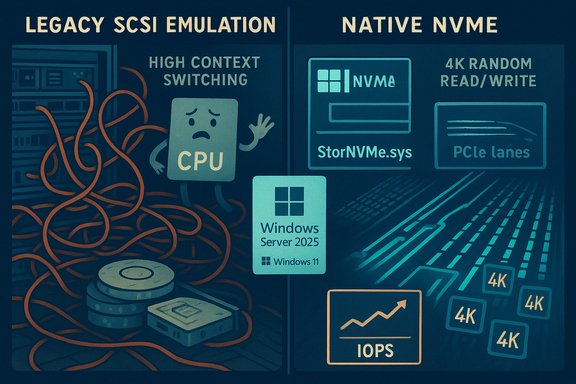
For more than a decade Windows treated NVMe drives as if they were just another block device presented through a SCSI-style abstraction. That design simplified compatibility across HDDs, SATA SSDs, SAN targets and NVMe devices, but it also introduced translation overhead, global locking and serialization points that increasingly limit throughput as modern NVMe controllers and PCIe lanes scale up. NVMe was built for deep parallelism — per-core queues and thousands of queue pairs — and the legacy SCSI emulation gradually became the software bottleneck for high-concurrency workloads.
Microsoft’s Windows Server 2025 introduces a purpose-built, native NVMe path that speaks NVMe semantics directly to devices (the implementation surfaces as a Microsoft native NVMe class driver such as nvmedisk.sys / StorNVMe.sys). In lab microbenchmarks published with the Server announcement, Microsoft demonstrated up to roughly 80% higher IOPS on targeted 4K random read tests and about 45% fewer CPU cycles per I/O in the scenarios they measured, using DiskSpd.exe to reproduce the workload profile. Those server figures are engineering upper bounds on enterprise-class hardware but they prove the fundamental point: the old translation layer was constraining modern NVMe hardware. Because so much of kernel and driver code is shared between Server and Client SKUs, community researchers discovered the native NVMe components are already present in recent Windows 11 builds. By setting FeatureManagement overrides in the registry, testers have caused Windows 11 to load the Microsoft native NVMe class driver and reported measurable improvements — particularly in small-block random I/O where the legacy path used to bite. Those community toggles are unofficial and unsupported; they work in some configurations and break things in others.
The native NVMe path eliminates the translation step, exposing NVMe’s multi-queue and per-core semantics directly to the kernel. The immediate consequences are:
diskspd.exe -b4k -r -Su -t8 -L -o32 -W10 -d30
In the specific dual-socket testbed and enterprise NVMe device Microsoft reported up to ~80% higher IOPS and ~45% fewer CPU cycles per I/O on 4K random read tests versus the legacy path. Those numbers are credible as lab upper bounds, but they are conditional on the test hardware, firmware and workload profile.
Source: Wccftech With Native NVMe Driver, NVMe SSDs Deliver Double-Digit Gains In Random Read/Write On Windows 11
 Background / Overview
For more than a decade Windows treated NVMe drives as if they were just another block device presented through a SCSI-style abstraction. That design simplified compatibility across HDDs, SATA SSDs, SAN targets and NVMe devices, but it also introduced translation overhead, global locking and serialization points that increasingly limit throughput as modern NVMe controllers and PCIe lanes scale up. NVMe was built for deep parallelism — per-core queues and thousands of queue pairs — and the legacy SCSI emulation gradually became the software bottleneck for high-concurrency workloads.Microsoft’s Windows Server 2025 introduces a purpose-built, native NVMe path that speaks NVMe semantics directly to devices (the implementation surfaces as a Microsoft native NVMe class driver such as nvmedisk.sys / StorNVMe.sys). In lab microbenchmarks published with the Server announcement, Microsoft demonstrated up to roughly 80% higher IOPS on targeted 4K random read tests and about 45% fewer CPU cycles per I/O in the scenarios they measured, using DiskSpd.exe to reproduce the workload profile. Those server figures are engineering upper bounds on enterprise-class hardware but they prove the fundamental point: the old translation layer was constraining modern NVMe hardware. Because so much of kernel and driver code is shared between Server and Client SKUs, community researchers discovered the native NVMe components are already present in recent Windows 11 builds. By setting FeatureManagement overrides in the registry, testers have caused Windows 11 to load the Microsoft native NVMe class driver and reported measurable improvements — particularly in small-block random I/O where the legacy path used to bite. Those community toggles are unofficial and unsupported; they work in some configurations and break things in others.
Technical primer: why native NVMe matters
NVMe architecture vs SCSI emulation
NVMe was designed for flash attached over PCI Express:- Multiple submission/completion queues — thousands possible — enabling massive parallelism.
- Per-core queueing and low locking contention when the OS maps queues to CPU cores.
- Minimal per-command overhead compared with legacy block abstractions.
The native NVMe path eliminates the translation step, exposing NVMe’s multi-queue and per-core semantics directly to the kernel. The immediate consequences are:
- Lower per-I/O CPU cost.
- Reduced context switching and lock contention.
- Improved average and tail latency (p99/p999) for high-concurrency small-block workloads.
- Better utilization of the device’s internal parallelism and PCIe bandwidth.
What Microsoft measured (and how to reproduce it)
Microsoft published the DiskSpd.exe command line and a hardware list used in their lab tests so labs and administrators can reproduce the synthetic microbenchmarks. The DiskSpd invocation used in the published test was:diskspd.exe -b4k -r -Su -t8 -L -o32 -W10 -d30
In the specific dual-socket testbed and enterprise NVMe device Microsoft reported up to ~80% higher IOPS and ~45% fewer CPU cycles per I/O on 4K random read tests versus the legacy path. Those numbers are credible as lab upper bounds, but they are conditional on the test hardware, firmware and workload profile.
What the community found on Windows 11 (consumer experimentation)
How enthusiasts enabled the driver
Because the native NVMe code exists in the Windows 11 binaries, community testers discovered a set of registry FeatureManagement override values that cause Windows 11 to prefer the Microsoft native NVMe driver for eligible devices. The commonly circulated (community-sourced, unsupported) commands look like this:- reg add HKEY_LOCAL_MACHINE\SYSTEM\CurrentControlSet\Policies\Microsoft\FeatureManagement\Overrides /v 735209102 /t REG_DWORD /d 1 /f
- reg add HKEY_LOCAL_MACHINE\SYSTEM\CurrentControlSet\Policies\Microsoft\FeatureManagement\Overrides /v 1853569164 /t REG_DWORD /d 1 /f
- reg add HKEY_LOCAL_MACHINE\SYSTEM\CurrentControlSet\Policies\Microsoft\FeatureManagement\Overrides /v 156965516 /t REG_DWORD /d 1 /f
Benchmarks and observed gains
Independent outlets and community users ran AS SSD, CrystalDiskMark and DiskSpd comparisons before and after the native driver switch. The headline patterns are consistent:- Sequential throughput (large file reads/writes) typically shows little change; PCIe link and NAND bandwidth are the limiting factors here.
- Random 4K read/write and 4K-64Thrd workloads show the biggest and most practical gains. These are the small-block, high-concurrency patterns where the SCSI translation layer had been most punitive.
- Percent gains vary widely by drive model, firmware, platform topology and whether a vendor-supplied NVMe driver was previously in use.
Practical checklist: what enthusiasts and IT teams should do (and not do)
The temptation to flip the switch is understandable — double-digit gains in random I/O are immediately useful — but the client-side route today is experimental. Follow this conservative checklist.- Create a full disk image and recovery media before any changes.
- Update motherboard BIOS/UEFI and NVMe firmware to vendor-recommended levels.
- Confirm whether your system uses a vendor-supplied NVMe driver (Samsung, WD, Intel, etc.. If a vendor driver is installed it may continue to control the device and block the Microsoft native path.
- If you choose to test the native path on Windows 11, apply the registry override values in an isolated test machine (not your daily driver), then reboot and verify Device Manager and Driver Details show nvmedisk.sys or StorNVMe.sys.
- Run repeatable benchmarks: DiskSpd.exe for synthetic reproduction of Microsoft’s tests, plus CrystalDiskMark and AS SSD for consumer-focused comparisons. Capture baseline and post-change metrics: IOPS, average and p99 latency, host CPU utilization.
- Check third-party tooling: some vendor utilities (Samsung Magician, WD Toolbox) and backup or encryption products have been reported to misbehave with the native path in early community testing.
- If you see duplicate devices, inaccessible volumes, or boot/recovery failures, revert immediately and use your backups. Unverified registry edits at kernel scope can produce irreversible states on some hardware.
- Prefer waiting for an official client rollout from Microsoft or vendor-validated drivers for client SKUs if you need predictable, supported behavior.
Risks and observed compatibility issues
Community experimentation has surfaced real problems that explain why Microsoft shipped the native path as server-only, opt-in initially:- Third-party tools may misreport or fail. Reports show utilities like Samsung Magician may not work correctly or may show unexpected device state after switching drivers.
- Device/volume accessibility: some testers saw duplicated disk entries, missing volumes, or other device presentation oddities; a small number reported drives becoming inaccessible until driver stacks were restored.
- Boot and recovery hazards: modifying kernel-level I/O behavior repeatedly in the field can complicate Windows Recovery Environment (WinRE) operations and imaging-based restore flows.
- Clustered and storage fabrics: Storage Spaces Direct, replication, and clustered failover need careful validation — changing device presentation or driver semantics can interact badly with resynchronization and recovery logic.
- Vendor drivers and platform differences: many vendor-supplied drivers already implement host-side optimizations for NVMe; in those cases switching to the Microsoft native path may provide little benefit or may be incompatible.
Where you’ll see the biggest practical wins
The native NVMe path attacks software overhead and queuing inefficiencies, so the improvements are most visible where those factors dominate:- Enterprise server workloads: virtualization hosts with heavy VM boot or snapshot storms, OLTP databases, and AI/ML nodes with NVMe scratch file demands — these environments can see the largest absolute and relative IOPS and CPU-efficiency gains.
- High-end PCIe Gen4/Gen5 NVMe drives: drives with tremendous internal parallelism often have headroom that the legacy SCSI path bottled up.
- Handheld / small-form-factor devices with fast NVMe: devices with powerful NVMe media and CPU cores that benefit from reduced per-I/O overhead can show measurable responsiveness gains.
- Desktop responsiveness: Increased random 4K IOPS and reduced tail latency can produce snappier UI behavior, fewer stutters during IO-heavy operations, and modestly faster application launch times for some workloads.
What Microsoft and the ecosystem should do next
This is a genuine engineering win with practical implications for both datacenter and consumer platforms. The sensible path forward requires coordination:- Microsoft should continue the careful, staged rollout — document the feature for client SKUs, provide supported opt-in mechanisms for enterprise clients, and publish known compatible/incompatible vendor drivers.
- NVMe SSD vendors should test their firmware and vendor drivers against the native path and publish guidance: confirm if vendor drivers continue to be preferred or whether the Microsoft stack is now the recommended baseline.
- Motherboard and platform vendors must verify NVMe controller topology, VMD/HBA interactions, and boot/recovery scenarios under the native path.
- Independent benchmarking and telemetry from diverse hardware profiles should be aggregated to identify common failure modes and stable combinations for broader client delivery.
Critical analysis: strengths, shortcomings and unanswered questions
Strengths
- Architectural correctness: aligning the OS with NVMe semantics is the right long-term choice. The native path eliminates a systemic inefficiency that limited NVMe headroom for years.
- Measurable server gains: Microsoft’s lab microbenchmarks show real, reproducible uplifts on enterprise hardware when the workload stresses kernel overhead. These are not marketing smoke — the DiskSpd invocation is published for reproducibility.
- Consumer-visible benefits: community tests demonstrate that the same kernel-level change can translate into practical responsiveness and random I/O gains on some consumer systems. When it works, the effects are useful rather than purely academic.
Shortcomings and risks
- Client-side rollout risks: shipping the feature to consumers without comprehensive vendor validation risks bricked systems, broken tooling and confusing support scenarios. Microsoft’s server-first approach is conservative for good reasons.
- Variable results: not all drives or platforms benefit. Vendor drivers that already optimize host-side behavior may see little improvement, and platform topology (VMD, RAID, HBAs) can nullify benefits entirely. That variability complicates messaging for mainstream users.
- Tooling and telemetry gaps: third-party utilities and imaging/backup workflows must be validated under the new path. Without that, the risk of silent failures grows.
Unanswered questions and unverifiable claims
- Some community posts claim very large percentage gains (e.g., 85% random write in a handheld test). Those numbers are compelling but represent synthetic or corner-case runs that depend heavily on drive firmware, queue depth and the specific benchmark configuration. They should be treated as anecdotal until reproduced across many platforms and by multiple independent labs. The server ~80% IOPS figure is verifiable in Microsoft’s lab context, but extrapolating that number across the consumer landscape is unsafe without broader validation.
How to test responsibly (step-by-step for technical users)
- Image the drive and create recovery media.
- Update UEFI/BIOS and NVMe firmware, and document current driver stacks.
- On a test machine, record baseline metrics:
- Disk IOPS, avg/p99/p999 latency, and CPU utilization.
- Use DiskSpd.exe for server-style reproduction and CrystalDiskMark/AS SSD for consumer-level comparisons.
- Apply the community registry overrides only on test hardware, or use Microsoft’s published server toggle if evaluating Windows Server 2025. Reboot.
- Verify Device Manager now references nvmedisk.sys or StorNVMe.sys and that volumes are accessible.
- Re-run benchmarks and compare before/after. Look beyond overall numbers: examine latency distributions and CPU per-I/O to understand where gains came from.
- If issues arise, revert the registry toggles and use the recovery image.
Conclusion
Microsoft’s native NVMe path in Windows Server 2025 is a substantive engineering modernization that removes a long-standing software choke point for NVMe storage. In controlled server labs it delivers dramatic efficiency and IOPS improvements; in consumer tests the most practical benefits show up as double-digit gains in random 4K read/write performance and better tail latency, especially for high-end NVMe media and I/O-concurrent workloads. Enthusiasts have coaxed the same driver into Windows 11 via registry overrides and reported striking wins, but the client route today is experimental, unsupported and capable of producing compatibility and recovery problems. The right next step for most users is caution: update firmware, back up, test in isolated environments and await a supported client rollout or vendor-validated drivers. For IT teams and labs, the native path is a major optimization to validate and, where safe and supported, deploy — because when the storage stack stops being the limiter, the hardware’s true headroom finally becomes usable.Source: Wccftech With Native NVMe Driver, NVMe SSDs Deliver Double-Digit Gains In Random Read/Write On Windows 11
