Windows 10 Network Settings "Unexpected error" while changing DNS

halva12221

New Member
Joined
Mar 19, 2019
Messages
4
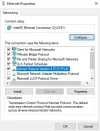
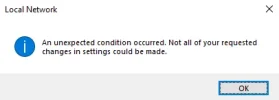
Hi all. I was going on about my day and I decided that I wanted to change my DNS to cloudflares DNS. While changing i got error pop up stating "an unexpected error occurred. Not all of your requested changes in settings could be made." I quickly looked up how to solve this and one thread stated that VMware was the problem. I thought it would be a good idea to uninstall it but VMware Bridge Protocol still resided. Im still unsure what to do next since not many videos or threads exist of this topic.

Thanks.
 

Attachments

  • error 2.webp
    error 2.webp
    25.3 KB · Views: 439
  • error.webp
    error.webp
    6 KB · Views: 419

livix07

Honorable Member
Joined
Feb 19, 2018
Messages
585
How exactly did you change your DNS to Cloudflares?
Have you restarted the computer after changing the settings or after uninstalling VMware to see if that helps?
 

Last edited:

Neemobeer

Windows Forum Team
Staff member
Joined
Jul 4, 2015
Messages
8,998
DNS changes should not require a restart. Did you look in the event log to see if there are any more verbose errors?
 

halva12221

New Member
Joined
Mar 19, 2019
Messages
4
I've managed to fix it by manually doing it in command prompt but I cant do it via the DHCP settings
 

Back
Top