

Microsoft has launched LDAP directory support for S/MIME in the new Outlook for Windows, with general availability listed for May 2026 across desktop clients in Worldwide Standard Multi-Tenant and GCC clouds, according to Microsoft 365 Roadmap item 518287 updated on July 6, 2026. The change sounds narrow, almost clerical, but it lands in one of the most sensitive gaps between Microsoft’s new web-derived Outlook client and the old Win32 workhorse it is trying to replace. For organizations that still rely on certificate-based mail encryption, this is less a shiny feature than a missing bridge finally being bolted into place. Microsoft’s broader Outlook migration story is still a bet that enough old enterprise plumbing can be rebuilt before administrators run out of patience.
The new Outlook for Windows has spent much of its public life being judged not by what it can do, but by what classic Outlook already did. That is a brutal comparison for any modernized client, because classic Outlook is not merely an email app; it is decades of enterprise edge cases, local behaviors, add-ins, protocols, and compliance habits wearing a ribbon UI.
LDAP directory support for S/MIME belongs squarely in that category. Most consumers will never knowingly touch it. Many enterprise users will never see the setting. But in regulated environments, government-adjacent organizations, legal workflows, health care, defense contracting, and old-school public key infrastructure shops, certificate lookup is not optional decoration.
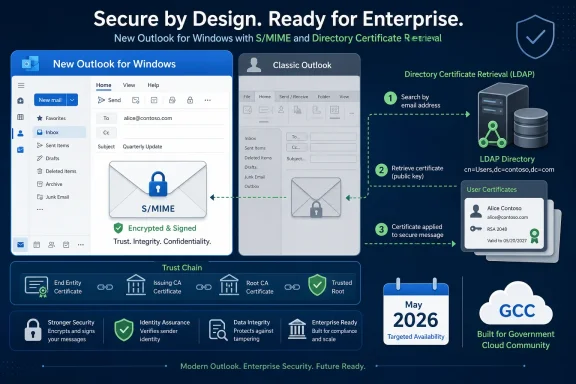
S/MIME depends on the sender being able to obtain the recipient’s public certificate before encrypting a message. If that certificate is not already cached, stored in a contact, or published somewhere Outlook can query, the workflow breaks at precisely the moment a user thinks they are doing the secure thing. LDAP directories have long been one of the pragmatic answers to that problem: ask a directory, retrieve the certificate, encrypt the message.
Microsoft’s roadmap language is straightforward. Users can add an LDAP directory in the new Outlook and use it to fetch recipients’ certificates from that configured directory when sending S/MIME encrypted messages. The deeper message is sharper: Microsoft knows the new Outlook cannot win enterprise trust merely by supporting the most common cloud-first scenarios.
Classic Outlook has accumulated an enormous surface area. It supports habits that no product manager would design from scratch in 2026 but that thousands of organizations still depend upon. Local PST workflows, COM add-ins, delegated mailbox rituals, offline assumptions, account oddities, registry controls, and certificate operations all live in that long tail.
The new Outlook’s defenders often point out, correctly, that Microsoft is rebuilding features quickly. S/MIME support itself appeared in Microsoft’s new Outlook update stream before this LDAP directory milestone. PST support, shared mailbox archive work, search folder improvements, and other classic-era capabilities have been arriving in waves.
But velocity is not the same as parity. A feature that arrives late may still require testing, policy review, user training, and exception handling before a cautious IT department can trust it. For the administrator who already delayed migration because S/MIME certificate lookup was incomplete, the May 2026 availability date is not the end of the story; it is the start of a new validation cycle.
S/MIME is also not fashionable in the way modern security vendors like to talk about encryption. Microsoft Purview Message Encryption, sensitivity labels, data loss prevention, and cloud-mediated policy controls fit more neatly into Microsoft 365’s current architecture. S/MIME, by contrast, carries the smell of public key infrastructure: certificates, private keys, directory publishing, revocation, trust chains, and user-level failure modes.
Yet S/MIME has a stubborn advantage in certain environments. It is standards-based, it can interoperate across organizations, and it allows encryption tied to individual certificates rather than only to a provider’s service boundary. That matters when encrypted email has to cross tenant, agency, contractor, or jurisdictional lines.
LDAP certificate lookup is one of the unglamorous mechanisms that makes that interoperability tolerable. Without it, users may need manual certificate exchange, pre-populated contacts, directory synchronization workarounds, or a fallback to classic Outlook. With it, the new Outlook becomes more plausible in places where secure mail is not a checkbox but a daily operating requirement.
LDAP support complicates that caricature in a useful way. It shows Microsoft adding a capability that is not simply a webmail convenience or a consumer-facing polish item. It is a concession to enterprise dialect, the set of protocols and workflows that keep showing up in migration blockers.
Still, the concession has limits. The roadmap entry identifies desktop platforms, general availability, Worldwide Standard Multi-Tenant and GCC, and Outlook as the product. It does not, by itself, answer every deployment question an administrator will ask at 8:30 a.m. on patch Tuesday.
Admins will want to know how LDAP directory configuration is exposed, whether it can be centrally managed, how authentication behaves, whether LDAPS is required or strongly preferred, what logging exists when certificate lookup fails, and how the client handles multiple directories or stale certificates. Those are not pedantic questions. In S/MIME deployments, a small ambiguity in certificate selection can become a support ticket, a compliance finding, or a message that cannot be decrypted by the intended recipient.
If a directory contains an expired certificate, a duplicate certificate, an old certificate for a renamed account, or a certificate that chains to an untrusted authority, the user may see only a failure that reads like Outlook being broken. The help desk then has to unwind whether the issue sits in Outlook, the directory, the certificate authority, the recipient object, revocation checking, or user training.
That is the operational debt behind every “now supports” line in a roadmap. Microsoft can add the lookup path, but the organization owns the directory hygiene. If anything, making certificate lookup easier can expose how messy the certificate estate has become.
There is also a security tradeoff in directory availability. LDAP directories that are reachable by clients must be designed and monitored like security infrastructure, not treated as address books with a certificate field. They need appropriate access controls, secure transport, auditability, and a plan for compromise or misconfiguration. A directory that helps employees find public certificates can also become a reconnaissance surface if carelessly exposed.
For WindowsForum readers, that is the practical edge: this feature reduces one migration blocker, but it also gives administrators another reason to review old PKI and directory assumptions before declaring the new Outlook ready.
Those customers also tend to move slowly because their constraints are real. They may have stricter compliance requirements, legacy partner ecosystems, special handling rules, or interagency communication patterns that do not bend quickly to consumer-grade product timelines. A new mail client that cannot handle certificate lookup is not an inconvenience there; it can be a nonstarter.
Microsoft has spent years trying to pull public-sector and regulated customers further into the Microsoft 365 platform while maintaining separate cloud environments and controls. Delivering LDAP-backed S/MIME support into GCC signals that the company understands secure messaging parity cannot arrive only for the commercial mainstream.
But GCC inclusion should not be mistaken for automatic readiness across every sovereign or specialized cloud. Microsoft’s own migration documentation distinguishes between environments and warns administrators to target policies carefully. The headline is that GCC is in scope for this feature; the fine print is that every tenant still needs its own readiness assessment.
Microsoft wants to argue that the new Outlook is becoming mature enough for broad deployment. Skeptical admins respond by pointing to the next missing feature, the next workflow regression, the next add-in, the next unsupported account configuration, or the next user complaint. The debate is less about whether Microsoft is adding features and more about whether it is adding the right features fast enough.
LDAP support for S/MIME is a strong exhibit for Microsoft because it targets a serious enterprise requirement rather than a cosmetic annoyance. It tells security-conscious organizations that Microsoft is still investing in standards-based encrypted mail workflows, not merely steering everyone toward cloud-native encryption controls.
At the same time, it reveals the awkwardness of the new Outlook project. Microsoft is effectively rebuilding pieces of classic Outlook in public while also nudging customers toward the rebuilt product. That sequence naturally breeds distrust. Administrators do not like being asked to migrate first and discover missing edge cases later.
The better reading is that Microsoft is now in the proof phase. Each roadmap item must be judged not by its press-release phrasing but by whether it removes a real blocker in real tenants. LDAP directory support for S/MIME does remove one. It does not remove the broader burden of proving the new Outlook can survive enterprise complexity.
When it fails, however, it becomes the entire experience. The recipient cannot be encrypted to. The certificate cannot be found. The message cannot be sent as intended. The user may not know what LDAP means, but they will absolutely know that the “new” Outlook got in the way of work.
That is why this feature’s success will be measured in silence. Fewer forced switches back to classic Outlook. Fewer help desk scripts that begin with “use the old client for this.” Fewer security exceptions in which users are told to send something another way because encrypted mail is too fragile.
Microsoft’s challenge is that feature delivery and user trust operate on different clocks. A feature can launch in May 2026, but the memory of past gaps lingers. The new Outlook has to be boringly reliable for months before the people who were burned by missing functionality stop treating it as suspect.
The first testing target is certificate discovery. Administrators should verify whether the new Outlook can locate certificates for internal users, external partners, shared workflows, and edge cases such as renamed users or recipients with multiple certificates. Testing only the happy path will miss the failures that users will find in the first week.
The second target is certificate correctness. Finding a certificate is not the same as finding the right certificate. Expired, duplicated, weak, or unintended certificates can create confusing behavior, and S/MIME systems are rarely forgiving about ambiguity.
The third target is policy and supportability. If LDAP settings are left to manual user configuration, adoption will be uneven and support costs will rise. If settings can be standardized, documented, and audited, the feature becomes a migration enabler rather than another checkbox that works only in a lab.
LDAP support for S/MIME shows why both sides have a point. Microsoft is modernizing a client that badly needed architectural renewal. Classic Outlook’s power is inseparable from its complexity, and that complexity has costs in servicing, security, performance, and user experience.
But the traditionalists are right about one crucial thing: Outlook is infrastructure. For many organizations, it is not merely a place to read mail but a front end for identity, compliance, records, workflows, calendaring, delegation, encryption, and line-of-business glue. Replacing that kind of software requires humility.
The LDAP feature is a small act of humility. It acknowledges that secure email in the enterprise is not only a Microsoft 365 label, a transport rule, or a service-side policy. Sometimes it is a certificate in a directory, fetched just in time, because two organizations agreed on a standards-based way to communicate securely.
 Microsoft Fills a Security Gap It Could Not Hand-Wave Away
The new Outlook for Windows has spent much of its public life being judged not by what it can do, but by what classic Outlook already did. That is a brutal comparison for any modernized client, because classic Outlook is not merely an email app; it is decades of enterprise edge cases, local behaviors, add-ins, protocols, and compliance habits wearing a ribbon UI.LDAP directory support for S/MIME belongs squarely in that category. Most consumers will never knowingly touch it. Many enterprise users will never see the setting. But in regulated environments, government-adjacent organizations, legal workflows, health care, defense contracting, and old-school public key infrastructure shops, certificate lookup is not optional decoration.
S/MIME depends on the sender being able to obtain the recipient’s public certificate before encrypting a message. If that certificate is not already cached, stored in a contact, or published somewhere Outlook can query, the workflow breaks at precisely the moment a user thinks they are doing the secure thing. LDAP directories have long been one of the pragmatic answers to that problem: ask a directory, retrieve the certificate, encrypt the message.
Microsoft’s roadmap language is straightforward. Users can add an LDAP directory in the new Outlook and use it to fetch recipients’ certificates from that configured directory when sending S/MIME encrypted messages. The deeper message is sharper: Microsoft knows the new Outlook cannot win enterprise trust merely by supporting the most common cloud-first scenarios.
The New Outlook Migration Keeps Running Into the Old Outlook’s Shadow
Microsoft’s official migration documentation has been careful to frame the new Outlook transition as staged rather than sudden. New Outlook reached general availability for commercial customers in 2024, while classic Outlook remains supported until at least 2029, according to Microsoft Learn. That long runway is not generosity so much as recognition of reality.Classic Outlook has accumulated an enormous surface area. It supports habits that no product manager would design from scratch in 2026 but that thousands of organizations still depend upon. Local PST workflows, COM add-ins, delegated mailbox rituals, offline assumptions, account oddities, registry controls, and certificate operations all live in that long tail.
The new Outlook’s defenders often point out, correctly, that Microsoft is rebuilding features quickly. S/MIME support itself appeared in Microsoft’s new Outlook update stream before this LDAP directory milestone. PST support, shared mailbox archive work, search folder improvements, and other classic-era capabilities have been arriving in waves.
But velocity is not the same as parity. A feature that arrives late may still require testing, policy review, user training, and exception handling before a cautious IT department can trust it. For the administrator who already delayed migration because S/MIME certificate lookup was incomplete, the May 2026 availability date is not the end of the story; it is the start of a new validation cycle.
LDAP Is Boring Because It Works, Which Is Exactly Why It Matters
LDAP is not fashionable infrastructure. It is old, plain, widely implemented, and deeply embedded in identity and directory systems. That is precisely why its absence from a replacement Outlook client was a problem.S/MIME is also not fashionable in the way modern security vendors like to talk about encryption. Microsoft Purview Message Encryption, sensitivity labels, data loss prevention, and cloud-mediated policy controls fit more neatly into Microsoft 365’s current architecture. S/MIME, by contrast, carries the smell of public key infrastructure: certificates, private keys, directory publishing, revocation, trust chains, and user-level failure modes.
Yet S/MIME has a stubborn advantage in certain environments. It is standards-based, it can interoperate across organizations, and it allows encryption tied to individual certificates rather than only to a provider’s service boundary. That matters when encrypted email has to cross tenant, agency, contractor, or jurisdictional lines.
LDAP certificate lookup is one of the unglamorous mechanisms that makes that interoperability tolerable. Without it, users may need manual certificate exchange, pre-populated contacts, directory synchronization workarounds, or a fallback to classic Outlook. With it, the new Outlook becomes more plausible in places where secure mail is not a checkbox but a daily operating requirement.
Microsoft’s Cloud Client Still Has to Speak Enterprise Dialect
The new Outlook for Windows is often described by critics as Outlook on the web in a desktop wrapper. That description is reductive, but it captures the source of much enterprise unease. The new client’s architecture is service-led, frequently updated, and aligned with Outlook on the web in ways that promise consistency but threaten long-standing desktop assumptions.LDAP support complicates that caricature in a useful way. It shows Microsoft adding a capability that is not simply a webmail convenience or a consumer-facing polish item. It is a concession to enterprise dialect, the set of protocols and workflows that keep showing up in migration blockers.
Still, the concession has limits. The roadmap entry identifies desktop platforms, general availability, Worldwide Standard Multi-Tenant and GCC, and Outlook as the product. It does not, by itself, answer every deployment question an administrator will ask at 8:30 a.m. on patch Tuesday.
Admins will want to know how LDAP directory configuration is exposed, whether it can be centrally managed, how authentication behaves, whether LDAPS is required or strongly preferred, what logging exists when certificate lookup fails, and how the client handles multiple directories or stale certificates. Those are not pedantic questions. In S/MIME deployments, a small ambiguity in certificate selection can become a support ticket, a compliance finding, or a message that cannot be decrypted by the intended recipient.
The Security Win Comes With Operational Debt
Adding LDAP lookup improves new Outlook’s security story, but it does not magically simplify S/MIME. The protocol remains unforgiving because encryption workflows tend to punish ordinary users for infrastructure mistakes.If a directory contains an expired certificate, a duplicate certificate, an old certificate for a renamed account, or a certificate that chains to an untrusted authority, the user may see only a failure that reads like Outlook being broken. The help desk then has to unwind whether the issue sits in Outlook, the directory, the certificate authority, the recipient object, revocation checking, or user training.
That is the operational debt behind every “now supports” line in a roadmap. Microsoft can add the lookup path, but the organization owns the directory hygiene. If anything, making certificate lookup easier can expose how messy the certificate estate has become.
There is also a security tradeoff in directory availability. LDAP directories that are reachable by clients must be designed and monitored like security infrastructure, not treated as address books with a certificate field. They need appropriate access controls, secure transport, auditability, and a plan for compromise or misconfiguration. A directory that helps employees find public certificates can also become a reconnaissance surface if carelessly exposed.
For WindowsForum readers, that is the practical edge: this feature reduces one migration blocker, but it also gives administrators another reason to review old PKI and directory assumptions before declaring the new Outlook ready.
The GCC Detail Is More Important Than It Looks
The roadmap entry’s inclusion of GCC alongside Worldwide Standard Multi-Tenant is not just a deployment footnote. Government Community Cloud customers are often precisely the kind of organizations that care about S/MIME and certificate-based messaging.Those customers also tend to move slowly because their constraints are real. They may have stricter compliance requirements, legacy partner ecosystems, special handling rules, or interagency communication patterns that do not bend quickly to consumer-grade product timelines. A new mail client that cannot handle certificate lookup is not an inconvenience there; it can be a nonstarter.
Microsoft has spent years trying to pull public-sector and regulated customers further into the Microsoft 365 platform while maintaining separate cloud environments and controls. Delivering LDAP-backed S/MIME support into GCC signals that the company understands secure messaging parity cannot arrive only for the commercial mainstream.
But GCC inclusion should not be mistaken for automatic readiness across every sovereign or specialized cloud. Microsoft’s own migration documentation distinguishes between environments and warns administrators to target policies carefully. The headline is that GCC is in scope for this feature; the fine print is that every tenant still needs its own readiness assessment.
This Is Feature Parity as Political Theater
Every new Outlook feature now carries political weight inside IT departments. It is not just a capability; it is evidence in the case for or against migration.Microsoft wants to argue that the new Outlook is becoming mature enough for broad deployment. Skeptical admins respond by pointing to the next missing feature, the next workflow regression, the next add-in, the next unsupported account configuration, or the next user complaint. The debate is less about whether Microsoft is adding features and more about whether it is adding the right features fast enough.
LDAP support for S/MIME is a strong exhibit for Microsoft because it targets a serious enterprise requirement rather than a cosmetic annoyance. It tells security-conscious organizations that Microsoft is still investing in standards-based encrypted mail workflows, not merely steering everyone toward cloud-native encryption controls.
At the same time, it reveals the awkwardness of the new Outlook project. Microsoft is effectively rebuilding pieces of classic Outlook in public while also nudging customers toward the rebuilt product. That sequence naturally breeds distrust. Administrators do not like being asked to migrate first and discover missing edge cases later.
The better reading is that Microsoft is now in the proof phase. Each roadmap item must be judged not by its press-release phrasing but by whether it removes a real blocker in real tenants. LDAP directory support for S/MIME does remove one. It does not remove the broader burden of proving the new Outlook can survive enterprise complexity.
Users Will Notice the Failures More Than the Feature
The paradox of certificate lookup is that when it works, nobody applauds. The user selects encryption, addresses the message, and sends it. The directory query, certificate retrieval, trust evaluation, and encryption process disappear behind the ordinary act of composing email.When it fails, however, it becomes the entire experience. The recipient cannot be encrypted to. The certificate cannot be found. The message cannot be sent as intended. The user may not know what LDAP means, but they will absolutely know that the “new” Outlook got in the way of work.
That is why this feature’s success will be measured in silence. Fewer forced switches back to classic Outlook. Fewer help desk scripts that begin with “use the old client for this.” Fewer security exceptions in which users are told to send something another way because encrypted mail is too fragile.
Microsoft’s challenge is that feature delivery and user trust operate on different clocks. A feature can launch in May 2026, but the memory of past gaps lingers. The new Outlook has to be boringly reliable for months before the people who were burned by missing functionality stop treating it as suspect.
Administrators Should Treat Launch as the Beginning of Testing
For IT teams, the right reaction is neither celebration nor dismissal. LDAP directory support should be added to the new Outlook pilot checklist immediately, especially in organizations that delayed migration because S/MIME encryption depended on external or internal directory lookups.The first testing target is certificate discovery. Administrators should verify whether the new Outlook can locate certificates for internal users, external partners, shared workflows, and edge cases such as renamed users or recipients with multiple certificates. Testing only the happy path will miss the failures that users will find in the first week.
The second target is certificate correctness. Finding a certificate is not the same as finding the right certificate. Expired, duplicated, weak, or unintended certificates can create confusing behavior, and S/MIME systems are rarely forgiving about ambiguity.
The third target is policy and supportability. If LDAP settings are left to manual user configuration, adoption will be uneven and support costs will rise. If settings can be standardized, documented, and audited, the feature becomes a migration enabler rather than another checkbox that works only in a lab.
The Real Story Is Microsoft Learning to Respect the Long Tail
The new Outlook debate often turns into a culture war between cloud modernizers and desktop traditionalists. One side sees a cleaner, faster, consistently updated client aligned with Microsoft 365. The other sees a less capable replacement being pushed before it has earned the right to inherit the Outlook name.LDAP support for S/MIME shows why both sides have a point. Microsoft is modernizing a client that badly needed architectural renewal. Classic Outlook’s power is inseparable from its complexity, and that complexity has costs in servicing, security, performance, and user experience.
But the traditionalists are right about one crucial thing: Outlook is infrastructure. For many organizations, it is not merely a place to read mail but a front end for identity, compliance, records, workflows, calendaring, delegation, encryption, and line-of-business glue. Replacing that kind of software requires humility.
The LDAP feature is a small act of humility. It acknowledges that secure email in the enterprise is not only a Microsoft 365 label, a transport rule, or a service-side policy. Sometimes it is a certificate in a directory, fetched just in time, because two organizations agreed on a standards-based way to communicate securely.
The Certificate Lookup Fix Narrows the Excuse List
Microsoft’s launch of LDAP directory support for S/MIME does not make the new Outlook universally ready, but it meaningfully changes the readiness conversation for security-minded tenants. The feature is specific, practical, and aimed at an enterprise blocker that could not be solved with UI polish.- Organizations using S/MIME should test LDAP certificate lookup in the new Outlook before expanding migration cohorts.
- Administrators should validate certificate accuracy, not merely certificate discovery, because stale or duplicate certificates can undermine the user experience.
- GCC availability makes the feature especially relevant to public-sector and regulated customers with certificate-heavy workflows.
- The launch reduces one reason to remain on classic Outlook, but it does not eliminate the need for broader feature-parity testing.
- Directory and PKI hygiene now matter even more because easier lookup can expose old certificate-management problems.
- The new Outlook’s credibility will depend on whether features like this work reliably in production, not simply whether they appear on the roadmap.
References
- Primary source: Microsoft 365 Roadmap
Published: 2026-07-06T23:00:50.6928566Z
Microsoft 365 Roadmap | Microsoft 365
The Microsoft 365 Roadmap lists updates that are currently planned for applicable subscribers. Check here for more information on the status of new features and updates.www.microsoft.com
- Official source: support.microsoft.com
What's new in new Outlook for Windows - Microsoft Support
 support.microsoft.com
- Official source: learn.microsoft.com
Configure S/MIME For Windows | Microsoft Learn
S/MIME lets users encrypt outgoing messages and attachments so that only intended recipients with a digital ID, also known as a certificate, can read them. Learn how to configure S/MIME for Windows.learn.microsoft.com - Official source: mrmicrosoft.com
LDAP Support for S/MIME Certificate Lookup in New Outlook for Windows - Mezba Uddin
Introducing LDAP Support for S/MIME Certificate Lookup in New Outlook for Windowsmrmicrosoft.com - Official source: download.microsoft.com
- Official source: cdn-dynmedia-1.microsoft.com