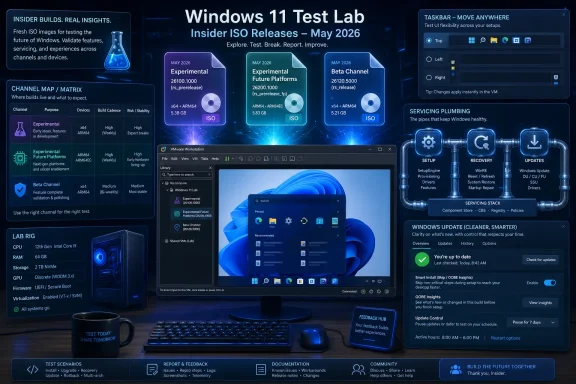
Microsoft published fresh Windows 11 Insider ISO images in mid-May 2026 for its renamed preview channels, including Experimental Future Platforms build 29591.1000, Experimental build 26300.8493, and Beta build 26220.8474, giving testers a cleaner path to install, upgrade, or virtualize the newest Windows 11 preview code. The ISOs are not just a convenience download; they are a signal that Microsoft wants more people testing the operating system at the image level, not merely through Windows Update. That matters because the most interesting Windows work right now is happening in the plumbing between servicing, setup, recovery, and staged feature delivery. The headline is not simply that new builds exist, but that Microsoft is trying to make preview Windows feel more installable at the exact moment its channel map is becoming more complicated.
For years, Insider builds have been treated mostly as something that arrives through Windows Update, a stream of flights that nudges a machine forward one reboot at a time. ISO images are different. They are a commitment to letting users start from a known point, build a VM, refresh a test bench, or attempt an in-place upgrade without waiting for the update stack to cooperate.
That difference is not academic for WindowsForum readers. Anyone who has maintained a lab, validated a driver, reproduced a bug, or tried to compare pre-release behavior across machines knows that “I upgraded from some prior state” is often a poor test condition. A downloadable image gives testers a better baseline, even if the build itself remains pre-release and unstable.
The newly available images cover three of Microsoft’s active Windows 11 preview lanes: the former Canary-style future-platforms branch, the former Dev-style Experimental channel, and the still-familiar Beta channel. Each serves a different audience, but all three now sit under a broader Insider reshuffle that Microsoft has been rolling out through 2026.
That reshuffle is the context Neowin’s report only hints at. The ISO drop is useful because the Insider program is no longer a tidy ladder from risky to safe. It is becoming a matrix of release trains, enablement packages, platform branches, and controlled feature rollouts. The ISO page is therefore doing more work than usual: it is not just hosting files, it is giving testers a map.
Build 29591.1000 belongs to the Future Platforms track, the branch formerly associated with the bleeding-edge Canary 29500 series. Microsoft says this channel represents early platform work and should not be read as attached to a specific Windows release. That is the polite version of “do not build your deployment calendar around this.”
Build 26300.8493 sits in the Experimental channel, formerly Dev. Microsoft describes it as based on Windows 11 version 25H2 with an enablement package that increments the build number. Build 26220.8474, the Beta release, is also based on Windows 11 version 25H2 through a similar enablement-package model.
That is an important distinction. Two of the headline ISO builds are not necessarily separate operating-system generations in the way casual readers may assume from the different build prefixes. They are different preview experiences layered on top of the Windows 11 25H2 base, with Microsoft using enablement mechanics and staged rollout controls to expose features at different levels of readiness.
The result is a program that makes more sense to Microsoft’s internal servicing model than to the average enthusiast. Canary used to imply “wild,” Dev implied “active development,” Beta implied “closer to release,” and Release Preview implied “nearly done.” Those labels were never perfect, but they were memorable. Experimental Future Platforms may be more accurate, but it is also a warning that the simple Insider mental model is dead.
The awkward part is that Microsoft also had to correct its own release notes. The company originally described an ability to extend update pauses as many times as needed, then updated the note on May 19 to say that extended pause is not yet available in that channel. That correction is small, but revealing.
Windows users do not merely want new controls; they want controls that behave exactly as described. The history of Windows Update is littered with technically defensible choices that users experienced as coercion: restarts at the wrong time, vague update descriptions, gray-area deferrals, and setup screens that imply urgency without explaining consequences. A promised pause feature that is not actually present will be noticed precisely because the subject is so sensitive.
Still, the direction is worth watching. The ability to skip updates during OOBE would matter for administrators imaging devices, testers trying to preserve a clean state, and ordinary users who do not want a brand-new PC to turn first boot into a servicing gauntlet. More explicit update information could also help users understand whether they are installing security fixes, preview features, driver changes, or cumulative quality updates.
Microsoft has spent the Windows 11 era arguing that continuous innovation is good for the platform. The counterargument from the field has always been that continuous innovation without continuous consent feels like a loss of ownership. These preview changes suggest Redmond understands that the update experience itself has become a product surface.
This matters because the Windows 11 taskbar became a symbol of Microsoft’s redesign trade-offs. When Windows 11 launched, the cleaner centered taskbar looked modern, but it also removed or weakened long-standing behaviors power users had built into their daily rhythm. The loss of taskbar relocation was one of those cuts that seemed small to designers and enormous to people who work differently.
Microsoft’s preview implementation is not complete. Support for touch gestures, the Search box, and Ask Copilot in alternate taskbar positions is still in progress, and auto-hidden and touch-optimized taskbar behavior is not yet supported in those alternate locations. That limitation is exactly why these builds belong in Insider channels rather than production.
Even so, the move is politically meaningful. Microsoft is not merely adding a toggle; it is retreating from a design premise. Windows 11’s first act prized consistency over configurability. This build suggests the second act may be more pragmatic: make the desktop feel modern, but stop punishing users who have legitimate muscle memory.
The smaller taskbar option fits the same pattern. On paper, it is just a density setting. In practice, it acknowledges that Windows runs on everything from compact tablets to ultrawide workstations, and that a one-size taskbar is an aesthetic choice masquerading as simplicity.
Search in Windows has suffered because Microsoft kept trying to make it do too many jobs. A launcher, a file finder, a settings entry point, a web search surface, a promotional canvas, and an AI doorway are not the same thing. When a user types the name of a local app and gets a web suggestion first, the system teaches the user not to trust the box.
The Widgets change is smaller but culturally similar. Microsoft is testing less urgent taskbar badging, including using the Windows accent color instead of a red badge for users who have badging enabled. It is also experimenting with quieting the experience for users who do not engage much with Widgets.
That is an admission that engagement is not always the right metric. A system component that badgers people into clicks may increase activity while reducing satisfaction. Windows has too often treated attention as a resource to harvest. These changes suggest Microsoft is at least testing the idea that quiet can be a feature.
Even the new solid “donut” spinners across boot, logon, restart, shutdown, and update flows fit this theme. Nobody buys a PC for a spinner, but inconsistent status screens make Windows feel older than it is. A unified animation language will not fix update failures, but it can make system transitions feel less like a patchwork of eras.
This is the kind of AI feature that will probably matter more than the splashier Copilot branding because it solves a concrete problem in a place users already work. Dictation is only useful if it is fast, private enough to trust, and accurate enough that correcting it does not erase the time saved. On-device language models are a plausible way to improve that equation.
The Spanish and French expansion is also important. Microsoft cannot credibly pitch AI-assisted Windows as a mainstream platform capability if its best language experiences remain concentrated in English. Multilingual support is not a localization footnote; it is the difference between a global feature and a demo.
For administrators, the interesting part is not merely the dictation quality. It is the operational model. Features powered by local models raise questions about hardware capability, model updates, privacy settings, storage footprint, accessibility policy, and support boundaries. A feature that feels personal to a user becomes administrative when deployed across a fleet.
The broader trend is that Windows is absorbing AI less as a single assistant and more as a set of ambient corrections. Dictation, search ranking, accessibility descriptions, suggested actions, and local summarization are likely to become harder to separate from the OS. That makes Insider testing more important, because these features can change everyday workflows without arriving as a traditional app.
In mid-May, Microsoft’s Release Preview work included fixes for issues such as audio behavior and notification bugs, alongside broader reliability improvements. These are the kinds of changes that matter to IT departments because they are likely to feed into the next optional preview update and, eventually, into cumulative updates that reach supported systems more broadly.
The 26H1 branch deserves special caution. Microsoft’s own documentation describes Windows 11 version 26H1 as not a feature update for 25H2, but a platform change to support specific silicon. That distinction can be easy to miss, especially because version numbers invite assumptions. A higher version does not automatically mean a general-purpose upgrade path for every current PC.
This is where Microsoft’s modern Windows cadence becomes difficult to explain outside enthusiast circles. Version 24H2 is still widely relevant. Version 25H2 is the annual update track for many devices. Version 26H1 is a more specialized platform release tied to hardware needs. Experimental branches then sit above and around those releases, previewing work that may or may not ship.
For home users, that is confusing. For admins, it is a reason to read the fine print. The safe assumption is no longer “newer build equals next Windows.” The safer assumption is “newer build equals one point on a servicing graph Microsoft may redraw.”
Microsoft’s own notes for these builds include known issues and reminders that features may change, be removed, or never ship beyond the Insider program. The Experimental and Beta builds both note a Reset this PC issue where the reset process may get stuck unless the cloud download option is used. That is not a minor footnote for anyone who uses reset as a recovery plan.
An ISO also does not eliminate controlled feature rollout. Two users on the same build may not see exactly the same capabilities at the same time, depending on rollout state, toggles, eligibility, device class, and Microsoft’s flighting decisions. That can frustrate testers trying to reproduce behavior from a blog post or forum thread.
In-place upgrades carry their own special risk. They preserve more state than a clean install, which is precisely why users like them and precisely why they can produce messy results. A bug after an in-place upgrade may come from the new build, the old configuration, a driver, a policy, a shell extension, or some historical artifact that a clean VM would never reveal.
The right way to treat these ISOs is as lab media. They are excellent for virtual machines, spare hardware, compatibility smoke tests, screenshots, app validation, and hands-on exploration. They are not a shortcut to a stable daily driver unless the user is comfortable being the support department.
Virtualization lets users snapshot before risky changes, compare builds, isolate failures, and avoid contaminating a production install. It also makes it easier to test OOBE behavior, setup screens, account flows, and update policies from scratch. Those are precisely the areas Microsoft is changing in the Future Platforms build.
The trade-off is hardware realism. A VM may not expose the same graphics, audio, Bluetooth LE Audio, power management, firmware, or security behavior as a physical PC. Shared audio, for example, depends on supported Bluetooth LE Audio hardware, which makes it much more meaningful on real devices than in a generic virtual environment.
That means the best testing strategy is layered. Use VMs for first contact and reproducibility. Use spare physical hardware for driver, power, audio, Bluetooth, sleep, and peripheral validation. Keep production machines on stable or Release Preview tracks unless there is a specific reason to go further.
This is not gatekeeping; it is how serious Windows testing works. The Insider program is most valuable when users can describe not just what broke, but where, on what hardware, after what install path, and whether it reproduces from clean media.
That tension explains the channel complexity. Future Platforms gives Microsoft somewhere to test deep platform work without promising a release vehicle. Experimental gives it room to stage visible desktop changes. Beta moves closer to features likely to matter for the next annual update. Release Preview remains the proving ground for fixes that are nearly ready for ordinary supported PCs.
The problem is that users experience all of this through a single brand: Windows 11. When a preview bug appears, it damages confidence in Windows. When a feature appears in one channel and not another, it looks arbitrary. When Microsoft changes a channel name, updates a release note, or gates a feature behind a rollout flag, the technically correct explanation may still feel slippery.
The new ISO images help because they give users agency. They let testers choose a build, choose a machine, choose an install path, and choose whether to risk an upgrade. That is the right instinct. The more Microsoft experiments with Windows as a continuously serviced platform, the more it needs to give testers clean entry points and honest boundaries.
The deeper question is whether the company can resist turning every preview into a marketing beat. Some of these changes are genuinely promising: movable taskbars, less intrusive Widgets, better local search, multilingual on-device dictation, more transparent update controls. But the lesson of Windows 11 is that users remember what was removed as vividly as what was added.
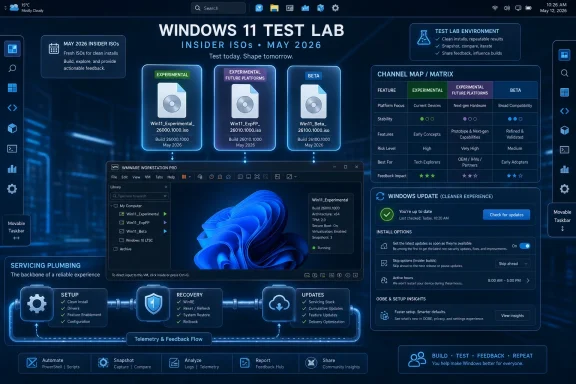 Microsoft Turns Insider ISOs Into a Front Door Again
For years, Insider builds have been treated mostly as something that arrives through Windows Update, a stream of flights that nudges a machine forward one reboot at a time. ISO images are different. They are a commitment to letting users start from a known point, build a VM, refresh a test bench, or attempt an in-place upgrade without waiting for the update stack to cooperate.That difference is not academic for WindowsForum readers. Anyone who has maintained a lab, validated a driver, reproduced a bug, or tried to compare pre-release behavior across machines knows that “I upgraded from some prior state” is often a poor test condition. A downloadable image gives testers a better baseline, even if the build itself remains pre-release and unstable.
The newly available images cover three of Microsoft’s active Windows 11 preview lanes: the former Canary-style future-platforms branch, the former Dev-style Experimental channel, and the still-familiar Beta channel. Each serves a different audience, but all three now sit under a broader Insider reshuffle that Microsoft has been rolling out through 2026.
That reshuffle is the context Neowin’s report only hints at. The ISO drop is useful because the Insider program is no longer a tidy ladder from risky to safe. It is becoming a matrix of release trains, enablement packages, platform branches, and controlled feature rollouts. The ISO page is therefore doing more work than usual: it is not just hosting files, it is giving testers a map.
The Channel Names Changed Because the Old Labels Stopped Explaining the Risk
The most visible change is branding. Microsoft’s old Canary and Dev labels are giving way to names like Experimental and Experimental Future Platforms, even as some enrolled devices may still see the older names during the transition. That sounds cosmetic until you look at the build numbers and what they imply.Build 29591.1000 belongs to the Future Platforms track, the branch formerly associated with the bleeding-edge Canary 29500 series. Microsoft says this channel represents early platform work and should not be read as attached to a specific Windows release. That is the polite version of “do not build your deployment calendar around this.”
Build 26300.8493 sits in the Experimental channel, formerly Dev. Microsoft describes it as based on Windows 11 version 25H2 with an enablement package that increments the build number. Build 26220.8474, the Beta release, is also based on Windows 11 version 25H2 through a similar enablement-package model.
That is an important distinction. Two of the headline ISO builds are not necessarily separate operating-system generations in the way casual readers may assume from the different build prefixes. They are different preview experiences layered on top of the Windows 11 25H2 base, with Microsoft using enablement mechanics and staged rollout controls to expose features at different levels of readiness.
The result is a program that makes more sense to Microsoft’s internal servicing model than to the average enthusiast. Canary used to imply “wild,” Dev implied “active development,” Beta implied “closer to release,” and Release Preview implied “nearly done.” Those labels were never perfect, but they were memorable. Experimental Future Platforms may be more accurate, but it is also a warning that the simple Insider mental model is dead.
The Most Important New Feature Is the One Microsoft Already Corrected
The Future Platforms build is the most intriguing because it contains Windows Update changes aimed at user control. Microsoft lists new capabilities such as skipping updates during the out-of-box experience, making shutdown and restart options with updating more consistently available, and providing more insight into available updates before installation. Those are not flashy desktop features, but they strike directly at one of Windows’ longest-running trust problems.The awkward part is that Microsoft also had to correct its own release notes. The company originally described an ability to extend update pauses as many times as needed, then updated the note on May 19 to say that extended pause is not yet available in that channel. That correction is small, but revealing.
Windows users do not merely want new controls; they want controls that behave exactly as described. The history of Windows Update is littered with technically defensible choices that users experienced as coercion: restarts at the wrong time, vague update descriptions, gray-area deferrals, and setup screens that imply urgency without explaining consequences. A promised pause feature that is not actually present will be noticed precisely because the subject is so sensitive.
Still, the direction is worth watching. The ability to skip updates during OOBE would matter for administrators imaging devices, testers trying to preserve a clean state, and ordinary users who do not want a brand-new PC to turn first boot into a servicing gauntlet. More explicit update information could also help users understand whether they are installing security fixes, preview features, driver changes, or cumulative quality updates.
Microsoft has spent the Windows 11 era arguing that continuous innovation is good for the platform. The counterargument from the field has always been that continuous innovation without continuous consent feels like a loss of ownership. These preview changes suggest Redmond understands that the update experience itself has become a product surface.
Taskbar Restoration Is Microsoft Admitting Users Were Right
If the Future Platforms build is about setup and servicing, the Experimental build is about the desktop experience Microsoft spent years telling users to accept. Build 26300.8493 brings a major taskbar change: the ability to move the taskbar to the top, left, or right side of the screen, not merely keep it pinned to the bottom. It also introduces a smaller taskbar option for users who want more screen space.This matters because the Windows 11 taskbar became a symbol of Microsoft’s redesign trade-offs. When Windows 11 launched, the cleaner centered taskbar looked modern, but it also removed or weakened long-standing behaviors power users had built into their daily rhythm. The loss of taskbar relocation was one of those cuts that seemed small to designers and enormous to people who work differently.
Microsoft’s preview implementation is not complete. Support for touch gestures, the Search box, and Ask Copilot in alternate taskbar positions is still in progress, and auto-hidden and touch-optimized taskbar behavior is not yet supported in those alternate locations. That limitation is exactly why these builds belong in Insider channels rather than production.
Even so, the move is politically meaningful. Microsoft is not merely adding a toggle; it is retreating from a design premise. Windows 11’s first act prized consistency over configurability. This build suggests the second act may be more pragmatic: make the desktop feel modern, but stop punishing users who have legitimate muscle memory.
The smaller taskbar option fits the same pattern. On paper, it is just a density setting. In practice, it acknowledges that Windows runs on everything from compact tablets to ultrawide workstations, and that a one-size taskbar is an aesthetic choice masquerading as simplicity.
Search, Widgets, and Spinners Show a Company Fighting Irritation by the Millimeter
Not every change in the Experimental build is dramatic. Some of the most telling work is in the irritants: Windows Search ranking, Widgets badging, and system animations. Microsoft says files and apps should more reliably appear ahead of web suggestions when local content is the stronger match. That is a sentence Windows users have wanted to read for years.Search in Windows has suffered because Microsoft kept trying to make it do too many jobs. A launcher, a file finder, a settings entry point, a web search surface, a promotional canvas, and an AI doorway are not the same thing. When a user types the name of a local app and gets a web suggestion first, the system teaches the user not to trust the box.
The Widgets change is smaller but culturally similar. Microsoft is testing less urgent taskbar badging, including using the Windows accent color instead of a red badge for users who have badging enabled. It is also experimenting with quieting the experience for users who do not engage much with Widgets.
That is an admission that engagement is not always the right metric. A system component that badgers people into clicks may increase activity while reducing satisfaction. Windows has too often treated attention as a resource to harvest. These changes suggest Microsoft is at least testing the idea that quiet can be a feature.
Even the new solid “donut” spinners across boot, logon, restart, shutdown, and update flows fit this theme. Nobody buys a PC for a spinner, but inconsistent status screens make Windows feel older than it is. A unified animation language will not fix update failures, but it can make system transitions feel less like a patchwork of eras.
Voice Features Are Becoming Local, Multilingual, and Quietly Strategic
Both the Experimental and Beta builds bring Fluid Dictation to Spanish and French for Windows Insiders. Microsoft describes the feature as using on-device small language models to smooth voice-based dictation by correcting grammar, punctuation, and filler words as the user speaks. It works through voice access and voice typing.This is the kind of AI feature that will probably matter more than the splashier Copilot branding because it solves a concrete problem in a place users already work. Dictation is only useful if it is fast, private enough to trust, and accurate enough that correcting it does not erase the time saved. On-device language models are a plausible way to improve that equation.
The Spanish and French expansion is also important. Microsoft cannot credibly pitch AI-assisted Windows as a mainstream platform capability if its best language experiences remain concentrated in English. Multilingual support is not a localization footnote; it is the difference between a global feature and a demo.
For administrators, the interesting part is not merely the dictation quality. It is the operational model. Features powered by local models raise questions about hardware capability, model updates, privacy settings, storage footprint, accessibility policy, and support boundaries. A feature that feels personal to a user becomes administrative when deployed across a fleet.
The broader trend is that Windows is absorbing AI less as a single assistant and more as a set of ambient corrections. Dictation, search ranking, accessibility descriptions, suggested actions, and local summarization are likely to become harder to separate from the OS. That makes Insider testing more important, because these features can change everyday workflows without arriving as a traditional app.
Release Preview Is the Channel for People Who Still Need a Calendar
The Neowin report also points to Release Preview builds for Windows 11 versions 24H2, 25H2, and 26H1. Release Preview remains the channel closest to what ordinary users may see in optional non-security updates, and that makes it the least glamorous but most operationally useful part of the Insider ecosystem.In mid-May, Microsoft’s Release Preview work included fixes for issues such as audio behavior and notification bugs, alongside broader reliability improvements. These are the kinds of changes that matter to IT departments because they are likely to feed into the next optional preview update and, eventually, into cumulative updates that reach supported systems more broadly.
The 26H1 branch deserves special caution. Microsoft’s own documentation describes Windows 11 version 26H1 as not a feature update for 25H2, but a platform change to support specific silicon. That distinction can be easy to miss, especially because version numbers invite assumptions. A higher version does not automatically mean a general-purpose upgrade path for every current PC.
This is where Microsoft’s modern Windows cadence becomes difficult to explain outside enthusiast circles. Version 24H2 is still widely relevant. Version 25H2 is the annual update track for many devices. Version 26H1 is a more specialized platform release tied to hardware needs. Experimental branches then sit above and around those releases, previewing work that may or may not ship.
For home users, that is confusing. For admins, it is a reason to read the fine print. The safe assumption is no longer “newer build equals next Windows.” The safer assumption is “newer build equals one point on a servicing graph Microsoft may redraw.”
ISOs Make Testing Easier, Not Safer
The temptation with a fresh ISO is to treat it as an invitation. Download, mount, upgrade, reboot, and enjoy the future. That is fine if the target is a virtual machine or a sacrificial test box. It is reckless if the machine stores work, credentials, or a family photo archive that has not been backed up.Microsoft’s own notes for these builds include known issues and reminders that features may change, be removed, or never ship beyond the Insider program. The Experimental and Beta builds both note a Reset this PC issue where the reset process may get stuck unless the cloud download option is used. That is not a minor footnote for anyone who uses reset as a recovery plan.
An ISO also does not eliminate controlled feature rollout. Two users on the same build may not see exactly the same capabilities at the same time, depending on rollout state, toggles, eligibility, device class, and Microsoft’s flighting decisions. That can frustrate testers trying to reproduce behavior from a blog post or forum thread.
In-place upgrades carry their own special risk. They preserve more state than a clean install, which is precisely why users like them and precisely why they can produce messy results. A bug after an in-place upgrade may come from the new build, the old configuration, a driver, a policy, a shell extension, or some historical artifact that a clean VM would never reveal.
The right way to treat these ISOs is as lab media. They are excellent for virtual machines, spare hardware, compatibility smoke tests, screenshots, app validation, and hands-on exploration. They are not a shortcut to a stable daily driver unless the user is comfortable being the support department.
VMware, Virtual Machines, and the New Shape of Enthusiast Testing
The timing is useful for virtualization users. Neowin notes that the images can be installed in virtual machines, including with VMware Workstation Pro 26H1. That is exactly where many Windows enthusiasts should start, because VMs turn the Insider program from a lifestyle choice into a controlled experiment.Virtualization lets users snapshot before risky changes, compare builds, isolate failures, and avoid contaminating a production install. It also makes it easier to test OOBE behavior, setup screens, account flows, and update policies from scratch. Those are precisely the areas Microsoft is changing in the Future Platforms build.
The trade-off is hardware realism. A VM may not expose the same graphics, audio, Bluetooth LE Audio, power management, firmware, or security behavior as a physical PC. Shared audio, for example, depends on supported Bluetooth LE Audio hardware, which makes it much more meaningful on real devices than in a generic virtual environment.
That means the best testing strategy is layered. Use VMs for first contact and reproducibility. Use spare physical hardware for driver, power, audio, Bluetooth, sleep, and peripheral validation. Keep production machines on stable or Release Preview tracks unless there is a specific reason to go further.
This is not gatekeeping; it is how serious Windows testing works. The Insider program is most valuable when users can describe not just what broke, but where, on what hardware, after what install path, and whether it reproduces from clean media.
Microsoft’s Real Bet Is That Windows Can Change Faster Without Feeling Less Stable
Taken together, the May Insider ISOs show a company trying to square a hard circle. Microsoft wants Windows to evolve faster, preview more ideas, support new silicon, push AI into local experiences, and keep the desktop competitive. At the same time, it needs Windows to feel predictable enough for people who use it to earn a living.That tension explains the channel complexity. Future Platforms gives Microsoft somewhere to test deep platform work without promising a release vehicle. Experimental gives it room to stage visible desktop changes. Beta moves closer to features likely to matter for the next annual update. Release Preview remains the proving ground for fixes that are nearly ready for ordinary supported PCs.
The problem is that users experience all of this through a single brand: Windows 11. When a preview bug appears, it damages confidence in Windows. When a feature appears in one channel and not another, it looks arbitrary. When Microsoft changes a channel name, updates a release note, or gates a feature behind a rollout flag, the technically correct explanation may still feel slippery.
The new ISO images help because they give users agency. They let testers choose a build, choose a machine, choose an install path, and choose whether to risk an upgrade. That is the right instinct. The more Microsoft experiments with Windows as a continuously serviced platform, the more it needs to give testers clean entry points and honest boundaries.
The deeper question is whether the company can resist turning every preview into a marketing beat. Some of these changes are genuinely promising: movable taskbars, less intrusive Widgets, better local search, multilingual on-device dictation, more transparent update controls. But the lesson of Windows 11 is that users remember what was removed as vividly as what was added.
The May ISO Drop Gives Testers a Cleaner Map Through a Messier Windows
The practical story is straightforward: the new ISOs are worth downloading if you test Windows seriously, but they should be treated as preview media rather than upgrade bait. The strategic story is more interesting: Microsoft is rebuilding the Insider program around a Windows roadmap that no longer fits neat annual boxes.- The newest ISO images let registered Windows Insiders install or upgrade directly to recent Experimental Future Platforms, Experimental, and Beta builds without waiting for Windows Update.
- Build 29591.1000 is the riskiest of the three headline images because it belongs to the Future Platforms track and is not tied to a specific Windows release.
- Build 26300.8493 is the most visible desktop-preview build, with alternate taskbar positions, a smaller taskbar option, search relevance changes, quieter Widgets behavior, and logon-performance work.
- Build 26220.8474 is the more conservative 25H2 Beta build, carrying Fluid Dictation expansion, File Explorer fixes, SSDP reliability work, and DISM reliability improvements.
- The known Reset this PC issue means testers should not assume recovery will be painless, especially on machines they cannot afford to rebuild.
- Release Preview remains the better channel for users who care less about experimentation and more about seeing fixes before they reach broadly deployed Windows systems.
References
- Primary source: Neowin
Published: Tue, 19 May 2026 21:38:00 GMT
Microsoft releases new Windows 11 images with the latest preview builds - Neowin
Microsoft has released new Windows 11 images with the latest preview builds for clean installations and in-place upgrades. www.neowin.net
- Related coverage: windowscentral.com
Major Windows 11 performance upgrades set to rollout within weeks, Microsoft confirms: New 'Low Latency Profile' improvements confirmed to "accelerate app launches and core shell experiences" | Windows Central
Windows 11's highly anticipated Low Latency Profile performance feature is now in the final round of testing, with rollout expected to begin within the next few weeks.www.windowscentral.com - Official source: learn.microsoft.com
Flight Hub - Windows Insider Program | Microsoft Learn
Flight schedules and status for Windows Insider Programlearn.microsoft.com - Related coverage: betawiki.net
- Official source: blogs.windows.com
Announcing new builds for 8 May 2026
Hello Windows Insiders, We continue to expand the rollout of the new WIP changes to those channels already announced. We have not yet begun moving Insiders in Canary 29500 Series Channel orblogs.windows.com - Related coverage: techspot.com
Microsoft begins testing Windows 11 26H2 with major fixes and Copilot changes | TechSpot
Build 26300.7674 is the first public test of what's expected to become the major feature update for 2026. Unlike routine quality improvements, this new release is designed...www.techspot.com
- Related coverage: computerworld.com
Windows 11 Insider Previews: What’s in the latest build? – Computerworld
Get the latest info on new preview builds of Windows 11 as they roll out to Windows Insiders. Now updated for the June 26, 2026 releases for the Beta, Beta 26H1, Experimental, Experimental 26H1, and Experimental Future Platforms Channels. www.computerworld.com
- Related coverage: pureinfotech.com
Download Windows 11 ISO: Build 26300.8553, 29599, and 28020.2207 (Insider Preview) - Pureinfotech
Builds 29599, 28020.2207, 26300.8553, 26220.8544, 28000.1896, and 26200.8328 for Windows 11 are now available for download through the Experimental and Beta tracks. pureinfotech.com
- Official source: microsoft.com
Download Windows Insider Preview ISO
www.microsoft.com
- Related coverage: tomshardware.com
Microsoft confirms Windows 11 26H1 will be for Arm devices only at launch — Snapdragon X2-powered devices officially shipping with 26H1 | Tom's Hardware
It's 24H2 all over again, but with the caveat that 26H1 will only support specific hardware for its entire lifecycle. Devices running 26H1 will not be able to upgrade to 26H2.www.tomshardware.com - Related coverage: techradar.com
It seems Microsoft just started work on Windows 11 27H2 — and this could be the update that saves the OS... or dooms it | TechRadar
We're seeing multiple signs that work on fixing the fundamentals of Windows 11 has begunwww.techradar.com