

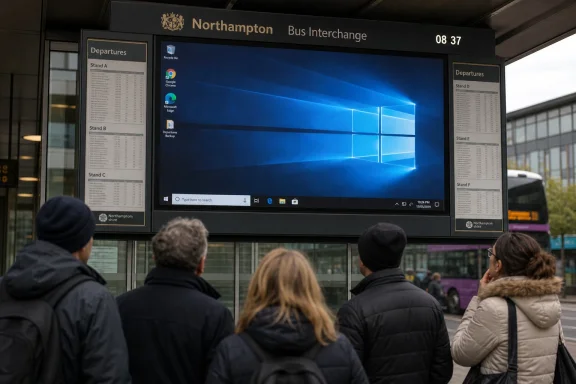
A Northampton bus station’s main passenger information display was photographed by a Register reader showing a Windows 10 desktop instead of live bus times, after months of clock drift and software failures at North Gate bus station in the town centre, which opened in 2014. The image is funny because public screens are funny when they fail in public. It is also familiar because Windows has become the background radiation of civic infrastructure: unseen when it works, absurdly visible when it does not. The lesson is not that Microsoft ruined a bus station, but that cheap, general-purpose computing keeps being asked to do the job of boring, resilient public systems.
The Northampton display is a small failure, but it is a pure one. A screen meant to collapse uncertainty into a simple answer — which bus, which stand, how long — instead displayed the machinery underneath. The customer-facing layer fell away, and the operating system walked onstage in its socks.
That moment is why public display failures travel so well online. A Windows desktop on a departures board is not merely an error message; it is an accidental confession. It tells everyone waiting for the next service that the supposedly purpose-built transport system is, somewhere beneath the signage vendor’s software and the council procurement chain, a PC.
There is nothing inherently scandalous about that. Windows has powered kiosks, tills, ticket machines, advertising screens, medical displays, manufacturing terminals, and airport boards for decades. The trouble begins when a consumer-shaped maintenance model is bolted into a public-service context where the expected behavior is not “mostly fine after a reboot,” but “quietly correct every day.”
A bus station display is not glamorous infrastructure. That is precisely why it matters. People rely on it while juggling work shifts, school runs, hospital appointments, and connections that do not wait for a software process to relaunch.
The report says the display had already been drifting several minutes off the correct time before the application stopped loading. That is the more interesting failure than the Windows wallpaper. A frozen or exposed desktop is obvious; a clock that is three or four minutes wrong is quietly dangerous.
Transport information is an exercise in trust. If a board says a bus is due in four minutes, passengers make decisions around that claim. They may walk more slowly, wait under shelter, or assume they have missed a service when they have not. A small time error can become a missed connection, and a missed connection can become a late arrival at work.
The brutal thing about this class of failure is that it does not require catastrophe. Nobody needs to hack the display. Nobody needs to break the network. The system can simply drift, decay, lose its application state, and keep glowing.
That does not mean the Northampton display was insecure, unsupported, or abandoned. We do not know the device’s edition, patch channel, network exposure, vendor contract, or whether it sits inside a managed embedded environment. Windows 10 Enterprise LTSC and specialist deployments have their own timelines and servicing realities, and public infrastructure often uses configurations that are invisible to passers-by.
Still, the optics are awful because the public sees the brand and the age before it sees the nuance. Windows 10 has become a symbol of the upgrade cliff, a reminder that millions of devices still work well enough to be left in place but not cleanly enough to be ignored. The bus board is one more artifact in the long afterlife of a platform Microsoft would rather move beyond.
This is where Microsoft’s messaging collides with real-world estates. The company can push Windows 11, hardware-backed security, TPM requirements, cloud management, and AI-era PCs. Councils, transport operators, and signage contractors still have cabinets full of equipment installed when Windows 10 was new and budgets were tighter than ambition.
That is not exotic engineering. Watchdogs, kiosk shells, locked-down accounts, automatic relaunchers, correct time synchronization, remote monitoring, and sane alerting are the unglamorous furniture of reliable digital signage. If the time feed drifts or the display app dies, someone should know before the morning peak turns it into street theatre.
In practice, the weakest link is often not the OS but the contract wrapped around it. Public-sector technology procurement has a talent for buying visible hardware and underfunding maintenance. A display goes up, the ribbon is cut, the system works well enough for launch, and then responsibility diffuses across a vendor, a facilities team, a transport authority, and someone with a spreadsheet of service-level agreements.
The result is civic computing that behaves like a forgotten office PC. It may be physically rugged, bolted high, and armored against pigeons, but the software lifecycle is treated as a background chore. Northampton’s display reportedly had spikes to keep birds off the top. The software appears to have enjoyed less visible protection.
Modern systems have many ways to know the time. They can use network time protocols, cellular links, central scheduling feeds, GPS-backed sources, or backend services that supply both timetable and real-time running data. A display that drifts suggests either a broken synchronization path, a local configuration problem, a failing network dependency, or a monitoring regime that did not treat time accuracy as a service-critical metric.
That matters because a wrong clock can be worse than no clock. A blank board tells passengers to distrust it. A slightly wrong board invites them to trust it just enough to be punished.
For IT pros, this is the old lesson of observability in miniature. The system should not merely be checked for whether the screen is powered on. It should be checked for whether the displayed information is fresh, plausible, and aligned with authoritative time. A green light that says “display online” is useless if the board is confidently lying.
That history deserves some respect. The alternative to Windows was not always a pristine embedded Linux appliance with perfect lifecycle discipline. Sometimes it was a proprietary box with worse tooling, weaker update practices, and a vendor lock-in story that made Windows look like open country.
But ubiquity carries a penalty. Once Windows becomes the substrate for everything from bus boards to check-in kiosks, every desktop leak becomes a referendum on the whole ecosystem. The public does not distinguish between Microsoft, the signage application, the integrator, and the operator. It sees Windows where bus times should be.
That is unfair, but not irrational. A general-purpose desktop OS brings with it the visible metaphors of general-purpose computing: wallpapers, icons, taskbars, notifications, update prompts, and login screens. If those layers are not aggressively hidden and managed, they will eventually appear at the worst possible moment.
But a broken display application running on Windows 11 would still be a broken display application. A misconfigured kiosk shell is not redeemed by rounded corners. A bad monitoring contract is not fixed by the Start menu moving around again.
In fact, Windows 11 can complicate these estates because its hardware requirements force a sharper inventory reckoning. If a display controller cannot upgrade, someone must decide whether to replace hardware, pay for support, isolate the device, or accept risk. That decision costs money, and public transport display systems are rarely at the front of the queue when budgets are being defended.
The better argument for moving on from Windows 10 is not cosmetic. It is about security updates, vendor support, fleet manageability, and the opportunity to revisit the whole design rather than merely swapping the operating system under the same fragile application.
The end of Windows 10 support sharpened this problem but did not create it. Long-lived infrastructure always outlasts the assumptions made at purchase. A bus station opened in 2014 could easily contain systems specified before Windows 10 shipped in 2015, upgraded later, patched unevenly, and then left to age behind a panel.
That is not necessarily negligence. Infrastructure has different replacement rhythms from laptops. A council or operator may expect a display installation to last a decade or more, while Microsoft’s client OS strategy now assumes a far more active migration cycle. The collision between those rhythms produces machines that are physically fine, functionally useful, and strategically awkward.
IT departments know this shape well. The asset register says “digital signage.” The vulnerability scanner says “Windows endpoint.” The finance team says “not yet.” The passenger says “where is my bus?”
But security-minded readers should still care. Publicly exposed Windows endpoints are tempting precisely because they are often neglected, network-connected, and physically inaccessible to defenders during normal operations. Even if a display cannot process payments or access sensitive databases, it may sit on a network path that matters.
The best practice is not simply “upgrade to Windows 11.” It is segmentation, least privilege, application allow-listing, remote health checks, controlled update rings, secure boot where appropriate, and a kiosk configuration that assumes the user interface will be seen by everyone. A display controller should have no more network access than it needs, no interactive desktop for the public to discover, and no dependency that fails silently for weeks.
Public display systems also need incident thinking that goes beyond confidentiality. Integrity and availability are the main event. A tampered or broken board can misdirect people, damage trust, and create safety issues in crowded spaces, even if no personal data is exposed.
What makes the Northampton case useful is its ordinariness. It is not a spectacular outage at a hyperscaler. It is not ransomware taking down a hospital. It is a local public screen doing the wrong thing in a place where ordinary people expected it to do one simple job.
That ordinariness is the point. Digital transformation did not only put apps on phones and workloads in clouds. It also moved mundane civic functions onto fleets of small computers maintained through layered contracts and aging assumptions. The software did not replace the bus station; it became part of the bus station.
When it fails, the physical environment suddenly looks unfinished. The spikes stop birds from perching, the display housing protects the panel, and the architecture channels the foot traffic. But the public-facing truth of the system depends on a process that may or may not have launched correctly after reboot.
This is especially important because public transport already asks passengers to absorb uncertainty. Buses are affected by traffic, staffing, weather, roadworks, and operational disruption. Real-time displays are meant to reduce that uncertainty, not add a software-shaped layer of doubt.
If the display is wrong often enough, people stop treating it as infrastructure and start treating it as decoration. That is corrosive. Once passengers learn that the board may be stale, they shift to private information sources, driver gossip, apps of varying quality, or resignation. The public system loses authority one small failure at a time.
For administrators, the lesson is that user trust is a monitored asset. It can be depleted by inaccuracies that never trigger a major incident report. A clock drifting by four minutes may not look like an outage on paper, but to the person who missed the last connecting bus, it is the whole story.
That is the uncomfortable part of modern infrastructure: a system can become less acceptable without becoming less functional. A Windows 10 endpoint on October 13, 2025 and the same endpoint on October 15, 2025 may look identical on the wall, but its risk profile and support assumptions are different.
Organizations that planned well treated the deadline as an inventory forcing function. They identified devices, checked compatibility, negotiated vendor support, isolated systems that could not move, and budgeted replacements where necessary. Organizations that did not plan well are now discovering Windows installations hiding inside “non-PC” assets.
The Northampton board, if it is indeed a standard Windows 10 deployment without extended support or embedded lifecycle coverage, would be exactly the sort of device that gets missed until the public sees it. Even if it is properly licensed and supported, the appearance alone shows why communication and maintenance discipline matter. In public infrastructure, perception is part of reliability.
The hard part is assigning ownership. If the board displays the wrong time, is that the signage vendor, the transport data provider, the station operator, the council, the network supplier, or the contractor responsible for the physical estate? The user does not care, but the ticket queue certainly will.
Good systems collapse that ambiguity before failure. They define who is paged, what counts as degraded service, how quickly faults must be acknowledged, and what fallback information should appear when live data is unavailable. A blank-but-honest “service information temporarily unavailable” screen is less funny than a Windows desktop and more useful than a clock that lies.
The other fix is architectural humility. If a device has one job, design the computing environment around that job. A departures display does not need the personality of a desktop PC. It needs to boot into a locked application, recover predictably, and report its own failure before a commuter becomes the monitoring system.
The more interesting inventory is not under desks. It is above doors, behind counters, inside cabinets, and mounted in public places. These are the machines that make organizations realize too late that “Windows estate” means more than employee endpoints.
For Microsoft, this is both success and liability. Windows won because it was adaptable enough to be used everywhere. Now the company has to drag that everywhere into a security model built for a different era, while customers decide which old boxes deserve replacement and which can be fenced off until the next capital cycle.
For local operators, the reputational calculus is simpler. Nobody waiting for a bus wants to hear about lifecycle policy. They want the board to know the time.
Source: The Register Bus station display takes the Windows 10 road to nowhere
 The Desktop Was the Destination All Along
The Northampton display is a small failure, but it is a pure one. A screen meant to collapse uncertainty into a simple answer — which bus, which stand, how long — instead displayed the machinery underneath. The customer-facing layer fell away, and the operating system walked onstage in its socks.That moment is why public display failures travel so well online. A Windows desktop on a departures board is not merely an error message; it is an accidental confession. It tells everyone waiting for the next service that the supposedly purpose-built transport system is, somewhere beneath the signage vendor’s software and the council procurement chain, a PC.
There is nothing inherently scandalous about that. Windows has powered kiosks, tills, ticket machines, advertising screens, medical displays, manufacturing terminals, and airport boards for decades. The trouble begins when a consumer-shaped maintenance model is bolted into a public-service context where the expected behavior is not “mostly fine after a reboot,” but “quietly correct every day.”
A bus station display is not glamorous infrastructure. That is precisely why it matters. People rely on it while juggling work shifts, school runs, hospital appointments, and connections that do not wait for a software process to relaunch.
Public Screens Fail Differently Because the Audience Cannot Opt Out
A home PC can misbehave in private. A bus station screen fails in front of a crowd, and the crowd has no keyboard, no admin rights, and no useful workaround beyond squinting at a phone or asking a driver. The humiliation belongs to the machine, but the cost belongs to the passenger.The report says the display had already been drifting several minutes off the correct time before the application stopped loading. That is the more interesting failure than the Windows wallpaper. A frozen or exposed desktop is obvious; a clock that is three or four minutes wrong is quietly dangerous.
Transport information is an exercise in trust. If a board says a bus is due in four minutes, passengers make decisions around that claim. They may walk more slowly, wait under shelter, or assume they have missed a service when they have not. A small time error can become a missed connection, and a missed connection can become a late arrival at work.
The brutal thing about this class of failure is that it does not require catastrophe. Nobody needs to hack the display. Nobody needs to break the network. The system can simply drift, decay, lose its application state, and keep glowing.
Windows 10 Is Not the Villain, But It Is the Tell
The visible Windows 10 desktop gives the story its punchline, particularly now that Windows 10 has passed its mainstream support endpoint. Microsoft ended free security updates and general support for Windows 10 on October 14, 2025, leaving organizations to move to Windows 11, pay for extended security updates where eligible, or accept growing risk. By May 2026, a Windows 10 desktop on a public information board is not just a nostalgic image; it is an operational question.That does not mean the Northampton display was insecure, unsupported, or abandoned. We do not know the device’s edition, patch channel, network exposure, vendor contract, or whether it sits inside a managed embedded environment. Windows 10 Enterprise LTSC and specialist deployments have their own timelines and servicing realities, and public infrastructure often uses configurations that are invisible to passers-by.
Still, the optics are awful because the public sees the brand and the age before it sees the nuance. Windows 10 has become a symbol of the upgrade cliff, a reminder that millions of devices still work well enough to be left in place but not cleanly enough to be ignored. The bus board is one more artifact in the long afterlife of a platform Microsoft would rather move beyond.
This is where Microsoft’s messaging collides with real-world estates. The company can push Windows 11, hardware-backed security, TPM requirements, cloud management, and AI-era PCs. Councils, transport operators, and signage contractors still have cabinets full of equipment installed when Windows 10 was new and budgets were tighter than ambition.
The Real Failure Is Usually Procurement, Not the Operating System
The cheap joke is that Windows crashed. The better question is why the architecture allowed the crash to become the passenger’s problem. A public display system should expect application failure, recover from it, and expose as little of the underlying platform as possible.That is not exotic engineering. Watchdogs, kiosk shells, locked-down accounts, automatic relaunchers, correct time synchronization, remote monitoring, and sane alerting are the unglamorous furniture of reliable digital signage. If the time feed drifts or the display app dies, someone should know before the morning peak turns it into street theatre.
In practice, the weakest link is often not the OS but the contract wrapped around it. Public-sector technology procurement has a talent for buying visible hardware and underfunding maintenance. A display goes up, the ribbon is cut, the system works well enough for launch, and then responsibility diffuses across a vendor, a facilities team, a transport authority, and someone with a spreadsheet of service-level agreements.
The result is civic computing that behaves like a forgotten office PC. It may be physically rugged, bolted high, and armored against pigeons, but the software lifecycle is treated as a background chore. Northampton’s display reportedly had spikes to keep birds off the top. The software appears to have enjoyed less visible protection.
The Clock Drift Was the Warning Light
The report’s detail about the clock being several minutes out deserves more attention than the exposed desktop. Time is the foundation of passenger information. If a departures system cannot keep time accurately, it is already failing before the app vanishes.Modern systems have many ways to know the time. They can use network time protocols, cellular links, central scheduling feeds, GPS-backed sources, or backend services that supply both timetable and real-time running data. A display that drifts suggests either a broken synchronization path, a local configuration problem, a failing network dependency, or a monitoring regime that did not treat time accuracy as a service-critical metric.
That matters because a wrong clock can be worse than no clock. A blank board tells passengers to distrust it. A slightly wrong board invites them to trust it just enough to be punished.
For IT pros, this is the old lesson of observability in miniature. The system should not merely be checked for whether the screen is powered on. It should be checked for whether the displayed information is fresh, plausible, and aligned with authoritative time. A green light that says “display online” is useless if the board is confidently lying.
Windows Became Infrastructure by Being Good Enough
Windows is everywhere in public-facing systems because it solved boring problems for vendors. It had drivers. It had developer familiarity. It ran on commodity hardware. It supported remote administration, legacy applications, and awkward peripherals. In many deployments, it was the path of least resistance.That history deserves some respect. The alternative to Windows was not always a pristine embedded Linux appliance with perfect lifecycle discipline. Sometimes it was a proprietary box with worse tooling, weaker update practices, and a vendor lock-in story that made Windows look like open country.
But ubiquity carries a penalty. Once Windows becomes the substrate for everything from bus boards to check-in kiosks, every desktop leak becomes a referendum on the whole ecosystem. The public does not distinguish between Microsoft, the signage application, the integrator, and the operator. It sees Windows where bus times should be.
That is unfair, but not irrational. A general-purpose desktop OS brings with it the visible metaphors of general-purpose computing: wallpapers, icons, taskbars, notifications, update prompts, and login screens. If those layers are not aggressively hidden and managed, they will eventually appear at the worst possible moment.
Windows 11 Would Not Magically Fix This
The temptation is to turn this into a Windows 10 versus Windows 11 parable. Microsoft would certainly prefer customers to migrate. Windows 11 brings a more modern security baseline, stricter hardware assumptions, and a support runway Windows 10 no longer has for ordinary deployments.But a broken display application running on Windows 11 would still be a broken display application. A misconfigured kiosk shell is not redeemed by rounded corners. A bad monitoring contract is not fixed by the Start menu moving around again.
In fact, Windows 11 can complicate these estates because its hardware requirements force a sharper inventory reckoning. If a display controller cannot upgrade, someone must decide whether to replace hardware, pay for support, isolate the device, or accept risk. That decision costs money, and public transport display systems are rarely at the front of the queue when budgets are being defended.
The better argument for moving on from Windows 10 is not cosmetic. It is about security updates, vendor support, fleet manageability, and the opportunity to revisit the whole design rather than merely swapping the operating system under the same fragile application.
The Public Sector Has a Long Tail of Zombie PCs
The Northampton display is likely one visible member of a much larger class: devices that are not thought of as PCs until they fail like PCs. They sit behind menu boards, payment terminals, queue systems, interactive maps, CCTV consoles, building controls, and reception kiosks. Many are administratively orphaned because nobody wants to own both the hardware and the service outcome.The end of Windows 10 support sharpened this problem but did not create it. Long-lived infrastructure always outlasts the assumptions made at purchase. A bus station opened in 2014 could easily contain systems specified before Windows 10 shipped in 2015, upgraded later, patched unevenly, and then left to age behind a panel.
That is not necessarily negligence. Infrastructure has different replacement rhythms from laptops. A council or operator may expect a display installation to last a decade or more, while Microsoft’s client OS strategy now assumes a far more active migration cycle. The collision between those rhythms produces machines that are physically fine, functionally useful, and strategically awkward.
IT departments know this shape well. The asset register says “digital signage.” The vulnerability scanner says “Windows endpoint.” The finance team says “not yet.” The passenger says “where is my bus?”
The Comic Surface Hides a Security Story
It would be overblown to infer a security incident from a failed departures board. The visible desktop could be the result of a crashed application, a failed autostart process, a local reboot, or remote maintenance gone wrong. There is no need to invent hackers when entropy will do.But security-minded readers should still care. Publicly exposed Windows endpoints are tempting precisely because they are often neglected, network-connected, and physically inaccessible to defenders during normal operations. Even if a display cannot process payments or access sensitive databases, it may sit on a network path that matters.
The best practice is not simply “upgrade to Windows 11.” It is segmentation, least privilege, application allow-listing, remote health checks, controlled update rings, secure boot where appropriate, and a kiosk configuration that assumes the user interface will be seen by everyone. A display controller should have no more network access than it needs, no interactive desktop for the public to discover, and no dependency that fails silently for weeks.
Public display systems also need incident thinking that goes beyond confidentiality. Integrity and availability are the main event. A tampered or broken board can misdirect people, damage trust, and create safety issues in crowded spaces, even if no personal data is exposed.
The Register’s Bork Beat Works Because It Documents the Ordinary
The Register has long understood that the most revealing technology stories are sometimes the least grand. A broken departures board, a checkout running Windows, an airport screen showing an error dialog — these are small embarrassments that expose the hidden seams of everyday systems. The joke is the entry point, not the destination.What makes the Northampton case useful is its ordinariness. It is not a spectacular outage at a hyperscaler. It is not ransomware taking down a hospital. It is a local public screen doing the wrong thing in a place where ordinary people expected it to do one simple job.
That ordinariness is the point. Digital transformation did not only put apps on phones and workloads in clouds. It also moved mundane civic functions onto fleets of small computers maintained through layered contracts and aging assumptions. The software did not replace the bus station; it became part of the bus station.
When it fails, the physical environment suddenly looks unfinished. The spikes stop birds from perching, the display housing protects the panel, and the architecture channels the foot traffic. But the public-facing truth of the system depends on a process that may or may not have launched correctly after reboot.
The Passenger Information Board Is a Promise
A departure board is not just a screen. It is an institutional promise that the operator knows what is happening and is willing to share that knowledge accurately. When the board fails, the promise weakens.This is especially important because public transport already asks passengers to absorb uncertainty. Buses are affected by traffic, staffing, weather, roadworks, and operational disruption. Real-time displays are meant to reduce that uncertainty, not add a software-shaped layer of doubt.
If the display is wrong often enough, people stop treating it as infrastructure and start treating it as decoration. That is corrosive. Once passengers learn that the board may be stale, they shift to private information sources, driver gossip, apps of varying quality, or resignation. The public system loses authority one small failure at a time.
For administrators, the lesson is that user trust is a monitored asset. It can be depleted by inaccuracies that never trigger a major incident report. A clock drifting by four minutes may not look like an outage on paper, but to the person who missed the last connecting bus, it is the whole story.
The Upgrade Cliff Is Now a Civic Maintenance Problem
Windows 10’s support deadline turned what used to be a back-office lifecycle issue into a public-infrastructure concern. The machines still boot. The displays still light. The software may still run. Yet the support context around them has changed.That is the uncomfortable part of modern infrastructure: a system can become less acceptable without becoming less functional. A Windows 10 endpoint on October 13, 2025 and the same endpoint on October 15, 2025 may look identical on the wall, but its risk profile and support assumptions are different.
Organizations that planned well treated the deadline as an inventory forcing function. They identified devices, checked compatibility, negotiated vendor support, isolated systems that could not move, and budgeted replacements where necessary. Organizations that did not plan well are now discovering Windows installations hiding inside “non-PC” assets.
The Northampton board, if it is indeed a standard Windows 10 deployment without extended support or embedded lifecycle coverage, would be exactly the sort of device that gets missed until the public sees it. Even if it is properly licensed and supported, the appearance alone shows why communication and maintenance discipline matter. In public infrastructure, perception is part of reliability.
The Fix Is Boring, Which Is Why It Is Hard
There is no heroic solution here. The right answer is a bundle of dull operational habits: asset management, patch management, monitoring, vendor accountability, tested reboot behavior, time synchronization, and lifecycle funding. None of this fits neatly into a launch press release.The hard part is assigning ownership. If the board displays the wrong time, is that the signage vendor, the transport data provider, the station operator, the council, the network supplier, or the contractor responsible for the physical estate? The user does not care, but the ticket queue certainly will.
Good systems collapse that ambiguity before failure. They define who is paged, what counts as degraded service, how quickly faults must be acknowledged, and what fallback information should appear when live data is unavailable. A blank-but-honest “service information temporarily unavailable” screen is less funny than a Windows desktop and more useful than a clock that lies.
The other fix is architectural humility. If a device has one job, design the computing environment around that job. A departures display does not need the personality of a desktop PC. It needs to boot into a locked application, recover predictably, and report its own failure before a commuter becomes the monitoring system.
Northampton Is a Small Window Into a Bigger Windows Hangover
Windows 10’s long goodbye has been framed mostly around consumers and office PCs. Can this laptop upgrade? Should that desktop be replaced? Is the user willing to sign into an account, pay for updates, or buy new hardware? Those questions matter, but they understate the embedded sprawl of Windows in the built environment.The more interesting inventory is not under desks. It is above doors, behind counters, inside cabinets, and mounted in public places. These are the machines that make organizations realize too late that “Windows estate” means more than employee endpoints.
For Microsoft, this is both success and liability. Windows won because it was adaptable enough to be used everywhere. Now the company has to drag that everywhere into a security model built for a different era, while customers decide which old boxes deserve replacement and which can be fenced off until the next capital cycle.
For local operators, the reputational calculus is simpler. Nobody waiting for a bus wants to hear about lifecycle policy. They want the board to know the time.
The Northampton Screen Says the Quiet Part in Plain Blue
The practical lessons from this small bork are not complicated, but they are easy to postpone because the affected systems rarely look strategic until they fail in public. Treating them as real endpoints is the first step toward preventing the next accidental desktop reveal.- Public-facing displays should be monitored for information freshness, time accuracy, application state, and network health, not merely for whether the panel is powered on.
- Windows 10 devices still used in civic or transport environments need a documented support path, whether that means migration, extended security coverage, isolation, or replacement.
- Kiosk and signage systems should recover automatically into the intended application after reboot, crash, update, or network interruption.
- Procurement contracts should define who owns the service outcome when a display shows wrong information, not just who installed the hardware.
- A fallback screen that admits live information is unavailable is better than exposing the operating system or displaying stale departures.
- Passenger trust should be treated as part of system reliability, because small inaccuracies can change real journeys.
Source: The Register Bus station display takes the Windows 10 road to nowhere
