

Windows Takes a Crash Dump After One McDonald’s Order Too Many
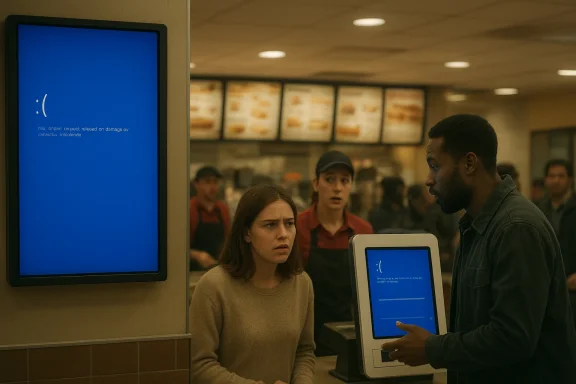
A fast-food order screen in Healdsburg, California, briefly turned into a very different kind of kiosk when it flashed a Windows blue screen instead of customer order progress. The sight, spotted by a Register reader, is the sort of retail-tech comedy that lands because it is so familiar: a system that is supposed to be simple, self-contained, and customer-facing suddenly exposing the messy plumbing underneath. It also underscores a broader truth about modern point-of-sale and restaurant systems: when the software stack fails, the failure is visible to everyone in the room.
The image described in The Register is funny first, but it is also a reminder of how much of daily commerce now runs on generalized computing platforms rather than purpose-built appliances. A McDonald’s kitchen display or front-counter order board is supposed to be invisible infrastructure, just another interface between customer and food. When it collapses into a Windows crash screen, the abstraction breaks, and the restaurant’s digital backbone becomes impossible to ignore.
That kind of failure resonates because Windows has carried the Blue Screen of Death for decades, even as Microsoft has tried to make the experience less grim and more recoverable. The article suggests the screen looked like a modern Windows version, with a crash dump reaching 100 percent, and that the stop code may have been IRQL_NOT_LESS_OR_EQUAL. That specific stop code is widely associated with memory access problems, bad drivers, or kernel-mode software misbehavior, which makes it a useful shorthand for “something in the low-level stack went wrong.”
This is not just a joke about one restaurant in one California town. The incident fits a pattern that has become common across retail, hospitality, healthcare, transportation, and public-service systems: the front end may look bespoke, but underneath it often runs the same operating systems, drivers, embedded PCs, and management software used everywhere else. That brings efficiency, but it also means commodity failure modes can surface in highly visible places.
For consumers, the immediate effect is inconvenience and confusion. For operators, the bigger lesson is that uptime is no longer a back-office concern. A customer staring at a blue screen in the middle of a lunch rush is staring at a breakdown in brand experience, order flow, and labor efficiency all at once.
IRQL_NOT_LESS_OR_EQUAL is one of those stop codes that sounds more technical than it is friendly. In plain terms, it usually points to a driver or kernel component touching memory at the wrong priority or in the wrong way, which can trigger a crash if the request conflicts with Windows’ memory and interrupt handling rules. Guides and reference material consistently describe it as a memory-access or driver-related fault rather than a single, unique hardware defect.
Restaurant point-of-sale and kitchen-display environments are especially vulnerable to this kind of drama because they combine many moving parts. There is the operating system, the display software, network links to ordering systems, touch input or barcode peripherals, backend sync services, and sometimes remote monitoring or fleet-management tools. If any one of those layers is unstable, the person standing in line may end up witnessing the full stack unwind in public.
Historically, restaurants used simpler systems: humans, handwritten tickets, and durable cash registers. Those systems were slower and less data-rich, but they failed in ways people understood. Modern systems promise speed, integration, and fewer mistakes, yet they also inherit the complexity of general-purpose computing. That tradeoff is not hypothetical; it is the everyday reality of digital service delivery.
What makes this incident especially newsworthy is not that Windows crashed. Windows crashes happen. It is that the crash happened in a place where the public expects uninterrupted choreography, and where a screen’s only job is to reassure people that the queue is moving. Instead, the screen reassured no one and, in a very literal sense, exposed the machine room.
There is also something culturally durable about the Blue Screen of Death. It has survived generations of interface changes because it marks a moment that users instinctively recognize as bad news, regardless of the underlying technical details. In a retail setting, that instant recognition matters; the customer may not know what IRQL means, but they know the screen is not supposed to look like that.
The Register’s tone makes the story memorable, but the underlying point is serious. Public-facing computing systems must be stable not because they are glamorous, but because they become part of the customer journey the moment the system stops functioning. A crash in a back office can be a support ticket. A crash on the order screen is a brand event.
This architecture has advantages. It makes remote management easier, simplifies spare parts, and allows chains to deploy standardized software across hundreds or thousands of locations. But it also means the systems inherit all the fragility of a general-purpose platform, including driver conflicts, update regressions, peripheral issues, and storage corruption.
The operating system is only part of the story. Kiosk software often relies on network services for menu updates, payment validation, analytics, promotions, and order routing. Even when the visible interface is simple, the hidden dependency graph can be complicated enough to make root-cause analysis slow and frustrating. That complexity is the price of centralization.
The likely IRQL_NOT_LESS_OR_EQUAL code, if correctly identified from the blurred image, would normally push technicians toward drivers, memory, or low-level software interactions. It is the sort of issue that can be caused by bad updates, corrupted system files, or unstable peripheral drivers. That is not the same as saying the machine was doomed; it means the failure is often fixable, but not necessarily quick to diagnose.
That ubiquity is both Microsoft’s strength and its burden. A Windows-based kiosk ecosystem is attractive because IT teams already know the stack, vendors can ship standardized images, and support contracts are easier to structure. But every additional deployment footprint also multiplies the number of places where an update, misconfiguration, or hardware fault can turn public.
This is why retail IT teams obsess over patch windows, device baselines, and rollback plans. A single bad update may only affect a handful of machines, but if those machines happen to be the customer entry point at lunch hour, the business impact is disproportionate. In retail, visibility magnifies failure.
That is why the line between software failure and customer experience has mostly disappeared. The hardware may belong to a vendor, the operating system to Microsoft, the display application to a third party, and the network link to an ISP, but the customer sees only the restaurant logo. If the logo is fronting a crash screen, the restaurant owns the moment.
But the humor also makes the right point about public computing. Modern software stacks are expected to be both sophisticated and invisible, which creates a strange expectation that errors should never appear outside of support logs. When one does appear, it feels like a breach of etiquette as much as a malfunction.
The story even taps into a longstanding relationship between Windows and public embarrassment. From office screens to airport monitors, Windows has long been the operating system of systems people notice only when they fail. That makes the BSOD a cultural icon, not just a support artifact.
For consumers, the impact is simpler but more immediate: less confidence in the ordering system and more uncertainty about whether the kitchen saw the order at all. A crash in the ordering path can produce duplicate taps, delayed receipts, or missed transactions, all of which create friction that spills into the service counter. In a busy location, that friction can be enough to alter purchasing behavior on the spot.
The issue also shows why self-service is only as strong as the fallback. If kiosks go down and staff cannot rapidly switch to manual ordering, the store loses one of the core benefits of digitization. Redundancy, then, is not just a data-center concept; it is a customer-service requirement.
Competitively, the market for retail technology is built on the promise of reducing labor cost and improving order accuracy. Every visible outage chips away at that promise. Rivals offering Linux-based embedded systems, custom appliance-style terminals, or tightly controlled SaaS-managed endpoints can use these moments to argue that fewer moving parts mean fewer visible failures.
Still, the comparison should not be romanticized. No platform is failure-proof, and many so-called appliance systems simply hide complexity rather than remove it. The real differentiator is operational discipline: update management, observability, and support response.
A careful buyer will ask not only which platform is used, but how it is maintained. The most elegant interface in the world is still a liability if it cannot recover cleanly from a bad patch or corrupt driver. Operational maturity beats marketing language every time.
This is where modern fleet management becomes critical. A rollback strategy, pilot ring, and canary deployment model are not just enterprise buzzwords; they are the difference between a contained hiccup and a front-of-house disaster. If a rollout goes wrong in a few kiosks before it touches hundreds, the blast radius stays limited.
The broader lesson is that update management should be designed for embarrassment avoidance as much as security compliance. Businesses rightly patch devices to close vulnerabilities, but they also need to ensure the cure does not disable the ordering line. That balancing act has become one of the central challenges of retail IT.
For Windows in particular, incidents like this are a reputational footnote rather than an existential threat. The platform remains deeply embedded in business operations, and its familiarity is still an advantage. But that advantage only holds if operators keep treating kiosk endpoints as critical infrastructure rather than decorative screens.
Source: theregister.com Windows takes a crash dump after one McDonald's too many
A fast-food order screen in Healdsburg, California, briefly turned into a very different kind of kiosk when it flashed a Windows blue screen instead of customer order progress. The sight, spotted by a Register reader, is the sort of retail-tech comedy that lands because it is so familiar: a system that is supposed to be simple, self-contained, and customer-facing suddenly exposing the messy plumbing underneath. It also underscores a broader truth about modern point-of-sale and restaurant systems: when the software stack fails, the failure is visible to everyone in the room.
 Overview
The image described in The Register is funny first, but it is also a reminder of how much of daily commerce now runs on generalized computing platforms rather than purpose-built appliances. A McDonald’s kitchen display or front-counter order board is supposed to be invisible infrastructure, just another interface between customer and food. When it collapses into a Windows crash screen, the abstraction breaks, and the restaurant’s digital backbone becomes impossible to ignore.That kind of failure resonates because Windows has carried the Blue Screen of Death for decades, even as Microsoft has tried to make the experience less grim and more recoverable. The article suggests the screen looked like a modern Windows version, with a crash dump reaching 100 percent, and that the stop code may have been IRQL_NOT_LESS_OR_EQUAL. That specific stop code is widely associated with memory access problems, bad drivers, or kernel-mode software misbehavior, which makes it a useful shorthand for “something in the low-level stack went wrong.”
This is not just a joke about one restaurant in one California town. The incident fits a pattern that has become common across retail, hospitality, healthcare, transportation, and public-service systems: the front end may look bespoke, but underneath it often runs the same operating systems, drivers, embedded PCs, and management software used everywhere else. That brings efficiency, but it also means commodity failure modes can surface in highly visible places.
For consumers, the immediate effect is inconvenience and confusion. For operators, the bigger lesson is that uptime is no longer a back-office concern. A customer staring at a blue screen in the middle of a lunch rush is staring at a breakdown in brand experience, order flow, and labor efficiency all at once.
Background
Windows crash screens have been part of the public imagination for so long that they now function as a visual language of failure. Even when Microsoft simplified the Blue Screen of Death in recent Windows 11-era designs, the basic concept remained the same: a fatal system fault severe enough to halt the machine and force a diagnostic dump. The stop-code style error remains the digital equivalent of a hard stop, telling technicians that the system has crossed a line from recoverable misbehavior into kernel-level instability.IRQL_NOT_LESS_OR_EQUAL is one of those stop codes that sounds more technical than it is friendly. In plain terms, it usually points to a driver or kernel component touching memory at the wrong priority or in the wrong way, which can trigger a crash if the request conflicts with Windows’ memory and interrupt handling rules. Guides and reference material consistently describe it as a memory-access or driver-related fault rather than a single, unique hardware defect.
Restaurant point-of-sale and kitchen-display environments are especially vulnerable to this kind of drama because they combine many moving parts. There is the operating system, the display software, network links to ordering systems, touch input or barcode peripherals, backend sync services, and sometimes remote monitoring or fleet-management tools. If any one of those layers is unstable, the person standing in line may end up witnessing the full stack unwind in public.
Historically, restaurants used simpler systems: humans, handwritten tickets, and durable cash registers. Those systems were slower and less data-rich, but they failed in ways people understood. Modern systems promise speed, integration, and fewer mistakes, yet they also inherit the complexity of general-purpose computing. That tradeoff is not hypothetical; it is the everyday reality of digital service delivery.
What makes this incident especially newsworthy is not that Windows crashed. Windows crashes happen. It is that the crash happened in a place where the public expects uninterrupted choreography, and where a screen’s only job is to reassure people that the queue is moving. Instead, the screen reassured no one and, in a very literal sense, exposed the machine room.
Why This Image Resonates
The joke lands because it is so visually specific. A blue screen in a restaurant context is already absurd, and the fact that it appears on a display meant to track burger orders turns technical failure into theater. The juxtaposition is perfect: a piece of customer-facing software is effectively confessing that it cannot even manage its own operating environment.There is also something culturally durable about the Blue Screen of Death. It has survived generations of interface changes because it marks a moment that users instinctively recognize as bad news, regardless of the underlying technical details. In a retail setting, that instant recognition matters; the customer may not know what IRQL means, but they know the screen is not supposed to look like that.
The Register’s tone makes the story memorable, but the underlying point is serious. Public-facing computing systems must be stable not because they are glamorous, but because they become part of the customer journey the moment the system stops functioning. A crash in a back office can be a support ticket. A crash on the order screen is a brand event.
What the Blue Screen Conveys
The screen conveys at least three things at once: the system is down, the issue is low-level, and the failure is likely not something a cashier can fix. That makes the diagnostic value of the BSOD useful to technicians, but its visual impact is disastrous for front-of-house confidence. When customers see a crash dump, they stop thinking about lunch and start wondering how long the delay will be.- It signals a kernel-level failure, not a normal app glitch.
- It implies a system restart or recovery may be underway.
- It tells customers the restaurant’s digital workflow is interrupted.
- It often points to drivers, memory, or system corruption rather than user error.
The Technology Behind Restaurant Kiosks
Restaurant kiosks and kitchen-display systems are often built on commodity hardware because commodity hardware is cheap, serviceable, and widely supported. The result is a market that values scale and uniformity over elegance. In practice, that means many fast-food interfaces are essentially small PCs doing specialized work under heavy uptime pressure.This architecture has advantages. It makes remote management easier, simplifies spare parts, and allows chains to deploy standardized software across hundreds or thousands of locations. But it also means the systems inherit all the fragility of a general-purpose platform, including driver conflicts, update regressions, peripheral issues, and storage corruption.
The operating system is only part of the story. Kiosk software often relies on network services for menu updates, payment validation, analytics, promotions, and order routing. Even when the visible interface is simple, the hidden dependency graph can be complicated enough to make root-cause analysis slow and frustrating. That complexity is the price of centralization.
Why a Crash Dump Matters
A crash dump suggests the machine did not merely freeze; it detected a fatal condition and tried to preserve diagnostic data. In a retail context, that is both reassuring and alarming. Reassuring, because there may be evidence for repair. Alarming, because the system reached a point where it could no longer safely continue.The likely IRQL_NOT_LESS_OR_EQUAL code, if correctly identified from the blurred image, would normally push technicians toward drivers, memory, or low-level software interactions. It is the sort of issue that can be caused by bad updates, corrupted system files, or unstable peripheral drivers. That is not the same as saying the machine was doomed; it means the failure is often fixable, but not necessarily quick to diagnose.
- Driver instability is one of the most common culprits.
- Faulty RAM can produce similar crash behavior.
- Corrupted system files may trigger repeat failures.
- Peripheral firmware can also contribute in kiosk environments.
Windows as Retail Infrastructure
For all the jokes about Windows being everywhere, this incident demonstrates the point in the most literal way possible. Windows is not just a desktop operating system in office towers anymore. It is embedded in signage, self-checkout lanes, lottery terminals, back-office panels, and ordering stations that ordinary customers touch every day without ever noticing the platform beneath.That ubiquity is both Microsoft’s strength and its burden. A Windows-based kiosk ecosystem is attractive because IT teams already know the stack, vendors can ship standardized images, and support contracts are easier to structure. But every additional deployment footprint also multiplies the number of places where an update, misconfiguration, or hardware fault can turn public.
This is why retail IT teams obsess over patch windows, device baselines, and rollback plans. A single bad update may only affect a handful of machines, but if those machines happen to be the customer entry point at lunch hour, the business impact is disproportionate. In retail, visibility magnifies failure.
The Consumer Sees the Brand
Consumers do not usually know or care whether a touchscreen runs Windows, Linux, or a vendor-specific embedded build. They care that the screen works, the order goes through, and the food arrives. Once the system crashes in public, however, the brand absorbs the blame even if the root cause sits several layers below the surface.That is why the line between software failure and customer experience has mostly disappeared. The hardware may belong to a vendor, the operating system to Microsoft, the display application to a third party, and the network link to an ISP, but the customer sees only the restaurant logo. If the logo is fronting a crash screen, the restaurant owns the moment.
- Customers blame the venue, not the operating system.
- Downtime becomes queue time, which directly affects satisfaction.
- Visible failures erode trust faster than hidden ones.
- Staff productivity drops when frontline systems are unavailable.
The Humor and the Reality
The Register’s copy is funny because it leans into absurdity without losing the technical core. The notion that an order screen has “crashed” in a way that looks like a dump at 100 percent is funny precisely because it sounds like the machine has eaten too much fast food itself. That is classic tech satire: a human process is mirrored by a machine failure in a way that seems almost karmic.But the humor also makes the right point about public computing. Modern software stacks are expected to be both sophisticated and invisible, which creates a strange expectation that errors should never appear outside of support logs. When one does appear, it feels like a breach of etiquette as much as a malfunction.
The story even taps into a longstanding relationship between Windows and public embarrassment. From office screens to airport monitors, Windows has long been the operating system of systems people notice only when they fail. That makes the BSOD a cultural icon, not just a support artifact.
Why the Timing Matters
The incident arrives at a moment when Microsoft has been trying to refine the visual presentation of critical failure screens. That does not eliminate failures; it merely changes how they look. In a kiosk setting, though, design changes matter less than system resilience, because the real problem is not aesthetics but uptime.- Simplified crash screens do not prevent kernel faults.
- Retail devices still need strong recovery behavior.
- Fleet management matters as much as interface design.
- Visible errors are now part of the public brand experience.
Enterprise and Consumer Implications
For enterprises, especially chains with distributed endpoints, the main lesson is that endpoint hardening is not optional. Restaurant kiosks should be treated less like glorified tablets and more like critical line-of-business systems with strict configuration control. That means testing patches, validating driver stacks, and maintaining recovery images that can be redeployed quickly.For consumers, the impact is simpler but more immediate: less confidence in the ordering system and more uncertainty about whether the kitchen saw the order at all. A crash in the ordering path can produce duplicate taps, delayed receipts, or missed transactions, all of which create friction that spills into the service counter. In a busy location, that friction can be enough to alter purchasing behavior on the spot.
The issue also shows why self-service is only as strong as the fallback. If kiosks go down and staff cannot rapidly switch to manual ordering, the store loses one of the core benefits of digitization. Redundancy, then, is not just a data-center concept; it is a customer-service requirement.
Operational Lessons for Chains
Operators should assume that even a robust platform will eventually fail at the edge. The question is not whether a device can crash, but whether the business can survive the crash without public embarrassment or serious revenue loss. That is why mature chains invest in monitoring, remote management, and staged rollout policies.- Test updates before broad deployment.
- Maintain spare devices and recovery images.
- Separate customer-facing systems from nonessential services.
- Monitor kiosks proactively for signs of instability.
- Train staff on manual fallback procedures.
Competitive Implications for Retail Tech Vendors
Incidents like this are awkward for any vendor ecosystem that sells reliability as part of the package. The restaurant itself may be the visible face of the problem, but hardware makers, software integrators, and platform providers all have a stake in the perception that kiosk systems are dependable. A public BSOD turns abstract promises about resilience into a concrete failure image.Competitively, the market for retail technology is built on the promise of reducing labor cost and improving order accuracy. Every visible outage chips away at that promise. Rivals offering Linux-based embedded systems, custom appliance-style terminals, or tightly controlled SaaS-managed endpoints can use these moments to argue that fewer moving parts mean fewer visible failures.
Still, the comparison should not be romanticized. No platform is failure-proof, and many so-called appliance systems simply hide complexity rather than remove it. The real differentiator is operational discipline: update management, observability, and support response.
How Rivals Will Frame the Story
Other vendors will likely position themselves around controlled environments, faster recovery, and stronger remote administration. They may emphasize that their devices are locked down, purpose-built, or easier to reset in the field. Those claims matter because buyers in retail are often purchasing risk reduction as much as hardware.A careful buyer will ask not only which platform is used, but how it is maintained. The most elegant interface in the world is still a liability if it cannot recover cleanly from a bad patch or corrupt driver. Operational maturity beats marketing language every time.
What the Incident Suggests About Updates
One of the most plausible explanations for this kind of crash is an unstable update or a bad interaction between software layers. That could involve a Windows patch, a device driver update, a display application change, or something as mundane as a corrupted configuration file. In distributed environments, those failures can appear suddenly and without warning.This is where modern fleet management becomes critical. A rollback strategy, pilot ring, and canary deployment model are not just enterprise buzzwords; they are the difference between a contained hiccup and a front-of-house disaster. If a rollout goes wrong in a few kiosks before it touches hundreds, the blast radius stays limited.
The broader lesson is that update management should be designed for embarrassment avoidance as much as security compliance. Businesses rightly patch devices to close vulnerabilities, but they also need to ensure the cure does not disable the ordering line. That balancing act has become one of the central challenges of retail IT.
Sequential Response When a Kiosk Fails
- Confirm the device is actually stuck in a crash state.
- Isolate the unit from the customer flow.
- Check whether the failure is local or part of a wider outage.
- Restore service from a known-good image if necessary.
- Review logs, dumps, and recent update history.
Strengths and Opportunities
The bigger story here is not just a crash, but a reminder that the retail technology stack is now mature enough to benefit from better engineering discipline. The same tools that create complexity also create opportunities for resilience, and chains that learn from public failures can improve both uptime and customer trust.- Better endpoint management can reduce the odds of visible failures.
- Staged updates can catch regressions before they spread.
- Crash telemetry can shorten diagnosis time.
- Improved fallback workflows can keep orders moving.
- Hardware standardization can simplify spares and repairs.
- Remote recovery tooling can restore service faster.
- Public lessons can drive stronger internal governance.
Risks and Concerns
The risk is that businesses normalize these failures as harmless glitches when they are actually symptoms of fragile operational design. A single blue screen may be funny to outsiders, but recurring crashes at customer-facing terminals can signal deeper problems with patching, fleet management, or hardware quality. If the failure mode is not addressed, the business ends up paying for it in labor, lost orders, and damaged confidence.- Reputational damage when failures are publicly visible.
- Lost transactions during peak ordering periods.
- Staff disruption when employees must improvise.
- Repeat crashes if root causes are not isolated.
- Hidden dependency sprawl that slows remediation.
- Overreliance on automation with weak manual backup.
- Fragmented vendor accountability across the tech stack.
Looking Ahead
The next phase of retail computing will almost certainly push further toward managed endpoints, cloud oversight, and faster recovery paths. But the underlying lesson from this McDonald’s screen is that fancy orchestration does not eliminate the need for basic stability. If anything, it raises the bar, because customers now expect software-defined service to behave like an appliance even when it is built like a small computer.For Windows in particular, incidents like this are a reputational footnote rather than an existential threat. The platform remains deeply embedded in business operations, and its familiarity is still an advantage. But that advantage only holds if operators keep treating kiosk endpoints as critical infrastructure rather than decorative screens.
- More aggressive fleet monitoring will become standard.
- Rollback-ready deployment pipelines will matter more.
- Locked-down kiosk builds will gain appeal.
- Manual-order fallback procedures will need regular drills.
- Visibility into endpoint health will become a competitive differentiator.
Source: theregister.com Windows takes a crash dump after one McDonald's too many
