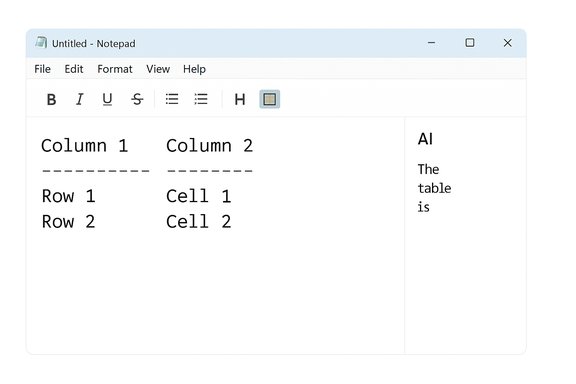
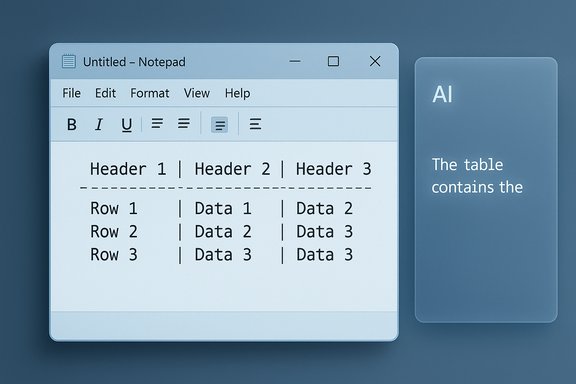
Notepad’s latest preview release continues the app’s slow-motion transformation from a pocket-sized, no-frills text editor into a lightweight, Markdown-aware authoring tool with built‑in AI — and that shift is provoking more than a little conversation about whether anyone actually asked for this. Windows Insiders in Canary and Dev channels are now seeing native table support and streaming AI responses in Notepad version 11.2510.6.0, while debate about sign‑in prompts, subscription ties, and feature bloat is spreading across forums and social networks.
Two important caveats to keep in mind:
However, the controversy is not merely about features; it’s about identity and expectations. Notepad amassed goodwill over decades by being immediate, tiny, and reliably offline. When a product’s identity is altered — even incrementally — users react emotionally. The risk for Microsoft is twofold: alienating loyal users who prize simplicity, and normalizing account‑ and subscription‑gated experiences inside core OS utilities. Both effects have broader implications for user trust and platform perception.
That said, the rollout remains experimental in Insider channels and subject to change. Microsoft has provided mechanisms to opt out or revert, and enterprises have administrative controls to standardize behaviour. For now, the sensible stance for most users is pragmatic: try the new tools where they make sense, and revert to the classic experience where they don’t. The debate over Notepad is a microcosm of a larger conversation about how much intelligence — and how many account and monetization hooks — belong inside the apps users rely on every day.
In short: the new Notepad is more useful for some and more annoying for others — and the real question is not whether Microsoft can add AI and tables, but whether it should reframe an iconic utility’s simplicity as a premium surface for AI-driven features.
Source: Windows Central https://www.windowscentral.com/soft...to-notepad-what-happened-to-the-app-we-loved/
 Background
From tiny text box to feature-rich editor
Notepad began life as the simplest of utilities: fast to open, minimal UI, and reliably offline. Over the last few years Microsoft has added features that would have been unthinkable for the classic app — tabs, spellcheck, lightweight formatting (bold, italics, lists, headings), and a suite of AI actions (Write, Rewrite, Summarize). Those changes were introduced gradually via the Windows Insider program so Microsoft could test direction and gather feedback, but the pattern is clear: Notepad is being reimagined as a convenient authoring surface for quick, structured work rather than a bare-bones text box.Why this matters now
The additions arriving in 11.2510.6.0 — namely tables and streaming AI — are practical improvements if your Notepad use includes short structured notes, meeting minutes, or iterative text editing. For power users who treat Notepad as a quick scratchpad, the new features can reduce the friction of switching to Word or Excel for small tasks. At the same time, these changes highlight a tension: does integrating AI and richer formatting into a legacy utility serve users, or does it erode the very simplicity that made Notepad indispensable?What’s new in Notepad 11.2510.6.0
Native table support — Markdown and toolbar entry
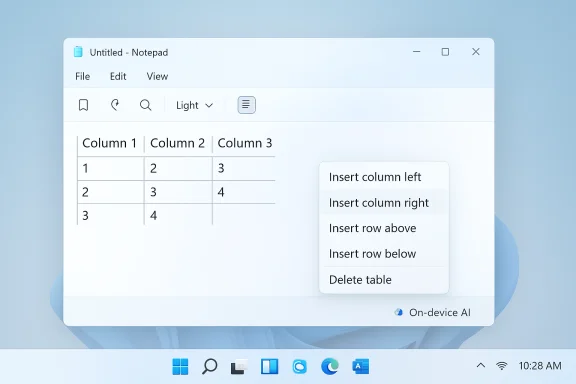
Notepad’s lightweight formatting is being extended to include tables. The new interface exposes a Table button in the formatting toolbar for documents that are in Notepad’s formatting mode, and users can also create tables by typing standard Markdown table syntax (pipe-delimited rows and header separators). Once a table exists, quick edits — adding or removing rows and columns — are available through a right‑click context menu or the Table menu in the toolbar. Importantly, this is explicitly a formatting-layer feature: the underlying content remains portable Markdown when formatting is toggled off. The implementation is deliberately basic — think layout and structure, not formulas or spreadsheet functionality.- Key table details:
- Insert via toolbar or Markdown syntax.
- Add/remove rows and columns with context menu or toolbar.
- Preserves plain-text/Markdown portability.
- Not a spreadsheet — no formulas, sorting, or pivots.
Streaming AI responses — faster perceived output
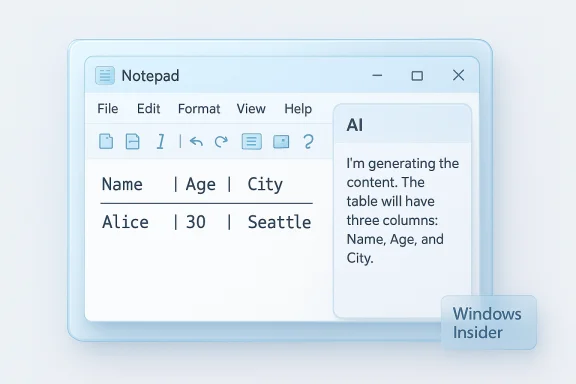
Notepad’s Write, Rewrite, and Summarize tools now support streaming results. Instead of waiting for a full response to finish, the UI displays partial output as the language model generates it (token-by-token). The perceived latency drops and users see early drafts quickly, which can speed iterative editing and reduce the annoyance of waiting for a single-block response. There’s one notable operational caveat: streaming for the Rewrite feature is currently supported only when the model runs locally on Copilot+ capable PCs; cloud-generated Rewrite results may still appear non‑streaming for now. Additionally, using these AI actions requires signing in with a Microsoft account.- What streaming changes practically:
- Early previews of AI output reduce perceived response time.
- Users can iterate faster (request tone changes, shortenings).
- On-device streaming (Copilot+) gives lower latency than cloud variants.
How the new features work in practice
Tables: small, fast, Markdown-first
Microsoft’s design choice is pragmatic: embed small tables as a formatting layer mapped to Markdown so Notepad files remain readable in other Markdown-aware editors. That keeps portability intact while letting users create quick side‑by‑side notes without launching a heavyweight app.- Typical workflow:
- Toggle formatting on, click Table in the toolbar, pick dimensions, and edit in-place.
- Or type a Markdown table and let Notepad render it when formatting is active.
- Toggle formatting off to see the plain-text Markdown again.
Streaming AI: responsiveness vs. completeness
Streaming AI changes the interaction model from "wait, then get a result" to "watch the result appear." That’s excellent for perceived performance and early feedback, but streaming introduces subtle UX and safety trade-offs: partial outputs can be visible before final safety filters or moderation steps complete, and cloud vs. local processing introduces different privacy and latency dynamics. Microsoft’s rollout notes emphasize the on-device advantage for Copilot+ hardware while keeping cloud generation available where local models aren’t possible.Community reaction: who wanted this?
The backlash and the nostalgia
A persistent theme across forums and social media is disappointment among long-time users who feel Notepad’s simplicity is being compromised. Comments like “Why are they not letting Notepad be the super light and efficient tool that it is?” echo widely, framing the updates as feature bloat rather than useful enhancement. Some users say they no longer trust Notepad for quick, private notes because of AI ties and sign-in prompts; others joke that WordPad was killed only to have its features gradually reincarnated in Notepad. These sentiments are visible in multiple community threads reacting to the recent Insider rollout.Supporters and pragmatic users
Not everyone objects. For users already invested in Markdown workflows or the Microsoft ecosystem, tables and instant AI can be genuinely productive. Small tables remove friction for quick comparisons, and streaming AI makes rewrite/summarize actions feel interactive and snappy. For some, this is a pragmatic improvement that keeps short, structured tasks inside the editor they already open dozens of times a day.Strengths: practical wins in the update
- Reduced context switching — Insert small tables or quickly rewrite text without opening Word, Excel, or a web editor.
- Markdown portability — Table markup remains text-based, preserving workflows that rely on plain files or cross-editor compatibility.
- Faster AI interactions — Streaming results cut perceived latency and speed up iterative editing workflows.
- On-device privacy option (Copilot+) — Local model execution for eligible hardware reduces cloud exposure and gives lower latency for streaming rewrite results.
Risks and trade-offs: what’s being sacrificed
- Feature creep and bloat — Adding more UI and cloud-driven features risks diluting Notepad’s core identity as a tiny, instant tool; for users who prize speed and minimalism, any added friction matters. Community feedback underscores how strongly some users resist this direction.
- Sign-in prompts and subscription creep — AI actions require a Microsoft account to access. Some reports and community posts also point to ties between advanced AI features and Microsoft 365 subscription models or limited free credits — a monetization dynamic that stirs pushback. While basic Notepad functions remain free, the perception of pay‑gating valuable features creates discontent. Note: claims about exact subscription gating and free‑credit removal vary over time and across reports and should be treated as subject to change.
- Privacy and data flow concerns — Cloud-based Rewrite/Summarize/Write routes content to remote services unless processed locally on a Copilot+ device. That raises legitimate questions for privacy‑sensitive users and organizations about telemetry, data retention, and compliance. On‑device options mitigate but don’t eliminate these concerns.
- Partial outputs and moderation — Streaming shows partial content before the model finishes. Partial results may appear before full quality or safety checks conclude, which could lead to transient display of problematic content in rare cases. Microsoft’s notes acknowledge the moderation and processing differences between on-device and cloud generation.
- Fragmentation and discoverability — Users now must decide between the modern packaged Notepad app and the classic notepad.exe fallback. This fragmentation complicates system management and can confuse nontechnical users who simply want a single, predictable text editor. Enterprises must decide which experience to standardize on.
Practical guidance: keep Notepad simple if you want to
For users and admins who prefer the classic, tiny Notepad experience, there are supported ways to avoid the modern app’s AI and formatting features:- Use the classic notepad.exe binary (C:\Windows\notepad.exe) or disable the packaged app’s execution alias so notepad.exe opens the legacy editor. This keeps the ultra‑lightweight behaviour intact.
- Inside the modern Notepad app, turn off AI actions in the app’s settings or sign out of Microsoft account integrations to prevent Rewrite/Write/Summarize from appearing.
- For enterprise fleets, apply Group Policy or Intune controls that disable Notepad’s modern features or enforce the classic executable; this is the recommended route for organizations with strict privacy or compliance needs.
Enterprise and admin considerations
- Policy controls exist: Documentation and community guides show that administrative settings — App execution aliases, Group Policy/ADMX, and Intune policies — can prevent or revert modern Notepad behaviour across devices. This is essential for organizations that must control data flows and maintain predictable, offline tooling.
- Data residency and compliance: Cloud‑based AI features may route text to remote services, so organizations with regulatory constraints should require on-device processing or disable AI in Notepad for managed endpoints. The Copilot+ on-device path helps, but hardware requirements and availability must be considered.
- User training: If a company adopts the modern Notepad, clear communication is needed: which features are enabled, how sign‑in is handled, and how to opt out. Left unaddressed, these updates can generate confusion and support tickets.
The bigger picture: Microsoft’s strategy and the industry trend
Notepad’s evolution mirrors a broader industry shift: legacy utilities are being retrofitted with AI capabilities and richer UI, often accessible only with an account or subscription. Microsoft’s approach — keep classic functionality free while applying premium gating or account requirements for advanced AI — is consistent with how companies monetize generative AI investments. This strategy drives innovation but also leads to user friction when applied to beloved, simple tools.Two important caveats to keep in mind:
- The specifics of subscription requirements, free credits, and which AI actions are gated can change rapidly as Microsoft experiments with business models and customer offerings. Reports differ and some claims remain time-sensitive; treat precise monetization assertions as provisional unless confirmed in the official product notes at the time of inquiry.
- The rollout behavior seen in Insider channels (Canary, Dev) may change before general availability. Microsoft uses Insiders to collect feedback and iterate, so features, UI, and gating can evolve.
Assessment: who benefits, who loses
- Beneficiaries:
- Users who write short, structured notes and prefer to stay in one editor.
- People using Markdown workflows who benefit from portable table markup.
- Those on Copilot+ machines who get low-latency, on-device AI with streaming responsiveness.
- Those likely to push back:
- Purists who value Notepad’s original simplicity and ultra‑fast startup.
- Privacy-conscious users and organizations that prefer fully offline tools.
- People sensitive to subscription creep or who resent sign‑in prompts for formerly offline utilities.
Recommendations for Windows users
- If you like the new features: try them in the Insider build (if enrolled), test table insertion and the streaming Rewrite behavior, and evaluate whether the productivity gains outweigh the change in habit.
- If you dislike the new direction: switch to classic notepad.exe or disable the modern Notepad app’s features using the App execution aliases or app settings. For managed fleets, enforce policies via Group Policy or Intune.
- For privacy-conscious users: prefer on-device processing where available (Copilot+ hardware), and verify whether your text is being sent to cloud services before using AI actions. If uncertain, disable AI features for sensitive content.
Final analysis and outlook
Notepad’s addition of tables and streaming AI is a logical continuation of a roadmap that has steadily expanded the app’s capabilities. The features are useful for many short-form workflows: tables permit small structured notes without leaving the editor, and streaming AI makes rewrite/summarize tools more responsive. Those improvements deliver tangible productivity wins for specific users, especially those who already value Markdown and quick in-place editing.However, the controversy is not merely about features; it’s about identity and expectations. Notepad amassed goodwill over decades by being immediate, tiny, and reliably offline. When a product’s identity is altered — even incrementally — users react emotionally. The risk for Microsoft is twofold: alienating loyal users who prize simplicity, and normalizing account‑ and subscription‑gated experiences inside core OS utilities. Both effects have broader implications for user trust and platform perception.
That said, the rollout remains experimental in Insider channels and subject to change. Microsoft has provided mechanisms to opt out or revert, and enterprises have administrative controls to standardize behaviour. For now, the sensible stance for most users is pragmatic: try the new tools where they make sense, and revert to the classic experience where they don’t. The debate over Notepad is a microcosm of a larger conversation about how much intelligence — and how many account and monetization hooks — belong inside the apps users rely on every day.
In short: the new Notepad is more useful for some and more annoying for others — and the real question is not whether Microsoft can add AI and tables, but whether it should reframe an iconic utility’s simplicity as a premium surface for AI-driven features.
Source: Windows Central https://www.windowscentral.com/soft...to-notepad-what-happened-to-the-app-we-loved/