

Microsoft has quietly vaulted Notepad from a utilitarian plain‑text editor into a lightweight content creation surface by adding native tables and real‑time streaming for AI text tools in the latest Insider build, a change that recasts the decades‑old app as a deliberate entry point for Microsoft’s broader Copilot strategy.
Notepad has long been the minimalist workhorse of Windows — instant to open, reliably plain text, and free of visual distractions. That simplicity made it a favorite for quick notes, logs, and developers who prized raw text over formatting. Over the last few years Microsoft has steadily modernized several inbox apps, layering in features such as spellcheck, basic formatting, and AI actions that generate or rewrite text. The most recent step in that evolution is a Notepad update distributed to Windows Insiders that combines a Markdown‑first table editor with streaming output for generative features like Write, Rewrite, and Summarize.
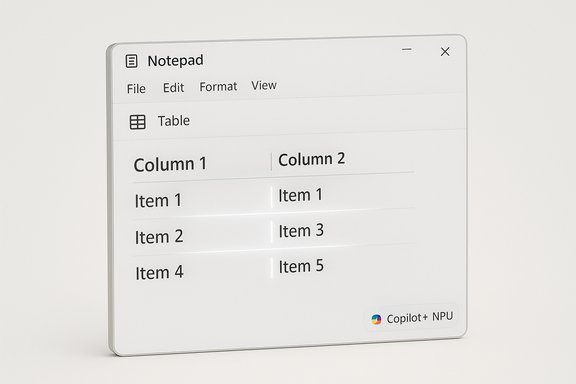
The rollout of this functionality is part of a staged Insider release. The build number that carries these features is Notepad 11.2510.6.0, distributed to users in the Canary and Dev channels. The update introduces a visual Table toolbar and a Markdown rendering layer that together let users add, edit, and remove table rows and columns without leaving the app. At the same time, Microsoft is changing how AI results appear: instead of waiting for a full response, rewritten or newly generated text now streams into the document as it is produced, token‑by‑token, improving perceived responsiveness and enabling earlier interaction.
Key behavior:
Practical implications:
Consequences of this segmentation:
In the broader Microsoft ecosystem, AI usage is commonly tied to an AI credits system that Microsoft has rolled out across Microsoft 365 and consumer apps. Different subscription tiers receive monthly allotments of credits; higher tiers and premium plans offer more or unlimited usage. This architecture means that extensive use of on‑device or cloud AI features can be governed by entitlements attached to Microsoft 365 or Copilot subscriptions.
This model has two sides: it rewards customers who buy AI‑optimized hardware with better performance and data locality, but it also introduces a fragmentation of experience that may frustrate users on older machines. It’s an explicit nudge toward a more connected, subscription‑anchored ecosystem.
Conversely, cloud processing centralizes computation and creates more obvious data egress and storage considerations. Microsoft requires sign‑in and ties AI usage to accounts, so even on cloud paths there are audit trails and account linkage that organizations must consider.
Accessibility considerations were not heavily detailed in the rollout notes. Streaming text benefits screen‑reader users by providing incremental updates rather than a sudden dump of content, but the exact interaction model with assistive technologies needs verification. Developers and accessibility advocates should test the new behavior with a variety of assistive tools to ensure compatibility.
Power users who rely on keyboard‑driven workflows may welcome Markdown insertion, while GUI users will appreciate the Table toolbar. The feature set avoids locking users into a non‑portable file format.
On the AI front, Microsoft’s hybrid model—local models on capable hardware and cloud models otherwise—matches industry patterns: device‑native inference for low latency and privacy, cloud models for the heaviest or continually updated capabilities. Other ecosystems and vendors are making similar tradeoffs between local performance and cloud scale, so Microsoft’s approach is consistent with broader moves across desktop and mobile platforms.
The changes are small in scope but meaningful in practice: tables solve a persistent usability gap and streaming reduces the friction of AI assistance. However, Microsoft’s hardware and account segmentation — local streaming reserved for Copilot+ NPUs and AI features gated by sign‑in and credits — turns Notepad into another touchpoint in the company’s broader strategy to monetize AI via subscriptions and premium hardware.
For most users, the update will simply feel like a smarter, faster Notepad. For power users, IT admins, and privacy‑conscious organizations, the rollout raises new decision points about hardware, subscription entitlements, and policy controls. The evolution is pragmatic: Notepad keeps its plain‑text soul while growing into a richer, more immediate editing surface that better reflects where desktop productivity is headed.
Source: WinBuzzer Microsoft Adds Tables and Streaming AI to Windows Notepad App - WinBuzzer
 Background
Notepad has long been the minimalist workhorse of Windows — instant to open, reliably plain text, and free of visual distractions. That simplicity made it a favorite for quick notes, logs, and developers who prized raw text over formatting. Over the last few years Microsoft has steadily modernized several inbox apps, layering in features such as spellcheck, basic formatting, and AI actions that generate or rewrite text. The most recent step in that evolution is a Notepad update distributed to Windows Insiders that combines a Markdown‑first table editor with streaming output for generative features like Write, Rewrite, and Summarize.The rollout of this functionality is part of a staged Insider release. The build number that carries these features is Notepad 11.2510.6.0, distributed to users in the Canary and Dev channels. The update introduces a visual Table toolbar and a Markdown rendering layer that together let users add, edit, and remove table rows and columns without leaving the app. At the same time, Microsoft is changing how AI results appear: instead of waiting for a full response, rewritten or newly generated text now streams into the document as it is produced, token‑by‑token, improving perceived responsiveness and enabling earlier interaction.
What’s new in Notepad: Tables and Markdown‑first editing
Visual tables meet plain‑text portability
Notepad now supports the insertion and in‑place editing of tables. This is not a spreadsheet engine: it’s a lightweight, Markdown‑first table editor designed to help users structure small datasets, checklists, or comparison charts without switching to Word or a dedicated note app.Key behavior:
- A new Table button appears in the formatting toolbar when lightweight formatting is enabled.
- Users can also write standard Markdown table syntax (pipe-delimited rows and header separators); Notepad renders that Markdown as a visual grid when formatting is active.
- Right‑click context menu options and the Table toolbar allow quick edits to add or remove rows and columns.
- When formatting is turned off, the underlying content remains as pipe‑delimited Markdown so files stay portable and compatible with other editors and version control.
Limits and realistic expectations
The implementation intentionally avoids complex spreadsheet features. There are no formulas, sorting, pivots, or merged‑cell support. The feature is optimized for short, structured content inside text documents rather than data analysis or financial workbooks. That constraint is important: it keeps Notepad fast, lightweight, and aligned with its original intent.Streaming AI: faster, incremental results
From blocking waits to token‑by‑token streaming
Previously, Notepad’s AI features showed a loading animation and only inserted content when the full response was ready. The latest change moves to a streaming model where the UI reveals generated text incrementally — word by word or token by token — as the model produces it. This reduces perceived latency and lets users preview, edit, or interrupt output sooner.Practical implications:
- Users get an immediate sense of progress: partial responses appear quickly, so waiting for large blocks of text is less common.
- Early visibility supports quicker iteration: you can judge tone, direction, and quality early and submit follow‑up prompts or discard output without waiting for the full result.
- The UI is more responsive for shorter requests such as rewrites or summaries, where seeing the initial wording often suffices to decide acceptance.
Hardware segmentation: where streaming happens locally
Streaming behavior is nuanced and tied to where the model runs. For specific features, notably the Rewrite action, streaming is supported only when the result is generated locally on a qualified device. Microsoft’s implementation currently restricts local streaming to devices that meet the Copilot+ PC specification — systems equipped with a Neural Processing Unit (NPU) and certified to run on‑device models efficiently.Consequences of this segmentation:
- On Copilot+ PCs with local model execution, Rewrite can stream live from the device, offering the lowest latency and keeping data on the local hardware.
- On devices without the necessary NPU or certification, Rewrite results are processed in the cloud and may not benefit from the same streaming behavior — instead the experience depends on server behavior and network latency.
- Write and Summarize may stream as cloud responses arrive, but network conditions and service behavior will determine how incremental the experience feels.
Account and monetization picture
Sign‑in and credits
Generative features in Notepad require users to sign in with a Microsoft account. This authentication enables usage tracking, enforcement of rate limits, and association with any AI‑usage entitlements tied to subscriptions.In the broader Microsoft ecosystem, AI usage is commonly tied to an AI credits system that Microsoft has rolled out across Microsoft 365 and consumer apps. Different subscription tiers receive monthly allotments of credits; higher tiers and premium plans offer more or unlimited usage. This architecture means that extensive use of on‑device or cloud AI features can be governed by entitlements attached to Microsoft 365 or Copilot subscriptions.
Hardware as a monetization lever
Locking premium local functionality — the fastest streaming and on‑device Rewrite — to Copilot+ PC hardware is a strategic signal. By reserving the smoothest local experience for NPU‑equipped, Copilot+ certified devices, Microsoft is effectively coupling hardware capability with the best user experience for AI features. That reinforces the value proposition of newer Windows PCs that ship with dedicated NPUs and are marketed as Copilot+ devices.This model has two sides: it rewards customers who buy AI‑optimized hardware with better performance and data locality, but it also introduces a fragmentation of experience that may frustrate users on older machines. It’s an explicit nudge toward a more connected, subscription‑anchored ecosystem.
Privacy, security, and data locality
Local models vs cloud: tradeoffs
Running models locally on NPUs offers two notable privacy advantages: data can be kept on device and model execution does not require sending content to external servers. For sensitive data owners, that’s a meaningful benefit.Conversely, cloud processing centralizes computation and creates more obvious data egress and storage considerations. Microsoft requires sign‑in and ties AI usage to accounts, so even on cloud paths there are audit trails and account linkage that organizations must consider.
Practical privacy caveats
- Local does not automatically mean private: telemetry, diagnostics, and optional features can still transmit data unless explicitly disabled.
- Cloud services are subject to the hosting company’s data policies; enterprises need to evaluate compliance and contractual protections when generative features are used with business data.
- Admin controls and group policies for inbox apps continue to evolve; IT departments should confirm how Notepad’s AI features can be managed at scale.
UX, accessibility, and developer impact
Small changes, big user experience wins
The combination of Markdown‑first tables and streaming AI greatly improves the day‑to‑day Notepad experience for many users. Short tasks — drafting a quick project brief, restructuring a paragraph, or comparing two options in a table — now feel more immediate and less disruptive.Accessibility considerations were not heavily detailed in the rollout notes. Streaming text benefits screen‑reader users by providing incremental updates rather than a sudden dump of content, but the exact interaction model with assistive technologies needs verification. Developers and accessibility advocates should test the new behavior with a variety of assistive tools to ensure compatibility.
Developer and power‑user workflows
Because Notepad preserves Markdown in the underlying file, developers and power users retain compatibility with version control systems and other tooling. The lack of proprietary formatting is a deliberate design choice that preserves Notepad’s longstanding role in developer workflows.Power users who rely on keyboard‑driven workflows may welcome Markdown insertion, while GUI users will appreciate the Table toolbar. The feature set avoids locking users into a non‑portable file format.
Strategic context: where Notepad fits in Microsoft’s AI roadmap
Notepad’s update is not a one‑off cosmetic enhancement; it’s a tactical fit within a broader strategy to surface AI across Windows inbox apps and to make Copilot the default assistant for everyday tasks.- Notepad joins other inbox apps that have gained generative features, making AI available in both editing and imaging contexts.
- Local model support on Copilot+ devices and a credits‑based monetization model for cloud usage together create a hybrid business architecture: better local experience for premium hardware, and gated but broadly available cloud features tied to accounts and credits.
- The upgrade path mirrors other product moves where incremental features (spellcheck, autocorrect, richer formatting) modernized traditional apps while simultaneously nudging users toward connected services.
Competitive comparison
Notepad’s new table capability narrows a gap with contemporary note apps that have offered rich formatting for years. Popular note tools and mobile note apps have included table support for nearly a decade; Microsoft’s addition brings the native Windows default editor into similar territory for basic use cases.On the AI front, Microsoft’s hybrid model—local models on capable hardware and cloud models otherwise—matches industry patterns: device‑native inference for low latency and privacy, cloud models for the heaviest or continually updated capabilities. Other ecosystems and vendors are making similar tradeoffs between local performance and cloud scale, so Microsoft’s approach is consistent with broader moves across desktop and mobile platforms.
Practical guidance for users and IT admins
- If you are on the Windows Insider Canary or Dev channels, expect Notepad 11.2510.6.0 to appear as an update. Look for a Table option in the formatting toolbar and the new streaming behavior when using Write, Rewrite, or Summarize.
- To use Notepad’s generative features you must sign in with a Microsoft account. Confirm that any organizational policies permit the use of personal accounts for AI actions if you are testing this on corporate machines.
- If low latency, local processing, and data locality matter, consider upgrading to a Copilot+ PC with an NPU. Only those devices currently get the full local streaming Rewrite experience.
- For IT admins, review group policies and tenant settings to control Copilot and AI features across devices. Evaluate whether the AI credits model applies to your environment and how usage will be billed.
- Test accessibility behavior — especially streaming output — with the screen readers and assistive technologies used in your organization.
Strengths and notable wins
- Low‑friction structure: The Markdown‑first table editing balances modern UX with plain‑text portability.
- Perceived speed improvements: Streaming AI output makes the interactions feel faster and more interactive.
- Device privacy option: Local model execution on Copilot+ PCs provides a path for on‑device inference, improving latency and offering data locality.
- Developer friendliness: Retaining plain Markdown keeps Notepad useful for dev workflows and version control.
Risks, caveats, and areas to watch
- Fragmented experience: The best streaming behavior is limited to Copilot+ hardware, creating different user experiences across the installed base.
- Subscription and credit complexity: The account + credits model can be confusing; casual users may encounter limits that push them toward paid tiers.
- Privacy expectations: Local execution is beneficial, but organizations should verify telemetry settings and ensure compliance with data governance policies.
- Accessibility verification missing: The rollout notes don’t fully describe how streaming integrates with assistive technologies; this requires hands‑on validation.
- Feature scope: Notepad’s tables are intentionally lightweight. Users expecting spreadsheet features will be disappointed.
What remains unclear or unverifiable
A few points remain contextually interpretive or schedule‑dependent and should be treated cautiously:- The long‑term monetization strategy and how Microsoft will segment features between free, Microsoft 365, and Copilot Pro tiers could change; published pricing and credit allocations have already shifted in prior months.
- Exact enterprise controls and administrative templates for Notepad’s AI features were not exhaustively documented in the initial rollout notes. IT administrators should verify settings in their tenant consoles and official policy documentation.
- Accessibility behavior for streaming with specific screen readers and assistive devices will need independent validation across platforms and versions.
Bottom line
Notepad’s addition of tables and streaming AI marks a deliberate modernization of one of Windows’ oldest apps. By combining a Markdown‑first table editor with incremental streaming for AI features, Microsoft has made Notepad far more capable for everyday structured notes and quick generative tasks.The changes are small in scope but meaningful in practice: tables solve a persistent usability gap and streaming reduces the friction of AI assistance. However, Microsoft’s hardware and account segmentation — local streaming reserved for Copilot+ NPUs and AI features gated by sign‑in and credits — turns Notepad into another touchpoint in the company’s broader strategy to monetize AI via subscriptions and premium hardware.
For most users, the update will simply feel like a smarter, faster Notepad. For power users, IT admins, and privacy‑conscious organizations, the rollout raises new decision points about hardware, subscription entitlements, and policy controls. The evolution is pragmatic: Notepad keeps its plain‑text soul while growing into a richer, more immediate editing surface that better reflects where desktop productivity is headed.
Source: WinBuzzer Microsoft Adds Tables and Streaming AI to Windows Notepad App - WinBuzzer
