

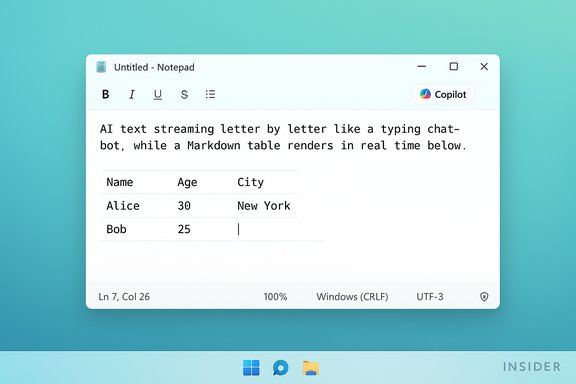
Microsoft has quietly added a token‑by‑token “streaming” mode to Notepad’s Copilot features—so you can now watch AI-generated text type out letter‑by‑letter—and paired that behavior with a modest but notable Markdown‑first table editor in an Insider preview release of Notepad for Windows 11.
Notepad’s slow transformation from a bare‑bones text scratchpad into a lightweight, Markdown‑aware writing surface has accelerated over the past year. Microsoft has layered in tabs, spellcheck, a formatting toolbar, and generative tools such as Write, Rewrite, and Summarize; the latest flight—Notepad version 11.2510.6.0—introduces two headline changes to the Insider channels: native table support and streaming AI output. Both features are rolling to Windows Insiders in the Canary and Dev channels for early feedback. The streaming behavior is primarily intended to reduce perceived latency and make AI interactions feel more conversational, while the tables feature aims to remove small, repeat context switches to Word or Excel for short structured notes.
A related question is whether Microsoft is simply trying to replicate the ChatGPT “typing” feel to attract users who enjoy those conversational interactions. That’s a plausible product psychology move, but it’s speculative; there’s no public Microsoft statement that streaming was added specifically to lure ChatGPT users. Mark that conclusion as conjecture rather than verified fact. (This claim is speculative and flagged accordingly.
At the same time, they also intensify long‑standing trade‑offs: the tension between simplicity and capability, and the operational questions that come with AI features—privacy, manageability, and accessibility. Administrators should evaluate the preview on targeted hardware, update policies accordingly, and use the provided Group Policy/ADMX controls if they prefer to limit AI exposure. For individual users who don’t want AI in Notepad, the app provides a straightforward toggle to disable Copilot‑driven features. Microsoft’s next steps—whether to widen the rollout, smooth the on‑device/cloud experience, or add more granular controls—will determine whether Notepad’s evolution is remembered as a practical modernization or an avoidable expansion of scope. Until then, the new streaming and table features are useful additions for many, controversial for some, and unmistakable evidence that even the simplest Windows tools are now part of the AI era.
Source: PCWorld Windows 11 adds 'streaming' to Notepad: Watch AI type letter by letter
 Background / Overview
Notepad’s slow transformation from a bare‑bones text scratchpad into a lightweight, Markdown‑aware writing surface has accelerated over the past year. Microsoft has layered in tabs, spellcheck, a formatting toolbar, and generative tools such as Write, Rewrite, and Summarize; the latest flight—Notepad version 11.2510.6.0—introduces two headline changes to the Insider channels: native table support and streaming AI output. Both features are rolling to Windows Insiders in the Canary and Dev channels for early feedback. The streaming behavior is primarily intended to reduce perceived latency and make AI interactions feel more conversational, while the tables feature aims to remove small, repeat context switches to Word or Excel for short structured notes. What changed: the facts
Streaming AI: the UI types as the model generates
- What it does: When Notepad runs a Copilot AI action (Write, Rewrite, Summarize), generated text now appears incrementally—word or token at a time—rather than being inserted as a completed block after generation finishes. The result is the familiar “chatbot typing” effect users see in other generative services.
- Where it’s available now: The feature is delivered in Notepad 11.2510.6.0 to Insiders in Canary and Dev. Not all streaming flows are identical: streaming for the Rewrite action is currently limited to results produced locally on Copilot+ certified machines (devices with neural hardware and the right provisioning). Cloud‑generated responses behave differently depending on server and network behavior.
- Why Microsoft says it helps: Streaming reduces perceived wait time—users see content arriving sooner and can interrupt or edit mid‑stream if the AI drifts. Microsoft frames this as a responsiveness and iteration improvement for quick editing workflows.
Tables: lightweight, Markdown‑first grids
- What it does: Notepad now includes a Table button in the formatting toolbar when lightweight formatting is enabled. You can insert a visual grid or type standard pipe‑delimited Markdown table syntax; Notepad renders the Markdown into an editable table when formatting is toggled on and preserves the underlying Markdown when formatting is off. This keeps files portable and repository‑friendly.
- Limits: These are not spreadsheet tables—there are no formulas, sorting, pivoting, merges, or advanced data types. The feature is aimed at quick checklists, README snippets, and small comparison matrices, not number crunching.
Why this matters now
- Notepad fills a vacuum left by WordPad’s removal from Windows 11 (24H2). With WordPad deprecated, Microsoft’s inbox tool strategy pushes simple rich editing and lightweight authoring responsibilities toward Notepad and Word. That strategic context partly explains why Microsoft invests in this app.
- Streaming makes AI interactions feel immediate. For casual drafting or quick rewrites, seeing output as it arrives can speed iteration and reduce the friction of repeated “generate → wait → edit” cycles. This is especially noticeable for longer outputs.
- The Copilot strategy continues to bifurcate experiences between on‑device and cloud. Copilot+ hardware yields lower‑latency, on‑device streaming for some flows; cloud paths may be constrained by network and server behavior. That split matters for administrators, power users, and anyone concerned about data residency and performance.
Deep dive: streaming behavior, performance, and privacy trade‑offs
How streaming changes the interaction model
Streaming converts Notepad’s previously synchronous AI behavior into an incremental experience. Functionally, that gives users:- Faster perceived responsiveness: partial output shows immediately.
- Interruption points: users can stop generation early or begin editing while generation continues.
- Early exposure to model behavior: biases, hallucinations, or fact‑errors can surface before any post‑generation moderation or completion logic runs.
On‑device vs. cloud: the Copilot+ split
- Copilot+ machines: When generation happens locally (on an NPU‑equipped Copilot+ device), streaming is lowest latency and keeps content on the device during inference—reducing risks associated with sending text to cloud endpoints. Microsoft is selectively gating some streaming flows (notably Rewrite) to on‑device execution during this preview.
- Cloud paths: Write and Summarize may use cloud models or hybrid flows. Streaming behavior in those flows depends on how the cloud endpoint streams tokens and on network latency; not all cloud responses stream the same way. That results in an inconsistent user experience across hardware.
Privacy and governance considerations
Streaming exposes partial output early—useful for catching errors quickly, but it also means users may see incomplete or erroneous suggestions before any content filtering completes. Local generation on Copilot+ reduces cloud exposure but is not a total privacy guarantee: telemetry, model updates, or provisioning may still involve network components. Enterprises should treat streaming flows as a distinct risk surface and evaluate accordingly.Strengths: practical wins in everyday workflows
- Less context switching: Tiny tables and inline AI drafting keep short tasks in Notepad rather than forcing Word or Excel launches. That’s a real productivity win for frequent quick notes.
- Faster iteration: Streaming makes the AI feel like a collaborator that types with you instead of a black‑box generator. For short rewrites or summaries, this speeds workflows.
- Markdown compatibility: By representing tables as Markdown under the hood, Microsoft preserves Notepad’s portability for source‑control and cross‑editor workflows. This is sensible for developers and writers who want readable diffs.
- Admin control: Enterprises get ADMX/Group Policy controls to disable AI features in Notepad at scale, which helps IT manage the new capabilities in managed environments.
Risks and open questions
1. Feature creep vs. minimalism
Notepad’s identity as the near‑instant, no‑friction editor is eroding. For many users, that simplicity was the point. Adding more features—tables, Markdown rendering, AI actions, streaming—feeds a broader debate about when a utility becomes a full application suite and whether that’s desirable. Community reaction so far has been mixed, with notable pushback from users who preferred a lightweight Notepad.2. Fragmented user experience
Gating streaming to Copilot+ hardware creates a two‑tiered experience:- Copilot+ users get smoother, on‑device streaming.
- Traditional AMD/Intel PCs may see cloud‑dependent behavior with different latency and streaming characteristics.
3. Privacy nuance
On‑device generation reduces the need to ship corpora to a cloud service, but it does not eliminate telemetry or provisioning interactions. Streaming can also reveal model errors earlier; that’s useful but also increases the chance of exposing undesirable model outputs to users mid‑generation. Administrators should review policies and telemetry settings before enabling streaming AI broadly.4. Accessibility and moderation
Streaming exposes partial sentences and fragments in real time. That behavior may complicate screen‑reader experiences or moderation workflows that rely on the final, filtered output. Microsoft and accessibility teams must ensure streaming doesn’t regress support for assistive technologies. This is an area that requires further testing and clear guidance. (This is a cautionary observation; definitive compatibility claims are still being validated in Insider builds.How to try it and how to shut it off
For enthusiasts: try the Insider preview
- Join the Windows Insider Program and enroll a device in the Canary or Dev channel.
- Update Windows and the Microsoft Store apps so Notepad updates to version 11.2510.6.0.
- Enable Notepad’s lightweight formatting to access the Table button and use the Copilot commands to see streaming in Write/Rewrite/Summarize.
For users or admins who prefer the classic Notepad
Notepad’s AI features are optional and can be disabled at multiple levels:- App settings: Notepad includes a Copilot toggle under AI Features; turning it off removes AI UI elements and the Microsoft account requirement. This is the simplest choice for casual users.
- Group Policy / ADMX: For managed devices, IT can download the Notepad ADMX and configure DisableAIFeaturesInNotepad or deploy the Windows Copilot Group Policy to block Copilot across devices. That prevents employees from using the AI flows in Notepad.
- Uninstall or rollback: It’s also possible to uninstall Notepad or hold devices to a prior Notepad version in tightly controlled environments, though updates may reinstall the app. This is more disruptive and generally unnecessary if policies and settings are properly configured.
Practical guidance for IT and power users
- Pilot first: Test the Notepad update on a small hardware matrix that includes Copilot+ and non‑Copilot machines. Measure latency, battery/thermal impact, and user satisfaction.
- Update policies: If you operate in a regulated environment, update acceptable‑use policies and data‑handling guidelines to cover AI features in Notepad. Consider disabling streaming for sensitive groups until governance is clear.
- User education: Communicate the difference between local and cloud generation, and remind users that AI outputs should be treated like draft content that needs verification. Streaming can speed workflows but also surfaces errors earlier.
- Accessibility testing: Ensure screen readers and other assistive tech behave correctly with streaming outputs. If issues appear, restrict streaming until fixes are available. (This recommendation is precautionary and based on early preview behavior.
Critical analysis: Microsoft’s product strategy and user appetite
Microsoft’s decisions here reflect a broader strategic pattern: consolidate lightweight tasks into the inbox apps and use Copilot as the common AI surface across Windows. Notepad’s expansion into formatting and AI is methodical—tables are deliberately Markdown‑first and streaming is gated to on‑device generation where possible—yet the move is also symbolic. Notepad was once the smallest, fastest tool you could open; now it signals Microsoft’s willingness to add AI capabilities across even the simplest utilities. Two conflicting truths emerge:- For many everyday workflows, Notepad’s new features increase value. The ability to jot a brief table or get a quick rewrite without leaving the app is pragmatic and well scoped.
- For users who prized Notepad’s ultra‑light, dependency‑free model, the app’s drift toward AI integration and cloud account requirements feels like feature creep.
A related question is whether Microsoft is simply trying to replicate the ChatGPT “typing” feel to attract users who enjoy those conversational interactions. That’s a plausible product psychology move, but it’s speculative; there’s no public Microsoft statement that streaming was added specifically to lure ChatGPT users. Mark that conclusion as conjecture rather than verified fact. (This claim is speculative and flagged accordingly.
Cross‑checks and verification
Key technical claims in this article have been cross‑checked against Microsoft’s Windows Insider Blog and independent coverage:- Notepad version 11.2510.6.0 and the two headline features (tables and streaming AI) are listed in Microsoft’s Windows Insider announcement for the Canary and Dev channel rollouts.
- Independent outlets and community reporting confirm the details about Markdown‑first tables and the Copilot+ streaming gating, and they discuss the user reaction to Notepad’s evolving scope.
Bottom line
The Notepad update is small in UI footprint but large in signal: Microsoft intends to keep folding lightweight authoring, Markdown literacy, and Copilot‑style AI into the Windows inbox apps. Streaming makes AI feel immediate and interactive; Markdown tables close a gap left open by WordPad’s removal. Both additions bring practical benefits for convenience and iteration.At the same time, they also intensify long‑standing trade‑offs: the tension between simplicity and capability, and the operational questions that come with AI features—privacy, manageability, and accessibility. Administrators should evaluate the preview on targeted hardware, update policies accordingly, and use the provided Group Policy/ADMX controls if they prefer to limit AI exposure. For individual users who don’t want AI in Notepad, the app provides a straightforward toggle to disable Copilot‑driven features. Microsoft’s next steps—whether to widen the rollout, smooth the on‑device/cloud experience, or add more granular controls—will determine whether Notepad’s evolution is remembered as a practical modernization or an avoidable expansion of scope. Until then, the new streaming and table features are useful additions for many, controversial for some, and unmistakable evidence that even the simplest Windows tools are now part of the AI era.
Source: PCWorld Windows 11 adds 'streaming' to Notepad: Watch AI type letter by letter
