

Microsoft’s humble Notepad has quietly graduated from a one‑trick, plain‑text scratchpad into a lightweight, Markdown‑aware authoring surface with optional AI-powered writing tools — and the company is doing it in a softly opt‑in way that keeps the old, minimal experience intact while exposing new capabilities to users who want them.
Notepad has been the archetype of the simplest Windows app for decades: fast, tiny, and reliably plain-text. That identity has been evolving slowly but deliberately over the last few Windows 11 development cycles. Microsoft has layered on a formatting toolbar, Markdown rendering, tabs, spellcheck and, more recently, a trio of generative tools — Write, Rewrite, and Summarize — surfaced through the app’s Copilot/AI integration strategy. Those changes are being validated in the Windows Insider program before broader rollout. This feature set is part of a broader strategy to embed generative AI into everyday touchpoints in Windows rather than restricting it to Office or web products. Microsoft’s stated design choice has been conservative: keep the underlying file format portable (plain text / Markdown), make AI optional, and use on‑device inference where possible to reduce latency and privacy exposure.
Notepad’s quiet transformation is a useful case‑study in platform evolution: small UI additions can change the way millions of people work, and the careful preservation of plain‑text principles shows Microsoft is aware of what it risks and what it gains. The features are rolling through Insider channels now; expect more iteration, clearer entitlements, and administrative controls as Microsoft prepares a broader release.
Source: PCQuest The simplest Windows app is no longer so simple
 Background
Notepad has been the archetype of the simplest Windows app for decades: fast, tiny, and reliably plain-text. That identity has been evolving slowly but deliberately over the last few Windows 11 development cycles. Microsoft has layered on a formatting toolbar, Markdown rendering, tabs, spellcheck and, more recently, a trio of generative tools — Write, Rewrite, and Summarize — surfaced through the app’s Copilot/AI integration strategy. Those changes are being validated in the Windows Insider program before broader rollout. This feature set is part of a broader strategy to embed generative AI into everyday touchpoints in Windows rather than restricting it to Office or web products. Microsoft’s stated design choice has been conservative: keep the underlying file format portable (plain text / Markdown), make AI optional, and use on‑device inference where possible to reduce latency and privacy exposure. What changed in Notepad (the short technical summary)
- Notepad build: the Insider flight carrying the headline items is Notepad 11.2510.6.0 (rolled to Canary and Dev channels).
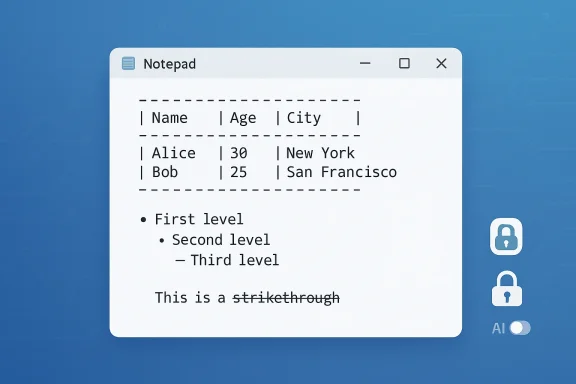
- New formatting: lightweight Markdown gains expanded syntax, notably tables, nested lists, and strikethrough, surfaced via a formatting toolbar that keeps the underlying Markdown intact.
- Generative features: Write, Rewrite, and Summarize can now produce streaming output — partial text appears token‑by‑token while the model continues to generate. This makes the tools feel more interactive.
- Access and gating: AI features require signing in with a Microsoft account. Some streaming behavior — particularly Rewrite — is limited to Copilot+ PCs when running locally. Cloud flows remain possible but behave differently depending on server and network conditions.
Overview: Why these changes matter
Notepad’s updates are small in UI terms — a table button here, a streaming UI there — but significant in practical and philosophical ways.- For everyday users, a visible Table inserter and nested lists mean quicker notes, readable checklists, and faster documentation without leaving Notepad. The underlying files remain plain text (pipe-delimited Markdown), so portability and scriptability are preserved.
- For productivity workflows, streaming AI reduces perceived latency: users see early output and can interrupt or edit mid‑generation, improving iterative writing and editing.
- For IT and privacy teams, the mix of on‑device (Copilot+ NPU) and cloud models — plus the Microsoft account requirement and credit/subscription nuances — creates new policy decisions around rollout, telemetry, and compliance.
Deep dive: AI features — streaming, local inference, and account gate
How streaming works — and why Microsoft added it
Previously, Notepad’s AI actions waited for the model to complete before inserting the final block of text. The new streaming mode shows partial output incrementally — token‑by‑token or word‑by‑word — as it’s generated. That creates the familiar “chatbot typing” experience and reduces the perception of waiting. Users can stop the generation, adjust prompts, or edit early drafts immediately. Streaming offers three practical benefits:- Perceived speed: early fragments appear quickly, making the tool feel snappier.
- Interactivity: users can interrupt or refine generation mid‑stream.
- Transparency: partial output gives early signals about tone or direction, useful for rapid iteration.
On‑device vs cloud models: Copilot+ gating
Microsoft is shipping a hybrid model: where hardware allows, models run locally (on Copilot+ PCs equipped with an NPU), otherwise generation falls back to cloud servers. The Insider notes explicitly state that streaming for the Rewrite action is currently limited to locally generated results on Copilot+ devices, while cloud flows may not stream in the same way depending on network and server behavior. The tradeoffs are straightforward:- Local (on‑device): lower latency, reduced cloud exposure, and the possibility of using AI tools without consuming cloud credits or requiring constant connectivity. But local models require capable hardware and may not match the latest cloud models in raw capability.
- Cloud: more powerful models and feature parity, but higher latency and dependency on credentials, account entitlements, and potential credit consumption for image/text generation services.
Sign‑in and entitlements
Microsoft’s support documentation confirms that to use Notepad’s AI features you must be signed into a Microsoft account. That sign-in unlocks model access, enforces entitlements, and lets Microsoft map usage to account-level any AI credit model they deploy). At the same time, Microsoft emphasizes that the base Notepad functionality does not require a Microsoft account and can be used exactly as before if AI features are disabled.Deep dive: Markdown, tables, and the formatting layer
Notepad’s approach to richer formatting is deliberately conservative: add convenience without breaking portability.- The new Table tool inserts a pipe‑delimited Markdown table behind a visual editor. Toggle formatting off and the raw Markdown persists in the file. That keeps files friendly for version control, scripting, and cross‑platform editing.
- Nested lists and strikethrough expand Markdown parity so Notepad becomes more useful for notes, tasks, and README‑style documentation without becoming a word processor.
The UX shift: discovery, first‑run messaging, and opt‑out controls
Microsoft has also added a small first‑run “What’s new” welcome dialog and a megaphone icon to help users discover new features. This is a practical move — incremental feature sets benefit from discoverability nudges — and it’s accompanied by clear toggles in settings to disable AI and formatting features. Microsoft’s support page reiterates that AI features can be turned off with a single click and that Notepad will revert to classic behavior immediately. A user‑reported detail in some early coverage describes a welcome message that characterizes Notepad as “Your essential text editor, elevated.” That precise tagline has been repeated in some outlets, but it does not appear verbatim in Microsoft’s official release note; treat the exact slogan as a user‑observed UI copy that may vary across builds or localized flights. This minor claim is plausible but not independently verifiable from Microsoft’s official announcement at the time of writing. Exercise caution in treating UI strings as permanent.Practical effects for users and administrators
For everyday users
- If you like Notepad’s speed and simplicity, you can continue to use it exactly the same way by disabling lightweight formatting and AI tools in settings. The app remains a near‑instant plain‑text editor.
- If you want occasional help drafting or summarizing, the new Write and Summarize flows will feel more natural because of streaming. Use them for quick email drafts, note distillation, or brainstorming bullet lists.
For power users and developers
- The Markdown‑ftion preserves text portability: files will remain readable and editable in code editors, CI pipelines, and version control systems. That’s a deliberate win for text‑centric workflows.
- Don’t expect spreadsheet features — no formulas, sorting, or pivoting. Treat the table feature as a layout convenience, not a replacement for Excel.
For IT and security teams
- Policy decision points: will you permit users to sign into Microsoft accounts on managed devices? Will you allow Copilot/AI features that may route data to the cloud? These are new questions for many organizations.
- Telemetry and compliance: partial streaming output might surface sensitive content before moderation is finalized. On‑device inference mitigates data egress, but enterprise teams need to validate the threat model and log behavior before broad enablement.
Step‑by‑step: try the features (Insider preview)
- Join Windows Insider and enroll a test device in the Canary or Dev channel.
- Update Windows and ensure the Microsoft Store delivers Notepad version 11.2510.6.0 (or the package indicated in your Insider notes).
- Sign in with a Microsoft account to unlock AI features.
- Enable lightweight formatting if you want rendered Markdown, or keep it off for classic plain‑text behavior.
- Use the Table button to insert a grid or type pipe‑delimited Markdown to create tables manually.
- Try Write, Rewrite, or Summarize from the Copilot menu or right‑click context menu and watch the streaming preview as the model generates text. If the feature isn’t available, confirm your device’s Copilot+ status and whether the flow is gated to on‑device inference.
Strengths: why this is a smart, low‑friction evolution
- Preserves portability: Markdown-first formatting keeps the underlying file plain text, which respects long‑standing user expectations for .txt files.
- Opt‑in AI: AI features are explicitly toggleable, avoiding the “forced AI” backlash Microsoft has experienced in other parts of Windows. Users who value minimalism can disable the extras instantly.
- Responsiveness improvements: streaming addresses perceived latency — a common complaint with generative tools — and makes drafts usable earlier.
- Hybrid execution model: on‑device inference on Copilot+ PCs reduces cloud dependency and can keep sensitive data local when configured correctly.
Risks and trade‑offs
- Feature creep vs. minimalism: Notepad’s expanded feature set risks diluting the very attribute that made it indispensable — simplicity. Some users see any added UI or dependency as bloat. Microsoft mitigates this risk with toggles, but perception matters.
- Privacy and data governance: AI features require account sign‑in and may invoke cloud services. Enterprises and privacy‑conscious users must treat AI flows as new data channels that require review. Streaming adds complexity: partial outputs might reveal sensitive fragments earlier in the generation lifecycle.
- Fragmentation: the split between Copilot+ hardware and cloud-based flows risks a two‑tier experience. Local inference will be faster and possibly cheaper, but not everyone will have Copilot+ hardware, which can create uneven UX and administrative headaches.
- Regulatory and regional availability: some AI features have historically been region‑gated; enterprises operating across jurisdictions should verify availability and compliance before enabling the features for all users.
Recommendations for WindowsForum readers and sysadmins
- If you manage endpoints, create a short pilot: enable the Notepad preview on a small set of test devices (including at least one Copilot+ PC), evaluate telemetry, and then expand based on user feedback. Keep a policy for Microsoft account sign‑in tied to device profiles.
- For privacy‑sensitive teams, prefer on‑device inference where available and document any cloud flows that remain necessary. Confirm whether AI credit or subscription models apply to your tenants.
- For individual users who value minimalism: turn off lightweight formatting and AI features in Notepad settings and continue using it as the classic plain‑text editor. Microsoft’s support docs explain how to disable the features quickly.
What remains unclear or unverifiable right now
- Exact UI copy can change between Insider builds and final releases; a tagline observed in one build may not be universally present. Treat exact wording (for example, “Your essential text editor, elevated.”) as ephemeral until Microsoft publishes a definitive release image.
- Pricing and credit models for certain cloud AI flows have been evolving. Microsoft documents AI credits and entitlements in support pages, but the rules for specific app‑level operations can shift; verify your tenant’s billing entitlements before enabling features at scale.
Final analysis: a cautious, pragmatic evolution
Microsoft’s approach to modernizing Notepad is notable for its restraint. Rather than forcing a new experience on everyone, the company has added features that are optional, portable, and reversible. The app’s Markdown‑first philosophy, the plain‑text fallback, and the ability to disable AI are strong design choices that respect long‑time users while offering meaningful productivity gains to those who want them. At the same time, the update surfaces new operational questions for IT and privacy teams: Microsoft account sign‑in, cloud credits, and Copilot+ hardware gating create policy decisions that didn’t exist for Notepad before. Organizations should pilot, measure, and, where necessary, restrict AI‑enabled features until they’re comfortable with the risk/benefit balance. For individual users, the best outcome is that Notepad becomes an optionally smarter tool: still fast and plain when you want it, and lightly generative when you don’t. That compromise — power on demand, simplicity by default — is exactly the kind of product decision that preserves Notepad’s legacy while letting it evolve for modern workflows.Notepad’s quiet transformation is a useful case‑study in platform evolution: small UI additions can change the way millions of people work, and the careful preservation of plain‑text principles shows Microsoft is aware of what it risks and what it gains. The features are rolling through Insider channels now; expect more iteration, clearer entitlements, and administrative controls as Microsoft prepares a broader release.
Source: PCQuest The simplest Windows app is no longer so simple
