

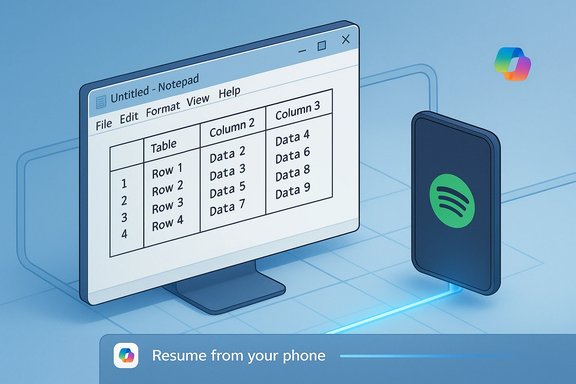
Microsoft has quietly finished turning one of Windows’ oldest helpers into a more capable, structured writing surface while also testing a Handoff‑style continuity feature for Android apps — two changes that together reveal Microsoft’s current priorities: reduce friction for small tasks, fold cross‑device experiences into Windows, and lean on AI where latency matters most. The Notepad update adds a visual table inserter and streaming AI results, and Microsoft’s Phone Link / Cross‑Device Resume work is beginning to let Android app activity transfer to Windows — with initial tests limited and staged, but the implications broad for productivity, privacy, and platform lock‑in.
Both features will be valuable to many users but also raise questions about bloat, privacy, and platform dependency. Expect iterative changes — clearer admin controls, expanded app support for resume, additional AI streaming scenarios, and policy documentation to follow as Microsoft moves these features from preview to broad availability.
Conclusion
Small convenience features can have outsized effects on daily workflows. Notepad’s tables and AI streaming cut friction for structured notes and iterative writing, while Phone Link’s resume work promises fewer interruptions when switching between Android and Windows. The changes are well‑scoped technically — Markdown‑first tables, streaming that favors on‑device models where available — but they also compress several strategic threads: deeper Copilot integration, stronger ties to the Microsoft account and Store, and a nudge for developers to enable cross‑device continuity. Users and administrators should test, configure, and govern these features deliberately: they are useful, but not risk‑free, and their staged rollouts mean availability will vary while Microsoft collects feedback and refines controls.
Source: Windows Report https://windowsreport.com/windows-1...oid-windows-11-resume-feature-105057825.html]
 Background
Why two small changes matter
Notepad and phone‑to‑PC continuity are not headline features like a new Start menu or a major Windows version. They matter because both touch frequent, low‑friction user interactions: jotting quick structured notes and continuing app tasks across devices. Microsoft’s strategy for years has been to take small, frequently used surfaces and add incremental convenience — a pattern visible across the inbox apps and the Copilot story. The Notepad table feature and live AI streaming are logical extensions of that strategy; the Phone Link Resume capability follows the broader cross‑device trend Apple established with Handoff. Independent reporting and Microsoft’s Insider notes line up on these changes and their staged rollouts.The timeline in brief
- Notepad’s table support and streaming AI arrived in Insider flights as Notepad version 11.2510.6.0 and were tested in Canary and Dev channels before appearing in broader production channels according to multiple reports.
- The cross‑device resume for Android apps is still in testing and initially limited to a small number of apps (reporting points to Spotify as an early example), relying on Phone Link / Link to Windows as the transport and on Windows showing a “Resume from your phone” notification to prompt activity continuation.
Notepad: what’s actually new
The features, technically described
- Visual table insertion: Notepad now exposes a Table control in the formatting toolbar when lightweight formatting (Markdown rendering) is enabled. A grid picker lets users choose rows and columns visually; Notepad renders the table in formatted view and keeps the underlying content as plain Markdown (pipe |‑delimited) when formatting is toggled off. This preserves portability and makes Notepad a Markdown‑first editor with WYSIWYG convenience.
- In‑table editing controls: Once a table is inserted, right‑click menu and toolbar options let you add/remove rows and columns, select rows/columns/tables, and adjust column width (fit to window). Basic formatting — bold, italics, links — works inside cells. There are no spreadsheet capabilities like formulas, sorting, pivoting, or cell types. Treat this as a text layout convenience, not a data‑analysis engine.
- AI streaming for Write / Rewrite / Summarize: Notepad’s Copilot actions now show streaming output — partial text appears token‑by‑token or word‑by‑word as the model generates, rather than waiting for a finished block. That reduces perceived latency and makes iteration feel conversational. Streaming for the Rewrite action is limited in the current preview to on‑device model execution on Copilot+ certified PCs; other AI flows may remain cloud‑hosted and behave differently based on server support and network conditions. Use of these AI utilities requires signing in with a Microsoft account.
How this is implemented (and why it matters)
Microsoft implemented tables as part of the existing lightweight formatting / Markdown rendering layer in Notepad instead of embedding a new proprietary binary format. That choice matters because:- Files remain human‑readable and diff‑friendly (important for scripting, source control, and cross‑editor workflows).
- Users who prefer the classic plain‑text Notepad can toggle formatting off and return to the minimalist behavior.
- The feature targets common quick workflows — meeting notes, short comparison matrices, README snippets — avoiding the overhead of Office apps.
Confirmed version and rollout status
Microsoft documented the feature in the Windows Insider Blog under Notepad version 11.2510.6.0, calling out table support and streaming AI results in the November Insider flight. Independent outlets subsequently reported that the feature is moving beyond Insiders and appearing in production channels for many users, though availability can be staged by region and store updates. If your PC does not show the controls yet, check that Notepad is updated from the Microsoft Store and that Formatting is enabled in Notepad settings.Notepad: benefits and immediate use cases
- Fast structure without context switching: Create small tables while taking notes instead of opening Word or Excel; this saves seconds that add up over repeated tasks.
- Markdown portability: Because tables are stored as pipe‑delimited Markdown, notes remain compatible with other editors, version control, and tooling that expects plain text.
- Iterative AI workflows: Streaming results let you see and edit AI output early, enabling faster back‑and‑forth between user and model.
- Optionality: Formatting and Copilot features can be disabled, restoring classic Notepad behavior for purists.
Practical examples
- Quick comparison tables for pros/cons in a meeting note.
- Small configuration key/value tables for developer README files.
- Embedding simple lists with columns for to‑do items that remain plain text when exported.
Notepad: risks, trade‑offs, and community reaction
Feature bloat vs. utility
Notepad’s identity is rooted in minimalism. Adding formatting, tables, and AI steadily shifts that identity toward a richer editor. For many users it’s an improvement; for long‑time purists it feels like feature creep. Microsoft’s Markdown‑first implementation reduces the backlash risk by preserving plain text, but the direction is clear: Notepad is becoming a lightweight authoring surface rather than a purely plain‑text scratchpad.Privacy and AI concerns
- Microsoft account requirement: All AI actions in Notepad require a Microsoft sign‑in. That introduces account linkage and telemetry considerations for users who preferred a completely offline experience.
- On‑device vs cloud processing: Some AI streaming is limited to Copilot+ hardware running models locally; other flows use cloud models and may consume credits or be subject to server policies. Users should be aware of where their text is processed.
- Unverifiable claims: While multiple outlets report the new features are rolling out broadly, Microsoft’s rollout timelines are often staged. Exact global availability and per‑region timing cannot be verified at a single moment — expect variation and store‑side staging. Treat claims of “available for everyone” as operational shorthand that may lag for some systems.
Accessibility and enterprise concerns
- Notepad updates delivered through the Microsoft Store mean organizationally managed devices could delay or block the feature depending on policy. Enterprises should inventory which PCs need formatting/AI and plan guidance. For administrators concerned about data exfiltration or unapproved AI use, the existence of optional toggles does not replace a formal governance policy.
Phone Link / Resume: Android app continuity explained
What Microsoft is testing
Microsoft is testing a Cross‑Device Resume capability that surfaces recent tasks from an Android app on a linked Windows PC and shows a “Resume from your phone” prompt. The initial testing has been limited to select apps — early reports highlight Spotify — and the experience typically opens the Windows counterpart (or prompts install via Microsoft Store) and continues playback or activity where the phone left off. This is conceptually similar to Apple’s Handoff.How it works (developer and platform details)
- The continuity surface is handled via Phone Link / Link to Windows, and Microsoft exposes a Phone Link Task Continuity surface that apps can integrate with. Apps supply recent tasks (URLs, document links, media playback tokens) that the connected PC can surface in the Phone Link Apps node or as a notification flyout. There are developer rules and limits (for example, rate‑limits and privacy‑centric rules about syncing only when the user is actively engaging).
- From the user perspective, prerequisites include:
- A linked Android device with Link to Windows / Phone Link installed and running.
- A Windows 11 PC with Phone Link configured and the same Microsoft account tied where required.
- The corresponding Windows app installed (or the PC will prompt for install via the Microsoft Store).
Current limitations
- Small app set: Early testing is limited to a handful of apps (Spotify has been the common example). Microsoft has not yet announced a broad SDK timeline for mass adoption.
- Platform fragmentation: Because this relies on each Android app implementing the continuity APIs, adoption depends on developers prioritizing the feature; not all apps will be available immediately.
- Insider testing: The functionality is rolling through Dev/Beta Insider channels; general availability dates are not public and may be staged.
Why this matters: user, developer, and ecosystem impacts
For users
- Resume reduces friction: you can continue media, reading, or simple tasks without manual re‑search or re‑login.
- Notepad tables reduce context switches for small structured notes, saving time on frequent micro‑tasks.
- Both features push users toward the Microsoft account and Microsoft Store ecosystem for the “frictionless” experience.
For developers
- Phone Link Task Continuity is an explicit invitation to integrate; there’s a concrete API surface and rules about what to sync and when. Developers who want better cross‑device UX should evaluate the Phone Link docs and rate‑limits and consider privacy implications.
For Microsoft’s platform strategy
- These moves increase the value of Windows as a continuity hub for devices and content, and they push the Microsoft Store as the convenient distribution channel for resumed apps.
- AI streaming in Notepad is another nudge toward Copilot branding and Copilot+ hardware, showing Microsoft’s investment in perceived responsiveness as a product differentiator.
How to try these features today (step‑by‑step)
- Notepad tables and AI streaming
- Update Notepad from the Microsoft Store and confirm Notepad is at or beyond version 11.2510.6.0.
- Open Notepad and enable Formatting (if the UI prompts you) or go to Notepad Settings and turn formatting on.
- Click the Table icon on the formatting toolbar to insert a table via the grid picker, or type a Markdown pipe table and toggle formatted view.
- To test AI streaming, use the right‑click Copilot actions (Write / Rewrite / Summarize) and watch for incremental results — note that on‑device streaming for Rewrite may require a Copilot+ certified PC.
- Resume Android app activity on Windows 11
- Install and sign into Link to Windows / Phone Link on your Android device and connect it to your Windows 11 PC.
- Be on an Insider Dev/Beta build if required by your region/rollout (early testing has been conducted in Insider channels).
- On your phone, open a supported app activity (e.g., a song in Spotify). Look for a “Resume from your phone” notification on the Windows taskbar and follow the prompt to continue on PC. If the Windows app isn’t installed, the system will prompt an install.
Security, privacy, and policy recommendations
- Treat AI actions as potentially cloud‑processed: Encourage users to avoid pasting sensitive data into Copilot features until your organization’s policy specifies acceptable use. For enterprises, use app configuration policies to disable Copilot/AI features where needed.
- Control device linking: Phone Link provides convenience but increases the attack surface for social engineering that leverages cross‑device prompts or app install flows. Require device enrollment controls and educate users on verifying install prompts and account matching.
- Monitor updates and staged rollouts: Because these features are often delivered through the Microsoft Store and staged rollouts, admins should test in a controlled pilot group before broad adoption. Use update management tooling to control timing and to audit feature exposure.
Bottom line — what to expect next
Notepad’s table insertion and AI streaming are small in isolation but signal an ongoing direction: Microsoft will continue to extend lightweight capabilities into inbox apps while tying optional AI services to accounts, on‑device hardware, and cloud services. Cross‑device resume for Android is an incremental but meaningful step toward a more unified multi‑device experience on Windows, and it will succeed only if developers adopt the Phone Link continuity APIs at scale.Both features will be valuable to many users but also raise questions about bloat, privacy, and platform dependency. Expect iterative changes — clearer admin controls, expanded app support for resume, additional AI streaming scenarios, and policy documentation to follow as Microsoft moves these features from preview to broad availability.
Conclusion
Small convenience features can have outsized effects on daily workflows. Notepad’s tables and AI streaming cut friction for structured notes and iterative writing, while Phone Link’s resume work promises fewer interruptions when switching between Android and Windows. The changes are well‑scoped technically — Markdown‑first tables, streaming that favors on‑device models where available — but they also compress several strategic threads: deeper Copilot integration, stronger ties to the Microsoft account and Store, and a nudge for developers to enable cross‑device continuity. Users and administrators should test, configure, and govern these features deliberately: they are useful, but not risk‑free, and their staged rollouts mean availability will vary while Microsoft collects feedback and refines controls.
Source: Windows Report https://windowsreport.com/windows-1...oid-windows-11-resume-feature-105057825.html]
