

Windows 11’s tiny, decades-old Notepad just picked up new formatting tools and faster AI output — and it broke, for some users, at almost the same moment. The release that adds nested lists, strikethrough, a first‑run “What’s New” panel and streaming results for Notepad’s Write/Rewrite/Summarize features is real and rolling to Insiders, but it arrives amid a cluster of January 2026 Windows updates that produced app‑launch failures, OneDrive/Outlook I/O hangs and even shutdown regressions. The juxtaposition matters because it crystallizes a broader tension at Microsoft today: ship flashy AI features into inbox apps while a nontrivial number of users suffer from regressions in Windows fundamentals. This article explains precisely what changed, verifies the technical details, analyzes where responsibility and risk lie, and lays out pragmatic steps for both consumers and IT administrators.
Microsoft’s Notepad and Paint apps are no longer the throwaway utilities they once were. Over the last few Windows 11 development cycles both apps have accumulated small feature packs and Copilot integrations that bring lightweight Markdown formatting, table support, AI-assisted text generation, and generative image tools into the inbox experience. The Notepad update currently flying to Windows Insiders is identified as Notepad version 11.2512.10.0 and Paint as 11.2512.191.0; the Windows Insider team publicly documented the changes in a January 21, 2026 post.
At the same time, Microsoft shipped a January 13, 2026 cumulative update (KB5074109) that patched a variety of issues but — for a subset of devices and scenarios — introduced or revealed additional problems. Several highly visible failures emerged: some inbox and Store‑packaged apps refused to launch with error 0x803F8001, certain cloud‑backed file operations caused apps (notably classic Outlook when PSTs lived in OneDrive) to hang, and other regression clusters affected shutdown/hibernate behaviors on Secure Launch‑enabled systems. Microsoft’s support pages and community Q&A threads reflect both the KB announcement and the wave of user reports.
A second pattern is the increased dependence on cloud‑backed storage and AI‑driven flows. Streaming AI that runs locally needs careful gating to hardware and driver compatibility; cloud flows need robust network and backend validation. Both demand elevated QA surface area across firmware, driver, Store, and cloud services — and the current incident shows how a fault in one of those layers can impact perception of Windows’ overall quality.
A couple of important caveats and checks on commonly heard claims:
The fix is not binary. Microsoft should continue to evolve inbox apps and integrate AI where it reduces friction, but it must also invest proportionally in integration QA, staged rollouts that protect critical workflows, and clearer policy controls for AI usage in managed environments. Until then, users and administrators should exercise cautious rollout discipline: pilot new app updates on test rings, hold major OS updates until validated for your environment, and apply Microsoft’s documented mitigations for high‑impact regressions when necessary. The Notepad of today can be both more powerful and still true to its simple roots — but only if engineering rigor follows feature ambition.
Source: TechRadar https://www.techradar.com/computing...the-company-focused-on-fixing-things-instead/
 Background / Overview
Microsoft’s Notepad and Paint apps are no longer the throwaway utilities they once were. Over the last few Windows 11 development cycles both apps have accumulated small feature packs and Copilot integrations that bring lightweight Markdown formatting, table support, AI-assisted text generation, and generative image tools into the inbox experience. The Notepad update currently flying to Windows Insiders is identified as Notepad version 11.2512.10.0 and Paint as 11.2512.191.0; the Windows Insider team publicly documented the changes in a January 21, 2026 post. At the same time, Microsoft shipped a January 13, 2026 cumulative update (KB5074109) that patched a variety of issues but — for a subset of devices and scenarios — introduced or revealed additional problems. Several highly visible failures emerged: some inbox and Store‑packaged apps refused to launch with error 0x803F8001, certain cloud‑backed file operations caused apps (notably classic Outlook when PSTs lived in OneDrive) to hang, and other regression clusters affected shutdown/hibernate behaviors on Secure Launch‑enabled systems. Microsoft’s support pages and community Q&A threads reflect both the KB announcement and the wave of user reports.
What’s new in Notepad — the facts, verified
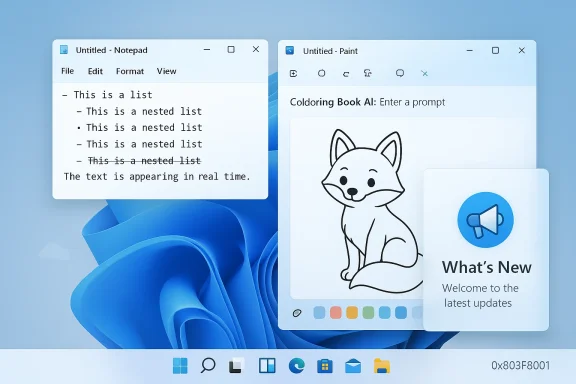
Microsoft’s Insider announcement lists the specific Notepad changes being rolled to Canary and Dev channel testers. These are not vague product-speak; they behavior updates:- Nested lists and strikethrough support have been added to Notepad’s lightweight Markdown‑style formatting layer. These are available via the formatting toolbar and by typing standard Markdown syntax. ([)
- A What’s New / welcome experience appears on first run (and can be reopened via a megaphone icon). This panel surfaces recent changes so casual users discover new features without reading release notes.
- The Write, Rewrite and Summarize AI actions now support streaming results: instead of waiting for a full reply, Notepad displays partial output faster, which reduces perceived latency and allows earlier user interaction with the draft. Microsoft notes that AI features require a Microsoft account sign‑in and that some streaming behaviors depend on whether generation runs locally (on Copilot+ hardware) or in the cloud.
Why these changes are implemented (Microsoft’s rationale)
Microsoft frames the Notepad changes as pragmatic extensions: make Notepad a Markdown‑first lightweight editor that reduces context switching for quick, structured tasks (notes, README snippets, micro‑tables) while keeping underlying storage as plain text so files remain portable. Streaming AI is explicitly a responsiveness improvement: incremental output feels faster and supports iterative editing. These are deliberate product decisions—small, additive surface changes rather than a full transformation into a word processor.Paint’s update in brief — practical additions
Paint’s headline addition in the same Insider wave is a Coloring book tool: an AI‑powered generator that produces line‑art pages from a text prompt. This is treated as a Copilot feature and is gated to Copilot+ PCs (devices certified to run on‑device models using an NPU). Paint also gains a fill tolerance slider for more precise bucket fills. Like Notepad’s AI features, Paint’s Copilot operations require signing in with a Microsoft account and may run locally on eligible hardware.The bug cluster that landed at the worst possible time
Two separate but related problems gained traction after the January 13, 2026 cumulative update package (KB5074109):- App launch failures returning error 0x803F8001, with messages such as “This app is currently not available in your account.” These failures primarily surfaced for Package/Store‑delivered or AppX/MSIX‑registered inbox apps (Notepad, Snipping Tool, and several OEM utilities). For many affected systems the legacy, System32 Notepad executable could still run while the packaged Notepad failed — a strong signal that the issue sits in Store entitlement/registration layers rather than in the apps’ core binaries. Community troubleshooting steps that helped some users included resetting the Store cache, signing out and back into the Store, re‑registering AppX packages, or reinstalling affected apps.
- A cloud‑backed file I/O regression causing applications to hang or become unresponsive when reading/writing files stored in cloud‑synced folders (OneDrive, Dropbox). Classic Outlook with PST files in OneDrive was particularly impacted: hangs, lost Sent Items indexing, and forced re‑downloads were reported. Microsoft acknowledged these symptoms and provided mitigation guidance while engineering investigated.
Technical root causes — a clear pattern
The most important technical reality underpinning both the feature push and the regression wave is architectural: Microsoft has modularized many inbox experiences into AppX/MSIX packages delivered and serviced through the Store and modern servicing pipelines. That modularization enables quicker updates and richer features, but it also couples basic availability to entitlement, registration, and servicing correctness. When the Store or package registration layer malfunctions — or when a cumulative update changes the servicing sequence — multiple, otherwise independent apps can fail at once. The 0x803F8001 symptom set is a textbook manifestation of a Store/entitlement/registration ripple rather than application binary corruption.A second pattern is the increased dependence on cloud‑backed storage and AI‑driven flows. Streaming AI that runs locally needs careful gating to hardware and driver compatibility; cloud flows need robust network and backend validation. Both demand elevated QA surface area across firmware, driver, Store, and cloud services — and the current incident shows how a fault in one of those layers can impact perception of Windows’ overall quality.
Strengths and clear benefits
- Practical productivity improvements: native nested lists, strikethrough and Markdown parity reduce friction for people who shuttle text between Notepad, code editors and Markdown‑aware tools. The table and formatting changes are explicitly not spreadsheet features; they’re quick structure for short entries.
- Faster-feeling AI interactions: streaming results make AI actions feel more conversational and less like a blocking task. For quick rewrites or summaries this is a tangible UX win.
- Cohesive Copilot ecosystem: bringing small AI primitives into widely used inbox apps lowers the barrier to usefulness for everyday tasks (from quick edits to classroom uses of Paint’s Coloring book). When implemented sensibly, these features can save user time.
Risks, trade‑offs and why critics are right to be concerned
- Feature creep vs. minimalism: Notepad’s core promise has long been simple, immediate text editing. Adding toolbars, AI prompts and welcome panels changes the product’s mental model for long‑time users. The risk is not just subjective annoyance — it’s the potential for increased memory/launch overhead, more frequent background services (for cloud validation), and added telemetry surfaces. Critics who fear bloat are seeing a legitimate trade‑off.
- Dependency surface area: moving essential functionality into Store‑served packages and gating AI on Microsoft account sign‑ins or hardware classes introduces fragility. The 0x803F8001 incidents and cloud I/O hangs show how an otherwise small servicing error can cascade into major user impact.
- Privacy and enterprise manageability: AI features that stream or that route to cloud models create potential data‑egress considerations. Requiring Microsoft account sign‑in for AI tools adds administrative overhead for managed fleets and raises policy questions in regulated environments. Enterprises must evaluate acceptability and logging controls before exposing Copilot flows on production machines.
- QA and release cadence concerns: the simultaneous arrival of feature additions and high‑impact regressions fuels a perception problem: is Microsoft prioritizing visible new features over the stability of the platform? The pattern of staged Insider rolls, monthly cumulative updates and occasional out‑of‑band emergency patches points to an iterative but brittle pipeline that needs stronger end‑to‑end validation.
Practical recommendations — what to do now
The following steps separate advice for typical home users from guidance for administrators managing fleets.For home users and power users
- If you value Notepad’s old simplicity, opt out of Insider builds and wait for the features to reach general release. Notepad’s formatting and AI features are opt‑in in practice (they require sign‑in for AI).
- If you rely on inbox apps and notice 0x803F8001 errors, try these quick steps in order: sign out and sign back into the Microsoft Store, run wsreset.exe to clear the Store cache, uninstall and reinstall the affected app from the Store, or run the Windows Store Apps troubleshooter. Some users reported success with reinstalling the app binary when the packaged variant failed. These steps helped many but not all impacted machines.
- Avoid storing critical PST files or other mission‑critical data in OneDrive or other cloud‑synced folders until the cloud I/O regressions are confirmed fixed; move such files to local-only folders as a temporary precaution.
For IT administrators and enterprise teams
- Prioritize a staged deployment ring: keep production fleets on well‑tested cumulative updates and hold Insider or preview App updates to dedicated test machines. Validate end‑to‑end scenarios (shell, remote access, Outlook PST workflows, Store‑packaged inbox apps).
- If you encounter the Secure Launch shutdown regression, follow Microsoft’s KB guidance for applying out‑of‑band fixes (for example KB5077797) and, as a last resort, evaluate temporary Secure Launch disablement only with full risk assessment. Microsoft’s OOB advisories and Q&A threads document known mitigations and their limitations.
- Treat Copilot/AI rollouts as policy decisions: require account and telemetry governance, and provide education on allowable content for AI prompts to reduce sensitive data leakage risk. Evaluate on‑device Copilot+ gating when privacy is a concern.
Quality assurance, perception and the broader product strategy
Microsoft’s design direction is clear: embed Copilot primitives broadly, make apps more capable, and use the Windows Insider model to iterate quickly. That strategy has undeniable upside — it accelerates feature delivery and surfaces innovation in everyday places. But the current incident cycle exposes a weakness in that approach: modularization and fast servicing mean the blast radius of a single maintenance flaw becomes larger. The update pipeline now touches firmware/NPUs, the Store, AppX registration, cloud services and on‑device AI stacks. That requires correspondingly stronger integration testing and staged validations across a wider cross‑section of hardware and enterprise scenarios.A couple of important caveats and checks on commonly heard claims:
- It is verifiable that the Notepad features and the Paint Coloring book exist in Insider builds and are documented by Microsoft’s Windows Insider team. Those claims are not speculative.
- It is verifiable that KB5074109 was published on January 13, 2026 and that Microsoft subsequently issued out‑of‑band fixes (mid‑January) for some regressions; Microsoft’s official KB pages and subsequent OOB entries enumerate fixes and known issues. However, the degree to which a single update caused every reported symptom may involve multiple contributing factors (hardware, firmware, OEM drivers, non‑persistent provisioning workflows), so attributions that collapse the root cause to a single line of code should be treated cautiously.
Long‑term takeaways for Microsoft and Windows users
- Microsoft must match its rapid feature cadence with stronger, systems‑level QA that tests Store entitlement flows, on‑device AI gating, and cloud file I/O at scale. A single servicing or registration regression now impacts a larger swath of the desktop experience than it did when apps were monolithic Win32 programs.
- Users and admins need clearer, proactive communication about which experiences are gated (Copilot+, account sign‑in, hardware requirements) and which remain offline, minimal and untethered. That clarity reduces surprise and allows sensible default policies for privacy and stability.
- Feature work is worthwhile, but the business value of new Notepad/ Paint capabilities will be undermined if platform trust erodes. Trust means predictability, transparent remediation timelines and demonstrable improvements in update reliability. The Copilot roadmap depends on people being comfortable giving AI privileged access — comfort that is fragile in the face of repeated, visible regressions.
Conclusion
The Notepad and Paint updates are legitimate, incremental feature wins: better Markdown fidelity, streaming AI output, and creative Copilot tools are useful additions for many users. But the timing — landing while a January cumulative update produced cataloged regressions like 0x803F8001 app failures and cloud I/O hangs — exposes a systemic tension at Microsoft between rapid innovation and platform reliability.The fix is not binary. Microsoft should continue to evolve inbox apps and integrate AI where it reduces friction, but it must also invest proportionally in integration QA, staged rollouts that protect critical workflows, and clearer policy controls for AI usage in managed environments. Until then, users and administrators should exercise cautious rollout discipline: pilot new app updates on test rings, hold major OS updates until validated for your environment, and apply Microsoft’s documented mitigations for high‑impact regressions when necessary. The Notepad of today can be both more powerful and still true to its simple roots — but only if engineering rigor follows feature ambition.
Source: TechRadar https://www.techradar.com/computing...the-company-focused-on-fixing-things-instead/
