

NTLite version 2026.04.10936, reported by gHacks on May 4, 2026, adds support for removing Copilot, Windows Recall, and other Windows 11 25H2 AI components from installation images before the operating system is deployed. The update is not just another checkbox in a tweaking utility; it is a small but telling referendum on where Windows is heading. Microsoft is trying to make AI feel native to the PC, while a visible slice of its most technical users is trying to make the PC feel native to them again. The fight is not really about disk space, even if disk space is one of the measurable wins.
The most interesting thing about NTLite’s latest update is not that it removes Copilot or Recall. Plenty of scripts, registry edits, policy templates, and post-install cleanup tools have tried to do some version of that already. What matters is where NTLite acts: before Windows ever boots.
That distinction is easy to miss, but it is the whole story. A post-install debloater is a broom. An image customizer is a printing press. The former cleans up Microsoft’s default assumptions after they have already landed on a machine; the latter changes the assumptions before they become the machine.
For enthusiasts, that means a cleaner install without the familiar first-day ritual of uninstalling apps, disabling services, and hunting through Settings pages. For IT pros, it means the possibility of standardizing an image that never included certain AI features in the first place. That is operationally different from deploying Windows, then layering policy and remediation on top.
NTLite has long lived in this space between sanctioned enterprise tooling and enthusiast self-defense. It is not a Microsoft product, and that matters. But its appeal comes from solving a problem Microsoft has never been eager to solve: giving users a simple, visual way to decide that a Windows installation should be smaller, quieter, and less opinionated than Redmond’s default.
AI changed the emotional temperature. Copilot, Recall, Click to Do, AI actions, semantic indexing, writing tools, and related components are not perceived by skeptics as just another wave of bundled utilities. They are perceived as an architectural shift: Windows becoming not merely an operating system, but an observing, interpreting, suggesting layer between the user and the computer.
Microsoft would object to the harshest version of that framing. The company has spent the last two years emphasizing local processing, user control, security boundaries, enterprise policy, and opt-in behavior for the most sensitive features. Recall in particular went through a public redesign after its 2024 backlash, and Microsoft’s current posture is much more cautious than the original pitch that alarmed security researchers and privacy advocates.
But trust, once cracked, does not reassemble on Microsoft’s release schedule. The Recall episode taught users a simple lesson: if a feature is ambitious enough to capture the history of what appears on your screen, the burden of proof shifts dramatically. Even when the implementation improves, the category remains radioactive for many people.
That is why an NTLite checkbox carries more symbolic weight than a typical feature update. It says that for a subset of Windows users, “turn it off” is no longer enough. They want “it was never installed” instead.
That makes the Windows version number both useful and misleading. An administrator may say “25H2,” but the actual user experience depends on edition, region, hardware, Microsoft account state, Copilot+ PC eligibility, policy configuration, Store app versions, and whether a feature has been lit up for that device. Windows is no longer a static thing you install; it is a negotiated state.
NTLite’s update responds to that reality by treating the installation image as one of the few remaining points of leverage. If Microsoft can progressively attach more functionality to Windows through modular components, then the counter-move is to remove those components from the image before they acquire dependencies, scheduled tasks, services, app registrations, and policy surfaces.
That does not mean every removal will be risk-free. Windows components are notoriously interconnected, and the more ambitious the removal, the more likely a future cumulative update, feature dependency, or servicing operation may behave unexpectedly. Image surgery is powerful precisely because it is invasive.
Still, the timing is revealing. Users are not waiting until AI becomes an immovable part of the shell. Toolmakers are reacting while the architecture is still visibly modular enough to prune.
When Microsoft announced Recall in 2024 for Copilot+ PCs, the idea was easy to explain and difficult to defend: Windows would help users find things they had previously seen or done by maintaining a searchable history based on snapshots. Microsoft’s argument was that local storage, on-device processing, encryption, and identity protections could make that useful without making it reckless.
The first public reaction was brutal because the mental model was simpler than the technical one. If a PC takes recurring snapshots of user activity, people worry about passwords, health records, legal documents, source code, private chats, financial data, and abusive domestic or workplace surveillance. Security professionals worry about the same things, but with adversaries attached.
Microsoft responded by changing Recall’s security posture, delaying broad availability, making the feature opt-in, and adding management controls. Those changes were not cosmetic. They mattered, particularly for enterprise environments where policy and compliance are not optional extras.
But the controversy also created a permanent association between Windows AI and latent surveillance, even where that association is incomplete or unfair. Once a user has decided that Recall is the emblem of Microsoft overreach, every AI affordance nearby inherits some of that distrust. Copilot in the taskbar, writing tools in Notepad, image features in Paint, and context actions in File Explorer become part of the same story, whether or not they share the same data model.
NTLite’s value proposition feeds on that accumulated skepticism. It does not ask users to parse the difference between AI branding, cloud assistant, local model, runtime, app extension, and optional feature. It offers a more primitive but satisfying answer: remove the category.
This is a familiar Microsoft pattern. When a brand layer becomes too noisy, the underlying platform work continues under more neutral language. “Copilot” becomes “writing tools.” AI buttons become contextual actions. Assistive features become part of search, settings, camera effects, accessibility, or productivity workflows.
That may be good product design. Not every AI feature needs a logo, and users should not have to feel as if they are invoking a branded assistant every time they summarize text or clean up an image. But it also complicates consent. If AI becomes infrastructure, users who object to it need controls that operate at the infrastructure level, not just app-by-app toggles.
This is where Microsoft’s consumer and enterprise obligations diverge. Enterprises want policy surfaces, documentation, auditability, and predictable deployment behavior. Consumers want a switch they can understand. Enthusiasts want a knife.
NTLite is the knife. It is not subtle, but it is legible.
The difference is that Windows enthusiasts increasingly think like small IT departments. A power user managing a gaming desktop, a family laptop, a lab machine, and a spare mini PC may not have Configuration Manager or Intune, but they still want repeatability. They want one ISO, one install path, and fewer surprises.
NTLite’s interface matters because it lowers the threshold. DISM, unattended files, PowerShell, provisioning packages, and policy templates are powerful, but they are not inviting. A graphical image editor turns Windows customization from an administrative discipline into something closer to system building.
That accessibility is double-edged. Removing inbox apps is one thing; removing deeper components can produce subtle problems later. Windows servicing assumes certain packages exist. Support technicians assume a baseline system. Some Microsoft Store apps, shell features, and optional experiences may depend on packages whose names do not obviously describe their consequences.
For WindowsForum readers, that is not a reason to avoid the tool. It is a reason to test like professionals. Build images in a VM. Snapshot aggressively. Keep an untouched ISO. Document what was removed. Assume the first build is a hypothesis, not a production artifact.
On modern desktops with multi-terabyte SSDs, reclaiming some space is not the headline. On low-end laptops, virtual machines, test labs, thin images, and embedded-ish deployments, it becomes more meaningful. A leaner image can install faster, back up faster, and consume less of the system’s limited baseline.
But the better argument is not storage. It is determinism. A stripped image is attractive because it contains fewer features that might light up later, fewer app surfaces that might change through the Store, and fewer prompts that might convert a local workflow into a Microsoft-account-shaped workflow.
That is the same reason some users still prefer LTSC-style deployments, local accounts, offline installers, and carefully managed update rings. They are not merely nostalgic for Windows 7. They are trying to preserve a model in which the operating system does what it did yesterday unless the owner deliberately changes it.
Microsoft’s counterargument is that a modern OS must evolve continuously to stay secure, competitive, and useful. That is not wrong. The problem is that every new layer of “helpfulness” arrives carrying Microsoft’s commercial incentives with it.
Some of that will be genuinely useful. Local transcription, live captions, background blur, image cleanup, semantic search, accessibility features, power-efficient model execution, and smarter system settings are not fantasies. Many users will adopt them once they become quiet, fast, private, and boring.
But the sales pitch got ahead of the consent model. Microsoft tried to make AI feel inevitable before it made AI feel trustworthy. That is why tools like NTLite have cultural momentum: they give users a way to vote against inevitability.
The deeper risk for Microsoft is not that enthusiasts remove Copilot from ISOs. It is that the company trains its most technical users to treat first-party Windows features as contamination. Once that reflex sets in, every new component is met not with curiosity but with forensics.
That is bad for Microsoft, and arguably bad for Windows. An operating system whose best users begin every installation by carving pieces out of it is an operating system with a trust problem.
That is not new. Anyone who used vLite, nLite, MSMG Toolkit, Tiny11-style builders, or hand-rolled DISM workflows knows the pattern. A removal that seems harmless today can break an optional feature tomorrow. A cumulative update may restore something, fail to install, or leave behind a hybrid state that is harder to reason about than the original bloat.
The AI layer may make this more complicated because features are likely to span system packages, inbox apps, model runtimes, hardware abstraction, cloud endpoints, identity controls, and policy settings. “Remove Copilot” is simple as a user desire; it may not remain simple as a technical operation.
That does not make NTLite irresponsible. It makes it a tool for people who understand that control and maintenance are the same bargain. If you want a Windows image that reflects your preferences rather than Microsoft’s, you also inherit the work of validating that image after Patch Tuesday.
The right posture is neither panic nor blind trust. Use removal tools, but treat them as part of a deployment process. Keep notes, test updates, and know how to rebuild.
Windows does not need to ship as a single ideological bundle. Microsoft already differentiates by edition, region, hardware capability, commercial policy, and feature rollout ring. It could offer a supported minimal install profile that removes consumer promotion, hides nonessential AI entry points, keeps optional AI components uninstalled until requested, and presents privacy-sensitive features as explicit additions rather than ambient defaults.
That would not satisfy everyone. Some users will never trust Microsoft’s switches. Some will always prefer third-party tooling because it feels independent. But a supported minimal mode would drain much of the grievance from the ecosystem.
The irony is that Microsoft has the management plumbing to do much of this for enterprises. Group Policy, Intune, provisioning, optional features, Store app controls, and Windows Update for Business already provide many of the levers administrators need. The missing piece is a coherent consumer-facing expression of the same principle: this is your PC, and “no” is a first-class configuration.
Until that exists, third-party tools will keep filling the gap. They will be rougher, riskier, and less supportable than an official path. They will also be popular because they answer a demand Microsoft keeps underestimating.
Windows will keep moving toward AI because Microsoft believes the next platform war depends on it, and because the hardware industry needs a reason to sell the next PC. But the company’s success will depend less on how many places it can insert Copilot-adjacent intelligence than on whether users believe Windows still belongs to them. NTLite’s new release is not a rebellion by itself; it is a pressure gauge. Right now, the needle says that Microsoft’s AI future may be technically impressive, commercially urgent, and strategically coherent — but for many of the people who know Windows best, it is still something they want the power to remove before first boot.
Source: gHacks NTLite Update Lets Users Strip Copilot and AI Features From Windows 11 25H2 Installation Images - gHacks Tech News
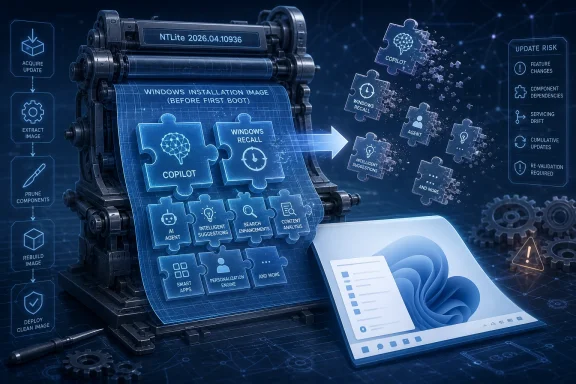 The Windows Image Has Become the New Battleground
The most interesting thing about NTLite’s latest update is not that it removes Copilot or Recall. Plenty of scripts, registry edits, policy templates, and post-install cleanup tools have tried to do some version of that already. What matters is where NTLite acts: before Windows ever boots.That distinction is easy to miss, but it is the whole story. A post-install debloater is a broom. An image customizer is a printing press. The former cleans up Microsoft’s default assumptions after they have already landed on a machine; the latter changes the assumptions before they become the machine.
For enthusiasts, that means a cleaner install without the familiar first-day ritual of uninstalling apps, disabling services, and hunting through Settings pages. For IT pros, it means the possibility of standardizing an image that never included certain AI features in the first place. That is operationally different from deploying Windows, then layering policy and remediation on top.
NTLite has long lived in this space between sanctioned enterprise tooling and enthusiast self-defense. It is not a Microsoft product, and that matters. But its appeal comes from solving a problem Microsoft has never been eager to solve: giving users a simple, visual way to decide that a Windows installation should be smaller, quieter, and less opinionated than Redmond’s default.
Microsoft’s AI Push Made Debloating Political Again
For years, Windows debloating was mostly about annoyance. Users complained about bundled apps, preloaded games, promotional shortcuts, telemetry settings, and the steady migration of consumer hooks into places that once felt like system territory. It was irritating, but familiar.AI changed the emotional temperature. Copilot, Recall, Click to Do, AI actions, semantic indexing, writing tools, and related components are not perceived by skeptics as just another wave of bundled utilities. They are perceived as an architectural shift: Windows becoming not merely an operating system, but an observing, interpreting, suggesting layer between the user and the computer.
Microsoft would object to the harshest version of that framing. The company has spent the last two years emphasizing local processing, user control, security boundaries, enterprise policy, and opt-in behavior for the most sensitive features. Recall in particular went through a public redesign after its 2024 backlash, and Microsoft’s current posture is much more cautious than the original pitch that alarmed security researchers and privacy advocates.
But trust, once cracked, does not reassemble on Microsoft’s release schedule. The Recall episode taught users a simple lesson: if a feature is ambitious enough to capture the history of what appears on your screen, the burden of proof shifts dramatically. Even when the implementation improves, the category remains radioactive for many people.
That is why an NTLite checkbox carries more symbolic weight than a typical feature update. It says that for a subset of Windows users, “turn it off” is no longer enough. They want “it was never installed” instead.
The 25H2 Timing Is the Tell
Windows 11 25H2 is the right target for this kind of tool because Microsoft’s Windows strategy has become less about big-bang version releases and more about cumulative feature flow. Annual version numbers still exist, but modern Windows is increasingly shaped by continuous updates, staged rollouts, enablement packages, Store-delivered app changes, and hardware-gated features.That makes the Windows version number both useful and misleading. An administrator may say “25H2,” but the actual user experience depends on edition, region, hardware, Microsoft account state, Copilot+ PC eligibility, policy configuration, Store app versions, and whether a feature has been lit up for that device. Windows is no longer a static thing you install; it is a negotiated state.
NTLite’s update responds to that reality by treating the installation image as one of the few remaining points of leverage. If Microsoft can progressively attach more functionality to Windows through modular components, then the counter-move is to remove those components from the image before they acquire dependencies, scheduled tasks, services, app registrations, and policy surfaces.
That does not mean every removal will be risk-free. Windows components are notoriously interconnected, and the more ambitious the removal, the more likely a future cumulative update, feature dependency, or servicing operation may behave unexpectedly. Image surgery is powerful precisely because it is invasive.
Still, the timing is revealing. Users are not waiting until AI becomes an immovable part of the shell. Toolmakers are reacting while the architecture is still visibly modular enough to prune.
Recall Is the Feature That Made Everyone Read the Fine Print
Copilot is the brand users see. Recall is the feature that made them suspicious.When Microsoft announced Recall in 2024 for Copilot+ PCs, the idea was easy to explain and difficult to defend: Windows would help users find things they had previously seen or done by maintaining a searchable history based on snapshots. Microsoft’s argument was that local storage, on-device processing, encryption, and identity protections could make that useful without making it reckless.
The first public reaction was brutal because the mental model was simpler than the technical one. If a PC takes recurring snapshots of user activity, people worry about passwords, health records, legal documents, source code, private chats, financial data, and abusive domestic or workplace surveillance. Security professionals worry about the same things, but with adversaries attached.
Microsoft responded by changing Recall’s security posture, delaying broad availability, making the feature opt-in, and adding management controls. Those changes were not cosmetic. They mattered, particularly for enterprise environments where policy and compliance are not optional extras.
But the controversy also created a permanent association between Windows AI and latent surveillance, even where that association is incomplete or unfair. Once a user has decided that Recall is the emblem of Microsoft overreach, every AI affordance nearby inherits some of that distrust. Copilot in the taskbar, writing tools in Notepad, image features in Paint, and context actions in File Explorer become part of the same story, whether or not they share the same data model.
NTLite’s value proposition feeds on that accumulated skepticism. It does not ask users to parse the difference between AI branding, cloud assistant, local model, runtime, app extension, and optional feature. It offers a more primitive but satisfying answer: remove the category.
Microsoft Is Learning to Hide the Brand, Not Retreat From the Strategy
Recent reporting that Microsoft has reduced or reworked some Copilot branding in built-in apps should not be mistaken for a surrender. It is more likely a tactical adjustment. The company has learned that “Copilot everywhere” can make useful features feel like ads, and that the Copilot name itself has become a lightning rod.This is a familiar Microsoft pattern. When a brand layer becomes too noisy, the underlying platform work continues under more neutral language. “Copilot” becomes “writing tools.” AI buttons become contextual actions. Assistive features become part of search, settings, camera effects, accessibility, or productivity workflows.
That may be good product design. Not every AI feature needs a logo, and users should not have to feel as if they are invoking a branded assistant every time they summarize text or clean up an image. But it also complicates consent. If AI becomes infrastructure, users who object to it need controls that operate at the infrastructure level, not just app-by-app toggles.
This is where Microsoft’s consumer and enterprise obligations diverge. Enterprises want policy surfaces, documentation, auditability, and predictable deployment behavior. Consumers want a switch they can understand. Enthusiasts want a knife.
NTLite is the knife. It is not subtle, but it is legible.
The Free Tool With the Enterprise-Shaped Shadow
NTLite’s free edition gives it a broader audience than a typical deployment utility, but the idea behind it is deeply enterprise-shaped. Corporate IT has always cared about image composition: what is in the base image, what is layered later, what is controlled by policy, what survives servicing, and what breaks when Microsoft changes the ground underneath it.The difference is that Windows enthusiasts increasingly think like small IT departments. A power user managing a gaming desktop, a family laptop, a lab machine, and a spare mini PC may not have Configuration Manager or Intune, but they still want repeatability. They want one ISO, one install path, and fewer surprises.
NTLite’s interface matters because it lowers the threshold. DISM, unattended files, PowerShell, provisioning packages, and policy templates are powerful, but they are not inviting. A graphical image editor turns Windows customization from an administrative discipline into something closer to system building.
That accessibility is double-edged. Removing inbox apps is one thing; removing deeper components can produce subtle problems later. Windows servicing assumes certain packages exist. Support technicians assume a baseline system. Some Microsoft Store apps, shell features, and optional experiences may depend on packages whose names do not obviously describe their consequences.
For WindowsForum readers, that is not a reason to avoid the tool. It is a reason to test like professionals. Build images in a VM. Snapshot aggressively. Keep an untouched ISO. Document what was removed. Assume the first build is a hypothesis, not a production artifact.
Smaller Installs Are Nice; Fewer Assumptions Are the Prize
The gHacks report notes that removing AI components can reduce the overall installation size, and that is true enough to matter. Windows has grown into an OS where storage overhead is not just the operating system folder, but recovery components, app packages, servicing caches, preinstalled experiences, and feature payloads waiting for the right hardware or account state.On modern desktops with multi-terabyte SSDs, reclaiming some space is not the headline. On low-end laptops, virtual machines, test labs, thin images, and embedded-ish deployments, it becomes more meaningful. A leaner image can install faster, back up faster, and consume less of the system’s limited baseline.
But the better argument is not storage. It is determinism. A stripped image is attractive because it contains fewer features that might light up later, fewer app surfaces that might change through the Store, and fewer prompts that might convert a local workflow into a Microsoft-account-shaped workflow.
That is the same reason some users still prefer LTSC-style deployments, local accounts, offline installers, and carefully managed update rings. They are not merely nostalgic for Windows 7. They are trying to preserve a model in which the operating system does what it did yesterday unless the owner deliberately changes it.
Microsoft’s counterargument is that a modern OS must evolve continuously to stay secure, competitive, and useful. That is not wrong. The problem is that every new layer of “helpfulness” arrives carrying Microsoft’s commercial incentives with it.
The AI PC Needs Consent More Than Hype
The PC industry has spent the last two years trying to make the AI PC happen. NPUs are now a standard talking point in laptop launches. Copilot+ PCs gave OEMs a new premium story. Microsoft, Intel, AMD, Qualcomm, and the rest of the ecosystem all have reasons to frame local AI as the next major upgrade cycle.Some of that will be genuinely useful. Local transcription, live captions, background blur, image cleanup, semantic search, accessibility features, power-efficient model execution, and smarter system settings are not fantasies. Many users will adopt them once they become quiet, fast, private, and boring.
But the sales pitch got ahead of the consent model. Microsoft tried to make AI feel inevitable before it made AI feel trustworthy. That is why tools like NTLite have cultural momentum: they give users a way to vote against inevitability.
The deeper risk for Microsoft is not that enthusiasts remove Copilot from ISOs. It is that the company trains its most technical users to treat first-party Windows features as contamination. Once that reflex sets in, every new component is met not with curiosity but with forensics.
That is bad for Microsoft, and arguably bad for Windows. An operating system whose best users begin every installation by carving pieces out of it is an operating system with a trust problem.
The Servicing Trap Has Not Gone Away
There is a practical caveat that deserves more attention than the anti-AI excitement will give it: customized Windows images can be fragile. Microsoft tests updates against supported configurations, not every possible combination of removed packages and disabled features. The further an image drifts from the expected baseline, the more the owner becomes the support department.That is not new. Anyone who used vLite, nLite, MSMG Toolkit, Tiny11-style builders, or hand-rolled DISM workflows knows the pattern. A removal that seems harmless today can break an optional feature tomorrow. A cumulative update may restore something, fail to install, or leave behind a hybrid state that is harder to reason about than the original bloat.
The AI layer may make this more complicated because features are likely to span system packages, inbox apps, model runtimes, hardware abstraction, cloud endpoints, identity controls, and policy settings. “Remove Copilot” is simple as a user desire; it may not remain simple as a technical operation.
That does not make NTLite irresponsible. It makes it a tool for people who understand that control and maintenance are the same bargain. If you want a Windows image that reflects your preferences rather than Microsoft’s, you also inherit the work of validating that image after Patch Tuesday.
The right posture is neither panic nor blind trust. Use removal tools, but treat them as part of a deployment process. Keep notes, test updates, and know how to rebuild.
Microsoft Could Defuse This With a Real Minimal Mode
The most rational response from Microsoft would not be to fight NTLite. It would be to learn from it.Windows does not need to ship as a single ideological bundle. Microsoft already differentiates by edition, region, hardware capability, commercial policy, and feature rollout ring. It could offer a supported minimal install profile that removes consumer promotion, hides nonessential AI entry points, keeps optional AI components uninstalled until requested, and presents privacy-sensitive features as explicit additions rather than ambient defaults.
That would not satisfy everyone. Some users will never trust Microsoft’s switches. Some will always prefer third-party tooling because it feels independent. But a supported minimal mode would drain much of the grievance from the ecosystem.
The irony is that Microsoft has the management plumbing to do much of this for enterprises. Group Policy, Intune, provisioning, optional features, Store app controls, and Windows Update for Business already provide many of the levers administrators need. The missing piece is a coherent consumer-facing expression of the same principle: this is your PC, and “no” is a first-class configuration.
Until that exists, third-party tools will keep filling the gap. They will be rougher, riskier, and less supportable than an official path. They will also be popular because they answer a demand Microsoft keeps underestimating.
The Checkboxes That Explain the Backlash
NTLite’s update is a small release in the grand Windows economy, but it captures the mood better than a dozen product keynotes. The argument is not that every user should strip AI out of Windows. The argument is that users increasingly want the right to decide before Microsoft’s defaults become their baseline.- NTLite 2026.04.10936 reportedly adds support for removing Windows 11 25H2 AI components, including Copilot and Recall, from installation images before deployment.
- The practical benefit is a leaner Windows install, but the larger appeal is preventing unwanted components from appearing in the first place.
- The feature is most useful for enthusiasts, lab builders, and IT pros who validate customized images before using them on real hardware.
- Removing Windows components can create servicing and compatibility risks, especially when future updates assume Microsoft’s default package set.
- Microsoft could reduce demand for aggressive debloating by offering a supported minimal Windows profile with clearer AI opt-in behavior.
Windows will keep moving toward AI because Microsoft believes the next platform war depends on it, and because the hardware industry needs a reason to sell the next PC. But the company’s success will depend less on how many places it can insert Copilot-adjacent intelligence than on whether users believe Windows still belongs to them. NTLite’s new release is not a rebellion by itself; it is a pressure gauge. Right now, the needle says that Microsoft’s AI future may be technically impressive, commercially urgent, and strategically coherent — but for many of the people who know Windows best, it is still something they want the power to remove before first boot.
Source: gHacks NTLite Update Lets Users Strip Copilot and AI Features From Windows 11 25H2 Installation Images - gHacks Tech News
