

O&O Software has released O&O ShutUp10 3.0.1076 for Windows 10 and Windows 11, according to Neowin, adding a Premium edition that can automatically monitor and reapply privacy settings after Windows updates change them. That turns a long-running portable privacy tweaker into something closer to a resident policy enforcer. The release matters because the Windows privacy fight has moved from one-time cleanup to persistence: users no longer just ask what they can disable, but whether those choices will survive the next cumulative update, feature drop, or Microsoft account nudge. For enthusiasts, the new tier is useful; for administrators, it is also a reminder that unmanaged privacy tools can become their own shadow configuration layer.
O&O ShutUp10 built its reputation on a simple bargain: Microsoft hides or scatters many privacy-relevant Windows settings, and O&O puts them in one portable executable with plain-language recommendations. That was enough when the job was mostly to flip telemetry, app access, advertising ID, Cortana, search, update, and account-related switches after a fresh install.
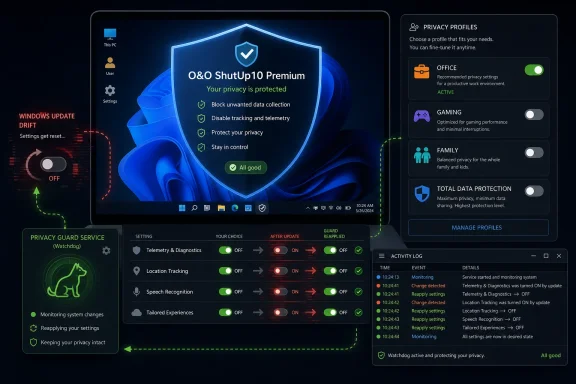
Version 3.0.1076 changes the product’s center of gravity. The headline feature is not another toggle, though the changelog adds plenty of them. It is the introduction of O&O ShutUp10 Premium, which brings profiles, a background service, automatic protection, setting enforcement, notifications, a usage overview, and an activity log.
That is a larger philosophical shift than it first appears. A portable privacy tool is episodic: you run it, make changes, export a configuration, and hope Windows leaves things alone. A background enforcement service is continuous: it watches the machine, detects drift, and pushes it back toward the user’s chosen baseline.
For many WindowsForum readers, that sounds like exactly what the platform has trained them to want. Windows updates have a long habit of introducing new defaults, surfacing new cloud features, re-promoting Edge integrations, or changing where controls live. O&O is selling not merely privacy settings, but relief from the chore of checking whether they still apply.
The awkward part is that this relief now sits behind a premium tier. O&O says the free version remains available and functional for manual adjustment, but the company is clearly drawing a line between control and continuous control. That line will be controversial because ShutUp10’s identity has long been wrapped up in being free, portable, and clean.
That is especially relevant on Windows 11, where Microsoft’s integration strategy keeps expanding across Edge, Bing, Microsoft accounts, widgets, search, Copilot-era features, Paint AI functions, Game Bar, OneDrive prompts, and device telemetry. Not every integration is sinister, and not every data flow is avoidable. But the surface area has grown large enough that even technically competent users can miss what changed.
The Premium feature set is designed around that exact anxiety. Privacy Profiles cover scenarios such as Office, Gaming, Family, and Total Data Protection, with export and import support through profile configuration files. The background service provides automatic protection and setting enforcement. An activity log gives users a way to see what the tool changed or restored.
That makes Premium less like a donation button and more like a small-scale configuration management product for individual PCs. It is not Group Policy, Intune, Desired State Configuration, or a compliance tool. But for a home power user maintaining several family systems, or a small shop without full endpoint management, it could occupy the same emotional space: “keep these machines the way I set them.”
The criticism writes itself, too. A privacy tool that runs in the background must be trusted more than one that exits after use. A product designed to reduce Windows telemetry and cloud nudges now asks users to install or allow a persistent component that monitors settings. That does not make it bad software, but it raises the bar for transparency.
The 3.0.1076 changelog does not appear to remove that model. It adds Premium on top of it. The free edition still has a role for users who prefer to run privacy changes manually after major updates or who do not want another background service on a clean Windows install.
That distinction will matter in how the community receives the release. If O&O preserves the full manual controls in the free edition, Premium looks like paid automation. If future releases begin moving important toggles or practical restoration features behind the paid tier, the story changes from monetization to enclosure.
The company has some credibility to spend here because ShutUp10 has been one of the better-known Windows privacy tools for years. But privacy utilities live and die by trust, and trust is unusually brittle in this category. The moment users suspect a privacy tool is upselling fear rather than reducing it, the relationship changes.
For now, the cleanest interpretation is that O&O is formalizing two usage patterns. The free user wants a portable dashboard. The Premium user wants a persistent guardrail.
Settings can move. Defaults can change. New recommended experiences can appear. Edge can gain new integrations. Search can become more web-connected. Paint can become an AI feature host. Widgets, news, account prompts, and optional previews can all become part of the operating system conversation.
O&O’s changelog reads like a map of that expansion. Version 3.0.1076 adds controls to disable Edge Secure Network, Xbox Game Bar and Game DVR, NFC, Wireless Display, cellular broadband, Wi-Fi Direct, Bluetooth pairing, and optional updates including preview updates. It also improves existing entries for Microsoft Paint’s Cocreator and AI-powered image filling, Microsoft account sign-in icons, Edge redirection behavior, local AI functions, Bing search extensions, taskbar search, and news or interests display.
This is not just a privacy list. It is a Windows surface area list. Network radios, browser VPNs, AI features, taskbar feeds, gaming overlays, optional update channels, and account UI all coexist under the broader banner of what a user may want to disable.
That breadth is both useful and dangerous. Useful, because privacy-conscious Windows users often care about more than telemetry. Dangerous, because a single-click hardening tool can easily encourage people to disable features without understanding operational dependencies. Turning off wireless display or restricting Bluetooth pairing is not the same class of decision as hiding a Microsoft account icon.
O&O tries to manage that with recommendations and explanatory text, but the core tension remains. Windows is now a bundle of services, local features, cloud hooks, and policy-controlled behaviors. Tools like ShutUp10 exist because Microsoft’s own Settings app does not present that bundle in a way privacy-minded users trust.
A decade ago, the conversation revolved around Windows 10 diagnostic data, advertising IDs, Cortana, Wi-Fi Sense, and app permissions. Those topics have not disappeared, but they no longer define the frontier. The new frontier is where local productivity features blend into cloud services and AI-assisted workflows.
Paint’s Cocreator and AI-powered image filling are good examples. For some users, they are welcome additions to an old utility. For others, they are another sign that formerly local apps are becoming service front ends. Even when features offer user control, privacy-minded users want one dashboard that can say: disable this class of thing everywhere.
Edge Secure Network is another interesting addition. A built-in browser VPN can be a user-protective feature in one context and an unwanted routing, policy, or trust complication in another. In a managed environment, administrators may not want employees using a consumer browser privacy network that bypasses expected traffic controls. In a household, a parent may simply want fewer invisible network layers.
The new entries for optional updates and preview updates also speak to a real Windows problem. Enthusiasts may choose preview bits knowingly, but ordinary users often discover they were pulled toward optional experiences without understanding the support tradeoff. A privacy tool adding optional-update control is another sign that privacy, stability, and user autonomy now overlap.
This is where O&O’s product positioning is strongest. The company is not merely saying “Microsoft collects data.” It is implicitly arguing that Windows changes too often, across too many surfaces, for users to rely on memory and scattered Settings pages.
The 3.0.1076 changelog includes a correction that should make readers pay attention: a factory reset previously left policy registry keys that blocked Windows updates. That is the sort of bug that reveals the stakes. Privacy hardening does not happen in an abstract preference layer; it often works through mechanisms Windows also uses for enterprise policy.
When those mechanisms are left behind unintentionally, the result can be confusing. A user may think they reset the tool, but Windows Update still behaves as if a policy is in place. A home user may not know to check Local Group Policy, the registry, or update policy keys. They just see a machine that will not update normally.
That does not condemn O&O. In fact, fixing this kind of issue is exactly what mature maintenance looks like. But it is a reminder that aggressive privacy tooling is not risk-free, even when it comes from a reputable vendor.
For IT pros, the lesson is sharper: do not treat consumer privacy tools as harmless utilities on managed devices. If your organization already controls telemetry, update rings, browser settings, AI feature exposure, and account policies through enterprise management, a user-level tool that writes overlapping settings can create troubleshooting noise. The more Premium behaves like a resident enforcement agent, the more important that boundary becomes.
A Windows endpoint may already be subject to Group Policy, MDM configuration profiles, security baselines, Defender policies, browser management, and update management. Add a third-party background service that watches and rewrites privacy-related settings, and it may not be immediately clear which layer wins or why a setting keeps changing.
That is not a theoretical concern. The Windows management stack is full of precedence rules, tattooed registry settings, policy refresh intervals, and UI states that display one thing while the effective policy says another. A persistent consumer tool can complicate that picture, particularly if it does not provide detailed logs that map each enforcement action to a specific registry path or policy category.
O&O’s activity log is therefore not a minor Premium feature. It is a necessary accountability layer. If the tool is going to reapply settings in the background, users need to know what it touched, when it touched it, and why it decided the setting had drifted.
For home users, the activity log may simply provide reassurance. For admins helping relatives, small offices, or unmanaged fleets, it may be the difference between a useful safeguard and a mystery gremlin. The best version of Premium is one that makes its automation boringly visible.
That is sensible. A gaming PC may want Game Bar disabled if the user never uses it, but it may also rely on Xbox services, overlays, or capture features. A family PC may prioritize account prompts, content surfaces, app permissions, and location controls. An office profile may care more about Office telemetry, Edge behavior, optional updates, and search integration. A total-protection profile may accept more breakage in exchange for less data sharing.
The risk is that profiles can make complicated decisions feel too easy. A label like Total Data Protection sounds definitive, but Windows privacy is not absolute. Some diagnostic data may be required depending on edition and policy state. Some cloud-linked features may be disabled in one place and still have residual behavior elsewhere. Some changes improve privacy while reducing security or manageability.
Still, profiles are a practical response to the reality that few users want to evaluate dozens of switches one by one. The best privacy tools are opinionated enough to guide novices but transparent enough for experts to override them. O&O’s advanced editing mode, edit-mode explanation dialog, and profile import/export support suggest the company is trying to serve both groups.
The export/import angle is especially useful. It lets technically inclined users build a known configuration and replicate it across machines. That is not enterprise-grade management, but it is valuable for enthusiasts, repair shops, and family IT departments — the informal administrators who keep a surprising amount of Windows computing functional.
Security purists may object that disabling features is not the same as securing them. They are right. But on consumer Windows systems, reducing unused capabilities is often a reasonable hardening step. A desktop with no need for wireless display or NFC does not lose much if those surfaces are disabled.
The problem is reversibility and discoverability. Six months later, a user may buy a wireless display adapter or Bluetooth peripheral and forget that a privacy tool restricted pairing. They may blame Windows, drivers, or hardware before remembering ShutUp10. This is where better UI, status bars, filtered views, and logs matter.
The new status bar display of filtered views and the reworked menu structure sound mundane compared with Premium enforcement, but they help with this exact issue. A privacy dashboard needs to be searchable, explainable, and auditable. Once a tool grows beyond a few dozen obvious settings, interface quality becomes part of safety.
Accessibility and UI automation support also deserve mention. Privacy tools are often built for power users, but privacy is not a power-user-only concern. If the interface can be used more reliably with assistive technologies and automation frameworks, that is a meaningful improvement rather than a cosmetic one.
That is why the messaging around the free edition is crucial. O&O needs users to believe that the free ShutUp10 is not being hollowed out. The article from Neowin presents the free version as fully functional for manual adjustments, while Premium adds automatic enforcement and long-term hands-off protection. If that boundary holds, the split is reasonable.
There is also a support reality here. Maintaining a Windows privacy tool is not a one-time engineering effort. Microsoft changes Windows. New builds add features. Old registry values stop working. New AI and cloud integrations appear. Bugs like the factory reset policy issue must be fixed. A Premium tier may fund that work more sustainably than goodwill and dog-bone donations.
But privacy software is judged not only by economics. It is judged by alignment. Users ask whether the vendor’s incentives still point toward user control. A Premium tier that automates enforcement can align with that goal. A Premium tier that withholds essential knowledge or nags free users would not.
The early shape of 3.0.1076 suggests O&O understands the distinction. The free product remains the manual control panel; the paid product becomes the always-on guardian. That is a coherent split, provided the guardian does not become a gatekeeper.
On personal systems, the tool can be a fast route to a more private and less noisy Windows installation. On lab machines, test benches, and enthusiast rigs, it is a convenient way to standardize preferences. On unmanaged small-business PCs, it may help keep unwanted consumer experiences at bay, though that depends on licensing, support expectations, and the organization’s risk tolerance.
On managed enterprise devices, however, admins should be cautious. If Windows Update, Edge, Microsoft 365, Defender, telemetry, and Copilot-related settings are already governed through policy, a local privacy utility can undermine clarity. When something breaks, the help desk needs one source of truth, not a stack of overlapping intent.
The more interesting enterprise takeaway is not “deploy ShutUp10.” It is “notice what users are trying to solve.” If employees reach for tools like this, they may be reacting to unwanted taskbar content, account prompts, web search, preview updates, Edge behavior, or AI features that IT has not clearly governed. The shadow tool is a symptom of a policy vacuum.
Microsoft has made major investments in enterprise controls, but consumer-facing Windows defaults still shape expectations and frustrations. O&O’s release is a reminder that users want durable consent, not settings that feel provisional until the next update.
That is why the Premium tier is the real story. Not because profiles are glamorous, or because a background service is technically novel, but because it reframes privacy as an ongoing state to be enforced. The user no longer merely says “turn this off.” The user says “keep it off.”
There is power in that. There is also responsibility. A tool that keeps things off must know when a feature changed meaning, when a setting became obsolete, and when enforcement risks breaking updates or services. The more O&O automates, the more it must explain.
The changelog’s fixes and UI improvements suggest the company knows the product needs more than raw switches. Online help, F1 support, advanced editing explanations, accessibility improvements, a status bar for filtered views, and activity logging all point toward a tool trying to mature from enthusiast utility into a privacy management layer.
That maturation is overdue if O&O wants to sell Premium credibly. A paid enforcement service cannot behave like a mystery batch file with a nice front end. It needs to be legible.
 O&O Turns a Tweaker Into a Watchdog
O&O ShutUp10 built its reputation on a simple bargain: Microsoft hides or scatters many privacy-relevant Windows settings, and O&O puts them in one portable executable with plain-language recommendations. That was enough when the job was mostly to flip telemetry, app access, advertising ID, Cortana, search, update, and account-related switches after a fresh install.Version 3.0.1076 changes the product’s center of gravity. The headline feature is not another toggle, though the changelog adds plenty of them. It is the introduction of O&O ShutUp10 Premium, which brings profiles, a background service, automatic protection, setting enforcement, notifications, a usage overview, and an activity log.
That is a larger philosophical shift than it first appears. A portable privacy tool is episodic: you run it, make changes, export a configuration, and hope Windows leaves things alone. A background enforcement service is continuous: it watches the machine, detects drift, and pushes it back toward the user’s chosen baseline.
For many WindowsForum readers, that sounds like exactly what the platform has trained them to want. Windows updates have a long habit of introducing new defaults, surfacing new cloud features, re-promoting Edge integrations, or changing where controls live. O&O is selling not merely privacy settings, but relief from the chore of checking whether they still apply.
The awkward part is that this relief now sits behind a premium tier. O&O says the free version remains available and functional for manual adjustment, but the company is clearly drawing a line between control and continuous control. That line will be controversial because ShutUp10’s identity has long been wrapped up in being free, portable, and clean.
The Premium Tier Monetizes a Real Windows Annoyance
The most defensible reading of O&O ShutUp10 Premium is that it charges for labor the user previously had to perform. Windows privacy hardening is not a single decision; it is maintenance. If a tool can detect that an update has re-enabled a feature or introduced a new data path, then restore a known-good state, it is solving a recurring problem rather than selling decorative convenience.That is especially relevant on Windows 11, where Microsoft’s integration strategy keeps expanding across Edge, Bing, Microsoft accounts, widgets, search, Copilot-era features, Paint AI functions, Game Bar, OneDrive prompts, and device telemetry. Not every integration is sinister, and not every data flow is avoidable. But the surface area has grown large enough that even technically competent users can miss what changed.
The Premium feature set is designed around that exact anxiety. Privacy Profiles cover scenarios such as Office, Gaming, Family, and Total Data Protection, with export and import support through profile configuration files. The background service provides automatic protection and setting enforcement. An activity log gives users a way to see what the tool changed or restored.
That makes Premium less like a donation button and more like a small-scale configuration management product for individual PCs. It is not Group Policy, Intune, Desired State Configuration, or a compliance tool. But for a home power user maintaining several family systems, or a small shop without full endpoint management, it could occupy the same emotional space: “keep these machines the way I set them.”
The criticism writes itself, too. A privacy tool that runs in the background must be trusted more than one that exits after use. A product designed to reduce Windows telemetry and cloud nudges now asks users to install or allow a persistent component that monitors settings. That does not make it bad software, but it raises the bar for transparency.
The Free Version Still Matters Because Portability Is the Product
O&O says the free version remains available for manual adjustments, and that matters. ShutUp10’s strongest historic pitch was not just the number of switches; it was the lack of installation ceremony. Download it, run it, create a restore point, apply recommended settings, and leave no bundled junk behind. That model fit perfectly with the Windows enthusiast habit of carrying a toolkit on a USB stick.The 3.0.1076 changelog does not appear to remove that model. It adds Premium on top of it. The free edition still has a role for users who prefer to run privacy changes manually after major updates or who do not want another background service on a clean Windows install.
That distinction will matter in how the community receives the release. If O&O preserves the full manual controls in the free edition, Premium looks like paid automation. If future releases begin moving important toggles or practical restoration features behind the paid tier, the story changes from monetization to enclosure.
The company has some credibility to spend here because ShutUp10 has been one of the better-known Windows privacy tools for years. But privacy utilities live and die by trust, and trust is unusually brittle in this category. The moment users suspect a privacy tool is upselling fear rather than reducing it, the relationship changes.
For now, the cleanest interpretation is that O&O is formalizing two usage patterns. The free user wants a portable dashboard. The Premium user wants a persistent guardrail.
Microsoft’s Moving Target Creates the Market
The existence of O&O ShutUp10 Premium says as much about Windows as it does about O&O. Microsoft has spent the last decade turning Windows from a boxed operating system into an always-updated service with cloud-linked defaults. That has security benefits, compatibility benefits, and undeniable user-convenience benefits. It also means the “state” of a Windows machine is less static than it used to be.Settings can move. Defaults can change. New recommended experiences can appear. Edge can gain new integrations. Search can become more web-connected. Paint can become an AI feature host. Widgets, news, account prompts, and optional previews can all become part of the operating system conversation.
O&O’s changelog reads like a map of that expansion. Version 3.0.1076 adds controls to disable Edge Secure Network, Xbox Game Bar and Game DVR, NFC, Wireless Display, cellular broadband, Wi-Fi Direct, Bluetooth pairing, and optional updates including preview updates. It also improves existing entries for Microsoft Paint’s Cocreator and AI-powered image filling, Microsoft account sign-in icons, Edge redirection behavior, local AI functions, Bing search extensions, taskbar search, and news or interests display.
This is not just a privacy list. It is a Windows surface area list. Network radios, browser VPNs, AI features, taskbar feeds, gaming overlays, optional update channels, and account UI all coexist under the broader banner of what a user may want to disable.
That breadth is both useful and dangerous. Useful, because privacy-conscious Windows users often care about more than telemetry. Dangerous, because a single-click hardening tool can easily encourage people to disable features without understanding operational dependencies. Turning off wireless display or restricting Bluetooth pairing is not the same class of decision as hiding a Microsoft account icon.
O&O tries to manage that with recommendations and explanatory text, but the core tension remains. Windows is now a bundle of services, local features, cloud hooks, and policy-controlled behaviors. Tools like ShutUp10 exist because Microsoft’s own Settings app does not present that bundle in a way privacy-minded users trust.
The Changelog Shows Windows’ AI and Edge Era Arriving in Privacy Tools
The most telling entries in 3.0.1076 are not the old telemetry standards. They are the controls for Microsoft Paint AI features, Edge Secure Network, Bing search extensions, local AI functions, and Microsoft account sign-in prompts. These are the places where the modern Windows privacy debate is migrating.A decade ago, the conversation revolved around Windows 10 diagnostic data, advertising IDs, Cortana, Wi-Fi Sense, and app permissions. Those topics have not disappeared, but they no longer define the frontier. The new frontier is where local productivity features blend into cloud services and AI-assisted workflows.
Paint’s Cocreator and AI-powered image filling are good examples. For some users, they are welcome additions to an old utility. For others, they are another sign that formerly local apps are becoming service front ends. Even when features offer user control, privacy-minded users want one dashboard that can say: disable this class of thing everywhere.
Edge Secure Network is another interesting addition. A built-in browser VPN can be a user-protective feature in one context and an unwanted routing, policy, or trust complication in another. In a managed environment, administrators may not want employees using a consumer browser privacy network that bypasses expected traffic controls. In a household, a parent may simply want fewer invisible network layers.
The new entries for optional updates and preview updates also speak to a real Windows problem. Enthusiasts may choose preview bits knowingly, but ordinary users often discover they were pulled toward optional experiences without understanding the support tradeoff. A privacy tool adding optional-update control is another sign that privacy, stability, and user autonomy now overlap.
This is where O&O’s product positioning is strongest. The company is not merely saying “Microsoft collects data.” It is implicitly arguing that Windows changes too often, across too many surfaces, for users to rely on memory and scattered Settings pages.
The Restore Point Safety Net Is Still Necessary, Not Decorative
O&O ShutUp10 has long encouraged users to create a System Restore point before applying changes. That detail can sound like cautious boilerplate, but it is central to why tools in this class must be handled carefully. Many settings map to registry values, local policies, service configurations, scheduled tasks, app permissions, or feature flags whose interactions are not always obvious.The 3.0.1076 changelog includes a correction that should make readers pay attention: a factory reset previously left policy registry keys that blocked Windows updates. That is the sort of bug that reveals the stakes. Privacy hardening does not happen in an abstract preference layer; it often works through mechanisms Windows also uses for enterprise policy.
When those mechanisms are left behind unintentionally, the result can be confusing. A user may think they reset the tool, but Windows Update still behaves as if a policy is in place. A home user may not know to check Local Group Policy, the registry, or update policy keys. They just see a machine that will not update normally.
That does not condemn O&O. In fact, fixing this kind of issue is exactly what mature maintenance looks like. But it is a reminder that aggressive privacy tooling is not risk-free, even when it comes from a reputable vendor.
For IT pros, the lesson is sharper: do not treat consumer privacy tools as harmless utilities on managed devices. If your organization already controls telemetry, update rings, browser settings, AI feature exposure, and account policies through enterprise management, a user-level tool that writes overlapping settings can create troubleshooting noise. The more Premium behaves like a resident enforcement agent, the more important that boundary becomes.
Automatic Enforcement Is Comforting Until It Fights Another Policy Engine
Premium’s automatic setting enforcement is the feature that will sell the upgrade, but it is also the feature that most needs disciplined use. On a standalone PC, enforcement is simple: the user defines a desired state, and the tool restores it when Windows drifts. On a machine governed by multiple authorities, enforcement can become a tug-of-war.A Windows endpoint may already be subject to Group Policy, MDM configuration profiles, security baselines, Defender policies, browser management, and update management. Add a third-party background service that watches and rewrites privacy-related settings, and it may not be immediately clear which layer wins or why a setting keeps changing.
That is not a theoretical concern. The Windows management stack is full of precedence rules, tattooed registry settings, policy refresh intervals, and UI states that display one thing while the effective policy says another. A persistent consumer tool can complicate that picture, particularly if it does not provide detailed logs that map each enforcement action to a specific registry path or policy category.
O&O’s activity log is therefore not a minor Premium feature. It is a necessary accountability layer. If the tool is going to reapply settings in the background, users need to know what it touched, when it touched it, and why it decided the setting had drifted.
For home users, the activity log may simply provide reassurance. For admins helping relatives, small offices, or unmanaged fleets, it may be the difference between a useful safeguard and a mystery gremlin. The best version of Premium is one that makes its automation boringly visible.
Profiles Turn Privacy Into a Lifestyle Preset
The new Privacy Profiles are another revealing piece of the release. Office, Gaming, Family, and Total Data Protection are not merely technical bundles; they are narratives. They tell users that privacy is not one universal configuration but a tradeoff shaped by how the machine is used.That is sensible. A gaming PC may want Game Bar disabled if the user never uses it, but it may also rely on Xbox services, overlays, or capture features. A family PC may prioritize account prompts, content surfaces, app permissions, and location controls. An office profile may care more about Office telemetry, Edge behavior, optional updates, and search integration. A total-protection profile may accept more breakage in exchange for less data sharing.
The risk is that profiles can make complicated decisions feel too easy. A label like Total Data Protection sounds definitive, but Windows privacy is not absolute. Some diagnostic data may be required depending on edition and policy state. Some cloud-linked features may be disabled in one place and still have residual behavior elsewhere. Some changes improve privacy while reducing security or manageability.
Still, profiles are a practical response to the reality that few users want to evaluate dozens of switches one by one. The best privacy tools are opinionated enough to guide novices but transparent enough for experts to override them. O&O’s advanced editing mode, edit-mode explanation dialog, and profile import/export support suggest the company is trying to serve both groups.
The export/import angle is especially useful. It lets technically inclined users build a known configuration and replicate it across machines. That is not enterprise-grade management, but it is valuable for enthusiasts, repair shops, and family IT departments — the informal administrators who keep a surprising amount of Windows computing functional.
The New Hardware and Connectivity Toggles Broaden the Mission
Some of the added controls in 3.0.1076 step outside the classic privacy lane. Disabling NFC, Miracast or WiDi, cellular broadband, Wi-Fi Direct, and restricting Bluetooth pairing are as much about attack surface, device behavior, and administrative preference as about data collection. That broadening reflects how users actually think about privacy: fewer radios, fewer automatic connections, fewer background capabilities, fewer surprises.Security purists may object that disabling features is not the same as securing them. They are right. But on consumer Windows systems, reducing unused capabilities is often a reasonable hardening step. A desktop with no need for wireless display or NFC does not lose much if those surfaces are disabled.
The problem is reversibility and discoverability. Six months later, a user may buy a wireless display adapter or Bluetooth peripheral and forget that a privacy tool restricted pairing. They may blame Windows, drivers, or hardware before remembering ShutUp10. This is where better UI, status bars, filtered views, and logs matter.
The new status bar display of filtered views and the reworked menu structure sound mundane compared with Premium enforcement, but they help with this exact issue. A privacy dashboard needs to be searchable, explainable, and auditable. Once a tool grows beyond a few dozen obvious settings, interface quality becomes part of safety.
Accessibility and UI automation support also deserve mention. Privacy tools are often built for power users, but privacy is not a power-user-only concern. If the interface can be used more reliably with assistive technologies and automation frameworks, that is a meaningful improvement rather than a cosmetic one.
The Freeware Reputation Meets the Subscription-Age Suspicion
O&O’s move into Premium territory lands in a market that is tired of subscriptions, upsells, and formerly free utilities discovering “pro” editions. Even if Premium is sold as a perpetual license rather than a subscription, the cultural reaction will be shaped by that fatigue. Windows users have seen too many simple tools become funnels.That is why the messaging around the free edition is crucial. O&O needs users to believe that the free ShutUp10 is not being hollowed out. The article from Neowin presents the free version as fully functional for manual adjustments, while Premium adds automatic enforcement and long-term hands-off protection. If that boundary holds, the split is reasonable.
There is also a support reality here. Maintaining a Windows privacy tool is not a one-time engineering effort. Microsoft changes Windows. New builds add features. Old registry values stop working. New AI and cloud integrations appear. Bugs like the factory reset policy issue must be fixed. A Premium tier may fund that work more sustainably than goodwill and dog-bone donations.
But privacy software is judged not only by economics. It is judged by alignment. Users ask whether the vendor’s incentives still point toward user control. A Premium tier that automates enforcement can align with that goal. A Premium tier that withholds essential knowledge or nags free users would not.
The early shape of 3.0.1076 suggests O&O understands the distinction. The free product remains the manual control panel; the paid product becomes the always-on guardian. That is a coherent split, provided the guardian does not become a gatekeeper.
The Enterprise Lesson Is Not to Install It Everywhere
It is tempting to read this release as a tool recommendation for every Windows machine. That would be too simple. O&O ShutUp10 is useful precisely because Microsoft exposes too much privacy-relevant behavior in too many places, but it is not a replacement for formal endpoint governance.On personal systems, the tool can be a fast route to a more private and less noisy Windows installation. On lab machines, test benches, and enthusiast rigs, it is a convenient way to standardize preferences. On unmanaged small-business PCs, it may help keep unwanted consumer experiences at bay, though that depends on licensing, support expectations, and the organization’s risk tolerance.
On managed enterprise devices, however, admins should be cautious. If Windows Update, Edge, Microsoft 365, Defender, telemetry, and Copilot-related settings are already governed through policy, a local privacy utility can undermine clarity. When something breaks, the help desk needs one source of truth, not a stack of overlapping intent.
The more interesting enterprise takeaway is not “deploy ShutUp10.” It is “notice what users are trying to solve.” If employees reach for tools like this, they may be reacting to unwanted taskbar content, account prompts, web search, preview updates, Edge behavior, or AI features that IT has not clearly governed. The shadow tool is a symptom of a policy vacuum.
Microsoft has made major investments in enterprise controls, but consumer-facing Windows defaults still shape expectations and frustrations. O&O’s release is a reminder that users want durable consent, not settings that feel provisional until the next update.
The 3.0.1076 Release Is Really About Drift
The concrete changelog is long, but the theme is short: drift. Windows drifts as Microsoft adds features. Privacy expectations drift as AI and cloud services become more embedded. User configurations drift when updates reset, reinterpret, or route around old settings. O&O ShutUp10 3.0.1076 is built around the idea that the user’s preferred state should not drift silently.That is why the Premium tier is the real story. Not because profiles are glamorous, or because a background service is technically novel, but because it reframes privacy as an ongoing state to be enforced. The user no longer merely says “turn this off.” The user says “keep it off.”
There is power in that. There is also responsibility. A tool that keeps things off must know when a feature changed meaning, when a setting became obsolete, and when enforcement risks breaking updates or services. The more O&O automates, the more it must explain.
The changelog’s fixes and UI improvements suggest the company knows the product needs more than raw switches. Online help, F1 support, advanced editing explanations, accessibility improvements, a status bar for filtered views, and activity logging all point toward a tool trying to mature from enthusiast utility into a privacy management layer.
That maturation is overdue if O&O wants to sell Premium credibly. A paid enforcement service cannot behave like a mystery batch file with a nice front end. It needs to be legible.
The Most Useful Reading of This Release Fits on One Screen
O&O ShutUp10 3.0.1076 is not just another privacy-tweaker update; it is a marker of where Windows customization is heading. The operating system is more dynamic, the privacy surface is broader, and the tools that sit around Windows are becoming more persistent in response.- O&O ShutUp10 3.0.1076 adds a Premium edition whose defining feature is automatic monitoring and reapplication of user-defined privacy settings.
- The free version remains positioned as a manual, portable privacy-control tool for Windows 10 and Windows 11.
- The new controls reflect modern Windows pressure points, including Edge Secure Network, Paint AI features, Bing-connected search, optional updates, wireless capabilities, and account prompts.
- Premium’s background enforcement is most attractive on personal and unmanaged PCs, where users want settings to survive Windows updates without repeated manual checks.
- Managed business devices should treat the tool cautiously because it can overlap with Group Policy, MDM, update rings, browser policies, and security baselines.
- The release’s most important promise is durable user choice, but that promise depends on transparent logs, reversible changes, and a free edition that remains genuinely useful.
References
- Primary source: Neowin
Published: Wed, 20 May 2026 16:04:00 GMT
O&O ShutUp10 3.0.1076 released with new premium tier - Neowin
With O&O ShutUp10 you have full control over which functions under Windows 10/11 you wish to use, and you decide when the passing on of your data goes too far. www.neowin.net
- Related coverage: oo-software.com
Qué hay de nuevo - O&O Software GmbH
Cambios en las versiones respectivas (registro de cambios) Version 2.0 Versión 2.0.1033 – publicada el 28/01/2026 NUEVO: Nuevos gráficos de rendimiento para CPU, memoria y red NUEVO: Visualización del estado de la batería, si el sistema lo admite NUEVO: Detección … Sigue leyendo →www.oo-software.com
- Related coverage: tweakhound.com
O&O ShutUp10 Updated - TweakHound
Optimize your computing experience, Performance, Tweak, Tweaker, Tweaking Windows, Tweak Guides, Tweakguides, Privacy, Security, Computer How-to, fix computer, Computer news and information, Windows Xp, Windows 7, Windows 10, Linuxwww.tweakhound.com
