
 Microsoft Gave Windows a Privacy Feature With an Escape Hatch
DNS is one of the internet’s least glamorous systems, which is exactly why it matters. Every time a user types a domain name, opens an app, loads a tracker-heavy page, or lets a background service phone home, something has to translate a human-readable name into an IP address. Traditional DNS does that in clear text, which means a local network operator, ISP, hotspot owner, corporate gateway, or suitably positioned observer can often see the lookup even if they cannot read the encrypted web session that follows.
DNS-over-HTTPS, usually shortened to DoH, was supposed to close that gap. Instead of sending DNS lookups as ordinary DNS traffic, the client sends them over HTTPS to a resolver that supports the protocol. It does not make a user anonymous, and it does not hide the destination from every possible layer of the network stack, but it does prevent the old, casual form of DNS snooping that has been baked into networking for decades.
Windows 11 includes support for DoH in the operating system, which is the right architectural place for it. Browser-level DoH can protect browser traffic, but it cannot cover every app, service, updater, launcher, telemetry component, game client, or command-line tool. OS-level encrypted DNS is the cleaner promise: configure it once, and the system should stop leaking DNS lookups in the old way.
The problem is the phrase should stop. Windows has a long tradition of making the network work first and making the network elegant second. That instinct helped make Windows survivable in messy offices, hotels, schools, airports, coffee shops, and home networks with half-forgotten routers. But in the privacy era, the same instinct can undermine the user’s explicit security intent.
The Setting Looks Binary, but the Behavior Is Conditional
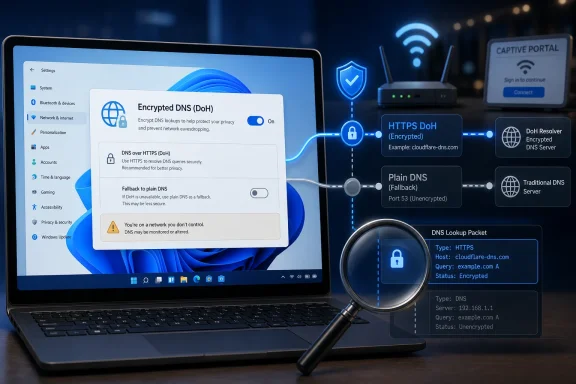
The MakeUseOf piece that triggered the latest round of attention makes a simple claim: enabling DoH in Windows 11 may not be enough if Windows later decides it needs to complete a lookup by falling back to plaintext DNS. That claim fits a broader tension in Microsoft’s implementation. Windows exposes encrypted DNS as a user-facing setting, but the platform also has compatibility behaviors designed to keep name resolution from breaking when networks are misconfigured, restrictive, captive, or simply old.
That is not a conspiracy; it is a design tradeoff. DNS is not an optional subsystem that can fail politely in the corner. If name resolution breaks, the user experiences “the internet is down,” even when the Wi-Fi signal is strong and the router is technically reachable. Operating systems are therefore engineered to recover, retry, and fall back in ways that ordinary users never see.
The privacy problem is that fallback is not neutral. If a user has chosen encrypted DNS for privacy reasons, silently retrying in plaintext changes the security model without meaningful consent. The page loads, the app connects, and the user gets no obvious indication that the lookup escaped the encrypted path.
That is what makes the issue feel worse than an ordinary misconfiguration. If Windows refused to resolve names when DoH failed, users would complain loudly, but the failure mode would be visible. Silent fallback preserves convenience while hiding the downgrade, and privacy features are only as trustworthy as their downgrade behavior.
Windows Still Thinks Like an Office PC
To understand why this exists, it helps to remember the environment Windows was built to survive. For decades, the dominant expectation was that the local network knew best. DHCP handed out addresses, gateways, and DNS servers; Windows accepted them; administrators controlled the network from the middle; users were grateful if everything worked.
That model still exists in enterprises, and it is not inherently wrong. Corporate IT often needs internal DNS zones, split-horizon records, security filtering, private services, device enrollment, VPN integration, and audit controls. A laptop that refuses local DNS instructions can be a nightmare in that environment.
But the modern Windows machine also lives on hostile or semi-trusted networks. It joins hotel Wi-Fi, shared apartments, airports, schools, conferences, tethered phones, consumer routers with ancient firmware, and ISP networks that may monetize or log DNS behavior. In that world, trusting the network by default is not the safe assumption it once appeared to be.
The result is a product straddling two eras. Windows 11 tells consumers it can encrypt DNS, while much of Windows’ networking culture still assumes that a working connection is the highest good. That is a reasonable engineering bias until the user explicitly asks for privacy. After that, the bias should change.
The Difference Between “Use” and “Require” Is the Whole Story
The important distinction is not whether Windows 11 supports DNS-over-HTTPS. It does. The important distinction is whether Windows is configured to prefer encrypted DNS or require it.
A preference says: use DoH when conditions are right, but keep the connection alive if they are not. A requirement says: if encrypted DNS is unavailable, fail instead of downgrading. The first model is friendly to ordinary users and messy networks. The second model is faithful to the user’s privacy choice.
That distinction is familiar in security. HTTPS-only browser modes, certificate validation, VPN kill switches, firewall deny rules, and modern authentication policies all revolve around the same principle. A security control that quietly disables itself when inconvenient is not a control; it is a suggestion.
For Windows 11 Pro, Enterprise, and Education users, Group Policy can set the stronger posture by requiring DoH for name resolution. That is the administrative answer, and it is exactly the sort of lever enterprise Windows has traditionally offered. The catch is that Windows 11 Home users do not get the same clean policy surface.
That division is not new, but it is increasingly awkward. Microsoft sells Windows 11 Home on devices that travel constantly and connect to untrusted networks all the time. The users most likely to rely on simple Settings toggles are also the users least likely to have Group Policy available.
The Consumer Fix Is Easier Than the Platform Fix
For many home users, the practical workaround is not to fight Windows’ DNS client directly. It is to use a trusted encrypted DNS or tunnel client that captures traffic more comprehensively and offers its own failure behavior. Cloudflare’s WARP is the example MakeUseOf highlights, and it is easy to see why: it gives ordinary users an installable app rather than a policy editor.
That approach has advantages. It is simpler than explaining DNS templates, interface bindings, NRPT rules, Group Policy, and fallback behavior. It also makes protection more portable across networks. For users who just want to stop local DNS snooping on public Wi-Fi, a reputable client can be a better experience than spelunking through Windows settings.
But it also shifts trust. Instead of relying on the local network or ISP, the user is relying on the encrypted DNS provider or tunnel operator. That may be a good trade, especially with a provider that publishes clear privacy practices, but it is still a trade. DNS privacy is never magic; it is a question of who can see what, where the logs might exist, and which failure mode the user prefers.
Browser-level DoH is another partial answer. Microsoft Edge, Chrome, Firefox, and other browsers can be configured to use secure DNS independently of the operating system. That protects a large share of a typical user’s visible web activity, but it leaves the rest of the machine outside the umbrella. In 2026, that is a serious caveat because “the browser” is no longer the only internet client on a PC.
The cleanest solution would be for Windows to make the distinction clearer in the consumer UI. “Encrypted preferred” and “encrypted required” are not obscure concepts if explained honestly. Users already understand the idea of a VPN kill switch; they can understand that strict DNS privacy may break connectivity on some networks.
Enterprise IT Has a Different Problem Than Home Users
For administrators, the question is not simply whether to require DoH everywhere. Enterprise DNS is complicated because it is part security layer, part directory service, part application dependency, and part institutional memory. A strict encrypted-DNS policy can collide with internal zones, captive networks, VPN clients, endpoint detection tools, and resolvers that are intentionally controlled by the organization.
That does not make plaintext DNS acceptable by default. It means the policy has to be designed rather than wished into existence. If an organization wants encrypted DNS, it should define approved resolvers, test internal name resolution, account for VPN behavior, and document what happens when the encrypted path fails.
The most dangerous enterprise posture is accidental inconsistency. Some clients use DoH, some fall back to plaintext, some browsers use a public resolver, some VPN clients override everything, and help desk tickets become the only monitoring system. That kind of half-migration creates both privacy confusion and operational risk.
There is also a security monitoring tension. Some organizations inspect DNS for malware detection, data-loss signals, or policy enforcement. If users independently move DNS into encrypted channels to third-party providers, defenders may lose visibility. That is why enterprises need managed encrypted DNS, not just enthusiastic users toggling settings in browsers.
The right enterprise answer is not “ban DoH” or “turn it on everywhere by Friday.” It is to decide what DNS is for inside the organization, then implement a policy that matches that decision. Windows gives administrators some of the necessary machinery, but the operating system cannot supply the governance.
Microsoft’s Documentation Explains the Mechanism, Not the Trust Gap
Microsoft’s official guidance describes where DoH can be configured and how Windows administrators can require it. That is useful as documentation, but it does not fully solve the communication problem. A user who sees “encrypted DNS” in Settings is unlikely to infer a full matrix of resolver templates, automatic upgrades, network-provided configuration, and fallback behavior.
This is a recurring Microsoft pattern. The company often builds powerful policy controls for administrators while leaving consumers with simplified interfaces that blur important distinctions. That works when the simplified choice is harmless. It works less well when the simplified choice implies a privacy guarantee that may not hold under stress.
Windows is hardly alone here. The broader technology industry has spent years turning nuanced security states into reassuring toggles, badges, locks, shields, and “recommended” settings. Those symbols reduce friction, but they also train users to stop asking what happens when the happy path fails.
With DNS, the failure path is the product. An encrypted lookup that succeeds is easy. The hard design question is what the system does when the resolver times out, the network blocks HTTPS to the resolver, the captive portal intercepts traffic, DHCP hands out a different resolver, or a VPN shoves a new namespace into the stack. Privacy depends on those edge cases.
Microsoft could make this clearer without overwhelming users. Windows could warn when encrypted DNS is configured but not currently being used. It could expose a strict mode in Home editions. It could separate “automatic encrypted DNS when available” from “never use plaintext DNS” in plain language. It could log downgrades in a place normal users can find.
The absence of those signals is why the MakeUseOf article resonates. It gives a name to an uneasy feeling many Windows power users already have: the platform has security features, but you often have to know the hidden second step before those features behave the way the label suggests.
Privacy Settings Need Failure Honesty
The deeper issue is not DNS alone. It is the way consumer operating systems present privacy controls as if they were simple preferences rather than conditional systems. A privacy feature that depends on network state, resolver compatibility, edition-specific policy, and fallback rules should say so.
This matters because users make risk decisions based on the interface in front of them. A journalist on hotel Wi-Fi, an activist on a hostile network, a student on campus internet, or a consultant on a client’s guest network may reasonably believe that enabling encrypted DNS means DNS lookups are no longer being sent in plaintext. If that belief is sometimes false, the product has created a false sense of safety.
The security industry often responds to this by blaming users for not understanding the stack. That is lazy. Users should not need to know the internals of Windows name resolution to understand whether their DNS privacy setting is strict or best-effort.
At the same time, power users should resist overselling DoH. Encrypted DNS does not hide the IP address a machine connects to. It does not defeat all corporate monitoring. It does not replace a VPN, Tor, good browser hygiene, or sensible endpoint security. It narrows a specific leak, and that is valuable precisely because DNS has historically been so exposed.
The correct criticism of Windows 11 is therefore narrow but important. Microsoft is not failing to support encrypted DNS. Microsoft is failing to make the policy boundary obvious enough: when Windows may fall back, who can prevent it, and what the user will see when strict privacy breaks connectivity.
The Few Minutes That Decide Whether DoH Is a Preference or a Rule
The practical lesson for Windows users is refreshingly concrete. If you care about DNS privacy, do not stop at “I selected an encrypted resolver once.” Verify how your machine behaves, decide whether you want strict failure, and choose the enforcement method that fits your edition of Windows.
For Windows 11 Pro, Enterprise, and Education, Group Policy is the cleanest native route. Requiring DNS-over-HTTPS changes the posture from convenience-first to privacy-first. The cost is that DNS failures become real failures, which is exactly the point but also exactly why administrators should document the setting.
For Windows 11 Home, the native path is less satisfying. Users can still configure encrypted DNS in Settings, and that is better than doing nothing. But if they want a stronger guarantee without unsupported policy hacks, a reputable encrypted DNS client or tunnel app may be the more realistic answer.
Browser secure DNS remains useful, especially for users who cannot change system settings on a managed or shared PC. But it should be treated as browser protection, not system protection. The updater, game launcher, chat app, package manager, and telemetry client may not follow the browser’s lead.
There is also a simple operational habit worth adopting: test before trusting. DNS leak-test sites are imperfect and can be misunderstood, but they can reveal obvious mismatches between the resolver you think you are using and the resolver actually visible from the outside. For administrators, packet captures and endpoint telemetry are better tools than assumptions.
The Windows DNS Privacy Checklist Microsoft Should Have Shipped
The fix is not the same for every user, but the decision tree is small enough that Microsoft could have made it part of the interface. Until it does, Windows users and admins should treat encrypted DNS as a configuration that deserves verification rather than a checkbox that deserves faith.
- Windows 11’s built-in DNS-over-HTTPS support is useful, but users should distinguish between preferring encrypted DNS and requiring it.
- Silent fallback to plaintext DNS is the privacy-relevant failure mode, because the connection can keep working while the protection has changed.
- Windows 11 Pro, Enterprise, and Education users can use Group Policy to require DoH and prevent ordinary plaintext fallback.
- Windows 11 Home users who want stricter system-wide behavior may be better served by a reputable encrypted DNS or tunnel client than by the basic Settings toggle alone.
- Browser-level secure DNS is worthwhile, but it protects browser lookups rather than every DNS request made by the operating system and installed applications.
- Administrators should test encrypted DNS behavior across VPNs, captive portals, internal domains, and managed networks before treating it as a deployed control.
The uncomfortable lesson is that Windows 11’s encrypted DNS setting is a good privacy upgrade, but not always the privacy guarantee its label implies. Microsoft has done the hard engineering work of bringing DoH into the Windows networking stack; now it needs to do the harder product work of making failure modes visible and strict privacy available without edition gymnastics. Until then, the safest assumption is that encrypted DNS on Windows is not finished when it is enabled — it is finished when you have decided what Windows is allowed to do when encryption fails.
