

Your ISP can control a lot more of your home connection than most people realize, and DNS is one of the easiest places to feel that control. The practical workaround is not exotic hardware or a deep networking project: it is moving DNS enforcement from the router to the device, where the router’s defaults stop mattering. That approach is especially useful when an ISP locks down gateway settings, because modern operating systems and browsers can still be pointed at a different resolver, including encrypted DNS services. The result is a modest but meaningful privacy and flexibility win, though it is not the same thing as full anonymity.
For years, home networking advice focused on the router because the router sat at the center of everything. That made sense in the era of a single desktop PC and a couple of household devices, but it is a weaker model now that families juggle phones, laptops, consoles, smart TVs, tablets, and IoT gear. If the gateway is managed by an ISP, its DNS defaults can become the network-wide baseline, even when those defaults are not ideal for speed, filtering, or privacy.
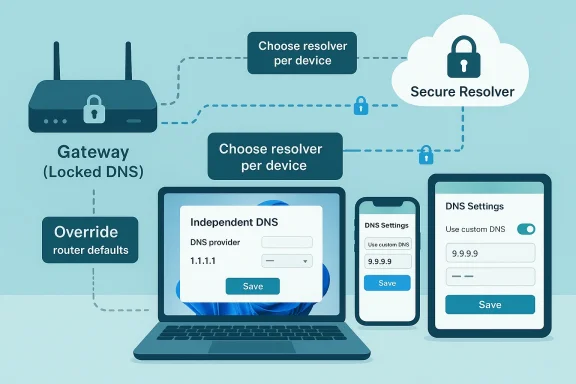
The key technical point is that DNS resolution starts on the device, not in the router. A system will check local mechanisms such as the hosts file and DNS cache before it asks the configured resolver for help. If a device has been explicitly configured to use a different resolver, it does not need to defer to the router’s DNS choice first; it uses the settings it was given. That is why a device-level DNS configuration can override an ISP gateway that refuses to cooperate.
This matters because traditional DNS traffic is usually plaintext. That leaves lookups visible to intermediaries and vulnerable to interception or manipulation, which is one reason encrypted DNS standards such as DNS over HTTPS and DNS over TLS exist. The IETF standardized DoH in RFC 8484 and DoT in RFC 7858, and newer privacy techniques such as Oblivious DNS over HTTPS go even further by separating query content from client identity.
What MakeUseOf is really describing, then, is a shift in control plane. Instead of trying to pry open a locked-down ISP router, you move the decision closer to the user and closer to the operating system. That is not just convenient; it also reduces dependence on hardware you do not fully control, which is a recurring theme in consumer networking.
The broader appeal is easy to understand. A household that cannot or does not want to replace its ISP gateway can still choose a faster or more privacy-conscious resolver, and it can do so device by device. For many people, that is enough to improve browser responsiveness, sidestep some DNS-based filtering, and reduce the amount of resolver metadata exposed in transit.
That can help in homes where the ISP gateway is functional but inflexible. Some gateways allow limited changes, while others hide DNS controls behind confusing menus or proprietary app dashboards. The article’s central argument is that changing each device individually is often easier than trying to wrestle admin privileges back from the gateway vendor.
Not every household will notice the same improvement, though. If the ISP already operates a fast local resolver, raw latency gains may be small. In that case, the more meaningful advantage is control: you decide who handles your DNS, not the gateway you were handed with your service contract.
Cloudflare’s documentation says its resolver supports encrypted transports, and Quad9 likewise presents itself as a privacy-oriented public resolver. Both are examples of services that aim to make DNS less exposed to surveillance and tampering. That said, choosing a resolver is still a trust decision; you are moving visibility from your ISP to another provider.
This is where browser-based encrypted DNS becomes especially interesting. If a browser is set to use secure DNS, it may send lookups over its own encrypted path rather than relying on whatever the local network configured. Cloudflare’s guidance explicitly describes enabling DoH in browsers such as Firefox, Chrome, Edge, and Brave.
The exact choice depends on what you value most. Some users want the fastest response times, some want filtering, and others want the strongest privacy story they can verify. That means there is no universal winner, only a provider that fits a household’s priorities and technical comfort level.
There is also a compatibility angle. Some devices and browsers now support secure DNS natively, but others still require manual server entry. That means the “best” provider is not just a policy choice; it is also a question of what your operating systems and apps can actually use without friction.
The user-facing process is fairly direct. In the modern Windows network UI, you can open the adapter’s hardware properties, edit DNS server assignment, enter preferred and alternate resolvers, and optionally enable DNS over HTTPS. The point is not merely to “change a number”; it is to attach a resolution policy to the machine itself.
That said, Windows settings alone do not necessarily solve every case. If another device on the same network is hard-coded to use the router’s resolver, or if the browser itself imposes secure DNS preferences, then DNS behavior becomes a patchwork rather than a single household policy. In other words, endpoint control is powerful, but it can also be inconsistent.
On iPhone, the workflow is network-specific, which means the configuration follows the Wi‑Fi network rather than applying as a universal system rule in the same way some users expect. That is useful for home and office Wi‑Fi, but it also means you need to know whether you are changing a single network profile or the broader device behavior. The distinction matters more than it sounds like it should.
There is a caveat, though. Secure DNS on mobile can be disrupted by VPNs, parental controls, enterprise profiles, or network-specific policies. So while phones are easy to configure, they are also easy to accidentally override, which is why a quick settings change is not the same as a permanent policy.
This is why people sometimes think their ISP is “forcing” DNS when the browser is actually bypassing the network in another direction. The reverse can happen too: users may believe they are protected by browser secure DNS, while the operating system or another app still uses the router’s plain resolver. These overlapping layers are helpful, but they are also a recipe for confusion.
This layered model also explains why the MakeUseOf workaround is attractive to everyday users. It avoids a full network redesign and focuses on the layer you actually control. That is not a hack in the shady sense; it is just a deliberate use of precedence rules that network software already follows.
For some households, the router swap is the real solution because it removes the ISP from the center of the configuration story. A decent consumer router is inexpensive enough now that the barrier is no longer price so much as willingness to manage the hardware yourself. The article’s own suggestion that a Wi‑Fi 6E router can be had at relatively low cost reflects how normalized that option has become.
For a power user, there is also the middle path: run your own DNS stack such as Pi-hole or Unbound and point the household to it. That gives local caching, filtering, and more control, while still letting you choose upstream privacy protections. It is the most flexible option, but also the one most likely to overwhelm casual users.
For enterprises or technically ambitious homes, the problem is governance. A company does not want every employee choosing a different public resolver on a whim, because that complicates policy, logging, and incident response. Microsoft’s DNS client and policy tooling make it clear that administrators still need centralized control when they care about consistency.
Families sit somewhere in the middle. Parents may want safe-search or filtered DNS, while kids’ devices may need device-specific exceptions for school portals or gaming services. That makes resolver choice not just a technical decision but also a household management tool.
What happens next will depend on how aggressively ISPs continue to lock down gateways. If that trend persists, more users will learn the same lesson MakeUseOf is highlighting: the network edge is not the only place where control can be exercised. The device itself is often enough.
Source: MakeUseOf I finally escaped my ISP's DNS lock-in with this device-level trick
 Background
For years, home networking advice focused on the router because the router sat at the center of everything. That made sense in the era of a single desktop PC and a couple of household devices, but it is a weaker model now that families juggle phones, laptops, consoles, smart TVs, tablets, and IoT gear. If the gateway is managed by an ISP, its DNS defaults can become the network-wide baseline, even when those defaults are not ideal for speed, filtering, or privacy.The key technical point is that DNS resolution starts on the device, not in the router. A system will check local mechanisms such as the hosts file and DNS cache before it asks the configured resolver for help. If a device has been explicitly configured to use a different resolver, it does not need to defer to the router’s DNS choice first; it uses the settings it was given. That is why a device-level DNS configuration can override an ISP gateway that refuses to cooperate.
This matters because traditional DNS traffic is usually plaintext. That leaves lookups visible to intermediaries and vulnerable to interception or manipulation, which is one reason encrypted DNS standards such as DNS over HTTPS and DNS over TLS exist. The IETF standardized DoH in RFC 8484 and DoT in RFC 7858, and newer privacy techniques such as Oblivious DNS over HTTPS go even further by separating query content from client identity.
What MakeUseOf is really describing, then, is a shift in control plane. Instead of trying to pry open a locked-down ISP router, you move the decision closer to the user and closer to the operating system. That is not just convenient; it also reduces dependence on hardware you do not fully control, which is a recurring theme in consumer networking.
The broader appeal is easy to understand. A household that cannot or does not want to replace its ISP gateway can still choose a faster or more privacy-conscious resolver, and it can do so device by device. For many people, that is enough to improve browser responsiveness, sidestep some DNS-based filtering, and reduce the amount of resolver metadata exposed in transit.
Why Device-Level DNS Matters
The biggest reason device-level DNS matters is simple: it bypasses the router bottleneck. If the gateway is locked to the ISP’s resolver, every device inherits that choice by default. But if the laptop, phone, or tablet is pointed elsewhere, the router’s DNS preference is no longer the final word.That can help in homes where the ISP gateway is functional but inflexible. Some gateways allow limited changes, while others hide DNS controls behind confusing menus or proprietary app dashboards. The article’s central argument is that changing each device individually is often easier than trying to wrestle admin privileges back from the gateway vendor.
What actually changes
A custom resolver can alter three things at once. It can improve lookup speed if the ISP resolver is sluggish, it can give access to filtering or security features, and it can reduce the amount of unencrypted DNS metadata that travels over the network. In other words, the benefit is not only privacy; it is also operational quality.Not every household will notice the same improvement, though. If the ISP already operates a fast local resolver, raw latency gains may be small. In that case, the more meaningful advantage is control: you decide who handles your DNS, not the gateway you were handed with your service contract.
- Device-level DNS is useful when the router is locked down.
- It can improve privacy when paired with encrypted DNS.
- It can make troubleshooting easier on individual machines.
- It gives households a way around ISP defaults without new hardware.
- It may not be faster in every location or for every provider.
The Privacy Argument Is Real, but Limited
The privacy pitch for DNS changes is often overstated, so it is worth being precise. Switching to a third-party resolver does not hide your browsing from the internet as a whole, and it does not make you invisible to websites you visit. What it does is reduce the number of parties that can see your plaintext DNS requests in transit, especially when you use DoH or DoT.Cloudflare’s documentation says its resolver supports encrypted transports, and Quad9 likewise presents itself as a privacy-oriented public resolver. Both are examples of services that aim to make DNS less exposed to surveillance and tampering. That said, choosing a resolver is still a trust decision; you are moving visibility from your ISP to another provider.
Encrypted DNS in context
DoH and DoT are not interchangeable in implementation, even if their privacy goals overlap. DoH wraps DNS inside HTTPS, while DoT uses TLS on a dedicated port. In practical terms, both can protect queries from passive observation, but they integrate differently with browsers, operating systems, and network appliances.This is where browser-based encrypted DNS becomes especially interesting. If a browser is set to use secure DNS, it may send lookups over its own encrypted path rather than relying on whatever the local network configured. Cloudflare’s guidance explicitly describes enabling DoH in browsers such as Firefox, Chrome, Edge, and Brave.
- Encrypted DNS reduces exposure of DNS content in transit.
- It does not eliminate all network visibility.
- It shifts trust from ISP-controlled resolution to the chosen provider.
- It works best when configured consistently across devices or browsers.
- It complements, but does not replace, broader privacy tools.
Choosing the Right Resolver
Resolver choice is where the article gets practical, and also where it risks oversimplification. Cloudflare and Quad9 are both common suggestions because they support encrypted transports and have public documentation about privacy-oriented operation. Cloudflare says its 1.1.1.1 service is designed for privacy and security, while Quad9 says it keeps no information that can correlate queries to a specific user or IP address in the way many people fear.The exact choice depends on what you value most. Some users want the fastest response times, some want filtering, and others want the strongest privacy story they can verify. That means there is no universal winner, only a provider that fits a household’s priorities and technical comfort level.
Cloudflare versus Quad9
Cloudflare’s public resolver is built around performance and privacy, with encrypted endpoints available for DoH and DoT. Quad9’s public positioning is more aggressively security-focused, and its published material emphasizes privacy-preserving handling of resolver data. Those are not identical value propositions, which is why the best provider for gaming latency may not be the best provider for a security-minded family.There is also a compatibility angle. Some devices and browsers now support secure DNS natively, but others still require manual server entry. That means the “best” provider is not just a policy choice; it is also a question of what your operating systems and apps can actually use without friction.
- Decide whether your priority is speed, filtering, or privacy.
- Confirm whether your device supports DoH, DoT, or only plain DNS.
- Check whether the provider publishes stable endpoints and hostname templates.
- Test for latency and reliability before changing every device.
- Keep a rollback note in case a resolver causes issues.
Windows 11: The Most Relevant Desktop Case
Windows 11 is the clearest example of why device-level DNS has become mainstream rather than niche. Microsoft now exposes DNS server assignment in the network settings, and its command-line tools can manage DNS client settings, including encryption features such as DoH and DoT. That gives users and administrators more leverage than the average ISP gateway interface ever will.The user-facing process is fairly direct. In the modern Windows network UI, you can open the adapter’s hardware properties, edit DNS server assignment, enter preferred and alternate resolvers, and optionally enable DNS over HTTPS. The point is not merely to “change a number”; it is to attach a resolution policy to the machine itself.
Why the Windows path matters
Windows is still the anchor platform for many households and small businesses. If a Windows laptop bypasses the router’s DNS defaults successfully, that often proves the concept for the rest of the network. It also demonstrates how much of today’s network control has moved out of the physical gateway and into the endpoint.That said, Windows settings alone do not necessarily solve every case. If another device on the same network is hard-coded to use the router’s resolver, or if the browser itself imposes secure DNS preferences, then DNS behavior becomes a patchwork rather than a single household policy. In other words, endpoint control is powerful, but it can also be inconsistent.
- Windows 11 can set DNS per adapter.
- DoH adds a privacy layer on top of resolver choice.
- The settings are more accessible than many router admin pages.
- Endpoint DNS can differ from browser-level secure DNS.
- Mixed-device homes may still need broader network planning.
Mobile Devices Make This Even More Practical
Phones are often the best place to start because they travel between networks and inherit whatever the local gateway wants unless you intervene. Android and iPhone both support custom DNS configurations in different ways, and Android’s Private DNS feature has made encrypted DNS far more user-friendly than it used to be. Cloudflare specifically documents a hostname-based setup on Android because the feature expects a provider hostname rather than an IP address.On iPhone, the workflow is network-specific, which means the configuration follows the Wi‑Fi network rather than applying as a universal system rule in the same way some users expect. That is useful for home and office Wi‑Fi, but it also means you need to know whether you are changing a single network profile or the broader device behavior. The distinction matters more than it sounds like it should.
Why mobile often wins
Mobile devices are good candidates because their DNS settings immediately expose how little a locked ISP router matters once the endpoint is configured. If your phone is using secure DNS over cellular data or home Wi‑Fi, the gateway’s plaintext defaults become less relevant. That is a strong real-world demonstration of endpoint autonomy.There is a caveat, though. Secure DNS on mobile can be disrupted by VPNs, parental controls, enterprise profiles, or network-specific policies. So while phones are easy to configure, they are also easy to accidentally override, which is why a quick settings change is not the same as a permanent policy.
- Android supports hostname-based Private DNS.
- iPhone settings are tied closely to Wi‑Fi network configuration.
- Mobile DNS changes are useful on both home and public networks.
- VPNs and profiles may override your chosen settings.
- A phone can be a fast proof-of-concept for the whole household.
Browser-Level Secure DNS Is the Quiet Wild Card
One of the most overlooked parts of this discussion is that browsers increasingly manage their own DNS behavior. Chrome, Edge, Firefox, and Brave all support secure DNS settings in different ways, and that means the browser may not always care what the router is doing. In effect, the browser can become its own DNS policy layer.This is why people sometimes think their ISP is “forcing” DNS when the browser is actually bypassing the network in another direction. The reverse can happen too: users may believe they are protected by browser secure DNS, while the operating system or another app still uses the router’s plain resolver. These overlapping layers are helpful, but they are also a recipe for confusion.
The practical implication
The practical implication is that you should think in layers, not absolutes. A router can provide one resolver, the OS can provide another, and the browser can provide a third. When all three disagree, the one closest to the request usually wins, which is why endpoint configuration is so effective when gateway control is weak.This layered model also explains why the MakeUseOf workaround is attractive to everyday users. It avoids a full network redesign and focuses on the layer you actually control. That is not a hack in the shady sense; it is just a deliberate use of precedence rules that network software already follows.
- Browser DNS can supersede system defaults.
- System DNS can supersede router defaults.
- Router defaults still matter for devices you never touch.
- Overlapping settings can create confusing behavior.
- Testing one layer at a time is the cleanest way to debug.
When a New Router Still Makes Sense
Device-level DNS is the cheap and immediate fix, but it is not always the best long-term one. If your ISP gateway is restrictive in many areas beyond DNS, replacing it with your own router can restore broader control over the network. That includes more advanced security settings, custom firmware options, QoS, and better visibility into how traffic is moving.For some households, the router swap is the real solution because it removes the ISP from the center of the configuration story. A decent consumer router is inexpensive enough now that the barrier is no longer price so much as willingness to manage the hardware yourself. The article’s own suggestion that a Wi‑Fi 6E router can be had at relatively low cost reflects how normalized that option has become.
Device-by-device versus network-wide control
The trade-off is between convenience and uniformity. Device-by-device DNS changes are quick, but they require maintenance and can be forgotten on a new laptop or smart TV. A router replacement is more work initially, but it gives the whole household one consistent policy.For a power user, there is also the middle path: run your own DNS stack such as Pi-hole or Unbound and point the household to it. That gives local caching, filtering, and more control, while still letting you choose upstream privacy protections. It is the most flexible option, but also the one most likely to overwhelm casual users.
- A new router can remove ISP lock-in more completely.
- It may unlock advanced networking features.
- It requires more setup than a DNS-only change.
- It is better for whole-home consistency.
- It can be paired with Pi-hole or Unbound for deeper control.
Enterprise and Family Implications Are Different
For individual consumers, the appeal of device-level DNS is simplicity. One laptop or phone at a time is easy to manage, and the privacy gain is immediately understandable. The downside is that it is easy to forget a device, and that leaves the home with mixed DNS behavior and inconsistent protections.For enterprises or technically ambitious homes, the problem is governance. A company does not want every employee choosing a different public resolver on a whim, because that complicates policy, logging, and incident response. Microsoft’s DNS client and policy tooling make it clear that administrators still need centralized control when they care about consistency.
Why policy matters
The broader lesson is that DNS is not just a performance knob anymore. It is a security control, a privacy control, and sometimes a compliance issue. When that is true, the “best” choice depends less on internet folklore and more on who owns the policy and who needs to enforce it.Families sit somewhere in the middle. Parents may want safe-search or filtered DNS, while kids’ devices may need device-specific exceptions for school portals or gaming services. That makes resolver choice not just a technical decision but also a household management tool.
Strengths and Opportunities
The strength of the device-level approach is that it turns an ISP weakness into a user advantage. Instead of waiting for gateway access, firmware updates, or support calls, you can make the change immediately and selectively. That gives users a sense of control that modern broadband setups often lack.- Works even when the ISP gateway is locked down.
- Lets each device use the best resolver for its role.
- Can improve privacy when paired with DoH or DoT.
- Helps households standardize on a trusted resolver.
- Reduces dependence on ISP firmware and menus.
- Can be rolled out gradually without replacing hardware.
- Fits well with modern browser-level secure DNS features.
Risks and Concerns
The biggest risk is mistaking DNS control for total privacy. A third-party resolver can reduce exposure of plaintext lookups, but it does not hide the rest of your online activity from websites, VPN operators, or other observers. In that sense, DNS hardening is valuable, but it is only one layer in a much larger privacy stack.- Resolver trust shifts from ISP to another provider.
- Mixed configurations can create confusing behavior.
- Browser-level DNS can conflict with system-level DNS.
- Some apps ignore system settings or use their own lookups.
- Privacy gains are real but limited.
- Filtering features may break some services or sites.
- Public resolvers still collect some operational metadata.
Looking Ahead
The direction of travel is clear: more DNS decisions are moving to endpoints, browsers, and encrypted transports. Microsoft’s support for DNS client management and DoH, Cloudflare’s browser and device guidance, and Android’s Private DNS model all point to the same future, where the router is important but no longer supreme. That is a structural change in how consumer networks work.What happens next will depend on how aggressively ISPs continue to lock down gateways. If that trend persists, more users will learn the same lesson MakeUseOf is highlighting: the network edge is not the only place where control can be exercised. The device itself is often enough.
- More browsers will default to secure DNS.
- More operating systems will surface resolver controls clearly.
- More households will mix local and encrypted DNS policies.
- More users will choose privacy-first resolvers by habit.
- Router replacement will remain the cleanest full-network fix.
Source: MakeUseOf I finally escaped my ISP's DNS lock-in with this device-level trick
Last edited:
