

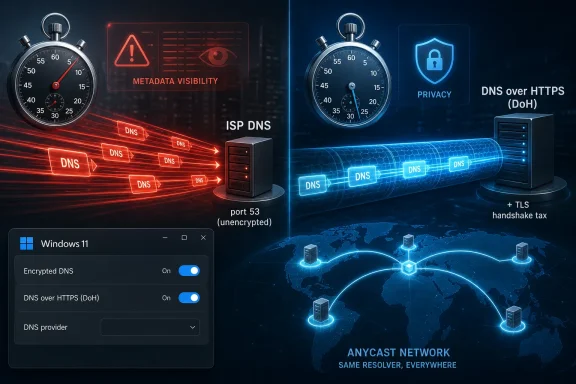
Encrypted DNS is a privacy upgrade that can lose badly in raw speed tests, as one MakeUseOf benchmark found when an ISP’s unencrypted resolver answered typical lookups in 38 ms while Cloudflare’s DNS-over-HTTPS took 167 ms from the same connection. The surprising part is not that encryption has a cost; it is that the cost is visible enough to offend anyone who treats DNS latency as a scoreboard. But the more useful lesson is harder: the fastest resolver is not automatically the best resolver. For Windows users, sysadmins, and privacy-minded home networks, DNS is no longer just plumbing — it is a policy choice.
DNS has always lived in the awkward space between invisibility and importance. When it works, nobody thinks about it; when it fails, the internet appears broken even though the connection is fine. That makes DNS latency a tempting metric, because it turns an invisible dependency into a number you can rank.
The MakeUseOf test is valuable precisely because it is not flattering to the privacy story. The author tested an ISP resolver, Cloudflare’s plain 1.1.1.1 service, and DNS-over-HTTPS endpoints from Cloudflare, Quad9, and NextDNS. Across 150 lookups per resolver, the ISP’s traditional DNS finished with a 38 ms median, Cloudflare’s unencrypted 1.1.1.1 landed at 60 ms, and the encrypted services ranged from 167 ms to 280 ms.
That is not a rounding error. Cloudflare’s encrypted option, the best of the DoH group, was more than four times slower than the ISP resolver on a typical lookup. Quad9 and NextDNS were slower still. If this were a product review scored only by synthetic latency, encrypted DNS would leave with a black eye.
But DNS benchmarks are not the same thing as browsing experience. They measure a narrow slice of the trip, often under artificially cold conditions, and then invite us to mistake that slice for the whole journey. The article’s thesis — “I switched anyway” — is the correct provocation because it forces the discussion away from milliseconds and toward threat models.
A resolver that is fastest because it is local, unencrypted, and operated by the access provider is not merely a performance component. It is also an observation point. Every plain DNS query gives that operator a readable record of which domain was requested, when, and by which subscriber-facing address. Speed is the easy number to publish; exposure is the harder number to price.
DNS-over-HTTPS changes that bargain. It wraps DNS questions inside HTTPS, meaning the client and resolver have to establish an encrypted channel before the query can be protected. TLS handshakes, certificate validation, connection setup, and transport behavior all become part of the cost structure. That cost can be amortized, but it does not disappear.
The MakeUseOf numbers show this cleanly because Cloudflare appears twice. Plain 1.1.1.1 came in at 60 ms, while Cloudflare DoH hit 167 ms. Same broad provider, same user line, different transport. The gap is not simply “Cloudflare is far away” or “public DNS is slow”; it is evidence that encryption and connection setup matter when the benchmark treats each lookup as fresh.
That matters for how users interpret tests like this. A cold DoH query is often a worst-case sample, not the steady-state behavior of a browser or operating system. Modern clients can keep encrypted connections open and reuse them, which means the handshake penalty is paid once and spread across many lookups. A script that reconnects constantly is useful for isolating overhead, but it is not a perfect mirror of normal desktop use.
Still, dismissing the benchmark would be a mistake. Handshake overhead is not imaginary, and it becomes more painful on high-latency links, congested mobile networks, and regions where public resolver infrastructure is less dense. Privacy tooling has too often been sold as free — no downside, no tradeoff, no user-visible cost. The better argument is that the cost exists, and in many cases it is worth paying.
This is where internet centralization meets physical reality. Cloudflare, Google, Quad9, and NextDNS operate global resolver networks, but global does not mean equally close to everyone. Anycast routing, peering agreements, submarine cable paths, and local exchange density all influence where a query actually goes. The domain name may be universal; the packet path is not.
The article points to a broader measurement result: DoH performance varies heavily by economy and region, and users in weaker infrastructure environments are more likely to see slowdowns. That tracks with common operational experience. Public resolvers are astonishingly fast in many markets, but “many” is not “all,” and averages hide the places where the last mile is not the only mile that matters.
For WindowsForum readers, that is the practical warning. Do not copy someone else’s DNS ranking as if it were a universal truth. Test from your own line, with your own ISP, at different times of day, and with the devices you actually use. A resolver benchmark from another continent is not advice; it is travel writing for packets.
This is also why ISP DNS can look surprisingly good. The resolver is often topologically close, sometimes inside the provider’s network, and optimized for that subscriber base. It may also integrate with local CDN steering in ways that make some content delivery paths work well. None of that makes it private, but it explains why the local default often wins the stopwatch.
That shift matters because DNS policy belongs below the browser. A browser-level DoH setting can protect browser traffic, but it does not necessarily cover every app, updater, game launcher, telemetry client, or background service. On a Windows PC, name resolution is a system behavior as much as an application behavior. If the operating system can enforce encrypted DNS, the user has a better chance of getting consistent results.
Microsoft’s own framing is blunt: traditional DNS exposes traffic to passive monitoring, traffic analysis, and manipulation. That is not activist language; it is the sober description of what happens when name lookups remain unencrypted. Windows 11’s DNS client support for encrypted protocols is an acknowledgement that this old internet default no longer fits the threat environment.
But ordinary is not the same as foolproof. Windows settings can be overridden by VPN clients, enterprise policy, router configuration, captive portals, endpoint security tools, and applications with their own resolver behavior. On managed machines, administrators may deliberately disable or redirect DoH because DNS logs feed security monitoring, content filtering, or compliance workflows. On unmanaged machines, users may believe they are encrypted when only one layer of the stack is.
That creates a familiar Windows tension. The platform now exposes privacy controls that used to require third-party tools, but the actual behavior depends on configuration discipline. “Turn on encrypted DNS” is easy advice; verifying that all relevant traffic obeys it is harder. For home users, the Settings app may be enough. For IT pros, packet captures and policy baselines still have a role.
The resolver still has to answer the question. If you move from ISP DNS to Cloudflare, Quad9, or NextDNS, you have changed who can see the resolver-side metadata. You have not abolished trust; you have reassigned it. That distinction matters because too much consumer privacy marketing treats encryption as a magic cloak rather than a narrower technical control.
The destination website may still see your IP address unless you are using a VPN, Tor, or another proxying layer. The network may still infer activity from IP addresses contacted, TLS Server Name Indication where not protected, traffic timing, and volume. Encrypted DNS removes one of the cleanest logs available to the access provider, but it does not erase every other signal.
This is why the resolver’s business model and policy matter. Cloudflare emphasizes privacy commitments for 1.1.1.1. Quad9 leans heavily on its Swiss nonprofit structure and its position that it does not log end-user IP addresses. NextDNS offers granular filtering and per-device policies, which are useful precisely because it is more configurable and account-centric. These are different trust propositions, not interchangeable speed tiers.
The user in the original piece chose Cloudflare DoH because it was the fastest encrypted option in that test. That is a reasonable home-user compromise. Another user might choose Quad9 for malware blocking and jurisdictional comfort, or NextDNS for parental controls, ad blocking, and analytics. The right answer depends less on brand loyalty than on what problem the resolver is being hired to solve.
From the ISP’s perspective, DNS can be useful operationally. It helps troubleshoot subscriber issues, manage abuse complaints, support parental-control products, implement lawful blocking orders where applicable, and optimize traffic flows. From the user’s perspective, the same visibility can feel like an unnecessary dossier of browsing intent. Both things can be true.
The privacy objection is not that every ISP employee is scrolling through individual domain histories. The objection is structural: unencrypted DNS creates a high-quality stream of behavioral metadata at the exact entity that already knows the customer’s identity, billing address, and access line. Even if the ISP’s policies are benign, the architecture is permissive.
That architecture also creates opportunities for manipulation. DNS responses can be filtered, redirected, monetized, or modified depending on jurisdiction and provider behavior. Some of those interventions are legitimate network management; others are advertising, censorship, or blunt-force security theater. Encryption does not solve every one of those issues, but it makes silent last-mile interference harder.
This is the real reason a slower encrypted resolver can be the better default. The ISP resolver wins because it is close and simple. It loses because it is too well positioned to observe the user. In a world where browsing behavior is economically and politically valuable, proximity is not an unqualified virtue.
Normal browsing is messier and often kinder. Operating systems cache DNS results. Browsers cache DNS results. Resolvers cache popular answers. Pages reuse connections, preload resources, and fetch dozens or hundreds of objects in parallel. The latency of one DNS lookup can matter, but it is only one ingredient in a stew that includes server response time, TLS negotiation, JavaScript execution, image weight, CDN placement, and the user’s access link.
This is why a 130 ms difference can be both real and unnoticeable. If the first lookup for a site takes longer, the browser may still spend far more time negotiating the web server connection, downloading scripts, rendering layout, and waiting for third-party resources. On a bloated modern page, DNS is rarely the only villain.
There are exceptions. Competitive gaming, command-line workflows that resolve many uncached names, enterprise applications with chatty service discovery, and high-latency satellite or mobile links can expose DNS delays more sharply. So can misconfigured DoH clients that fail to reuse connections properly. In those cases, the benchmark may predict pain.
But for most desktop users, the practical experience will align with the article’s conclusion: the slowdown lives mainly inside the test. That does not invalidate the measurement. It puts the measurement in its proper place. DNS latency is a component metric, not a moral ranking.
Security teams rely on DNS telemetry to detect malware callbacks, newly registered domains, phishing infrastructure, command-and-control patterns, and data exfiltration attempts. They also use DNS filtering to block known-bad destinations before the connection begins. If a client bypasses internal resolvers for a public DoH endpoint, those controls may weaken or fail.
That is why corporate opposition to consumer DoH has never been simply anti-privacy. In a managed environment, the organization is responsible for the machine, the data, and often the legal risk. Centralized DNS can be invasive if abused, but it can also be the difference between spotting a compromise early and discovering it after encryption has hidden the easy indicators.
The better enterprise answer is not to ban encrypted DNS reflexively. It is to deploy encrypted DNS in a way that preserves organizational controls. Windows Server’s movement toward DoH support for DNS Server is important in that context, even where features are still maturing or in preview. The end state should not be “plain DNS forever because monitoring is useful.” It should be encrypted transport to resolvers the organization operates or explicitly trusts.
For admins, the action item is policy clarity. Decide whether clients may use public DoH, whether browsers must follow OS DNS settings, whether VPN profiles enforce internal resolvers, and how exceptions are handled for roaming users. Encrypted DNS is not going away. If IT does not provide a managed path, users and applications will keep inventing unmanaged ones.
That evolution changes what “best DNS” means. A resolver can be fastest, most private, most configurable, most resistant to malicious domains, most compatible with enterprise policy, or most transparent. It is unlikely to be all of those things for every user in every country on every network. The benchmark table is only one view of a multidimensional decision.
For Windows enthusiasts, this is where tinkering becomes governance at household scale. Choosing a resolver determines whether a child’s tablet gets content filtering, whether a smart TV leaks lookups to the ISP, whether a laptop uses the same policy on hotel Wi-Fi, and whether malware domains are blocked before an endpoint product gets involved. DNS is boring until it becomes the first line of policy.
There is also a centralization concern. If everyone flees ISP DNS for a handful of global encrypted resolvers, the privacy problem does not vanish; it concentrates. Large public resolvers may have better policies, better engineering, and better audits than a local ISP, but they also become enormously important vantage points. The internet’s privacy story should not depend on a priesthood of three or four benevolent DNS giants.
That is why the long-term answer is broader deployment of encrypted DNS, not merely mass migration to famous public endpoints. ISPs can offer encrypted resolvers. Enterprises can operate encrypted resolvers. Home routers can make encrypted upstreams easier to configure. Operating systems can make resolver behavior more visible. The goal should be to make privacy a property of DNS transport, not a premium feature of a few brands.
Windows 11 users should also distinguish between configuring DNS servers and configuring encrypted DNS. Merely typing 1.1.1.1 or 9.9.9.9 into network settings does not necessarily mean queries are encrypted. The encryption setting matters, and so does whether the resolver supports the encrypted mode Windows expects. Browser-level settings add another layer that can either reinforce or bypass the OS choice.
Power users should check for leaks. Use a trusted DNS test page, inspect browser secure DNS settings, and remember that VPN clients can replace your DNS path entirely. If you run a Pi-hole, router-based filter, or local recursive resolver, think carefully before letting individual browsers bypass it. Privacy improvements that break your own security model are not improvements.
The MakeUseOf result should also discourage absolutism. If your ISP resolver is one hop away and your nearest public DoH endpoint is several network detours away, encrypted DNS may lose every synthetic test you run. That does not mean you configured it wrong. It means the internet is made of geography, contracts, and compromises — not just protocols.
The original benchmark is persuasive because it refuses to flatter the decision. The author did not switch because DoH won. The author switched because DoH lost in a way that did not matter much for daily browsing, while plain ISP DNS lost in a way that mattered more for privacy. That is the right hierarchy for many users.
The mistake would be universalizing the result in either direction. “Encrypted DNS is slow” is too broad. “Encrypted DNS has no performance cost” is too glib. The better claim is that encrypted DNS has a cost profile shaped by protocol overhead, caching behavior, resolver placement, and client implementation. Whether that cost matters depends on the person, the network, and the job being done.
That makes this less like choosing the fastest browser and more like choosing where to place trust. DNS sits before almost everything else you do online. If the resolver is unencrypted and run by the access provider, the default trust placement is maximally convenient for the network and minimally deliberate for the user. Changing that default is worthwhile even when the stopwatch complains.
 The Fastest DNS Server Won the Wrong Contest
DNS has always lived in the awkward space between invisibility and importance. When it works, nobody thinks about it; when it fails, the internet appears broken even though the connection is fine. That makes DNS latency a tempting metric, because it turns an invisible dependency into a number you can rank.The MakeUseOf test is valuable precisely because it is not flattering to the privacy story. The author tested an ISP resolver, Cloudflare’s plain 1.1.1.1 service, and DNS-over-HTTPS endpoints from Cloudflare, Quad9, and NextDNS. Across 150 lookups per resolver, the ISP’s traditional DNS finished with a 38 ms median, Cloudflare’s unencrypted 1.1.1.1 landed at 60 ms, and the encrypted services ranged from 167 ms to 280 ms.
That is not a rounding error. Cloudflare’s encrypted option, the best of the DoH group, was more than four times slower than the ISP resolver on a typical lookup. Quad9 and NextDNS were slower still. If this were a product review scored only by synthetic latency, encrypted DNS would leave with a black eye.
But DNS benchmarks are not the same thing as browsing experience. They measure a narrow slice of the trip, often under artificially cold conditions, and then invite us to mistake that slice for the whole journey. The article’s thesis — “I switched anyway” — is the correct provocation because it forces the discussion away from milliseconds and toward threat models.
A resolver that is fastest because it is local, unencrypted, and operated by the access provider is not merely a performance component. It is also an observation point. Every plain DNS query gives that operator a readable record of which domain was requested, when, and by which subscriber-facing address. Speed is the easy number to publish; exposure is the harder number to price.
The Handshake Tax Is Real, and It Is Not a Scandal
The core technical result should not surprise anyone who has debugged network paths for a living. Traditional DNS over port 53 is brutally simple. A client sends a small query, usually over UDP, and waits for a small response. There is little ceremony, which is exactly why the protocol became one of the internet’s great low-friction utilities.DNS-over-HTTPS changes that bargain. It wraps DNS questions inside HTTPS, meaning the client and resolver have to establish an encrypted channel before the query can be protected. TLS handshakes, certificate validation, connection setup, and transport behavior all become part of the cost structure. That cost can be amortized, but it does not disappear.
The MakeUseOf numbers show this cleanly because Cloudflare appears twice. Plain 1.1.1.1 came in at 60 ms, while Cloudflare DoH hit 167 ms. Same broad provider, same user line, different transport. The gap is not simply “Cloudflare is far away” or “public DNS is slow”; it is evidence that encryption and connection setup matter when the benchmark treats each lookup as fresh.
That matters for how users interpret tests like this. A cold DoH query is often a worst-case sample, not the steady-state behavior of a browser or operating system. Modern clients can keep encrypted connections open and reuse them, which means the handshake penalty is paid once and spread across many lookups. A script that reconnects constantly is useful for isolating overhead, but it is not a perfect mirror of normal desktop use.
Still, dismissing the benchmark would be a mistake. Handshake overhead is not imaginary, and it becomes more painful on high-latency links, congested mobile networks, and regions where public resolver infrastructure is less dense. Privacy tooling has too often been sold as free — no downside, no tradeoff, no user-visible cost. The better argument is that the cost exists, and in many cases it is worth paying.
Geography Turns Privacy Into a Latency Lottery
The most important sentence in the original piece is not the one with the biggest multiplier. It is the one that says encrypted DNS was slow “from here.” DNS performance is intensely local, even when the brands are global. The resolver that looks unbeatable in Frankfurt or Ashburn may look mediocre from a smaller city, a different ISP, or a country where peering is weaker.This is where internet centralization meets physical reality. Cloudflare, Google, Quad9, and NextDNS operate global resolver networks, but global does not mean equally close to everyone. Anycast routing, peering agreements, submarine cable paths, and local exchange density all influence where a query actually goes. The domain name may be universal; the packet path is not.
The article points to a broader measurement result: DoH performance varies heavily by economy and region, and users in weaker infrastructure environments are more likely to see slowdowns. That tracks with common operational experience. Public resolvers are astonishingly fast in many markets, but “many” is not “all,” and averages hide the places where the last mile is not the only mile that matters.
For WindowsForum readers, that is the practical warning. Do not copy someone else’s DNS ranking as if it were a universal truth. Test from your own line, with your own ISP, at different times of day, and with the devices you actually use. A resolver benchmark from another continent is not advice; it is travel writing for packets.
This is also why ISP DNS can look surprisingly good. The resolver is often topologically close, sometimes inside the provider’s network, and optimized for that subscriber base. It may also integrate with local CDN steering in ways that make some content delivery paths work well. None of that makes it private, but it explains why the local default often wins the stopwatch.
Windows Made Encrypted DNS Ordinary, but Not Automatic
For years, encrypted DNS felt like a browser feature or a power-user add-on. Firefox and Chrome pushed it into mainstream debate, VPN apps bundled it into privacy claims, and mobile operating systems slowly normalized the idea that DNS did not have to be naked on the wire. Windows 11 moved the discussion closer to the operating-system level by supporting encrypted DNS configuration directly.That shift matters because DNS policy belongs below the browser. A browser-level DoH setting can protect browser traffic, but it does not necessarily cover every app, updater, game launcher, telemetry client, or background service. On a Windows PC, name resolution is a system behavior as much as an application behavior. If the operating system can enforce encrypted DNS, the user has a better chance of getting consistent results.
Microsoft’s own framing is blunt: traditional DNS exposes traffic to passive monitoring, traffic analysis, and manipulation. That is not activist language; it is the sober description of what happens when name lookups remain unencrypted. Windows 11’s DNS client support for encrypted protocols is an acknowledgement that this old internet default no longer fits the threat environment.
But ordinary is not the same as foolproof. Windows settings can be overridden by VPN clients, enterprise policy, router configuration, captive portals, endpoint security tools, and applications with their own resolver behavior. On managed machines, administrators may deliberately disable or redirect DoH because DNS logs feed security monitoring, content filtering, or compliance workflows. On unmanaged machines, users may believe they are encrypted when only one layer of the stack is.
That creates a familiar Windows tension. The platform now exposes privacy controls that used to require third-party tools, but the actual behavior depends on configuration discipline. “Turn on encrypted DNS” is easy advice; verifying that all relevant traffic obeys it is harder. For home users, the Settings app may be enough. For IT pros, packet captures and policy baselines still have a role.
Privacy Is Not the Same Thing as Anonymity
The case for encrypted DNS should be strong, but it should not be oversold. DoH prevents local observers from reading DNS queries in transit between the client and the resolver. That is meaningful protection against ISPs, coffee-shop networks, hostile Wi-Fi operators, and some forms of network tampering. It does not make a user anonymous on the internet.The resolver still has to answer the question. If you move from ISP DNS to Cloudflare, Quad9, or NextDNS, you have changed who can see the resolver-side metadata. You have not abolished trust; you have reassigned it. That distinction matters because too much consumer privacy marketing treats encryption as a magic cloak rather than a narrower technical control.
The destination website may still see your IP address unless you are using a VPN, Tor, or another proxying layer. The network may still infer activity from IP addresses contacted, TLS Server Name Indication where not protected, traffic timing, and volume. Encrypted DNS removes one of the cleanest logs available to the access provider, but it does not erase every other signal.
This is why the resolver’s business model and policy matter. Cloudflare emphasizes privacy commitments for 1.1.1.1. Quad9 leans heavily on its Swiss nonprofit structure and its position that it does not log end-user IP addresses. NextDNS offers granular filtering and per-device policies, which are useful precisely because it is more configurable and account-centric. These are different trust propositions, not interchangeable speed tiers.
The user in the original piece chose Cloudflare DoH because it was the fastest encrypted option in that test. That is a reasonable home-user compromise. Another user might choose Quad9 for malware blocking and jurisdictional comfort, or NextDNS for parental controls, ad blocking, and analytics. The right answer depends less on brand loyalty than on what problem the resolver is being hired to solve.
The ISP Resolver Is Convenient Because It Is Already Watching
There is a reason ISPs remain the default DNS providers for most households. The router gets a resolver automatically, the user never sees a prompt, and everything works. Defaults are powerful in technology because they convert design decisions into invisible habits. DNS is one of the best examples of that power.From the ISP’s perspective, DNS can be useful operationally. It helps troubleshoot subscriber issues, manage abuse complaints, support parental-control products, implement lawful blocking orders where applicable, and optimize traffic flows. From the user’s perspective, the same visibility can feel like an unnecessary dossier of browsing intent. Both things can be true.
The privacy objection is not that every ISP employee is scrolling through individual domain histories. The objection is structural: unencrypted DNS creates a high-quality stream of behavioral metadata at the exact entity that already knows the customer’s identity, billing address, and access line. Even if the ISP’s policies are benign, the architecture is permissive.
That architecture also creates opportunities for manipulation. DNS responses can be filtered, redirected, monetized, or modified depending on jurisdiction and provider behavior. Some of those interventions are legitimate network management; others are advertising, censorship, or blunt-force security theater. Encryption does not solve every one of those issues, but it makes silent last-mile interference harder.
This is the real reason a slower encrypted resolver can be the better default. The ISP resolver wins because it is close and simple. It loses because it is too well positioned to observe the user. In a world where browsing behavior is economically and politically valuable, proximity is not an unqualified virtue.
Benchmarks Punish the First Lookup, Browsers Reward the Thousandth
The MakeUseOf test used cold lookups, and that is both its strength and its limitation. Cold testing exposes the penalty of setup and distance. It tells us what happens when nothing is cached, no connection is warm, and the resolver has to do the work from scratch. That is useful if you are comparing protocols under stress.Normal browsing is messier and often kinder. Operating systems cache DNS results. Browsers cache DNS results. Resolvers cache popular answers. Pages reuse connections, preload resources, and fetch dozens or hundreds of objects in parallel. The latency of one DNS lookup can matter, but it is only one ingredient in a stew that includes server response time, TLS negotiation, JavaScript execution, image weight, CDN placement, and the user’s access link.
This is why a 130 ms difference can be both real and unnoticeable. If the first lookup for a site takes longer, the browser may still spend far more time negotiating the web server connection, downloading scripts, rendering layout, and waiting for third-party resources. On a bloated modern page, DNS is rarely the only villain.
There are exceptions. Competitive gaming, command-line workflows that resolve many uncached names, enterprise applications with chatty service discovery, and high-latency satellite or mobile links can expose DNS delays more sharply. So can misconfigured DoH clients that fail to reuse connections properly. In those cases, the benchmark may predict pain.
But for most desktop users, the practical experience will align with the article’s conclusion: the slowdown lives mainly inside the test. That does not invalidate the measurement. It puts the measurement in its proper place. DNS latency is a component metric, not a moral ranking.
Enterprise IT Cannot Treat DoH as a Personal Preference
Home users can frame encrypted DNS as a privacy-versus-speed trade. Enterprises have a harder problem. DNS is not just a lookup service inside managed networks; it is also a control plane for security, asset visibility, incident response, and policy enforcement. When users or browsers silently move DNS outside that plane, administrators lose more than a convenient log.Security teams rely on DNS telemetry to detect malware callbacks, newly registered domains, phishing infrastructure, command-and-control patterns, and data exfiltration attempts. They also use DNS filtering to block known-bad destinations before the connection begins. If a client bypasses internal resolvers for a public DoH endpoint, those controls may weaken or fail.
That is why corporate opposition to consumer DoH has never been simply anti-privacy. In a managed environment, the organization is responsible for the machine, the data, and often the legal risk. Centralized DNS can be invasive if abused, but it can also be the difference between spotting a compromise early and discovering it after encryption has hidden the easy indicators.
The better enterprise answer is not to ban encrypted DNS reflexively. It is to deploy encrypted DNS in a way that preserves organizational controls. Windows Server’s movement toward DoH support for DNS Server is important in that context, even where features are still maturing or in preview. The end state should not be “plain DNS forever because monitoring is useful.” It should be encrypted transport to resolvers the organization operates or explicitly trusts.
For admins, the action item is policy clarity. Decide whether clients may use public DoH, whether browsers must follow OS DNS settings, whether VPN profiles enforce internal resolvers, and how exceptions are handled for roaming users. Encrypted DNS is not going away. If IT does not provide a managed path, users and applications will keep inventing unmanaged ones.
The Resolver Choice Is Now a Small Act of Governance
The old consumer DNS decision was mostly about performance and reliability. Google’s 8.8.8.8 became popular because it was easy to remember and often better than whatever the ISP supplied. Cloudflare’s 1.1.1.1 sharpened the pitch around speed and privacy. Quad9 added security filtering and a nonprofit privacy posture. NextDNS turned DNS into a customizable policy layer.That evolution changes what “best DNS” means. A resolver can be fastest, most private, most configurable, most resistant to malicious domains, most compatible with enterprise policy, or most transparent. It is unlikely to be all of those things for every user in every country on every network. The benchmark table is only one view of a multidimensional decision.
For Windows enthusiasts, this is where tinkering becomes governance at household scale. Choosing a resolver determines whether a child’s tablet gets content filtering, whether a smart TV leaks lookups to the ISP, whether a laptop uses the same policy on hotel Wi-Fi, and whether malware domains are blocked before an endpoint product gets involved. DNS is boring until it becomes the first line of policy.
There is also a centralization concern. If everyone flees ISP DNS for a handful of global encrypted resolvers, the privacy problem does not vanish; it concentrates. Large public resolvers may have better policies, better engineering, and better audits than a local ISP, but they also become enormously important vantage points. The internet’s privacy story should not depend on a priesthood of three or four benevolent DNS giants.
That is why the long-term answer is broader deployment of encrypted DNS, not merely mass migration to famous public endpoints. ISPs can offer encrypted resolvers. Enterprises can operate encrypted resolvers. Home routers can make encrypted upstreams easier to configure. Operating systems can make resolver behavior more visible. The goal should be to make privacy a property of DNS transport, not a premium feature of a few brands.
The Windows User’s Practical Test Is Smaller Than the Debate
The average Windows user does not need to become a DNS researcher. But a little testing beats folklore. If you are deciding whether to switch, measure the resolver from your own connection, then use the machine normally for a week. If the benchmark looks scary but browsing feels identical, the privacy trade may be easy.Windows 11 users should also distinguish between configuring DNS servers and configuring encrypted DNS. Merely typing 1.1.1.1 or 9.9.9.9 into network settings does not necessarily mean queries are encrypted. The encryption setting matters, and so does whether the resolver supports the encrypted mode Windows expects. Browser-level settings add another layer that can either reinforce or bypass the OS choice.
Power users should check for leaks. Use a trusted DNS test page, inspect browser secure DNS settings, and remember that VPN clients can replace your DNS path entirely. If you run a Pi-hole, router-based filter, or local recursive resolver, think carefully before letting individual browsers bypass it. Privacy improvements that break your own security model are not improvements.
The MakeUseOf result should also discourage absolutism. If your ISP resolver is one hop away and your nearest public DoH endpoint is several network detours away, encrypted DNS may lose every synthetic test you run. That does not mean you configured it wrong. It means the internet is made of geography, contracts, and compromises — not just protocols.
The Milliseconds Are Real, but So Is the Metadata
The most honest position is the least dramatic one. Encrypted DNS can be slower. ISP DNS can be faster. Public resolver privacy claims vary. Windows support is useful but not magic. Enterprise networks have legitimate reasons to control DNS. None of those facts cancel the basic case for encrypting a protocol that should not still be readable by every last-mile observer.The original benchmark is persuasive because it refuses to flatter the decision. The author did not switch because DoH won. The author switched because DoH lost in a way that did not matter much for daily browsing, while plain ISP DNS lost in a way that mattered more for privacy. That is the right hierarchy for many users.
The mistake would be universalizing the result in either direction. “Encrypted DNS is slow” is too broad. “Encrypted DNS has no performance cost” is too glib. The better claim is that encrypted DNS has a cost profile shaped by protocol overhead, caching behavior, resolver placement, and client implementation. Whether that cost matters depends on the person, the network, and the job being done.
That makes this less like choosing the fastest browser and more like choosing where to place trust. DNS sits before almost everything else you do online. If the resolver is unencrypted and run by the access provider, the default trust placement is maximally convenient for the network and minimally deliberate for the user. Changing that default is worthwhile even when the stopwatch complains.
The Sensible Switch Is the One You Verify
The useful lesson from this test is not that everyone should pick Cloudflare, Quad9, NextDNS, or their ISP. It is that encrypted DNS should be judged by both its measurable overhead and its privacy effect. A resolver that wins a benchmark but exposes every lookup may be the wrong kind of fast.- Users should test DNS performance from their own network instead of relying on global rankings or someone else’s country-specific results.
- Windows 11 users should confirm that DNS encryption is actually enabled, not merely that a public resolver address has been entered.
- Home users who cannot feel the latency difference in normal browsing should give more weight to privacy, filtering, and trust policy than to cold-query benchmarks.
- Gamers, mobile users, and people on high-latency links should treat DNS speed as a practical factor rather than a theoretical one.
- Enterprise administrators should provide managed encrypted DNS paths instead of pretending public DoH clients will not appear on their networks.
- Resolver choice should be revisited periodically because infrastructure, routing, provider policy, and Windows DNS behavior can change.
References
- Primary source: MakeUseOf
Published: 2026-06-05T17:10:15.289729
Encrypted DNS lost every speed test I ran - I switched anyway
Encrypted DNS is slower, here's why I stayed. www.makeuseof.com
- Related coverage: primarynewssource.org
