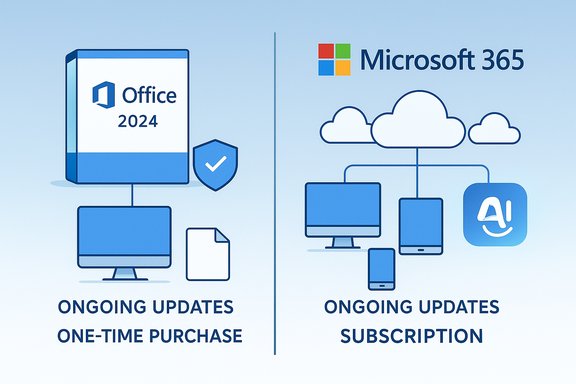
Microsoft has published a plain‑language support table that spells out the practical differences between the new one‑time purchase Office 2024 and the Microsoft 365 subscription, and the contrast is sharper than many marketing blurbs let on — one model buys stability and ownership, the other buys continuity, cloud services and ongoing innovation.
Microsoft’s product strategy now covers two clearly distinct purchasing models for core productivity: a perpetual, single‑purchase Office 2024 build (the traditional “buy once” model) and the continuously updated Microsoft 365 subscription that bundles apps, cloud storage and ongoing feature rollouts. The consumer Office 2024 release was made broadly available in late 2024, while Microsoft continues to position Microsoft 365 as its feature‑first offering with AI and cloud integration at its center.
This clarification matters because the practical impact on users — cost, device flexibility, access to AI assistants, cloud storage and feature cadence — is not just academic. Organizations and consumers deciding which path to take are effectively choosing a product lifecycle model: frozen snapshot versus an evolving service.
Source: Neowin Microsoft details feature differences between Office 2024 & Microsoft 365 on Windows 11/Mac
 Background
Microsoft’s product strategy now covers two clearly distinct purchasing models for core productivity: a perpetual, single‑purchase Office 2024 build (the traditional “buy once” model) and the continuously updated Microsoft 365 subscription that bundles apps, cloud storage and ongoing feature rollouts. The consumer Office 2024 release was made broadly available in late 2024, while Microsoft continues to position Microsoft 365 as its feature‑first offering with AI and cloud integration at its center.This clarification matters because the practical impact on users — cost, device flexibility, access to AI assistants, cloud storage and feature cadence — is not just academic. Organizations and consumers deciding which path to take are effectively choosing a product lifecycle model: frozen snapshot versus an evolving service.
Overview of Microsoft’s published comparison
Microsoft’s support guidance breaks the comparison into clear categories: cost, included apps, feature updates, installation rights, mobile/tablet features, online storage, and technical support. The headline contrasts are straightforward:- Office 2024 — one‑time purchase, install once on a single PC or Mac, includes the core Office applications, receives security updates but not new feature additions or upgrades to future major releases.
- Microsoft 365 — subscription model (monthly or annual), includes the full installed app set with continuous feature updates (including Microsoft’s AI/Copilot features on qualifying plans), allows installation across a user’s devices and includes cloud storage (typically 1 TB per user on consumer plans).
What Microsoft explicitly says (category by category)
Cost and licensing model
- Office 2024: one‑time payment — buy it once for a single device and keep the installed software on that device indefinitely. That payment does not include future major upgrades. This is the perpetual license model revived for Office 2024 consumer SKUs.
- Microsoft 365: pay monthly or yearly (Personal/Family/Premium tiers); subscription continues to grant access to the latest app versions and services while active. Pricing tiers and promotional discounts vary by region and time.
Included applications
- Office 2024: includes the core desktop apps — Word, Excel, PowerPoint and OneNote for consumers (Outlook may be included in certain Home & Business SKUs; Access and Publisher remain Windows‑only and are typically reserved for business or subscription SKUs).
- Microsoft 365: provides the fully installed set (Word, Excel, PowerPoint, Outlook, OneNote) and commonly adds apps and services like Teams, Access, Publisher, Microsoft Editor and integrated cloud services depending on the plan.
Feature updates and AI
- Office 2024: receives security updates and bug fixes, but does not receive the continuous stream of new features and AI enhancements that subscribers get. If Microsoft ships a feature‑heavy new major release later, Office 2024 perpetual buyers would need to purchase the next standalone product to pick it up.
- Microsoft 365: subscribers receive continuous updates, security fixes and new features — including the suite‑level rollout of AI features and Copilot‑powered tools in Word, Excel, PowerPoint, Outlook and OneNote when included in the subscription tier. This is the crux of Microsoft’s value proposition for many users.
Installation, device limits and mobility
- Office 2024: licensed for installation on a single PC or Mac (a one‑device license), making it more static by design.
- Microsoft 365: install across many devices — PCs, Macs, tablets and phones — and sign in on multiple devices simultaneously (specific limits depend on plan); Microsoft 365 Family or Premium allows sharing with other household members. That makes the subscription attractive for multi‑device households or users who frequently switch computers.
Tablets, phones and mobile features
- Office 2024: mobile apps can be installed for free on tablets and phones, but only basic editing features are available without a subscription.
- Microsoft 365: signing in to the Microsoft 365 account unlocks extra mobile features and richer editing experiences on tablets/phones, along with cloud sync and cross‑device continuity.
Cloud storage and collaboration
- Office 2024: does not include OneDrive cloud storage or the collaboration conveniences Microsoft bundles with Microsoft 365; files are local by default.
- Microsoft 365: most consumer plans include 1 TB of OneDrive storage per user with family plans allocating 1 TB per person, enabling cloud backup, real‑time co‑authoring and cross‑device sync.
Technical support
- Office 2024: access to support resources and limited activation support is provided, but ongoing full support and active feature development are oriented toward subscription customers.
- Microsoft 365: includes ongoing support options (chat/callback) and explicit technical support coverage across supported Windows versions; enterprise customers have longer and more formal support paths.
Technical verification and cross‑checks
Several of the most consequential claims in the comparison were verified across independent reporting and Microsoft documentation captured in the available coverage:- The consumer Office 2024 perpetual SKU is a one‑time purchase that does not automatically receive new features over time; this point is consistently reported across launch coverage.
- Microsoft 365 consumer plans commonly include 1 TB of OneDrive storage per user and are delivered as a subscription with ongoing feature updates. This is confirmed in product summaries and plan comparisons.
- The subscription model is the pathway Microsoft uses to deliver Copilot and other cloud‑centric AI features — access to those features depends on subscription tier, device hardware and in some cases region or organization settings. Independent reporting highlights hardware and OS requirements for Copilot on Mac and other platforms.
Strengths: what each model does well
Office 2024 — strengths
- Predictable, one‑off cost: No recurring fees make budgeting easy for single‑device users or organizations that prefer capital expenditure to recurring operational expense.
- Offline, local focus: For environments with strict data governance, limited connectivity, or regulatory restrictions, a perpetual offline desktop install remains easier to isolate.
- Simplicity: For users who only need Word, Excel and PowerPoint with a stable feature set, the frozen‑in‑time model is perfectly adequate.
Microsoft 365 — strengths
- Continuous innovation: Regular feature updates, including AI/Copilot capabilities and cloud integrations, keep the product continuously improving for subscribers.
- Multi‑device flexibility and sharing: Install and sign in across many devices, share with family members on Family/Premium plans, and access files from anywhere with OneDrive.
- Cloud features and co‑authoring: Real‑time collaboration, 1 TB per user of OneDrive and cloud backup enable modern hybrid workflows.
Risks, limitations and gotchas
- Feature stagnation for perpetual licenses: If your workflows depend on the latest AI shortcuts, data types, or collaboration metaphors Microsoft adds post‑release, a perpetual Office copy will eventually fall behind. The only remedy is another purchase.
- Device lock‑in: Office 2024 consumer SKUs licensed per device mean replacing a laptop or shifting to a new machine can require additional purchases or license transfers that are sometimes restricted. Check the SKU’s license terms carefully before buying.
- Hidden differences across platforms: Mac and Windows parity has improved, but macOS features like the native Copilot app require Apple Silicon and recent macOS versions; enterprises should test critical macros, add‑ins and integrations across the exact platform builds they deploy.
- Privacy and governance with Copilot/AI: The subscription model often ties into cloud processing and data handling that organizations must evaluate for compliance. Data governance and contractual terms should be reviewed before enabling broad Copilot usage in regulated environments.
- Variable marketing language: Some press coverage conflates “Office app” branding across mobile and desktop; mobile consolidated apps do not mean the desktop experience is a single binary replacement for Word/Excel/PowerPoint on macOS or Windows. Verify the actual app model you will deploy.
Practical guidance — how to decide
Below are concrete evaluation steps to identify which model fits your needs.- Inventory your workflows:
- List mission‑critical add‑ins, macros and integrations (SharePoint, Teams bots, Access databases).
- Note whether you need cross‑device continuity (phone, tablet, laptop), and whether real‑time co‑authoring is essential.
- Map feature needs to product strengths:
- If you need continuous AI assistance, cloud co‑authoring, OneDrive and multi‑device installs → favor Microsoft 365.
- If you only need the core desktop Office apps on a single machine, require local storage and desire a one‑time purchase → consider Office 2024.
- Calculate cost break‑even:
- If a Microsoft 365 Personal plan costs X per year, compute the number of years after which a one‑time purchase pays off, factoring in expected hardware refresh cycles and any need for advanced features.
- Verify platform and hardware requirements:
- For Copilot or advanced AI features on Mac, check for Apple Silicon and supported macOS versions; for Windows, confirm OS build and TPM/boot requirements if relevant to deployment.
- Test mission‑critical scenarios:
- Run macros, test add‑in compatibility, and validate printing, archival and security behavior on the exact machine images you plan to use.
- Check licensing transfer rules:
- Review whether your chosen Office 2024 SKU permits transferring the license to a new device, and what the activation/redeem deadlines are for purchased retail codes.
Enterprise considerations
- Enterprises often prefer subscription models for predictable operations, centralized management (Azure AD, Intune), and the ability to push features and security updates centrally; Microsoft 365 aligns with that approach and with modern device management tooling.
- For regulated or isolated environments that cannot or should not have cloud‑connected features, Microsoft provides an LTSC (Long‑Term Servicing Channel) and standalone Office variants suited to disconnected operations; these have different lifecycle and support windows that must be planned.
- Data governance: enabling Copilot at scale requires contractual and administrative review — understand how prompts and customer content are processed, retained and protected before enabling AI capabilities across an organization.
Cost calculus — an example
- Example assumptions (illustrative):
- Microsoft 365 Personal: $X/year (use the current published rate at the time of purchase).
- Office 2024 one‑time: $Y (check current MSRP and retail variations).
- Break‑even formula:
- Break‑even years = Y / X
- If Y is less than X and you never upgrade devices, the perpetual license can be cheaper over time; if you replace devices every 3 years or require cloud features, the subscription often yields better total value.
Final analysis: strengths, strategic intent and recommended approach
Microsoft’s published comparison is deliberately pragmatic: it frames Office 2024 as the conservative, single‑device, cost‑predictable option and Microsoft 365 as the progressive, cloud‑first, continuously improving service. For consumers and IT pros, the choice boils down to three core tradeoffs:- Ownership vs. Continuity — Do you prefer paying once and keeping a stable toolset, or paying for continuous improvements, cloud storage and AI?
- Local control vs. Cloud services — Are you constrained by data locality/regulations or do you benefit from OneDrive, co‑authoring and Copilot?
- Device permanence vs. mobility — Do you work primarily on a single, long‑lived device, or do you move between multiple devices constantly?
Closing notes and cautions
- Verify current prices and plan inclusions at point of purchase — press and community reports often reflect temporary promotions or regional differences.
- Test platform parity for mission‑critical functions, especially macros and add‑ins, before committing to a large‑scale deployment.
- Treat Copilot and cloud AI features as conditional capabilities: they depend on subscription tier, regional availability, and hardware/OS constraints; organizations must assess governance controls before wide rollout.
Source: Neowin Microsoft details feature differences between Office 2024 & Microsoft 365 on Windows 11/Mac