

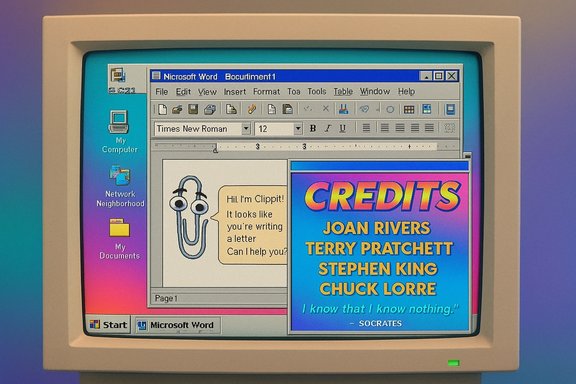
A decades‑old secret tucked inside Microsoft Office 97 has resurfaced: perform a handful of precise UI moves in Word 97, whisper the exact phrase “This is not a contest.” to the Office Assistant, and a hidden developer‑credits animation — complete with whimsical commentary from Clippit (Clippy) — plays out as if a 1990s development team left themselves a private party inside shipped binaries. ])
Office 97 arrived during the Windows 95/NT era and carried with it an ambitious — and now infamous — experiment in user assistance: the Office Assistant, officially named Clippit and commonly known as Clippy. The assistant was designed to surface contextual tips, but its interruptive behavior quickly made it a cultural touchstone for both nostalgia and design caution. The Office Assistant first appeared in Office 97 and became part of the Office experience across late‑90s releases. The newly observed Easter egg was publicized in January 2026 by X user Albacore (username @thebookisclosed), who published a short demonstration showing how to trigger the hidden sequence and what appears when it runs. Several mainstream and retrocomputing outlets replicated and documented the steps and results, confirming the find and prompting renewed interest in legacy Office binaries.
The specific activation complexity — dragging a toolbar through a precise sequence with Control presses and an exact search phrase — suggests an intentional obscurity rather than an accidental gate. This hints that the feature’s target audience was internal: colleagues who knew the incantation or contributors who would stumble into the surprise during internal demos. That empathy‑driven secrecy is distinct from viral Easter eggs designed to be found by the public.
For historians, designers, and preservationists, the sequence is a small but welcome primary source. For modern product teams, it’s a polite cautionary tale: persona and personality can humanize software, but they must be designed with care so they never overshadow the user’s goals.
Source: Windows Central A secret Clippy Easter egg in Office 97 just resurfaced after 30 years
 Background
Office 97 arrived during the Windows 95/NT era and carried with it an ambitious — and now infamous — experiment in user assistance: the Office Assistant, officially named Clippit and commonly known as Clippy. The assistant was designed to surface contextual tips, but its interruptive behavior quickly made it a cultural touchstone for both nostalgia and design caution. The Office Assistant first appeared in Office 97 and became part of the Office experience across late‑90s releases. The newly observed Easter egg was publicized in January 2026 by X user Albacore (username @thebookisclosed), who published a short demonstration showing how to trigger the hidden sequence and what appears when it runs. Several mainstream and retrocomputing outlets replicated and documented the steps and results, confirming the find and prompting renewed interest in legacy Office binaries. Overview of the discovery
What was found is not a bug or a user‑facing help widget; it’s a deliberate, obscure developer credit screen that includes animated transitions, colorful 1990s‑era text effects, and scripted lines attributed to Clippit. The sequence appears to have been intended as an internal nod — a private “hello” from the engineering team — rather than a discoverable user feature, given the activation complexity and the requirement to meet very specific runtime conditions. Key reproducible details reported by multiple outlets and retrocomputing researchers:- The Office 97 image must be an authentic build (the Easter egg doesn’t exist in modern Office releases).
- The host system date must be set to 1997 or later before launching Word 97.
- A sequence of toolbar moves while holding and releasing modifier keys triggers an internal flag; finally invoking the Office Assistant search with the exact phrase including the period — “This is not a contest.” — causes the credits screen to open. Additional animations can be produced by holding Shift while pressing Search.
How the Easter egg works — step‑by‑step (reproduced)
The activation flow is intentionally fiddly, which explains why the credit sequence remained hidden for decades. The following steps summarize the reproduction pathway as reported and replicated by testers. These are precise; small deviations may prevent the sequence from running.- Install and boot an authentic Office 97 build inside a controlled environment (virtual machine recommended).
- Set the virtual machine’s system date to 1997 or any later year. This satisfies a time check baked into the Office 97 resources.
- Launch Microsoft Word 97 and ensure the Standard toolbar is visible.
- Hold Ctrl, click and drag the Standard toolbar to the left edge of the Word window. Release Ctrl.
- Repeat the drag while holding Ctrl in this order: down, right, then up — releasing and re‑holding Ctrl between each directional move. The sequence of positions appears to toggle an internal state or sequence counter.
- Click the Office Assistant (Clippit/Clippy) to open the search box. Type This is not a contest. — the final period is significant — and press Search. (Holding Shift while pressing Search reportedly yields additional animations.
Why this matters: cultural, technical, and design angles
This resurfaced Easter egg is valuable for three overlapping reasons:- Cultural history: It offers a rare, inside look at how 1990s development teams commemorated their work inside shipped products. These hidden credits humanize software that is otherwise opaque. The credit sequence literally names contributors and pairs their credits with lighthearted commentary. That personal footprint is otherwise invisible in closed, pre‑cloud releases.
- Design lineage: Clippy’s appearance ties the modern conversation around assistant personality and trust back to its roots. Today’s AI assistants intentionally craft persona; the Office Assistant was an early and formative experiment in anthropomorphic helpfulness. Seeing Clippit used as a narrative voice for credits underscores how designers have been experimenting with characterful interfaces for decades.
- Preservation and archeology: The find emphasizes why software preservation matters. Without preserved Office 97 images and emulation environments, this Easter egg would likely have stayed buried forever. The discovery also highlights how subtle runtime checks (like system date) and UI sequences can gate content in legacy binaries.
Verification: cross‑checking the claims
To ensure accuracy, multiple independent sources and hands‑on writeups were consulted.- The discovery and activation steps were reported and demonstrated by mainstream outlets covering the find. The Windows Central writeup summarized the activation flow and noted additional animations when holding Shift during search; Tom’s Guide and Yahoo reproduced similar steps and described the resulting credits animation. Those reports align with the Albacore demonstration on X.
- Historic context for Clippit and Office 97 — including the assistant’s introduction and the suite’s era — is corroborated by archival documentation and platform histories. Office 97 included the Office Assistant and shipped in the late 1990s; Clippit (Clippy) was the default English assistant and remains the most notable example of Microsoft’s character‑based help experiments.
- Parallel comparisons to other well‑known Office Easter eggs were checked. Word 97’s pinball mini‑game and Excel 97’s flight simulator have been documented across retrocomputing archives and contemporary writeups going back decades, confirming that Microsoft teams previously embedded wholly different interactive Easter eggs into Office components. The reproducible steps for those games have long been archived in Easter‑egg registries and technical retrospectives.
Reproducibility and practical guidance for hobbyists
For those who want to reproduce the find, the safest path is a cautious, preservation‑minded approach:- Use a dedicated virtual machine (Windows 95/98 era VM or compatible) with a clean Office 97 installation image. Snapshot the VM before experimenting.
- Prefer retail or well‑documented SR‑1 builds; some placeholders or pirate/patched copies remove or alter resource files that Easter eggs depend on.
- Match the system date requirement (1997 or later) and execute the toolbar/Control drag sequence exactly as described. Small deviations often fail silently.
- Be ready for localization differences: help dialogs and the Office Assistant UI may vary by language, and exact string matching for “This is not a contest.” may fail in non‑English builds. If the credit screen doesn’t appear, try a different Office 97 language or build.
- Running legacy systems and legacy Office builds can introduce security risks if those images are exposed to networks or untrusted media. Keep the VM offline and limit interaction with the host to prevent legacy networking protocols from exposing the environment.
- Be mindful of licensing: vintage software remains under copyright; use legally obtained media or licensed archival sources.
What this says about developer culture in the 1990s
The Easter egg is a textbook example of an era when shipped software often included private jokes, hidden credits, and small interactive flourishes that were never intended for mass discovery. Before continuous delivery, telemetry, and cloud‑hosted updates, shipping a release was a major milestone — engineering teams sometimes tucked these signatures into the build as a human counterpoint to monolithic product artifacts.The specific activation complexity — dragging a toolbar through a precise sequence with Control presses and an exact search phrase — suggests an intentional obscurity rather than an accidental gate. This hints that the feature’s target audience was internal: colleagues who knew the incantation or contributors who would stumble into the surprise during internal demos. That empathy‑driven secrecy is distinct from viral Easter eggs designed to be found by the public.
Notable strengths of the find and the broader practice
- Humanizes engineering: Hidden credits remind users there were humans and personalities behind massive software projects, not just faceless corporate logos. That emotional connection matters to preservationists and historians.
- Educational value: For designers and engineers today, rediscoveries like this are instructive. They demonstrate tradeoffs in anthropomorphic assistance design (how persona can help or hinder user experience) and show how product architecture can include private states and triggers.
- Preservation momentum: Each sensational find encourages others to preserve, catalog, and document legacy software builds — a public good for computing history and reproducibility.
Potential risks, concerns, and caveats
- Misinterpretation as malicious backdoor: Hidden sequences that yield unexpected windows or behavior can be misconstrued as security backdoors. This find is a benign credit sequence, but opaque triggers reinforce caution: security practitioners must treat unknown binary behaviors as potentially risky until verified in controlled environments.
- Fragility and reproducibility: The Easter egg’s reliance on exact build artifacts and date checks makes it fragile; online documentation that gives imprecise or incomplete steps will produce false negatives and confusion. This fragility can produce a cascade of erroneous reports unless experiments are carefully controlled.
- Legal and licensing considerations: Encouraging readers to run legacy software carries licensing implications; hobbyists should avoid sharing pirated copies and should prefer legally obtained media or archival partnerships.
- Nostalgia vs. product lessons: Romanticizing Clippy risks overlooking why the Office Assistant was retired: unsolicited, interruptive assistance that harms productivity. Modern assistants must avoid repeating those UX mistakes even while embracing harmless nostalgia gestures.
Broader context: Easter eggs then and now
Microsoft’s Office suite has a long history of buried Easter eggs. Word 97 featured a playable Pinball mini‑game, accessible via an obscure sequence, and Excel 97 shipped a hidden Flight Simulator. These historic Easter active and sometimes substantial; they turn software into archival artifacts that can surprise even experienced users years later. The new Office 97 credits sequence sits in that lineage. The practice of embedding hidden content has diminished in the cloud era. Continuous deployment, legal scrutiny, and the need for transparent behavior in enterprise software have made such whimsical insertions rare and often discouraged. That makes rediscoveries like this one both charming and historically instructive: they're artifacts of a different product development ecosystem.What product teams should learn
- Design privacy and transparency first. Hidden behavior, even if playful, can be misread; in modern software, intentionality and discoverability matter for trust.
- If a team wants to celebrate contributors, consider publicly visible credits, interactive timelines, or opt‑in “about” features rather than obscured, build‑level sequences.
- Nostalgia can be a marketing win, but product teams must separate cosmetic callbacks from behavior: a visual Easter egg is low risk; restoring an intrusive, modality‑breaking assistant is not.
Conclusion
The newly resurfaced Office 97 Easter egg is a rare, well‑preserved wink from a bygone era of desktop software: a private developer credit reel with Clippit doing what it was always meant to do — add a touch of personality. The find connects product archaeology, software preservation, and the longer arc of assistant design in a single moment, reminding modern engineers that even the most buttoned‑down productivity suites once harbored playful, human touches.For historians, designers, and preservationists, the sequence is a small but welcome primary source. For modern product teams, it’s a polite cautionary tale: persona and personality can humanize software, but they must be designed with care so they never overshadow the user’s goals.
Source: Windows Central A secret Clippy Easter egg in Office 97 just resurfaced after 30 years
