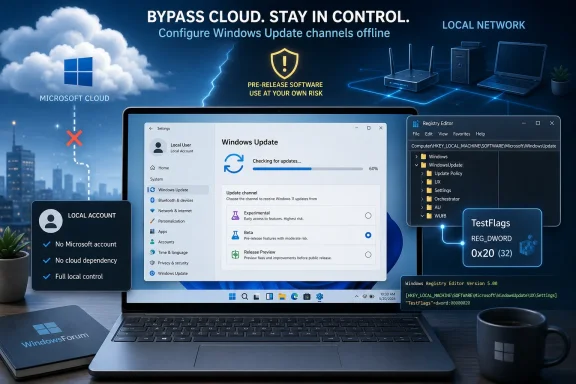
Microsoft’s latest Windows Insider reshuffle has opened the door for OfflineInsiderEnroll 2.6.6, an unofficial script updated in June 2026 to enroll Windows 11 PCs into preview channels without requiring a Microsoft account. The tool does not crack Windows Update so much as expose a long-standing seam in how Windows stores Insider configuration locally. That makes it useful, awkward, and revealing all at once. Microsoft wants a more orderly testing program; the enthusiast community is reminding Redmond that Windows still contains enough local plumbing to route around the front door.
The Windows Insider Program has spent the last decade becoming both more central to Windows development and more confusing to ordinary users. Microsoft has treated Insider channels as a public test lab, a telemetry funnel, a marketing preview machine, and occasionally a pressure valve for features that may or may not ship. The bargain is familiar: users get early access, Microsoft gets feedback and data.
But the Microsoft account requirement has never sat comfortably with a certain class of Windows user. For enthusiasts, lab builders, repair shops, and privacy-minded admins, tying a test installation to an online identity can feel less like program administration and more like unnecessary friction. Windows Update itself is capable of delivering builds once the machine is pointed at the correct flighting configuration; the account is the enrollment mechanism, not the delivery engine.
OfflineInsiderEnroll exists in that gap. According to reporting from Neowin and the project’s own description, the script configures Insider enrollment locally so Windows Update can continue receiving preview builds without the device being signed into a Microsoft account. The practical result is simple: a user can select a preview path and let Windows Update do the rest.
That is why this story matters beyond one GitHub script. It shows the difference between Microsoft’s preferred user journey and Windows’ actual internal architecture. Redmond may increasingly design Windows as an account-connected service, but the operating system still carries decades of local configuration machinery that power users know how to manipulate.
That distinction is important. OfflineInsiderEnroll is not a magical preview-build downloader, and it is not a replacement for Windows Update. It is more like a switchboard operator for settings Microsoft normally expects to be managed through the Insider interface and account-backed enrollment flow.
The script still requires administrator privileges, which should immediately narrow the audience. This is not something an ordinary user should run casually because a forum post promised “unreleased features.” It changes system-level update behavior, and Windows preview builds can carry bugs that range from cosmetic annoyances to upgrade blockers.
Yet the tool’s appeal is obvious. It packages a messy set of Registry edits into a menu-driven script, allowing users to move among supported Insider channels, refresh the Insider cache, reset enrollment settings, or stop Insider enrollment entirely. For lab machines and disposable test installs, that is exactly the kind of rough but effective utility Windows enthusiasts have always built for themselves.
Under the new model, Experimental becomes the place where the earliest and least certain Windows ideas appear. Beta is supposed to become more predictable, closer to features Microsoft expects to ship. Release Preview remains the safer last stop before general availability, with updates that are more about validation than exploration.
That is the theory. In practice, the transition is messy because existing machines sit on different build trains. Canary systems in the 28000-series path map differently from Canary systems in the 29500-series path, and Microsoft has been moving users gradually rather than flipping every tester at once. The new naming scheme is easier only after the migration dust settles.
OfflineInsiderEnroll 2.6.6 updates the script for that new world. It adds support for the newer channel lineup, including multiple Experimental options, alongside Beta and Release Preview choices. The tool is effectively following Microsoft’s reorganization and translating it back into local configuration choices.
That creates an odd symmetry. Microsoft is trying to make Insider testing less dependent on hacks and hidden feature workarounds, while the community is updating its hacks so they keep working with Microsoft’s cleaner model. The company simplifies the map; the script redraws the unofficial trail.
That honesty is welcome. One of the long-running frustrations with Windows Insider builds is that they can create false certainty. A feature appearing in a preview build is often treated by users, bloggers, and sometimes even vendors as a near-future shipping commitment, when Microsoft may only be measuring reaction or validating a technical path.
The new Experimental track also gives Microsoft room to expose feature flags more directly. Rather than forcing enthusiasts to rely on third-party tools to activate hidden or gradually rolled-out features, Microsoft has said it wants Insiders in Experimental to have more control through a feature flags page in Settings. That is a healthy direction, at least in principle.
But this is exactly where OfflineInsiderEnroll becomes revealing. If Microsoft gives enthusiasts more official toggles while still requiring account-backed enrollment, unofficial tools will remain attractive to anyone who wants the technical access without the identity layer. The fight is not just over early code; it is over who gets to decide the terms of participation.
There are reasonable arguments for that approach. Account-connected Windows can sync settings, improve device recovery, strengthen anti-fraud protections, and give Microsoft a clearer support and feedback channel. For Insider builds in particular, accounts help tie telemetry, feedback, and enrollment state together in a way that is administratively convenient.
The problem is that convenience for Microsoft can become a loss of agency for advanced users. A local test machine in a workshop does not necessarily need an online identity. A sysadmin validating an upgrade path may not want personal or corporate account state entangled with a throwaway installation. A privacy-conscious enthusiast may accept preview instability without accepting another sign-in mandate.
OfflineInsiderEnroll sits at the intersection of these tensions. It does not make the Microsoft account debate disappear; it makes the workaround concrete. As long as Windows can be steered by local configuration, users will look for ways to make the operating system behave like a locally owned machine rather than a service endpoint.
The irresponsible way to view it is as a shortcut to “new Windows features” on a primary machine. Insider builds are not merely regular updates with a few extra UI toggles. They can alter core OS behavior, introduce driver regressions, break apps, change security surfaces, and complicate rollback options.
The new channel structure may make this easier to explain, but it does not eliminate the risk. Experimental is still experimental. Beta may be calmer, but it remains pre-release software. Release Preview is the closest thing to conservative preview testing, yet even there users should expect the occasional sharp edge.
The script’s ability to reset or stop Insider enrollment is helpful, but it should not be mistaken for a guaranteed escape hatch. Moving between build trains has historically been constrained by version numbers, servicing rules, and downgrade limitations. Microsoft has been working to make channel movement less painful, but preview builds can still put a machine in a state where the cleanest path out is a reinstall.
OfflineInsiderEnroll works because the second Windows still exists underneath the first. The operating system may present a Settings page that expects account-backed enrollment, but the update stack still reads local state. The graphical interface tells one story; the plumbing tells another.
This duality is why Windows remains so valuable in enterprise and enthusiast contexts. Administrators can script it, image it, patch it, redirect it, lock it down, and sometimes bend it into shapes Microsoft did not explicitly bless. That flexibility is also why Windows is difficult to fully modernize without angering its most loyal technical users.
Microsoft’s challenge is that every local control surface is also a support liability. If users can alter Insider state locally, they can also create unsupported configurations. If a script can suppress online enrollment checks, Microsoft loses a clean link between program participation and account identity. If preview builds land on machines outside the intended flow, telemetry and feedback become less tidy.
But the alternative — sealing everything behind online enrollment and managed UI flows — would make Windows feel less like Windows. Power users tolerate a lot from Microsoft because they can still get under the hood. Remove too much of that, and the community’s relationship with the platform changes.
Microsoft’s 2026 restructuring is an attempt to cut through that lore. Experimental means early and uncertain. Beta means closer to shipping. Release Preview means nearly done. That is a better story, especially for users who do not follow every Windows build number like a baseball statistic.
The complication is that Windows development itself is not linear. Features are decoupled from OS releases, enablement packages can change what a build “is,” and staged rollouts mean two PCs on the same channel can behave differently. The Insider Program can simplify its labels, but it cannot fully simplify the engineering reality underneath.
That is where feature flags become the interesting piece. If Microsoft exposes more feature control directly to Insiders, the program becomes less of a guessing game. Users can test specific experiences instead of waiting for server-side rollout luck or reaching for third-party tools to enable hidden IDs.
Still, the presence of OfflineInsiderEnroll suggests that official feature flags will not satisfy every enthusiast. Some users are not merely trying to toggle a new Start menu experiment. They are trying to preserve the right to participate in Windows testing on their own terms.
A machine unexpectedly receiving preview builds may fall outside validated patch baselines. It may run code that has not passed internal compatibility testing. It may generate help-desk noise that looks like an application problem when the root cause is an unsupported Windows build.
The Microsoft account bypass angle also matters in managed environments. If an organization assumes Insider enrollment requires a user to sign in and opt into a program, a local script challenges that assumption. Administrative rights remain a major barrier, but many organizations still have too many users running with local admin privileges.
Modern endpoint management should be able to detect and prevent much of this. Policies can restrict preview builds, Windows Update for Business can control servicing channels, and device compliance rules can flag unsupported OS versions. But those controls need to be intentionally configured; they are not magic.
The broader point is that preview access should be treated like any other change to production servicing. Enthusiasts may see a shortcut. Enterprises should see a governance boundary.
Microsoft still decides what ships. Microsoft still controls Windows Update infrastructure. Microsoft still defines the build trains, signs the packages, and determines which features survive. OfflineInsiderEnroll can place a machine on a preview path, but it cannot turn Windows into a community-governed operating system.
That distinction matters because Windows enthusiasts often live in the gap between influence and ownership. Insider feedback can shape features, especially when Microsoft is actively measuring satisfaction or compatibility. But the program is not a referendum, and hidden or unreleased features are not public promises.
The best use of tools like OfflineInsiderEnroll is observational. They let technically capable users examine where Windows is going, test hardware and software, and understand Microsoft’s direction earlier than the general public. The worst use is entitlement — treating every preview artifact as something Microsoft owes to everyone immediately.
That is why Microsoft’s move toward official feature flags is strategically smart. It gives enthusiasts a sanctioned way to explore without pretending every experiment is a release candidate. But if Microsoft keeps that experience tied too tightly to account requirements, scripts like this will continue to serve users who want the experiment without the leash.
That strategy is partly about quality. Microsoft has taken years of criticism over Windows updates, staged rollouts, unclear feature availability, and the sense that users are often testing production code after it ships. A better Insider Program is one way to move more of that uncertainty earlier in the pipeline.
It is also about messaging. The old channel names carried baggage. Experimental and Beta communicate risk more clearly, especially to non-specialists. If Microsoft can align build delivery, feature flags, and rollback paths with those names, the Insider Program becomes easier to trust.
But the strategy is also about control. Account enrollment, telemetry correlation, feedback tooling, and staged feature exposure all help Microsoft manage Windows as a service. OfflineInsiderEnroll reminds us that a portion of the Windows base values control in the opposite direction: local, scriptable, minimally mediated.
Neither side is going away. Microsoft will keep building a more service-like Windows. Enthusiasts will keep looking for seams where local configuration still matters. The interesting future is not whether one side wins, but how much friction accumulates between them.
For WindowsForum readers, the practical guidance is straightforward. If you use it, use it on hardware you can afford to rebuild. Keep backups. Expect channel names and build paths to keep changing while Microsoft completes the Insider transition. Do not assume a successful enrollment today guarantees a painless exit tomorrow.
The most important details are also the easiest to miss:
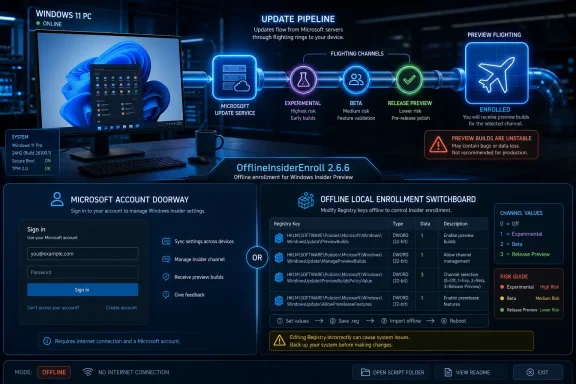 The Account Requirement Was Always More Policy Than Physics
The Windows Insider Program has spent the last decade becoming both more central to Windows development and more confusing to ordinary users. Microsoft has treated Insider channels as a public test lab, a telemetry funnel, a marketing preview machine, and occasionally a pressure valve for features that may or may not ship. The bargain is familiar: users get early access, Microsoft gets feedback and data.But the Microsoft account requirement has never sat comfortably with a certain class of Windows user. For enthusiasts, lab builders, repair shops, and privacy-minded admins, tying a test installation to an online identity can feel less like program administration and more like unnecessary friction. Windows Update itself is capable of delivering builds once the machine is pointed at the correct flighting configuration; the account is the enrollment mechanism, not the delivery engine.
OfflineInsiderEnroll exists in that gap. According to reporting from Neowin and the project’s own description, the script configures Insider enrollment locally so Windows Update can continue receiving preview builds without the device being signed into a Microsoft account. The practical result is simple: a user can select a preview path and let Windows Update do the rest.
That is why this story matters beyond one GitHub script. It shows the difference between Microsoft’s preferred user journey and Windows’ actual internal architecture. Redmond may increasingly design Windows as an account-connected service, but the operating system still carries decades of local configuration machinery that power users know how to manipulate.
OfflineInsiderEnroll Turns a Registry Seam Into a User Interface
The script’s central trick is not glamorous. It leans on local Registry configuration, including a value known asTestFlags, which Neowin says can be set to 0x20 to prevent Windows from talking to Microsoft’s online Insider enrollment services in the usual way. Once that happens, locally configured Insider settings are not overwritten by the cloud-side enrollment state.That distinction is important. OfflineInsiderEnroll is not a magical preview-build downloader, and it is not a replacement for Windows Update. It is more like a switchboard operator for settings Microsoft normally expects to be managed through the Insider interface and account-backed enrollment flow.
The script still requires administrator privileges, which should immediately narrow the audience. This is not something an ordinary user should run casually because a forum post promised “unreleased features.” It changes system-level update behavior, and Windows preview builds can carry bugs that range from cosmetic annoyances to upgrade blockers.
Yet the tool’s appeal is obvious. It packages a messy set of Registry edits into a menu-driven script, allowing users to move among supported Insider channels, refresh the Insider cache, reset enrollment settings, or stop Insider enrollment entirely. For lab machines and disposable test installs, that is exactly the kind of rough but effective utility Windows enthusiasts have always built for themselves.
Microsoft Simplified the Insider Program, Then the Community Re-Mapped It
The timing of OfflineInsiderEnroll 2.6.6 is not accidental. Microsoft recently began restructuring the Windows Insider Program around a new channel model, replacing the old overlap of Canary, Dev, Beta, and Release Preview with a more explicit split between Experimental, Beta, and Release Preview tracks. The goal is to make preview testing less opaque.Under the new model, Experimental becomes the place where the earliest and least certain Windows ideas appear. Beta is supposed to become more predictable, closer to features Microsoft expects to ship. Release Preview remains the safer last stop before general availability, with updates that are more about validation than exploration.
That is the theory. In practice, the transition is messy because existing machines sit on different build trains. Canary systems in the 28000-series path map differently from Canary systems in the 29500-series path, and Microsoft has been moving users gradually rather than flipping every tester at once. The new naming scheme is easier only after the migration dust settles.
OfflineInsiderEnroll 2.6.6 updates the script for that new world. It adds support for the newer channel lineup, including multiple Experimental options, alongside Beta and Release Preview choices. The tool is effectively following Microsoft’s reorganization and translating it back into local configuration choices.
That creates an odd symmetry. Microsoft is trying to make Insider testing less dependent on hacks and hidden feature workarounds, while the community is updating its hacks so they keep working with Microsoft’s cleaner model. The company simplifies the map; the script redraws the unofficial trail.
Experimental Is Microsoft’s New Playground, Not a Promise
The word Experimental is doing a lot of work in Microsoft’s revised Insider vocabulary. It is meant to be more honest than the old Canary and Dev split, where users often struggled to understand whether a build was future-facing, risky, abandoned, or merely early. Experimental says, plainly, that features may change, vanish, or arrive in public Windows by a route no one can predict.That honesty is welcome. One of the long-running frustrations with Windows Insider builds is that they can create false certainty. A feature appearing in a preview build is often treated by users, bloggers, and sometimes even vendors as a near-future shipping commitment, when Microsoft may only be measuring reaction or validating a technical path.
The new Experimental track also gives Microsoft room to expose feature flags more directly. Rather than forcing enthusiasts to rely on third-party tools to activate hidden or gradually rolled-out features, Microsoft has said it wants Insiders in Experimental to have more control through a feature flags page in Settings. That is a healthy direction, at least in principle.
But this is exactly where OfflineInsiderEnroll becomes revealing. If Microsoft gives enthusiasts more official toggles while still requiring account-backed enrollment, unofficial tools will remain attractive to anyone who wants the technical access without the identity layer. The fight is not just over early code; it is over who gets to decide the terms of participation.
The Microsoft Account Debate Keeps Spilling Into Windows Update
The Windows 11 era has repeatedly tightened the relationship between Windows and Microsoft’s online services. Setup flows, account prompts, OneDrive integration, Microsoft Store assumptions, Copilot positioning, and cross-device features all point in the same direction. Microsoft wants Windows to be a cloud-connected endpoint in a larger services ecosystem.There are reasonable arguments for that approach. Account-connected Windows can sync settings, improve device recovery, strengthen anti-fraud protections, and give Microsoft a clearer support and feedback channel. For Insider builds in particular, accounts help tie telemetry, feedback, and enrollment state together in a way that is administratively convenient.
The problem is that convenience for Microsoft can become a loss of agency for advanced users. A local test machine in a workshop does not necessarily need an online identity. A sysadmin validating an upgrade path may not want personal or corporate account state entangled with a throwaway installation. A privacy-conscious enthusiast may accept preview instability without accepting another sign-in mandate.
OfflineInsiderEnroll sits at the intersection of these tensions. It does not make the Microsoft account debate disappear; it makes the workaround concrete. As long as Windows can be steered by local configuration, users will look for ways to make the operating system behave like a locally owned machine rather than a service endpoint.
This Is Useful for Labs, Risky for Daily Drivers
The responsible way to view OfflineInsiderEnroll is as a lab tool. On a spare PC, virtual machine, test partition, or non-critical device, it can reduce friction for users who know what they are doing. It lets them observe Microsoft’s preview cadence without enrolling through the standard account path.The irresponsible way to view it is as a shortcut to “new Windows features” on a primary machine. Insider builds are not merely regular updates with a few extra UI toggles. They can alter core OS behavior, introduce driver regressions, break apps, change security surfaces, and complicate rollback options.
The new channel structure may make this easier to explain, but it does not eliminate the risk. Experimental is still experimental. Beta may be calmer, but it remains pre-release software. Release Preview is the closest thing to conservative preview testing, yet even there users should expect the occasional sharp edge.
The script’s ability to reset or stop Insider enrollment is helpful, but it should not be mistaken for a guaranteed escape hatch. Moving between build trains has historically been constrained by version numbers, servicing rules, and downgrade limitations. Microsoft has been working to make channel movement less painful, but preview builds can still put a machine in a state where the cleanest path out is a reinstall.
The Registry Hack Is a Symptom of Windows’ Two Souls
Windows has always had two identities. It is a consumer operating system increasingly shaped by online accounts, app stores, subscriptions, and service-driven features. It is also an admin-friendly platform full of Registry keys, policies, servicing channels, command-line tools, and compatibility affordances that make it unusually malleable.OfflineInsiderEnroll works because the second Windows still exists underneath the first. The operating system may present a Settings page that expects account-backed enrollment, but the update stack still reads local state. The graphical interface tells one story; the plumbing tells another.
This duality is why Windows remains so valuable in enterprise and enthusiast contexts. Administrators can script it, image it, patch it, redirect it, lock it down, and sometimes bend it into shapes Microsoft did not explicitly bless. That flexibility is also why Windows is difficult to fully modernize without angering its most loyal technical users.
Microsoft’s challenge is that every local control surface is also a support liability. If users can alter Insider state locally, they can also create unsupported configurations. If a script can suppress online enrollment checks, Microsoft loses a clean link between program participation and account identity. If preview builds land on machines outside the intended flow, telemetry and feedback become less tidy.
But the alternative — sealing everything behind online enrollment and managed UI flows — would make Windows feel less like Windows. Power users tolerate a lot from Microsoft because they can still get under the hood. Remove too much of that, and the community’s relationship with the platform changes.
The Insider Program Is Trying to Escape Its Own Lore
For years, the Windows Insider Program has had a vocabulary problem. Rings became channels. Fast became Dev. Skip Ahead appeared and disappeared. Canary became the high-risk edge, then Dev sometimes got features before Canary, while Beta became both stable-ish and still subject to staged rollout surprises. The mental model demanded more historical knowledge than a testing program should require.Microsoft’s 2026 restructuring is an attempt to cut through that lore. Experimental means early and uncertain. Beta means closer to shipping. Release Preview means nearly done. That is a better story, especially for users who do not follow every Windows build number like a baseball statistic.
The complication is that Windows development itself is not linear. Features are decoupled from OS releases, enablement packages can change what a build “is,” and staged rollouts mean two PCs on the same channel can behave differently. The Insider Program can simplify its labels, but it cannot fully simplify the engineering reality underneath.
That is where feature flags become the interesting piece. If Microsoft exposes more feature control directly to Insiders, the program becomes less of a guessing game. Users can test specific experiences instead of waiting for server-side rollout luck or reaching for third-party tools to enable hidden IDs.
Still, the presence of OfflineInsiderEnroll suggests that official feature flags will not satisfy every enthusiast. Some users are not merely trying to toggle a new Start menu experiment. They are trying to preserve the right to participate in Windows testing on their own terms.
Security Teams Will See a Configuration Drift Problem
For enterprise IT, the immediate lesson is not “block OfflineInsiderEnroll” so much as “watch for unauthorized Insider enrollment.” A script that changes update channel configuration locally is exactly the kind of thing that can create configuration drift outside normal management controls. In a business environment, that matters.A machine unexpectedly receiving preview builds may fall outside validated patch baselines. It may run code that has not passed internal compatibility testing. It may generate help-desk noise that looks like an application problem when the root cause is an unsupported Windows build.
The Microsoft account bypass angle also matters in managed environments. If an organization assumes Insider enrollment requires a user to sign in and opt into a program, a local script challenges that assumption. Administrative rights remain a major barrier, but many organizations still have too many users running with local admin privileges.
Modern endpoint management should be able to detect and prevent much of this. Policies can restrict preview builds, Windows Update for Business can control servicing channels, and device compliance rules can flag unsupported OS versions. But those controls need to be intentionally configured; they are not magic.
The broader point is that preview access should be treated like any other change to production servicing. Enthusiasts may see a shortcut. Enterprises should see a governance boundary.
Enthusiasts Should Not Confuse Access With Ownership
There is a romantic version of this story in which a clever community script defeats needless Microsoft bureaucracy and restores user freedom. There is truth in that version, but it is incomplete. Access to preview builds does not mean control over the future of Windows.Microsoft still decides what ships. Microsoft still controls Windows Update infrastructure. Microsoft still defines the build trains, signs the packages, and determines which features survive. OfflineInsiderEnroll can place a machine on a preview path, but it cannot turn Windows into a community-governed operating system.
That distinction matters because Windows enthusiasts often live in the gap between influence and ownership. Insider feedback can shape features, especially when Microsoft is actively measuring satisfaction or compatibility. But the program is not a referendum, and hidden or unreleased features are not public promises.
The best use of tools like OfflineInsiderEnroll is observational. They let technically capable users examine where Windows is going, test hardware and software, and understand Microsoft’s direction earlier than the general public. The worst use is entitlement — treating every preview artifact as something Microsoft owes to everyone immediately.
That is why Microsoft’s move toward official feature flags is strategically smart. It gives enthusiasts a sanctioned way to explore without pretending every experiment is a release candidate. But if Microsoft keeps that experience tied too tightly to account requirements, scripts like this will continue to serve users who want the experiment without the leash.
The Workaround Reveals the Real Product Strategy
The small irony is that OfflineInsiderEnroll’s update makes Microsoft’s strategy more legible. The script had to change because Microsoft changed the program. The unofficial tool is not operating in a vacuum; it is downstream of Redmond’s attempt to make Windows testing cleaner, more explicit, and more channel-driven.That strategy is partly about quality. Microsoft has taken years of criticism over Windows updates, staged rollouts, unclear feature availability, and the sense that users are often testing production code after it ships. A better Insider Program is one way to move more of that uncertainty earlier in the pipeline.
It is also about messaging. The old channel names carried baggage. Experimental and Beta communicate risk more clearly, especially to non-specialists. If Microsoft can align build delivery, feature flags, and rollback paths with those names, the Insider Program becomes easier to trust.
But the strategy is also about control. Account enrollment, telemetry correlation, feedback tooling, and staged feature exposure all help Microsoft manage Windows as a service. OfflineInsiderEnroll reminds us that a portion of the Windows base values control in the opposite direction: local, scriptable, minimally mediated.
Neither side is going away. Microsoft will keep building a more service-like Windows. Enthusiasts will keep looking for seams where local configuration still matters. The interesting future is not whether one side wins, but how much friction accumulates between them.
The New Script Is a Small Download With a Large Warning Label
The concrete lesson from OfflineInsiderEnroll 2.6.6 is narrower than the debate around it. The script has reportedly been updated to recognize Microsoft’s new Insider channel layout, including Experimental variants, Beta, and Release Preview. It still depends on elevated privileges. It still modifies local Insider-related configuration. It still should be treated as unofficial and unsupported.For WindowsForum readers, the practical guidance is straightforward. If you use it, use it on hardware you can afford to rebuild. Keep backups. Expect channel names and build paths to keep changing while Microsoft completes the Insider transition. Do not assume a successful enrollment today guarantees a painless exit tomorrow.
The most important details are also the easiest to miss:
- OfflineInsiderEnroll 2.6.6 is an unofficial script that configures Windows Insider enrollment locally rather than through the usual Microsoft account-backed path.
- The script’s reported use of the
TestFlagsRegistry value highlights that Windows Update can still honor local Insider configuration under certain conditions. - Microsoft’s new Insider structure centers on Experimental, Beta, and Release Preview, with Experimental absorbing much of the old Canary and Dev role.
- The tool is most defensible on test machines, virtual machines, and lab systems, not daily drivers or production endpoints.
- Administrators should treat unauthorized Insider enrollment as a servicing-control problem, especially where users retain local administrator rights.
- The existence of the workaround does not make preview builds safer, supported, or guaranteed to contain features that will ship.
References
- Primary source: Neowin
Published: Fri, 05 Jun 2026 07:50:00 GMT
Unofficial script lets you install unreleased Windows 11 features without Microsoft Account
This unofficial script enables users to install and access unreleased Windows 11 features while bypassing the requirement for a Microsoft Account. www.neowin.net
- Official source: blogs.windows.com
We’re moving to Experimental and Beta! Announcing new builds for 24 April 2026
Hello Windows Insiders, Today is the day we’re beginning to move to the new Experimental and Beta channels as announced earlier this monthblogs.windows.com - Related coverage: gadgets360.com
Microsoft Revamps Windows Insider Experience With New Beta and Experimental Channels | Technology News
Microsoft’s planned transition to the new Windows Insider channels kicked off on Friday.www.gadgets360.com - Related coverage: windowslatest.com
Microsoft is overhauling Windows Insider Program as it tries to get Windows 11 back on track
Microsoft is simplifying the Windows Insider Program with two channels, Feature Flags, and in-place upgrades to make switching builds easier. www.windowslatest.com
- Related coverage: windowscentral.com
Windows Insider reboot starts with the first Experimental build
The first Experimental Preview build is here as Microsoft reorganizes the Windows Insider Program. www.windowscentral.com
- Related coverage: tomshardware.com
Microsoft simplifies Windows Insider program — fewer channels, and switching without wiping your device
The company will also make it easier to ensure you get all of the latest features.www.tomshardware.com
- Related coverage: deskmodder.de
OfflineInsiderEnroll 2.6.6 unterstützt die neuen Insider-Kanäle von Windows 11
Wer von euch auch ohne ein Microsoft- bzw. Insider-Konto die Builds aus den Insider-Kanälen testen möchte, wird sicherlich OfflineInsiderEnroll von abbodi kennen. Ein kleines Tool, mit dem man die einzelnen Kanäle aktivieren kann. Wie schon bei der vorherigen Version muss…www.deskmodder.de - Related coverage: pureinfotech.com
Microsoft revamps Windows Insider Program with new Experimental and Beta channels - Pureinfotech
Windows 11 Insider Program gets simpler with Experimental and Beta channels plus feature flag control for faster, predictable testing. pureinfotech.com
- Official source: learn.microsoft.com
Flight Hub - Windows Insider Program | Microsoft Learn
Flight schedules and status for Windows Insider Programlearn.microsoft.com - Related coverage: arstechnica.com
Microsoft's "commitment to Windows quality" starts with overhaul of beta program
Windows Insider builds remain confusing, but they should be more predictable. arstechnica.com
- Related coverage: winbuzzer.com

Microsoft Slashes Windows Insider Program to Two Channels
Microsoft has overhauled its Windows Insider Program, cutting channels from four to two and ending Controlled Feature Rollout for all testers.
winbuzzer.com
- Related coverage: windowsreport.com

Windows Insider Program Gets Experimental Channel, Replacing Dev
Microsoft revamps the Windows Insider Program with a new Experimental channel, replacing Dev and improving how features release.
windowsreport.com
- Related coverage: windowsnews.ai
Windows 11 Insider Channels in 2026: Canary vs Dev vs Beta Explained
Windows 11 Insider channels in 2026: Canary for experimental daily builds, Dev for weekly feature testing, Beta for stable previews. Learn which channel...windowsnews.ai