

Omnissa made Windows Server management generally available in Workspace ONE UEM on May 6, 2026, letting organizations manage Windows Server systems from the same cloud console they already use for desktops, mobile devices, rugged endpoints, Linux, and IoT hardware. The move is more than a feature checkbox: it is Omnissa’s attempt to drag server administration into the same policy-and-automation model that reshaped endpoint management. For Windows shops, the interesting question is not whether a UEM console can touch a server. It is whether IT teams are ready to treat servers as managed endpoints without pretending they are just bigger laptops.
Unified endpoint management has always carried a little marketing inflation in its name. In practice, UEM usually meant phones, tablets, laptops, desktops, kiosks, and occasionally ruggedized warehouse hardware. Servers lived somewhere else, governed by Configuration Manager, Group Policy, scripts, monitoring stacks, remote access tools, ticketing processes, and years of local operational habit.
Omnissa’s new Workspace ONE UEM support for Windows Server attacks that boundary directly. The company says customers can now bring Windows Server into the same management plane as the rest of their device estate, with cloud-based configuration, policy enforcement, patch orchestration, inventory, automation, and remote support.
That sounds tidy, and in some environments it will be. But the real significance is organizational rather than cosmetic. Server teams and endpoint teams have long been separated not only by tools but by risk tolerance, maintenance windows, regulatory expectations, and blast radius. Omnissa is arguing that those differences still matter, but that they no longer justify a fragmented management architecture.
This is a familiar enterprise software move: consolidate the console, promise less infrastructure, and make the old toolchain look expensive and brittle. What makes it worth watching is the timing. Windows infrastructure is now spread across data centers, public cloud, branch locations, edge deployments, and AI-adjacent workloads, while many administrators are still balancing classic domain-era methods with newer cloud-native management ideas. Omnissa is betting that the server estate is finally ready for UEM’s treatment.
Omnissa appears to understand that distinction, at least in how it frames the product. The company is not saying servers should inherit consumer-device management habits wholesale. It is saying that the mechanics of modern endpoint management — desired state, telemetry, policy, staged patching, remote remediation, and automation — can be applied to servers without requiring every organization to maintain a parallel management stack.
Workspace ONE UEM’s Windows Server support includes configuration management over the air, server baseline enforcement, security settings, patch automation, application deployment, scripts, sensors, and inventory. The company also highlights role-based access controls and organizational grouping, which matter because a unified console without strong separation would be a governance nightmare.
The best reading of the announcement is that Omnissa wants to make servers part of the same operational fabric, not the same operational category. That distinction will decide whether the feature is useful or reckless. A shared platform can reduce duplication; a shared policy model applied carelessly can create synchronized failure.
That cost argument will land differently depending on the customer. Organizations deeply invested in Configuration Manager have decades of packaging, reporting, collections, task sequences, compliance rules, and administrator muscle memory wrapped around it. For them, “lower cost” is not just a licensing comparison. It must account for migration labor, retraining, coexistence, risk, and the political reality of touching server operations.
But Omnissa has a plausible opening. Configuration Manager remains powerful, but it also represents a style of management built around internal infrastructure and long-lived enterprise assumptions. Microsoft itself has spent years nudging customers toward cloud attachment, Intune, Entra ID, Windows Autopilot, and modern management. The market already accepts the premise that endpoint management is moving away from purely on-premises control planes.
Omnissa is extending that premise to Windows Server, and it is doing so from a position that may appeal to companies that do not want their entire management architecture pulled deeper into Microsoft’s stack. For organizations already running Workspace ONE for Windows clients, mobile devices, or rugged endpoints, the incremental question becomes whether server management is better as another Omnissa workflow or as a reason to keep a separate Microsoft-centric practice alive.
For endpoints, that transition is already well underway. Remote and hybrid work forced the issue. Laptops left the building, VPN became a bottleneck, and administrators needed a way to configure, patch, inventory, and wipe devices wherever they were.
Servers moved more slowly because many still sat inside controlled networks, were joined to Active Directory domains, and were surrounded by infrastructure that assumed locality. But that model is less universal now. Servers may be virtual machines in public cloud, edge systems at remote sites, hosts supporting virtual desktop infrastructure, or Windows Server instances backing line-of-business applications that cannot be treated as permanently internal.
A cloud management plane can help in those scenarios, but it also introduces questions that endpoint administrators know well. How is trust established? How are credentials protected? What happens if the cloud service has an outage during a change window? How are emergency break-glass procedures handled when the management plane is unavailable?
These are not arguments against Omnissa’s approach. They are the questions that separate a management feature from an operational architecture. Server teams will need answers before they let any UEM platform become a primary control surface for production workloads.
That matters because server patching is not just “install the latest update.” It is sequencing, maintenance windows, rollback planning, dependency mapping, application owner approval, vulnerability prioritization, and a careful dance around uptime expectations. Any vendor that treats patching as a button has not spent enough time with the people who get paged at 2 a.m.
Granular update selection is therefore the right kind of feature. It acknowledges that server admins need control over which updates are applied, when they land, and how they move through rings or groups. The ability to pre-download updates before a maintenance window is also useful, particularly for remote sites or bandwidth-constrained environments.
But the deeper test is integration with the processes enterprises already use. Change management, vulnerability scanners, CMDBs, ticketing systems, maintenance calendars, application dependency tools, and compliance reporting all shape real-world patching. Workspace ONE can make the endpoint-side mechanics smoother, but it will need to fit into the larger operational loop rather than pretend to replace it.
Servers are born from templates, hardened by standards, adjusted during incidents, changed by application teams, patched unevenly, exempted under pressure, and eventually documented poorly. Over time, the real server estate stops matching the intended server estate. The gap between those two is where audit findings, outages, and intrusions often live.
Desired state management is the right conceptual answer. Define the configuration, monitor for deviation, and remediate when the machine strays. In a server context, however, automated remediation must be handled with more caution than on commodity endpoints. A setting that is noncompliant in one context may be deliberately different because of a workload requirement.
That is why role-based access control, grouping, and reporting matter as much as the baseline feature itself. Administrators need to know not only that a server differs from policy, but whether the difference is unauthorized, approved, temporary, or workload-specific. If Workspace ONE can make that distinction visible, it becomes a useful compliance tool. If it simply marks everything red, it becomes another dashboard to ignore.
In practice, mature organizations already restrict RDP, place it behind VPNs or privileged access systems, monitor it, or avoid exposing it broadly. Still, the operational need remains: administrators must reach systems during incidents, maintenance, and troubleshooting. The question is not whether remote access exists, but whether it is auditable, authenticated, limited, and resistant to the usual mistakes.
A UEM-integrated remote support channel can reduce the temptation to open firewall holes or maintain separate remote tools for server teams. It can also centralize logging and access control if implemented properly. That is attractive in distributed environments where admins may need to support systems that are not conveniently reachable from a traditional management network.
The risk is concentration. A management console with remote server access becomes a high-value target. The more powerful Workspace ONE becomes across endpoints and servers, the more important tenant security, administrator identity, MFA, session logging, privilege separation, and emergency procedures become. Consolidation reduces tool sprawl, but it raises the stakes for the tool that remains.
Day to day, administrators care about a different word: control. They need predictable behavior, clear scoping, rollback paths, permission boundaries, audit trails, and confidence that a change intended for test systems will not spill into production. A single console is useful only if it makes those controls more legible.
Omnissa’s challenge is that server management buyers are often skeptical by design. Endpoint teams may be accustomed to large-scale policy pushes and rapid remediation. Server teams are conditioned to ask what could break, who approved it, whether the backup is good, and what happens if the agent misbehaves during a reboot.
That skepticism is healthy. The best version of Omnissa’s move does not bulldoze it. Instead, it gives server administrators a modern control plane while respecting the rituals that exist because production systems are unforgiving. Omnissa’s mention of multi-tenancy, organizational groups, and role-based access is not a footnote; it is the difference between a credible enterprise feature and a dangerous simplification.
Omnissa has to do two things at once. It must reassure existing customers that the products they depended on did not become orphaned in the Broadcom reshuffle. It must also prove that independence means more than a new logo and a new corporate website.
Adding Windows Server management to Workspace ONE is a useful proof point because it expands the product’s addressable role. This is not merely maintenance of a legacy EUC portfolio. It is an attempt to pull Workspace ONE toward infrastructure operations, digital employee experience, security compliance, and automation.
That ambition is not risk-free. The more Omnissa stretches Workspace ONE beyond traditional endpoint management, the more it competes with entrenched tools and expectations. But standing still would be riskier. The UEM market is crowded, Microsoft is unavoidable, and customers are increasingly suspicious of management products that solve only one slice of the operational puzzle.
If an organization already uses Workspace ONE heavily, Windows Server support deserves a pilot. Start with nonproduction systems, edge servers, lab infrastructure, or tightly scoped server groups where the management benefits are clear and the blast radius is limited. Test inventory accuracy, patch behavior, baseline reporting, scripting, remote access, and RBAC before touching anything that carries a serious uptime requirement.
If an organization is deeply invested in Configuration Manager, the new Omnissa feature is less likely to trigger a sudden replacement. It may instead become part of a coexistence strategy, especially where Workspace ONE already manages user endpoints and where server teams want cloud reach without building more on-premises management infrastructure.
The most interesting environments are the messy ones: hybrid estates with old domain-joined servers, new cloud-hosted Windows workloads, remote branch infrastructure, and overlapping endpoint tools. Those organizations feel the management tax Omnissa is describing. They are also the least able to tolerate a simplistic migration story.
Source: ChannelLife Australia https://channellife.com.au/story/omnissa-adds-windows-server-management-to-workspace-one/
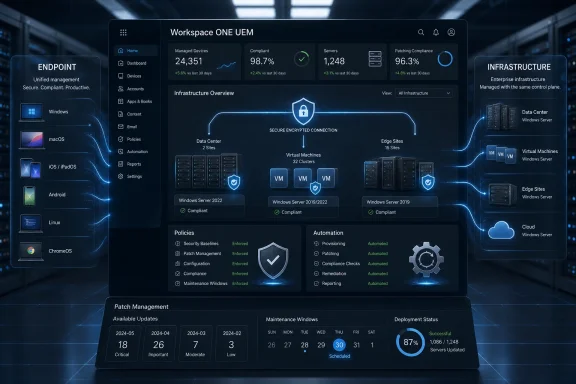 Omnissa Is Turning Endpoint Management Into Infrastructure Management
Unified endpoint management has always carried a little marketing inflation in its name. In practice, UEM usually meant phones, tablets, laptops, desktops, kiosks, and occasionally ruggedized warehouse hardware. Servers lived somewhere else, governed by Configuration Manager, Group Policy, scripts, monitoring stacks, remote access tools, ticketing processes, and years of local operational habit.Omnissa’s new Workspace ONE UEM support for Windows Server attacks that boundary directly. The company says customers can now bring Windows Server into the same management plane as the rest of their device estate, with cloud-based configuration, policy enforcement, patch orchestration, inventory, automation, and remote support.
That sounds tidy, and in some environments it will be. But the real significance is organizational rather than cosmetic. Server teams and endpoint teams have long been separated not only by tools but by risk tolerance, maintenance windows, regulatory expectations, and blast radius. Omnissa is arguing that those differences still matter, but that they no longer justify a fragmented management architecture.
This is a familiar enterprise software move: consolidate the console, promise less infrastructure, and make the old toolchain look expensive and brittle. What makes it worth watching is the timing. Windows infrastructure is now spread across data centers, public cloud, branch locations, edge deployments, and AI-adjacent workloads, while many administrators are still balancing classic domain-era methods with newer cloud-native management ideas. Omnissa is betting that the server estate is finally ready for UEM’s treatment.
The Server Becomes Another Endpoint, but Not a Normal One
The phrase “manage servers like endpoints” is useful, but dangerous. A Windows Server instance is not a sales laptop, and a failed driver update on a file server is not the same kind of incident as a botched app push to a user’s notebook. Servers often host dependencies that users never see until they break.Omnissa appears to understand that distinction, at least in how it frames the product. The company is not saying servers should inherit consumer-device management habits wholesale. It is saying that the mechanics of modern endpoint management — desired state, telemetry, policy, staged patching, remote remediation, and automation — can be applied to servers without requiring every organization to maintain a parallel management stack.
Workspace ONE UEM’s Windows Server support includes configuration management over the air, server baseline enforcement, security settings, patch automation, application deployment, scripts, sensors, and inventory. The company also highlights role-based access controls and organizational grouping, which matter because a unified console without strong separation would be a governance nightmare.
The best reading of the announcement is that Omnissa wants to make servers part of the same operational fabric, not the same operational category. That distinction will decide whether the feature is useful or reckless. A shared platform can reduce duplication; a shared policy model applied carelessly can create synchronized failure.
Microsoft’s Old Management Gravity Is the Real Target
Omnissa’s launch language takes direct aim at Microsoft System Center Configuration Manager, now folded into the broader Microsoft Intune family under the Microsoft Configuration Manager branding. The point is not subtle: Omnissa says Workspace ONE can manage Windows Server at a much lower cost than Microsoft’s traditional on-premises management approach.That cost argument will land differently depending on the customer. Organizations deeply invested in Configuration Manager have decades of packaging, reporting, collections, task sequences, compliance rules, and administrator muscle memory wrapped around it. For them, “lower cost” is not just a licensing comparison. It must account for migration labor, retraining, coexistence, risk, and the political reality of touching server operations.
But Omnissa has a plausible opening. Configuration Manager remains powerful, but it also represents a style of management built around internal infrastructure and long-lived enterprise assumptions. Microsoft itself has spent years nudging customers toward cloud attachment, Intune, Entra ID, Windows Autopilot, and modern management. The market already accepts the premise that endpoint management is moving away from purely on-premises control planes.
Omnissa is extending that premise to Windows Server, and it is doing so from a position that may appeal to companies that do not want their entire management architecture pulled deeper into Microsoft’s stack. For organizations already running Workspace ONE for Windows clients, mobile devices, or rugged endpoints, the incremental question becomes whether server management is better as another Omnissa workflow or as a reason to keep a separate Microsoft-centric practice alive.
Cloud-Native Management Meets Domain-Era Reality
The most provocative part of the announcement is Omnissa’s emphasis on over-the-air server configuration without dependence on traditional network domains. That claim fits the direction of travel in enterprise IT: fewer assumptions about devices being on the corporate LAN, more reliance on cloud brokers, identity-aware access, and agent-based management.For endpoints, that transition is already well underway. Remote and hybrid work forced the issue. Laptops left the building, VPN became a bottleneck, and administrators needed a way to configure, patch, inventory, and wipe devices wherever they were.
Servers moved more slowly because many still sat inside controlled networks, were joined to Active Directory domains, and were surrounded by infrastructure that assumed locality. But that model is less universal now. Servers may be virtual machines in public cloud, edge systems at remote sites, hosts supporting virtual desktop infrastructure, or Windows Server instances backing line-of-business applications that cannot be treated as permanently internal.
A cloud management plane can help in those scenarios, but it also introduces questions that endpoint administrators know well. How is trust established? How are credentials protected? What happens if the cloud service has an outage during a change window? How are emergency break-glass procedures handled when the management plane is unavailable?
These are not arguments against Omnissa’s approach. They are the questions that separate a management feature from an operational architecture. Server teams will need answers before they let any UEM platform become a primary control surface for production workloads.
Patching Is Where the Sales Pitch Becomes Operationally Serious
Patch management is the place where this announcement will either win credibility or expose its limits. Omnissa says Workspace ONE UEM version 2604 introduces granular patch management, allowing administrators to select specific updates from the Windows Update Catalog, target defined server groups, schedule deployment, pre-download updates, and track lifecycle status.That matters because server patching is not just “install the latest update.” It is sequencing, maintenance windows, rollback planning, dependency mapping, application owner approval, vulnerability prioritization, and a careful dance around uptime expectations. Any vendor that treats patching as a button has not spent enough time with the people who get paged at 2 a.m.
Granular update selection is therefore the right kind of feature. It acknowledges that server admins need control over which updates are applied, when they land, and how they move through rings or groups. The ability to pre-download updates before a maintenance window is also useful, particularly for remote sites or bandwidth-constrained environments.
But the deeper test is integration with the processes enterprises already use. Change management, vulnerability scanners, CMDBs, ticketing systems, maintenance calendars, application dependency tools, and compliance reporting all shape real-world patching. Workspace ONE can make the endpoint-side mechanics smoother, but it will need to fit into the larger operational loop rather than pretend to replace it.
Security Baselines Are Useful Only If Drift Is Treated as a First-Class Problem
Omnissa’s server management pitch includes security baselines, desired state management, automated remediation, certificate lifecycle management, and compliance reporting. That is the language security teams want to hear because the enemy is rarely a single missing checkbox. It is drift.Servers are born from templates, hardened by standards, adjusted during incidents, changed by application teams, patched unevenly, exempted under pressure, and eventually documented poorly. Over time, the real server estate stops matching the intended server estate. The gap between those two is where audit findings, outages, and intrusions often live.
Desired state management is the right conceptual answer. Define the configuration, monitor for deviation, and remediate when the machine strays. In a server context, however, automated remediation must be handled with more caution than on commodity endpoints. A setting that is noncompliant in one context may be deliberately different because of a workload requirement.
That is why role-based access control, grouping, and reporting matter as much as the baseline feature itself. Administrators need to know not only that a server differs from policy, but whether the difference is unauthorized, approved, temporary, or workload-specific. If Workspace ONE can make that distinction visible, it becomes a useful compliance tool. If it simply marks everything red, it becomes another dashboard to ignore.
Remote Access Without RDP Is a Sensible Security Pitch
Omnissa also highlights remote access through Workspace ONE Assist, including screen sharing, file browsing, and command-line access through the UEM console, without relying on exposed Remote Desktop Protocol. That is a smart message because RDP has long been a favorite target for attackers when it is poorly secured or directly exposed.In practice, mature organizations already restrict RDP, place it behind VPNs or privileged access systems, monitor it, or avoid exposing it broadly. Still, the operational need remains: administrators must reach systems during incidents, maintenance, and troubleshooting. The question is not whether remote access exists, but whether it is auditable, authenticated, limited, and resistant to the usual mistakes.
A UEM-integrated remote support channel can reduce the temptation to open firewall holes or maintain separate remote tools for server teams. It can also centralize logging and access control if implemented properly. That is attractive in distributed environments where admins may need to support systems that are not conveniently reachable from a traditional management network.
The risk is concentration. A management console with remote server access becomes a high-value target. The more powerful Workspace ONE becomes across endpoints and servers, the more important tenant security, administrator identity, MFA, session logging, privilege separation, and emergency procedures become. Consolidation reduces tool sprawl, but it raises the stakes for the tool that remains.
Omnissa Is Selling Consolidation, but IT Will Buy Control
Tool consolidation is the easiest part of this story to understand and the hardest part to execute. Every CIO has heard the pitch: fewer consoles, fewer agents, fewer contracts, fewer servers to maintain, fewer workflows to train. In a budget meeting, that pitch is almost irresistible.Day to day, administrators care about a different word: control. They need predictable behavior, clear scoping, rollback paths, permission boundaries, audit trails, and confidence that a change intended for test systems will not spill into production. A single console is useful only if it makes those controls more legible.
Omnissa’s challenge is that server management buyers are often skeptical by design. Endpoint teams may be accustomed to large-scale policy pushes and rapid remediation. Server teams are conditioned to ask what could break, who approved it, whether the backup is good, and what happens if the agent misbehaves during a reboot.
That skepticism is healthy. The best version of Omnissa’s move does not bulldoze it. Instead, it gives server administrators a modern control plane while respecting the rituals that exist because production systems are unforgiving. Omnissa’s mention of multi-tenancy, organizational groups, and role-based access is not a footnote; it is the difference between a credible enterprise feature and a dangerous simplification.
The VMware Afterlife Is Becoming a Product Strategy
This launch also belongs to Omnissa’s broader post-VMware identity project. The company emerged from VMware’s former end-user computing business after Broadcom’s acquisition of VMware and KKR’s purchase of the EUC division. That history matters because Workspace ONE, Horizon, and related products still carry the weight of their VMware lineage in customer minds.Omnissa has to do two things at once. It must reassure existing customers that the products they depended on did not become orphaned in the Broadcom reshuffle. It must also prove that independence means more than a new logo and a new corporate website.
Adding Windows Server management to Workspace ONE is a useful proof point because it expands the product’s addressable role. This is not merely maintenance of a legacy EUC portfolio. It is an attempt to pull Workspace ONE toward infrastructure operations, digital employee experience, security compliance, and automation.
That ambition is not risk-free. The more Omnissa stretches Workspace ONE beyond traditional endpoint management, the more it competes with entrenched tools and expectations. But standing still would be riskier. The UEM market is crowded, Microsoft is unavoidable, and customers are increasingly suspicious of management products that solve only one slice of the operational puzzle.
Windows Administrators Should Read This as a Pressure Test, Not a Mandate
For WindowsForum readers, the practical response should not be immediate enthusiasm or reflexive dismissal. The right response is a pressure test.If an organization already uses Workspace ONE heavily, Windows Server support deserves a pilot. Start with nonproduction systems, edge servers, lab infrastructure, or tightly scoped server groups where the management benefits are clear and the blast radius is limited. Test inventory accuracy, patch behavior, baseline reporting, scripting, remote access, and RBAC before touching anything that carries a serious uptime requirement.
If an organization is deeply invested in Configuration Manager, the new Omnissa feature is less likely to trigger a sudden replacement. It may instead become part of a coexistence strategy, especially where Workspace ONE already manages user endpoints and where server teams want cloud reach without building more on-premises management infrastructure.
The most interesting environments are the messy ones: hybrid estates with old domain-joined servers, new cloud-hosted Windows workloads, remote branch infrastructure, and overlapping endpoint tools. Those organizations feel the management tax Omnissa is describing. They are also the least able to tolerate a simplistic migration story.
The New Workspace ONE Bet Comes Down to Five Operational Tests
Omnissa’s announcement is strongest when read as a consolidation argument with real administrative consequences, not as a generic product expansion. The value will depend on how well Workspace ONE handles the parts of server management that are slower, more political, and more failure-sensitive than endpoint administration.- Workspace ONE UEM now supports Windows Server management in general availability, extending Omnissa’s cloud management plane beyond traditional endpoint categories.
- The feature set is aimed at reducing dependence on separate legacy server tools through shared policy, inventory, patching, automation, and remote support workflows.
- Granular patch management in Workspace ONE UEM 2604 is the capability most likely to matter to server teams because maintenance windows and update selection define real-world server operations.
- Omnissa’s security pitch depends on whether desired state management and baseline enforcement can distinguish harmful drift from approved workload-specific exceptions.
- The move strengthens Omnissa’s post-VMware identity by positioning Workspace ONE as a broader operational platform rather than only an endpoint management product.
- Administrators should pilot the feature with scoped server groups before treating UEM-based server management as a replacement for existing production tooling.
Source: ChannelLife Australia https://channellife.com.au/story/omnissa-adds-windows-server-management-to-workspace-one/
