

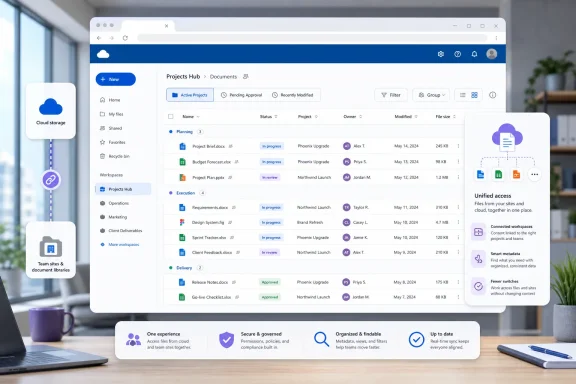
Microsoft is bringing SharePoint document library views directly into the OneDrive web experience, allowing users not only to switch among existing views but also to create and manage them without leaving OneDrive. The change, listed under Microsoft 365 Roadmap ID 566313, began rolling out in July 2026 for Targeted Release and general availability customers in the worldwide multi-tenant cloud. Although it may look like a modest interface enhancement, it represents an important step toward turning OneDrive into a more complete workspace for both personal files and structured team content.
OneDrive and SharePoint have shared a technical foundation for years, but Microsoft has traditionally presented them as different kinds of destinations. OneDrive has emphasized an individual user’s files, recent activity, shared content, and straightforward file management, while SharePoint document libraries have exposed more structured organizational features such as metadata columns, saved views, content types, retention controls, and workflow integration.
That division has become increasingly difficult to maintain from a user-experience perspective. Employees frequently encounter the same SharePoint-hosted document through OneDrive, Teams, Office applications, Microsoft 365 search, or a link sent in email. Requiring users to understand which underlying service owns a file before they can organize or display it effectively creates unnecessary friction.
This means many employees use OneDrive as their primary file portal even when much of their daily work resides in SharePoint. Until now, however, entering a document library through OneDrive did not always expose the complete view-management experience available from the SharePoint site itself.
For example, a project library might provide separate views for active deliverables, documents awaiting approval, recently modified files, records owned by a particular department, and material approaching a review deadline. All those views can operate over the same library while presenting different slices of its content.
Views are therefore not merely cosmetic settings. In well-designed SharePoint environments, they function as lightweight business applications that transform a large file repository into a manageable operational dashboard.
The rollout applies to OneDrive on the web in the worldwide standard multi-tenant cloud. Microsoft lists both Targeted Release and general availability release rings, with the deployment status marked as rolling out as of July 21, 2026.
That distinction matters in libraries containing hundreds or thousands of documents. A curated view can expose the subset relevant to a user’s role while suppressing columns, folders, or records that would otherwise add visual noise.
View creation commonly involves a sequence such as:
That is an important technical and governance distinction. OneDrive is acting as another interface to SharePoint content rather than replacing the library, its permissions, or its compliance controls.
A contract repository, for example, might include columns for customer, contract owner, region, renewal date, approval status, confidentiality level, and document category. Views can combine those properties to answer practical questions without requiring users to open each file.
Bringing view management into OneDrive could encourage wider use of this metadata because employees will encounter it in a familiar file-oriented interface. That creates an opportunity for organizations to move beyond deeply nested folder trees, but it also increases the importance of accurate and consistently populated metadata.
A useful view might filter a library to include only documents with an approval status of “Pending,” sort them by due date, and group them by responsible manager. The result resembles a task-oriented queue even though the underlying objects remain ordinary documents.
Permissions matter here. A user who can read or contribute to a library may not necessarily have authority to publish a shared view for everyone, change the default view, or delete a public view. Microsoft’s OneDrive implementation must preserve those distinctions if it is to remain consistent with SharePoint governance.
The roadmap entry does not promise that every advanced SharePoint presentation feature will become editable from OneDrive. Administrators should therefore distinguish between basic view management and the full range of library customization available from SharePoint settings or specialized development tools.
That consistency can be especially helpful in organizations where users participate in many Teams workspaces and SharePoint sites. OneDrive becomes a more predictable entry point, while document libraries retain their structured organization behind the scenes.
The improvement is not a substitute for a full project management system. It does, however, make document-centric processes easier to follow when the key business objects are proposals, specifications, reports, designs, presentations, and approval packages.
Users must still understand that a view is not an independent security boundary. Filtering out confidential records does not remove access to those records if the user otherwise has permission to the library.
Opening those views through OneDrive may reduce the temptation to download files, reorganize them locally, or build duplicate folder structures for convenience. Keeping employees in the managed cloud repository also improves the likelihood that they work with the current version.
A well-designed view makes the library behave like an indexed records workspace rather than a digital filing cabinet. The OneDrive integration extends that experience to users who might rarely visit the full SharePoint site.
File Explorer remains optimized around files, folders, and synchronized locations. SharePoint views depend on server-side metadata and presentation logic that do not map cleanly to the traditional Windows file-system model.
Users should not interpret a filtered view as proof that excluded documents no longer exist. They are simply omitted from the current browser display.
This may be especially useful on unmanaged computers, shared devices, or systems where users avoid synchronizing large libraries. The browser provides structured access without consuming local storage or requiring Files On-Demand configuration.
The risk is that users may still treat views as folders and misunderstand what happens when a view is changed or deleted. Training should emphasize that a view changes the presentation of content, not the content itself.
Conversely, poorly designed libraries may become more visibly confusing. Duplicate views, unclear names, obsolete filters, and inconsistent columns can create clutter in OneDrive just as easily as they do in SharePoint.
This could support a gradual shift away from excessive folder nesting. Rather than storing a document beneath a rigid chain of region, department, project, year, and status folders, an organization can retain a shallower structure and let views organize the content dynamically.
Administrators and site owners should establish a concise naming convention. Shared views should describe a business purpose, audience, or status, while experimental arrangements should remain personal whenever possible.
Sensitive material requires appropriate SharePoint permissions, site architecture, sensitivity labels, restricted access controls, or other supported governance measures. Presentation settings cannot replace authorization.
OneDrive support for switching views reduces dependence on a single all-purpose default. Library owners can provide a clean starting point and several clearly named alternatives rather than attempting to display every column and every document simultaneously.
Targeted Release participants are likely to encounter the change before all standard-release users. Administrators should test behavior with representative libraries instead of assuming every SharePoint configuration will look identical.
Administrators should nevertheless test several account types, including visitors, members, site owners, external guests, and users with custom permission levels. Edge cases often appear where organizations have broken permission inheritance or created narrowly tailored roles.
Support teams should prepare for reports that files have “disappeared.” In many cases, the user will have selected a filtered view rather than losing access to the document.
Document library views in OneDrive continue that convergence. The services retain distinct organizational roles, but users increasingly encounter a common content layer rather than separate products.
Adding view management gives users another reason to remain in this hub. Instead of merely locating a SharePoint library through OneDrive, they can work with the organizational logic embedded in that library.
SharePoint remains the managed content platform, while OneDrive provides an increasingly unified interface for reaching that content. This division allows Microsoft to simplify everyday navigation without discarding enterprise controls.
The addition of views to OneDrive increases consistency across this ecosystem, although interface parity will not necessarily be immediate. A library may still expose different controls depending on whether it is opened in SharePoint, OneDrive, Teams, or another embedded experience.
Microsoft’s advantage is the connection between OneDrive, SharePoint, Teams, Office, Microsoft Graph, Power Platform, and Microsoft Purview. Exposing SharePoint views in OneDrive makes that integrated architecture more accessible to ordinary users.
A regional sales proposal can appear in a customer view, a territory view, an approval queue, and a current-quarter view simultaneously. This model is particularly valuable for enterprises where documents belong to several overlapping business categories.
Views address a portion of that problem by giving teams curated, repeatable perspectives. Their arrival in OneDrive makes the capability easier to discover and reduces the training gap between basic cloud storage and formal content management.
Views do not generate that structure by themselves. However, making metadata-driven organization more visible may encourage organizations to improve the underlying information architecture that future automation depends upon.
Administrators should avoid promising that every user will see the capability on a particular day unless it is confirmed in their tenant.
They should also decide who maintains each view when processes change. A view built around an obsolete status or former organizational unit can silently mislead users long after its creator has moved to another role.
Feature parity is unlikely to be a simple all-or-nothing matter. Microsoft may expose common operations broadly while leaving complex library administration within SharePoint.
Organizations that rely on heavily customized views should avoid assuming visual consistency until they have tested the released experience.
Microsoft already treats structured columns and document metadata as important context for automation and AI-assisted work. Better access to views could become part of a broader strategy in which users move fluidly between natural-language discovery and governed library organization.
Perfect parity may be difficult because each application has different navigation and space constraints. Still, every reduction in interface inconsistency lowers training and support costs.
Organizations should monitor Microsoft 365 announcements for refinements made after the initial rollout. Roadmap delivery marks the beginning of real-world adoption, not necessarily the end of development.
Microsoft’s decision to expose document library views in OneDrive is a practical improvement with consequences beyond a new menu. It makes SharePoint’s structured organization available from the file portal many employees already use, reduces unnecessary movement between Microsoft 365 applications, and gives teams a better way to surface relevant content without duplicating it. If administrators pair the rollout with clear naming, reliable metadata, appropriate permissions, and disciplined view management, OneDrive can become a more capable front door to governed organizational knowledge rather than merely a place to browse files.
 Background
OneDrive and SharePoint have shared a technical foundation for years, but Microsoft has traditionally presented them as different kinds of destinations. OneDrive has emphasized an individual user’s files, recent activity, shared content, and straightforward file management, while SharePoint document libraries have exposed more structured organizational features such as metadata columns, saved views, content types, retention controls, and workflow integration.That division has become increasingly difficult to maintain from a user-experience perspective. Employees frequently encounter the same SharePoint-hosted document through OneDrive, Teams, Office applications, Microsoft 365 search, or a link sent in email. Requiring users to understand which underlying service owns a file before they can organize or display it effectively creates unnecessary friction.
OneDrive is more than personal storage
The modern OneDrive web application already provides access to files across Microsoft 365. Its navigation can surface personal documents, shared files, favorites, recent content, and libraries belonging to SharePoint sites or Microsoft Teams.This means many employees use OneDrive as their primary file portal even when much of their daily work resides in SharePoint. Until now, however, entering a document library through OneDrive did not always expose the complete view-management experience available from the SharePoint site itself.
Why SharePoint views matter
A document library view controls how library content appears without moving, copying, or altering the underlying files. A view can select which columns are shown, apply filters, specify sorting, group related records, and present information in a layout appropriate for a particular task.For example, a project library might provide separate views for active deliverables, documents awaiting approval, recently modified files, records owned by a particular department, and material approaching a review deadline. All those views can operate over the same library while presenting different slices of its content.
Views are therefore not merely cosmetic settings. In well-designed SharePoint environments, they function as lightweight business applications that transform a large file repository into a manageable operational dashboard.
What Microsoft Is Changing
The new capability allows users to work with document library views while they remain inside OneDrive for the web. According to the roadmap description, users can switch between existing views and create or manage views that customize how library content is organized and displayed.The rollout applies to OneDrive on the web in the worldwide standard multi-tenant cloud. Microsoft lists both Targeted Release and general availability release rings, with the deployment status marked as rolling out as of July 21, 2026.
Switching among existing views
The immediate improvement is access to views that library owners or site administrators have already configured. A user opening a SharePoint document library from OneDrive should be able to select an appropriate view rather than seeing only a generic file listing.That distinction matters in libraries containing hundreds or thousands of documents. A curated view can expose the subset relevant to a user’s role while suppressing columns, folders, or records that would otherwise add visual noise.
Creating and managing views
More significantly, eligible users can create and manage views from the OneDrive interface. The exact operations available will still depend on SharePoint permissions, library configuration, and the capabilities Microsoft exposes during the completed rollout.View creation commonly involves a sequence such as:
- The user selects the SharePoint document library in OneDrive.
- The user sorts, filters, groups, or adjusts the displayed columns.
- The resulting arrangement is saved as a named view.
- The view is designated as personal or public when permissions and the interface allow that choice.
- The user or an authorized library manager later updates, renames, or removes the view.
One library, multiple working contexts
The underlying content remains in SharePoint. Views do not create duplicate files, relocate documents, or establish a separate OneDrive copy of the library.That is an important technical and governance distinction. OneDrive is acting as another interface to SharePoint content rather than replacing the library, its permissions, or its compliance controls.
The Anatomy of a Document Library View
SharePoint views derive their usefulness from metadata. A library that contains only filenames and folders can still benefit from sorting and filtering, but a library with carefully designed columns becomes much more powerful.A contract repository, for example, might include columns for customer, contract owner, region, renewal date, approval status, confidentiality level, and document category. Views can combine those properties to answer practical questions without requiring users to open each file.
Columns and metadata
Columns provide structured information about files. Some are built in, such as name, modified date, modified by, file type, and size, while organizations can create custom columns for business-specific attributes.Bringing view management into OneDrive could encourage wider use of this metadata because employees will encounter it in a familiar file-oriented interface. That creates an opportunity for organizations to move beyond deeply nested folder trees, but it also increases the importance of accurate and consistently populated metadata.
Sorting, filtering, and grouping
Sorting controls the order of displayed records, while filters determine which records are included. Grouping organizes matching items beneath shared headings, such as project, department, owner, or status.A useful view might filter a library to include only documents with an approval status of “Pending,” sort them by due date, and group them by responsible manager. The result resembles a task-oriented queue even though the underlying objects remain ordinary documents.
Personal and public views
SharePoint can support both personal views and public views. A personal view is intended for an individual user, while a public view can become part of the shared navigation and working model of the library.Permissions matter here. A user who can read or contribute to a library may not necessarily have authority to publish a shared view for everyone, change the default view, or delete a public view. Microsoft’s OneDrive implementation must preserve those distinctions if it is to remain consistent with SharePoint governance.
Layout and formatting
Modern SharePoint libraries can go beyond simple rows and columns. Depending on the configuration, organizations may use compact lists, tiles, conditional column formatting, view formatting, or customized representations of document metadata.The roadmap entry does not promise that every advanced SharePoint presentation feature will become editable from OneDrive. Administrators should therefore distinguish between basic view management and the full range of library customization available from SharePoint settings or specialized development tools.
Practical Workflows Improved by the Update
The most obvious benefit is reduced navigation, but the larger value lies in making structured content easier to use during ordinary work. Employees can begin with OneDrive, locate the appropriate library, and select a task-specific view without first finding the corresponding SharePoint site.That consistency can be especially helpful in organizations where users participate in many Teams workspaces and SharePoint sites. OneDrive becomes a more predictable entry point, while document libraries retain their structured organization behind the scenes.
Project delivery
A project management office could maintain views such as “My Deliverables,” “Due This Week,” “Awaiting Client Review,” and “Completed.” Team members entering through OneDrive would be able to switch among those perspectives without browsing a complex project site.The improvement is not a substitute for a full project management system. It does, however, make document-centric processes easier to follow when the key business objects are proposals, specifications, reports, designs, presentations, and approval packages.
Legal and contract operations
Legal teams commonly rely on metadata to distinguish contracts by jurisdiction, counterparty, agreement type, responsible attorney, expiration date, and review status. A OneDrive-accessible view could surface contracts nearing renewal or documents awaiting a signature-related action.Users must still understand that a view is not an independent security boundary. Filtering out confidential records does not remove access to those records if the user otherwise has permission to the library.
Marketing and creative production
Creative libraries often hold drafts, approved assets, campaign material, brand resources, and regional variants. Views can separate work in progress from approved content or group assets by campaign and market.Opening those views through OneDrive may reduce the temptation to download files, reorganize them locally, or build duplicate folder structures for convenience. Keeping employees in the managed cloud repository also improves the likelihood that they work with the current version.
Finance and operations
Finance departments can use document metadata to track reporting period, business unit, document category, reconciliation state, or approval status. Operations teams can similarly classify procedures, inspection records, purchase documents, and maintenance material.A well-designed view makes the library behave like an indexed records workspace rather than a digital filing cabinet. The OneDrive integration extends that experience to users who might rarely visit the full SharePoint site.
Impact on Windows and OneDrive Users
This roadmap item applies specifically to the OneDrive web experience, not File Explorer. Users should not expect saved SharePoint views to become virtual folders or special directory layouts inside the Windows OneDrive sync client.File Explorer remains optimized around files, folders, and synchronized locations. SharePoint views depend on server-side metadata and presentation logic that do not map cleanly to the traditional Windows file-system model.
Web and File Explorer remain different
A view that filters documents by approval status may show 20 files in the browser while the synchronized library contains hundreds in File Explorer. That is normal because the view controls browser presentation, whereas sync exposes the selected files and folders permitted by the synchronization relationship.Users should not interpret a filtered view as proof that excluded documents no longer exist. They are simply omitted from the current browser display.
Less context switching
For employees who already begin their day in OneDrive on the web, the update removes a common interruption. They can work with personal files and team libraries from one interface rather than switching to a SharePoint site whenever they need a specialized library view.This may be especially useful on unmanaged computers, shared devices, or systems where users avoid synchronizing large libraries. The browser provides structured access without consuming local storage or requiring Files On-Demand configuration.
A gentler introduction to metadata
Many users understand folders intuitively but regard SharePoint columns and views as specialist features. Presenting views inside OneDrive could make metadata-driven organization feel less intimidating.The risk is that users may still treat views as folders and misunderstand what happens when a view is changed or deleted. Training should emphasize that a view changes the presentation of content, not the content itself.
Enterprise and Information Architecture Implications
The update gives information architects a broader surface through which users can consume their library designs. A thoughtfully configured SharePoint library will now be more useful even when employees approach it through OneDrive rather than the parent site.Conversely, poorly designed libraries may become more visibly confusing. Duplicate views, unclear names, obsolete filters, and inconsistent columns can create clutter in OneDrive just as easily as they do in SharePoint.
Metadata becomes more valuable
Organizations have often struggled to persuade users to populate metadata because the benefit was not apparent outside SharePoint. If OneDrive exposes the resulting views consistently, the connection between entering metadata and finding documents becomes easier to demonstrate.This could support a gradual shift away from excessive folder nesting. Rather than storing a document beneath a rigid chain of region, department, project, year, and status folders, an organization can retain a shallower structure and let views organize the content dynamically.
Naming standards will matter
As more users create views, libraries may accumulate entries such as “Test,” “New View,” “My Documents,” “Final,” and “Final 2.” These names provide little guidance and can make the view selector harder to use.Administrators and site owners should establish a concise naming convention. Shared views should describe a business purpose, audience, or status, while experimental arrangements should remain personal whenever possible.
Views are not permissions
A filtered view must never be treated as a security mechanism. If a view hides documents marked “Executive,” it does not prevent users from finding those documents through another view, search, a direct link, Microsoft Graph, or other interfaces if permissions still grant access.Sensitive material requires appropriate SharePoint permissions, site architecture, sensitivity labels, restricted access controls, or other supported governance measures. Presentation settings cannot replace authorization.
The default view still matters
The default library view remains important because it defines the initial experience for many entry points. Organizations should avoid making a highly specialized or narrowly filtered arrangement the default unless it genuinely serves most users.OneDrive support for switching views reduces dependence on a single all-purpose default. Library owners can provide a clean starting point and several clearly named alternatives rather than attempting to display every column and every document simultaneously.
Administration and Governance
The roadmap entry indicates a service-side rollout, so organizations should not expect a traditional Windows update package or separate OneDrive desktop-client installation to activate the feature. Availability may appear gradually across tenants and users as Microsoft progresses through deployment.Targeted Release participants are likely to encounter the change before all standard-release users. Administrators should test behavior with representative libraries instead of assuming every SharePoint configuration will look identical.
Permissions should remain authoritative
The OneDrive interface should respect the same SharePoint permission model as the underlying library. Users who lack the necessary authority should not gain the ability to publish public views, alter defaults, or change library-wide settings simply because they entered through OneDrive.Administrators should nevertheless test several account types, including visitors, members, site owners, external guests, and users with custom permission levels. Edge cases often appear where organizations have broken permission inheritance or created narrowly tailored roles.
Review existing libraries before rollout
A practical readiness review should include:- Inventorying important document libraries that users commonly open from OneDrive.
- Removing abandoned or redundant public views that would clutter the selector.
- Renaming ambiguous views so users can understand their purpose without SharePoint site context.
- Checking filters for outdated values such as former departments, completed projects, or retired workflow states.
- Confirming that default views remain useful for the broadest intended audience.
- Testing formatted views and custom columns to identify differences between OneDrive and SharePoint presentation.
- Documenting permission expectations for users who will create personal or public views.
Change management
The feature does not require a major training program, but it deserves a targeted communication. Users should know where the view selector appears, how to return to the standard library display, and whether they are expected to create personal views or request shared views from a library owner.Support teams should prepare for reports that files have “disappeared.” In many cases, the user will have selected a filtered view rather than losing access to the document.
The Broader OneDrive and SharePoint Convergence
Microsoft has spent years reducing visible differences between OneDrive and SharePoint file experiences. Both services participate in Microsoft 365 search, sharing, co-authoring, version history, Office integration, and the OneDrive synchronization architecture.Document library views in OneDrive continue that convergence. The services retain distinct organizational roles, but users increasingly encounter a common content layer rather than separate products.
OneDrive as the file front door
OneDrive is becoming a general file-access hub for Microsoft 365. It can surface content based on ownership, sharing, activity, favorites, meetings, people, and organizational location.Adding view management gives users another reason to remain in this hub. Instead of merely locating a SharePoint library through OneDrive, they can work with the organizational logic embedded in that library.
SharePoint remains the system of record
The integration should not be interpreted as Microsoft de-emphasizing SharePoint. On the contrary, the value of the OneDrive experience depends on SharePoint’s library, metadata, permissions, versioning, compliance, and extensibility capabilities.SharePoint remains the managed content platform, while OneDrive provides an increasingly unified interface for reaching that content. This division allows Microsoft to simplify everyday navigation without discarding enterprise controls.
Teams is part of the same story
Files uploaded to a standard Teams channel are generally stored in the connected SharePoint site. Users may therefore encounter the same document through Teams, SharePoint, OneDrive, Office, or a Windows-synchronized folder.The addition of views to OneDrive increases consistency across this ecosystem, although interface parity will not necessarily be immediate. A library may still expose different controls depending on whether it is opened in SharePoint, OneDrive, Teams, or another embedded experience.
Competitive and Strategic Implications
Cloud storage competition increasingly centers on context rather than raw capacity. Enterprises expect a service to understand ownership, collaboration, metadata, workflow, retention, search relevance, and security—not merely store files.Microsoft’s advantage is the connection between OneDrive, SharePoint, Teams, Office, Microsoft Graph, Power Platform, and Microsoft Purview. Exposing SharePoint views in OneDrive makes that integrated architecture more accessible to ordinary users.
Moving beyond folders
Traditional file systems encourage users to decide on one permanent location for every document. Metadata and views allow the same document to appear in multiple logical contexts without creating duplicate copies.A regional sales proposal can appear in a customer view, a territory view, an approval queue, and a current-quarter view simultaneously. This model is particularly valuable for enterprises where documents belong to several overlapping business categories.
Discoverability as a differentiator
The ability to store a file is now commonplace. The harder problem is helping users find the correct file, understand its status, and act on it without browsing through multiple repositories.Views address a portion of that problem by giving teams curated, repeatable perspectives. Their arrival in OneDrive makes the capability easier to discover and reduces the training gap between basic cloud storage and formal content management.
Preparing content for automation and AI
Structured metadata also benefits automation, search, and artificial intelligence. A library with accurate document categories, ownership, lifecycle states, and business attributes is easier for workflows and agents to interpret than an unclassified mass of files.Views do not generate that structure by themselves. However, making metadata-driven organization more visible may encourage organizations to improve the underlying information architecture that future automation depends upon.
Strengths and Opportunities
The update delivers several meaningful advantages despite its relatively narrow roadmap description.- Users can remain in OneDrive while working with structured SharePoint content. This reduces navigation and makes team libraries feel like a native part of the broader OneDrive experience.
- Existing investments in SharePoint views become more visible. Carefully configured filters, groups, columns, and layouts can reach employees who rarely open the parent SharePoint site.
- Personal productivity can improve without reorganizing shared content. Users may create personal views tailored to their responsibilities without moving files or imposing their preferences on colleagues.
- Teams can offer role-specific perspectives over one authoritative library. Different departments can work from the same documents while seeing the columns and records relevant to them.
- Metadata-driven organization gains a more approachable interface. OneDrive’s familiarity may lower the barrier to using SharePoint’s structured content capabilities.
- Browser-based work becomes more practical. Users can avoid synchronizing large libraries while still receiving an organized, task-focused experience.
- Duplicate repositories may become less tempting. When employees can quickly surface relevant content, they have less reason to copy documents into personal folders for convenience.
- The change reinforces Microsoft 365’s integrated content model. OneDrive becomes a front end for personal and organizational files while SharePoint continues to provide the underlying controls.
Risks and Concerns
The new capability also introduces governance and usability questions that organizations should address early.- View proliferation could create clutter. If too many users publish public views without coordination, the library may become harder rather than easier to navigate.
- Users may confuse views with folders or permissions. A filtered display neither moves documents nor prevents authorized users from reaching excluded content elsewhere.
- Incomplete metadata will produce unreliable results. Files missing required properties may disappear from task-oriented views even though they still require attention.
- OneDrive and SharePoint may not expose identical controls. Advanced formatting, legacy settings, custom solutions, or specialized view types could behave differently across interfaces.
- The web-only scope may disappoint Windows users. Saved library views will not automatically transform File Explorer into a metadata-driven SharePoint browser.
- Public-view management depends on permissions. Organizations with unusual permission structures may encounter inconsistent user expectations.
- Filtered views can create false confidence. A user may assume a list is complete without realizing that a filter, grouping rule, or personal customization excludes relevant files.
- Large libraries still require sound design. Views help people navigate scale, but they do not eliminate the need for indexed columns, sensible filters, lifecycle management, and appropriate architecture.
- Support incidents may initially increase. Help desks should expect questions about missing files, changed layouts, unsaved filters, and the distinction between personal and shared views.
Deployment and User Readiness
Microsoft lists general availability for July 2026, with the feature rolling out to worldwide standard multi-tenant customers. A rolling deployment means availability may vary among tenants—and potentially among users in the same organization—until Microsoft completes the release.Administrators should avoid promising that every user will see the capability on a particular day unless it is confirmed in their tenant.
A sensible validation plan
IT teams can evaluate the feature through a controlled sequence:- Select libraries representing simple, metadata-heavy, highly formatted, and permission-sensitive scenarios.
- Open each library from OneDrive using accounts with different SharePoint roles.
- Confirm that existing public and personal views appear as expected.
- Test sorting, filtering, grouping, column changes, and saving a new view.
- Verify whether changes made in OneDrive are reflected when the same library is opened in SharePoint.
- Confirm that unauthorized users cannot create or alter shared views.
- Test large libraries and views that depend on indexed columns.
- Record any differences involving custom formatting, content types, external users, or embedded experiences.
- Prepare concise user guidance before enabling broad communication.
- Monitor support requests during the remainder of the rollout.
Guidance for library owners
Library owners should treat views as part of the library’s product design. Every shared view should have a clear audience, a recognizable name, and a continuing business purpose.They should also decide who maintains each view when processes change. A view built around an obsolete status or former organizational unit can silently mislead users long after its creator has moved to another role.
What to Watch Next
The immediate question is how closely the OneDrive view-management interface matches the SharePoint experience. Microsoft’s roadmap description confirms the ability to switch, create, and manage views, but organizations will want to test the depth of that support across advanced configurations.Feature parity is unlikely to be a simple all-or-nothing matter. Microsoft may expose common operations broadly while leaving complex library administration within SharePoint.
Advanced formatting compatibility
Administrators should watch how OneDrive renders column formatting, view formatting, tiles, grouped layouts, and customized document cards. Even when the underlying configuration is supported, spacing, command placement, or editing controls may differ.Organizations that rely on heavily customized views should avoid assuming visual consistency until they have tested the released experience.
Copilot and agent integration
A logical future direction would connect views with Microsoft 365 Copilot or SharePoint agents. Users could potentially ask for documents matching a business condition and then preserve the result as a reusable view.Microsoft already treats structured columns and document metadata as important context for automation and AI-assisted work. Better access to views could become part of a broader strategy in which users move fluidly between natural-language discovery and governed library organization.
Greater consistency across Microsoft 365
It will also be worth watching whether Microsoft brings equivalent view controls to document libraries opened within Teams and other embedded surfaces. Users increasingly expect the same library to behave consistently regardless of where they encounter it.Perfect parity may be difficult because each application has different navigation and space constraints. Still, every reduction in interface inconsistency lowers training and support costs.
Administrative controls and reporting
Enterprises may eventually seek better controls over who can publish views, how unused views are identified, and whether administrators can report on view adoption. SharePoint permissions already govern much of this behavior, but increased exposure through OneDrive could make lifecycle management more important.Organizations should monitor Microsoft 365 announcements for refinements made after the initial rollout. Roadmap delivery marks the beginning of real-world adoption, not necessarily the end of development.
Microsoft’s decision to expose document library views in OneDrive is a practical improvement with consequences beyond a new menu. It makes SharePoint’s structured organization available from the file portal many employees already use, reduces unnecessary movement between Microsoft 365 applications, and gives teams a better way to surface relevant content without duplicating it. If administrators pair the rollout with clear naming, reliable metadata, appropriate permissions, and disciplined view management, OneDrive can become a more capable front door to governed organizational knowledge rather than merely a place to browse files.