

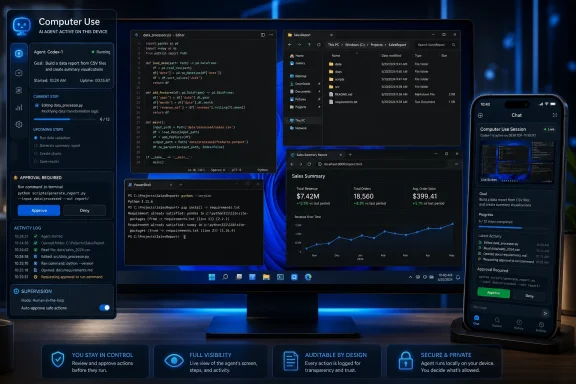
OpenAI expanded its Codex desktop app to Windows 11 on May 29, 2026, adding a Computer Use mode that lets the coding agent operate local apps, files, and developer tools while users supervise from the PC or ChatGPT mobile app. That is not just another checkbox in the AI coding wars. It is the moment the Windows desktop becomes a live surface for agentic software work, not merely the place where developers read suggestions and paste patches. For Windows users, the question is no longer whether AI can write code; it is whether they are ready to let it touch the machine where that code actually runs.
The first generation of coding assistants lived mostly in the editor. They completed functions, explained stack traces, and generated test cases with the tidy constraint that a human still copied, reviewed, ran, and committed the work. Codex on Windows breaks that neat division by letting the model drive software through the same visible interface a person would use: opening apps, clicking controls, reading screens, and interacting with local project state.
That matters because Windows remains the default operating environment for a huge slice of professional software work. Even teams that deploy to Linux often build, test, debug, package, or administer from Windows laptops joined to corporate domains and loaded with security tooling. If an agent can operate that environment, it stops being a detached code generator and becomes a junior operator sitting at the console.
OpenAI’s framing is developer-first: Codex can test apps, inspect behavior, reproduce bugs, and review work. But the implications are broader than coding. Any workflow that depends on local applications, credentials, terminals, files, browsers, emulators, or internal tools is suddenly a candidate for delegation.
The shift is subtle but important. A chatbot tells you what to do. A coding agent edits files. A computer-use agent can attempt the whole loop: make a change, launch the app, observe the result, adjust, and keep going.
Windows changes the audience. It brings Codex closer to enterprise fleets, .NET shops, game studios, IT departments, QA labs, business analysts, and the long tail of organizations whose workflows are glued together with desktop applications that never made the jump to clean web APIs. The boringness of Windows is precisely why this release matters.
A Windows PC is not just a terminal with a GUI attached. It is often a compliance boundary, an identity endpoint, a device management object, and a local store of sensitive work context. An agent operating there is closer to the organization’s nervous system than an agent running in a disposable cloud container.
That makes the Windows release both more useful and more uncomfortable. Codex can now work where the mess is: local builds, unsigned tools, bespoke installers, test harnesses, VPN-only resources, desktop admin consoles, and apps whose automation story has historically been “watch a human click through it.”
That abstraction is convenient. It is also the sort of abstraction that can hide how much authority is being granted. A model that can see and manipulate the desktop is not simply reading a codebase; it may encounter notifications, files, authentication prompts, browser sessions, local secrets, and system dialogs that were never written for machine interpretation.
This is where the difference between permission and judgment becomes central. A user may grant permission to operate a machine for a narrow task, but the agent still has to decide which windows matter, which prompts are safe, and which changes are relevant. That is a much harder problem than generating a plausible unit test.
The feature’s value will depend less on whether it can click buttons and more on whether it can pause at the right moments. The best agent is not the one that never asks for help. It is the one that knows when the next action crosses from routine work into a decision with consequences.
This is a powerful idea because software work already has idle gaps. Builds run, tests churn, package managers stall, browsers reload, and QA steps wait for someone to look at a result. If Codex can advance work through those gaps and ask for approval only when needed, the developer’s phone becomes a supervisory console rather than a second-class device.
It also changes the risk profile. Mobile approval encourages quick decisions made in transit, during meetings, or between other tasks. Anyone who has ever approved a pull request too quickly can imagine the new failure mode: an agent asks for permission to proceed, the user glances at a tiny screen, and the wrong change gets waved through because the interaction feels routine.
Remote oversight is still oversight, but it is thinner than sitting in front of the machine. For some work, that will be fine. For security-sensitive changes, production-adjacent debugging, or anything touching credentials and customer data, organizations will need stricter norms than “approve from your phone when it looks okay.”
What makes Codex’s Windows move strategically interesting is that it pushes beyond the editor. The editor is still important, but it is no longer sufficient. Modern software work spans terminals, browsers, dashboards, emulators, design tools, issue trackers, documentation, build logs, security scanners, and local applications that do not expose tidy agent APIs.
If OpenAI can make Codex operate across those surfaces reliably, it gains a different kind of leverage. It does not need every tool vendor to build a perfect integration on day one. The agent can use the computer as a compatibility layer.
That is the old dream of desktop automation, but with a model in the loop instead of brittle scripts. Robotic process automation tried to do this for business workflows and often collapsed under the weight of changing interfaces. The new bet is that a multimodal agent can survive UI drift because it understands enough of what it sees to adapt.
Traditional automated tests are excellent when the expected behavior is known and the environment is controlled. They are less helpful when the task is exploratory: “Find out why this dialog freezes,” “check whether the installer handles this edge case,” or “try the app like a user would and tell me what feels broken.” Computer Use gives Codex a way to operate in that exploratory space.
Windows is especially relevant here because so many desktop and enterprise applications still depend on GUI behavior that is hard to test from a pure code perspective. Win32 apps, Electron apps, internal utilities, old control panels, custom installers, and hybrid web-desktop tools all create testing surfaces where “just run the test suite” is not enough.
The danger is false confidence. An AI agent may find bugs, but it may also miss obvious issues, misunderstand the intended behavior, or declare success after testing the happy path. Teams should treat Codex-driven testing as a force multiplier, not a replacement for deterministic test suites, accessibility checks, security review, or human QA.
Prompt injection is the obvious concern. A malicious issue description, README, web page, log output, or test fixture could attempt to instruct the agent to ignore prior directions, expose secrets, alter files, or perform unrelated actions. When the agent is confined to a code sandbox, those risks are serious. When it can also operate a desktop session, the attack surface expands.
Windows administrators will want to know where Codex draws boundaries. Can it read notifications? Can it interact with password managers? What happens when a UAC prompt appears? How are screenshots handled? What logs exist for later review? Can enterprise policy disable Computer Use or limit it to specific machines, users, projects, or app classes?
Those are not theoretical procurement questions. They are the questions that decide whether this feature becomes a standard tool in managed environments or remains something power users enable on personal machines. Enterprise adoption will depend as much on auditability and policy control as on coding quality.
Microsoft is also OpenAI’s partner, investor, platform provider, and competitor depending on which product line one is looking at. GitHub Copilot remains the incumbent AI coding assistant in many organizations, while Windows is the host operating system that OpenAI now wants Codex to drive. That creates a fascinating overlap between platform control and application ambition.
If OpenAI’s approach works, users may come to think of Windows less as the place where Microsoft’s Copilot lives and more as the substrate on which third-party agents act. That would be a reversal of the usual platform story. The operating system would provide permissions, windows, files, identity, and management, while the agent layer captures the user’s attention and intent.
Microsoft will not ignore that. The company’s own developer tooling, GitHub ecosystem, Windows AI features, and enterprise management stack give it many ways to respond. But OpenAI’s Windows Codex release shows how quickly the center of gravity can move when the agent is not just embedded in the OS, but capable of using it.
That makes software development a safer proving ground for agentic computing than, say, personal finance or healthcare administration. Code can be diffed. Tests can be rerun. Repositories can be reverted. Logs can be inspected. The work is consequential, but it has more built-in verification than many everyday digital tasks.
At the same time, developer machines are high-value targets. They often contain credentials, signing keys, source code, package tokens, internal documentation, and access to production-adjacent systems. The industry has already learned that compromising developer workflows can compromise entire software supply chains.
So Codex’s expansion carries a paradox. Developers are the right early adopters for autonomous agents because they can supervise and validate them. Developers are also among the riskiest users to empower because their machines sit close to the systems everyone else depends on.
That is a real productivity change, but it is not effortless. Supervising agents is work. It requires enough domain knowledge to spot when the model is confidently wrong, enough systems knowledge to understand side effects, and enough discipline to reject changes that merely look complete.
The risk for organizations is that agentic work will be measured by activity rather than correctness. Codex may generate more branches, more patches, more test runs, and more apparent progress. Without strong review culture, that can become a faster path to technical debt.
The opportunity is equally real. A well-supervised agent can chew through reproduction steps, documentation updates, migration chores, UI smoke tests, dependency bumps, and exploratory debugging that would otherwise sit in the backlog. The productivity gain comes not from magic, but from moving tedious cycles off the human critical path.
That means IT teams need policies before the feature quietly spreads. Organizations should decide whether Codex can be installed, whether Computer Use can be enabled, which accounts may use it, what data classifications are permitted, and what logging is required. Waiting until an incident occurs will be too late.
There is also a training problem. Users need to understand that “the AI did it” is not an accountability model. If an employee authorizes Codex to modify files, run commands, or interact with an internal app, the organization will still treat those actions as occurring under that user’s authority unless a stronger control framework says otherwise.
The best deployments will likely start narrow. Give Codex access to non-production repositories, disposable test environments, and well-understood workflows. Measure where it helps, where it fails, and where the approval prompts are too easy to rubber-stamp. Then expand deliberately.
That is why the “super app” ambition matters. A super app in the AI era is not necessarily a single giant window that contains everything. It may be an intent layer that can reach across existing apps, files, and services while the user supervises from whatever device is convenient.
The Windows desktop is both the prize and the problem. It contains decades of accumulated workflows that no new app can simply replace. If an agent can use those workflows, it can become useful immediately. But because those workflows were designed for humans, not autonomous systems, every convenience comes with ambiguity.
This is the real frontier: not model intelligence in isolation, but model intelligence embedded into old, stateful, permission-rich computing environments. The AI does not need to own the operating system to change how the operating system is used.
For Windows enthusiasts and IT pros, the release offers a clean set of near-term lessons:
 Codex Moves From Pair Programmer to Machine Operator
The first generation of coding assistants lived mostly in the editor. They completed functions, explained stack traces, and generated test cases with the tidy constraint that a human still copied, reviewed, ran, and committed the work. Codex on Windows breaks that neat division by letting the model drive software through the same visible interface a person would use: opening apps, clicking controls, reading screens, and interacting with local project state.That matters because Windows remains the default operating environment for a huge slice of professional software work. Even teams that deploy to Linux often build, test, debug, package, or administer from Windows laptops joined to corporate domains and loaded with security tooling. If an agent can operate that environment, it stops being a detached code generator and becomes a junior operator sitting at the console.
OpenAI’s framing is developer-first: Codex can test apps, inspect behavior, reproduce bugs, and review work. But the implications are broader than coding. Any workflow that depends on local applications, credentials, terminals, files, browsers, emulators, or internal tools is suddenly a candidate for delegation.
The shift is subtle but important. A chatbot tells you what to do. A coding agent edits files. A computer-use agent can attempt the whole loop: make a change, launch the app, observe the result, adjust, and keep going.
Windows Was the Missing Surface
OpenAI introduced Computer Use for Codex on macOS first, which made sense for a developer demo. The Mac has cultural weight in software circles, a relatively uniform hardware and OS stack, and accessibility frameworks that many automation tools already understand. But a Mac-first release also made the feature feel like a preview for the developer elite rather than a mainstream computing shift.Windows changes the audience. It brings Codex closer to enterprise fleets, .NET shops, game studios, IT departments, QA labs, business analysts, and the long tail of organizations whose workflows are glued together with desktop applications that never made the jump to clean web APIs. The boringness of Windows is precisely why this release matters.
A Windows PC is not just a terminal with a GUI attached. It is often a compliance boundary, an identity endpoint, a device management object, and a local store of sensitive work context. An agent operating there is closer to the organization’s nervous system than an agent running in a disposable cloud container.
That makes the Windows release both more useful and more uncomfortable. Codex can now work where the mess is: local builds, unsigned tools, bespoke installers, test harnesses, VPN-only resources, desktop admin consoles, and apps whose automation story has historically been “watch a human click through it.”
The Toggle Is Small, the Trust Boundary Is Not
According to the rollout description, users enable Computer Use from Codex settings, then steer it with commands such as@computer or app-specific targets like @Paint. The syntax sounds almost quaint, but the design pattern is significant. OpenAI is trying to make desktop control feel like another addressable tool inside a developer workflow.That abstraction is convenient. It is also the sort of abstraction that can hide how much authority is being granted. A model that can see and manipulate the desktop is not simply reading a codebase; it may encounter notifications, files, authentication prompts, browser sessions, local secrets, and system dialogs that were never written for machine interpretation.
This is where the difference between permission and judgment becomes central. A user may grant permission to operate a machine for a narrow task, but the agent still has to decide which windows matter, which prompts are safe, and which changes are relevant. That is a much harder problem than generating a plausible unit test.
The feature’s value will depend less on whether it can click buttons and more on whether it can pause at the right moments. The best agent is not the one that never asks for help. It is the one that knows when the next action crosses from routine work into a decision with consequences.
Remote Control Makes the Desktop Less Local
The mobile piece is what turns this from a desktop feature into a workflow strategy. OpenAI says users can start or monitor Codex tasks through ChatGPT on iPhone and Android while the Windows machine remains the host for files, tools, and local context. In practice, that means the PC can keep doing development work while the user is away from the keyboard.This is a powerful idea because software work already has idle gaps. Builds run, tests churn, package managers stall, browsers reload, and QA steps wait for someone to look at a result. If Codex can advance work through those gaps and ask for approval only when needed, the developer’s phone becomes a supervisory console rather than a second-class device.
It also changes the risk profile. Mobile approval encourages quick decisions made in transit, during meetings, or between other tasks. Anyone who has ever approved a pull request too quickly can imagine the new failure mode: an agent asks for permission to proceed, the user glances at a tiny screen, and the wrong change gets waved through because the interaction feels routine.
Remote oversight is still oversight, but it is thinner than sitting in front of the machine. For some work, that will be fine. For security-sensitive changes, production-adjacent debugging, or anything touching credentials and customer data, organizations will need stricter norms than “approve from your phone when it looks okay.”
The Coding Agent War Is Becoming an Operating System War
OpenAI is not expanding Codex in a vacuum. The AI coding market has become one of the most important battlegrounds in enterprise software, with GitHub Copilot, Anthropic’s Claude Code, Google’s Jules, and a growing field of IDE-native and CLI-native tools all chasing the same prize: becoming the default interface between developers and their work.What makes Codex’s Windows move strategically interesting is that it pushes beyond the editor. The editor is still important, but it is no longer sufficient. Modern software work spans terminals, browsers, dashboards, emulators, design tools, issue trackers, documentation, build logs, security scanners, and local applications that do not expose tidy agent APIs.
If OpenAI can make Codex operate across those surfaces reliably, it gains a different kind of leverage. It does not need every tool vendor to build a perfect integration on day one. The agent can use the computer as a compatibility layer.
That is the old dream of desktop automation, but with a model in the loop instead of brittle scripts. Robotic process automation tried to do this for business workflows and often collapsed under the weight of changing interfaces. The new bet is that a multimodal agent can survive UI drift because it understands enough of what it sees to adapt.
The Windows Desktop Becomes a Test Bench
For developers, the most obvious use case is application testing. Codex can modify code, run the app, observe the UI, and attempt to reproduce a bug without waiting for the user to manually exercise the workflow. That could make it useful for the messy middle between unit tests and full QA automation.Traditional automated tests are excellent when the expected behavior is known and the environment is controlled. They are less helpful when the task is exploratory: “Find out why this dialog freezes,” “check whether the installer handles this edge case,” or “try the app like a user would and tell me what feels broken.” Computer Use gives Codex a way to operate in that exploratory space.
Windows is especially relevant here because so many desktop and enterprise applications still depend on GUI behavior that is hard to test from a pure code perspective. Win32 apps, Electron apps, internal utilities, old control panels, custom installers, and hybrid web-desktop tools all create testing surfaces where “just run the test suite” is not enough.
The danger is false confidence. An AI agent may find bugs, but it may also miss obvious issues, misunderstand the intended behavior, or declare success after testing the happy path. Teams should treat Codex-driven testing as a force multiplier, not a replacement for deterministic test suites, accessibility checks, security review, or human QA.
The Security Model Will Be Judged by the Worst Click
A desktop agent inherits the security reality of the desktop. If Codex can access what the user can access, then the consequences of a bad instruction, a misleading prompt, or a compromised project context become more serious. The agent’s actions may be constrained by app design and OS permissions, but within those boundaries it can still do real work — and real damage.Prompt injection is the obvious concern. A malicious issue description, README, web page, log output, or test fixture could attempt to instruct the agent to ignore prior directions, expose secrets, alter files, or perform unrelated actions. When the agent is confined to a code sandbox, those risks are serious. When it can also operate a desktop session, the attack surface expands.
Windows administrators will want to know where Codex draws boundaries. Can it read notifications? Can it interact with password managers? What happens when a UAC prompt appears? How are screenshots handled? What logs exist for later review? Can enterprise policy disable Computer Use or limit it to specific machines, users, projects, or app classes?
Those are not theoretical procurement questions. They are the questions that decide whether this feature becomes a standard tool in managed environments or remains something power users enable on personal machines. Enterprise adoption will depend as much on auditability and policy control as on coding quality.
Microsoft’s Own AI Ambitions Make This Awkward
There is an obvious irony in OpenAI making the Windows desktop more agentic while Microsoft is still working through its own AI identity crisis on Windows. Microsoft has spent years trying to turn Copilot into a system-level assistant, but the most concrete productivity gains often come from narrower tools with clearer jobs. Codex has that clarity: it is for software work, and now it can operate the machine where that work happens.Microsoft is also OpenAI’s partner, investor, platform provider, and competitor depending on which product line one is looking at. GitHub Copilot remains the incumbent AI coding assistant in many organizations, while Windows is the host operating system that OpenAI now wants Codex to drive. That creates a fascinating overlap between platform control and application ambition.
If OpenAI’s approach works, users may come to think of Windows less as the place where Microsoft’s Copilot lives and more as the substrate on which third-party agents act. That would be a reversal of the usual platform story. The operating system would provide permissions, windows, files, identity, and management, while the agent layer captures the user’s attention and intent.
Microsoft will not ignore that. The company’s own developer tooling, GitHub ecosystem, Windows AI features, and enterprise management stack give it many ways to respond. But OpenAI’s Windows Codex release shows how quickly the center of gravity can move when the agent is not just embedded in the OS, but capable of using it.
Autonomy Is Arriving Through Developer Tools First
The “super app” language around OpenAI’s broader strategy can sound grandiose, but Codex shows why developer tools are a natural starting point. Developers already tolerate complex tools, long-running processes, command-line logs, rough edges, and iterative failure. They are also unusually good at evaluating whether an automated change actually works.That makes software development a safer proving ground for agentic computing than, say, personal finance or healthcare administration. Code can be diffed. Tests can be rerun. Repositories can be reverted. Logs can be inspected. The work is consequential, but it has more built-in verification than many everyday digital tasks.
At the same time, developer machines are high-value targets. They often contain credentials, signing keys, source code, package tokens, internal documentation, and access to production-adjacent systems. The industry has already learned that compromising developer workflows can compromise entire software supply chains.
So Codex’s expansion carries a paradox. Developers are the right early adopters for autonomous agents because they can supervise and validate them. Developers are also among the riskiest users to empower because their machines sit close to the systems everyone else depends on.
The Human Job Becomes Supervising the Loop
The most plausible near-term future is not “Codex replaces developers.” It is that developers spend more time defining tasks, reviewing plans, approving tool use, reading diffs, and interpreting failures. The work shifts from typing every change to managing a loop of proposal, execution, observation, correction, and acceptance.That is a real productivity change, but it is not effortless. Supervising agents is work. It requires enough domain knowledge to spot when the model is confidently wrong, enough systems knowledge to understand side effects, and enough discipline to reject changes that merely look complete.
The risk for organizations is that agentic work will be measured by activity rather than correctness. Codex may generate more branches, more patches, more test runs, and more apparent progress. Without strong review culture, that can become a faster path to technical debt.
The opportunity is equally real. A well-supervised agent can chew through reproduction steps, documentation updates, migration chores, UI smoke tests, dependency bumps, and exploratory debugging that would otherwise sit in the backlog. The productivity gain comes not from magic, but from moving tedious cycles off the human critical path.
Windows Admins Will Need New House Rules
For Windows administrators, Codex Computer Use should be treated as a new class of endpoint automation. It is neither a conventional remote desktop session nor a simple developer plugin. It is an AI-mediated actor operating through a user session on a managed device.That means IT teams need policies before the feature quietly spreads. Organizations should decide whether Codex can be installed, whether Computer Use can be enabled, which accounts may use it, what data classifications are permitted, and what logging is required. Waiting until an incident occurs will be too late.
There is also a training problem. Users need to understand that “the AI did it” is not an accountability model. If an employee authorizes Codex to modify files, run commands, or interact with an internal app, the organization will still treat those actions as occurring under that user’s authority unless a stronger control framework says otherwise.
The best deployments will likely start narrow. Give Codex access to non-production repositories, disposable test environments, and well-understood workflows. Measure where it helps, where it fails, and where the approval prompts are too easy to rubber-stamp. Then expand deliberately.
The Windows Release Is a Preview of Everyday Agents
Codex is aimed at developers, but its Windows Computer Use feature points toward a broader consumer and workplace pattern. Once an agent can reliably operate local apps, the same basic architecture could apply to spreadsheets, design tools, email clients, ticketing systems, accounting software, and line-of-business applications that have resisted clean automation for decades.That is why the “super app” ambition matters. A super app in the AI era is not necessarily a single giant window that contains everything. It may be an intent layer that can reach across existing apps, files, and services while the user supervises from whatever device is convenient.
The Windows desktop is both the prize and the problem. It contains decades of accumulated workflows that no new app can simply replace. If an agent can use those workflows, it can become useful immediately. But because those workflows were designed for humans, not autonomous systems, every convenience comes with ambiguity.
This is the real frontier: not model intelligence in isolation, but model intelligence embedded into old, stateful, permission-rich computing environments. The AI does not need to own the operating system to change how the operating system is used.
The Practical Reading for Windows Power Users
The sensible response is neither panic nor hype. Codex Computer Use on Windows is an important milestone, but it should be adopted like any powerful automation tool: gradually, visibly, and with an assumption that mistakes will happen. The feature is most exciting when it handles bounded, reviewable work and most concerning when it drifts into open-ended authority.For Windows enthusiasts and IT pros, the release offers a clean set of near-term lessons:
- Codex on Windows 11 is now more than a coding chat interface because it can operate local desktop applications through Computer Use.
- The feature is best suited to supervised development workflows such as reproducing bugs, testing UI behavior, reviewing changes, and running local tools.
- Remote monitoring through the ChatGPT mobile app makes Codex more useful, but it also makes careless approvals easier.
- Enterprise teams should evaluate policy controls, logging, data exposure, and user accountability before enabling the feature broadly.
- Codex-driven testing should supplement existing QA and security practices rather than replace deterministic tests or human review.
- The Windows release signals a larger shift toward AI agents that use existing desktop software instead of waiting for every app to expose an API.
References
- Primary source: the-decoder.com
Published: Sat, 30 May 2026 10:19:47 GMT

OpenAI's Codex can now operate your Windows PC autonomously, hunting bugs and testing apps on its own
OpenAI's Codex app now runs on Windows 11 with "Computer Use": the AI can independently control programs, test apps, and hunt for bugs. When no one's at the PC, the ChatGPT mobile app lets users start and monitor tasks remotely from their phone. the-decoder.com
- Official source: openai.com

Introducing the Codex app
Introducing the Codex app for macOS—a command center for AI coding and software development with multiple agents, parallel workflows, and long-running tasks.openai.com
- Related coverage: macrumors.com

OpenAI's Codex Can Now Use Your Mac Even When It's Locked
OpenAI has rolled out Computer Use for its Codex desktop app on macOS, and its latest trick is that your Mac doesn't even have to be unlocked for the coding agent to use your apps while you're away. In a post on X, OpenAI Developers said users can now send Codex tasks from their phone and have... www.macrumors.com
- Related coverage: idlen.io

OpenAI Codex Takes Over Your Mac: 90 Plugins, Memory, Computer Use | Idlen
On April 16, 2026, OpenAI expands Codex with computer use, 90+ plugins, persistent memory and integrated browser. Biggest update since the desktop app launched. Direct strike at Anthropic's Claude Code and Cowork. www.idlen.io
- Related coverage: open-techstack.com
Codex Computer Use Update (April 2026): What Changed
What changed in Codex on April 16, 2026? A practical look at computer use on macOS, the in-app browser, memory, automations, and where the update fits in real developer workflows. open-techstack.com
- Related coverage: oflight.co.jp
OpenAI Codex Computer Use Comes to Windows — Reading "Windows users, this one's for you." from the Primary Sources and What It Means for Japanese Enterprises (May 2026)
On May 29, 2026, OpenAI's Codex desktop app v26.527 brought Computer Use (Codex driving any app by seeing, clicking, and typing on the screen) to Windows for the first time — previously macOS-only. This column reads the official Changelog and Codex Computer Use docs as primary sources to cover...www.oflight.co.jp
- Related coverage: techradar.com
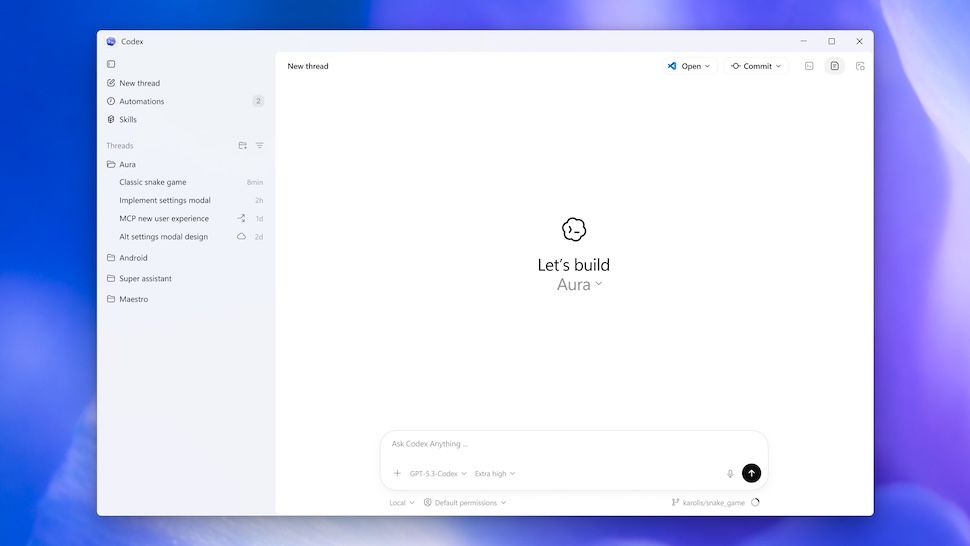
OpenAI releases a Windows version of Codex coding app
Around one month after launching Codex for Mac, OpenAI brings Codex to Windows with a new suite of IDEs supported.www.techradar.com
- Related coverage: doolpa.com
- Related coverage: windowsforum.com

Codex on Windows 11: Control Computer Use from ChatGPT Mobile
OpenAI said on May 29, 2026, that Codex app users on Windows 11 can now enable computer use and control active Codex work from the ChatGPT mobile app on iPhone and Android. The update sounds incremental, but it closes a conspicuous gap in OpenAI’s developer-agent strategy. Windows is where a... windowsforum.com
- Official source: help.openai.com
ChatGPT — Release Notes | OpenAI Help Center
A changelog of the latest updates and release notes for ChatGPT help.openai.com
- Related coverage: aipedia.wiki
OpenAI Turns Codex Desktop into a Super App: Computer Use, Memory, gpt-image-1.5, 90+ Plugins, aipedia.wiki News
OpenAI shipped a major Codex Desktop update on April 16, 2026. Adds Computer Use (Codex operates apps directly with a virtual cursor), Memory (persistent... aipedia.wiki
- Related coverage: evermx.com
- Related coverage: axios.com

You can access Codex on your phone now
OpenAI is working to make its coding tool more accessiblewww.axios.com
- Related coverage: itpro.com

OpenAI's Codex app is now available on macOS – and it’s free for some ChatGPT users for a limited time
OpenAI has rolled out the macOS app to help developers make more use of Codex in their work www.itpro.com
- Related coverage: windowscentral.com
OpenAI’s new "Chronicle" feature is just like Windows Recall: Making Codex smarter by remembering your screen
OpenAI’s Codex gets Chronicle, a memory feature that recalls your screen activity for better developer productivity. www.windowscentral.com
- Official source: cdn.openai.com
- Related coverage: doccompiler.ai
