

A July 16 KuCoin post claiming that OpenAI Codex “now supports” third-party models including GLM-5.2 and DeepSeek overstates what OpenAI has documented. Codex does support custom model providers and local open-source back ends, but OpenAI’s official configuration guide does not list DeepSeek or GLM-5.2 as built-in, named integrations.
OpenAI’s documentation describes two related paths. The
Per OpenAI’s advanced Codex configuration guide,
Custom providers are broader. An admin or developer can create a provider entry with a model name, endpoint, API key environment variable, headers, and either the Responses or Chat Completions protocol where applicable. OpenAI’s examples cover a generic proxy, a local Ollama instance, and Mistral, rather than DeepSeek or Zhipu AI’s GLM family.
That distinction matters because compatibility does not ensure feature parity. A third-party endpoint may support basic prompting while failing on streaming, tool calls, reasoning controls, model metadata, context handling, or Codex’s agent workflow. OpenAI’s GitHub issue tracker also contains active reports around custom-model selection, metadata loading, and provider behavior in OSS mode.
Before routing real repositories through an external provider:
For now, Codex users can run local models through Ollama or LM Studio and configure compatible remote services manually, but OpenAI has not announced a dedicated GLM-5.2 or DeepSeek integration.
OpenAI’s documentation describes two related paths. The
--oss option is intended for local open-source providers, specifically Ollama or LM Studio. Separately, Codex can be pointed at a custom provider through its config.toml file, supplying a base URL, authentication environment variable, and API “wire” format. That can accommodate services exposing a compatible endpoint, but it is not the same as OpenAI shipping official one-click support for a particular vendor.
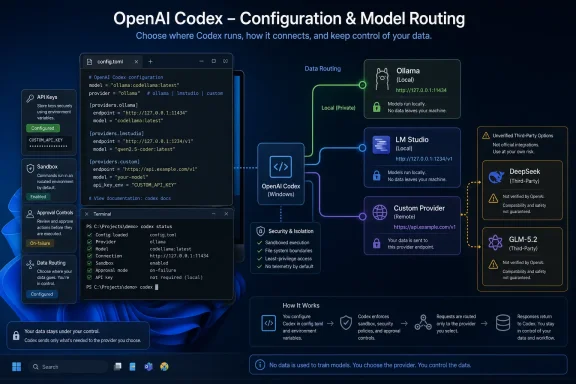 What is actually supported
Per OpenAI’s advanced Codex configuration guide, --oss launches Codex against a local provider. Users can select Ollama or LM Studio for a one-off session, or set a default provider. This is useful on Windows systems running models locally, including models downloaded through those tools.Custom providers are broader. An admin or developer can create a provider entry with a model name, endpoint, API key environment variable, headers, and either the Responses or Chat Completions protocol where applicable. OpenAI’s examples cover a generic proxy, a local Ollama instance, and Mistral, rather than DeepSeek or Zhipu AI’s GLM family.
That distinction matters because compatibility does not ensure feature parity. A third-party endpoint may support basic prompting while failing on streaming, tool calls, reasoning controls, model metadata, context handling, or Codex’s agent workflow. OpenAI’s GitHub issue tracker also contains active reports around custom-model selection, metadata loading, and provider behavior in OSS mode.
What Windows users should do
Windows developers who want to test a non-OpenAI model should treat the configuration as an advanced, self-managed deployment rather than a new Codex feature switch. The Codex configuration file normally lives under the user profile’s.codex directory, and API keys should be supplied through environment variables rather than pasted into shared configuration files.Before routing real repositories through an external provider:
- Confirm the provider supports the API protocol Codex expects.
- Use a disposable test repository first.
- Keep Codex approvals enabled and sandbox access restricted.
- Review where source code, prompts, and tool output are sent; an API key pointed at a third-party service moves that data outside OpenAI’s infrastructure.
- Do not assume a local-routing utility is endorsed by OpenAI simply because it can rewrite Codex configuration.
For now, Codex users can run local models through Ollama or LM Studio and configure compatible remote services manually, but OpenAI has not announced a dedicated GLM-5.2 or DeepSeek integration.
References
- Primary source: KuCoin
Published: 2026-07-16T01:59:03+00:00
OpenAI Codex now supports third-party models, including GLM-5.2 and DeepSeek. | KuCoin
Setting it up is actually very simple. I recommend using CC Switch, an open-source configuration management tool that lets you switch Codex model providers withwww.kucoin.com - Official source: github.com
OSS mode: Custom models not loaded from models_cache.json at turn setup · Issue #24659 · openai/codex · GitHub
OSS mode: Custom models not loaded from models_cache.json at turn setup Workaround guide: https://gist.github.com/LAP87/045cde0227512408d268c67cb49123be Summary When running Codex in --oss mode with custom models (e.g. via Ollama), get_m... github.com