

Enterprise AI has reached an awkward but decisive stage: companies have put assistants into Salesforce, Microsoft 365, SAP, service desks, and specialist business platforms, yet employees still spend too much of their day hunting for the content those assistants need. OpenText’s latest positioning around AI-to-AI integration argues that the answer is not another standalone chatbot, but a governed content layer that can supply trusted context to the AI tools already embedded in daily work.
The idea is compelling because it addresses a familiar productivity problem rather than inventing a new one. A sales representative may be working in Salesforce while the relevant contract, claims report, or product document sits in a separate content repository. A customer service agent may be drafting a reply in Microsoft Teams while the definitive answer is locked inside a case workspace. An SAP user may have transactional context but lack the corresponding engineering, procurement, or compliance documentation.
In each scenario, the employee becomes the integration layer. They switch applications, run searches, interpret results, copy information into another system, and hope that the AI assistant has enough context to produce something useful. AI-to-AI integration aims to remove that manual relay work by allowing one AI experience to retrieve governed content through another AI-aware platform or service.
For Windows-centric organizations that have standardized on Microsoft 365, Teams, SharePoint, Copilot, and line-of-business applications, the appeal is obvious. The most valuable AI experience is often not a new destination. It is the assistant already available within the workflow, equipped with the right information, the right identity controls, and an auditable path back to the source.
The enterprise AI market has developed rapidly, but its first phase created a new kind of fragmentation. Employees may have access to Microsoft Copilot for productivity tasks, Salesforce Agentforce for customer-facing workflows, SAP Joule for enterprise operations, and separate AI tools inside document management, analytics, or service platforms.
Each assistant can be useful in isolation. The problem is that business knowledge is rarely isolated.
A customer inquiry can depend on sales history in Salesforce, a signed agreement in a content management system, delivery data in SAP, and a conversation transcript in Microsoft Teams. If the AI assistant sees only one of those systems, it may produce an answer that is fluent but incomplete. In the worst case, it may make an unsupported inference because the authoritative document was never included in the prompt or retrieval process.
This is why the discussion is shifting from simply deploying generative AI to building AI content management architectures. The goal is not merely to let employees generate text faster. It is to make enterprise content discoverable, permission-aware, relevant to the current task, and usable within the application where action is taking place.
OpenText describes this approach through Content Aviator, a content-aware AI layer intended to connect governed OpenText repositories with AI assistants in platforms such as Microsoft Copilot, Salesforce Agentforce, and SAP Joule. In practical terms, the company is proposing an architecture in which the content platform acts as a controlled source of business truth while frontline AI experiences act as the conversational and operational interface.
That distinction matters. A modern AI assistant should not need employees to manually locate, upload, paste, and explain documents every time they ask a question. It should be able to retrieve relevant information within established access controls, understand enough business context to reduce irrelevant results, and provide an answer that is connected to a real record, workspace, or document.
That is especially disruptive in complex Windows environments where the workday spans desktop applications, browser-based services, Teams meetings, email, shared document libraries, CRM screens, and enterprise resource planning systems.
A user who is reviewing a customer account has a mental model of the account, current opportunity, prior contacts, open issues, and next action. Breaking that flow to search elsewhere forces the person to reconstruct the task once they return. Repeating that cycle throughout the day can slow decisions, increase error rates, and encourage shortcuts.
Those shortcuts are increasingly risky in an AI-driven workplace. Employees often resort to:
A user might have to open an AI chat, describe the customer or case, upload a document, ask a question, validate the response, copy the answer back into the original application, and then perform the actual business action. That process may still be faster than manual searching, but it is not a seamless workflow.
The stronger model is to place intelligence inside the moment of work. In Salesforce, that may mean retrieving evidence and preparing a record update while viewing a customer account. In Microsoft 365, it may mean grounding a Copilot response in governed external content without leaving Teams or Outlook. In SAP, it may mean associating operational transactions with the policies, specifications, or contracts that explain them.
This is the practical foundation of AI-to-AI integration: one assistant remains the user-facing experience, while another system contributes specialized knowledge and content context behind the scenes.
A user asks a question or starts a workflow in an AI-enabled application. The primary assistant identifies that it needs external information. It invokes a connected service, tool, agent, connector, or content-aware AI capability. That secondary capability retrieves relevant content from an approved repository, evaluates the available context according to its configuration, and returns information that can ground the primary assistant’s answer or action.
The employee still interacts with the application they already use. The integration happens in the background.
A system can enforce permissions in several ways. It may query the source repository at runtime using the signed-in user’s identity. It may synchronize selected content and associated access control lists into an intermediary index. It may use a service account with carefully limited scope. Or it may generate controlled summaries that can be consumed by a downstream assistant.
Each model creates different tradeoffs around freshness, latency, administration, privacy, and compliance.
For example, real-time retrieval can preserve source-system control and reduce duplication, but it may be slower or limited by connector capabilities. Indexed retrieval can improve performance and discoverability, but it introduces synchronization responsibilities and demands rigorous permission mapping. A deployment team must understand which model is being used for each content source.
This is strategically sensible. Content management systems often contain the most consequential information in an organization, including signed agreements, engineering documentation, claims evidence, regulated correspondence, employee records, compliance materials, and customer files. Yet these systems have traditionally been treated as repositories users visit only when they know where to look.
The AI content management model turns that pattern around. Instead of requiring employees to start with the repository, it aims to bring repository intelligence into the business application where the trigger event occurs.
A document inside a well-designed workspace can be linked to a customer, opportunity, account, supplier, project, case, asset, product, transaction, or legal matter. It can carry retention rules, version history, records classifications, ownership, sensitivity labels, and workflow status. It may also be connected to other documents that explain its meaning.
This context is essential for enterprise AI. A model cannot reliably infer whether a document is the latest contract amendment, a superseded policy, an internal draft, or an externally approved final version simply from text alone. Structured content management can provide signals that help retrieval systems prioritize the right material.
In theory, Content Aviator can make those signals available to the AI assistant operating in the user’s primary application. That is a stronger proposition than treating every document as an unstructured file in a generic vector database.
For content-heavy work, grounded answers should improve several outcomes:
For that reason, organizations should not market AI-to-AI integration as a guarantee of truth. It is better understood as a way to make answers more evidence-based, more contextual, and easier to verify.
The important point is not the individual tasks. Salesforce already supports record creation, communication workflows, and AI-assisted capabilities. The difference is the ability to bring governed content into the process without asking the user to leave the CRM interface.
The Salesforce account record might include current opportunity data, account contacts, support history, and meeting notes. But the answer to an urgent question may sit in:
This can reduce cycle time, but only if the system is precise about what it retrieves and what it is permitted to expose.
Generating a summary is one thing. Creating a contact record, updating a case, assigning a status, sending an email, or modifying an opportunity introduces a new class of risk. If the content grounding is incomplete or the assistant has misunderstood the request, an incorrect action can create downstream problems in customer records, reporting, compliance, and legal discovery.
A mature Agentforce integration should therefore separate retrieval, recommendation, and execution.
Microsoft’s connector ecosystem supports the general principle behind AI-to-AI integration: external line-of-business content can be connected to Microsoft 365 experiences so that Copilot and enterprise search can work with more than native Microsoft data.
A synced model copies or indexes selected external content into a Microsoft-managed search and reasoning environment. This can improve query speed and enable broader search experiences, but it creates a responsibility to manage refresh schedules, metadata mapping, and permission changes.
A federated or live-query model retrieves information from the original source when the user asks a question. This can preserve content locality and offer more current results, but it depends on reliable source availability, identity integration, and response time.
Neither approach is universally better.
A synced approach may fit relatively stable reference content, such as product documentation, policies, or approved knowledge articles. A live approach may be more appropriate for dynamic content, sensitive records, or situations where the source repository must remain the final authority at the moment of access.
If a connector makes data visible too broadly, the organization may create an oversharing problem that would not have existed in the original repository. If identity mapping is incomplete, users may be denied legitimate access or receive inconsistent results. If permission changes are delayed in an index, content access may not reflect the latest business or legal requirement.
A strong implementation should include:
The common thread is simple: the assistant becomes more valuable when it has access to the documents that explain why a transaction, case, or record looks the way it does.
A user may see only one assistant in Salesforce or Teams. Behind it, there may be multiple retrieval services, APIs, identity providers, data sources, model endpoints, and action tools. That hidden complexity requires strong operational ownership.
Organizations need an inventory that answers basic but essential questions:
This is a critical point for content management leaders. Generative AI does not remove the need for information governance. It raises the cost of neglecting it.
Before expanding AI retrieval, organizations should identify:
Define the current baseline:
Where possible, the workflow should let users understand what content informed the response, open the relevant workspace or document, and distinguish between source facts and AI-generated interpretation. This is particularly important for legal, financial, HR, medical, engineering, and regulatory content.
Useful measures include:
For organizations using Microsoft Copilot, Salesforce Agentforce, SAP Joule, and enterprise content management systems, the potential is substantial. A user should not need to become a search expert, repository navigator, or prompt engineer just to retrieve a contract clause, case finding, policy requirement, or customer commitment.
The most effective AI content management systems will make the right information available in context, preserve the controls that protect sensitive records, and keep a clear boundary between helpful recommendations and consequential automated actions.
AI-to-AI integration will not eliminate the need for content governance, identity management, workflow design, or human judgment. In fact, it makes each of those disciplines more important. But when those foundations are in place, the model can turn fragmented enterprise knowledge into a more continuous, usable part of the employee experience.
That is the real next step: not more AI windows competing for attention, but a connected AI layer that makes trusted content available wherever the work is already being done.
The idea is compelling because it addresses a familiar productivity problem rather than inventing a new one. A sales representative may be working in Salesforce while the relevant contract, claims report, or product document sits in a separate content repository. A customer service agent may be drafting a reply in Microsoft Teams while the definitive answer is locked inside a case workspace. An SAP user may have transactional context but lack the corresponding engineering, procurement, or compliance documentation.
In each scenario, the employee becomes the integration layer. They switch applications, run searches, interpret results, copy information into another system, and hope that the AI assistant has enough context to produce something useful. AI-to-AI integration aims to remove that manual relay work by allowing one AI experience to retrieve governed content through another AI-aware platform or service.
For Windows-centric organizations that have standardized on Microsoft 365, Teams, SharePoint, Copilot, and line-of-business applications, the appeal is obvious. The most valuable AI experience is often not a new destination. It is the assistant already available within the workflow, equipped with the right information, the right identity controls, and an auditable path back to the source.
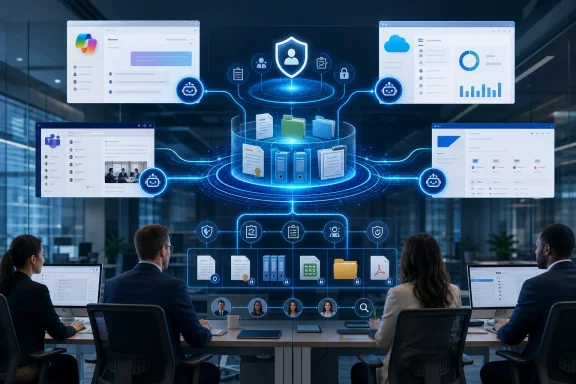 Overview: From AI Chat Sprawl to Connected Enterprise Context
The enterprise AI market has developed rapidly, but its first phase created a new kind of fragmentation. Employees may have access to Microsoft Copilot for productivity tasks, Salesforce Agentforce for customer-facing workflows, SAP Joule for enterprise operations, and separate AI tools inside document management, analytics, or service platforms.Each assistant can be useful in isolation. The problem is that business knowledge is rarely isolated.
A customer inquiry can depend on sales history in Salesforce, a signed agreement in a content management system, delivery data in SAP, and a conversation transcript in Microsoft Teams. If the AI assistant sees only one of those systems, it may produce an answer that is fluent but incomplete. In the worst case, it may make an unsupported inference because the authoritative document was never included in the prompt or retrieval process.
This is why the discussion is shifting from simply deploying generative AI to building AI content management architectures. The goal is not merely to let employees generate text faster. It is to make enterprise content discoverable, permission-aware, relevant to the current task, and usable within the application where action is taking place.
OpenText describes this approach through Content Aviator, a content-aware AI layer intended to connect governed OpenText repositories with AI assistants in platforms such as Microsoft Copilot, Salesforce Agentforce, and SAP Joule. In practical terms, the company is proposing an architecture in which the content platform acts as a controlled source of business truth while frontline AI experiences act as the conversational and operational interface.
That distinction matters. A modern AI assistant should not need employees to manually locate, upload, paste, and explain documents every time they ask a question. It should be able to retrieve relevant information within established access controls, understand enough business context to reduce irrelevant results, and provide an answer that is connected to a real record, workspace, or document.
Why App Switching Remains a Serious Productivity Problem
Application switching is often treated as a minor annoyance, but in content-heavy work it creates measurable operational friction. The employee does not simply lose a few seconds moving between windows. They must also restore context: remember what they were looking for, translate a business question into a search query, determine which repository might contain the answer, assess whether a document is current, and decide how much of it to carry back into the original workflow.That is especially disruptive in complex Windows environments where the workday spans desktop applications, browser-based services, Teams meetings, email, shared document libraries, CRM screens, and enterprise resource planning systems.
The hidden cost is cognitive, not just mechanical
Moving from Salesforce to a document repository and then back to Salesforce may take less than a minute. The real cost lies in the interruption to the employee’s reasoning process.A user who is reviewing a customer account has a mental model of the account, current opportunity, prior contacts, open issues, and next action. Breaking that flow to search elsewhere forces the person to reconstruct the task once they return. Repeating that cycle throughout the day can slow decisions, increase error rates, and encourage shortcuts.
Those shortcuts are increasingly risky in an AI-driven workplace. Employees often resort to:
- Copying content into unapproved AI tools.
- Sharing documents through temporary channels.
- Asking an assistant broad questions without supplying the needed evidence.
- Relying on outdated summaries rather than locating the authoritative record.
- Creating duplicate notes because source content is difficult to find again.
- Making decisions based on partial context.
A standalone assistant can become another interruption
There is a paradox in the first generation of enterprise AI deployments. AI was expected to reduce the number of steps in routine work, but a separate chat interface can add another place to navigate, authenticate, and manage context.A user might have to open an AI chat, describe the customer or case, upload a document, ask a question, validate the response, copy the answer back into the original application, and then perform the actual business action. That process may still be faster than manual searching, but it is not a seamless workflow.
The stronger model is to place intelligence inside the moment of work. In Salesforce, that may mean retrieving evidence and preparing a record update while viewing a customer account. In Microsoft 365, it may mean grounding a Copilot response in governed external content without leaving Teams or Outlook. In SAP, it may mean associating operational transactions with the policies, specifications, or contracts that explain them.
This is the practical foundation of AI-to-AI integration: one assistant remains the user-facing experience, while another system contributes specialized knowledge and content context behind the scenes.
What AI-to-AI Integration Actually Means
The term “AI-to-AI integration” can sound more autonomous than it is. It does not necessarily mean that two independent agents are freely negotiating decisions without human involvement. In the enterprise content management context, it usually means a more controlled pattern.A user asks a question or starts a workflow in an AI-enabled application. The primary assistant identifies that it needs external information. It invokes a connected service, tool, agent, connector, or content-aware AI capability. That secondary capability retrieves relevant content from an approved repository, evaluates the available context according to its configuration, and returns information that can ground the primary assistant’s answer or action.
The employee still interacts with the application they already use. The integration happens in the background.
The key components of the architecture
A credible AI-to-AI integration model requires more than an API connection. It depends on several layers working together:- Content repositories that store contracts, cases, correspondence, policies, reports, project records, invoices, and other business content.
- Metadata and workspace structure that establish relationships among documents, customers, transactions, projects, and processes.
- Identity and access controls that determine who may view, retrieve, summarize, or act on content.
- Retrieval and grounding services that locate relevant information and provide it to the AI experience.
- The user-facing AI assistant inside the employee’s active application.
- Action controls and audit trails that govern what the assistant can create, update, send, or recommend.
Retrieval is not the same as unrestricted access
One of the most important claims in the AI-to-AI integration model is that access controls can remain intact while information becomes easier to use. That is technically possible, but organizations should treat it as a design requirement rather than an automatic outcome.A system can enforce permissions in several ways. It may query the source repository at runtime using the signed-in user’s identity. It may synchronize selected content and associated access control lists into an intermediary index. It may use a service account with carefully limited scope. Or it may generate controlled summaries that can be consumed by a downstream assistant.
Each model creates different tradeoffs around freshness, latency, administration, privacy, and compliance.
For example, real-time retrieval can preserve source-system control and reduce duplication, but it may be slower or limited by connector capabilities. Indexed retrieval can improve performance and discoverability, but it introduces synchronization responsibilities and demands rigorous permission mapping. A deployment team must understand which model is being used for each content source.
OpenText Content Aviator as a Content-Aware Integration Layer
OpenText positions Content Aviator as the AI content assistant that sits above its content management capabilities and extends governed content into other enterprise AI experiences. The company’s framing emphasizes a relatively simple chain: organize business content in OpenText content management workspaces, use Content Aviator to understand and retrieve that content in business context, and allow platforms such as Microsoft Copilot, Salesforce Agentforce, and SAP Joule to draw on it.This is strategically sensible. Content management systems often contain the most consequential information in an organization, including signed agreements, engineering documentation, claims evidence, regulated correspondence, employee records, compliance materials, and customer files. Yet these systems have traditionally been treated as repositories users visit only when they know where to look.
The AI content management model turns that pattern around. Instead of requiring employees to start with the repository, it aims to bring repository intelligence into the business application where the trigger event occurs.
The value of structured workspaces
The strength of a platform such as OpenText is not just that it stores documents. Its value comes from structure.A document inside a well-designed workspace can be linked to a customer, opportunity, account, supplier, project, case, asset, product, transaction, or legal matter. It can carry retention rules, version history, records classifications, ownership, sensitivity labels, and workflow status. It may also be connected to other documents that explain its meaning.
This context is essential for enterprise AI. A model cannot reliably infer whether a document is the latest contract amendment, a superseded policy, an internal draft, or an externally approved final version simply from text alone. Structured content management can provide signals that help retrieval systems prioritize the right material.
In theory, Content Aviator can make those signals available to the AI assistant operating in the user’s primary application. That is a stronger proposition than treating every document as an unstructured file in a generic vector database.
The importance of grounded responses
The term grounding is widely used in enterprise AI, sometimes too broadly. In practical terms, grounding means supplying relevant enterprise information to the model so it can answer a question based on business evidence rather than relying entirely on general model knowledge.For content-heavy work, grounded answers should improve several outcomes:
- Reduced reliance on generic or invented responses.
- Better alignment with current policies and account-specific facts.
- Faster location of the exact document or workspace behind an answer.
- More consistent recommendations across teams.
- Lower need for users to manually assemble prompt context.
- Improved traceability for regulated or high-impact decisions.
For that reason, organizations should not market AI-to-AI integration as a guarantee of truth. It is better understood as a way to make answers more evidence-based, more contextual, and easier to verify.
Salesforce Agentforce: A Practical Example of the Workflow
The Salesforce scenario described by OpenText offers a useful illustration of what this model could look like in practice. A user remains inside Salesforce Agentforce, asks a question about content held in an OpenText workspace, receives information derived from that content, and continues directly into actions such as creating a contact record, drafting an email, or applying an AI-generated summary to a record.The important point is not the individual tasks. Salesforce already supports record creation, communication workflows, and AI-assisted capabilities. The difference is the ability to bring governed content into the process without asking the user to leave the CRM interface.
A customer-facing use case
Consider a sales or account-management team responding to a customer escalation.The Salesforce account record might include current opportunity data, account contacts, support history, and meeting notes. But the answer to an urgent question may sit in:
- A contractual statement of work.
- A renewal amendment.
- A project change request.
- A product compliance certificate.
- A service-delivery report.
- A customer correspondence file.
- An expert assessment attached to a claims workspace.
This can reduce cycle time, but only if the system is precise about what it retrieves and what it is permitted to expose.
The risk of action without sufficient controls
The transition from answering a question to changing a record is where enterprise AI becomes operationally significant.Generating a summary is one thing. Creating a contact record, updating a case, assigning a status, sending an email, or modifying an opportunity introduces a new class of risk. If the content grounding is incomplete or the assistant has misunderstood the request, an incorrect action can create downstream problems in customer records, reporting, compliance, and legal discovery.
A mature Agentforce integration should therefore separate retrieval, recommendation, and execution.
- Retrieval finds the relevant content and presents the evidence or summary.
- Recommendation proposes a next step, draft, classification, or record update.
- Execution performs the change only after the correct authorization and confirmation path has been met.
Microsoft Copilot and the Windows Enterprise Opportunity
For WindowsForum readers, Microsoft Copilot is the most consequential integration target in this discussion. Microsoft 365 is already where many employees read email, collaborate in Teams, create Office documents, attend meetings, and search for information. If governed enterprise content can be made available within these experiences, the productivity impact could be broader than a narrowly focused application integration.Microsoft’s connector ecosystem supports the general principle behind AI-to-AI integration: external line-of-business content can be connected to Microsoft 365 experiences so that Copilot and enterprise search can work with more than native Microsoft data.
Synced content versus live content
Organizations considering OpenText-to-Copilot integration should pay close attention to how content is delivered.A synced model copies or indexes selected external content into a Microsoft-managed search and reasoning environment. This can improve query speed and enable broader search experiences, but it creates a responsibility to manage refresh schedules, metadata mapping, and permission changes.
A federated or live-query model retrieves information from the original source when the user asks a question. This can preserve content locality and offer more current results, but it depends on reliable source availability, identity integration, and response time.
Neither approach is universally better.
A synced approach may fit relatively stable reference content, such as product documentation, policies, or approved knowledge articles. A live approach may be more appropriate for dynamic content, sensitive records, or situations where the source repository must remain the final authority at the moment of access.
Permission mapping is the decisive implementation detail
The largest risk in connecting external content to Copilot is not that AI will fail to produce fluent text. It is that access control assumptions will be wrong.If a connector makes data visible too broadly, the organization may create an oversharing problem that would not have existed in the original repository. If identity mapping is incomplete, users may be denied legitimate access or receive inconsistent results. If permission changes are delayed in an index, content access may not reflect the latest business or legal requirement.
A strong implementation should include:
- A documented content classification model.
- Role-based access rules for every connected repository.
- Identity mapping between the source platform and Microsoft Entra ID.
- Test cases for allowed, denied, and newly changed permissions.
- Separate validation for highly sensitive content categories.
- Monitoring for failed synchronization, inaccessible documents, and stale indexes.
- Clear ownership between content administrators, security teams, AI platform teams, and business process owners.
The Business Case: Where AI Content Management Can Deliver Value
AI-to-AI integration is most valuable when workers repeatedly need content from one system while performing actions in another. The opportunity is not evenly distributed across every job function. It is strongest in processes where delays, rework, and error rates are directly tied to fragmented information.High-value use cases
Several enterprise functions stand out.Customer service and claims
Service agents often need policies, prior correspondence, troubleshooting guides, warranty records, claim evidence, and customer history. Better access to governed content can support faster case resolution and more consistent responses.Sales and account management
Sales teams need contracts, pricing documentation, product specifications, customer commitments, delivery status, and prior communications. Integrating content into CRM workflows can reduce search time and improve the quality of follow-up.Finance and procurement
Procurement and finance teams work across invoices, purchase orders, vendor contracts, compliance documents, approvals, and exception records. AI content management can help locate supporting evidence when resolving discrepancies or reviewing obligations.Human resources
HR professionals often need current policies, employee documents, training records, case files, and region-specific guidance. This is also a highly sensitive domain, making permission-aware retrieval particularly important.Engineering and operations
Technical teams need drawings, maintenance records, change orders, specifications, quality documents, and supplier information. In these environments, incorrect or outdated content can create safety, quality, and financial consequences.The common thread is simple: the assistant becomes more valuable when it has access to the documents that explain why a transaction, case, or record looks the way it does.
The Risks Behind the AI-to-AI Promise
The OpenText vision addresses genuine enterprise pain points, but it should not be mistaken for a simple plug-and-play upgrade. Connecting AI systems across content repositories and business applications can expand capability and expand the attack surface at the same time.Agent sprawl can become integration sprawl
The industry increasingly discusses agent sprawl: a growing inventory of AI assistants, tools, plugins, connectors, prompts, knowledge bases, and workflow automations that operate with uneven governance. AI-to-AI integration can reduce the number of visible interfaces for employees, but it can also make the underlying architecture more complex.A user may see only one assistant in Salesforce or Teams. Behind it, there may be multiple retrieval services, APIs, identity providers, data sources, model endpoints, and action tools. That hidden complexity requires strong operational ownership.
Organizations need an inventory that answers basic but essential questions:
- Which AI assistants are approved?
- What data can each one retrieve?
- Which systems can each one update?
- Which identity is used for retrieval?
- Is content copied, indexed, summarized, or queried live?
- How long is content retained outside the source repository?
- What logs exist for prompts, retrievals, outputs, and actions?
- Who can approve a new integration or revoke an existing one?
Poor content quality produces polished errors
A content-aware assistant can only be as reliable as the content and metadata it receives. If a repository contains duplicate documents, expired policies, inconsistent naming, incomplete classifications, and weak lifecycle management, AI will surface those problems at scale.This is a critical point for content management leaders. Generative AI does not remove the need for information governance. It raises the cost of neglecting it.
Before expanding AI retrieval, organizations should identify:
- Which document versions are authoritative.
- Which content categories are eligible for AI use.
- Which records are confidential or legally restricted.
- Which repositories have incomplete metadata.
- Which workspaces contain outdated or abandoned material.
- Which retention and disposition rules apply.
- Which language, regional, or business-unit variations must be distinguished.
A Better Deployment Strategy for Enterprise IT
The strongest path to AI content management is incremental. Enterprises should resist the urge to connect every repository to every assistant on day one.Start with a bounded workflow
Choose a use case where the employee’s current workflow is well understood and the content source is relatively mature. Claims resolution, contract lookup, customer escalation management, or internal policy guidance can be good candidates.Define the current baseline:
- How long does content discovery take?
- How many applications does the employee use?
- How often are answers incomplete or delayed?
- How often is content copied manually?
- What errors occur because the wrong document was used?
- Which actions should remain human-approved?
Design for evidence, not just answers
The goal should not be to make the assistant sound confident. It should be to make it useful, transparent, and appropriately constrained.Where possible, the workflow should let users understand what content informed the response, open the relevant workspace or document, and distinguish between source facts and AI-generated interpretation. This is particularly important for legal, financial, HR, medical, engineering, and regulatory content.
Measure outcomes that matter
A successful pilot should track more than chat usage.Useful measures include:
- Time to locate relevant content.
- Average handling time for cases or requests.
- First-contact resolution rates.
- Rework and escalation rates.
- Accuracy of record updates.
- Percentage of AI drafts accepted with minimal revision.
- Permission-related access failures.
- Incidents of inappropriate content exposure.
- User reliance on unapproved AI tools.
The Next Phase of AI Is Content-Aware and Workflow-Native
OpenText’s AI-to-AI integration message reflects an important evolution in enterprise AI strategy. The early race to add chat interfaces is giving way to a harder but more valuable challenge: connecting AI assistants to governed business content while keeping users inside the applications where work happens.For organizations using Microsoft Copilot, Salesforce Agentforce, SAP Joule, and enterprise content management systems, the potential is substantial. A user should not need to become a search expert, repository navigator, or prompt engineer just to retrieve a contract clause, case finding, policy requirement, or customer commitment.
The most effective AI content management systems will make the right information available in context, preserve the controls that protect sensitive records, and keep a clear boundary between helpful recommendations and consequential automated actions.
AI-to-AI integration will not eliminate the need for content governance, identity management, workflow design, or human judgment. In fact, it makes each of those disciplines more important. But when those foundations are in place, the model can turn fragmented enterprise knowledge into a more continuous, usable part of the employee experience.
That is the real next step: not more AI windows competing for attention, but a connected AI layer that makes trusted content available wherever the work is already being done.
References
- Primary source: OpenText Blogs
Published: 2026-07-22T14:30:00+00:00
Loading…
blogs.opentext.com