

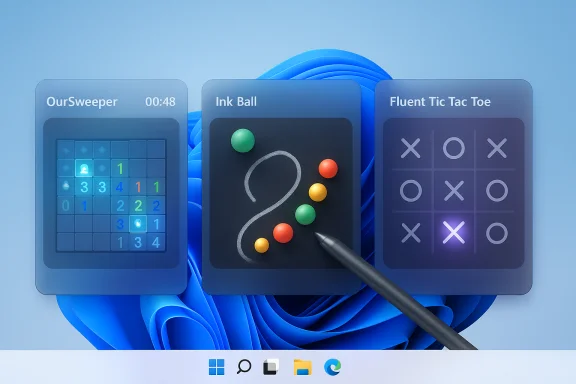
Three small, free games — a modern Minesweeper called OurSweeper, a faithful remake of InkBall, and the open‑source Fluent Tic‑Tac‑Toe — have quietly become some of the best micro‑break options for Windows 11 users who want nostalgia wrapped in native, Fluent‑style visuals and responsive input support. These titles are all available through the Microsoft ecosystem (Store/Xbox listings and GitHub for the open‑source project), ship with modern UI skinning like Mica and adaptive accents, and in two cases are built specifically to look and behave like they belong on a Windows 11 desktop.
Windows bundled casual games — Solitaire, Minesweeper, InkBall and 3D Pinball among them — were once part of the platform’s DNA. As Microsoft shifted toward a Store‑centric distribution model, many of those classics were removed from the default image and reappeared only sporadically or through third‑party remakes. That gap has opened a small but healthy market for compact, well‑designed recreations that bring the familiar gameplay back while adopting Windows 11’s design language: rounded corners, Mica, acrylic/glow effects, and adaptive accent coloring. Pocket‑style features such as stylus input and touch are also part of the renewed interest in bringing Tablet PC era mechanics back to modern PCs. These three games showcase different approaches to that revival:
For users who value a short cognitive reset between tasks, this combination — classic casual gameplay with modern visuals — is exactly the kind of micro‑app Windows 11 was designed to host: lightweight, responsive, and visually cohesive.
For full parity with the Windows 11 aesthetic, users should be running a reasonably recent build of Windows 11 (so Mica and accent color features work as intended) and keep graphics drivers up to date. The Store listing indicates broad device support (PC, Xbox family, mobile, HoloLens), which suggests the app is built on a portable UI framework and uses Store packaging.
Source: Pocket-lint These 3 free retro Windows 11 games are perfect when I need a little break
 Background
Windows bundled casual games — Solitaire, Minesweeper, InkBall and 3D Pinball among them — were once part of the platform’s DNA. As Microsoft shifted toward a Store‑centric distribution model, many of those classics were removed from the default image and reappeared only sporadically or through third‑party remakes. That gap has opened a small but healthy market for compact, well‑designed recreations that bring the familiar gameplay back while adopting Windows 11’s design language: rounded corners, Mica, acrylic/glow effects, and adaptive accent coloring. Pocket‑style features such as stylus input and touch are also part of the renewed interest in bringing Tablet PC era mechanics back to modern PCs. These three games showcase different approaches to that revival:- OurSweeper reimagines Minesweeper with a polished GlowUI and configurable options.
- Ink Ball resurrects a Windows XP Tablet PC Edition classic that rewards precise stylus drawing.
- Fluent Tic‑Tac‑Toe is an open‑source WinUI/Fluent take on one of the oldest paper‑and‑pen games, with adjustable board sizes and bot difficulty.
OurSweeper — Minesweeper for the rest of us
What it is and where to get it
OurSweeper is a modern Minesweeper remake published by FireCubeStudios and distributed via the Microsoft/Xbox storefront as a free app with optional purchases. The storefront listing describes the title as “based on Microsoft MineSweeper” and highlights a “Modern GlowUI” aesthetic along with configurable timers, mine count, and grid sizes. The app’s marketplace presence and Free+ model are clearly listed on the official platform page.Why it matters
Minesweeper’s original mechanics are deceptively deep: pattern recognition, probability estimation and efficient uncovering make it a perfect five‑to‑ten‑minute break game. OurSweeper preserves that core loop while dressing it in a contemporary Windows 11 visual layer that uses contrast, rounded elements and Mica‑style backgrounds to blend seamlessly with the desktop.For users who value a short cognitive reset between tasks, this combination — classic casual gameplay with modern visuals — is exactly the kind of micro‑app Windows 11 was designed to host: lightweight, responsive, and visually cohesive.
Key features at a glance
- Modern Fluent/GLOW visual styling tuned for Windows 11.
- Customizable grid sizes and mine density.
- Timer and scoring options for competitive or relaxed play.
- Free to download; in‑app purchase unlocks additional features on the Store page.
Technical and compatibility notes
OurSweeper is packaged for the Microsoft ecosystem and therefore benefits from the OS-level distribution, update and sandboxing model. That packaging can simplify installation across Windows 11 devices but also means the app’s behavior, permissions and update cadence are controlled through the Store ecosystem rather than a standalone installer.For full parity with the Windows 11 aesthetic, users should be running a reasonably recent build of Windows 11 (so Mica and accent color features work as intended) and keep graphics drivers up to date. The Store listing indicates broad device support (PC, Xbox family, mobile, HoloLens), which suggests the app is built on a portable UI framework and uses Store packaging.
Strengths and caveats
- Strengths: faithful gameplay, lightweight, native look and feel, sensible configuration options.
- Caveats: the free listing is “Free+” with in‑app purchases; verify what the paywall unlocks before buying. As with any Store app, read the privacy policy and permissions list if you’re concerned about telemetry or sign‑in requirements.
Ink Ball — Tablet‑era stylus fun, reborn
Lineage and modern edit
InkBall was originally a Microsoft demo game shipped with Windows XP Tablet PC Edition to showcase stylus input. The gameplay is simple and elegant: draw guide lines to direct colored balls into matching holes, using collision physics and quick thinking to prevent miscoloring or loss. Community interest and a recognized gap in Microsoft’s modern bundles led to third‑party remakes that reproduce the mechanics and update the visuals with Fluent design touches. A modern Ink Ball titled “Ink Ball” is available on the Microsoft Store and is presented as a faithful remake with Fluent UI visuals.Why it works on Windows 11
InkBall’s interaction model — drawing, nudging, and guiding with a pen or mouse — is inherently tactile and benefits from modern pen latency reductions and pressure improvements in Surface‑class devices. A surface device with a compatible pen (for example the Surface Slim Pen series) delivers very natural control; the Store listing and contemporary writeups note that stylus pairing makes the experience “feel native” again. This is a rare modern game that genuinely shines with pen input rather than merely supporting it.Practical features
- Pen and mouse support; touch friendly.
- Classic physics‑based puzzle levels that scale in difficulty.
- Free to download from the Microsoft Store; modern storefront page provides app details and system requirements.
Compatibility and accessibility considerations
InkBall is a good choice for hybrid devices and for scenarios where short bursts of tactile interaction are desirable (creative breaks, demoing pen hardware, or kid‑friendly entertainment). That said, for the ideal experience run it on a device with an active pen or high‑quality touch digitizer. Users on non‑touch desktops will still get a fun mouse experience, but the stylus nuance is lost.Risks and provenance
Because InkBall is a third‑party recreation of a formerly Microsoft‑shipped title, provenance matters. Verify the publisher on the Store page and avoid side‑loading untrusted binaries. The official Store listing reduces risk by vetting packages and tying updates to your Microsoft account, but it’s still wise to review the app’s privacy policy if you have strict data‑handling requirements.Fluent Tic‑Tac‑Toe — minimalism, open‑source, and WinUI polish
What sets it apart
Fluent Tic‑Tac‑Toe is an open‑source WinUI/Fluent‑styled tic‑tac‑toe project by Dustin Fu Chang that lives on GitHub under an MIT license. The repository demonstrates a WinUI/Win32 XAML approach and is explicitly framed as an educational/code learning project that also doubles as a polished little game. The project’s README highlights WinUI 3 and typical Fluent affordances (adaptive theming, Mica) while offering customization options like larger board sizes (4x4 and beyond), multiple bot players, and adjustable difficulty.Why the open‑source angle matters
Open‑source games provide two particular benefits for Windows enthusiasts:- Transparency: source availability allows code audits and the ability to confirm there’s no hidden telemetry or malicious logic.
- Forkability: if the original author stops maintaining the project, the community can pick it up and keep it alive.
Features and developer notes
- Single‑player (bot), local multiplayer, and board customization.
- MIT license; repository shows source files for XAML and C# WinUI application structure.
- No published releases on the GitHub repo as of the repository snapshot; installation expects an MSIX/appx packaged build through the Microsoft Store or manual packaging from source if building locally.
Technical recommendations for enthusiasts
Developers and curious users can clone the repo, inspect the code and build the app locally using Visual Studio and the WinUI 3 tooling. For non‑developers, installing the Store package (when available) remains the simplest path; for security‑conscious users, building from source and sideloading an unsigned package into an isolated test account is an option.Security, privacy and practical caveats for all three games
Check the publisher and permissions
- Always confirm the publisher name on the Microsoft Store/Xbox listing. Store packaging mitigates many distribution risks, but it is not a substitute for due diligence.
- Look at required permissions and any linked privacy policy. Some Store apps flag telemetry or optional sign‑in requirements; be mindful if you are using a managed or corporate machine.
Free vs Free+
- “Free” on the Store often means the core experience is zero cost while additional features or ad‑removal are behind one‑time purchases or subscriptions. OurSweeper is listed as Free+ and notes in‑app purchases; verify precisely what is unlocked by payment before committing.
Code provenance and open‑source advantage
- Fluent Tic‑Tac‑Toe’s MIT license and public repository lower the barrier for verification. For privacy‑forward users, open‑source is a strong plus; you can check the codebase and watch for community forks if ongoing maintenance is important.
UX and compatibility
- Stylus and touch support vary by app. Ink Ball is designed to shine with a pen; while it will work with a mouse, the tactile benefit is reduced. OurSweeper and Fluent Tic‑Tac‑Toe are comfortable with mouse and touch and follow modern input patterns.
Corporate and managed devices
- On enterprise machines, installing Store apps may be restricted by policy. In those environments, consult your IT admin before installing third‑party Store titles.
How to install safely (quick checklist)
- Open Microsoft Store (or Xbox app on PC) and search for the exact app name (OurSweeper, Ink Ball, Fluent Tic‑Tac‑Toe).
- Verify publisher identity and read the short description on the listing to confirm it matches the title you expect.
- Review the app’s permissions and privacy policy link on the Store page.
- Install on a personal account or non‑privileged user first; test for unexpected popups, sign‑ins, or network traffic.
- If you prefer maximum transparency, fetch the Fluent Tic‑Tac‑Toe source from GitHub and build locally to confirm behavior.
Critical analysis — strengths, limitations, and long‑term outlook
Notable strengths
- Native polish: All three titles show that small games can look native on Windows 11 when developers adopt WinUI/Fluent design patterns — rounded corners, Mica backgrounds, adaptive accent colors and tidy typography.
- Low friction: Store distribution simplifies updates and installation across desktops, tablets and Xbox‑linked PCs.
- Targeted interaction models: Ink Ball’s stylus focus and Fluent Tic‑Tac‑Toe’s local multiplayer make these games flexible: both quick single sessions and short social play fit naturally into modern workflows.
Limitations and risks
- Maintenance risk: Small indie titles can be abandoned. An app that looks great today may not receive updates for OS changes or security fixes; open‑source projects mitigate this but Store‑only titles rely on the original author.
- Monetization creep: Free assets can become gateways to in‑app purchases or ad placements. Users looking for a truly ad‑free, offline experience should verify whether a purchase is necessary to remove ads or unlock offline play.
- Compatibility edge cases: While modern Windows 11 systems will run these apps fine, very old builds or enterprise images with Store restrictions may not; stylus nuance requires proper drivers and a compatible digitizer.
What to watch for next
- Watch for community forks of Fluent Tic‑Tac‑Toe or community‑maintained releases — they will indicate sustained interest.
- Keep an eye on the Store update logs for OurSweeper and Ink Ball: frequent updates mean active maintenance; long gaps suggest potential abandonment or unresolved compatibility issues.
Verdict — which one to install and when
- For someone who misses the classic Minesweeper but wants a Windows 11 aesthetic: OurSweeper is the first pick. It preserves the mechanics while modernizing the presentation and remains lightweight for quick breaks.
- For stylus owners and Surface users who want a genuinely tactile, short‑session game: Ink Ball is the clear winner — it’s a rare casual title that actually benefits from pen input. Verify your pen drivers and try it full screen on your tablet or convertible device.
- For privacy‑minded users and anyone who enjoys inspecting or modifying code: Fluent Tic‑Tac‑Toe is the best choice thanks to its open‑source MIT license and straightforward WinUI implementation. It’s also an excellent learning resource for WinUI/Win32 development.
Final thoughts
These three apps represent a small movement: modern UX and nostalgia coexisting. They prove that classic, focused gameplay still has a place on contemporary desktops — especially when developers take the time to integrate Fluent principles and support modern input like pen and touch. For users who want a short, satisfying break that complements Windows 11 rather than fighting it, OurSweeper, Ink Ball and Fluent Tic‑Tac‑Toe deliver exactly that: lightweight, polished, and approachable micro‑games — available through the Store or as open code — ready to slot into a productivity routine or a quick social pause.Source: Pocket-lint These 3 free retro Windows 11 games are perfect when I need a little break
